VD31 - Watch PULSAR - Free user manual and instructions
Find the device manual for free VD31 PULSAR in PDF.


| Product Type | Quartz Analog Watch |
| Model | VD31 |
| Brand | Pulsar |
| Movement | Japanese Quartz |
| Case Material | Stainless Steel |
| Case Diameter | 40 mm |
| Case Thickness | 10 mm |
| Band Material | Stainless Steel Bracelet |
| Band Width | 20 mm |
| Dial Color | Black |
| Crystal Material | Mineral Glass |
| Water Resistance | 50 meters (165 feet) |
| Power Source | Battery (SR626SW or equivalent) |
| Functions | Hour, Minute, Second, Date |
| Closure Type | Fold-over clasp with safety |
| Weight | Approx. 120 g |
| Warranty | 2 years |
Frequently Asked Questions - VD31 PULSAR
User questions about VD31 PULSAR
0 question about this device. Answer the ones you know or ask your own.
Ask a new question about this device
Download the instructions for your Watch in PDF format for free! Find your manual VD31 - PULSAR and take your electronic device back in hand. On this page are published all the documents necessary for the use of your device. VD31 by PULSAR.
USER MANUAL VD31 PULSAR
● Hour, minute, second and 24-hour hands
● Dual time display by dual time hour hand
● Date displayed in numerals
ENGLISH

VD31_E.indd 1 2015/07/27 9:22

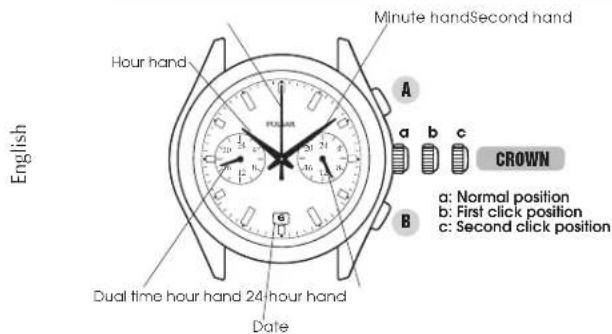
DISPLAY AND CROWN/BUTTONS
text_image
Minute hand Second hand Hour hand English a b c CROWN a: Normal position b: First click position c: Second click position Dual time hour hand 24 hour hand Date2
VD31_E.indd 2-3 2015/07/27 9:22
SCREW DOWN CROWN
[for models with screw down crown]
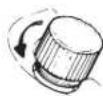
Unlocking the crown
1 Turn Crown counterclockwise until you no longer feel the threads turning.
2 Crown can be pulled out.
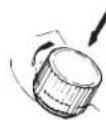
Locking the crown
1 Push Crown back in to normal position.
2 Turn Crown clockwise while pressing it lightly until tight.
English
3
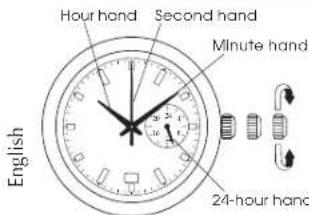
SETTING THE TIME
text_image
Hour hand Second hand Minute hand 24-hour hand EnglishCROWN
Pull out to second click when the second hand is at the 12 o'clock position.

Turn to set the hour and minute hands.

Push back in to normal position in accordance with a time signal.
• The 24-hour hand moves correspondingly with the hour hand.
- The moment the date changes is midnight. When setting the hour hand, make sure that AM/PM is correctly set by using the 24-hour hand as an AM/PM indicator.
4
SETTING THE DATE
● Before setting the date, be sure to set the time.

natural_image
Diagram of a circular dial with directional arrows indicating movement or force (no text or symbols)Date
CROWN
1 Pull out to first click.
2 Turn clockwise until the desired date appears.
3 Push back in to normal position.
English
- It is necessary to adjust the date on the first day after a 30-day month and February.
- Do not set the date between 9:00 p.m. and 1:00 a.m., as the date may not change properly. If it is necessary to set the date during that period of time, first change the time to any time outside of this period, set the date, and then reset to the correct time.
5
DUAL TIME FUNCTION
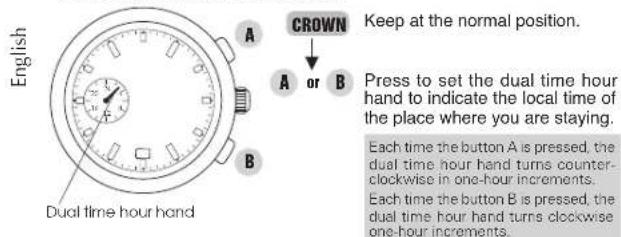
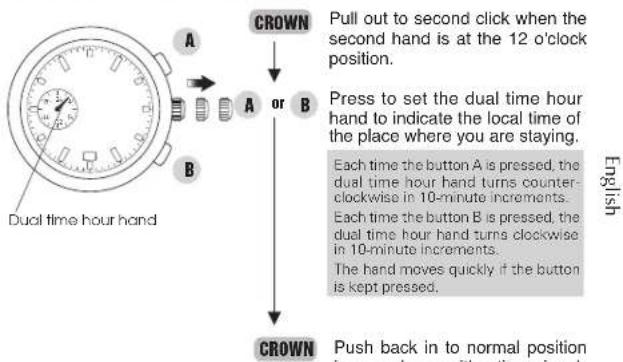
● While staying in a place in a different time zone from where you usually use this watch, you can set the dual time hour hand to indicate the local time of the place where you are staying.
text_image
English A CROWN Keep at the normal position. Press to set the dual time hour hand to indicate the local time of the place where you are staying. Each time the button A is pressed, the dual time hour hand turns counter- clockwise in one-hour increments. Each time the button B is pressed, the dual time hour hand turns clockwise one-hour increments.6
flowchart
graph TD
    A["Dual time hour hand"] --> B{A or B}
    B -->|Pull out to second click when the second hand is at the 12 o'clock position.| C["CROWN"]
    B -->|Press to set the dual time hour hand to indicate the local time of the place where you are staying.| D["CROWN"]
    D --> E["Push back in to normal position in accordance with a time signal. English"]
VD31_F.indd 6-7 2015/07/27 9:22

IF YOUR WATCH HAS A BEZEL WITH CITY NAMES OF THE WORLD'S MAJOR CITIES
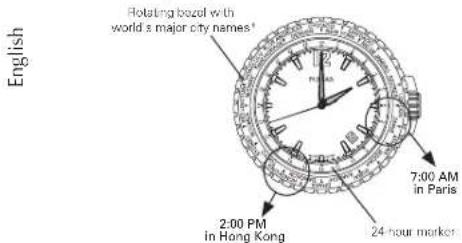
The city names of the world's major cities are displayed on this bezel. The combination of city name on the bezel and the 24-hour marker lets you know the approximate time of each city.
Example: When you wish to know the time in Paris while you are staying in Hong Kong
text_image
English Rotating boxel with world's major city names* 7:00 AM in Paris 2:00 PM in Hong Kong 24 hour marker8
* Cities on the bezel may differ by model.
Supposing that the hour hand is pointing to the current hour in Hong Kong which is 2:00 PM:
- Convert the current hour in Hong Kong to the 24-hour format.
2:00 PM to 14:00
- Turn the bezel until the city name HONG KONG points to "14" on the 24-hour marker. The hour in Paris which is 7 o'clock in the morning (7:00 AM) can be obtained by reading the hour marker to which the city name PARIS corresponds.
The time differences between cities represented by the city names on the bezel are one-hour offsets.
The same manner can be applied to read the time in any other city on the bezel.
For example, the hour in Los Angeles can be read as 22:00 (10:00 PM).
The same manner can be applied to read the time, if the 24-hour marker is not indicated on the model.
English
9
IF YOUR WATCH HAS AN INNER ROTATING RING WITH THE NAMES OF THE WORLD'S MAJOR CITIES
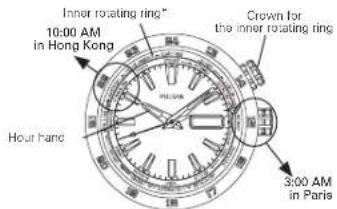
The names of the world's major cities are displayed on this inner rotating ring. The ring can be rotated by turning the crown for the inner rotating ring. The combination of a city name on the ring and the hour hand lets you know the approximate time of each city.
Example 1: When you wish to know the time in Paris while you are staying in Hong Kong

text_image
Inner rotating ring™ 10:00 AM in Hong Kong Crown for the inner rotating ring Hour hand 3:00 AM in Paris* Cities on the inner rotating ring may differ by model.
10
Supposing that the hour hand is pointing to the current hour in Hong Kong which is 10:00 AM:
Turn the crown for the inner rotating ring until the city name HONG KONG is set to the time to which the hour hand is pointing. The hour in Paris which is 3 o'clock can be obtained by reading the hour marker to which the city name PARIS corresponds.
- For determining if the time is AM or PM in Paris, follow the city names on the ring from HONG KONG to find PARIS (do not turn the crown). The city name on the ring starts from MIDWAY and ends at AUCKLAND. Time goes ahead if following the ring clockwise from MIDWAY to AUCKLAND, and goes behind if following the ring counterclockwise from AUCKLAND to MIDWAY. In this example, if you follow the ring clockwise, you cannot go further when you reach AUCKLAND. Therefore, follow the ring counterclockwise to reach PARIS. It can be read that it is 3:00 AM in Paris.
The time differences between cities represented by the city names on the ring are one hour offsets.

11
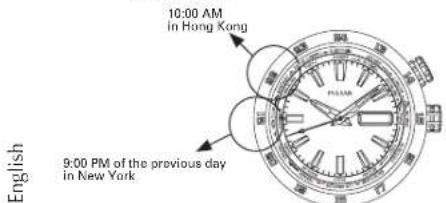
Example 2: When you wish to know the time in New York while you are staying in Hong Kong.
text_image
10:00 AM in Hong Kong 9:00 PM of the previous day in New York EnglishSupposing that the hour hand is pointing to the current hour in Hong Kong which is 10:00 AM:
- Turn the crown for the inner rotating ring until the city name HONG KONG is set to the time to which the hour hand is pointing. The hour in New York which is 9 o'clock can be obtained by reading the hour marker to which the city name NEW YORK corresponds.
- For determining if the time is AM or PM in New York, follow the city names on the ring from HONG KONG to find NEW YORK (do not turn the crown). If you follow the ring clockwise, you cannot go further when you reach AUCKLAND. Therefore, follow the ring counterclockwise to reach NEW YORK.
12
- Since the 12 o'clock hour marker is passed before reaching NEW YORK, it can be read that it is 9:00 PM of the previous day in New York.
The time differences between cities represented by the city names on the ring are one-hour offsets.
Daylight saving time is a system adopted by some countries to make the best use of daylight during a certain period in summer. Under this system the time is advanced one hour.
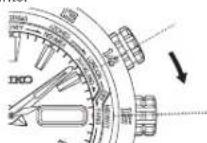
If daylight saving time is in effect in the selected city, rotate the ring to, or read the hour of, the city in the time zone which is advanced one hour. If daylight saving time is used in a city on the rotating bezel or inner rotating ring, an arrow mark is printed on the right of the city name. For example, if daylight saving time is in effect in Paris, it is in the time zone of Cairo to which the arrow mark points.
English

STANDARD TIME TABLE
GMT = Greenwich Mean Time
(As of June 2015)
| GMT± (hours) | Names of the cities | Other cities |
| 0 | LONDON (LON) | Lisbon |
| +1 | PARIS (PAR) | Rome, Berlin |
| +2 | CAIRO (CAI) | Athens |
| +3 | JEDDAH (JED) | Moscow, Baghdad |
| +4 | DUBAI (DXB) | |
| +5 | KARACHI (KHI) | |
| +6 | DHAKA (DAC) | |
| +7 | BANGKOK (BKK) | Jakarta |
| +8 | HONG KONG (HKG) | Singapore, Beijing |
| +9 | TOKYO (TYO) | Seoul |
| +10 | SYDNEY (SYD) | Guam, Gold Coast |
| +11 | NOUMÈA (NOU) | |
| +12 | WELLINGTON (WLG) | Auckland |
English
| GMT± (hours) | Names of the cities | Other cities |
| -11 | MIDWAY (MDY) | Samoa |
| -10 | HONOLULU (HNL) | |
| -9 | ANCHORAGE (ANC) | |
| -8 | LOS ANGELES (LAX) | Vancouver |
| -7 | DENVER (DEN) | |
| -6 | CHICAGO (CHI) | Mexico City |
| -5 | NEW YORK (NYC) | Montreal, Boston |
| -4 | SANTO DOMINGO (SDQ) | |
| -3 | RIO DE JANEIRO (RIO) | Buenos Aires |
| -2 | S. GEORGIA | |
| -1 | AZORES (PDL) |
- In some countries, the daylight saving time may be in effect. The time difference and daylight saving time of various countries are subject to change, according to the governments of respective countries or regions.
- Major cities in the various countries of the world are described as the names of cities. Please understand that some specifications of our products are subject to change for product improvements.
English

15
BATTERY CHANGE

Battery life : Approx. 2 years Battery : SEIKO SR920SW
English
- As the battery is inserted at the factory to check the function and performance of the watch, its actual life once in your possession may be less than the specified period.
- When the battery expires, be sure to replace it as soon as possible to prevent any malfunction.
- We recommend that you contact an AUTHORIZED PULSAR DEALER for battery replacement.
● Necessary procedure after battery change
After setting or changing the battery, before setting the time, make sure that the dual time hour hand is at the 24 o'clock position. If it is not at the 24 o'clock position, follow the procedures below to set it to the 24 o'clock position.
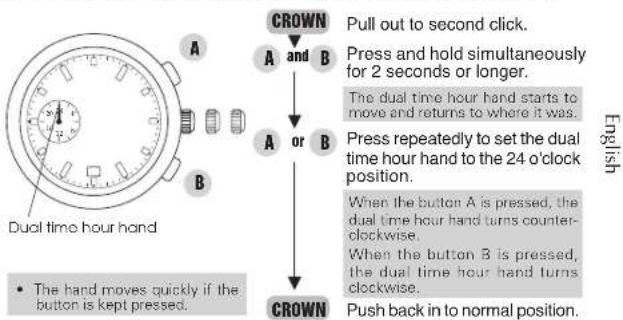
flowchart
graph TD
    A[" Dual time hour hand "] --> B[" CROWN "]
    B --> C[" Pull out to second click. "]
    B --> D[" Press and hold simultaneously for 2 seconds or longer. "]
    B --> E[" The dual time hour hand starts to move and returns to where it was. "]
    B --> F[" Press repeatedly to set the dual time hour hand to the 24 o'clock position. "]
    B --> G[" When the button A is pressed, the dual time hour hand turns counterclockwise. "]
    B --> H[" When the button B is pressed, the dual time hour hand turns clockwise. "]
    B --> I[" Push back in to normal position. "]
    J[" The hand moves quickly if the button is kept pressed. "]

WARNING
- Do not remove the battery from the watch.
- If it is necessary to take out the battery, keep it out of the reach of children. If a child swallows it, consult a doctor immediately.
● Never short-circuit, tamper with or heat the battery, and never expose it to fire. The battery may burst, become very hot or catch fire.

CAUTION
● The battery is not rechargeable. Never attempt to recharge it, as this may cause battery leakage or damage to the battery.
TO PRESERVE THE QUALITY OF YOUR WATCH
WATER RESISTANCE
● Non-water resistant If "WATER RESISTANT" is not inscribed on the case back, your watch is not water resistant, and care should be taken not to get it wet as water may damage the movement. If the watch becomes wet, we suggest that you have it checked by an AUTHORIZED PULSAR DEALER or SERVICE CENTER.
● Water resistance (3 bar) If “WATER RESISTANT” is inscribed on the case bac k, your watc h is des ignored and manufactured to withstand up to 3 bar, such as acci dental contact with splashes of water or rain, but it is not designed for swimming or diving.
● Water resistance (5 bar)* If "WATER RESISTANT 5 BAR" is inscribed on the case back, your watch is designed and manufactured to withstand up to 5 bar and is suitable for swimming, yachting and taking a shower.
- Water resistance (10 bar/15 bar/20 bar)* If "WATER RESISTANT 10 BAR", "WATER RESISTANT 15 BAR" or "WATER RESISTANT 20 BAR" is inscribed on the case back, your watch is designed and manufactured to withstand up to 10 bar/15 bar/20 bar and is suitable for taking a bath, shallow diving, but not for scuba diving. We recommend that you wear a PULSAR Diver's watch for scuba diving.

* Before using the water resistance 5, 10, 15 or 20 bar watch in water, be sure the crown is pushed in completely.
Do not operate the crown when the watch is wet or in water. If used in sea water, rinse the watch in fresh water and dry it completely.
* When taking a shower with the water resistance 5 bar watch, or taking a bath with the water resistance 10, 15 or 20 bar watch, be sure to observe the following:
- Do not operate the crown when the watch is wet
- If the watch is left in warm water, a slight time loss or gain may be caused. This condition, however, will be corrected when the watch returns to normal temperature.
NOTE:
Pressure in bar is a test pressure and should not be considered as corresponding to actual diving depth since swimming movement tends to increase the pressure at a given depth. Care should also be taken on diving into water.
TEMPERATURES

Your watch works with stable accuracy within a temperature range of 5°C and 35°C (41°F and 95°F). Temperatures over
50°C (122°F) may cause battery leakage or shorten the battery life.
Do not leave your watch in very low temperatures below -5^ C ( +23^ F) for a long time since the cold may cause a slight time loss or gain. However, the above conditions will be corrected when the watch returns to normal temperature.

MAGNETISM

Your watch will be adversely affected by strong magnetism. Keep it away from close contact with magnetic objects.
SHOCKS & VIBRATION

Light activities will not affect your watch, but be careful not to drop your watch or hit it against hard surfaces, as this
may cause damage.
CHEMICALS

Be careful not to expose the watch to solvents, mercury, cosmetic spray, detergents, adhesives or paints. Otherwise
the case, bracelet, etc. may become discolored, deteriorated or damaged.
CARE OF CASE AND BRACELET

To prevent possible rusting of the case and bracelet caused by dust, moisture and perspiration, wipe them periodically with a soft dry cloth.
PERIODIC CHECK

It is recommended that the watch be checked once every 2 to 3 years. Have your watch checked by an AUTHORIZED PULSAR
DEALER or SER VICE CENTER to ensure that the case, crown, buttons, gasket and crystal seal remain intact.
PRECAUTION REGARDING CASE BACK PROTECTIVE FILM

If your watch has a protective film and/or a sticker on the case back, be sure to peel them off before using your watch.