C-Stat 17-M - Thermostat Horstmann - Free user manual and instructions
Find the device manual for free C-Stat 17-M Horstmann in PDF.


User questions about C-Stat 17-M Horstmann
0 question about this device. Answer the ones you know or ask your own.
Ask a new question about this device
Download the instructions for your Thermostat in PDF format for free! Find your manual C-Stat 17-M - Horstmann and take your electronic device back in hand. On this page are published all the documents necessary for the use of your device. C-Stat 17-M by Horstmann.
USER MANUAL C-Stat 17-M Horstmann
Programmable room thermostats are widely recognised as one of the best ways in which to control central heating. Horstmann C-Stat programmable room thermostats have a large display and intuitive user interface, making them easy to set up and use. C-Stat uses a sophisticated time proportional integral (TPI) algorithm for accurate temperature control and energy efficiency.
What is a programmable room thermostat?
...an explanation for householders.
A programmable room thermostat is both a programmer and a room thermostat. A programmer allows you to set 'ON and OFF' time periods to suit your own lifestyle. A room thermostat works by sensing the air temperature, switching on the heating when the air temperature falls below the thermostat setting and switching it off once the set temperature has been reached.
So, a programmable room thermostat lets you choose what times you want the heating to be on, and what temperature it should reach while it is on. It will allow you to select different temperatures in your home at different times of the day (and days of the week) to meet your particular needs.
Turning a programmable room thermostat to a higher setting will not make the room heat up any faster. How quickly the room heats up depends on the design of the heating system, for example, the size of the boiler and radiators. Neither does the setting affect how quickly the room cools down. Turning a programmable room thermostat to a lower setting will result in the room being controlled at a lower temperature, and saves energy.
The way to set and use your programmable room thermostat is to find the lowest temperature settings that you are comfortable with at the different times you have chosen, and then leave it alone to do its job. The best way to do this is to set low temperatures first, say 18°C and then turn them up by one degree each day until you are comfortable with the temperatures. You won't have to adjust the thermostat further. Any adjustments above these settings will waste energy and cost you more money.
If your heating system is a boiler with radiators, there will usually be only one programmable room thermostat to control the whole house. But you can have different temperatures in individual rooms by installing thermostatic radiator valves (TRVs) on individual radiators. If you don't have TRVs, you should choose a temperature that is reasonable for the whole house. If you do have TRVs, you can chose a slightly higher setting to make sure that even the coldest room is comfortable, then prevent any overheating in other rooms by adjusting the TRVs.
The time on the programmer must be correct. Some types have to be adjusted in spring and autumn at the changes between Greenwich Mean Time and British Summer Time.
You may be able to temporarily adjust the heating programme, for example, 'Override', 'Advance' or 'Boost'. These are explained in the manufacturer's instructions.
Programmable room thermostats need a free flow of air to sense the temperature, so they must not be covered by curtains or blocked by furniture. Nearby electric fires, televisions, wall or table lamps may prevent the thermostat from working properly.
Your installer has made an excellent choice and installed one of the very latest programmable room thermostats manufactured by Horstmann of Bristol.
Full of the latest technology, the C-Stat has been designed to be simple to use and adjust whilst still giving accurate energy saving control over your heating system.
C-Stat 17-B | C-Stat 17-M
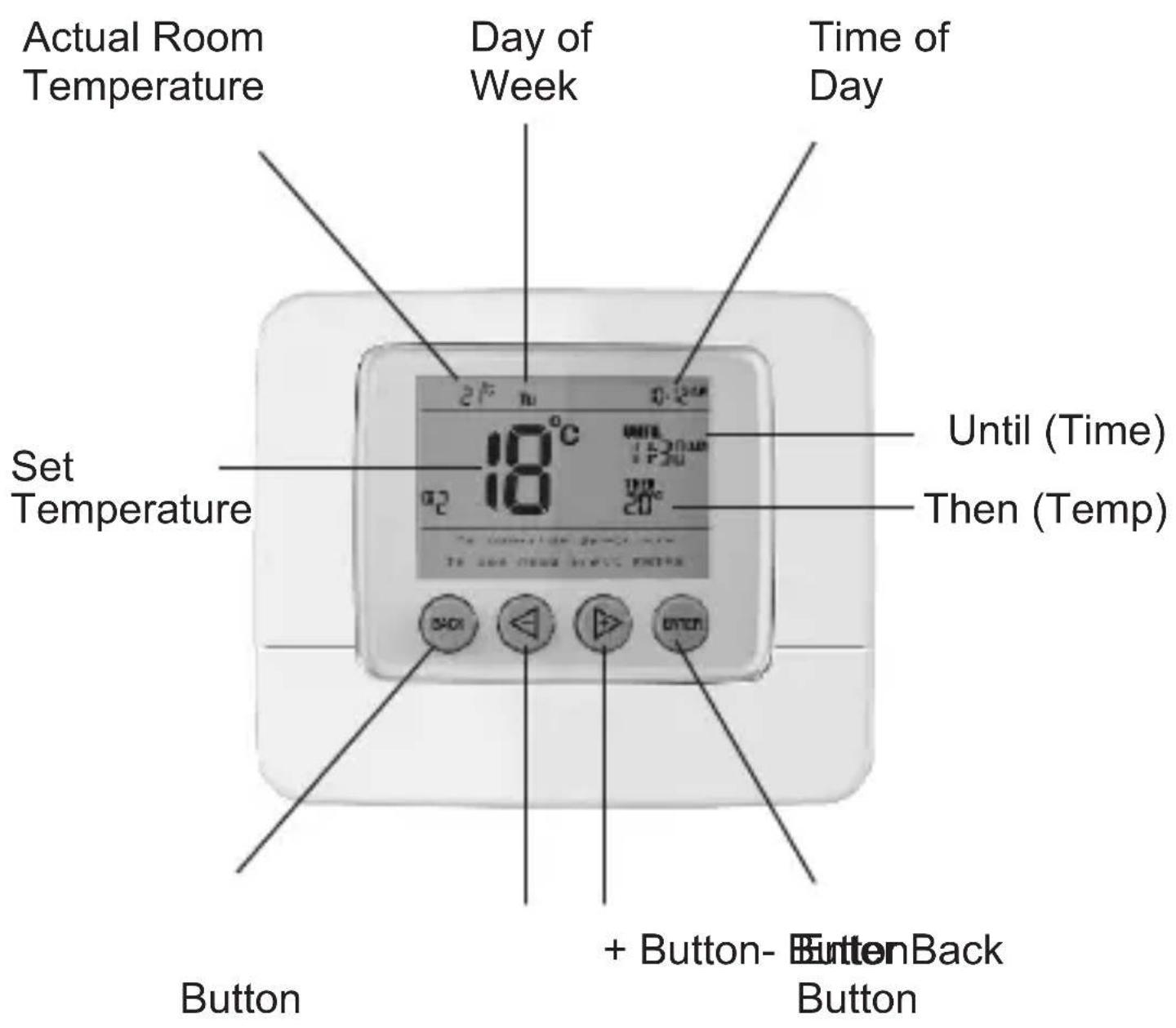
DISPLAY
text_image
Actual Room Temperature Day of Week Time of Day Set Temperature Until (Time) Then (Temp) Button + Button- ButtonBack ButtonDISPLAY
| Actual Room Temperature | This is the actual room temperature measured by the C-Stat |
| Set Temperature This is the | temperature that the C-Stat will allow the room to reach. The temperature range can be set between 5°C and 30°CWhen the temperature shown in the display is achieved the C-Stat will switch the heating OFF.If the temperature in the room falls below the setting the C-Stat will switch the heating ON. |
| Until (time) This is the time | that the next temperature setting is due to operate |
| Then (temp) This is the temperature setting that is due to operate next | |
| Day of the week It is important that the correct day of the week shows in the display | |
| Time of day This is the current time of day | |
| Setting Buttons Press any | button to illuminate the display.The message 'To override press -/+ To see menu press ENTER' will appear |
ACTIVATING THE BACK-LIT DISPLAY
Press any button to illuminate the display. This will remain illuminated for 10 seconds
GENERAL INFORMATION
During programming please note that the display will return to its normal operating screen if the last button press exceeds 10 seconds.
TEMPORARY OVERRIDE
A temporary temperature change can be made at any time. It is also possible to extend how long this temperature override is in operation.

flowchart
graph LR
    A["Press '-' or '+' to adjust temperature"] --> B["New temperature setting will be shown on the display"]
The temperature will revert to its normal programmed setting at the next timed temperature change
TEMPORARY OVERRIDE WITH TIME EXTENSION
(Maximum of 4 hours)
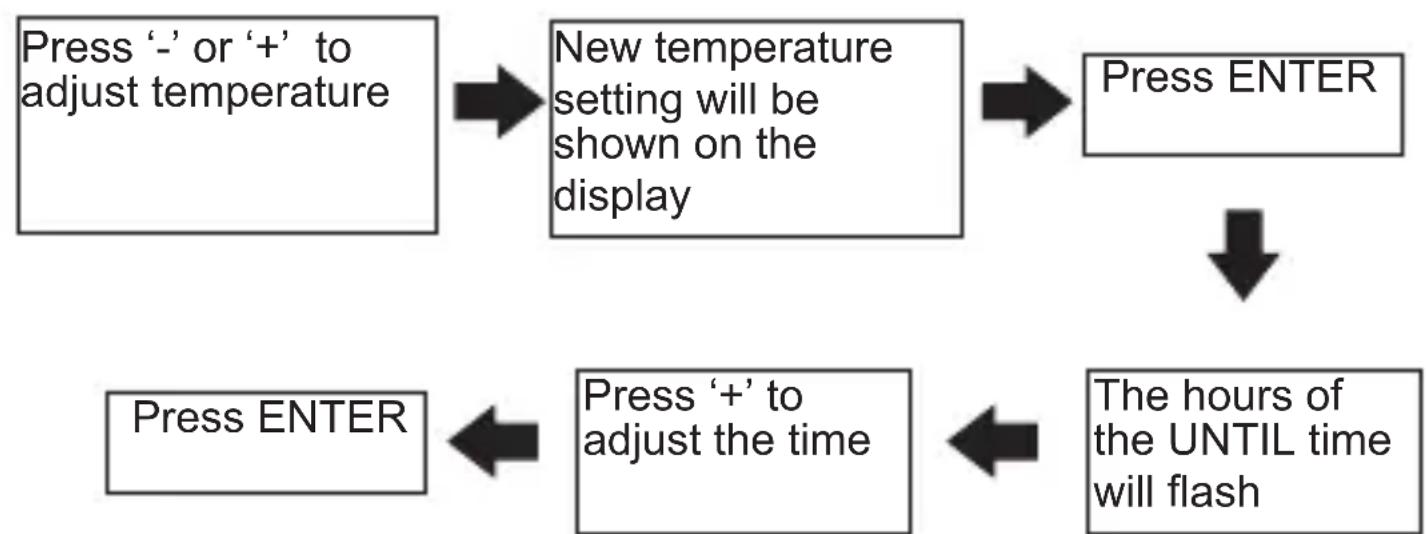
flowchart
graph TD
    A["Press ENTER"] --> B["New temperature setting will be shown on the display"]
    B --> C["Press ENTER"]
    C --> D["Press '+' to adjust the time"]
    D --> E["The hours of the UNTIL time will flash"]
The temperature will revert to its normal programmed setting at the next timed temperature change.
PERMANENT OVERRIDE
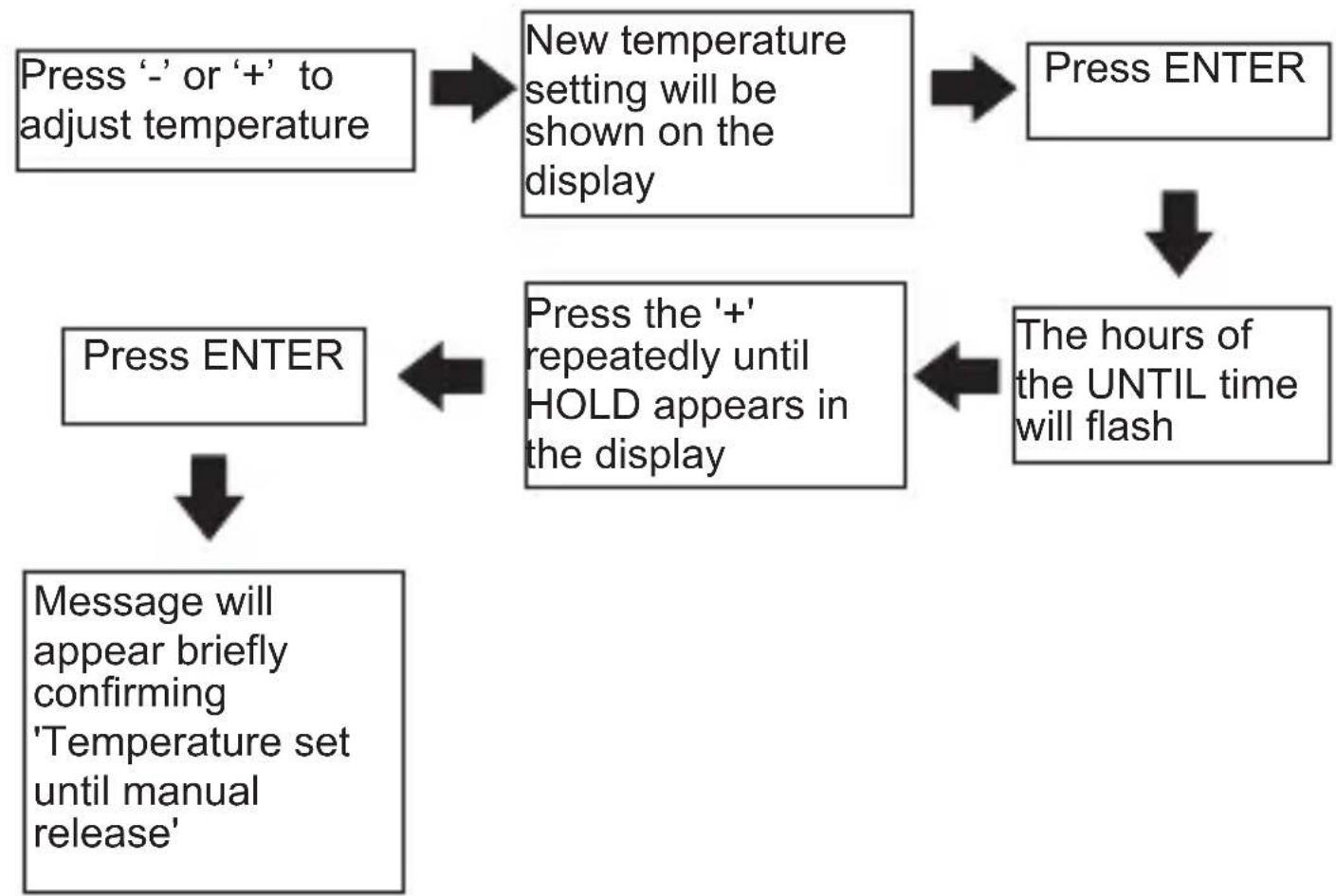
flowchart
graph TD
    A["Press '-' or '+' to adjust temperature"] --> B["New temperature setting will be shown on the display"]
    B --> C["Press ENTER"]
    C --> D["The hours of the UNTIL time will flash"]
    D --> E["Press the '+' repeatedly until HOLD appears in the display"]
    E --> F["Press ENTER"]
    F --> G["Message will appear briefly confirming 'Temperature set until manual release'"]
In the 'HOLD' position the temperature can be overridden by pressing either the '-' or '+' buttons. This will then become the new 'HOLD' temperature
PERMANENT OVERRIDE - CANCELLATION

flowchart
graph LR
    A["Press BACK"] --> B["Press ENTER"]
SETTING UP THE C-STAT
Upon initial installation the C-Stat has the following factory default settings
Settings – Monday to Friday
| Time Target Temperature | |
| Period 1 06:00 | am 20 °C |
| Period 2 08:30 | am 18 °C |
| Period 3 11:30 | am 20 °C |
| Period 4 01:30 | pm 18 °C |
| Period 5 05:00 | pm 21 °C |
| Period 6 10:00 | pm 15 °C |
Settings – Saturday and Sunday
| Time Target Temperature | ||
| Period 1 07:00 | am 20 °C | |
| Period 2 10:00 | am 19 °C | |
| Period 3 11:30 | am 21 °C | |
| Period 4 01:30 | pm 18 °C | |
| Period 5 05:00 | pm 21 °C | |
| Period 6 11:00 | pm 15 °C |
These can be changed by the installer or the end user at any time by accessing the MAIN MENU
MAIN MENU
To access the MAIN MENU take the following steps:
Press ENTER twice

Press '-' or '+' to toggle between the menu options
MENU OPTIONS
| Programme This allows the user to adjust the different time and temperature settings from the factory default settings shown in the table on page 8.Up to six different temperature levels can be set in any 24 hour period | |
| Standby This puts the | C-Stat into Frost protection or Standby condition and allows the heating to be permanently switched off but will activate and switch the heating on if the temperature in the house falls below the standby temperature set.All programme settings are overridden and the unit will not return to normal operation until the standby period has ended by pressing the ENTER button. |
| Holiday This puts the | C-Stat into a temporary standby mode with a start and end date which can be set to coincide with a holiday period. At the end of the set period the C-Stat will resume normal operation |
| Time / Date The C-Stat | has a built in clock and calendar.This will require setting on initial installation.If this has not been set on installation please go to Setting the TIME and DATE section on page 14 before continuing |
| Set Up Enables the programming of various options outlined in the SET UP MENU on page 15 of these instructions – These should be set on installation. | |
Setting the PROGRAMME
Six time and temperature settings are available in each 24 hour period. Pressing BACK at any time in this process will return you to normal operating mode.
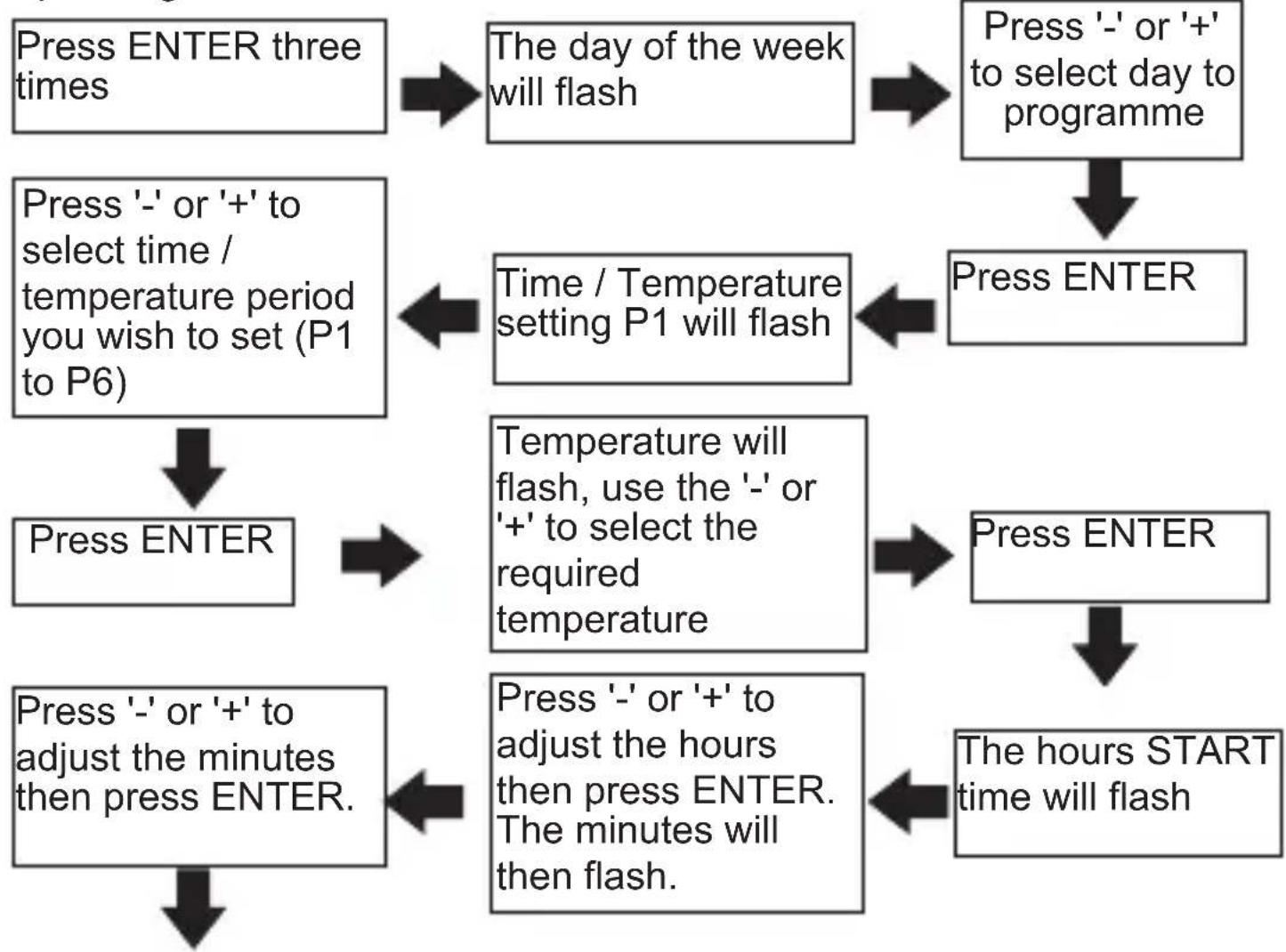
flowchart
graph TD
    A["Press ENTER three times"] --> B["The day of the week will flash"]
    B --> C["Press '-' or '+' to select day to programme"]
    C --> D["Press ENTER"]
    E["Press '-' or '+' to select time / temperature period you wish to set (P1 to P6)"] --> F["Time / Temperature setting P1 will flash"]
    F --> G["Press ENTER"]
    H["Press ENTER"] --> I["Temperature will flash, use the '-' or '+' to select the required temperature"]
    I --> J["Press ENTER"]
    K["Press '-' or '+' to adjust the minutes then press ENTER."] --> L["Press '-' or '+' to adjust the hours then press ENTER. The minutes will then flash."]
    L --> M["The hours START time will flash"]
If you require to set further periods for the same day, the next period will now automatically flash. Follow this process again to programme as required
On completion of period 6 (P6) go to the copy process on Page 11 of this booklet
If only two different temperature settings are required in 24 hours then set the first time and temperature using programme one (P1) and the second time and temperature setting using programme setting two (P2). The remaining programmes (P3 to P6) should all be set to the same time and temperature as P2.
This same method can be used if three, four or five temperature levels are required, always using the first settings to provide the temperature change commands with the remaining settings that are not required set to the same time and temperature as the last required setting.
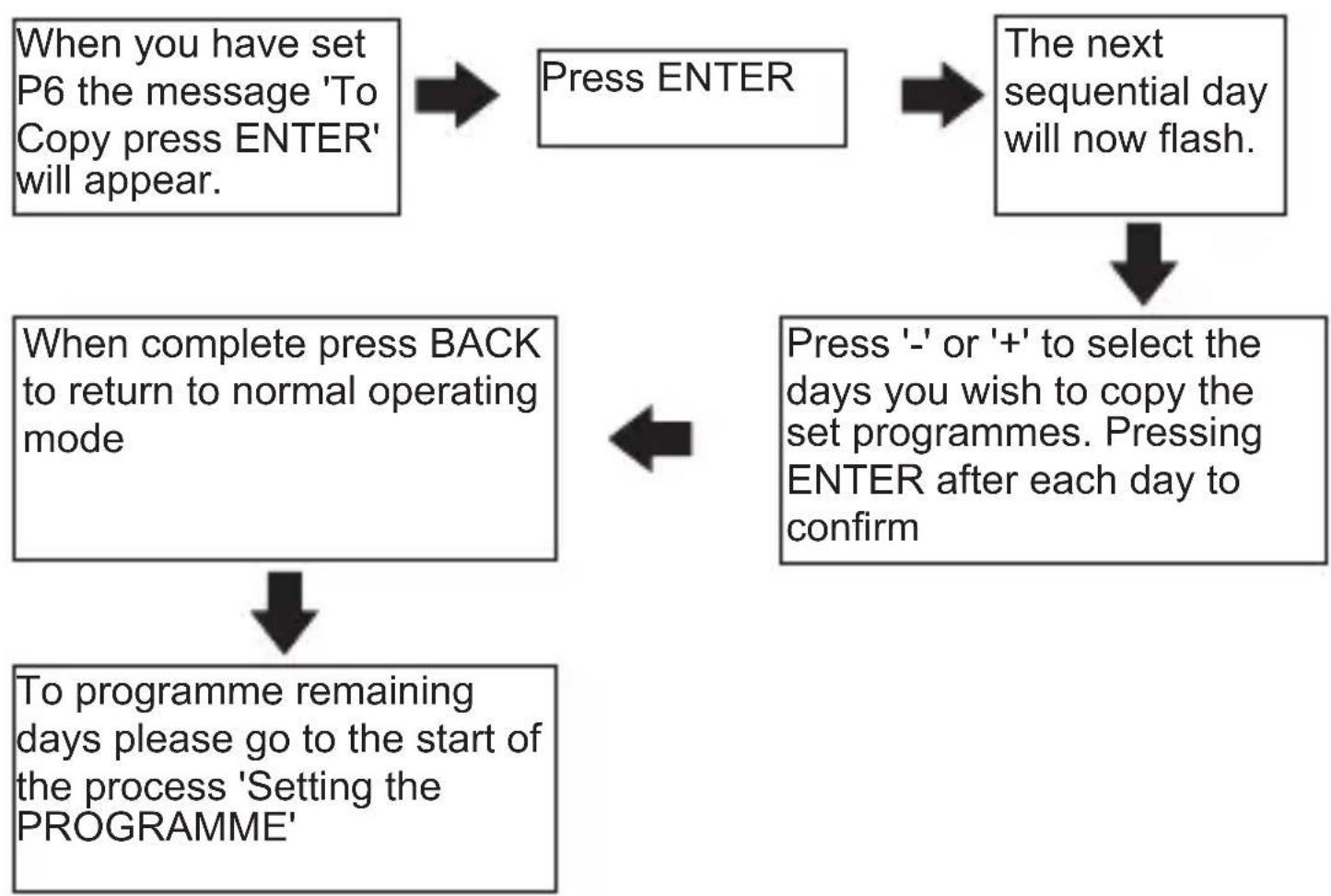
To copy the same programmes to other days of the week, please follow the process below
flowchart
graph TD
    A["When you have set P6 the message 'To Copy press ENTER' will appear."] --> B["Press ENTER"]
    B --> C["The next sequential day will now flash."]
    C --> D["Press '-' or '+' to select the days you wish to copy the set programmes. Pressing ENTER after each day to confirm"]
    D --> E["When complete press BACK to return to normal operating mode"]
    E --> F["To programme remaining days please go to the start of the process 'Setting the PROGRAMME'"]
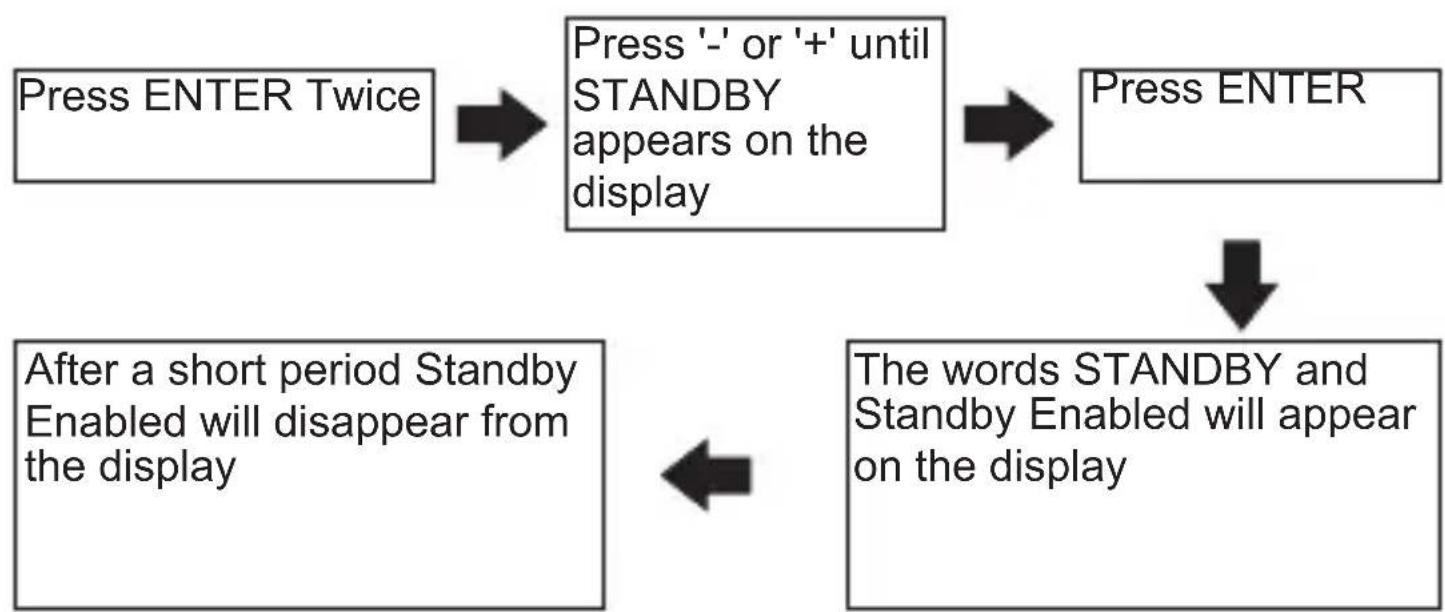
Setting the STANDBY
flowchart
graph TD
    A["Press ENTER Twice"] --> B["Press '-' or '+' until STANDBY appears on the display"]
    B --> C["Press ENTER"]
    D["After a short period Standby Enabled will disappear from the display"] <--> E["The words STANDBY and Standby Enabled will appear on the display"]
To exit STANDBY mode, press ENTER TWICE
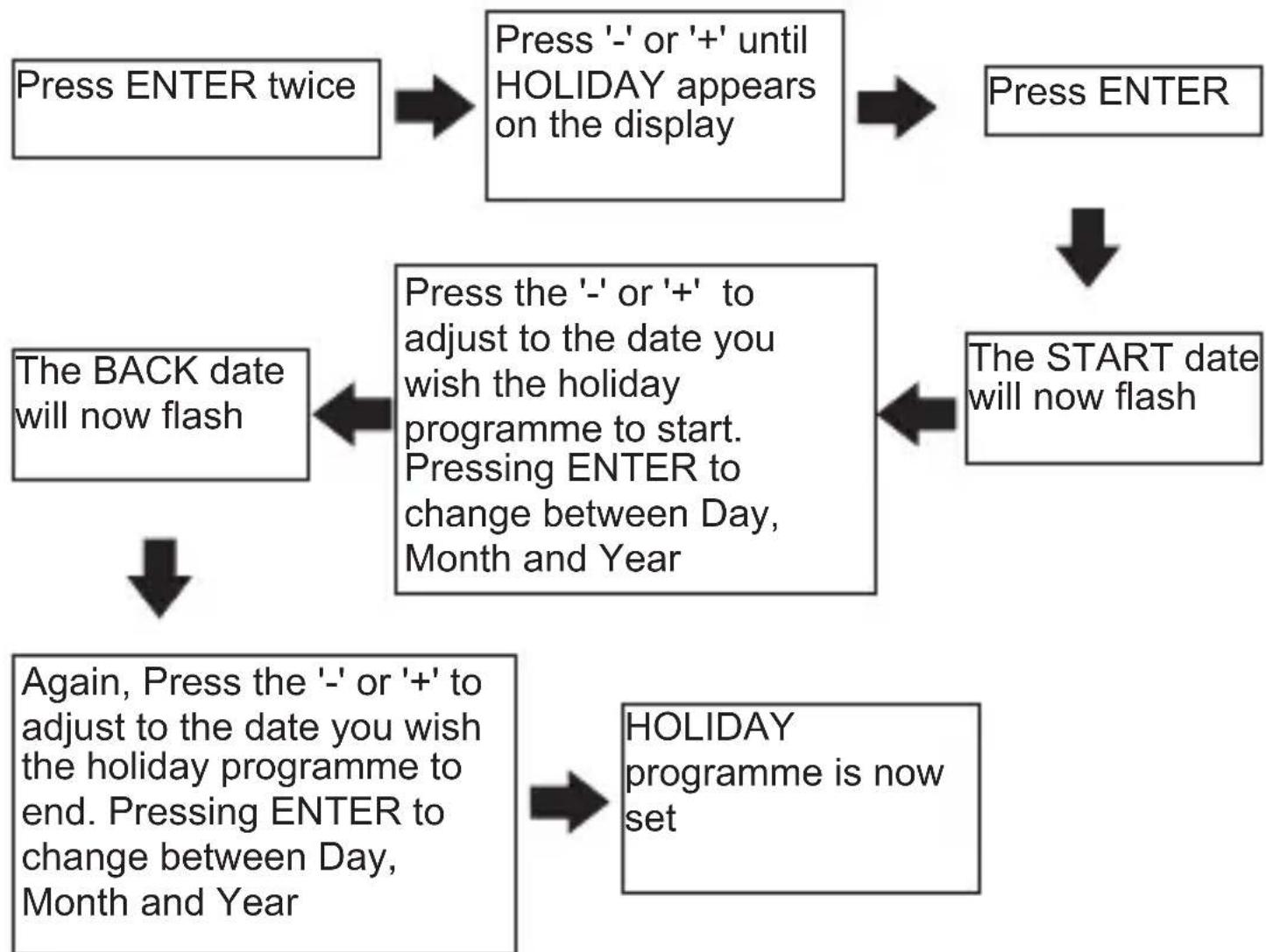
Setting the HOLIDAY programme
Pressing BACK at any time in this process will return you to normal operating mode
flowchart
graph TD
    A["Press ENTER twice"] --> B["Press '-' or '+' until HOLIDAY appears on the display"]
    B --> C["Press ENTER"]
    C --> D["The START date will now flash"]
    D --> E["Press the '-' or '+' to adjust to the date you wish the holiday programme to start. Pressing ENTER to change between Day, Month and Year"]
    E --> F["The BACK date will now flash"]
    F --> G["Again, Press the '-' or '+' to adjust to the date you wish the holiday programme to end. Pressing ENTER to change between Day, Month and Year"]
    G --> H["HOLIDAY programme is now set"]
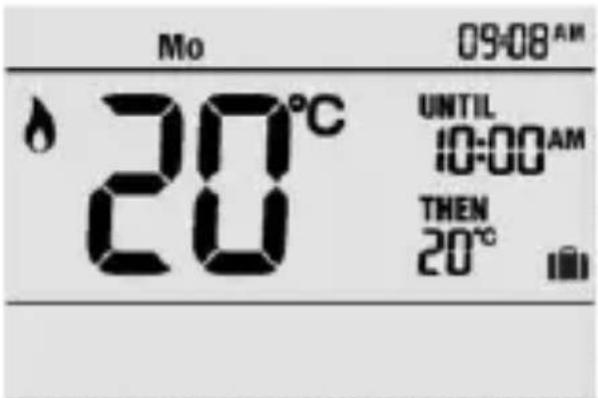
If the holiday period START date matches today's date, the STANDBY temperature will be shown on the display together with the suitcase icon.
If the holiday period START date does not match today's date the display will remain in normal operating mode but with the suitcase icon appearing on the right of the display. Indicating a holiday period is pending
text_image
Mo 09:08 AM 20°C UNTIL 10:00 AM THEN 20°CTo cancel a set holiday programme in ADVANCE of its activation, re-programme using the above procedure and set the START date and BACK date to today's date.
To cancel a set holiday programme during activation press ENTER button twice, the unit will return to normal operating mode and the suitcase icon will disappear.
THE DATES SPECIFIED BECOME EFFECTIVE FROM MIDNIGHT OF THE DAY ENTERED
Setting the TIME and DATE
Pressing BACK at any time in this process will return you to normal operating mode
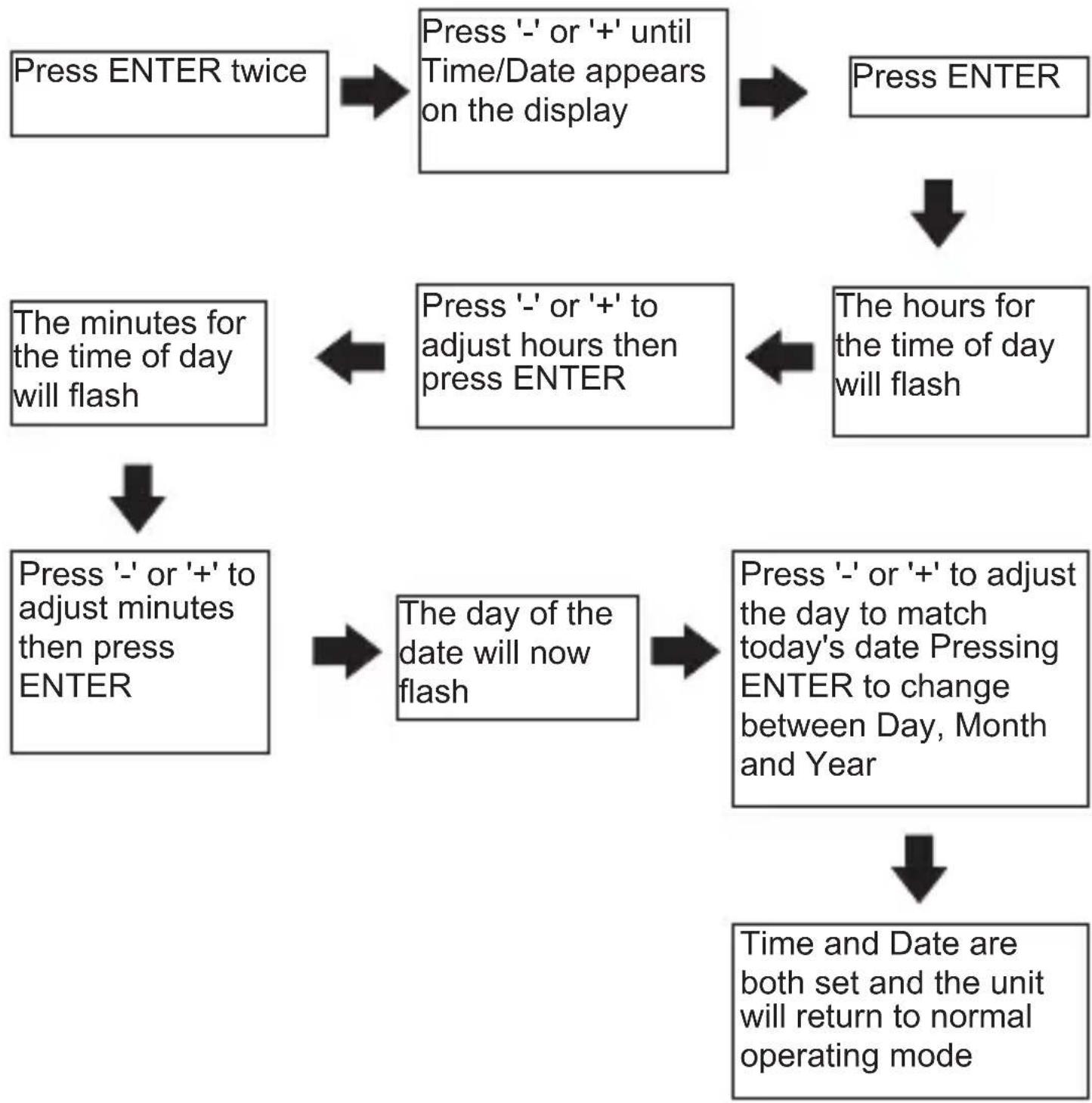
flowchart
graph TD
    A["Press ENTER twice"] --> B["Press '-' or '+' until Time/Date appears on the display"]
    B --> C["Press ENTER"]
    C --> D["The hours for the time of day will flash"]
    D --> E["Press '-' or '+' to adjust hours then press ENTER"]
    E --> F["Press '-' or '+' to adjust minutes then press ENTER"]
    F --> G["Press '-' or '+' to adjust days now flash"]
    G --> H["Press '-' or '+' to adjust today's date Pressing ENTER to change between Day, Month and Year"]
    H --> I["Time and Date are both set and the unit will return to normal operating mode"]
If an incorrect date is entered the wrong day will appear in the normal operating screen.
SETUP MENU
To access the SET UP MENU take the following steps:
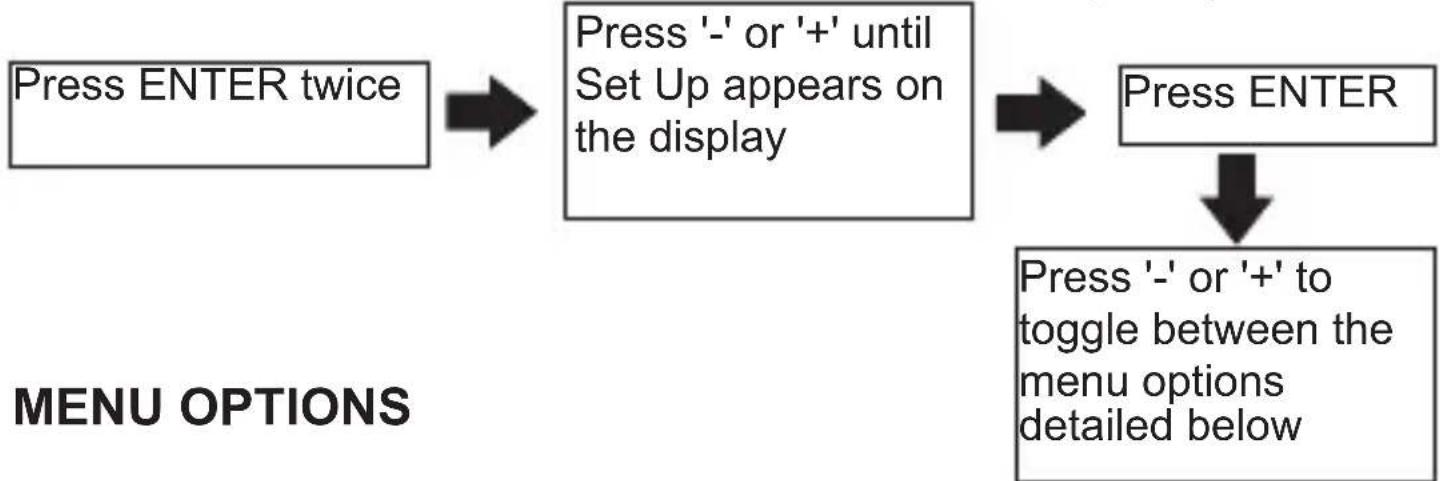
flowchart
graph TD
    A["Press ENTER twice"] --> B["Press '-' or '+' until Set Up appears on the display"]
    B --> C["Press ENTER"]
    C --> D["Press '-' or '+' to toggle between the menu options detailed below"]
| Select clock format This | allows the display to show the time in 24 hour or AM/PM format |
| Daylight saving This is the | the adjustment made in the UK when the clocks go back or forward in the Autumn and Spring.When using the C-Stat in the UK the daylight saving ON setting should be selected which will automatically adjust the GMT/BST times accordingly |
| Standby temperature This | is the temperature setting used when in Standby or Holiday mode (Min 5°C / Max 30°C)In cold weather the heating will activate if the temperature being measured falls below this temperature setting. |
| Lower temperature limit | This sets the lowest temperature setting the C-Stat will allow to be programmed.The default setting is 5°C |
| Upper temperature limit | This sets the highest temperature setting the C-Stat will allow to be programmedThe default setting is 30°C |
MENU OPTIONS (Contd...)
| TPI cycles per hour This | setting helps the TPI energy saving software to operate correctly depending on the type of heating system you have |
| Optimum start This calculates the amount of time the C-Stat may need to switch on in advance of the next target temperature setting in order to meet the requirement. | |
| Tamper setting This setting allows a 4 digit release code to be set up to stop unauthorised adjustments being made in multi occupancy buildings. | |
Setting the SELECT CLOCK FORMAT
Pressing BACK at any time in the process will return you to normal operating mode
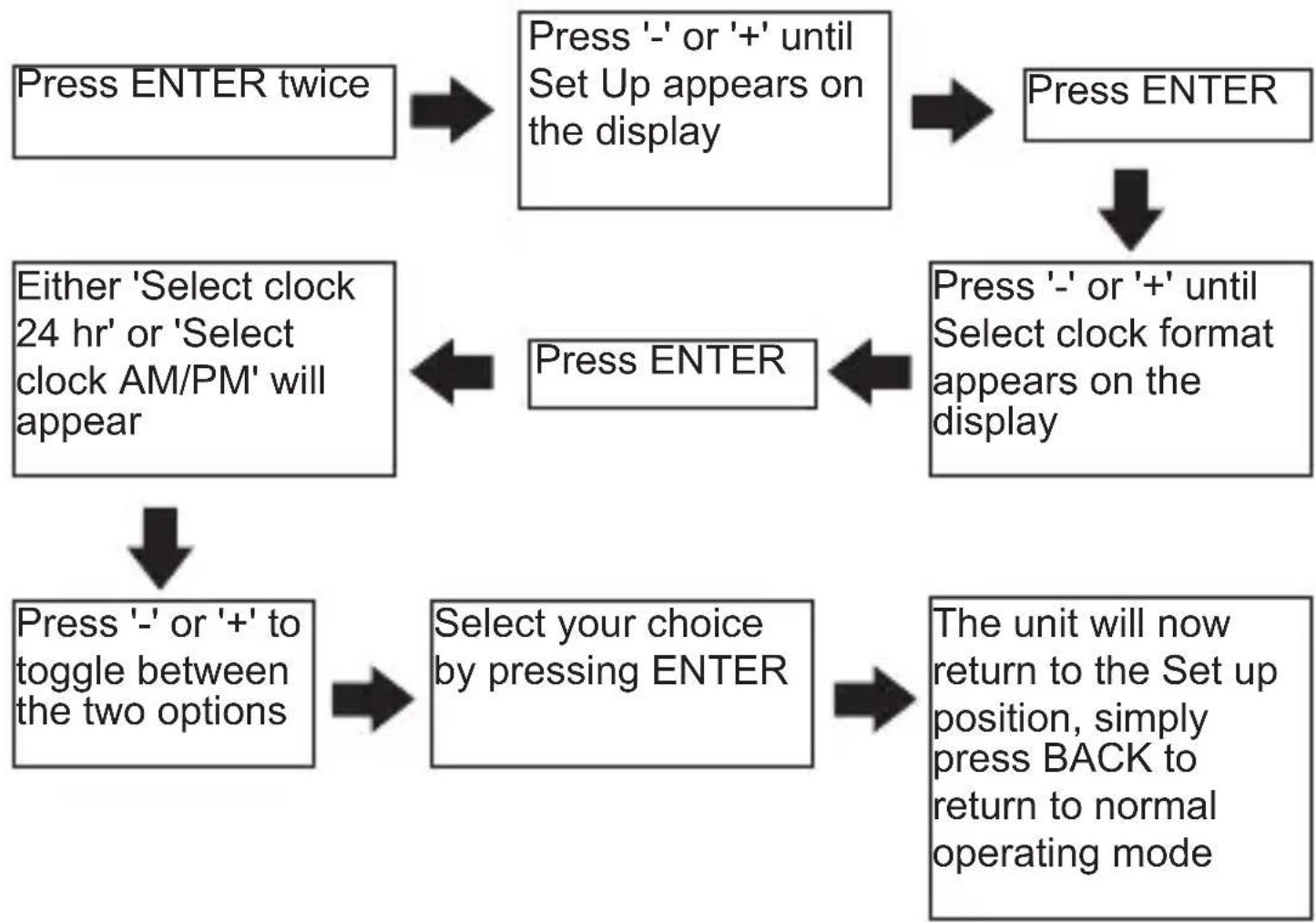
flowchart
graph TD
    A["Press ENTER twice"] --> B["Press '-' or '+' until Set Up appears on the display"]
    B --> C["Press ENTER"]
    C --> D["Press '-' or '+' until Select clock format appears on the display"]
    D --> E["Press ENTER"]
    E --> F["Either 'Select clock 24 hr' or 'Select clock AM/PM' will appear"]
    F --> G["Press ENTER"]
    G --> H["Press '-' or '+' to toggle between the two options"]
    H --> I["Select your choice by pressing ENTER"]
    I --> J["The unit will now return to the Set up position, simply press BACK to return to normal operating mode"]
Select the DAYLIGHT SAVING option
Pressing BACK at any time in this process will return you to normal operating mode
The default factory setting is for the Daylight saving to be ON giving automatic switching to GMT/BST
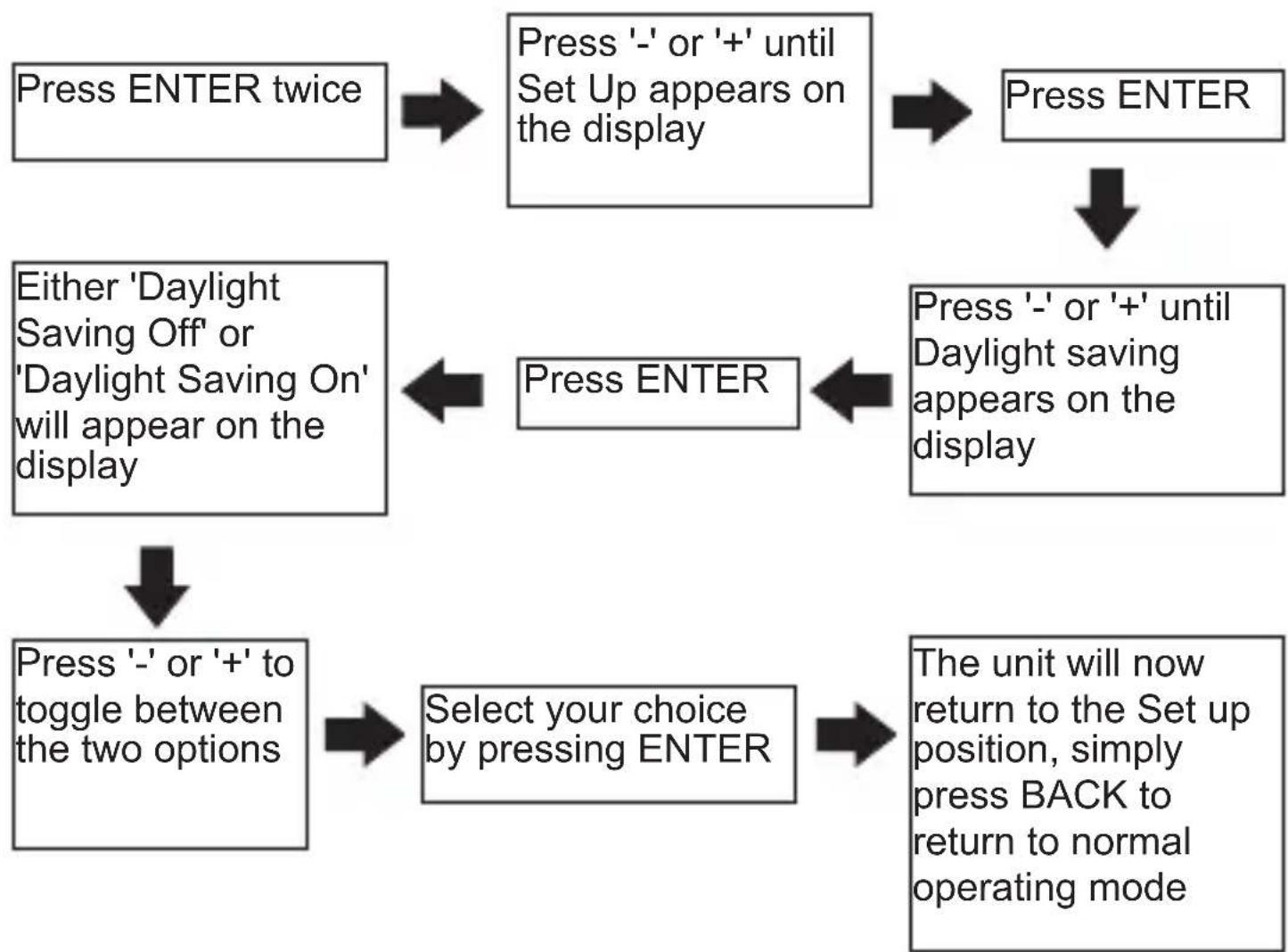
flowchart
graph TD
    A["Press ENTER twice"] --> B["Press '-' or '+' until Set Up appears on the display"]
    B --> C["Press ENTER"]
    C --> D["Press '-' or '+' until Daylight saving appears on the display"]
    D --> E["Press ENTER"]
    E --> F["Press '-' or '+' to toggle between the two options"]
    F --> G["Select your choice by pressing ENTER"]
    G --> H["The unit will now return to the Set up position, simply press BACK to return to normal operating mode"]
    I["Either 'Daylight Saving Off' or 'Daylight Saving On' will appear on the display"] --> E
Setting the STANDBY TEMPERATURE, LOWER TEMPERATURE LIMIT or UPPER TEMPERATURE LIMIT
Pressing BACK at any time in this process will return you to normal operating mode
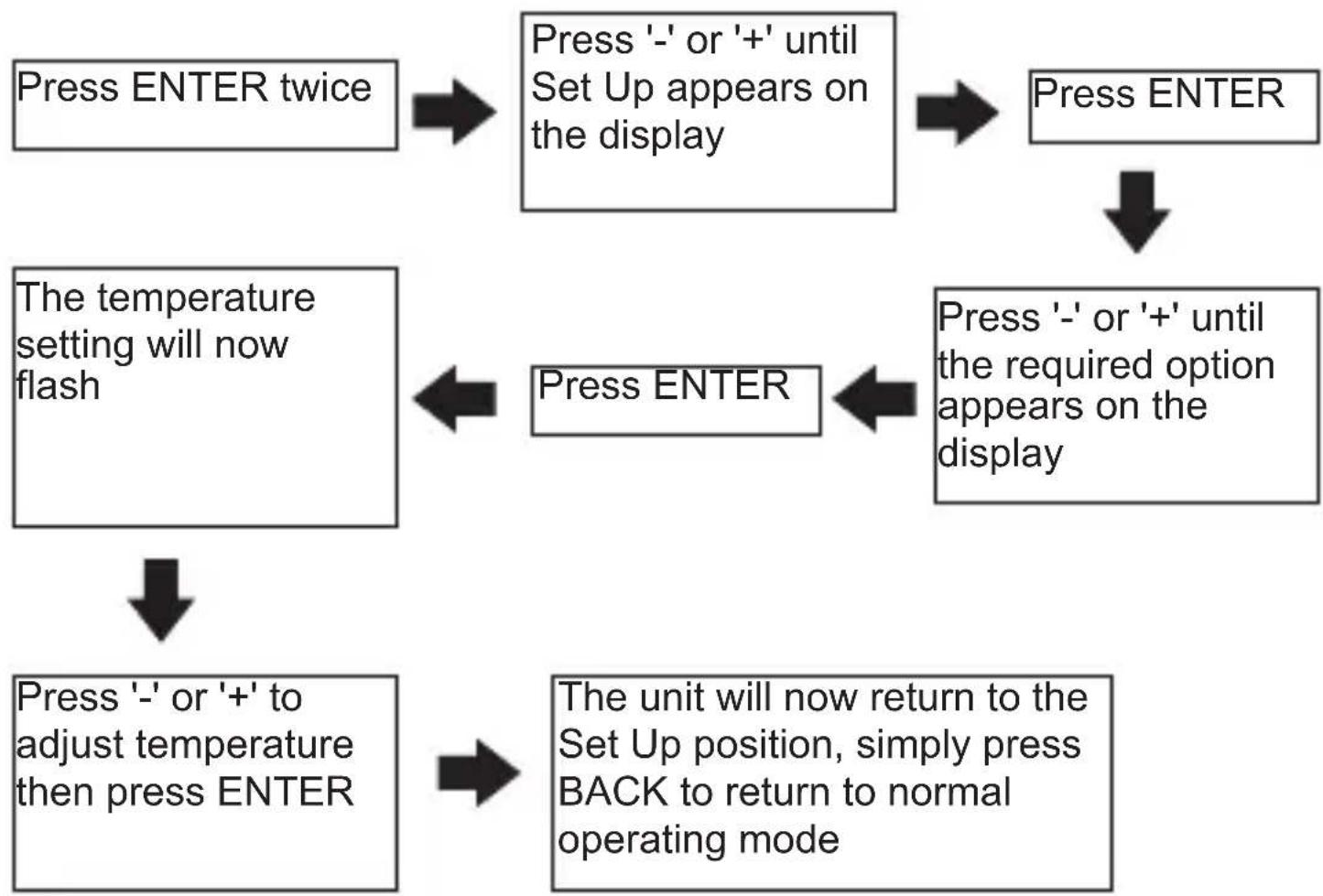
flowchart
graph TD
    A["Press ENTER twice"] --> B["Press '-' or '+' until Set Up appears on the display"]
    B --> C["Press ENTER"]
    C --> D["Press '-' or '+' until the required option appears on the display"]
    D --> E["Press ENTER"]
    E --> F["Press '-' or '+' to adjust temperature then press ENTER"]
    F --> G["The unit will now return to the Set Up position, simply press BACK to return to normal operating mode"]
    G --> H["Press ENTER"]
    H --> I["The temperature setting will now flash"]
    I --> J["Press ENTER"]
Setting the TPI cycles
Pressing the BACK at any time in this process will return you to normal operating mode
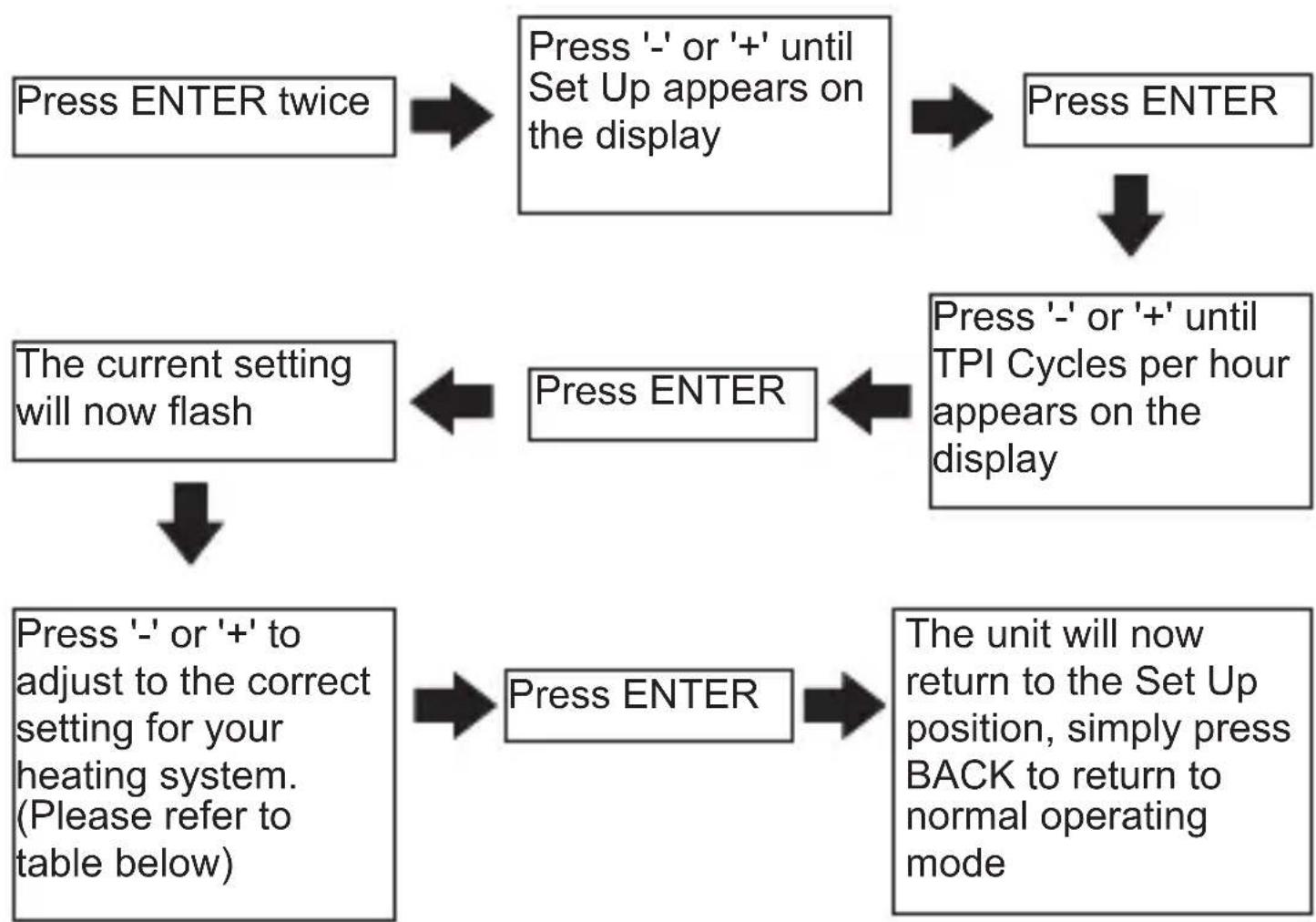
flowchart
graph TD
    A["Press ENTER twice"] --> B["Press '-' or '+' until Set Up appears on the display"]
    B --> C["Press ENTER"]
    C --> D["Press '-' or '+' until TPI Cycles per hour appears on the display"]
    D --> E["Press ENTER"]
    E --> F["Press '-' or '+' to adjust to the correct setting for your heating system. (Please refer to table below)"]
    F --> G["Press ENTER"]
    G --> H["The unit will now return to the Set Up position, simply press BACK to return to normal operating mode"]
    H --> I["Press ENTER"]
    I --> J["The current setting will now flash"]
| Oil Boilers 3 cycles per hour | |
| Gas Boilers 6 cycles per hour | |
| Not used 9 cycles per hour | |
| Electric Heating 12 cycles per hour |
This feature would normally be set by your installer
Setting the OPTIMUM START
This setting will allow the C-Stat to anticipate the next set temperature and switch on up to two hours in advance to ensure room temperature has been reached by the time the new set temperature applies.
As a consequence the switch on time could take place anywhere between 2 hours and zero before the set time and temperature.
With the optimum start set to OFF the user will need to anticipate the warm up time needed in the programme settings. (Typically the set temperature will be set approx. 1 hour in advance of when it is required)
Pressing the BACK at any time in this process will return you to normal operating mode
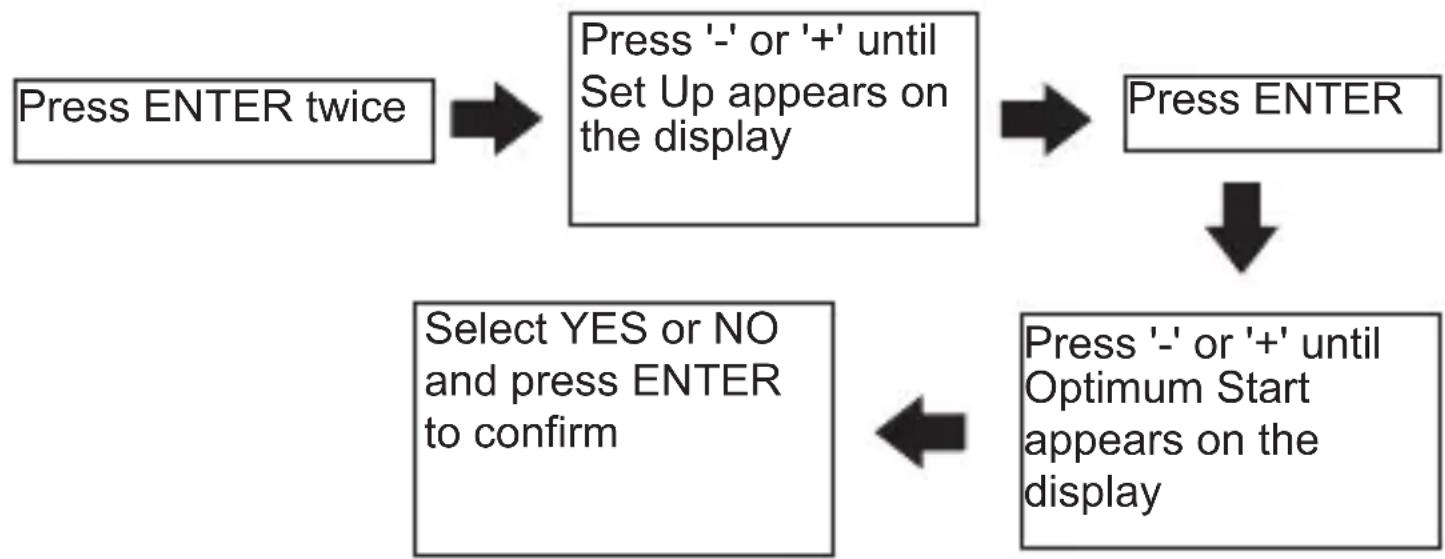
flowchart
graph TD
    A["Press ENTER twice"] --> B["Press '-' or '+' until Set Up appears on the display"]
    B --> C["Press ENTER"]
    C --> D["Select YES or NO and press ENTER to confirm"]
    D --> E["Press '-' or '+' until Optimum Start appears on the display"]
This feature would normally be set by your installer.
Setting the TAMPER SETTING
This setting allows the unit to be locked to the programmes set and can only be reactivated by entering the pin code.
None of the buttons will operate until the security code is entered
Pressing BACK at any time in this process will return you to normal operating mode
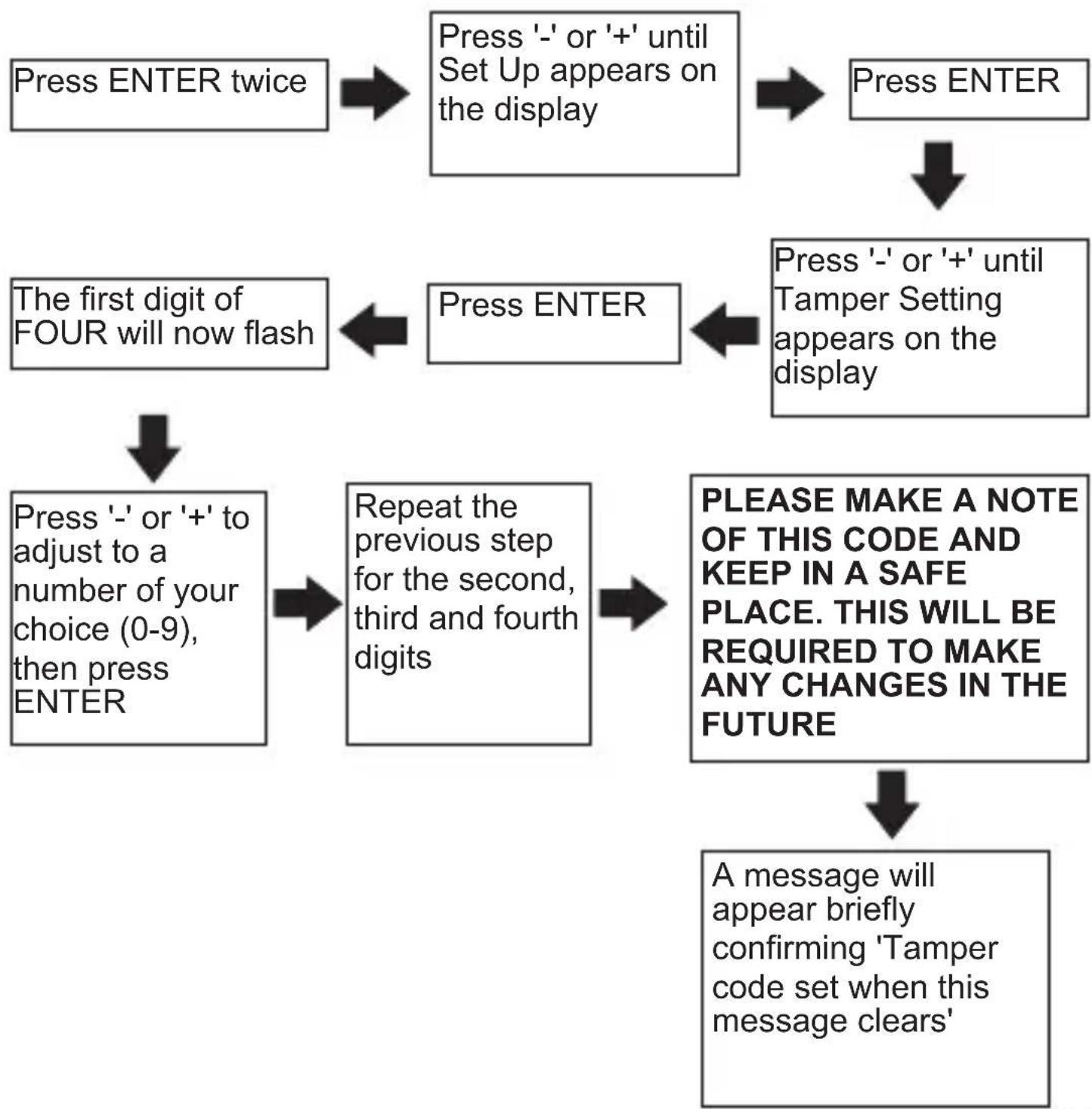
flowchart
graph TD
    A["Press ENTER twice"] --> B["Press '-' or '+' until Set Up appears on the display"]
    B --> C["Press ENTER"]
    C --> D["Press '-' or '+' until Tamper Setting appears on the display"]
    D --> E["Press ENTER"]
    E --> F["The first digit of FOUR will now flash"]
    F --> G["Press ENTER"]
    G --> H["Press '-' or '+' to adjust to a number of your choice (0-9), then press ENTER"]
    H --> I["Repeat the previous step for the second, third and fourth digits"]
    I --> J["PLEASE MAKE A NOTE OF THIS CODE AND KEEP IN A SAFE PLACE. THIS WILL BE REQUIRED TO MAKE ANY CHANGES IN THE FUTURE"]
    J --> K["A message will appear briefly confirming 'Tamper code set when this message clears'"]
Cancelling the TAMPER SETTING
Pressing BACK at any time in this process will return you to normal operating mode
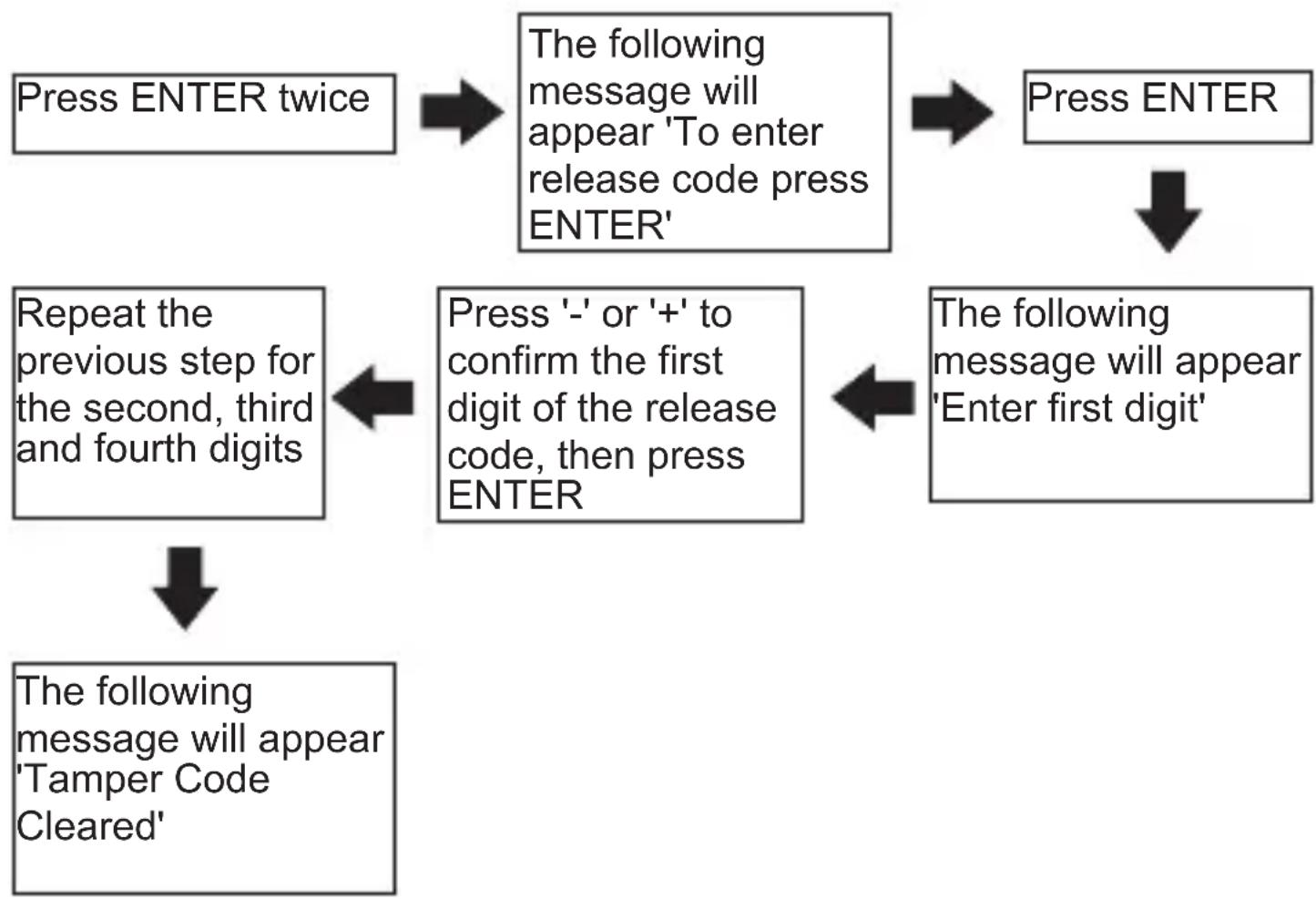
flowchart
graph TD
    A["Press ENTER twice"] --> B["The following message will appear 'To enter release code press ENTER'"]
    B --> C["Press ENTER"]
    C --> D["The following message will appear 'Enter first digit'"]
    D --> E["Press '-' or '+' to confirm the first digit of the release code, then press ENTER"]
    E --> F["Repeat the previous step for the second, third and fourth digits"]
    F --> G["The following message will appear 'Tamper Code Cleared'"]
If you do not know the release code, contact the Homeowner or Landlord in the first instance.
If you are the Homeowner or Landlord have forgotten the code, contact Horstmann Technical who will be able to provide you with an override code once various security questions have been answered satisfactorily.
RESETTING THE C-STAT
Electronic equipment can in some circumstances be affected by electrical interference.
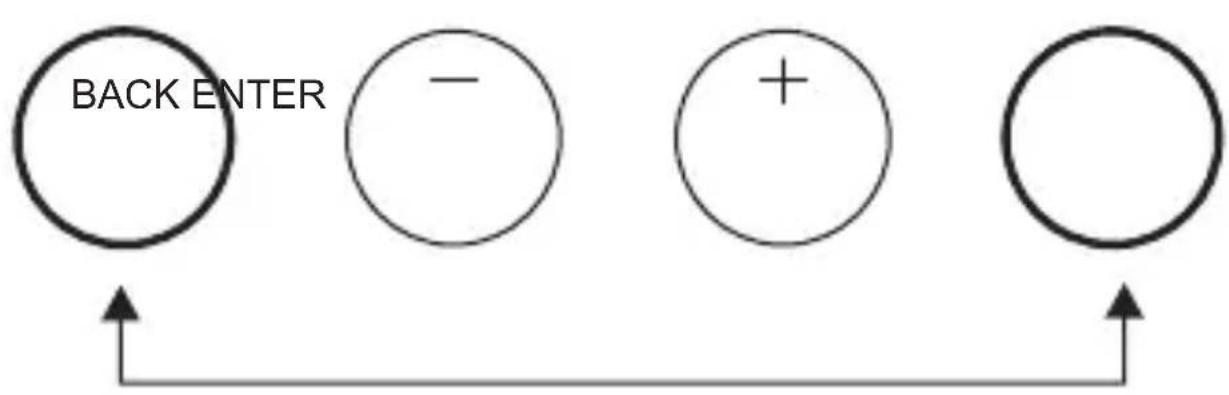
If the display becomes frozen or scrambled simply press both the BACK and ENTER button simultaneously.
ALL settings made prior to resetting will remain except the Time and Date, which will need to be re-entered.
Details of how to do this can be found on page 14 of this leaflet
flowchart
graph TD
    A["BACK ENTER"] --> B["-"]
    B --> C["+"]
    C --> D[" "]
BATTERY
The C-Stat 17-B runs on 2 standard AA (Alkaline) non rechargeable batteries and is designed to give a battery life of approximately two years.
The C-Stat 17-M is mains powered and therefore does not require a battery.
There are three stages of warning as the batteries become low in power.
Stage 1 – The battery low symbol will appear in the display
Stage 2 – The words 'Low Battery' will appear in the display for 1 second each time a button is operated
Stage 3 – The unit will switch itself OFF and the message 'Replace Batteries' will appear permanently in the display.
The batteries should be changed at Stage 2 at the latest.
To replace the batteries of the C-Stat 17-B, please carefully pull down the hinged battery cover on the front of the unit. Ensure they are fitted correctly as indicated by the terminal markings in the battery compartment.
Please dispose the old batteries responsibly
SERVICE AND REPAIR
This programmer is NOT user serviceable. Please do not dismantle the unit. In the unlikely event of a fault developing please refer to the RESETTING THE C-STAT on page 23. If this fails to resolve the problem please contact a local heating engineer or a qualified electrician.
HORSTMANN
Secure Controls (UK) Limited
South Bristol Business Park,
Roman Farm Road, Bristol BS4 1UP
E-mail: sales@horstmann.co.uk
Web site: www.horstmann.co.uk