URC 4 - Remote control Entone - Free user manual and instructions
Find the device manual for free URC 4 Entone in PDF.


User questions about URC 4 Entone
0 question about this device. Answer the ones you know or ask your own.
Ask a new question about this device
Download the instructions for your Remote control in PDF format for free! Find your manual URC 4 - Entone and take your electronic device back in hand. On this page are published all the documents necessary for the use of your device. URC 4 by Entone.
USER MANUAL URC 4 Entone
Universal Remote Control
URC 4
User's Guide (North America Edition)
COPYRIGHT
©2012 Entone, Inc. All rights reserved. This document contains proprietary information protected by copyright. No part of this publication may be reproduced, stored in a retrieval system, or transmitted in any form or by any means, electronic, mechanical, photocopying, recording or otherwise, without the prior written consent of Entone, Inc., 20863 Stevens, Creek Blvd, Suite 300, Cupertino, CA 95014, U.S.A.
DISCLAIMER
IF THIS PRODUCT DIRECTS YOU TO COPY MATERIALS, YOU MUST HAVE PERMISSION FROM THE COPYRIGHT OWNER OF THE MATERIALS TO AVOID VIOLATING THE LAW WHICH COULD RESULT IN DAMAGES OR OTHER REMEDIES.
TRADEMARKS
Entone and the tagline "Connecting the Home" are trademarks of Entone, Inc. All other trademarks or registered trademarks belong to their respective owners.
CHANGES
The material in this document is for information only and is subject to change without notice. While reasonable efforts have been made in the preparation of this document to assure its accuracy, Entone, Inc. assumes no liability resulting from the use of the information contained herein.
Entone, Inc. reserves the right to make changes in the product design without reservation and without notification to its users.
P/N: 99-98xx10-00
CUSTOMER SUPPORT AND CONTACT INFORMATION
For Customer Support please call: 650.572.7000
Customer Contact Information:
Entone, Inc.
20863 Stevens, Creek Blvd
Suite 300,
Cupertino, CA 95014
U.S.A.
Tel: 650.572.7000
www.entone.com
Table of Contents
Declaration of Conformity ....3
1.1 Introduction....4 Loading Batteries....4
2.1 Controlling STB using RF URC .... 5 RAP Installation (in remote room).... 6 Connecting STB to the TV coax network.... 7 RF URC Registration.... 8
3.1 Controlling STB using IR URC....9 IR Reception Range....10
4.1 Controlling Your Television and other A/V Devices....11 To Program a TV or AUX device....12 Toggle Power Key Punch-through Functionality....12 Toggle Volume Key Punch-through Functionality....12 Toggle Channel Up/Down Keys for TV/AUX....13 Auto Search Procedures....13
Appendix A – Device Code....15 Appendix B – Other Features....25 Showing URC 4 Firmware Version....25 Showing Programmed Device Code....25
Declaration of Conformity
The manufacturer is not responsible for any radio or TV interference caused by unauthorized modifications to this equipment. Such modifications could void the user's authority to operate the equipment.
Chapter 1
1.1 Introduction
The Entone Universal Remote Control v4.x (URC 4) is designed to work either on Radio Signals (RF) or InfraRed (IR). It can control Janus Media Hub using RF from another room where is not at direct sight distance from the Janus. Or, it can use IR to control Amulet High Definition IP Television Receiver at direct sight distance. The URC 4 can also be used to control other A/V devices such as TV, DVD player and audio equipment using IR. There are two types of Entone URC 4: IR only (IR URC) and IR+RF (RF URC). IR URC is included in the package of Janus/Amulet while RF URC is included in Entone Second Stream Kit.
Loading Batteries
The URC 4 comes with AA-size batteries, which need to be installed when you first receive your system. When you replace old batteries, you should replace all of the batteries. Use batteries of the same kind, for example alkaline or carbon zinc, and do not mix batteries of different kinds. Alkaline batteries last longer than carbon zinc.
Warning: Mixing old and new batteries or different types of batteries poses a fire hazard.
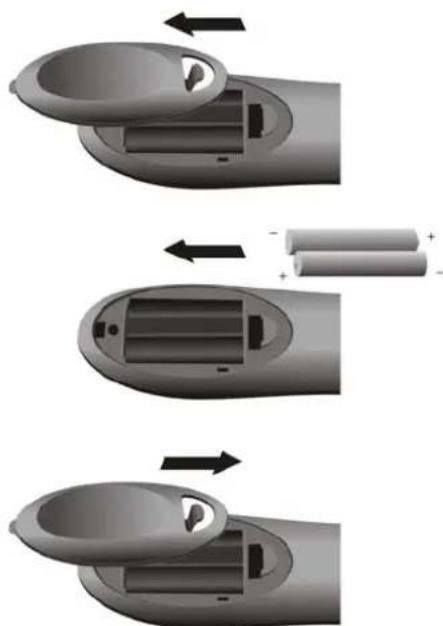
To load batteries to URC 4:
- Press down on the battery cover's top latch and slide the cover off.
- If you are changing out batteries, take out all of the old batteries.
- Put the new batteries in. Make sure you match the plus ("+") ends with the plus markings on the battery case.
- Slide the cover back into place.
natural_image
Three-step diagram showing battery charging process: top-down, middle-down, and final close-up of internal components (no text or symbols)Figure 1-1 Loading Batteries to URC 4
Chapter 2
2.1 Controlling STB using RF URC
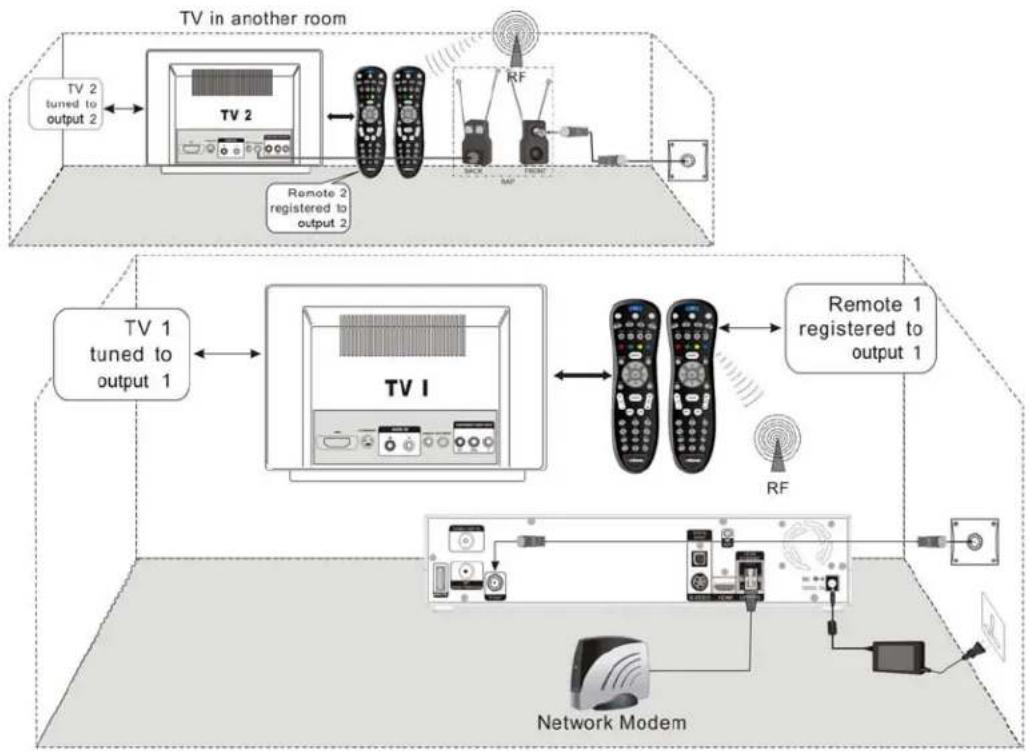
Janus is a multi-television media hub. It can support multiple outputs in multiple rooms viewing different channels or TV programs. Amulet is a single output video receiver. You can connect Amulet to a primary output only.
You can use RF URC 4 to control Janus/Amulet using radio signals (RF). These radio signals travel over long distances and go though walls and other solid objects. You must connect the Remote Antenna Package (RAP) to the rear panel of the Janus/Amulet.
Your Janus/Amulet comes with one IR URC 4 to be used for output 1 (primary). (Additional RF URC 4 can be purchased separately.) Your RF URC 4 must be registered to one of the 2 outputs (primary or secondary) before it can be used. One RF URC 4 can only be registered to one output. However, you can register at most 3 RF URC 4 to an output. After registration, you need to use the corresponding RF URC 4 to control the outputs.
flowchart
graph TD
    A["TV in another room"] --> B["TV 2 tuned to output 2"]
    B --> C["TV 2"]
    C --> D["Remote 2 registered to output 2"]
    D --> E["RF"]
    E --> F["Network Modem"]
    F --> G["Remote 1 registered to output 1"]
    G --> H["TV 1 tuned to output 1"]
    H --> I["TV 1"]
    I --> J["Remote 1"]
    J --> K["RF"]
    K --> L["Network Modem"]
Figure 2-1 Controlling STB using RF URC 4
Here are some principles of the remote registration method:
- Each output allows a maximum of 3 RF URC 4 to be registered and a registration list is maintained. If the user has registered 3 RF URC 4 and tries to register another RF URC 4, the first registered RF URC 4 will be removed from the registration list. This works as a first-in-first-out fashion.
- Each RF URC 4 can only be registered for one output. If user tries to register a RF URC 4 which is already registered to another output, that remote registration will be removed from the original registration list.
- The registration list is maintained in order. If the secondly registered RF URC 4 is removed from the list, the third entry will move forth to the second and the third will be blank for a new RF URC 4 to be registered.
You must install the Remote Antenna Package (RAP) comes with Entone Second Stream Kit before doing the registration. Please refer to the following sections for installing the RAP.
RAP Installation (in remote room)
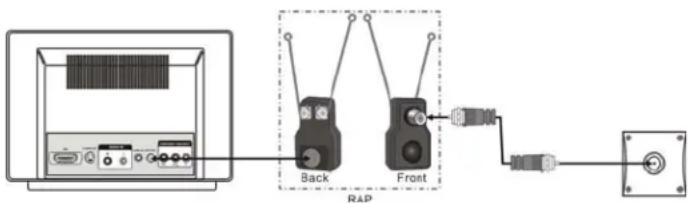
Please follow the following diagram to install the RAP. The RAP is used to enhance the URC radio frequency transmission using the TV coax cable network in your home.
1 Plug the RAP into the TV.
2 Connect the TV coax cable to the RAP and the TV coax network wall outlet.
text_image
Back Front RAPFigure 2-2 Attaching Remote Antenna Package
NOTE: Don't let the antenna touch anything.
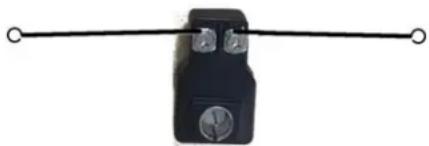
ATTENTION: If your URC 4 isn't working very well from far away, you may be experiencing interference from objects near your receiver. To improve your URC 4's reception range, try to adjust the antenna orientation using screwdriver as shown. You may need to try different antenna orientation to achieve the best reception.
natural_image
Simple black mechanical component with two circular end caps and a horizontal rod (no text or symbols)Figure 2-3 Adjusting Antenna Orientation
Connecting STB to the TV coax network
Connect the Entone STB to the TV coax network wall outlet according to whether you are using an Entone Janus or Amulet STB. The rear panel of actual product may vary.
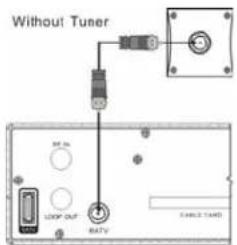
- Janus without Tuner Connection: Connect the Janus "MATV" or "TV OUT" output to the TV coax network as shown.
text_image
Without Tuner Control Unit Control Unit Control Unit Control Unit Control Unit Control Unit Control Unit Control Unit Control Unit Control Unit Control Unit Control Unit Control Unit Control Unit Control Unit Control Unit Control Unit Control Unit Control Unit Control Unit Control Unit Control Unit Control Unit Control Unit Control Unit Control Unit Control Unit Control Unit Control Unit Control Unit Control Unit Control Unit Control Unit Control UnitFigure 2-4 Connecting Janus without Tuner
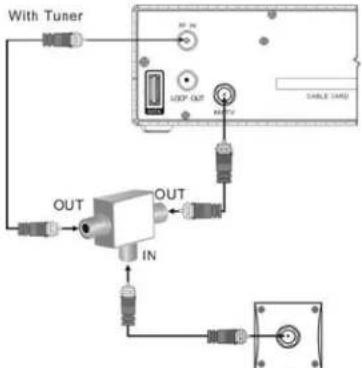
- Janus with Tuner Connection: Connect the Janus "MATV" or "TV OUT" and "RF IN" or "CABLE/ANT IN" output to the TV coax network as shown using a 3-way splitter (which is not provided).
flowchart
graph TD
    A["With Tuner"] --> B["Device with Tuner"]
    B --> C["Output"]
    C --> D["Switch"]
    D --> E["In"]
    E --> F["Switch"]
    F --> G["Output"]
    G --> H["Switch"]
    H --> I["Output"]
    I --> J["Switch"]
    J --> K["Output"]
    K --> L["Switch"]
    L --> M["Output"]
Figure 2-5 Connecting Janus with Tuner
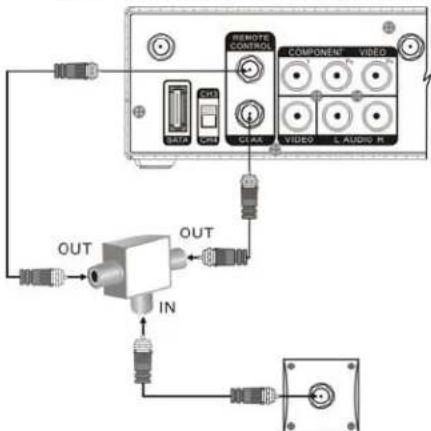
- Amulet F1 Connection: Connect the Amulet "REMOTE CONTROL" and "COAX" or "TV OUT" output to the TV coax network as shown using a 3-way splitter (which is not provided).
text_image
REMOTE CONTROL COMPONENT VIDE DATA CLK CLEK VIDEO L AUDIO R OUT IN OUTFigure 2-6 Connecting Amulet
RF URC Registration
You may need to register the RF URC to the STB before you can use the remote. The RF URC registration procedures may vary for different middleware and TV service running in the Entone STB. Please refer to the TV service user guide for detailed RF URC registration procedures.
Below lists the general RF URC registration procedures (NOTE: Refer to your TV service user guide for exact RF URC registration procedures):
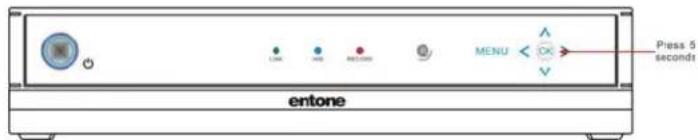
- Press and hold the "OK" button on the STB front panel for 5 seconds until the touch panel backlight is flashing. The STB is now in URC registration mode.
text_image
Press 5 secondtr MENU entoneFigure 2-5 Janus in Remote Registration Mode
NOTE: If registration is not completed in 30 seconds, the touch panel backlight will stop flashing.
- Press "STB" button once on the URC.
- Press and hold the "STB" button on the URC for 5 seconds until the "STB" button backlight is on.
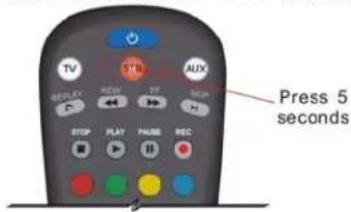
text_image
TV TTL AUX RED/FLY REV FF REQ FTP PLAY PHASE REC Press 5 seconds- Press "STB" button once again. Both the "STB" and "AUX" button backlight will illuminate.
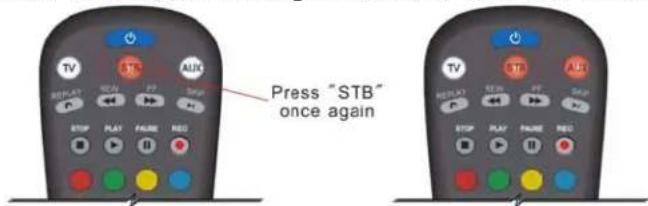
text_image
Press "STB" once again- Press "1" or "2" to register the URC to output 1 (primary) or output 2 (secondary) (depending on the middleware).
Upon successful registration, the STB POWER indicator will flash once and the touch panel backlight will stop flashing.
NOTE:
- The POWER key can be configured to control both the STB and TV while the URC 4 is in "STB" mode, please refer to the section "Toggle Power Key Punch-through Functionality" in Chapter 4 for details.
- The Volume +/- and MUTE key can be configured to control both the STB and TV while the URC 4 is in "STB" mode, please refer to the section "Toggle Volume Key Punch-through Functionality" in Chapter 4 for details.
Chapter
3
3.1 Controlling STB using IR URC
Unlike RF, you do not need to do remote registration in order to use URC 4 to control Janus/Amulet through IR. The remote comes with Janus/Amulet is IR URC 4. However, you have to program the RF URC 4 comes with Entone Second Stream Kit to use IR mode.
To set the RF URC 4 to use IR to control Janus/Amulet:
- On the URC 4, press and hold the "STB" button for approx. 5 seconds. The "STB" button backlight will illuminate. Now the URC 4 is in registration mode.
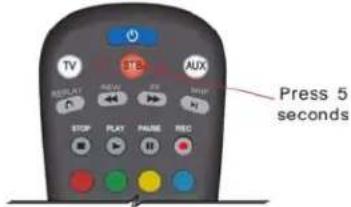
text_image
Press 5 seconds- On the URC 4, press "STB" once again. Both the "STB" and "AUX" button backlight will illuminate.
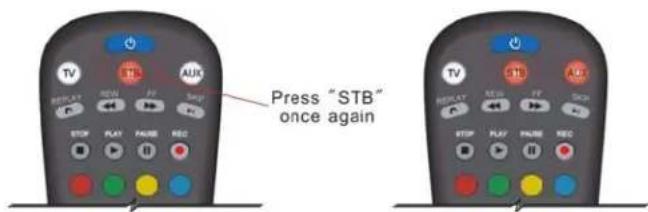
text_image
Press "STB" once again- Press "0" to set RF URC 4 to IR mode only. The RF URC 4 will not send any RF signal.
The "STB" button backlight on the URC 4 will blink twice to indicate that the setting was successful.
Pressing a key other than "0", "1", "2", "3" or a button is not pressed within 30 seconds, the "STB" backlight will blink rapidly for 7 times to indicate an error and then extinguish, and the URC 4 registration process will be terminated.
IR Reception Range
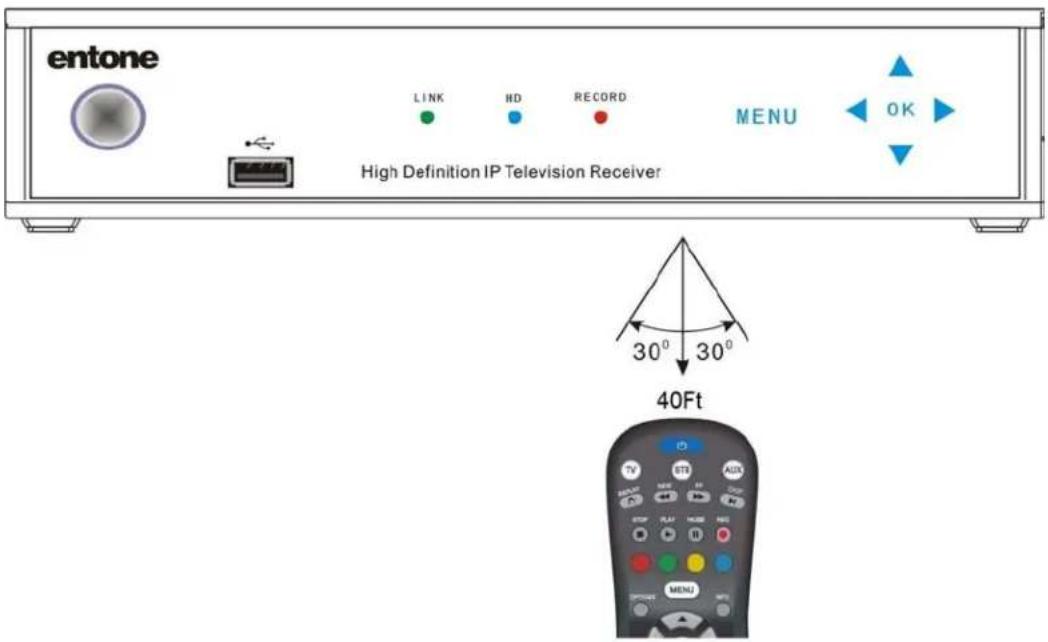
IR signals travel only short distances (40 feet or less), and cannot go through walls or other solid objects. You must point the URC 4 to the STB, with no objects blocking the line of sight.
text_image
entone LINK HD RECORD MENU OK High Definition IP Television Receiver 30° 30° 40FtFigure 3-4 IR Reception Range
Chapter 4
4.1 Controlling Your Television and other A/V Devices
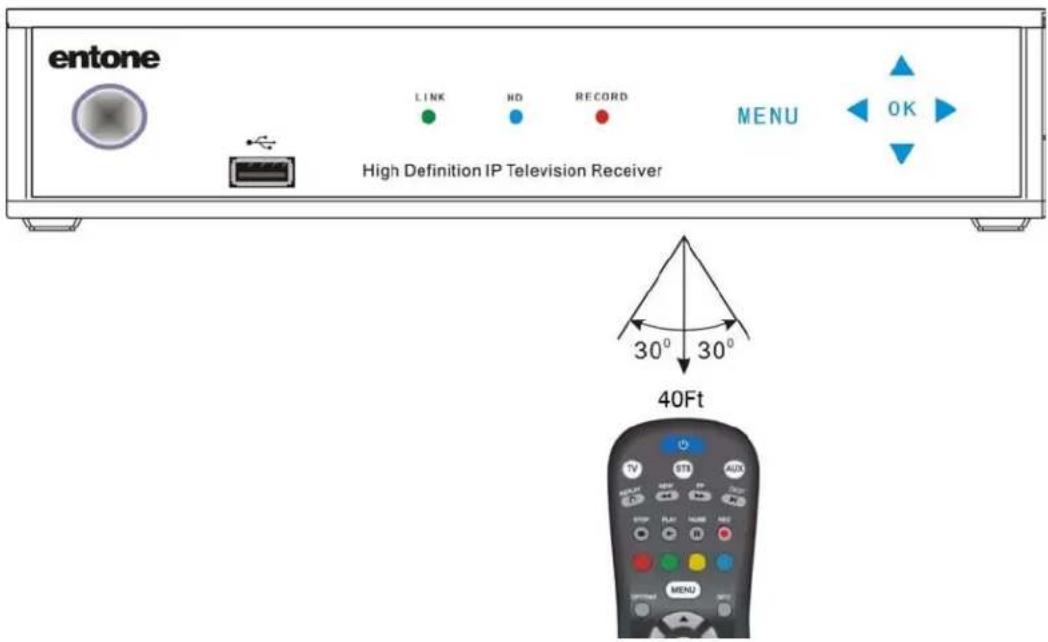
The URC 4 can also be used to control TVs and other A/V devices such as DVD players and recorders. The URC 4 uses InfraRed (IR) light signals to control other devices that the remote is programmed to control. IR signals travel only short distances (40 feet or less), and cannot go through walls or other solid objects. You must point the URC 4 directly at these devices, with no objects blocking the line of sight.
text_image
entone LINK HD RECORD MENU OK High Definition IP Television Receiver 30° 30° 40Ft TV STD AUX MENUFigure 4-1 Controlling Devices using URC 4
You can program URC 4 to control one TV and one AUX device. Use the remote control's mode keys (i.e., "STB", "TV", or "AUX") to control a specific device. When pressed, the selected mode key will light up confirming your choice. Then you can use the URC 4 to control your STB, TV or AUX device.
You have to program the URC 4 what TV and AUX devices you are using by either 1) entering the 4-digit device code 2) doing an auto search.
NOTE:
- The POWER key can be configured to control both the STB and TV while the URC 4 is in "STB" mode, please refer to the section "Toggle Power Key Punch-through Functionality" in Chapter 4 for details.
- The Volume +/- and MUTE key can be configured to control both the STB and TV while the URC 4 is in "STB" mode, please refer to the section "Toggle Volume Key Punch-through Functionality" in Chapter 4 for details.
To Program a TV or AUX device
- Locate the device code for your desired device in the device code table provided in the Appendix. If you could not find the device code for your device or it does not work after trying the listed device codes for your device brand, then you can go to the next section to try the auto search procedures.
- Turn on your device and with media inserted (if applicable).
- On the remote control, press a device mode key for 5 seconds (i.e., "TV" or "AUX"). The device mode key will light up.
NOTE: Use the "AUX" mode key to program control of VCR, DVD player, cable box, satellite set-top-box and audio device.
- Enter the four-digit device code for you device. If you perform this procedure correctly, the selected device mode key backlight will blink twice.
NOTE: If you enter an invalid device code, the selected device mode key will fast blink 7 times. Device program mode will be terminated.
- Aim the remote control at your device and press the "POWER" once. The device should be turned off. If it does not respond, repeat the above steps.
NOTE: In the programming mode if no key is received within 30s, the device mode key backlight will blink rapidly for 7 times to indicate an error and then extinguish, and the programming mode will end.
Toggle Power Key Punch-through Functionality
By default, if the remote control is in STB mode, the URC Power button switches STB off ONLY. To control the URC Power button functionality to switch off either both the TV and/or STB, do the following:
- Press and hold the "STB mode key for 5s. The "STB" device mode key backlight will light up.
- Press "POWER" key once.
- Either do the following:
a. Press 1 to control both the STB and TV, OR
b. Press 0 to control the STB ONLY
NOTE: In the programming mode if no key is received within 30s, the device mode key backlight will blink rapidly for 7 times to indicate an error and then extinguish, and the programming mode will end.
Toggle Volume Key Punch-through Functionality
By default, Vol +/- and MUTE keys are sent to STB only when URC is in STB mode.
Punch-through function for those keys is enabled at the same time when programming the device code for TV or AUX. That is:
- If user program device code for a TV device, the punch through function will be configured for TV at the same time.
- If user program device code for an AUX device, the punch through function will be configured for AUX at the same time.
To disable the Punch-through function for those keys, do the following:
- Press and Hold STB for 5 seconds, then STB led will switch on.
- Press STB key once again, then both STB and AUX led will switch on.
- Press 0
Toggle Channel Up/Down Keys for TV/AUX
Every time user programs a new TV or AUX code, by default, the Channel Up and Channel Down keys are working as normal for TV or AUX device. However it is possible to toggle ON/OFF these two keys in their mode.
User can enable channel up/channel down keys feature for TV or AUX by pressing the following key sequence:
Enable Channel Up/Down key for TV mode:
- Press and Hold TV key for 5 seconds
- Press Channel Up to enable it.
Disable Channel Up/Down keys for TV mode
- Press and Hold TV key for 5 seconds
- Press Channel Down to enable it.
Enable Channel Up/Down key for AUX mode:
- Press and Hold AUX key for 5 seconds
- Press Channel Up to enable it.
Disable Channel Up/Down keys for AUX mode
- Press and Hold AUX key for 5 seconds
- Press Channel Down to enable it.
Auto Search Procedures
If your device does not respond to the remote control after trying all devices codes listed for you brand, or if your brand is not listed at all, try searching for your device code as follows:
- Turn on your TV or your A/V device.
- On the remote control, press a device mode key (i.e., "TV" or "AUX") and hold for 5s. The device mode key will light up.
NOTE: Use the "AUX" mode key to program control of VCR, DVD player, cable box, satellite set-top-box and audio device.
- Press the "POWER" key once.
- Aim the remote control at the device. Press either the "CH UP" key or "CH DOWN" key to do device auto-scan:
a. Press the "CH UP" key to start searching upward at an approx. 5 seconds interval for each device code. The TV/AUX mode key will be on and blink every 5 seconds while in the device scan mode.
NOTE: In this search mode, the remote control will send IR codes from the library starting from the lowest code set number to the end of code set for that device; OR
b. Press the "CH DOWN" key to start searching downward at an approx. 5 seconds interval for each code set. The TV/AUX mode key will be on and blink every 5 seconds while in the device scan mode.
NOTE: In this search mode, the remote control will send IR codes from the highest code set number to the beginning of code set of that device.
- If the device turns off, a working code has been found. Press OK once to lock in the code. The selected mode key will blink twice
- If all code sets of that device is exhausted in the search and the OK is not pressed, the selected device key will fast blink 7 times and the search mode will be terminated.
NOTE: During the auto-scan, you can press "UP" arrow or "DOWN" arrow to advance to the next device code immediately without waiting for 5 seconds. You can also use "UP" arrow or "DOWN" arrow to change the direction of the search.
NOTE: In the programming mode if no key is received within 30s, the device mode key backlight will blink rapidly for 7 times to indicate an error and then extinguish, and the programming mode will end.
Appendix
Appendix A – Device Code
Your URC 4 can control many brands and models of television, VCR, DVD and other types of audio-visual equipment. The following pages list device codes for many categories and brands of equipment. Many brands list more than one code, and you may need to test several codes to find the best match for your equipment. Your equipment may be supported even if your brand is not shown in the list below. If you cannot locate your brand, or none of the listed device codes works, then you may still use the Auto-Search feature to try to locate a suitable device code. Instructions for using the Auto-Search feature are located on page 13 of this guide.
TV - Digital TV
| Samsung 0163 | |
| Zenith 0165 | |
TV - HD Plasma Display
| RCA 0242, 0262 |
TV - HDTV
| Apex 0083 | |
| Daewoo 0267 | |
| Hitachi 0091 | |
| ILO 0094 | |
| JVC 0071 | |
| Mitsubishi 01 | 11, 0238, 0013, 0147 |
| Panasonic | 0311, 0012 |
| Philips | 0192, 0303, 0000, 0244 |
| Proscan 0138 | |
| RCA 0138, 0 | 158, 0140, 0262 |
| Sampo | 0055 |
| Sharp | 0198 |
| Sony 0236, 0 | 0035, 0043, 0231 |
| Zenith 0103, | 0105 |
TV - HDTV Monitor
| Brillian | 0184 |
| Panasonic | 0161 |
| Philips | 0217 |
| RCA 0282 | |
| Sears | 0184 |
TV - HDTV Projection Monitor
| Panasonic | 0215, 0299, 0310 |
| Pioneer | 0010, 0058 |
| Zenith 0091 |
TV - HDTV Projection TV
| Panasonic | 0196 |
| Sony 0236 |
TV - LCD HDTV
| Akai | 0108 |
| ILO 0059 | |
| Olevia | 0142 |
| Polaroid 0212 | |
| Syntax 0142 | |
| Westinghouse | 0021 |
| Zenith 0018 | |
TV - LCD Projection TV
| Epson | 0247 |
| LG | 0207 |
| Panasonic | 0033 |
| Sony 0243, | 0053, 0292 |
TV - LCD TV
| Akai | 0270 |
| AOC | 0275 |
| Audiovox | 0205, 0003, 0150 |
| Benq | 0028 |
| Coby | 0306 |
| Dell | 0070, 0256, 0230 |
| Emerson | 0115 |
| Emprex | 0134 |
| Funai | 0144 |
| Hisense | 0109 |
| HP | 0191 |
| Initial | 0271 |
| Insignia | 0139 |
| JVC 0251, 0 | 101, 0194 |
| LG | 0148, 0308, 0040, 0172 |
| Magnavox | 0044, 0271 |
| Maxent | 0098 |
| Mintek | 0271 |
| Mitsubishi 02 | 38 |
| NEC 0149 | |
| NET-TV | 0197 |
| Norcent | 0275 |
| Olevia | 0168 |
| Panasonic | 0253, 0038, 0285, 0117, 0291 |
| Philips | 0034, 0112 |
| Polaroid 013 | 0, 0089, 0078, 0281, 0167 |
| RCA 0242 | |
| Samsung 01 | 87, 0166, 0234, 0177, 0057, 0093, 0283, 0296, 0180 |
| Sansui 0199 | |
| Sanyo | 0031, 0298 |
| Sharp | 0008, 0160, 0219, 0084, 0241, 0060, 0294, 0074 |
| Sony 0243, 0 | 155, 0035, 0126, 0090 |
| Sylvania | 0144, 0115, 0284 |
| Syntax 0168 | |
| Tatung | 0092 |
| Toshiba | 0042, 0222, 0064 |
| Trutech | 0206 |
| Viewsonic 00 | 21, 0085, 0107,0026, 0290, 0174,0082, 0277, 0255,0069, 0304 |
| Vizio 0002 | |
| Westinghouse | 0021, 0063, 0054 |
| Zenith 0146 |
TV - LCD TV/PC Monitor
| Sampo 0280 |
TV - LCD TV/Tuner Combo
| Polaroid 0130 |
TV - Plasma Display
| Acer 0229 | |
| Daewoo 0067 | |
| Fujitsu 0240 | |
| Funai 0250 | |
| Panasonic 0195 | |
| Pioneer 0203, 0077, 0065 | |
| Samsung 0171, 0118, 0095, 0258 | |
| Toshiba | 0099 |
| Viewsonic 0156, 0106 | |
| Zenith 0183, | 0214, 0226 |
TV - PLASMA TV
| Akai | 0201 |
| Elite | 0213 |
| Gateway | 0269 |
| Hewlett Packard | 0123 |
| HP | 0191 |
| ILO | 0237 |
| LG | 0133, 0172 |
| Magnavox | 0047, 0025 |
| Panasonic | 0033, 0104, 0179 |
| Pioneer | 0213 |
| Samsung | 0166, 0254 |
| Sanyo | 0131 |
| Sony | 0155 |
| SVA | 0185 |
| Viewsonic | 0080 |
| Vizio | 0002 |
TV - Plasma TV Monitor
| Akai | 0170 |
| Fujitsu 0252, | 0049, 0260,0186, 0257 |
| Hitachi | 0091, 0041, 0080, 0314 |
| Marantz | 0224 |
| NEC | 0224 |
| NET-TV | 0004 |
| Panasonic 0039 | |
| Pioneer 0208 | |
| Plasmsync | 0224 |
| Sony | 0289, 0086 |
| Toshiba | 0224, 0120 |
| Zenith 0011 | |
TV - Projection HDTV
| Sharp | 0313, 0246 |
TV - Projection TV
| Hitachi | 0091, 0066, 0141, 0100, 0020, 0261, 0235 |
| JVC | 0071, 0248 |
| Magnavox | 0202 |
| Mitsubishi | 0263, 0111, 0238, 0013, 0147, 0073, 0137 |
| Panasonic 00 | 033, 0196, 0110 |
| Philips 0132 | |
| Pioneer 0152 | |
| RCA | 0138, 0158 |
| Samsung 00 | 07, 0300, 0218, 0119 |
| Sharp | 0127 |
| Sony | 0243, 0178, 0135, 0125 |
| Toshiba | 0307, 0159, 0081, 0006 |
| Zenith 0164 |
TV - TV
| Admiral | 0223, 0288, 0129 |
| Advent | 0312 |
| Adventura | 0143 |
| Aiwa 0124 | |
| Akai | 0153, 0177, 0046, 0287 |
| Alleron | 0268 |
| America Action | 0097 |
| Amtron | 0182 |
| Anam | 0097 |
| Anam National | 0279, 0182 |
| AOC 0239, 0 | 308 |
| Apex | 0249, 0264 |
| Apex Digital | 0227 |
| Audiovox | 0182, 0097 |
| Aventura | 0295 |
| Belcor | 0308 |
| Bell & Howell | 0223, 0014 |
| Benq | 0079 |
| Bradford | 0182, 0097 |
| Brockwood | 0308 |
| Broksonic | 0097, 0288, 0032, 0046, 0199 |
| Candle 0143, | 0308 |
| Carver | 0122 |
| Celebrity | 0153 |
| Celera 0227 | |
| Changhong | 0227 |
| Citizen | 0182, 0221, 0308, 0061 |
| Clarion 0097 | |
| Colortyme | 0308 |
| Colt | 0076 |
| Concerto | 0308 |
| Contec 0097 | |
| Contec/Cony | 0182 |
| Craig | 0182, 0097 |
| Crosley | 0122 |
| Crown | 0182, 0097 |
| CTX | 0027 |
| Curtis Mathes | 0017, 0014, 0221, 0122, 0209, 0308, 0129 |
| CXC | 0182, 0097 |
| Cytron 0051, | 0220 |
| Daewoo 0239 | 0, 0062, 0274, 0308, 0061 |
| Daytron | 0308 |
| Denon 0209 | |
| Diamond Vision | 0045, 0216, 0188 |
| Dimensia | 0017 |
| Dumont | 0286, 0308 |
| Durabrand 00 | 048, 0295, 0097, 0288 |
| Dwin 0129 | |
| Electroband | 0153 |
| Electrograph | 0228 |
| Electrohome | 0153, 0279, 0308 |
| Emerson 018 | 02, 0268, 0014, 0295, 0097, 0288, 0062, 0032, 0162, 0308, 0276, 0061 |
| Envision 0308 | |
| Epson 0301 | |
| ESA 0295, 0177 | |
| Fisher 0014 | |
| Fujitsu 0268 | |
| Funai 0182, | 0268, 0295, 0097, 0169 |
| Futuretech 0182, 0097 | |
| Gateway 0228, 0173 | |
| GE 0017, 0279, 0309, 0138, 0308, 0245, 0087 | |
| Gibraltar | 0286, 0308 |
| Goldstar 0239, 0308, 0030 | |
| Grunpy | 0182, 0268, 0097 |
| Haier | 0048 |
| Hallmark 0308 | |
| Harley Davidson | 0169 |
| Harman/Kardon | 0122 |
| Harvard | 0182, 0097 |
| Havermy 0129 | |
| Hisense | 0116 |
| Hitachi | 0209, 0091, 0273, 0308, 0169 |
| Ilo | 0271 |
| IMA | 0182 |
| Infinity | 0122 |
| Insignia | 0001, 0278, 0211 |
| Janeil | 0143 |
| JBL | 0122 |
| JC Penney | 0017, 0239, 0221, 0308 |
| JCB | 0153 |
| Jensen | 0308 |
| JVC | 0102, 0175, 0297, 0259, 0096, 0121 |
| Kawasho | 0153, 0308 |
| KEC | 0097 |
| Kenwood | 0308 |
| KLH | 0227 |
| Kloss Novabeam | 0182, 0143 |
| KTV | 0182, 0097 |
| LG | 0239 |
| Lloyd's | 0169 |
| Logik | 0223 |
| Luxman | 0308 |
| LXI | 0017, 0014, 0122 |
| Magnasonic | 0061 |
| Magnavox | 0122, 0022, 0009, 0308, 0276, 0169 |
| Magnin | 0245 |
| Majestic | 0223 |
| Marantz | 0122, 0308 |
| Maxent | 0228 |
| Megatron | 0209 |
| Memorex | 0223, 0239, 0014, 0288, 0144, 0019, 0075, 0030 |
| MGA | 0239, 0308, 0245 |
| Midland | 0286 |
| Mitsubishi | 0239, 0263, 0308, 0129, 0087 |
| Montgomery Ward | 0223 |
| Motorola | 0279, 0129 |
| MTC | 0239, 0221, 0308 |
| Multitech 0182, 0097 | |
| NEC | 0279, 0239, 0308 |
| Net-TV | 0228 |
| Norcent | 0116 |
| Onwa | 0182, 0097 |
| Optimus | 0075 |
| Optionica 0225, 0129 | |
| Orion | 0288, 0001, 0032 |
| Panasonic | 0279, 0056, 0036, 0196, 0190, 0176, 0029, 0075 |
| Penney | 0245, 0030 |
| Philco | 0279, 0239, 0122, 0050, 0308 |
| Philips 0279, | 0122, 0068, 0128, 0114, 0016, 0308 |
| Philips Magnavox | 0068, 0022, 0114 |
| Pilot | 0308 |
| Pioneer | 0308 |
| Polaroid | 0227, 0204 |
| Portland | 0239, 0308 |
| Price Club | 0221 |
| Prima | 0312 |
| Proscan | 0017, 0138 |
| Proton 0308 | |
| Pulsar 0286, | 0308 |
| Quasar | 0279, 0075 |
| Radio Shack | 0014, 0097, 0169 |
| Radio Shack/Realistic | 0017, 0182, 0014, 0225, 0308 |
| RCA | 0017, 0279, 0239, 0266, 0138, 0157, 0242, 0023, 0308, 0005, 0262, 0245 |
| Realistic 001 | 4, 0097 |
| Runco | 0286 |
| Sampo | 0228, 0265, 0308 |
| Samsung | 0239, 0221, 0232, 0233, 0177, 0193, 0308 |
| Sansui | 0288, 0316, 0001, 0032, 0046, 0199, 0169 |
| Sanyo 0014, | 0308, 0245 |
| Scott | 0182, 0268, 0097, 0308 |
| Sears | 0017, 0268, 0014, 0145, 0122, 0295, 0308, 0169, 0030 |
| Sharp | 0225, 0308, 0113, 0129 |
| Sheng Chia | 0129 |
| Shogun | 0308 |
| Signature | 0223 |
| Sony | 0153, 0243, 0072, 0154, 0302, 0305, 0037, 0169 |
| Sounddesign | 0182, 0268, 0097, 0308 |
| Squareview | 0145, 0295 |
| SSS 0182, 0097, 0308 | |
| Starlite 0182, 0097 | |
| Superscan 0276, 0129 | |
| Supre-Macy | 0143 |
| Supreme 0153 | |
| Sylvania 0122, 0295, 0024, 0315, 0308, 0276 | |
| Symphonic 0182, 0145, 0295, 0097, 0272, 0169 | |
| Tandy 0129 | |
| Tatung 0279, 0173 | |
| Techwood 0308 | |
| Teknika 0223, 0239, 0182, 0268, 0221, 0122, 0097, 0308 | |
| Thomas | 0169 |
| TMK | 0308 |
| Toshiba | 0014, 0221, 0200, 0136, 0015, 0293, 0189, 0046, 0052, 0210, 0151 |
| TVS | 0288 |
| Vidikron | 0122 |
| Vidtech | 0239, 0308 |
| Viewsonic | 0228 |
| Viking | 0143 |
| Vizio | 0173 |
| Wards | 0017, 0223, 0239, 0268, 0225, 0122, 0308 |
| WhiteWestinghouse | 0288, 0062 |
| Yamaha | 0239, 0308 |
| Zenith | 0223, 0288, 0286, 0088, 0032, 0308, 0169 |
TV - TV Monitor
| Sony | 0181 |
TV - TV/DVD/Tuner Combo
| Panasonic | 0176 |
| Sony | 0126 |
TV - TV/DVD/VCR/Tuner Combo
| Polaroid | 0281 |
TV - TV/Tuner
| Audiovox | 0205, 0003 |
TV - TV/VCR Combo
| Broksonic | 0032 |
| Citizen | 0061 |
| Colt | 0076 |
| Daewoo | 0061 |
| Emerson 0032, 0061 | |
| Funai | 0169 |
| GE | 0245, 0087 |
| Goldstar 0030 | |
| Harley Davidson | 0169 |
| Hitachi | 0169 |
| Lloyd's | 0169 |
| Magnasonic | 0061 |
| Magnavox 0169 | |
| Magnin | 0245 |
| Memorex | 0075, 0030 |
| MGA | 0245 |
| Mitsubishi | 0087 |
| Optimus | 0075 |
| Orion | 0032 |
| Panasonic | 0075 |
| Penney | 0245, 0030 |
| Quasar | 0075 |
| RadioShack | 0169 |
| RCA | 0245, 0087 |
| Sansui | 0032, 0169 |
| Sanyo 0245 | |
| Sears | 0169, 0030 |
| Sony | 0169 |
| Symphonic 0169 | |
| Thomas | 0169 |
| Zenith | 0032, 0169 |
TV - TV/DVD Combo
| Aiwa | 0124 |
| Akai | 0046, 0270 |
| Apex | 0264 |
| Audiovox | 0150 |
| Broksonic | 0046, 0199 |
| Coby | 0306 |
| Cytron | 0220 |
| Diamond Vision | 0216 |
| Emerson 0162 | |
| Ilo | 0271 |
| Initial | 0271 |
| JVC | 0121 |
| LG | 0308, 0040 |
| Magnavox 0271 | |
| Mintek | 0271 |
| Panasonic | 0190 |
| Philips | 0016, 0271 |
| RCA | 0023 |
| Samsung | 0193 |
| Sansui | 0046, 0199, 0199 |
| Sylvania 0315, 0284 | |
| Toshiba | 0046, 0052, 0210 |
TV - TV/DVD/VCR Combo
| Akai | 0287 |
| Diamond Vision | 0188 |
| Emerson 0276 | |
| Magnavox 0276 | |
| Memorex | 0019 |
| Panasonic | 0029 |
| Polaroid | 0204 |
| RCA | 0005 |
| Samsung | 0193 |
| Sharp | 0113 |
| Superscan 0276 | |
| Sylvania 0276 | |
| Toshiba | 0151 |
VCR - VCR
| ABS 3053 | |
| Adventura | 3062 |
| Aiwa | 3062 |
| Akai | 3068, 3039 |
| Alienware | 3053 |
| American High | 3021 |
| Asha | 3052 |
| Audio Dynamics | 3024 |
| Audiovox | 3043 |
| Beaumark | 3052 |
| Bell & Howell | 3083 |
| Broksonic 30 | 51, 3067, 3060, 3022 |
| Calix 3043 | |
| Candle 3052 | 3043 |
| Canon 3021 | |
| Citizen 3052 | 3043, 3097 |
| Colortyme 30 | 24 |
| Colt 3008 | |
| Craig 3052 | 3043 |
| Curtis Mathes | 3020, 3024, 3052, 3021, 3011 |
| Cybernex 30 | 52 |
| Cyperpower | 3053 |
| Daewoo 306 | 2, 3010, 3055, 3097 |
| DBX 3024 | |
| Dell | 3053 |
| Diamond Vision | 3058 |
| Dimensia | 3020, 3011 |
| Durabrand | 3073 |
| Dynatech | 3062 |
| Electrohome | 3043 |
| Electrophonic | 3043 |
| Emerson | 3043, 3021, 3062, 3063, 3049, 3003, 3097, 3022 |
| ESA | 3007 |
| Fisher | 3083, 3050, 3087 |
| Fuji | 3068, 3021 |
| Funai | 3062, 3037, 3063, 3091 |
| Garrard | 3062 |
| Gateway | 3053 |
| GE | 3020, 3052, 3021, 3011, 3069, 3019 |
| Go Video | 3027 |
| Goldstar | 3024, 3043, 3064, 3001 |
| Gradiente 30 | 62 |
| Harley Davidson | 3062, 3091 |
| Harman/Kardon | 3024 |
| Headquarter | 3083 |
| Hewlett Packard | 3053 |
| Hitachi 3066 | 3014, 3091 |
| Howard Computers | 3053 |
| HP | 3053 |
| Hush | 3053 |
| iBUYPOWER | 3053 |
| Insignia | 3082 |
| Instant Replay | 3021 |
| JC Penney | 3024, 3083, 3052, 3043, 3021 |
| JCL 3021 | |
| JVC | 3024, 3083, 3098, 3044, 3041, 3089, 3028, 3017, 3025, 3034, 3071, 3046, 3054, 3094, 3030 |
| Kenwood | 3024, 3083 |
| Kodak | 3043, 3021 |
| LG | 3043, 3075, 3082, 3081 |
| Linksys | 3053 |
| Lloyd's 3062 | 3091 |
| LXI | 3043 |
| Magnasonic | 3097 |
| Magnavox | 3021, 3073, 3013, 3085, 3003, 3091 |
| Magnin | 3043, 3069 |
| Marantz | 3024, 3083, 3021 |
| Marta | 3043 |
| Matsushita | 3021 |
| Media Center PC | 3053 |
| MEI 3021 | |
| Memorex | 3083, 3052, 3043, 3021, 3062, 3073, 3038, 3090, 3067, 3009, 3092, 3001 |
| MGA | 3069 |
| MGN Technology | 3052 |
| Microsoft | 3053 |
| Mind | 3053 |
| Mitsubishi | 3031, 3019 |
| Motorola | 3021 |
| MTC | 3052 |
| Multitech | 3052, 3062 |
| NEC | 3024, 3083 |
| Nikko | 3043 |
| Niveus Media | 3053 |
| Noblex | 3052 |
| Northgate 30 | 53 |
| Olympus | 3021 |
| Optimus 304 | 3, 3092 |
| Orion | 3038, 3022 |
| Panasonic | 3021, 3040, 3023, 3096, 3070, 3076, 3092 |
| Penney | 3069, 3001 |
| Philco | 3021 |
| Philips 3021 | 3013, 3063, 3074 |
| Philips Magnavox | 3013 |
| Pilot | 3043 |
| Pioneer | 3002 |
| Polaroid 305 | 9, 3077 |
| Presidian | 3063 |
| Proscan 302 | 0, 3011, 3016 |
| Pulsar | 3073 |
| Quarter | 3083 |
| Quartz | 3083 |
| Quasar | 3021, 3092 |
| Radio Shack | 3043, 3091 |
| Radio Shack/Realistic | 3083, 3052, 3043, 3021, 3062 |
| Radix | 3043 |
| Randex | 3043 |
| RCA | 3020, 3052, 3021, 3011, 3088, 3035, 3000, 3079, 3069, 3019 |
| Realistic | 3083, 3052, 3043, 3021, 3062 |
| Ricavision 30 | 53 |
| Ricoh | 3026 |
| Runco | 3073 |
| Samsung | 3052, 3048, 3012 |
| Sanky | 3073 |
| Sansui 3038, | 3047, 3067, 3091, 3022 |
| Sanyo 3083, | 3052, 3050, 3087, 3093, 3069 |
| Sears 3083, | 3043, 3021, 3091, 3001 |
| Sharp 3084, | 3065, 3086, 3078, 3015, 3056, 3018 |
| Shintom 3068 | |
| Shogun 3052 | |
| Singer 3021, | 3026 |
| Sony 3068, | 3042, 3053, 3005, 3033, 3004, 3072, 3029, 3091 |
| Stack 3053 | |
| STS 3021 | |
| Superscan 3003 | |
| Sylvania | 3021, 3062, 3063, 3032, 3003 |
| Symphonic | 3062, 3037, 3063, 3091 |
| Systemax | 3053 |
| Tagar Systems | 3053 |
| Tandy 3083 | |
| Tashiko | 3043 |
| Teac | 3062 |
| Technics | 3021 |
| Teknika | 3043, 3021, 3062 |
| Thomas | 3091 |
| TMK | 3052 |
| Toshiba | 3053, 3057, 3095, 3006, 3045, 3036 |
| Totevision | 3052, 3043 |
| Touch | 3053 |
| Unitech 3052 | |
| Vector Research | 3024 |
| Video Concepts | 3024 |
| Videosonic | 3052 |
| Viewsonic | 3053 |
| Voodoo 3053 | |
| Wards | 3052, 3043, 3021, 3062 |
| WhiteWestinghouse | 3037 |
| XR-1000 | 3021, 3062 |
| Yamaha 3024 | 4, 3083 |
| Zenith | 3068, 3026, 3073,3061, 3082, 3099,3091, 3022 |
| ZT Group | 3053 |
| VCR - DVD-DVR/VCR Combo | |
| JVC | 3017, 3071, 3054,3080 |
| VCR - TV/VCR Combo | |
| Broksonic | 3022 |
| Citizen 3097 | |
| Colt | 3008 |
| Daewoo 3097 | |
| Emerson | 3097, 3022 |
| Funai 3091 | |
| GE | 3069, 3019 |
| Goldstar | 3001 |
| HarleyDavidson | 3091 |
| Hitachi 3091 | |
| Lloyd's 3091 | |
| Magnasonic | 3097 |
| Magnavox | 3091 |
| Magnin | 3069 |
| Memorex | 3092, 3001 |
| MGA 3069 | |
| Mitsubishi | 3019 |
| Optimus 3092 | |
| Orion | 3022 |
| Panasonic | 3092 |
| Penney 3069, 3001 | |
| Quasar | 3092 |
| RadioShack | 3091 |
| RCA | 3069, 3019 |
| Sansui 3091, 3022 | |
| Sanyo 3069 | |
| Sears 3091, 3001 | |
| Sony 3091 | |
| Symphonic | 3091 |
| Thomas | 3091 |
| Zenith | 3091, 3022 |
VCR - TV/DVD/VCR Combo
| Akai 3039 | |
| Diamond Vision | 3058 |
| Emerson | 3003 |
| Magnavox | 3003 |
| Memorex | 3009 |
| Panasonic | 3076 |
| Polaroid 307 | 7 |
| RCA | 3079 |
| Samsung | 3012 |
| Sharp 3018 | |
| Superscan 3 | 003 |
| Sylvania | 3003 |
| Toshiba | 3036 |
VCR - DVD/VCR Combo
| Broksonic | 3051, 3067, 3060 |
| Daewoo 3055 | |
| Emerson | 3063, 3049 |
| Funai 3063 | |
| Go Video | 3027 |
| Goldstar | 3064 |
| Hitachi 3066 | 3014 |
| Insignia 3082 | |
| JVC | 3028, 3025, 3034, 3046, 3030 |
| LG | 3075, 3075, 3082, 3081 |
| Magnavox | 3085 |
| Memorex | 3067 |
| Panasonic | 3070 |
| Philips | 3063, 3074 |
| Pioneer 3002 | |
| Polaroid 3059 | |
| Presidian | 3063 |
| RCA | 3000 |
| Samsung | 3048 |
| Sansui 3067 | 3047 |
| Sanyo 3093 | |
| Sharp 3015, | 3078, 3056 |
| Sony 3072, | 3029 |
| Sylvania | 3063, 3032 |
| Symphonic | 3063 |
| Toshiba | 3006, 3045 |
| Zenith 3082, | 3099 |
| DVD - DVD | |
| Advent 4234 | |
| Aiwa 4077 | |
| Akai 4093, 4088, 4129, 4199 | |
| Alco 4118 | |
| Alpine 4040 | |
| Amphion MediaWorks | 4023 |
| AMW 4023 | |
| Apex 4201, 4074, 4124 | |
| Apex Digital | 4111 |
| Aspire Digital | 4246 |
| Audiovox 4118, 4229, 4041, 4022 | |
| Blaupunkt 4111, 4188 | |
| Blue Parade | 4117 |
| BOSE 4095, | 4235 |
| Broksonic 4093, 4088, 4173 | |
| California Audio Labs | 4017 |
| CambridgeSoundWorks | 4144 |
| Clarion 4242 | |
| Classic 4218, 4140 | |
| Coby | 4243, 4149, 4089, 4147 |
| CyberHome | 4107 |
| Cytron | 4116 |
| Daewoo | 4035, 4067 |
| Denon | 4017, 4222, 4054, 4037, 4090, 4047 |
| Desay | 4176 |
| Diamond Vision | 4158, 4075, 4014 |
| Disney 4049 | |
| Emerson | 4165, 4049, 4181, 4208, 4030, 4206, 4079 |
| ESA | 4167 |
| Fisher 4065 | |
| Funai | 4049, 4181, 4208 |
| GE | 4224, 4111 |
| Go Video 4072 | |
| Goldstar | 4162 |
| GPX | 4220 |
| Gradiente 40 | 17 |
| Greenhill | 4111 |
| Grundig | 4085 |
| Harman/Kardon | 4244 |
| Hitachi | 4180, 4156, 4028 |
| Ilo | 4066 |
| Initial | 4111, 4060 |
| Insignia | 4121 |
| Integra 4209 | 4117 |
| JBL | 4221 |
| Jensen | 4149 |
| JVC | 4152, 4006, 4212, 4056, 4245, 4186, 4123, 4064, 4195 |
| Kawasaki | 4118 |
| Kenwood | 4017, 4031 |
| KLH 4118, 4 | 111, 4214 |
| Konka | 4010 |
| Koss | 4002, 4011, 4052, 4099, 4239 |
| Lasonic | 4210 |
| Lenoxx | 4061 |
| LG | 4105, 4223, 4029 |
| Liquid Video | 4011 |
| Magnavox | 4165, 4198, 4085, 4049, 4050, 4060 |
| Marantz | 4085, 4168, 4193 |
| Memorex | 4093, 4225, 4012 |
| Microsoft | 4224 |
| Mintek | 4111, 4237, 4060 |
| Mitsubishi 42 | 07, 4155 |
| NAD | 4157 |
| Nakamichi | 4191 |
| Nesa | 4111 |
| Norcent | 4243, 4083, 4073, 4232 |
| Onkyo | 4209, 4198, 4027, 4062, 4159, 4133, 4058 |
| Oritron | 4002, 4011 |
| Panasonic | 4017, 4198, 4120, 4081, 4222, 4091, 4200, 4038, 4143, 4080, 4044, 4013 |
| Philips | 4198, 4085, 4049, 4019, 4070, 4208, 4247, 4078, 4009, 4161 |
| Pioneer | 4163, 4117, 4153, 4194, 4130, 4119 |
| Polaroid | 4230, 4016, 4069, 4102 |
| Polk Audio | 4085 |
| Presidian 40 | 49, 4208 |
| Proscan | 4224, 4226 |
| Qwestar | 4002 |
| RCA | 4118, 4224, 4117, 4111, 4007, 4226, 4042, 4086, 4185, 4160 |
| Regent | 4061 |
| Rotel | 4152 |
| Rowa | 4092 |
| Sampo 4182 | |
| Samsung | 4017, 4180, 4032, 4051, 4082, 4241, 4135, 4146 |
| Sansui | 4093, 4088, 4173, 4251 |
| Sanyo | 4093, 4132, 4213 |
| Sharp | 4049, 4204, 4131, 4202, 4115 |
| Sherwood 4 | 77, 4203 |
| Shinco | 4008 |
| Shinsonic | 4205 |
| Sony 4205, | 4216, 4174, 4045, 4169, 4166, 4189, 4240, 4094, 4211, 4154, 4048, 4127, 4142, 4249, 4217 |
| Sungale | 4228 |
| Superscan | 4165 |
| Sylvania | 4165, 4049, 4181, 4208, 4187, 4112, 4001 |
| Symphonic | 4049, 4104, 4208 |
| Teac | 4118, 4015 |
| Technics | 4017, 4222 |
| Techwood | 4137 |
| Theta Digital | 4117 |
| Toshiba 4093, 4198, 4184, 4071, 4088, 4024, 4173, 4175, 4100 | |
| Trutech 4059 | |
| Urban Concepts | 4198 |
| Venturer 4118, 4036 | |
| Xbox 4224 | |
| Yamaha 4017, 4085, 4106, 4101 | |
| Zenith 4198, 4025, 4021 | |
DVD - DVD Recorder
| Apex 4097 | |
| Broksonic 4026 | |
| Gateway 4190 | |
| Go Video 4190 | |
| Hitachi 4150, 4171 | |
| Insignia 4145 | |
| Irradio 4126 | |
| JVC | 4046, 4000, 4057, 4003, 4164, 4179, 4227, 4098 |
| LG | 4148, 4076, 4170 |
| LiteON | 4248, 4238, 4215, 4005 |
| Lite-On | 4190 |
| Panasonic | 4084, 4043, 4151, 4039 |
| Philips | 4250, 4192, 4231, 4053 |
| Pioneer 4068, 4138 | |
| RCA | 4219 |
| Samsung | 4150, 4136, 4178 |
| Sansui 4063 | |
| Sanyo 4034 | |
| Sensory Science | 4190 |
| Sharp | 4096, 4108, 4087, 4109 |
| Sony 4183 | |
| Sylvania | 4233, 4033 |
| Toshiba 4020, 4236, 4114 | |
| Yamaha 4139 | |
| Zenith 4018, | 4122, 4170 |
DVD - DVD-DVR
| JVC | 4004, 4113, 4128, 4196 |
| Pioneer 4055 | |
| RCA | 4103 |
| Toshiba 4125, 4110, 4134 | |
DVD - DVD-DVR/VCR Combo
| JVC | 4004, 4113, 4128, 4196 |
| DVD - TV/DVD/Tuner Combo | |
| Panasonic | 4143 |
| Polaroid 4069 | |
| Sony 4127 | |
DVD - TV/DVD Combo
| Aiwa | 4077 |
| Akai | 4088, 4129 |
| Apex 4124 | |
| Audiovox 4229 | |
| Broksonic 4088, 4173 | |
| Coby | 4089 |
| Cytron | 4116 |
| Diamond Vision | 4075 |
| Emerson | 4206 |
| Ilo | 4066 |
| Initial | 4060 |
| JVC | 4186 |
| LG | 4223, 4029 |
| Magnavox | 4060 |
| Mintek | 4060 |
| Panasonic | 4038 |
| Philips | 4078, 4060 |
| RCA | 4086 |
| Samsung | 4082 |
| Sansui 4088, 4173, 4251 | |
| Sylvania | 4112, 4001 |
| Toshiba 4088, 4024, 4173 | |
DVD - TV/DVD/VCR Combo
| Akai | 4199 |
| Diamond Vision | 4014 |
| Emerson | 4165 |
| Magnavox | 4165 |
| Memorex | 4012 |
| Panasonic | 4080 |
| Polaroid 4102 | |
| RCA | 4185 |
| Samsung | 4241 |
| Sharp | 4202 |
| Superscan | 4165 |
| Sylvania | 4165 |
| Toshiba 4175 | |
DVD - DVD/VCR Combo
| Broksonic 40 | 93, 4026, 4173 |
| Daewoo 4067 | |
| Emerson | 4208, 4030 |
| Funai | 4208 |
| Go Video 4072 | |
| Goldstar | 4162 |
| Hitachi 4171, 4028 | |
| Insignia 4145 | |
| JVC | 4000, 4245, 4057, 4003, 4164 |
| LG | 4148, 4076, 4170, 4105 |
| Magnavox | 4050 |
| Memorex | 4093 |
| Panasonic | 4200 |
| Philips | 4208, 4247 |
| Pioneer 4138 | |
| Polaroid 4016 | |
| Presidian 4208 | |
| RCA | 4042 |
| Samsung | 4051 |
| Sansui 4093, 4063 | |
| Sanyo 4132 | |
| Sharp | 4108, 4087, 4131 |
| Sony 4154, 4048 | |
| Sylvania | 4208, 4187 |
| Symphonic | 4208 |
| Toshiba 4114, 4071 | |
| Zenith 4170, 4021 | |
DVD - HTIB
| Audiovox 40 | 41, 4022 |
| BOSE 4235 | |
| CambridgeSoundWorks | 4144 |
| Classic | 4140 |
| Coby | 4147 |
| Denon | 4047 |
| Emerson | 4079 |
| Insignia 412 | |
| JBL | 4221 |
| JVC 4123, 4064, 4195 | |
| Koss 4099, 4239 | |
| Onkyo 4159, 4133, 4058 | |
| Panasonic 4044, 4013, 4197 | |
| Philips 4009, 4161 | |
| Pioneer 4194, 4130, 4119 | |
| RCA 4219 | |
| Samsung 4135, 4146 | |
| Sanyo 4213 | |
| Sharp 4115 | |
| Sherwood 4203 | |
| Sony 4172, 4142, 4249, 4217, 4141 | |
| Toshiba | 4100 |
| Venturer | 4036 |
| Yamaha | 4106, 4101 |
AUDIO - Amplifier
| Denon 2041 | |
| JBL | 2090 |
| Krell | 2068 |
| Magnavox | 2013 |
| Marantz | 2098 |
| Parasound | 2034, 2103 |
| Pioneer 2070, 2031 | |
| RCA 2010 | |
| Rotel | 2011 |
| Soundmatters | 2039 |
| Technics | 2008 |
| Yamaha | 2079, 2026 |
AUDIO - Audio Cassette
| Curtis Mathes | 2070 |
| Magnavox | 2013 |
| Marantz | 2008, 2013 |
| Optimus | 2070 |
| Pioneer 2070 | |
| Technics | 2008 |
AUDIO - Audio System
| Curtis Mathes | 2070 |
| Pioneer 2070 | |
AUDIO - LCD TV/Tuner Combo
| Polaroid | 2028 |
AUDIO - Phono
| Magnavox | 2013 |
| Marantz | 2013 |
| Pioneer 2070 | |
AUDIO - Receiver
| JBL | 2020 |
| Sanyo 2071 |
AUDIO - Receiver/Amplifier
| Yamaha | 2026 |
AUDIO - Receiver/Tuner
| Adcom | 2078 |
| Aiwa | 2085, 2037, 2093 |
| Audiovox | 2077, 2036 |
| BOSE | 2060, 2032 |
| CambridgeSoundWorks | 2053 |
| Carver | 2085 |
| Classic | 2009 |
| Coby | 2045 |
| CurtisMathes | 2070 |
| Denon 2023 | 2091, 2016 |
| Emerson | 2014 |
| Harman/Kardon | 2085, 2052, 2094 |
| Insignia 2082 | 2063, 2038 |
| JBL | 2020 |
| JVC 2097, 2073, 2029,2006, 2000, 2024 | |
| Kenwood | 2019, 2072, 2044,2089, 2099, 2012 |
| Linn 2085 | |
| Magnavox | 2013, 2085 |
| Marantz | 2008, 2013, 2085,2056 |
| Mitsubishi 2080 | |
| NAD 2095 | |
| Nakamichi 2033 | |
| Onkyo 2067, | 2017, 2002,2057, 2100, 2065 |
| Optimus | 2070, 2054 |
| Panasonic 2008, 2088, 2058,2007, 2051, 2066 | |
| Philips 2085, | 2096, 2047 |
| Pioneer 2070 | 2048, 2062, 2074, 2030, 2027, 2022, 2049 |
| Polk Audio | 2050 |
| Quasar | 2008 |
| RCA 2059 | |
| Rotel | 2011 |
| Samsung 2064, 2021 | |
| Sansui | 2085 |
| Sharp 2001 | |
| Sherwood 2046, 2015 | |
| Sony 2086, 2081, 2092, 2061, 2083, 2069, 2101, 2025 | |
| Technics | 2008, 2088, 2058 |
| Toshiba | 2084 |
| Wards 2085 | |
| Yamaha | 2075, 2003, 2040, 2076 |
AUDIO - Tuner
| Aiwa | 2043 |
| Audiovox | 2087 |
| Koss 2018 | |
| Panasonic | 2007, 2004, 2042 |
| Polaroid | 2028, 2035 |
| Sony 2055, | 2025 |
| Venturer | 2036 |
AUDIO - Tuner/CD Combo
| Aiwa | 2043 |
| BOSE | 2060 |
| Panasonic 2042 | |
AUDIO - TV/DVD/Tuner Combo
| Panasonic 2004 | |
| Polaroid | 2035 |
| Sony 2055 | |
AUDIO - TV/Tuner
| Audiovox | 2087 |
AUDIO - TV/VCR/Tuner Combo
| Panasonic 2007 |
AUDIO - HTIB
| Audiovox | 2077, 2036 |
| BOSE | 2032 |
| CambridgeSoundWorks | 2053 |
| Classic | 2009 |
| Coby | 2045 |
| Denon 2016 | |
| Emerson 2014 | |
| Insignia 2038 | |
| JBL 2020 | |
| JVC 2006, 2000, 2024 | |
| Koss 2018, 2018 | |
| Onkyo 2057, 2100, 2065 | |
| Panasonic 2051, 2066, 2102 | |
| Philips 2096, 2047 | |
| Pioneer 2027, 2022, 2049 | |
| RCA 2059 | |
| Samsung 2064, 2021 | |
| Sanyo 2071 | |
| Sharp 2001 | |
| Sherwood | 2015 |
| Sony | 2101, 2025, 2025, 2025, 2005 |
| Toshiba | 2084 |
| Venturer | 2036 |
| Yamaha | 2040, 2076 |
| CD - CD | |
| ADC 4274 | |
| Aiwa | 4272 |
| BOSE | 4269 |
| Denon 4273 | |
| Harman Kardon | 4270 |
| JVC 4261, 4259 | |
| Kenwood | 4263 |
| Marantz | 4275 |
| McIntosh 4265 | |
| Nakamichi 4271 | |
| Onkyo 4257, | 4278 |
| Panasonic 4254, 4264 | |
| Philips 4262 | |
| Pioneer 4255 | |
| RCA 4256 | |
| Sanyo 4258 | |
| Sherwood | 4268 |
| Sony | 4276, 4266, 4252 |
| Teac 4277 | |
| Technics | 4267 |
| Yamaha | 4260 |
| CD - CD/CD Recorder | |
| Philips 4262 | |
| CD - Tuner/CD Combo | |
| Aiwa | 4272 |
| BOSE | 4269 |
| Panasonic 4254 | |
Appendix B – Other Features
Showing URC 4 Firmware Version
The URC 4 firmware version is in the format of x.y.z, where x, y and z is digit 0-9. Use the following procedures to show the URC 4 firmware version:
- Press "STB" and hold for 5s. The "STB" backlight will illuminate.
- Press "INFO" once.
- The 3 digits of the firmware version (x, y and z as described above) will be displayed in the following manner.
a. The "STB" backlight blinks to indicate the digit. One blink indicates 1, 2 blinks indicates 2, etc until 9 blinks indicates 9. A 0 is indicates by a shot, long, short, long, short, long blink.
b. In between each digit, the "STB" backlight will be off for 1 second.
c. For example, the following blink pattern shows a firmware version of 2.0.4.
... ... ...
NOTE: In the programming mode if no key is received within 30s, the device mode key backlight will blink rapidly for 7 times to indicate an error and then extinguish, and the programming mode will end.
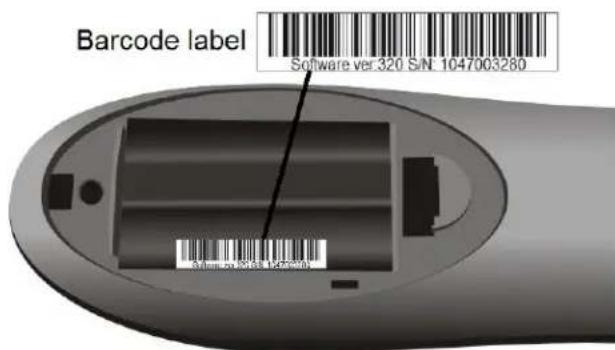
In addition, the URC 4 Firmware version will also be shown on the sticker inside the battery compartment at the back of the remote control.
text_image
Barcode label Software ver.320 S/N 1047003280 S/N: 00-00-00 1047003280Showing Programmed Device Code
You can display the 4-digit device code by the following procedures:
- Press and hold "TV" or "AUX" for 5 seconds. The "TV" or "AUX" backlight will illuminate.
- Press "INFO" once.
- The 4-digits device code will be displayed in the following manner.
a. The "TV"/"AUX" backlight blinks to indicate the digit. One blink indicates 1, 2 blinks indicates 2, etc until 9 blinks indicates 9. A 0 is indicates by a shot, long, short, long, short, long blink.
b. In between each digit, the "TV"/"AUX" backlight will be off for 1 second.
c. For example, the following blink pattern shows a device code of 0123.
... ... ...
NOTE: In the programming mode if no key is received within 30s, the device mode key backlight will blink rapidly for 7 times to indicate an error and then extinguish, and the programming mode will end.