
FL-300 - Headphones Gioteck - Free user manual and instructions
Find the device manual for free FL-300 Gioteck in PDF.


User questions about FL-300 Gioteck
0 question about this device. Answer the ones you know or ask your own.
Ask a new question about this device
Download the instructions for your Headphones in PDF format for free! Find your manual FL-300 - Gioteck and take your electronic device back in hand. On this page are published all the documents necessary for the use of your device. FL-300 by Gioteck.
USER MANUAL FL-300 Gioteck
GAMING HEADSET & BLUETOOTH® SPEAKERS
FL300UNI-31-MU, FL300UNI-32-MU,
FL300UNI-33-MU, FL300UNI-34-MU
NEED HELP?:
WWW.GIOTECK.COM/CONTACT-SUPPORT
ACTIVATE YOUR PRODUCT WARRANTY: GIOTECK.COM/REGISTER
PRECAUTIONS

Before using the headset, turn the volume down to a mid-level or very low, then slowly adjust it to a comfortable level. Exposure to high volume sound levels may cause temporary or permanent damage to your hearing. You should always set your volume to moderate levels and avoid long exposure to high volume levels.
- Contains small parts. Not suitable for children under 7 years of age.
- Store in a dry & dust free area.
- Do not store in areas of extreme low (0^) or high [40^] temperatures.
- Avoid direct sunlight and heat sources.
- Do not allow the product to get wet or dirty; doing so may cause damage.
- Do not clean with benzene, paint thinner, acetone, alcohol, or other such solvents.
- Do not take the product apart; doing so will void your warranty and may cause electrical shock or damage to internal components.
- Please help to conserve the environment by recycling the cardboard packaging of this product.
- This product should NOT be disposed of in normal household waste. It should be disposed of separately. Please take it to an electrical waste collection point.
This product is covered by a one [1] year warranty. For full Terms and Conditions, and for Technical Assistance, go to : www.gioteck.com/contact-support
Activate your product warranty: www.gioteck.com/register
For help with the set-up or operation of this product please go to: GIOTECK.COM/CONTACT-SUPPORT
Thank you for buying the Gioteck FL300 Gaming Headset & Bluetooth® Speakers. These Headphones are designed to be convenient, stylish and provide high quality audio Playback from any Bluetooth® enabled Audio Device or wired only device.
The FL300 can also be used as portable Bluetooth® stereo speakers for enjoying music with friends or listening to movies together.
The FL300 can also be used to receive telephone calls while in use and will automatically pause the audio playback in order to receive the call and when the call ends audio Playback will resume.
Please read this User Guide thoroughly before use so that you can understand the setup and functions.
CONTENTS
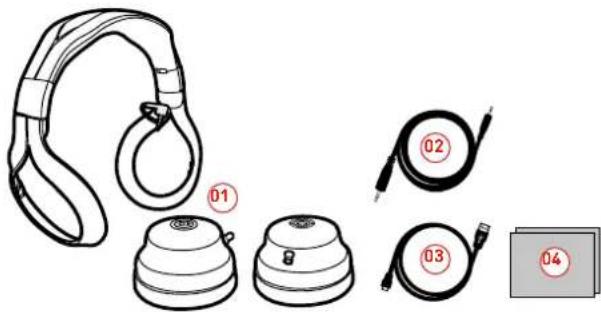
Please check your package contains the following items: 01 FL300 Gaming Headset & Bluetooth® Speakers 02] 3.5MM Audio Cable 03] USB Charging Cable 04] User Guide
text_image
Diagram showing product parts of a headset with numbered labels (01 to 04) indicating different components.PRODUCT FEATURES
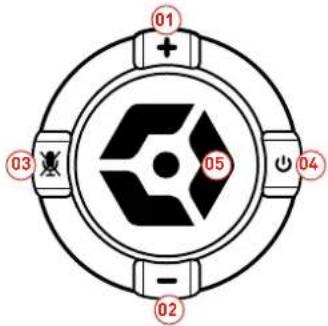
01] Volume Up
02] Volume Down
03] Mute Button
04] Power Button
05] Multi-Function Button
text_image
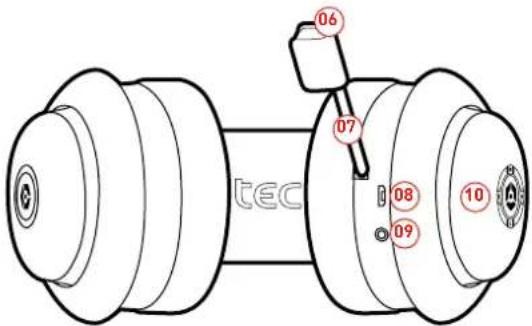
01 + 03 05 04 - 0206] Microphone Indication LED
07] Retractable Boom Microphone
08] USB Charging Port
09] Audio Cable Port (Line IN)
10) Status LED
text_image
06 07 08 10 09 tecSETUP
Note: Please fully charge the battery before using for the first time. See "Charging the Headphones" section of this User Guide for details.
To turn the Headphones ON simply hold down the Power Button for 5 seconds. The status LED Indicator on the earcup will flash three times, and you will hear a "Power On" voice through the Headphones.
To turn the Headphones OFF simply hold down the Power Button for 5 seconds. The status LED Indicator on the earcup will flash six times, and you will hear a "Power Off" voice through the Headphones.
Please note: To conserve power, if the headset is not connected to a device for approximately 10 minutes, the headset will turn off automatically. To reactivate the Headphone just push the power button.
CONNECTING WITH BLUETOOTH®
1] Turn ON the Headphones using the Power Button and keep the button held down for 5 seconds.
2) The headphones will automatically pair with the previously paired BT device within 10 seconds. If no previously paired devices are found, the headset will enter pairing mode. You will hear a voice say "pairing" and the Status LED on the earcups will flash blue. The Headphones are ready to connect to the device.
3] Go to the Bluetooth® option in the settings of your Bluetooth Audio device or Smartphone and in the list of Devices select FL300
4] You will hear a voice say "connected", the Headphones are now ready to use.
CONNECTING WITH AUDIO CABLE
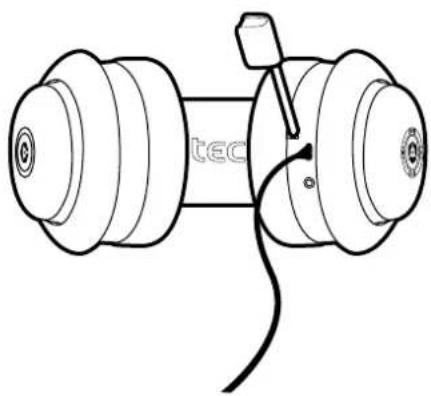
To connect the Headphones to devices that do not support Bluetooth®, plug the provided 3.5MM Audio cable into the Headphone port on the left earcup and connect the other end of the cable into the audio device. Note: This allows you to use the Headphones in places where wireless signals are restricted.
HEADPHONE FUNCTIONALITY
+ADJUSTING VOLUME
Press the volume +/- key to adjust the volume. One short press will adjust one level. A tone will sound when the volume reaches it's maximum or minimum level.
PLAY/PAUSE MUSIC
Press Multi-function Button one time to Play or Pause music.
+PREVIOUS/NEXT SONG
When playing music you can press "Volume Up" button for 2 seconds to play next song and press "Volume Down" button for 2 seconds to play the previous song.
MUTE FUNCTION
To mute the Headphones push the Mute Button, to unmute simply push the Button again. When the Microphone is muted the Microphone Indication LED will turn red.
VOICE CALL FUNCTIONS
When connected to a Bluetooth® Enabled Smartphone the FL300 can function as a hands-free headset. The operation of these features is detailed below.
RECEIVING A PHONE CALL
If you are listening to music when there is incoming Phone call or you are making a Phone call, the Headphones will automatically switch the connection from the music player to the Phone. The Music will be paused temporarily. After you end the call, the music resumes.
To answer a call, push the Multi-function Button quickly. To end the call push the Multi-function Button quickly again.
Note: When you press Multi-function Button to answer or end a call, please just press one time.
MAKING A PHONE CALL
1] Use the Phone's keypad to dial the phone number.
2] Press Phones "SEND" or "OK" key. The Phone begins the call and automatically transfers the call from the Phone to the FL300.
MICROPHONE MUTE
In a call mode, press the Mute button on the FL300 Headphones, you can switch to open and close mute function. When in mute mode, the LED on the boom Microphone will illuminate RED.
mZ
USING THE PORTABLE SPEAKERS
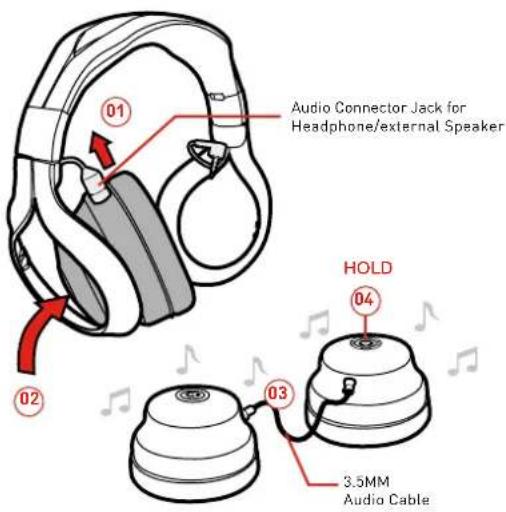
To use the External Speaker function, please follow this procedure;
1] Disconnect the fixed audio cable from the headband and both of the earcups.
2] Remove the earcups from the headband by carefully pulling them away from the Headband housing.
3] When the earcups are disconnected from the headband, use the provided 3.5mm audio cable to connect the left and right earcup speakers together through the fixed audio cable ports on the top of the earcups.
4] To enable the External Speaker Mode, hold the multi-function button for 2 Seconds. To change back to headphones mode hold the multi-function button for 2 Seconds.
text_image
Audio Connector Jack for Headphone/external Speaker HOLD 3.5MM Audio Cable1] To charge the Headphones, use the supplied USB cable and insert into any powered USB Port. Normal charging process takes 2-3 hours.
2] The red LED on the left Earcup will turn on when charging and will turn off when charging is complete.
3] Make sure the battery has been fully charged and fully released at the first three times of use to ensure the battery the best performance. After charging is complete, please remove the cable from the Headphones and the USB Cable from the USB port.

Do not keep the Headphones connected to the USB port for a long time when charging complete as this will shorten the lifetime of the Battery.
natural_image
Technical line drawing of a mechanical assembly with two flanged components and a cable (no text or symbols)EN