
XL6500LU - Vidéo-projecteur MITSUBISHI - Free user manual and instructions
Find the device manual for free XL6500LU MITSUBISHI in PDF.


| Product Type | Video Projector |
| Brand | Mitsubishi |
| Model | XL6500LU |
| Display Technology | DLP |
| Resolution | WUXGA (1920 x 1200) |
| Brightness | 6500 Lumens |
| Contrast Ratio | 2000:1 |
| Lamp Type | UHP |
| Lamp Life | 2000 hours (Normal), 3000 hours (Eco) |
| Lens | Motorized zoom and focus |
| Lens Shift | Vertical: ±30%, Horizontal: ±10% |
| Dimensions (W x D x H) | 490 x 430 x 200 mm |
| Weight | 16.5 kg |
| Power Consumption | 580 W (Normal), 0.5 W (Standby) |
| Noise Level | 38 dB (Normal), 35 dB (Eco) |
| Inputs | HDMI, DVI, VGA, Component, Composite, S-Video, RS-232, LAN |
| Safety Features | Overheat protection, Kensington lock |
| Maintenance | Filter cleaning every 100 hours |
| Repairability | Lamp replacement, fan replacement |
Frequently Asked Questions - XL6500LU MITSUBISHI
User questions about XL6500LU MITSUBISHI
0 question about this device. Answer the ones you know or ask your own.
Ask a new question about this device
Download the instructions for your Vidéo-projecteur in PDF format for free! Find your manual XL6500LU - MITSUBISHI and take your electronic device back in hand. On this page are published all the documents necessary for the use of your device. XL6500LU by MITSUBISHI.
USER MANUAL XL6500LU MITSUBISHI
Controlling the projector using a personal computer
This projector can be controlled by connecting a personal computer with RS-232C terminal.
PC-controllable functions:
- Turning the power ON or OFF
- Changing input signals
- Inputting commands by pressing the buttons on the control panel and remote control
- Menu setting
Connection
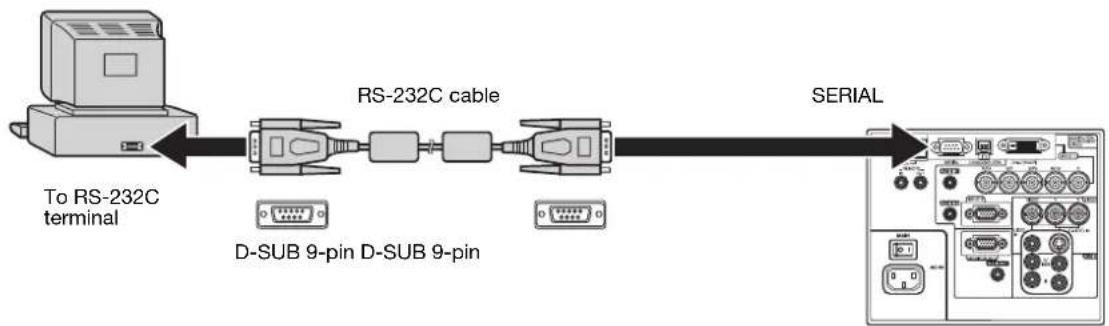
flowchart
graph LR
    A["To RS-232C terminal"] --> B["RS-232C cable"]
    B --> C["SERIAL"]
    subgraph D_SUB_9_PIN
        D["USB port"]
        E["USB port"]
    end
Important:
- Connect the computer with the projector on a one-to-one basis.
• Make sure that your computer and projector are turned off before connection. - Boot up the computer first, and then plug the power cord of the projector.
(If you do not follow this instruction, the Com port may not function.) - Adapters may be necessary depending on the PC connected to this projector. Contact your dealer for details.
1. Interface
1.1 Pin assignment of SERIAL terminal (D-SUB 9-pin)
| Pin No. | Name I/O | |
| 1 | OPEN | |
| 2 | RXD IN | |
| 3 | TXD OUT | |
| 4 | OPEN | |
| 5 | GND | |
| 6 | OPEN | |
| 7 | OPEN | |
| 8 | OPEN | |
| 9 | OPEN |
1.2 Communications format
| PROTOCOL | RS-232C |
| BAUD RATE | 9600 [bps] |
| DATA LENGTH | 8 [bits] |
| PARITY BIT | NONE |
| STOP BIT | 1 [bit] |
| FLOW CONTROL | NONE |
This projector uses RXD, TXD and GND lines for RS-232C control.
For RS-232C cable, the reverse type cable should be used.
2. Control command diagram
The command consists of the address code, function code, data code, and end code. The length of the command varies among the functions.
| Address code Function code Data code End code | ||||
| ASCII '30h' | 30h' Function Data '0Dh' | |||
| Character 00 Function Data | ||||
[Address code] 00 (In ASCII code, '30h' '30h') fi xed.
[Function code] A code of each fixed control move.
[Data code] A code of each fixed control data (number) and not always indicated.
[End code] In ASCII code, '0Dh') fixed.
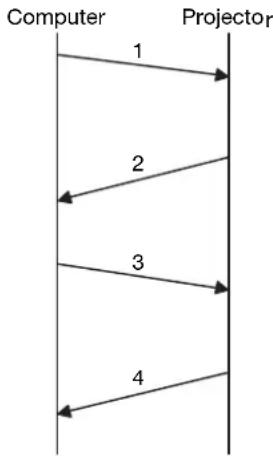
3. Control sequence
flowchart
graph TD
    A["Computer"] -->|1| B["Projector"]
    B -->|2| A
    A -->|3| B
    B -->|4| A
| Sequence | Note | |
| 1 | Send the command from the personal computer to the projector. | |
| 2 | The projector will send a return command after it receives an end code. | If the projector does not receive commands normally, that is, if the projector is not connected physically or unable to receive commands, it does not send out a return command.The projector sends out a return command within one second at the latest. |
| 3 | The personal computer checks the command and confirms if the sent command has been received or not. | Although the projector receives the commands, it in some cases does not execute the commands. |
| 4 | Use the check command to see if the projector has executed the command. | This projector sends various codes other than the return code. When having a control sequence by RS-232C, reject other codes from the personal computer. |
- Although the projector sends out the return command, the command may not take effect in the following cases.
(1) During signal switching
(2) In the process of the auto position
(3) After the power is turned on.
The projector receives no commands for about 20 seconds (or for 2 minutes at the longest if the lamp does not light up promptly as the life is expiring.)
- When sending commands successively, wait to receive the return command of the current command before sending a next command.
- The projector may not receive a command when the splash screen is being displayed immediately after turning on the power. Use command "00r10" to cancel the splash screen.
- While using the LAN terminals, the LAN functions take precedence.
- For the LAN terminals, the same commands as those for connecting with the TCP/IP (port number 63007) are available. Note, however, that the response becomes slightly slower than when using the RS-232C terminals.
[Example] When turning the power ON. (Figures and symbols enclosed in quotation marks are ASCII codes.):
| Sending commands from the PC, etc. | Status code from the projector | Description |
| ‘30’ ‘30’ ‘21’ ‘0D’ 00! | Command for POWER ON | |
| ‘30’ ‘30’ ‘21’ ‘0D’ 00! | Command receipt confirmation (Command echo back) |
- The flowchart on the next page shows the recommended operating sequence for your reference to create a program.
[RS-232C control flowchart]
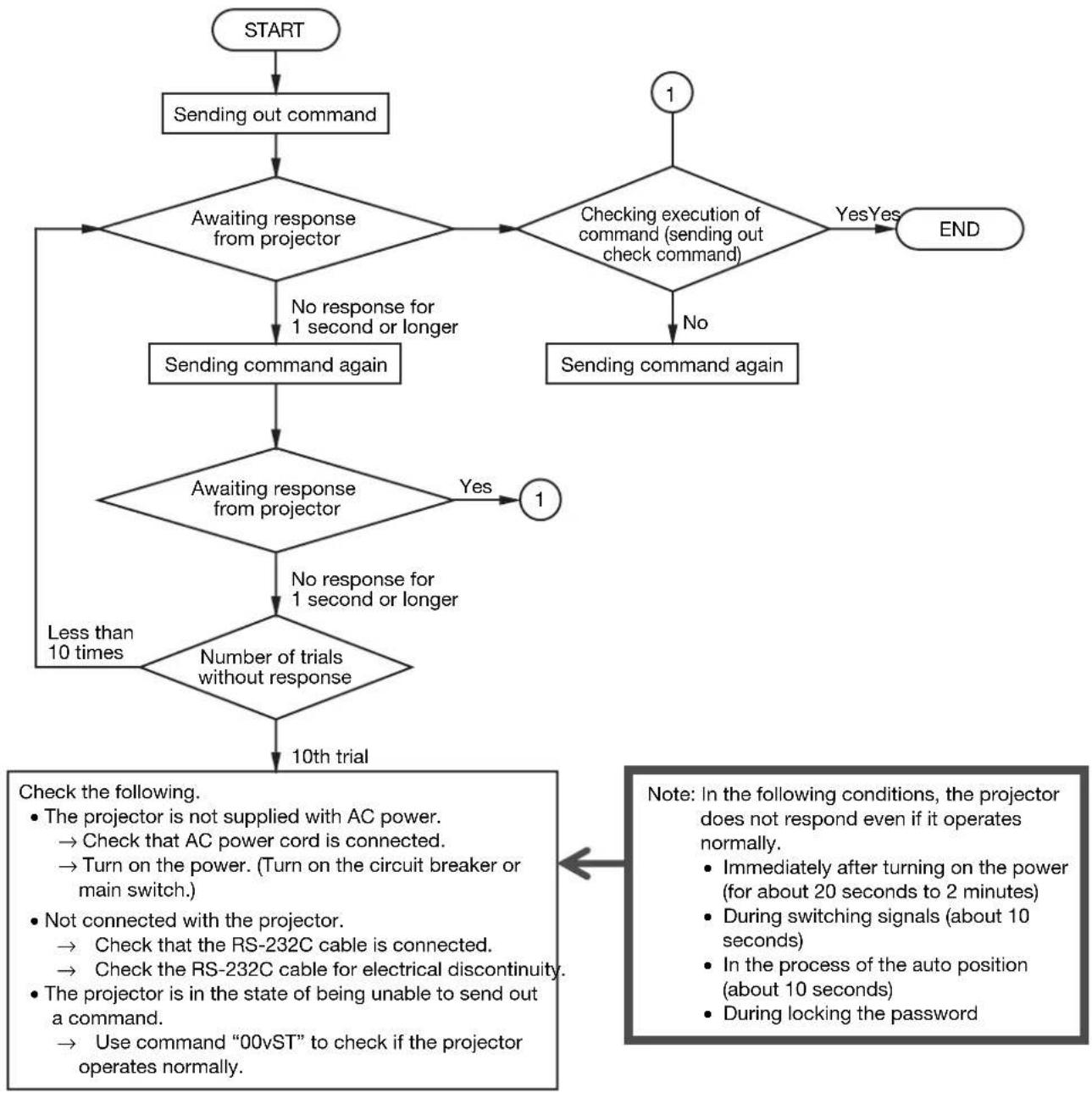
flowchart
graph TD
    A["START"] --> B["Sending out command"]
    B --> C{Awaiting response from projector}
    C -->|No response for 1 second or longer| D["Sending command again"]
    C -->|Yes response for 1 second or longer| E{Checking execution of command (sending out check command)}
    E -->|No| F["Sending command again"]
    E -->|Yes| G["END"]
    D --> H{Awaiting response from projector}
    H -->|Yes| I["10th trial"]
    H -->|No| J{Number of trials without response}
    J --> K["Less than 10 times"]
    I --> L["Check the following: The projector is not supplied with AC power. → Check that AC power cord is connected. → Turn on the power. (Turn on the circuit breaker or main switch.)"]
    J --> M["Not connected with the projector. → Check that the RS-232C cable is connected. → Check the RS-232C cable for electrical discontinuity."]
    J --> N["The projector is in the state of being unable to send out a command. → Use command "00vST" to check if the projector operates normally."]
    E --> O{Checking execution of command (sending out check command)}
    O -->|Yes| P["END"]
    O -->|No| Q["End"]
[Method of checking state of projector]
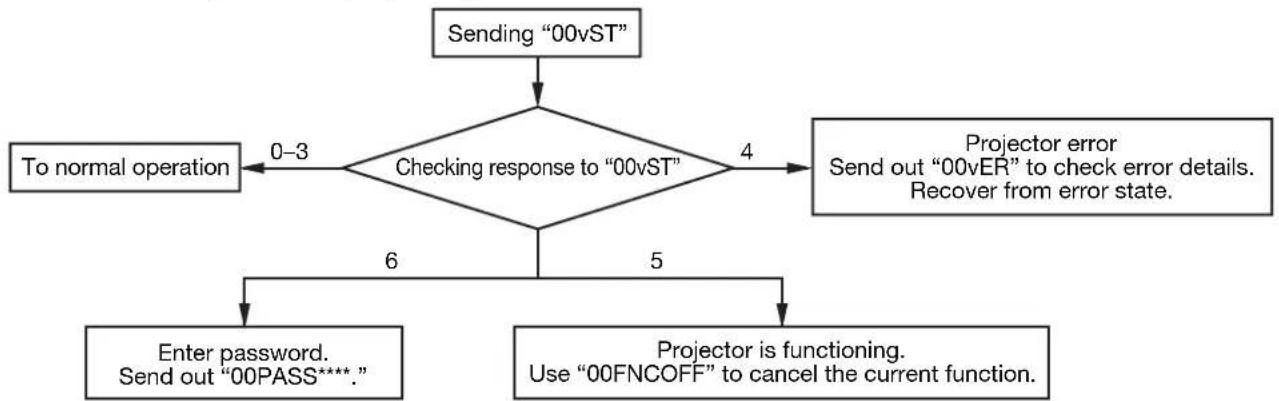
flowchart
graph TD
    A["Sending "00vST""] --> B{Checking response to "00vST"}
    B -->|0-3| C["To normal operation"]
    B -->|4| D["Projector error\nSend out "00vER" to check error details.\nRecover from error state."]
    C -->|6| E["Enter password.\nSend out "00PASS****.""]
    C -->|5| F["Projector is functioning.\nUse "00FNCOFF" to cancel the current function."]
4. Command list
4.1 Operation commands (Not executable in stand-by mode. When the commands for input select are sent while the splash screen is being displayed, the splash screen is only canceled.)
The operation commands are used for the basic operation setting of this projector. They may not be executed while the signals are changed. The operation commands have no data codes.
| ITEM | Function | Note | |
| Character | ASCII | ||
| POWER ON | ! | 21h | This command is invalid for 1 minute after the power is turned off. |
| POWER OFF | " | 22h | This command is invalid for 1 minute after the power is turned on. |
| INPUT COMPUTER 1 | _r1 | 5Fh 72h 31h | This command will not be executed in Stand-by mode or when the MUTE is executed. |
| INPUT COMPUTER 2 | _r2 | 5Fh 72h 32h | This command will not be executed in Stand-by mode or when the MUTE is executed. |
| INPUT DVI | _d1 | 5Fh 64h 31h | This command will not be executed in Stand-by mode or when the MUTE is executed. |
| INPUT VIDEO | _v1 | 5Fh 76h 31h | This command will not be executed in Stand-by mode or when the MUTE is executed. |
| INPUT S-VIDEO | _v2 | 5Fh 76h 32h | This command will not be executed in Stand-by mode or when the MUTE is executed. |
[Example] When setting the input signal to COMPUTER 1. (Figures and symbols enclosed in quotation marks are ASCII codes.):
| Sending commands from the PC, etc. | Status code from the projector | Description |
| ‘30’ ‘30’ ‘5F’ ‘72’ ‘31’ ‘0D’ 00_r1← | Command for setting the input signal to COMPUTER 1 | |
| ‘30’ ‘30’ ‘5F’ ‘72’ ‘31’ ‘0D’ 00_r1← | Command receipt confirmation (Command echo back) |
4.2 Reading command diagram
The projectors operating status, such as POWER-ON/OFF and the currently selected input terminal, etc. can be monitored.
| ITEM | Character ASCII | |||
| Function Data (Receive) Function Data (Receive) | ||||
| POWER ON vP 1 76h 50h 31h | ||||
| POWER OFF | vP 0 76h | 50h 30h | ||
| INPUT COMPUTER 1 | vl | r1 | 76h 49h | 72h 31h |
| INPUT COMPUTER 2 | vl | r2 | 76h 49h | 72h 32h |
| INPUT DVI | vl | d1 | 76h 49h 64h 31h | |
| INPUT VIDEO | vl | v1 | 76h 49h 76h 31h | |
| INPUT S-VIDEO | vl | v2 | 76h 49h 76h 32h | |
| POWER ON/OFF IMPOSSIBLE | vPK | 0 | 76h 50h 4Bh | 30h |
| POWER ON/OFF POSSIBLE | vPK | 1 | 76h 50h 4Bh | 31h |
| NO SIGNAL SUPPLIED | vSM | 0 | 76h 53h 4Dh | 30h |
| SIGNAL SUPPLIED | vSM | 1 76h 53h 4Dh | 31h | |
Use the following commands to obtain the values of the items in the INFORMATION menu.
| ITEM | Function | Data (Receive) | |
| Character | ASCII | ||
| LAMP TIME (LOW) | vLE | 76h 4Ch 45h | hhhhmm |
| RESOLUTION | vRESO | 76h 52h 45h 53h 4Fh | HHHHxVVVV |
| VERTICAL FREQUENCY | vVFREQ | 76h 56h 46h 52h 45h 51h | ***.** |
| HORIZONTAL FREQUENCY | vHFREQ | 76h 48h 46h 52h 45h 51h | ***.** |
| SYNC. TYPE | vSYNCT | 76h 53h 59h 4Eh 43h 54h | 0 (NO SIGNAL), 3 (3wire), 4 (4wire), 5 (5wire), 6 (SCART) |
“hhhh” and “mm” represent hours and minutes respectively.
“HHHH” and “VVVV” represent the horizontal and vertical resolutions respectively.
Use the following commands to obtain other information.
| ITEM | Function | Data (Receive) | |
| Character | ASCII | ||
| Model name | vMDL | 76h 4Dh 44h 4Ch | ********** (within 16 characters) |
| Serial number | vS/N | 76h 53h 2Fh 4Eh | ********** (within 7 characters) |
| Input source | vSOUCE | 76h 53h 4Fh 55h 43h 45h | r1 r2 d1 v1 v2 |
| Projector status vST 76h 53h 54h 0 (Stand-by mode), | 1 (Within 1 minute after POWER-ON (warm-up mode)),2 (POWER-ON mode (including state of warning)),3 (Cooling mode),4 (Abnormal state (including shutdown due to an error)),5 (State of functioning (menu display, dialog display,MUTE, PinP, FREEZE)),6 (Awaiting password entry) | ||
| Error status vER 76h 45h 52h Reading out error data (3 digits, hexadecimal numbers, total 9 bits)(MSB) xb1, xb2... xb8, xb9, 0, 0, 0 (LSB)xb1: Fan errorxb2: Lamp error (The lamp goes out or does not light.)xb3: Lamp warning 1 (The lamp life has expired.)xb4: Lamp warning 2 (The lamp life is expiring.)xb5: Temperature errorxb6: The temperature warning is being indicated.xb7: Lamp cover open errorxb8: Filter cover open errorxb9: States of other component abnormality | |||
The PC sends the command without attaching the data code to it. On the other hand, the projector attaches to the received command its current operating status as the data code and send it back to the PC.
[Example] When checking the currently selected input terminal (when the INPUT VIDEO is being selected). (Figures and symbols enclosed in quotation marks are ASCII codes.):
| Sending commands from the PC, etc. | Status code from the projector | Description |
| ‘30’ ‘30’ ‘76’ ‘49’ ‘0D’ 00vl← | Command for checking the input terminal | |
| ‘30’ ‘30’ ‘76’ ‘49’ ‘76’ ‘31’ ‘0D’ 00vlv1← | Check result (VIDEO) |
4.3 Remote commands (Not executable in stand-by mode. When the remote commands are sent while the splash screen is being displayed, the splash screen is only canceled.)
Some remote control operations can be achieved by the remote command codes. The remote commands have no data codes.
| Button's name on remote | Function | |
| Character | ASCII | |
| +/VOLUME r06 72h 30h 36h | ||
| -/VOLUME r07 72h 30h 37h | ||
| ZOOM/FOCUS r0f 72h 30h 66h | ||
| LENS SHIFT | r47 72h 34h 37h | |
| KEYSTONE | r43 72h 34h 33h | |
| MAGNIFY | r02 72h 30h 32h | |
| PiP | r04 72h 30h 34h | |
| AV MUTE | ra6 72h 61h 36h | |
| ▲ | r53 72h 35h 33h | |
| ▼ | r2b | 72h 32h 62h |
| ◀ | r4f | 72h 34h 66h |
| ▶ | r59 72h 35h 39h | |
| MENU | r54 72h 35h 34h | |
| ENTER | r10 72h 31h 30h | |
| AUTO POSITION | r09 72h 30h 39h | |
| FREEZE | ra4 72h 61h 34h | |
| ASPECT | re2 72h 65h 32h | |
| CE | re7 72h 65h 37h | |
[Example] When displaying the MENU selection bar. (Figures and symbols enclosed in quotation marks are ASCII codes.):
| Sending commands from the PC, etc. | Status code from the projector | Description |
| ‘30’ ‘30’ ‘72’ ‘35’ ‘34’ ‘0D’ 00r54 | Command operating the same as the MENU button | |
| ‘30’ ‘30’ ‘72’ ‘35’ ‘34’ ‘0D’ 00r54 | Command receipt confirmation (Command echo back) |
4.4 Direct commands (Not executable in stand-by mode. Possible only to read during muting.)
The direct commands are used for the keystone setting of this projector with the value.
| ITEM | Function | Data | |
| Character | ASCII | ||
| VOLUME VL 56h 4Ch 00–31 | |||
| KEYSTONE (vertical) KS 4Bh | 53h ±35 | ||
| KEYSTONE (horizontal) KSH 4Bh 53h 48h ±25 | |||
How to set the value
Use the character or ASCII code as shown below to set the value.
| Character | + | - | 0 | 1 | 2 | 3 | 4 | 5 | 6 | 7 | 8 | 9 |
| ASCII | ‘2Bh’ | ‘2Dh’ | ‘30h’ | ‘31h’ | ‘32h’ | ‘33h’ | ‘34h’ | ‘35h’ | ‘36h’ | ‘37h’ | ‘38h’ | ‘39h’ |
[Example] When setting the volume to 15. (Figures and symbols enclosed in quotation marks are ASCII codes.):
| Sending commands from the PC, etc. | Status code from the projector | Description |
| ‘30’ ‘30’ ‘56’ ‘4C’ ‘31’ ‘35’ ‘0D’ 00VL15 | Command for setting the volume | |
| ‘30’ ‘30’ ‘56’ ‘4C’ ‘31’ ‘35’ ‘0D’ 00VL15 | Command receipt confirmation (Command echo back) |
4.5 Function commands (Not executable in stand-by mode. When the mute commands are sent while the splash screen is being displayed, the splash screen is not muted but only canceled.)
The mute commands are used for the mute setting of this projector with the 0 (30h) and 1 (31h).
| ITEM | Function | Data | |
| Character | ASCII | ||
| AV MUTE | MUTE | 4Dh 55h 54h 45h | 0 (OFF), 1 (ON) |
| PinP | PiP | 50h 69h 50h | 0 (OFF), 1 (ON) |
| MAGNIFY | MGNFY | 4Dh 47h 4Eh 46h 59h 0 (OFF), 1 (ON) | |
| FREEZE | FRZ | 46h 52h 5Ah | 0 (OFF), 1 (ON) |
| Function canceling | FNCOFF | 46h 4Eh 43h 4Fh 46h 46h | |
4.6 Menu setting commands (Not executable in stand-by mode. Possible only to read during muting.)
The menu setting commands are used for the menu setting of this projector. If the personal computer sends the command without attaching the data code, the projector attaches to the received command its current setting value as the data code and send it back to the PC.
| ITEM | Function | Data | |
| Character | ASCII | ||
| COLOR ENHANCER | CE | 43h 45h | 0 (AUTO), 1 (PRESENTATION), 2 (STANDARD), 3 (THEATER), 4 (sRGB), 5 (USER) |
| COLOR ENHANCER-USER-GAMMA MODE | CEU1GS | 43h 45h 55h 31h 47h 53h | 0 (DYNAMIC), 1 (NATURAL), 2 (DETAIL) |
| COLOR ENHANCER-USER-RGB-COLOR | CEU1C | 43h 45h 55h 31h 43h | ±10 |
| COLOR ENHANCER-USER-RGB-TINT | CEU1T | 43h 45h 55h 31h 54h | ±10 |
| CONTRAST | PP 50h | 50h ±30 | |
| BRIGHTNESS | 51h 51h | ±30 | |
| COLOR TEMP. | A | 41h | 1 (STANDARD), 2 (HIGH), 3 (LOW), 4 (USER) |
| COLOR TEMP.-USER (CONTRAST) | P | 50h | ±30 ±30 ±30 (R, G, B) |
| COLOR TEMP.-USER (BRIGHTNESS) | Q 51h ±30 | ±30 ±30 (R, G, B) | |
| COLOR T 54h ±10 | |||
| TINT S 53h ±10 | |||
| SHARPNESS R 52h ±5 | |||
| NOISE REDUCTION NR 4Eh 52h 0 (OFF), 1 (ON) | |||
| CTI CTI 43h 54h 49h 0 (OFF), 1 (ON) | |||
| INPUT LEVEL | IPL | 49h 50h 4Ch | ±5, For DVI input: +0 (NORMAL), +1 (ENHANCED) |
| LAMP MODE | LM | 4Ch 4Dh | 0 (STANDARD), 1 (LOW) |
| AUTO POWER ON | APON | 41h 50h 4Fh 4Eh | 0 (OFF), 1 (ON) |
| AUTO POWER OFF | APOF | 41h 50h 4Fh 46h | 00 (OFF), 05, 10, 15, 30, 60 |
| SPLASH SCREEN | SS | 53h 53h | 0 (OFF), 1 (ON) |
| BACK COLOR | BB | 42h 42h | 0 (BLACK), 1 (BLUE), 2 (IMAGE) |
| MUTE MODE MM 4Dh 4Dh | 0 (BLACK), 1 (IMAGE) | ||
| IMAGE REVERSE | IR | 49h 52h | 0 (OFF), 1 (MIRROR), 2 (INVERT), 3 (MIRROR INVERT) |
| ZOOM/FOCUS LOCK | FZL | 46h 5Ah 4Ch | 0 (OFF), 1 (ON) |
| LENS SHIFT LOCK LSL | 4Ch 53h 4Ch | 0 (OFF), 1 (ON) | |
| LENS SHIFT RESET | LSRST | 4Ch 53h 52h 53h 54h | |
| ASPECT | SC | 53h 43h | 0 (AUTO), 1 (16:9), 2 (REAL), 3 (FULL) |
| ASPECT-16:9(Display position) | SCP | 53h 43h 50h 0 (CENTER), 1 (UPPER), 2 (LOWER) | |
| PASSWORD FUNCTION | PSLOCK | 50h 53h 4Ch 4Fh 43h 4Bh | 0**** (UNLOCK), 1**** (DISPLAY INPUT), 2**** (MENU ACCESS), 3**** (SPLASH ID SCREEN)**** is a 4 to 8-digit password comprised of any figures 1 to 4. |
| MENU POSITION | MP | 4Dh 50h | 0 (Upper left), 1 (Lower right) |
| CINEMA MODE | CINE | 43h 49h 4Eh 45h | 0 (VIDEO), 1 (AUTO), 2 (FILM) |
| VIDEO SIGNAL (VIDEO only) | VS | 56h 53h | 0 (AUTO), 1 (NTSC), 2 (PAL), 3 (SECAM), 4 (4.43NTSC), 5 (PAL-M), 6 (PAL-N), 7 (PAL-60) |
| SET UP STU 53h 54h 55h 0 (AUTO), 1 (OFF), 2 (3.75%), 3 (7.5%) | |||
| SCART INPUT | SRT | 53h 52h 54h 0 (OFF), 1 (ON) | |
| LANGUAGE | LG | 4Ch 47h | 00 (日本語), 01 (English), 02 (Español), 03 (Deutsch), 04 (Français), 05 (Italiano), 06 (中文), 07 (###), 08 (PYCCKN), 09 (PORTUGUÉS), 11 (SVENSKA), 12 (POLSKI) |
| RESET ALL | RSTALL | 52h 53h 54h 41h 4Ch 4Ch | |
| MEMORY CALL | MMC | 4Dh 4Dh 43h | 0 (AUTO), 1 (MEMORY1), 2 (MEMORY2) |
| HORIZ.POSITION | HP | 48h 50h | + (increment), - (decrement)*1 |
| VERT. POSITION | VP | 56h 50h | + (increment), - (decrement)*1 |
| FINE SYNC. | FN | 46h 4Eh 00-31 | |
| TRACKING | TRK | 54h 52h 4Bh | + (increment), - (decrement)*1 |
| COMPUTER INPUT | CIN | 43h 49h 4Eh | 0 (RGB), 1 (YCBCR/YPBR), 2 (AUTO) |
| OVER SCAN | VOS | 56h 4Fh 53h 00 (90%) - 10 (100%) | |
| HOLD | HLD | 48h 4Ch 44h | 0 (OFF), 1 (ON) |
| HOLD BEGIN | HLB | 48h 4Ch 42h | 00-99 |
| HOLD END | HLE | 48h 4Ch 45h | 00-99 |
| CLAMP POSITION | CLP | 43h 4Ch 50h | 001-255 |
| CLAMP WIDTH | CLW | 43h 4Ch 57h | 01-63 |
| VERT. SYNC | VSC | 56h 53h 43h | 0 (AUTO), 1 (OFF) |
| LPF | LPF | 4Ch 50h 46h | 0 (OFF), 1 (ON) |
| SHUTTER(U) | SHU | 53h 48h 55h 00-20 | |
| SHUTTER(L) | SHL | 53h 48h 4Ch | 00-20 |
| SHUTTER(LS) | SHLS | 53h 48h 4Ch 53h | 00-20 |
| SHUTTER(RS) | SHRS | 53h 48h 52h 53h | 00-20 |
*1) Setting range differs depending on the input signals.
- Some commands are not executed depending on the input signal. The operational restrictions same as those on the menu setting are applied. Refer to “Menu operation” in the User Manual for more details.
How to set the value
Use the character or ASCII code as shown below to set the value.
| Character | + | - | 0 | 1 | 2 | 3 | 4 | 5 | 6 | 7 | 8 | 9 |
| ASCII | ‘2Bh’ | ‘2Dh’ | ‘30h’ | ‘31h’ | ‘32h’ | ‘33h’ | ‘34h’ | ‘35h’ | ‘36h’ | ‘37h’ | ‘38h’ | ‘39h’ |
[Example 1] When setting the AUTO POWER ON to ON. (Figures and symbols enclosed in quotation marks are ASCII codes.):
| Sending commands from the PC, etc. | Status code from the projector | Description |
| ‘30’ ‘30’ ‘41’ ‘50’ ‘4F’ ‘4E’ ‘31’ ‘0D’ 00APON1 | Command for setting the AUTO POWER ON to ON | |
| ‘30’ ‘30’ ‘41’ ‘50’ ‘4F’ ‘4E’ ‘31’ ‘0D’ 00APON1 | Command receipt confirmation (Command echo back) |
[Example 2] When setting the CONTRAST R of the COLOR TEMP.-USER to +10, the CONTRAST G to 0, and the CONTRAST B to -5. (Figures and symbols enclosed in quotation marks are ASCII codes.):
| Sending commands from the PC, etc. | Status code from the projector | Description |
| ‘30’ ‘30’ ‘50’ ‘2B’ ‘31’ ‘30’ ‘2B’ ‘30’ ‘30’ ‘2D’ ‘30’ ‘35’ ‘0D’ 00P+10+00-05← | Command for setting the picture control | |
| ‘30’ ‘30’ ‘50’ ‘2B’ ‘31’ ‘30’ ‘2B’ ‘30’ ‘30’ ‘2D’ ‘30’ ‘35’ ‘0D’ 00P+10+00-05← | Command receipt confirmation (Command echo back) |
[Example 3] When checking the TINT setting (when the TINT is set to +10). (Figures and symbols enclosed in quotation marks are ASCII codes.):
| Sending commands from the PC, etc. | Status code from the projector | Description |
| ‘30’ ‘30’ ‘53’ ‘0D’ 00S← | Command for checking the TINT setting | |
| ‘30’ ‘30’ ‘53’ ‘2B’ ‘31’ ‘30’ ‘0D’ 00S+10← | Check result (+10) |
[Example 4] When setting the GAMMA MODE of the COLOR ENHANCER-USER to DETAIL. (Figures and symbols enclosed in quotation marks are ASCII codes.):
| Sending commands from the PC, etc. | Status code from the projector | Description |
| ‘30’ ‘30’ ‘43’ ‘45’ ‘55’ ‘31’ ‘47’ ‘53’ ‘32’ ‘0D’ 00CEU1GS2 | Command for setting the picture control | |
| ‘30’ ‘30’ ‘43’ ‘45’ ‘55’ ‘31’ ‘47’ ‘53’ ‘32’ ‘0D’ 00CEU1GS2 | Command receipt confirmation (Command echo back) |
4.7 Password lock commands
The password lock commands control the password lock. The password lock enabling or disabling command is sent with a 4 to 8-digit password comprised of any figures 1 to 4 added to the end of the data code. When the password lock is enabled or disabled successfully, the projector sends a return command comprising the data code, password, and "1" at the end. When enabling or disabling the password lock fails, it sends a return command with "0" at the end. There is no reconfirmation of the password. The password input command is for enabling projection of image when password lock has been set to DISPLAY INPUT. The password input command is sent with a 4 to 8-digit password comprised of any figures 1 to 4 at the end.
| ITEM | Function | Data | |
| Character | ASCII | ||
| Password lock enabling/disabling | PSLOCK | 50h 53h 4Ch 4Fh 43h 4Bh 0**** (Disabling), 1**** (DISPLAY INPUT),2**** (MENU ACCESS), 3**** (SPLASH ID SCREEN) | |
| Password input PASS 50h | 41h 53h | 53h **** | |
**** is a 4 to 8-digit password comprised of any figures 1 to 4.
[Example] When enabling the password lock of DISPLAY INPUT (in the case that the password is 123412):
| Sending commands from the PC, etc. | Status code from the projector | Description |
| ‘30’ ‘30’ ‘50’ ‘53’ ‘4C’ ‘4F’ ‘43’ ‘4B’ ‘31’ ‘31’ ‘32’ ‘33’ ‘34’ ‘31’ ‘32’ ‘0D’ 00PSLOCK1123412← | Command for enabling the password lock of DISPLAY INPUT | |
| ‘30’ ‘30’ ‘50’ ‘53’ ‘4C’ ‘4F’ ‘43’ ‘4B’ ‘31’ ‘31’ ‘32’ ‘33’ ‘34’ ‘31’ ‘32’ ‘31’ ‘0D’ 00PSLOCK11234121← | Response informing that the projector succeeded in enabling the password lock of DISPLAY INPUT |

- Controlling the projector using a personal computer
- PC-controllable functions:
- Connection
- Important:
- Interface
- Pin assignment of SERIAL terminal (D-SUB 9-pin)
- Communications format
- Control command diagram
- Control sequence
- Command list
- Reading command diagram
- Remote commands (Not executable in stand-by mode. When the remote commands are sent while the splash screen is being displayed, the splash screen is only canceled.)
- Direct commands (Not executable in stand-by mode. Possible only to read during muting.)
- Function commands (Not executable in stand-by mode. When the mute commands are sent while the splash screen is being displayed, the splash screen is not muted but only canceled.)
- Menu setting commands (Not executable in stand-by mode. Possible only to read during muting.)
- How to set the value
- Password lock commands
Brand : MITSUBISHI
Model : XL6500LU
Category : Vidéo-projecteur