
SoundLink AE2w - Headphones BOSE - Free user manual and instructions
Find the device manual for free SoundLink AE2w BOSE in PDF.


| Product Type | Wireless On-Ear Headphones |
| Brand | Bose |
| Model | SoundLink AE2w |
| Dimensions (Headphones) | Approximately 7.5 x 6.5 x 2.5 inches (19 x 16.5 x 6.4 cm) |
| Weight | Approximately 5.6 oz (158 g) |
| Wireless Range | Up to 30 ft (9 m) |
| Battery Life | Up to 15 hours on a full charge |
| Charging Time | Approximately 3 hours via USB |
| Bluetooth Version | Bluetooth 4.0 |
| Driver Size | Custom 40 mm drivers |
| Frequency Response | 20 Hz – 20 kHz |
| Impedance | 32 Ohm |
| Microphone | Built-in for calls |
| Controls | On-ear touch controls for volume, track skip, and calls |
| Cleaning | Wipe with a soft, dry cloth. Do not use liquids or abrasive cleaners. |
| Safety | Do not expose to moisture or extreme temperatures. Keep away from children. |
| Spare Parts & Repairability | Ear cushions and battery are replaceable. Contact Bose support for parts. |
| General Information | Compatible with all Bluetooth devices. Supports multipoint connection. |
Frequently Asked Questions - SoundLink AE2w BOSE
User questions about SoundLink AE2w BOSE
0 question about this device. Answer the ones you know or ask your own.
Ask a new question about this device
Download the instructions for your Headphones in PDF format for free! Find your manual SoundLink AE2w - BOSE and take your electronic device back in hand. On this page are published all the documents necessary for the use of your device. SoundLink AE2w by BOSE.
USER MANUAL SoundLink AE2w BOSE
natural_image
Black double-hop headphones with visible brand logo and control buttons (no text-heavy elements)Bose® AE2w
Bluetooth® headphones
Please read this owner's guide
Please take the time to follow the instructions in this owner's guide carefully. It will help you set up and operate your system properly and enjoy its advanced features. Please save this guide for future reference.

WARNING: Contains small parts which may be a choking hazard. Not suitable for children under age 3.

WARNING: This product contains magnets which can be harmful to pacemaker wearers.

WARNING:
- Contains small parts which may be a choking hazard. Not suitable for children under age 3.
- This product contains magnets which can be harmful to pacemaker wearers.
- To reduce the risk of fire or electrical shock, do not expose the product to rain or moisture.
- Do not expose this apparatus to dripping or splashing, and do not place objects filled with liquids, such as vases, on or near the apparatus. As with any electronic products, use care not to spill liquids into any part of the system. Liquids can cause a failure and/or a fire hazard.
- Do not place any naked flame sources, such as lighted candles, on or near the apparatus.
- Use caution when using your headset/headphones while operating a vehicle or engaging in any activity that requires your full attention. Check and follow local laws regarding mobile phone and headphone/headset use. Some jurisdictions impose specific limitations, such as single earpiece configuration, on the use of such products while driving.
- Sounds that you rely on as reminders or warnings may have an unfamiliar character when using headphones. Be aware of how these sounds may vary in character so you can recognize them as needed.
- DO NOT use mobile phone adapters to connect headphones to airplane seat jacks as this could result in personal injury such as burns or property damage due to overheating. Remove and disconnect immediately if you experience warming sensation or loss of audio.
- Except in case of emergency, Bose recommends that you NOT use these headphones as aviation communication headsets because:
- No incoming audio will be heard with a discharged or improperly installed battery. This could result in the potential of missed communications while piloting an aircraft.
- Extremely loud ambient noise levels common to many propeller-driven aircraft may impair your ability to receive incoming audio communications, particularly during takeoff and climb out.
- TheBose® AE2w Bluetooth® headphones are not engineered for noise conditions, altitude, temperature or other environmental conditions common in non-commercial aircraft, resulting in possible interference to critical communications.
- Do not submerge or expose for extended period to water or wear while participating in water sports, i.e. swimming, waterskiing, surfing, etc.
- Do not leave a battery on prolonged charge when not in use.

CAUTION:
• Refer to the owners guide for safety related information.
- Make no modifications to the system or accessories. Unauthorized alterations may compromise safety, regulatory compliance, and system performance.
- Long-term exposure to loud music may cause hearing damage. It is best to avoid extreme volume when using headphones, especially for extended periods.
- Use only with an agency approved power supply meeting local regulatory requirements (ex. UL, CSA, VDE, CCC).
- Refer to the power supply owner's guide for safety related information.
- Do not use headphones when operating a motor vehicle or anywhere the inability to hear outside sounds may present a danger to you or others.
- Do not drop, sit on or allow the headphones to be immersed in water.
- Be sure the earcup ports are kept clear, and that no moisture is allowed to get inside the earcup.
- The Bose AE2w Bluetooth headphones do not require scheduled cleaning. Should cleaning be necessary, simply wipe the outside surfaces with a soft cloth.


Bose Corporation hereby declares that this product is in compliance with the essential requirements and other relevant provisions of Directive 1999/5/EC and all other applicable EU directive requirements. The complete declaration of conformity can be found at: www.Bose.com/compliance.
Important Safety Instructions
- Read these instructions.
- Keep these instructions.
- Heed all warnings.
- Follow all instructions.
- Do not use this apparatus near water.
- Clean only with a dry cloth.
- Only use attachments/accessories specified by the manufacturer.
This device complies with FCC and Industry Canada RF radiation exposure limits set forth for general population. It must not be co-located or be operating in conjunction with any other antenna or transmitter.
In the United States:
This equipment has been tested and found to comply with the limits for a Class B digital device, pursuant to Part 15 of the FCC Rules. These limits are designed to provide reasonable protection against harmful interference in a residential installation. This equipment generates, uses, and can radiate radio frequency energy and, if not installed and used in accordance with the instructions, may cause harmful interference to radio communications. However, this is no guarantee that interference will not occur in a particular installation. If this equipment does cause harmful interference to radio or television reception, which can be determined by turning the equipment off and on, you are encouraged to try to correct the interference by one or more of the following measures:
- Reorient or relocate the receiving antenna.
- Increase the separation between the equipment and receiver.
- Connect the equipment to an outlet on a different circuit than the one to which the receiver is connected.
- Consult the dealer or an experienced radio/TV technician for help.
Changes or modifications not expressly approved by Bose Corporation could void the user's authority to operate this equipment.
In USA and Canada:
This device complies with part 15 of the FCC rules and Industry Canada license exempt RSS standard(s). Operation is subject to the following two conditions: (1) this device may not cause harmful interference, and (2) this device must accept any interference received, including interference that may cause undesired operation.
This class B digital apparatus complies with CAN ICES-3 B / NMB-3 B.
Output power less than 6.3mW (8 dBm).
Other agency markings
FCC ID: A94BA1
IC: 3232A-BA1
Engineered in the United States
Made in China
Meets IDA Requirements

Bose® AE2w Bluetooth headphones Model BA1



Names and Contents of Toxic or Hazardous Substances or Elements
| Toxic or Hazardous Substances and Elements | ||||||
| Part Name | Lead (Pb) | Mercury (Hg) | Cadmium (Cd) | Hexavalent (CR(VI)) | Polybrominated Biphenyl (PBB) | Polybrominated diphenylether (PBDE) |
| Metal parts | K 0 | 0 | 0 | 0 | ||
| Plastic parts | 0 | 0 | 0 | 0 | 0 | |
| Speakers | X | 0 | 0 | 0 | 0 | 0 |
| Cables | X | 0 | 0 | 0 | 0 | 0 |
O: Indicates that this toxic or hazardous substance contained in all of the homogeneous materials for this part is below the limit requirement in SJ/T 11363-2006.
X: Indicates that this toxic or hazardous substance contained in at least one of the homogeneous materials used for this part is above the limit requirement in SJ/T 11363-2006.
Using the headphones....4
Introduction...... 4
Thank you....4
Included with the headphones....4
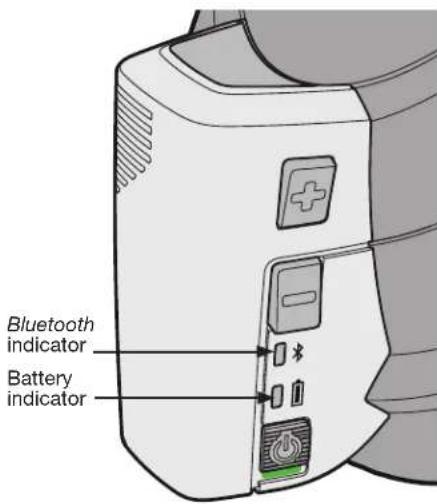
Control module features 4
Charging the battery.... 5
Tips for longer battery life 5
Connecting the headphones to your Bluetooth device 6
To pair the headphones with your device 6
Locating the Bluetooth device list 7
Battery charge level (for iOS devices) 7
Pairing additional devices 7
Using multiple devices 7
Wearing the headphones....7
Recognizing the lights and tones....8
Bluetooth Indicator 8
Battery Indicator 8
Audio Tones 8
Playback and phone call actions.... 8
Using the optional audio cable 9
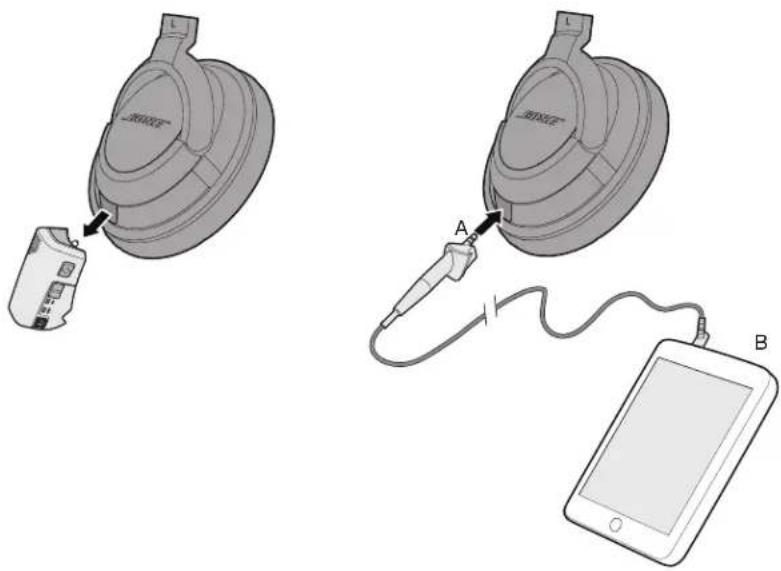
To attach the audio cable 9
Reference 10
Maintenance....10
Battery care 10
Cleaning the headphones....10
Replacement parts and accessories....10
Reattaching earcup cushions 11
Troubleshooting 11
Customer service....12
Limited Warranty....12
Technical information 12
Introduction
Thank you
We appreciate your choice of the Bose® AE2w Bluetooth® headphones. These wireless stereo headphones combine the audio performance and comfort you expect from Bose with the freedom to move away from your source.
Included with the headphones
natural_image
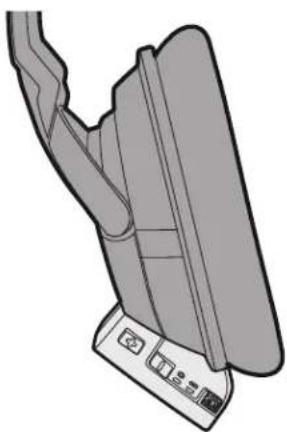
Diagram of a mechanical component with no visible text or symbolsBluetooth ^® control module (removable)
natural_image
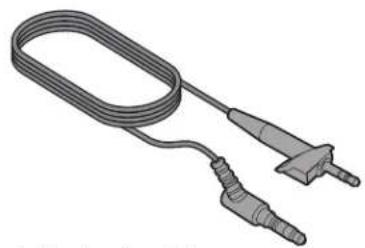
Illustration of a coiled electrical probe with two terminal connectors (no text or symbols)Optional audio cable
natural_image
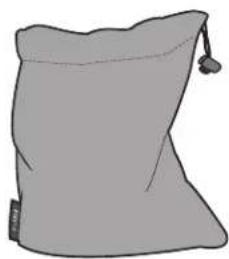
Simple illustration of a gray sack with a small tag and handle (no text or symbols)Carry bag
natural_image
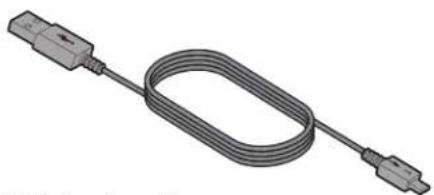
3D rendering of a coiled cable with two connectors (no text or symbols visible)USB charging cable
Control module features
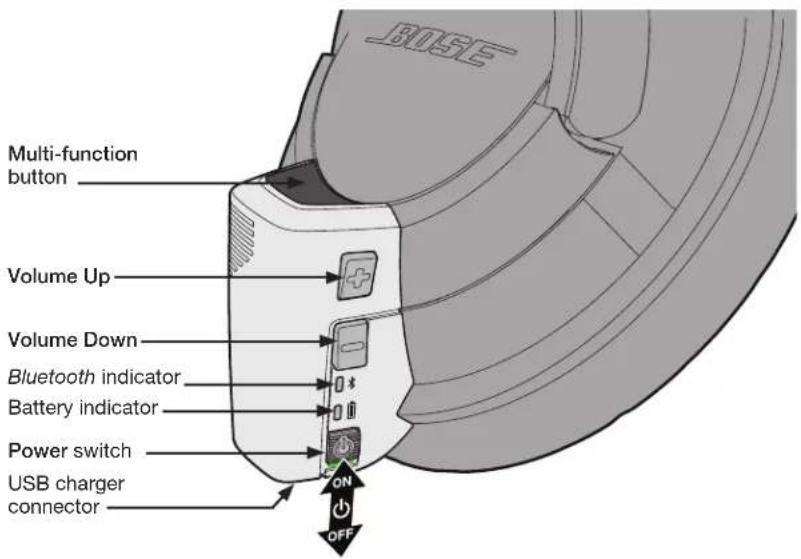
Charging the battery
Although the battery is partially charged at the factory, we recommend you fully charge the battery before first use. Allow up to 3 hours for a full charge.
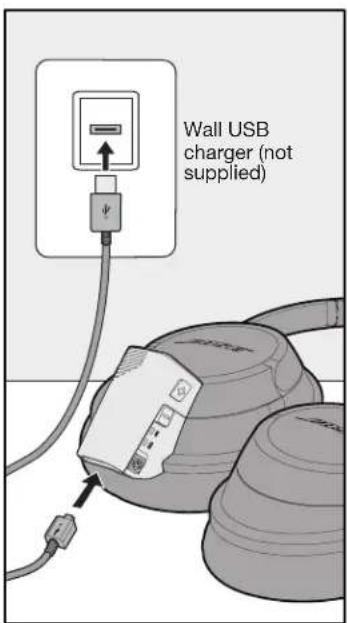
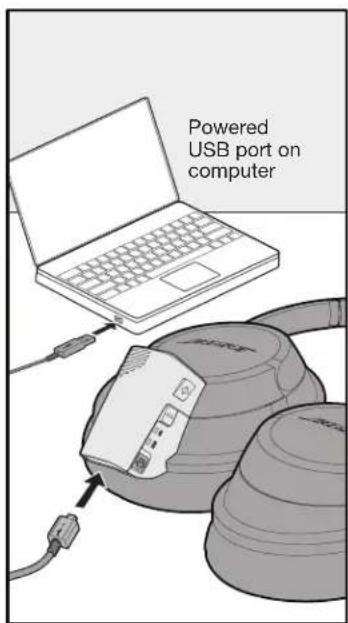
- Plug the small end of the USB cable into the headphones.
- Plug the large end of the USB cable into an agency approved wall USB charger (not supplied) or a powered USB port on your computer.
Note: The control module can also be charged when disconnected from the headphone earcup.
- Allow up to 3 hours for a full charge.
The battery indicator will blink amber while charging and turn green when charging is complete.
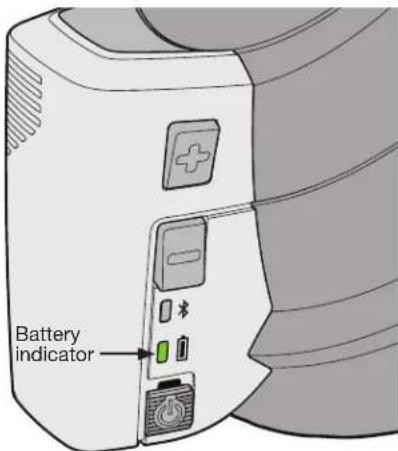
| Battery Indicator Color Indicates: | |
| Green (solid) • 1/2 hour to 7 hours | remaining battery time |
| Amber (solid) • Less than 1/2 hour | remaining battery time |
| Red (blinking) • Recharge headphones now | |
| Amber (blinking) • Headphones are charging | |
| Green (while charging) • Headphones are fully charged | |
| Red (while charging) • Headphones are not within acceptable temperature range | |
Note: The headphones will not operate while charging.
Note: Before charging, be sure the headphones are at room temperature, between 41°F (5°C) and 104°F (40°C).
Tips for longer battery life
When fully charged, your AE2w Bluetooth headphones will provide approximately 7 hours of wireless audio.
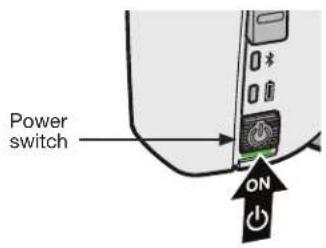
• Always slide the Power switch off when the headphones are not in use. This will help preserve battery life.
- Be aware that certain audio sources will deplete the battery more quickly than others.
- Do not leave the battery uncharged for long periods of time. Fully charge before storing.
Connecting the headphones to your Bluetooth device
To use your AE2w Bluetooth headphones with a Bluetooth device (such as a smartphone or tablet), you must first establish a wireless connection between the headphones and the device. This process is called "pairing". once the headphones and a device have been paired, they will automatically reconnect the next time you use them together.
To pair the headphones with your device
- Slide the control module power switch to on.
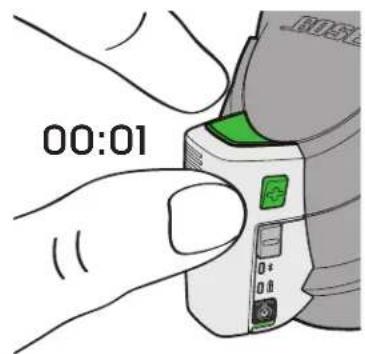
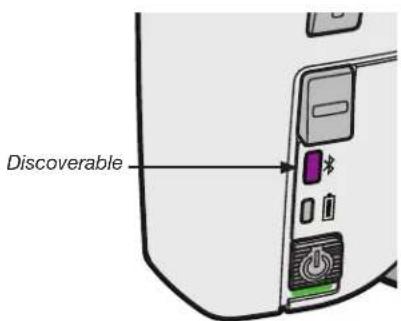
- Press and hold the Multi-Function and Volume + buttons together until the Bluetooth indicator blinks purple. The headphones are now discoverable and ready to pair with your device.
-
Enable Bluetooth on your device and locate the Bluetooth device list. (For help, see "Locating the Bluetooth device list" on page 7.)
-
Select "Bose AE2w" from the device list. If your device requires a passkey, enter "0000". When the wireless connection is complete, the Bluetooth indicator will turn solid blue.
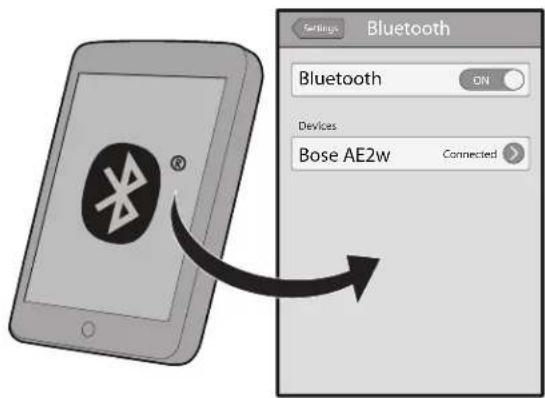
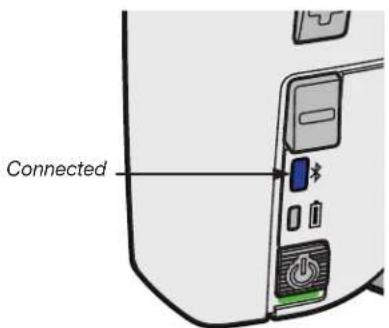
Note: If the Bluetooth indicator does not turn solid blue, the wireless connection has not been made. Turn the headphones off and repeat steps 1 to 4, or see "Troubleshooting" on page 11.
Locating the Bluetooth device list
iOS 5: Settings > General > Bluetooth > ON > "Bose AE2w"
iOS 6: Settings > Bluetooth > ON > "Bose AE2w"
Android: Settings > Wireless & Networks > Bluetooth or Bluetooth Settings > ON > Search or Scan for Devices > "Bose AE2w"
Blackberry: Home > Manage Connections > Set Up Bluetooth > Search > "Bose AE2w"
Mac OS X: System Preferences > Bluetooth > ON > "Bose AE2w"
Windows 7: Start > Control Panel > Hardware and Sound > View Devices and Printers > Add a Device > "Bose AE2w"
Windows XP: Start > Control Panel > Bluetooth Devices > "Bose AE2w"
Note: For additional help locating the device list, refer to the owner's guide that came with your device.
Battery charge level (for iOS devices)
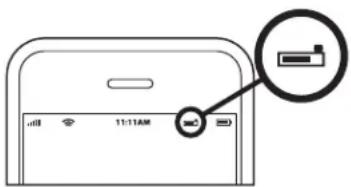
When connected to AE2w Bluetooth headphones, iOS devices will display the AE2w Bluetooth battery charge level near the upper right corner of the screen.
Pairing additional devices
You can pair up to eight Bluetooth devices with your headphones. To pair additional devices with your headphones, repeat steps 2-3 on page 8 for each device. Only two audio devices can be connected at the same time.
Using multiple devices
If you have two audio devices connected with your headphones, you can easily stop listening to one device and start listening to another. Simply stop or pause the music or video on the first device, then start the music or video on the second device. The headphones will switch to the device that is currently playing.
If you receive a phone call on a connected phone while you are listening to a connected audio source, the audio source will pause for the phone call and resume when the call has ended. For more information see “Playback and phone call actions” on page 8.
Wearing the headphones
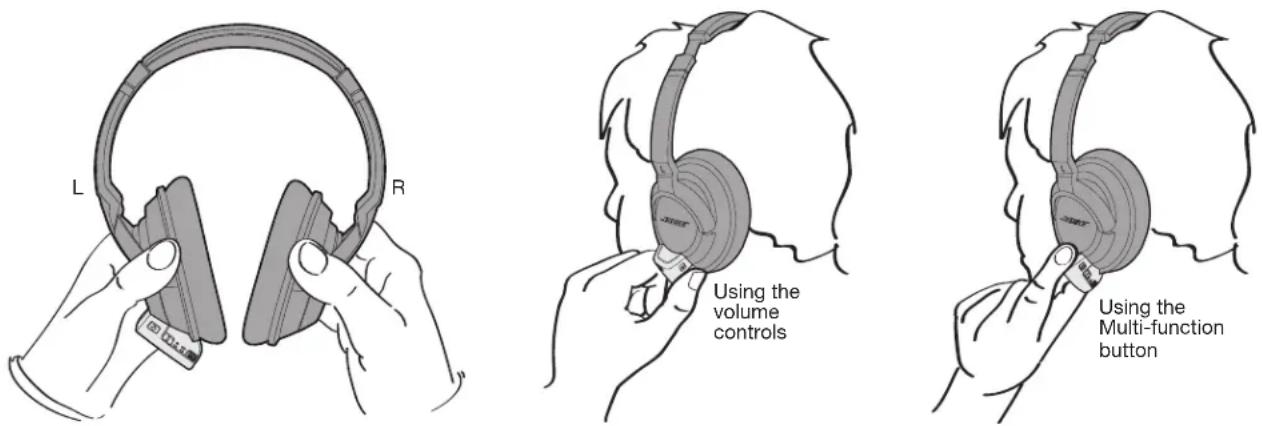
Be sure to wear your AE2w Bluetooth headphones with the left earcup (L) and control module over your left ear. You can easily access the control module with your left hand, as shown. Use your thumb to control the volume and power switch; use your index finger to control the Multi-function button.
Recognizing the lights and tones
Bluetooth Indicator

| Color Indicates: | |
| Purple (blinking) • The headphones are discoverable for pairing. | |
| Blue (blinking) | • The headphones are attempting to connect to aBluetoothdevice. |
| Blue (solid) • The headphones are connected to theBluetoothdevice. | |
Battery Indicator

| Color Indicates: | |
| Green (solid) • 1/2 to 7 hours remaining battery time | |
| Amber (solid) • Less than 1/2 hour remaining battery time | |
| Red (blinking) • Recharge headphones now | |
| Amber (blinking) • Headphones are charging | |
| Green (while charging) • | Headphones are fully charged |
Audio Tones
| Tone Indicates: | |
| Two ascending tones • Headphones are discoverable | |
| Three ascending tones | • Headphones are connected to a device |
| Four ascending tones • Power on | |
| Four descending tones | • Power off |
| Three descending tones | • Wireless connection ended |
| Single tone | • Low battery warning |
| Two descending tones | • Incoming call |
Playback and phone call actions
| Audio/video playback actions | Headphones control |
| Play or pause | PresMulti-function once |
| Track forward | Double pressMulti-function |
| Track back | Triple pressMulti-function |
| Adjust the volume | PressVolume + or Volume - |
| Fast forward | Press, then press and holdMulti-function |
| Rewind | Double press, then press and holdMulti-function |
| Phone call actions | Headphones control |
| Answer or end a call | PresMulti-function once |
| Ignore a call | Press and holdMulti-function |
| Answer second call | PresMulti-function |
| Ignore second call | Press and holdMulti-function |
| Activate voice control | Press and holdMulti-function |
| Multiple device actions | Headphones control |
| Pause audio on primary device and answer call on second device | PresMulti-function once |
| Ignore incoming call on second device and restart audio on primary device | Press and holdMulti-function |
Using the optional audio cable
Your AE2w Bluetooth headphones come with a 3.5 mm audio cable that is compatible with most music sources. Use the audio cable when:
• The desired audio source is not Bluetooth technology enabled.
• The headphones battery is not charged.
• You are in an area where Bluetooth connectivity is prohibited.
To attach the audio cable
- Slide the power switch to off.
- Remove the Bluetooth control module from the headphones by gently pulling it straight out.
- Insert the audio cable plug (A) into the connector on the headphones until fully seated.
- Insert the audio cable plug (B) into the 3.5 mm headphone connector on your audio source until fully seated.
Maintenance
Battery care
Be sure to turn off the headphones when it is not in use. Before storing the headphones for more than a few months, be sure the battery is fully charged.
Cleaning the headphones
The Bose® AE2w Bluetooth headphones does not require scheduled cleaning. Should cleaning be necessary, simply wipe the outside surfaces with a soft, dry cloth. Do not allow moisture to get inside the earcups or the audio input connector. Do not use liquids or sprays.
Replacement parts and accessories
Replacement parts and accessories can be ordered through Bose Customer Service. See the contact information for your area included in this guide.
Part Name Part Product Code
Carry bag 329585-0010
Replacement cushion kit 329586-0010
USB charging cable 330816-0010
Audio cable (3.5 mm) 329583-0010
Wall charger 329341-0010
Wall charger plus adapter 329342-0010
Reattaching earcup cushions
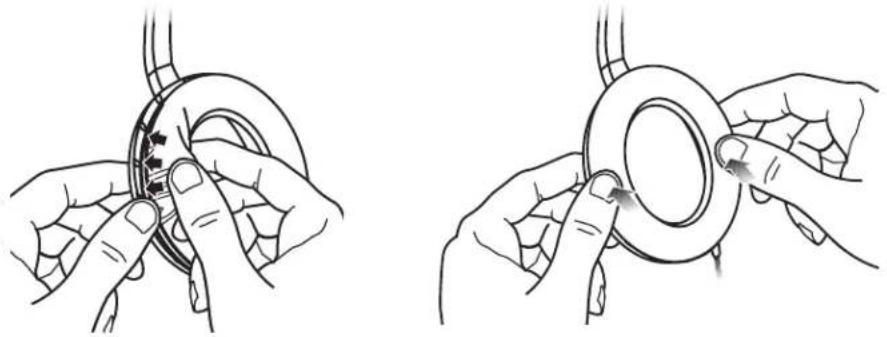
The earcup cushions are held in place by a mounting flange which snaps under eight small tabs located around the inside rim of each earcup. If an earcup cushion becomes partially or completely detached, push the mounting flange of the earcup cushion back into the earcup. Using your finger or thumb, press around the edge of the mounting flange, making sure it snaps in place all the way around the earcup.
natural_image
Illustration of two hands adjusting a circular component with arrows indicating motion (no text or symbols)Troubleshooting
| Problem What to do | |
| The headphones do not charge | When charging, make sure both ends of the USB cable are firmly connected.If you are using a power outlet, be sure the power supply is securely plugged in and the outlet is working.If you are using your computer, be sure the computer is plugged in and the USB port is powered.If solid red Indicator appears, the headphone temperature is too hot or cold. Return to room temperature conditions before charging.Turn headphone on and then off. Disconnect and reconnect the USB charging cable. |
| The headphones and the Bluetooth device do not pair | Make sure the headphones are not connected to the charger and the power switch is on.Turn the device off, then on again.Turn on the Bluetooth feature on the device.Turn off the Bluetooth feature on any other device that is paired with the headphones.Clear the paired device list from the headphones by pressing and holding Multi-function and Volume - for 10 seconds.See “To pair the headphones with your device” on page 6.Try pairing with a different device to ensure the headphones are working properly. |
| The headphones and the Bluetooth device do not connect | Make sure the headphones are not connected to the charger and the power switch is on.Make sure the Bluetooth feature on the device is on.Make sure the headphones are within range of the device: up to 33 feet (10 m).Turn off the Bluetooth feature on any other device that is paired with the headphonesTurn the headphones off, then on again, the headphones should automatically connect to the device. If it does not automatically reconnect, select “Bose AE2w” in the device’s pairing list.Power the device off, then on again.Try connecting to a different paired device to be sure the headphones are working properly. |
| No audio or poor audio quality from a streaming audio source/application | Make sure the streaming audio source is on and playing.Make sure the audio device supports A2DP audio streaming.Try another streaming audio source/application or try another track.Make sure the device’s Bluetooth volume is turned up and not muted.Move the device closer to the headphones (33 feet or 10 m).Move the device and headphones away from any device that could cause interference, such as another Bluetooth device, cordless phones, a microwave oven, or a wireless computer network router.Reduce the number of applications that are running on your device. Disabling Wi-Fi functionality on the device may also improve audio quality. |
| No audio or poor audio quality from a connected device | If using a Bluetooth device, ensure that the control module is firmly connected to the headphones.If using the 3.5 mm audio cable, ensure both ends of the audio cable are firmly seated.Try another music application or try another track.Try a different audio device.Make sure both ear cushions are firmly secured. |
| Audio does not match video | Try another streaming audio device or application or try another track. Some delay is expected from some sources or applications. |
| Mis-shaped cushion | The high-density earcup foam will regain its shape after a few minutes in a neutral position. |
| Short battery life | Fully charge the headphones. When fully charged, the battery indicator will glow solid green (while on the charger).When fully charged, your AE2w Bluetooth headphones will provide approximately 7 hours of wireless audio or approximately 200 hours of standby time.Disable tones and notifications in your device that may be frequently sent to the headphones.Be aware that some devices may drain the headphones battery more quickly than others.See page 5 of this document for more information on understanding battery performance. |
Customer service
Or for online support visit: owners.Bose.com (in the U.S.) or global.Bose.com (outside the U.S.).
To contact Bose by phone, refer to the address list included in the product carton.
For additional help in solving problems, contact your Bose ^® dealer.
Limited Warranty
Your Bose® AE2w headphones are covered by a limited warranty. Details of the limited warranty are provided on the product registration card that is included in the carton. Please refer to the card for instructions on how to register. Failure to register will not affect your limited warranty rights.
To obtain Limited Warranty service
Return the product, with proof of purchase from an authorized Bose dealer, as follows:
Contact Bose support in your country/region (visit Global.Bose.com for contact information in your country/region) for specific return and shipping instructions.
Label and ship the product, freight prepaid, to the address provided by Bose support in your country.
Place any necessary Return Authorization Number prominently on the outside of the carton. Cartons not bearing a Return Authorization Number, where required, will be refused.
The serial number can be found on the inside of the left earcup or on the original carton.
Technical information
Temperature ranges:
Operate this product within the temperature range of -4^ to 113^ ( -20^ to 45^ ) only.
Store this product within the temperature range of -4^ to 113^ ( -20^ to 45^ ) only.
Charge the battery where the temperature is between 41°F and 104°F (5°C and 40°C) only.
Battery: Rechargeable, non-replaceable lithium-ion polymer.
Charging time: 3 hours for full charge.
Operating time: Approximately 7 hours.
Operating range: Up to 33 feet (10 m) from device.
Bluetooth® QD ID: XXXXXX
Version 4.0
Profiles include: Headphones (HSP 1.1); Hands Free (HFP 1.5); Advanced Audio Distribution Profile (A2DP 1.2); Audio/Video Remote Control Profile (AVRCP 1.4).
The Bluetooth ^® word mark and logos are registered trademarks owned by Bluetooth SIG, Inc. and any use of such marks by Bose Corporation is under license.