
Street - Headphones IQUA - Free user manual and instructions
Find the device manual for free Street IQUA in PDF.


User questions about Street IQUA
0 question about this device. Answer the ones you know or ask your own.
Ask a new question about this device
Download the instructions for your Headphones in PDF format for free! Find your manual Street - IQUA and take your electronic device back in hand. On this page are published all the documents necessary for the use of your device. Street by IQUA.
USER MANUAL Street IQUA
- Welcome to Iqua Street
- What's in the box
- Iqua Street overview
- Getting started
4.1. Charging
4.2. Pairing, and switching on and off
- Functionalities
5.1. Music control
5.2. Volume control
5.3. Call control
- Tips and support
- Technical specifications
- Disclaimers
- Intellectual property rights
1. Welcome to Iqua Street
Thank you for purchasing Iqua Street wireless Bluetooth headphones.
You can use these full-featured headphones to listen to music and handle calls.
The headphones are compatible with all phones that support Bluetooth.
- Before use, please read all of the documentation, including all online documentation at www.iqua.com.
- To use the headphones, first charge the battery and then pair with a compatible device. For the latest compatibility information, please visit www.iqua.com.
2. What's in the box
The Iqua Street headphones sales package contains the following:

Iqua Street headphones

Extra ear cushions

USB charging cable

Carry bag

Iqua Street Quick Guide
3. Iqua Street overview
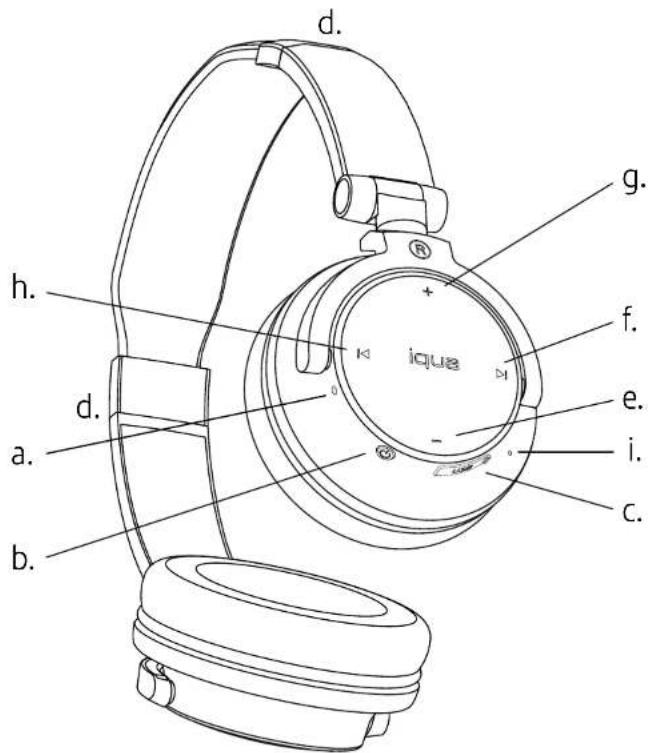
a. Indicator light
b. Power / Multifunction button
c. USB port
d. Headphones size adjustment
e. Volume down button
f. Next track button
g. Volume up button
h. Previous track button
i. Microphone
text_image
d. h. d. a. b. i. e. f. g. iqua c.Iqua • Street
4. Getting started
4.1. Charging
Before you start using the Iqua Street headphones, charge them fully for 3 hours.
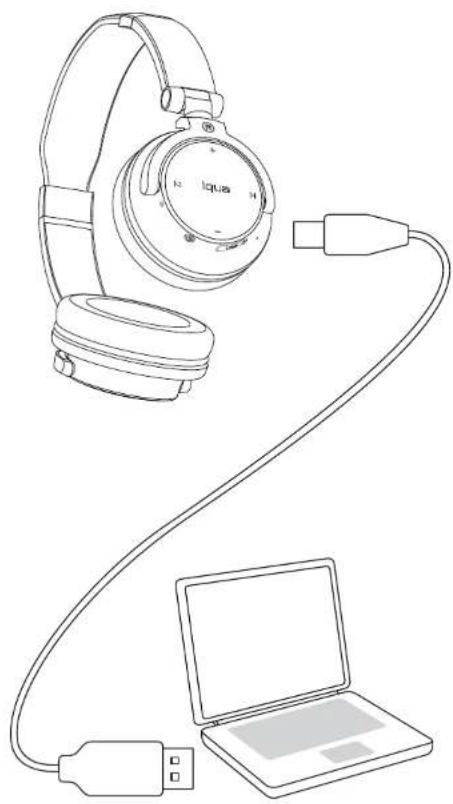
Connect the headphones to a computer or a USB charging device using the USB charging cable. The red indicator light will show continuously to indicate the battery is charging.
When charging is complete, the red indicator light will turn off.
When the Iqua Street headphones are running low on battery, an audio notification of three beeps will sound.
natural_image
Line drawing of a pair of headphones connected to a laptop via cable (no text or symbols)Iqua • Street
4.2 Pairing, and switching on and off
Pairing the Iqua Street headphones with your phone:
Before you start, make sure that your phone has Bluetooth turned on.
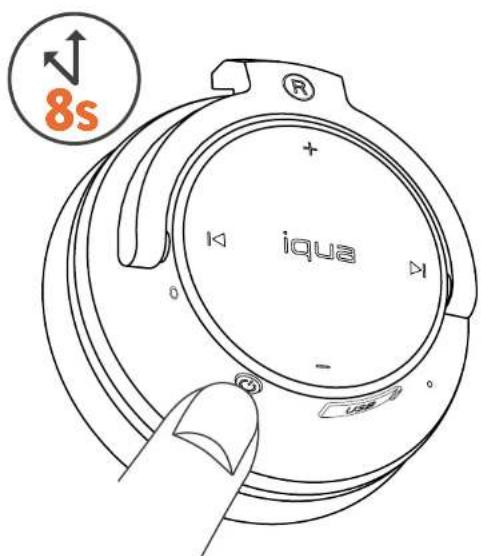
- With your Iqua Street headphones, go straight to the pairing mode by pressing the Power/Multifunction button for over 8 seconds. An audio notification and alternate flashing of the red and blue indicator lights will show that the pairing mode has been activated.
- In your phone, search for Bluetooth devices and select "Iqua Street".
- Once connected, you will hear an audio notification and the blue indicator light will flash 3 times every 4 seconds.
For more detailed instructions on how to pair the Iqua Street headphones with your phone, see the instructions provided with your phone.
If your phone requires a pairing code, it is 0000.
text_image
8s iquaSwitching the Iqua Street headphones on and off after pairing:
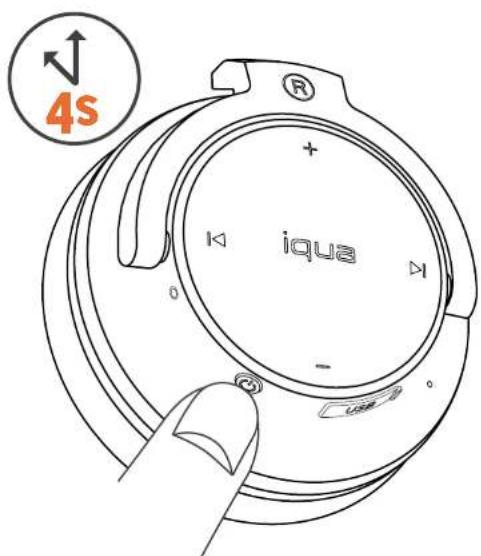
Switch the Iqua Street headphones on or off by pressing the Power / Multifunction button for more than 4 seconds. Connection with your phone is activated automatically when the phone's Bluetooth function is turned on.
When you switch the Iqua Street headphones on, you will hear an audio notification and the blue indicator light will flash once. The connection activation with your phone will be indicated with an audio notification and two slow flashes of the blue indicator light.
When you switch the Iqua Street headphones off, you will hear an audio notification and the red indicator light will flash once.
text_image
4s iquaIqua • Street
5. Functionalities
5.1. Music control
You can use the Iqua Street headphones to listen to music stored in your phone.
To play or pause music, briefly press the Power / Multifunction button.
To skip to the next track, briefly press the Next track button.
To skip to the previous track, briefly press the Previous track button.

text_image
iqua + - 0 i II / II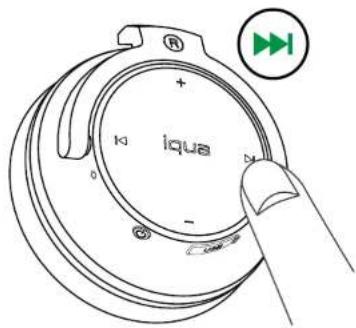
text_image
iqua + - 0 k y D +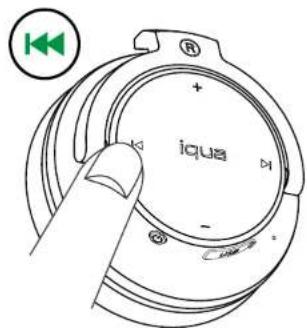
text_image
iquaIqua • Street
5.2. Volume control
You can easily control the volume of your music or calls with the Iqua Street headphones.
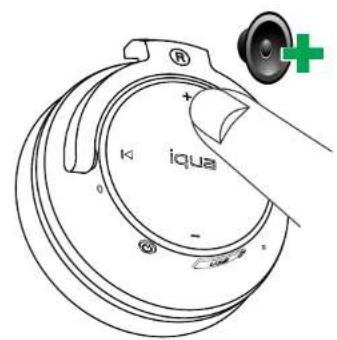
To increase the volume, press the Volume up button.
To decrease the volume, press the Volume down button.
text_image
iqua +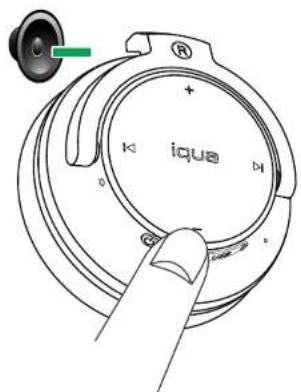
text_image
iqua5.3. Call control
You can also use the Iqua Street headphones to control calls.
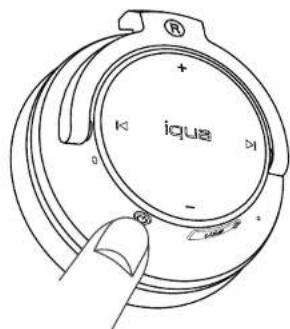
To answer or end a call, briefly press the Power / Multifunction button.
Press the Power / Multifunction button for 2 seconds to:
- Reject an incoming call.
- Switch between multiple ongoing calls.
Briefly press the Power / Multifunction button twice to:
• Redial the last dialed number. - Mute and unmute your microphone during a call.
To activate your phone's voice commands, press the Next track button for 2 seconds. For more information on voice commands, see your phone's instructions.
text_image
iqua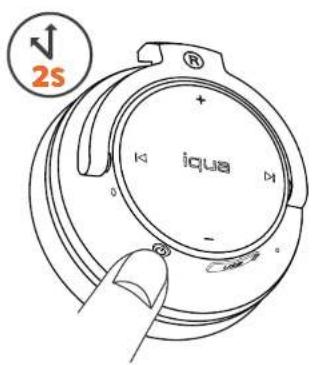
text_image
2S iqua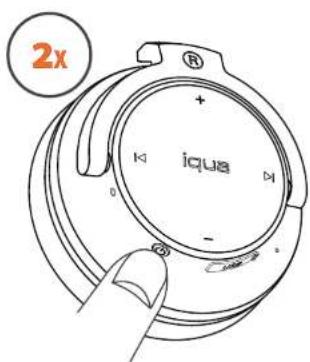
text_image
2x iquaIqua • Street
6. Tips and support
- If you would like to unpair your headphones from a phone, switch off your Iqua Street and then hold down the Power / Multifunction button and the Volume up button for 6 seconds.
- If the Bluetooth connection between your headphones and phone is lost, briefly press the Power / Multifunction button twice to reconnect.
- Do not wash the ear cushions in a washing machine.
If you need more support with your Iqua Street, please check out the support sections of the Iqua website or contact us directly:
• Iqua customer care: info@iqua.com
• Iqua technical support: technical.support@iqua.com
If your Iqua Street headphones are defective, please contact contact the retailer you bought them from.
7. Technical specifications
| Model | A10 | ||
| Size | 184 mm x 154 mm x 75 mm | ||
| Weight | 154 | g |
Music listening time Up to 14 hours
Talking time Up to 12 hours
Standby time Up to 280 hours
Battery type Lithium ion polymer rechargeable battery
Charger connector Micro USB
Charging time Up to 3 hours
Microphone Built into device, omnidirectional
Speakers 40 mm 32 Ohm
Bluetooth version 2.1 EDR, Class II
Supported Bluetooth profiles Handsfree (HFP) 1.5, Headset (HSP) 1.1, A2DP 1.0, and AVRCP 1.0
RF frequency 2.4 GHz
Communication range 10 m
Operating temperature -10°C - +50°C
Storage temperature -20°C - +80°C
8. Disclaimers
Power Management
This product is powered by a built-in rechargeable battery which can not be changed. Do not attempt to replace the battery. Rechargeable battery can be charged and discharged hundreds of times, but it will eventually wear out. After a period of time that will vary depending on the use and usage conditions you may find that the built-in battery will power your product for only a couple of hours requiring you to charge more frequently.
Do charge your device only with the charger provided in the sales package. Unplug the charger when not in use. Do not leave the device connected to the charger for longer period than needed, since overcharging may shorten the battery lifetime.
If left unused a fully charged battery will discharge itself over time.
Temperature extremes may affect the ability of the battery to charge. Always try to keep the device between 15 °C and 25 °C (59 °F and 77 °F). Leaving the device in hot or cold places such as in closed car in summer or winter conditions will reduce the capacity and lifetime of the battery. A device with hot or cold battery may not work for a while even when the battery is fully charged. Battery performance is particularly limited in temperatures well below freezing. Do not charge in humid environment.
Care and Maintenance
- Do not expose the device to liquid, moisture or humidity as it is not waterproof.
- Do not use or store the device in dusty, dirty areas. Its moving parts and electronic components can be damaged.
- Do not store the device in hot areas. High temperatures can shorten the life of electronic devices, damage batteries, and warp or melt certain plastics.
- Do not store the device in cold areas. When the device returns to its normal temperature, moisture can form inside the device and damage electronic circuit boards.
- Do not drop, knock, or shake the device. Rough handling can break internal circuit boards and fine mechanics.
- Do not use harsh chemicals, cleaning solvents, or strong detergents to clean the device.
- Use a soft, clean, dry cloth to clean any parts of the headset.
- Do not expose your device to contact with sharp objects as this will cause scratches and damage.
- Do not stick anything inside the device as this may damage internal components.
- Do not dismantle the device or the charger as they do not contain serviceable parts and taking apart the device may expose you to dangerous voltages or other hazards.
- Act according to your local rules and do not dispose of this product as part of your normal household waste. Follow the applicable separate collection system for electrical and electronic products.
Damage: The device is made of metal and plastics which could break if it is dropped or if it receives significant impact.
Do not use if the device's casing is broken or cracked as this could cause injury on you.
Responsible Listening: Damage to hearing occurs when a person is exposed to loud sounds over time. Hearing loss may increase as sound is played at louder volumes and for longer durations. Individual susceptibility to sound-inflicted hearing loss and hearing problems may vary. In addition, the volume of sound produced by this device may depend on the nature of the sound, the device to which it is connected, the device settings and other external factors. Thus, there is no single volume setting that is appropriate for you or for every combination of sound, setting and equipment. You are to use your personal judgment and common sense when adjusting the volume of the device.
Modification: Any changes or modifications to this device not expressly approved in this document could void your warranty and void your authority to operate this equipment. Use only approved batteries and chargers. The use of any unauthorized accessories may be dangerous and may void the device's warranty if said accessories cause damage or defect to the device.
How to get service for my IQUA product?
If you believe that you are entitled to a repair or replacement of your IQUA product based on your statutory rights under the applicable national laws relating to the sale of consumer products or warranty given by the retailer who has sold the IQUA Product to you, please contact your retailer.
DECLARATION OF CONFORMITY
We, Iqua Ltd., declare under our sole responsibility, that the product, A10, conforms with the provisions of the following Council Directive: 1999/5/EC. A copy of the Declaration of Conformity can be found at http://www.iqua.com/declaration_of_conformity.
CE
Warranty and Disclaimers:
DISCLAIMER OF WARRANTIES: TO THE FULLEST EXTENT PERMISSIBLE PURSUANT TO APPLICABLE LAW, IQUA, LTD.
("IQUA") DISCLAIMS ALL WARRANTIES EXPRESS OR IMPLIED, INCLUDING, BUT NOT LIMITED TO (A) MERCHANTABILITY, FITNESS FOR A PARTICULAR PURPOSE OR NON-INFRINGEMENT OF THIRD PARTY RIGHTS, (B) THAT THERE ARE NO VIRUSES OR OTHER HARMFUL COMPONENTS, (C) REGARDING CORRECTNESS, ACCURACY, OR RELIABILITY, OR (D) AGAINST INTERFERENCE WITH OTHER DEVICES. THE HARDWARE AND COMPUTER SOFTWARE PROVIDED TO YOU ARE PROVIDED WITH ALL FAULTS, AND THE ENTIRE RISK AS TO SATISFACTORY QUALITY, PERFORMANCE, AND ACCURACY IS WITH YOU ALONE. IQUA IS, UNDER NO CIRCUMSTANCES, RESPONSIBLE FOR ANY UNAUTHORIZED USE OR MODIFICATION OF THE DEVICE.
LIMITATION OF LIABILITY: UNDER NO CIRCUMSTANCES SHALL IQUA BE LIABLE TO YOU FOR INDIRECT, INCIDENTAL, CONSEQUENTIAL, SPECIAL OR EXEMPLARY DAMAGES (EVEN IF IQUA HAS BEEN ADVISED OF THE POSSIBILITY OF SUCH DAMAGES), ARISING FROM THE PURCHASE OR USE OF THE DEVICE PROVIDED HEREIN. IN NO EVENT SHALL IQUA'S TOTAL OBLIGATIONS OR LIABILITY HEREUNDER EXCEED THE LESSER OF THE MANUFACTURER'S SUGGESTED RETAIL PRICE IN QUESTION OR ONE THOUSAND DOLLARS (\$1,000.00). REGARDLESS OF ANY LAW TO THE CONTRARY, NO ACTION, SUIT OR PROCEEDING SHALL BE BROUGHT AGAINST IQUA MORE THAN ONE (1) YEAR AFTER THE DATE UPON WHICH THE CLAIM AROSE.
PURPOSE OF USE: IQUA ONLY SUPPLIES THE DEVICE FOR DOMESTIC AND PRIVATE USE. YOU AGREE NOT TO USE THE DEVICE FOR ANY COMMERCIAL, BUSINESS OR RE-SALE PURPOSE, AND IQUA HAS NO LIABILITY TO YOU FOR ANY LOSS OF PROFIT, LOSS OF REVENUE, LOSS OF BUSINESS, BUSINESS INTERRUPTION, OR LOSS OF BUSINESS OPPORTUNITY.
NOTHING IN THESE TERMS EXCLUDES OR LIMITS IN ANY WAY IQUA'S LIABILITY UNDER ENGLISH LAW FOR (A) DEATH OR PERSONAL INJURY CAUSED BY IQUA'S NEGLIGENCE; (B) FRAUD OR FRAUDULENT MISREPRESENTATION; (C) ANY BREACH OF THE OBLIGATIONS IMPLIED BY SECTION 12 OF THE SALE OF GOODS ACT 1979; OR (D) DEFECTIVE PRODUCTS UNDER THE CONSUMER PROTECTION ACT 1987.
CONSIDERATION: YOU HEREBY ACKNOWLEDGE THAT IQUA'S PRICING IS MADE IN RELIANCE UPON THE LIMITATIONS OF LIABILITY AND THE DISCLAIMERS OF WARRANTIES AND DAMAGES SET FORTH HEREIN, AND THAT THE CONSIDERATION FORM AN ESSENTIAL BASIS OF THE BARGAIN BETWEEN THE PARTIES. YOU AGREE THAT THE LIMITATIONS AND EXCLUSIONS OF LIABILITY AND DISCLAIMERS SPECIFIED IN THESE TERMS WILL SURVIVE AND APPLY EVEN IF FOUND TO HAVE FAILED OF THEIR ESSENTIAL PURPOSE. SOME JURISDICTIONS DO NOT ALLOW THE EXCLUSION OF CERTAIN WARRANTIES OR LIABILITIES; TO THE EXTENT SUCH LAWS APPLY, SOME OF THESE EXCLUSIONS MAY NOT APPLY TO YOU.
THIRD PARTY SOFTWARE: YOU MAY USE THIRD-PARTY SOFTWARE OR EQUIPMENT IN CONJUNCTION WITH THE DEVICE. IQUA MAKES NO WARRANTIES OR REPRESENTATIONS AND THERE ARE NO CONDITIONS, EXPRESS OR IMPLIED, STATUTORY OR OTHERWISE, AS TO THE QUALITY, CAPABILITIES, OPERATIONS, PERFORMANCE OR SUITABILITY OF ANY THIRD-PARTY SOFTWARE OR EQUIPMENT, INCLUDING THE ABILITY TO INTEGRATE ANY SUCH SOFTWARE OR EQUIPMENT WITH THE DEVICE. THE QUALITY, CAPABILITIES, OPERATIONS PERFORMANCE AND SUITABILITY OF ANY SUCH THIRD-PARTY SOFTWARE OR EQUIPMENT LIE SOLELY WITH YOU AND THE DIRECT VENDOR, OWNER OR SUPPLIER OF SUCH THIRD-PARTY SOFTWARE OR EQUIPMENT, AS THE CASE MAY BE.
No Modification of Disclaimer: The agents, employees, distributors, and dealers of Iqua are not authorized to make modifications to this disclaimer, or make any additional warranties binding on IQUA. Accordingly, additional statements such as dealer advertising or presentation, whether oral or written, do not constitute warranties by IQUA and should not be relied upon.
9. Intellectual property rights
IQUA, Ltd. makes no representations or warranties regarding the contents of this manual. IQUA reserves the right to revise this document at any time or to make changes to the product described within it without notice or obligation to notify any person of such revisions or changes.
IQUA ^ is a trademark of IQUA Ltd. and its affiliated companies. All rights reserved. Bluetooth ^TM is a trademark of the Bluetooth Special Interest Group (SIG), Inc. All rights reserved. All other company and product names referenced herein are trademarks of their respective owners. All rights reserved.
© Copyright 2012, Iqua Ltd. A member of Savox Communications Group. All rights reserved.