
Esko - Air conditioner CARRIER - Free user manual and instructions
Find the device manual for free Esko CARRIER in PDF.


| Brand | Carrier |
| Model | Esko |
| Product Type | Split Type Room Air Conditioner |
| Cooling Capacity | Varies by model (e.g., 21000 Btu/h and above) |
| Operating Modes | Cooling, Heating (on select models), Fan Only, Dry, Auto, Sleep |
| Special Functions | Clean Air (Ionizer/Plasma Dust Collector), Follow Me, Anti-mildew, Turbo, Auto-restart |
| Operating Temperature Range (Cooling) | Indoor: 17°C-32°C; Outdoor: 18°C-43°C (up to 52°C for tropical models) |
| Operating Temperature Range (Heating) | Indoor: 0°C-30°C; Outdoor: -7°C-24°C |
| Air Filter | Washable filter; clean every 2 weeks |
| Air Freshening Filter | Optional (Plasma Dust Collector, Silver Ion, Bio, Vitamin C, 3M); clean monthly, replace every 4-5 months |
| Remote Control | Yes, with Follow Me feature and timer |
| Warranty | 1 year full unit, 5 years compressor (as per conditions) |
| Voltage Requirements | 230V ±10%, recommended voltage stabilizer |
| Safety Features | Auto restart after power failure, compressor protection (3-4 min delay), anti-cold air, defrost |
| E-Waste Management | Compliant with E-Waste Rules; recycling program available |
| Customer Service Helpline | 1800 30 11 11 11 |
Frequently Asked Questions - Esko CARRIER
User questions about Esko CARRIER
0 question about this device. Answer the ones you know or ask your own.
Ask a new question about this device
Download the instructions for your Air conditioner in PDF format for free! Find your manual Esko - CARRIER and take your electronic device back in hand. On this page are published all the documents necessary for the use of your device. Esko by CARRIER.
USER MANUAL Esko CARRIER
USER'S MANUAL
Split Type Room Air Conditioner
Please read the operating instructions and safety precautions carefully and thoroughly before installing and operating your room air conditioner.

natural_image
Blue circular logo with a smiling face and earphones, no text or symbols present.SERVICE HELPLINE
1800 3011 1111
Dear Customer,
For trouble free services please register with Carrier
Customer Care on 180030111111 or write to us at :
carriercare@carriermidea.com
Manager
Customer Services
CONTENTS
SAFETY PRECAUTIONS
Warning 2 Caution 3
OPERATING INSTRUCTIONS
Parts names .... 4 Special Functions .... 5 Operating temperature .... 6 Manual operation.... 6 Airflow direction control .... 7 How the air conditioner works .... 8
CARE AND MAINTENANCE
Care and maintenance 9-10
OPERATION TIPS
Operation tips 11-12
TROUBLESHOOTING TIPS
Troubleshooting tips 13
E-WASTE MANAGEMENT GUIDELINES
E-Waste Management Guidelines 14
ANNUAL MAINTENANCE CONTRACT
Annual Maintenance Contract 15
WARRANTY TERMS AND CONDITIONS
WARRANTY TERMS AND CONDITIONS 16-18
WARRANTY CARD
Warranty card 19-20

CAUTION
- Contact an authorised service technician for repair or maintenance of this unit.
- Contact the authorised installer for installation of this unit.
- This appliance is not intended for use by persons (including children) with reduced physical, sensory or mental capabilities, or lack of experience and knowledge, unless they have been given supervision or instruction concerning use of the appliance by a person responsible for their safety.
- Young children should be supervised to ensure that they do not play with the air conditioner.
- If the power cord is to be replaced, replacement work shall be performed by authorised personnel only.
- Installation work must be performed in accordance with the national wiring standards by authorised personnel only.
To prevent injury to the user or other people and property damage, the following instructions must be followed. Incorrect operation due to ignoring of instructions may cause harm or damage.
■ The seriousness is classified by the following indications.
| WARNING | This symbol indicates the possibility of death or serious injury. |
| CAUTION | This symbol indicates the possibility of injury or damage to property. |
■ Meanings of symbols used in this manual are as shown below.
| Never do this. | |
| Always do this. |
WARNING
Connect with the power properly.
- Otherwise, it may cause electric shock or fire due to excess heat generation.
Do not modify power cord length or share the outlet with other appliances
- It may cause electric shock or fire due to heat generation.
Always ensure effective earthing.
- No earthing may cause electric shock.
① Disconnect the power if strange sounds, smell, or smoke comes from it.
- It may cause fire and electric shock.
Use the correctly rated breaker or fuse.
- There is risk of fire or electric shock.
① Ventilate room before operating air conditioner if there is a gas leakage from another appliance.
- It may cause explosion, fire and, burns.
Do not operate or stop the unit by switching on or off the power.
- It may cause electric shock or fire ● It may cause electric shock or fire. due to heat generation.
Do not operate with wet hands or in damp environment.
- It may cause electric shock.
Do not allow water to run into electric parts.
- It may cause failure of machine or electric shock.
Do not drink water drained from air conditioner.
- It contains contaminants and could make you sick.
Do not use the power cord close to heating appliances.
- It may cause fire and electric shock.
Do not damage or use an unspecified power cord.
- It may cause electric shock or fire.
Do not direct airflow at room occupants only.
• This could damage your health.
Always install circuit breaker and a dedicated power circuit.
- No installation may cause fire and electric shock.
Do not open the unit during operation.
- It may cause electric shock.
Do not use the power cord near flammable gas or combustibles, such as gasoline, benzene, thinner, etc.
- It may cause an explosion or fire.
Do not disassemble or modify unit.
- It may cause failure and electric shock.
CAUTION
When the air filter is to be removed, do not touch the metal parts of the unit.
- It may cause an injury.
Do not clean the air conditioner with water.
● Water may enter the unit and degrade the insulation. It may cause an electric shock.
① Ventilate the room well when used together with a stove, etc.
- An oxygen shortage may occur.
When the unit is to be cleaned, switch off, and turn off the circuit breaker.
- Do not clean unit when power is on as it may cause fire and electric shock, it may cause an injury.
Do not put a pet or house plant where it will be exposed to direct air flow.
- This could injure the pet or plant.
Do not use for special purposes.
- Do not use this air conditioner to preserve precision devices, food, pets, plants, and art objects. It may cause deterioration of quality, etc.
Stop operation and close the window in storm or hurricane.
- Operation with windows opened may cause wetting of indoor and soaking of household furniture.
Do not place obstacles around air-inlets or inside of air-outlet.
- It may cause failure of appliance or accident.
Turn off the main power switch when not using the unit for a long time.
- It may cause failure of product or fire.
Do not use strong detergent such as wax or thinner. Use a soft cloth for cleaning.
- Appearance may be deteriorated due to change of product color or scratching of its surface.
Ensure that the installation bracket of the outdoor appliance is not damaged due to prolonged exposure.
- If bracket is damaged, there is concern of damage due to falling of unit.
Always insert the filters securely. Clean filter once every two weeks.
● Operation without filters may cause failure.
Do not place heavy object on the power cord and take care so that the cord is not compressed.
- There is danger of fire or electric shock.
① Use caution when unpacking and installing. Sharp edges could cause injury.
If water enters the unit, turn the unit off and disconnect the power, contact a qualified service technician.
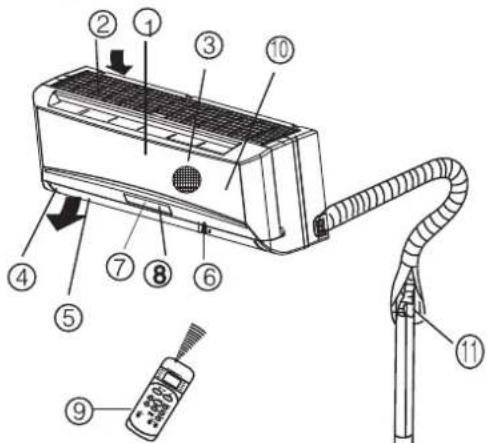
PARTS NAMES
Indoor unit
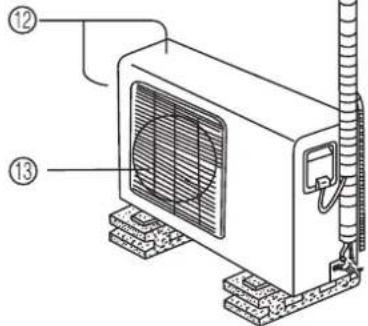
Outdoor unit
Indoor unit
- Front panel
- Air inlet
- Air filter
- Air outlet
- Horizontal air flow grille
- Vertical air flow louver
- Display panel
- Remote controller signal receiver
- Remote controller
10.Manual control button
Outdoor unit
- Connecting pipe, drain hose
- Air inlet (side and rear)
13.Air outlet
The operation indicator lights flash rapidly (five times per second.) when safety protection features come into operation.
Note:
All the pictures in this manual are for explanation purpose only. They may be slightly different from the air conditioner you purchased (depend on model).
The display panel of indoor unit will look like one of the following pictures:
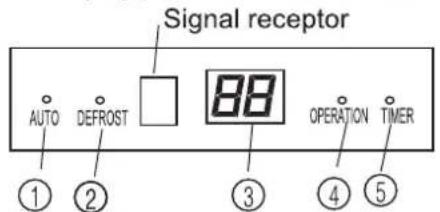
ModelA
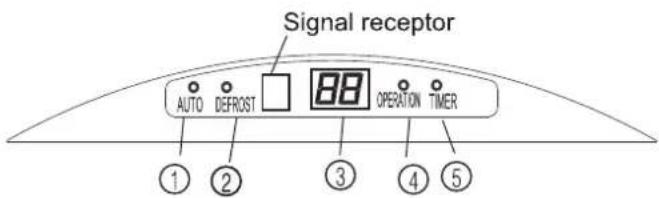
Model B
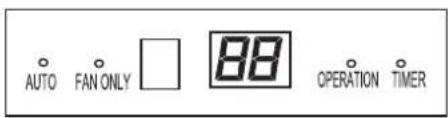
Model C

Model D
① AUTO indicator
This indicator illuminates when the air conditioner is inAUTO operation.
② DEFROST indicator (For Cooling & Heating models only)
This indicator illuminates when the air conditioner starts defrosting automatically or when the warm air control feature is activated in heating operation.
FAN ONLYIndicator(on some models):
This indicator illuminates when the air conditioner is under FAN ONLYmode.
③ TEMPERATURE indicator
Displays the temperature settings when the air conditioner is operational.
This indicator flashes after power is on and illuminates when the unit is in operation.
⑤ TIMER indicator
This indicator illuminates when TIMER is set ON/OFF.
Special function
CLEAN AIR function (on some models)
Improving the quality of indoor air is one of the mission of an air conditioner. This air conditioner is equipped with ionizer or Plasma Dust Collector (Depending on specific configuration of the model). With the anions generated by Ionizer, the air circulation of the air conditioner fills the room with refreshing, natural and healthy air. The Plasma Dust Collector generates an high voltage ionization zone, through which the air is converted to plasma. Inside the air most of the dust, smoke, and pollen particles are captured by the electrostatic filter.
Follow Me function (on some modles)
The remote control serves as a remote thermostat allowing for the precise temperature control at its location.
To activate the Follow Me feature, point the remote control towards the unit and press the Follow Me button. The remote display is actual temperature at its location. The remote control will send this signal to the air conditioner every 3 minutes interval until press the Follow Me button again. If the unit does not receive the Follow Me signal during any 7 minute interval, the Follow Me mode will be cancelled automatically.
Anti-mildew function (on some models)
- When turns off the unit on COOL, DRY,AUTO (Cool) mode, the air conditioner will continue operating for about 7-10 minutes (depending on models) at LOW fan speed. This will help to dry up the condensed water inside the evaporator, and prevent the breeding of mildew.
- UnderAnti-mildew operation, do not restart the air conditioner until the unit is completely off.
Turbo function (on some models)
TheTurbo function enables the unit to reach the preset temperature in the shortest time. On cooling mode, the unit will blow strong cooling air with super high fan speed. If the indoor unit adopts PTC heating device(For cooling & heating models only), the PTC device will energize automatically under heating mode and bring fast heating operation. Press theTurbo button on the remote controller will stop the fast heating operation, press it again to activate it.
NOTE: This manual does not include Remote Controller Operations, see the <
Operating temperature
| ModeTemperature | Cooling operation | Heating operation | Drying operation |
| Room temperature | 17°C~32°C(62°F~90°F) | 0°C~30°C(32°F~86°F) | 10°C~32°C/50°F~90°F(<21000Btu/h models) |
| 17°C~32°C/62°F~90°F(≥21000Btu/h models) | |||
| Outdoor temperature | 18°C~43°C(64°F~109°F) | -7°C~24°C(20°F~76°F) | 11°C~43°C/52°F~109°F(<21000Btu/h models) |
| (-5°C~43°C/23°F~109°F:For the models with low temperature cooling system) | 18°C~43°C/64°F~109°F(≥21000Btu/h models) | ||
| 21°C~52°C/70°F~126°F:For special tropical models | 21°C~52°C/70°F~126°F(For special tropical models) | ||
| NOTE:1. If air conditioner is used outside of the above conditions, certain safety protection features may come into operation and cause the unit to function abnormally.2. Room relative humidity less than 80%. If the air conditioner operates in excess of this figure, the surface of the air conditioner may attract condensation. Please sets the vertical air flow louver to its maximum angle (vertically to the floor), and set HIGH fan mode.3. Optimumperformance will be achieved within these operating temperature. | |||
Manual operation
Manul operation can be used temporarily in case the remote controller is disable or maintenance necessary.
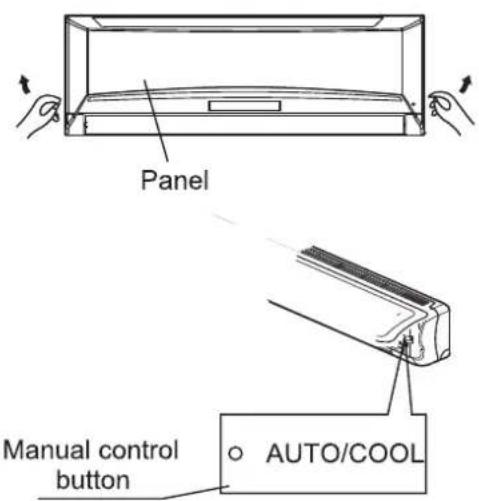
① Open and lift the front panel up to an angle until it remains fixed with a clicking sound.
② Push the button until the AUTO indicator is lit, the unit will workin forced AUTO mode (the default setting temperature is 24^ C/76°F).
③ Close the panel firmly to its original position.
CAUTION:
- Once you push the manual button, the operation mode is shifted in an order as: AUTO, COOL, OFF.
• This is used for testing purposes only. - To restore the remote controller operation, use the remote controller directly.
Airflow direction control
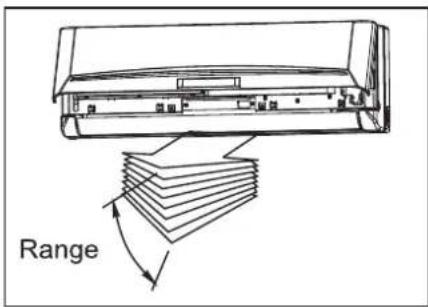
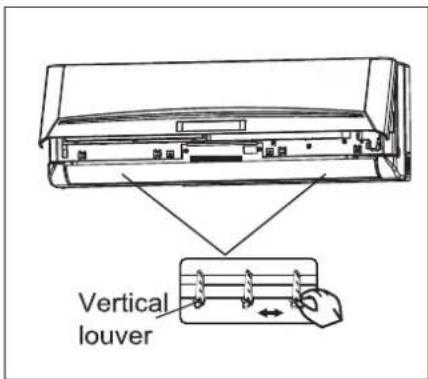
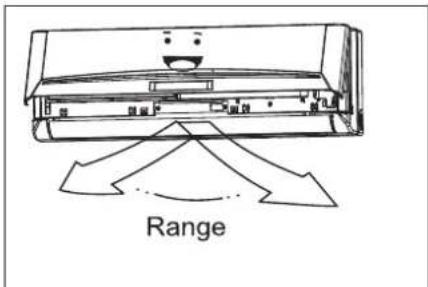
- Adjust the air flow direction properly otherwise, it might cause discomfort or cause uneven room temperatures.
- Adjust the horizontal louver using the remote controller.
- Adjust the vertical louver manually.
To set the vertical air flow(Up--Down) direction
Perform this function while the unit is in operation. Use the remote controller to adjust the air flow direction. The horizontal louver can be moved at a range of 6^ for each press, or swing up and down automatically. Please refer to the “REMOTE CONTROLLER OPERATION MANUAL” for details.
To set the horizontal air flow direction (left - right)
- Move the vertical louver manually to adjust the air flow in the direction you prefer.
IMPORTANT: Before adjusting the vertical louvers, the supply power must be disconnected.
- For some models, the vertical louver can be adjusted by using the remote controller. Please refer to the “REMOTE CONTROLLER OPERATION MANUAL” for details.
CAUTION
- Do not operate the air conditioner for long periods with the air flow direction set downward in cooling or dehumidifying mode. Otherwise, condensation may occur on the surface of the horizontal louver causing moisture to drop on to the floor or on furnishings.
- Do not move the horizontal louver manually unless it is necessary. Always use the remote controller.
- When the air conditioner is started immediately after it was stopped, the horizontal louver might not move for approximately 10 seconds.
- Open angle of the horizontal louver should not be set too small, as COOLING or HEATING performance may be impaired due to too restricted air flow area.
- Do not operate unit with horizontal louver in closed position.
- When the air conditioner is connected to power (initial power), the horizontal louver may generate a sound for 10 seconds, this is a normal operation.
How the air conditioner works
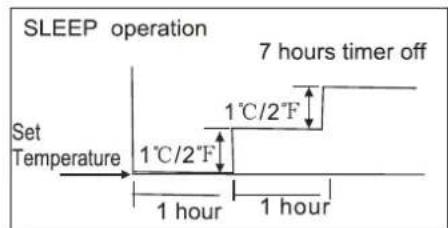
Cooling
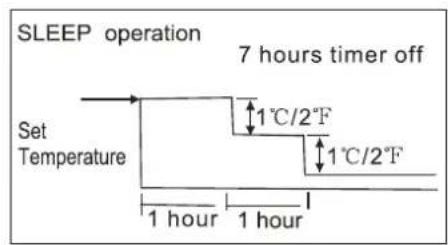
Heating
AUTO operation
- When you set the air conditioner in AUTO mode, it will automatically select cooling, heating(cooling/heating models only), or fan only operation depending on set temperature and the room temperature.
- The air conditioner will control room temperature automatically to the temperature point you set.
- If you feel uncomfortable in the AUTO mode, you can set your desired temperature.
SLEEP operation
When you push SLEEP button on remote controller during cooling, heating(cooling & heating models only), or AUTO operation, the air conditioner will automatically increase (cooling) or decrease (heating) 1°C/2°F per hour for the first 2 hours, then hold steadily for the next 5 hours, after that it will switch off. This mode saves you energy and brings you comfort at night.
DRYING operation
- The temperature is regulated while dehumidifying by repeating turning on and off of the cooling operation or fan only. The fan speed is LOW.
Optimal operation
To achieve optimal performance, please note the following:
- Adjust the air flow direction correctly so that it is not directed on people.
- Adjust the temperature to achieve the highest comfort level. Do not adjust the unit to excessive temperature levels.
- Close doors and windows on COOL or HEAT modes, or performance may be reduced.
- Use TIMER ON button on the remote controller to select a time you want to start your air conditioner.
- Do not put any object near air inlet or air outlet, as the efficiency of the air conditioner may be reduced and the air conditioner may stop running.
- Clean the air filter periodically, otherwise cooling performance may be reduced.
- Do not operate unit with horizontal louver in closed position.
Care and maintenance
natural_image
Diagram of hands operating a device with arrows indicating motion (no text or symbols)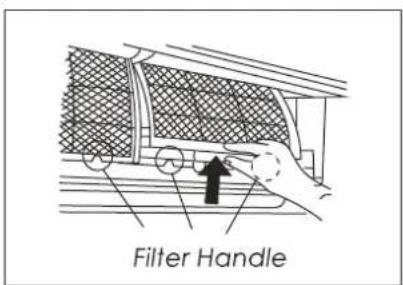
natural_image
Diagram showing a hand pressing down a car's seatbelt with a black arrow indicating the down-left direction (no text or symbols present)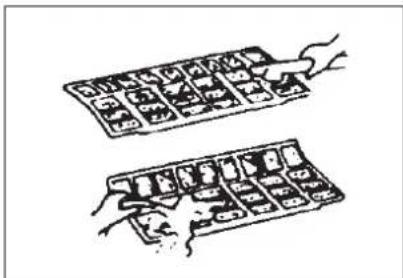
natural_image
Two hand-drawn illustrations of a keyboard with keys and buttons, no text or symbols presentCleaning the Grille, Case and Remote Controller
- Turn the system off before cleaning. To clean, wipe with a soft, dry cloth. Do not use bleach or abrasives.
NOTE: Power supply must be disconnectd before cleaning the indoor unit.

CAUTIONS
- A cloth dampened with cold water may be used on the indoor unit if it is very dirty. Then wipe it with a dry cloth.
- Do not use a chemically treated cloth or duster to clean the unit.
- Do not use benzine, thinner, polishing powder, or similar solvents for cleaning. These may cause the plastic surface to crack or deform.
- Never use water hotter than 40^ C/104°F to clean the front panel, it could cause deformation of discoloration.
Cleaning the air filter
NOTE: Power supply must be disconnectd before cleaning the indoor unit.
A clogged air filter reduces the cooling efficiency of this unit. Please clean the filter once every 2 weeks.
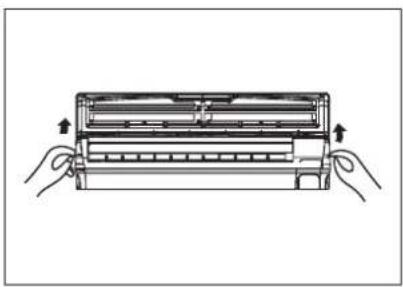
- Lift the indoor unit panel up to an angle until it stops with a clicking sound.
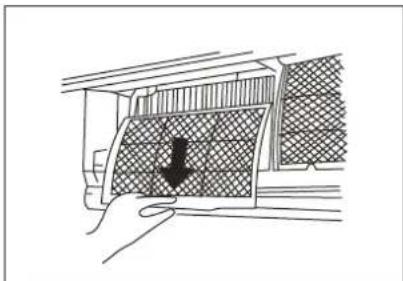
- Take hold of the handle of the air filter and lift it up slightly to take it out from the filter holder, then pull it downwards.
- Remove the AIR FILTER from the indoor unit. Clean the AIR FILTER once two weeks. Clean the AIR FILTER with a vacuum cleaner or water, then dry it up in cool place.
natural_image
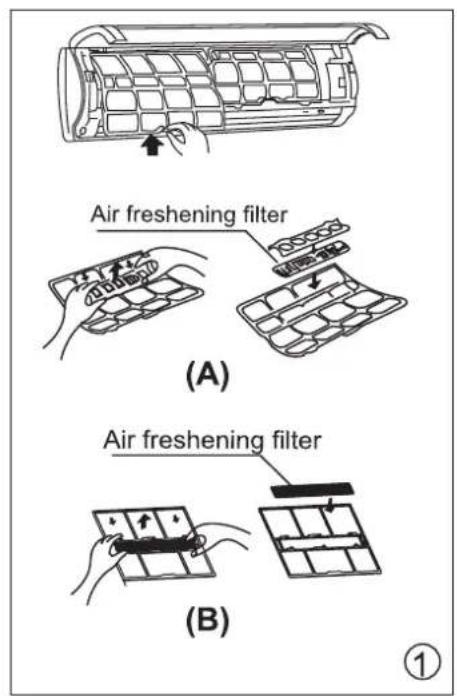
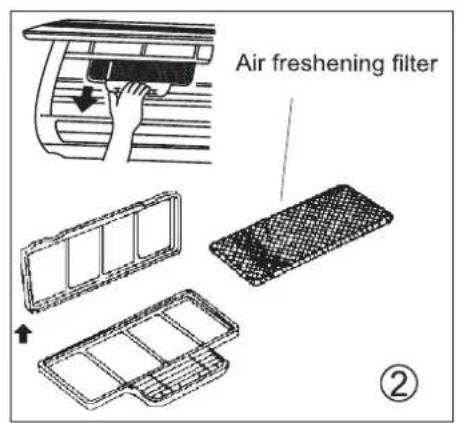
Line drawing of a hand placing a textured panel into a car air vent (no text or symbols)- Remove the Air Freshening Filter from its supporting frame, the solution to disassemble may be differ from each other for different filters. Refer to pictures marked ① and ② on the left.
(The optional filter include :Plasma Dust Collector/Silver Ion filter /Bio filter /Vitamin C filter/3M air purifier filter, etc.)
- Clean the air freshening filter at least once a month, and replace it every 4-5 months.
- Clean it with vacuum cleaner, then dry it in cool place.

For the units with PLASMA, do not touch the Plasma Dust Collector Filter within 10 minutes after opening the front panel, it may cause an electric shock.
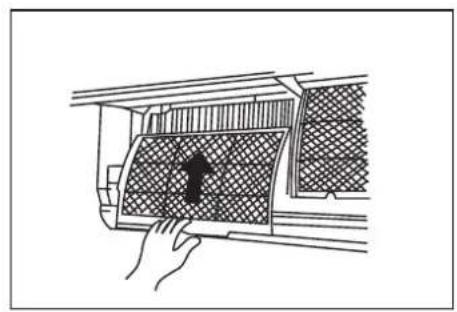
- Install the air freshening filter back into position.
- Insert the upper portion of air filter back into the unit, taking care that the left and right edges line up correctly and place filter into position.
Maintenance
If you plan to idle the unit for a long time, perform the following:
(1) Clean the indoor unit and filters.
(2) Operate the fan for about half a day to dry the inside of the unit.
(3) Stop the air conditioner and disconnect power.
(4) Remove the batteries from the remote controller. The outdoor unit requires periodic maintenance and cleaning. Do not attempt to do this yourself. Contact your dealer or service provider.
Checks before operation
- Check that the wiring is not broken off or disconnected.
- Clean the indoor unit and filters.
- Check that the air filter is installed.
- Check if the air outlet or inlet is blocked after the air conditioner has not been used for a long time.

Caution
- Do not touch the metal parts of the unit when removing the filter. Injuries can occur when handling sharp metal edges.
- Do not use water to clean inside the air conditioner. Exposure to water can destroy the insulation, leading to possible electric shock.
- When cleaning the unit, first make sure that the power and circuit breaker are turned off.
The following events may occur during normal operation.
1. Protection of the air conditioner.
Compressor protection
- The compressor can't restart for 3-4 minutes after it stops.
- The unit is designed not to blow cold air on HEAT mode, when the indoor heat exchanger is in one of the following three situations and the set temperature has not been reached.
Anti-cold air (Cooling and heating models only)
A) When heating has just started.
B) Defrosting.
C) Low temperature heating.
- The indoor or outdoor fan stop running when defrosting (Cooling and heating models only). Defrosting (Cooling and heating models only)
- Frost may be generated on the outdoor unit during heat cycle when outdoor temperature is low and humidity is high resulting in lower heating efficiency of the air conditioner.
- During this condition air conditioner will stop heating operation and start defrosting automatically.
- The time to defrost may vary from 4 to 10 minutes according to the outdoor temperature and the amount of frost built up on the outdoor unit.
2. A white mist coming out from the indoor unit
- A white mist may generate due to a large temperature difference between air inlet and air outlet on COOL mode in an indoor environment that has a high relative humidity.
- A white mist may generate due to moisture generated from defrosting process when the air conditioner restarts in HEAT mode operation after defrosting.
3. Low noise of the air conditioner
- You may hear a low hissing sound when the compressor is running or has just stopped running. It is the sound of the refrigerant flowing or coming to a stop.
- You can also hear a low "squeak" sound when the compressor is running or has just stopped running. This is caused by heat expansion and cold contraction of the plastic parts in the unit when the temperature is changing.
- A noise may be heard due to louver restoring to its original position when power is turned on.
4. Dust is blown out from the indoor unit.
This is a normal condition when the air conditioner has not been used for a long time or during first use of the unit.
5. A peculiar smell comes out from the indoor unit.
This is caused by the indoor unit giving off smells permeated from building material, from furniture, or smoke.
6. The air conditioner turns to FAN only mode from COOL or HEAT (For cooling and heating models only) mode.
When indoor temperature reaches the temperature setting on air conditioner, the compressor will stop automatically, and the air conditioner turns to FAN only mode. The compressor will start again when the indoor temperature rises on COOL mode or falls on HEAT mode (For cooling and heating models only) to the set point.
7. The air conditioner runs Anti-mildew function after turning off the unit.
When turning off the unit under COOL(AUTO COOL, FORCED COOL) and DRY mode, the air conditioner will run Anti-mildew function for 7-10 minutes, then stop the operation and turn off the unit automatically.
8. Heating mode (For cooling and heating models only)
The air conditioner draws in heat from the outdoor unit and releases it via the indoor unit during heating operation. When the outdoor temperature falls, heat drawn in by the air conditioner decreases accordingly. At the same time, heat loading of the air conditioner increases due to larger difference between indoor and outdoor temperature. If a comfortable temperature can't be achieved by the air conditioner, we suggest you use a supplementary heating device.
9. Auto-restart function
Power failure during operation will stop the unit completely.
- For the unit withoutAuto-restart feature, when the power restores, the OPERATION indicator on the indoor unit starts flashing. To restart the operation, push the ON/OFF button on the remote controller. For the unit withAuto-restart feature, when the power restores, the unit restarts automatically with all the previous settings preserved by the memory function.
-
For some models, the machine is special designed with Auto-restart function for the open angle of the horizontal louver. Power failure during operation or pressing the ON/OFF button on the remote controller will stop the unit completely. When the power restores or pressing the ON/OFF button on the remote controller again, the unit restarts automatically with all the previous settings including the open angle of the horizontal louver by the memory function. So we strongly suggest that the open angle of the horizontal louver should not be set too small, in case the condensed water forms and drops from the horizontal louver. Press the AUTO/COOL button under the front panel and the open angle of the horizontal louver will be restored to the standard angle when the condensed water forms on the horizontal louver.
-
Lightning or a car wireless telephone operating nearby may cause the unit to malfunction. Disconnect the unit with power and then re-connect the unit with power again. Push the ON/OFF button on the remote controller to restart operation.
Troubleshooting Tips
| If one of the following faults occurs, stop the air conditioner immediately, disconnect the power and then connect it in again. If the problem still exists, disconnect the power and contact the nearest customer service center. | |
| Trouble | OPERATION indicator or other indicators continue flashing. |
| Fuse blows frequently or circuit breaker trips frequently. | |
| Other objects or water fall into the air conditioner. | |
| The remote controller won't work or works abnormally. | |
| If one of the following code appears on the display area :E0,E1,E2,E3......or P0,P1,P2,P3...... | |
| Malfunctions | Cause | What should be done? |
| Unit does not start | Power cut | Wait for power to be restored. |
| Unit may have become Unplugged. | Check that plug is securely in wall receptacle. | |
| Fuse may have blown. | Replace the fuse. | |
| Battery in Remote controller may have been exhausted. | Replace the battery. | |
| The time you have set with timer is incorrect. | Wait or cancel timer setting. | |
| Unit not cooling or heating (Cooling/ heating models only) room very well while air flowing out from the air conditioner | Inappropriate temperature setting. | Set temperature correctly. For detailed method please refer to "Using remote control" section. |
| Air filter is blocked. | Clean the air filter. | |
| Doors or Windows are open. | Close the doors or windows. | |
| Air inlet or outlet of indoor or outdoor unit has been blocked. | Clear obstructions away first, then restart the unit. | |
| Compressor 3 or 4 minutes protection has been activated. | Wait. | |
| If the trouble has not been corrected, please contact a local dealer or the nearest customer service center. Be sure to inform them of the detailed malfunctions and unit model number. | ||
Notes: Do not attempt to repair the unit yourself.
Always consult an authorised service provider.

E-WASTE MANAGEMENT GUIDELINES
(PERTAINING TO THE E-WASTE RULES)
PROPER HANDLING AND/OR RECYCLING OF THE AIR CONDITIONER
Under the E-Waste (Management & Handling) Rules, 2011 (hereafter referred to as the "E-Waste Rules"), it is incumbent for all consumers, including the purchaser of this air-conditioner, to properly recycle and dispose of all electrical and electronic equipment through authorized recyclers.
E-Waste has been defined as "waste electrical and electronic equipment, whole or in part or rejects from their manufacturing and repair process, which are intended to be discarded".
E-Waste contains various hazardous materials like lead, mercury, cadmium, hexavalent chromium, polybrominated biphenyls and polybrominated diphenyls ethers. Hence, improper handling and disposal of e-waste releases these hazardous material in the environment causing pollution, contamination of soil and water and various health hazards.
Though the product purchased by you is ROHS compliant and does not contain any hazardous material above the prescribed limit under the E-Waste Rules, it is imperative that the product should be handled with utmost caution and as per the guidelines mentioned in this manual including the following Do's and Don'ts –
| Do's Don'ts | |
| Hand over the E-Waste to Authorised Recycler. Never sell the e-waste to any unauthorized agencies, scrap dealer/kabadiwalahs. | |
| E-Waste should be segregated from household and other wastes. | Never throw E-Waste in bins as part of household waste. |
| Keep the product in isolated area, after it becomes non-functional/un-repairable so as to prevent its accidental breakage. | Never keep E-Waste in open and exposed area, accessible by all. |
| The product should be opened only by authorised service personnel. | The product should not be opened by the user himself/herself. Dismantling of e-waste by the user can be dangerous |
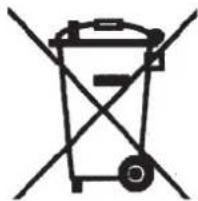
The following marking/symbol on the product or carton indicates that the product and its accessories/parts (e.g. remote controller, batteries, spare parts etc.) should not be disposed of with other household waste at the end of their working life. Please separate these items from other types of waste and recycle them responsibly for conservation of the environment and collective well-being.
natural_image
Simple line drawing of a trash bin with crossed lines indicating no waste or restriction (no text or symbols)E-WASTE RECYCLING PROGRAM
We have tied up with government approved e-waste recycler for facilitating the collection of e-waste from our channel partners and customers for recycling. You are simply required to call our toll free number 1800 30 11 11 11 and register your request for collection of e-waste. Once your request is received, the representatives of the authorized recycler would collect the e-waste from your house/premises after paying the value of the same to you. For more details and information on our E-Waste Recycling Program kindly visit our website www.carriermidea.com.
ANNUAL MAINTENANCE CONTRACT
Our air conditioners contain various components and inputs that are technical in nature and it is important that any repair or replacement of any of the components of the air conditioners is done only by the personnel authorized by Carrier.
We at Carrier Midea India Pvt. Ltd. believe in providing our valued customers the best in engineered technology & quality performance for extreme Indian conditions. Striving to keep our commitments and to ensure best product performance, We offer to you exciting “Happy Homes Annual Maintenance plans” to cover the service support for your products.
We recommend that you avail Happy Homes annual maintenance services from us in order to optimize the performance and the life span of your conditioners and also to ensure their safe and proper handling.
You can contact us on our call center number 180030111111, 8am to 8pm to register your request for An nua l Mai nte na nce ser vices or you can write to us on carriercare@carriermidea.com
WARRANTY TERMS & CONDITIONS
CARRIER MIDEA INDIA PRIVATE LIMITED (hereinafter referred to as the "Company"), hereby warrants to the original domestic purchaser (here in after called the "Purchaser") of the air-conditioning unit (as detailed within the Warranty Registration Card and here in after referred to as the "said unit") that the said unit is free from defects in materials and workmanship under normal use and service and under specified voltage conditions, and that during a period of twelve (12) months commencing from the date of invoice, as provided in the Warranty Registration Card, the Company undertakes to repair or to replace as it deems fit in sole discretion, free of charge, any part or parts of the said unit (including the compressor, condenser and evaporator) which proves to be defective in materials or workmanship.
FIVE YEAR COMPRESSOR WARRANTY
For four (4) years following the expiration of the entire unit warranty, the Company shall continue to warrant the compressor to be free from defects in material and workmanship under normal use and service and under specified voltage conditions. The Company shall repair or replace without cost to the original purchaser, any part or portion of the compressor, which shall be returned to us, transportation charges prepaid and which on inspection shall be shown to be thus defective. Expendable items like refrigerant gas, overload, oil, dryer, strainer and others are excluded from this warranty and are on chargeable basis. This warranty is subject to use of air-conditioner with input voltage of 230 V +/-10%. We recommend use of approved make of voltage stabilizer with output voltage of 230 V +/-10%. The terms and conditions as set out below shall form the basis of this warranty:
- The warranty shall be valid and that the Purchaser can have the benefit of this warranty, if and only if the Purchaser has duly intimated the fault to the Company or its authorized dealer and that the unit is in the possession of and is used by the Purchaser.
- The Warranty will shall be valid only for the said period of twelve months as specified above, irrespective of whether the said unit has been in use or not for any reason whatsoever, or the unit is moved from one location to another. The warranty period specified above shall include time taken for repairs, replacements, testing of unit, technical breakdowns, transit time etc. This warranty shall automatically expire by efflux of time on completion of the period indicated herein above and no notice of such expiry will be given by the Company.
- This warranty shall stand automatically terminated in the event of the said unit being serviced, repaired, installed, de-installed, re-installed or otherwise attended to by and person or organization or agency or by the Purchaser himself (by whatever name called), other that the authorized representative / Dealer of the Company
-
Parts of the units replaced or repaired under the terms of this warranty are warranted only for the remaining period of the original warranty period.
-
For attending any service call under this warranty beyond the Municipal limits of the locality in which the authorized representative/dealer is situated (outstation locations), all to and fro traveling and other incidental expenses as prevailing from time to time incurred in connection with the visit of the service personnel, technicians etc., shall be borne by the Purchaser and shall be payable in advance.
Additionally, all expenses incurred by the authorized representative/dealer in collecting the unit or any part thereof from such outstation locations and its return to the original location shall be borne exclusively by the Purchaser.
-
Any loss of refrigerant caused due to sabotage, improper handling or treatment, carelessness, accident, fire, flood, earthquake or any act of God, or any corrosive action on the original refrigerant pipes, fittings, valves etc. for whatever reason, shall not be covered under this warranty.
-
In the event of any change in the location of the unit, during the warranty period, this warranty shall become null and void unless the fact of the proposed change is communicated in writing to the authorized dealer at least seven (7) days prior to the said change. On receipt of such information, the authorized dealer or any of its counterparts shall arrange for de-installation of the said unit on a chargeable basis. However, it is expressly stated that in the event of any damage occurring to the unit or to any of its parts during the course of its transit by the Purchaser, repair or replacement of the said unit or any part thereof so damaged shall not be covered by this warranty.
-
While the Authorized Dealers/Company will make every effort to carry out repairs/replacement of parts under this warranty as soon as the complaint is received, it is expressly made clear that the Authorized Dealer/Company shall not be liable to do so within any specified period of time.
-
It shall be absolute discretion of the Company to (a) effect the repairs or replacement of parts whether at the site of installation or at any service center; and (b) have the job attended to either by the Company's service personnel or of its authorized dealers.
-
This warranty is in the nature of and for the purposes as set forth herein above and in particular, the Company shall not in any event be liable for any direct, indirect, incidental or consequential loss or damages to either the said purchaser and/or his property or any other third party in course of attending to any complaint.
-
Limitation of Warranty: Company shall not be responsible for providing any warranty under the following situations:
i. any damage caused by accident, mishandling, tampering with installation, or negligent in following instructions of the user manual issued by the Company.
ii. any damage caused by power surges and dips, improper electrical circuit outside the unit or by any defective electrical supply.
iii. at any time, during the currency of the warranty period, if any part of the unit is tampered with, altered, repaired or serviced by any unauthorized person, not being the authorized representative of the Company or its authorized dealers.
iv. the serial number on the unit or any part thereof is damaged, defaced, altered, obliterated, or tampered with or removed for any reason whatsoever.
v. the unit is unauthorizedly removed from its original place or installation or reinstallation.
vi. Condenser and Evaporator is found defective if the air conditioner is installed near the muddy sewages because toxic gases are harmful for the AC.
vii. Damage to the product due to operation in an abnormally corrosive alkaline / acidic atmosphere.
-
None of the employees and/or Authorized dealers of the Company have the authority whatsoever to vary the terms and conditions of this warranty.
-
This warranty shall be deemed to have been issued at Gurgaon in the State of Haryana, and Courts at Gurgaon shall have exclusive jurisdiction on matters covered by or following from this warranty, and the Purchaser alone shall have cause of action arising out of the transaction.
WARRANTY
Customer Copy
Carrier Midea India Private Limited
Model :
NAME OF CUSTOMER :
ADDRESS :
Sr. No. of the Unit :
Sr. No. of the Compressor :
Invoice No. :
Date of Purchase :
Name & Address of the Dealer :
Signature of the Dealer with seal :


WARRANTY
Carrier Midea India Private Limited
Model :
NAME OF CUSTOMER :
ADDRESS :
Sr. No. of the Unit :
Sr. No. of the Compressor :
Invoice No. :
Date of Purchase :
Name & Address of the Dealer :
Signature of the Dealer with seal :
Carrier Copy

PRODUCT WARRANTY CERTIFICATE
CARRIER MIDEA INDIA PRIVATE LIMITED (company) warrants this Carrier Room air conditioner to the original purchaser to be free from defects in material and workmanship under normal use and service and under specified voltage conditions and we shall, within one year from the date hereof, repair or replace any defect without cost to the original purchaser, a part or portion thereof which shall be returned to us, transportation charges prepaid, and which on inspection by the Company shall be shown to be thus defective. Plastic parts beyond the date of delivery, fuses, air filters, refrigerants, all and other expandable items are excluded from this warranty.
FIVE YEAR COMPRESSOR WARRANTY
For four (4) years following the expiration of the entire unit warranty, the Company shall continue to warrant the compressor only to be free from defects in material and workmanship under normal use and service and under specified voltage conditions. The Company shall repair or replace without cost to the original purchaser compressor, any part or portion of the compressor, which shall be returned to the Company, transportation charges prepaid and which on inspection shall be shown to be thus defective. Expendable items like refrigerant gas (which is required to be filled in again mandatorily at the time of repairing or replacing the compressor), overload, oil, dryer, strainer and others are excluded from this warranty and are on chargeable basis.
These warranties, however, shall not apply if the room air-conditioner has been installed in a manner affecting the efficiency or performance, or if the room air-conditioner has been tampered with, altered or in any way, repaired, serviced or worked on by anybody other than the Company's own technicians/staff or its authorized representative. This warranty shall also NOT apply to the compressor which has the serial numbers altered, defected or removed. The company shall not be liable for any injury, loss, or damage (direct, indirect, or consequential) of whatsoever arising out of the use or inability to use the product.

PRODUCT WARRANTY CERTIFICATE
CARRIER MIDEA INDIA PRIVATE LIMITED (company) warrants this Carrier Room air conditioner to the original purchaser to be free from defects in material and workmanship under normal use and service and under specified voltage conditions and we shall, within one year from the date hereof, repair or replace any defect without cost to the original purchaser, a part or portion thereof which shall be returned to us, transportation charges prepaid, and which on inspection by the Company shall be shown to be thus defective. Plastic parts beyond the date of delivery, fuses, air filters, refrigerants, all and other expandable items are excluded from this warranty.
FIVE YEAR COMPRESSOR WARRANTY
For four (4) years following the expiration of the entire unit warranty, the Company shall continue to warrant the compressor only to be free from defects in material and workmanship under normal use and service and under specified voltage conditions. The Company shall repair or replace without cost to the original purchaser compressor, any part or portion of the compressor, which shall be returned to the Company, transportation charges prepaid and which on inspection shall be shown to be thus defective. Expendable items like refrigerant gas (which is required to be filled in again mandatorily at the time of repairing or replacing the compressor), overload, oil, dryer, strainer and others are excluded from this warranty and are on chargeable basis.
These warranties, however, shall not apply if the room air-conditioner has been installed in a manner affecting the efficiency or performance, or if the room air-conditioner has been tampered with, altered or in any way, repaired, serviced or worked on by anybody other than the Company's own technicians/staff or its authorized representative. This warranty shall also NOT apply to the compressor which has the serial numbers altered, defected or removed. The company shall not be liable for any injury, loss, or damage (direct, indirect, or consequential) of whatsoever arising out of the use or inability to use the product.

For more details please contact Carrier Midea India Pvt. Ltd.:
REGISTERED OFFICE : 1st Floor, Pearl Global Tower, Plot No. 51, Institutional Area, Sector 32, Gurgaon - 122004, Haryana.
SALES OFFICES: Gurgaon: 0124-6144300, Ghaziabad: 0120-4183260, Chandigarh: 0172-5007548-50, Jaipur: 0141-4109080 Mumbai: 022-26528989, 42188800, Pune: 020-41051000, Goa: 0832-2447028, Ahmedabad: 079-40267777, Kolkata: 033-40201300, Chennai: 044-42222888, Bangalore: 080-43442000, Patna: 0612-2323517, Hyderabad: 040-45462888, Cochin: 0484-4029001, Lucknow: 0522-4158710, Indore: 0731-4294700, Pondicherry: 0413-2226676, Coimbatore: 0422-4385400, Guwahati: 0361-2666077, Bhubaneshwar: 0674-2585893, Nagpur: 0712-6453790, Ranchi: 0651-6452488, 2330095, Raipur: 0771-4013245.
Visit us at : www.carriermideaindia.com
The design and specifications are subject to change without prior notice for product improvement. Consult with the sales agency or manufacturer for details.
- USER'S MANUAL
- Split Type Room Air Conditioner
- SERVICE HELPLINE
- 3011 1111
- CONTENTS
- SAFETY PRECAUTIONS
- OPERATING INSTRUCTIONS
- CARE AND MAINTENANCE
- OPERATION TIPS
- TROUBLESHOOTING TIPS
- E-WASTE MANAGEMENT GUIDELINES
- ANNUAL MAINTENANCE CONTRACT
- WARRANTY TERMS AND CONDITIONS
- WARRANTY CARD
- CAUTION
- WARNING
- PARTS NAMES
- Indoor unit
- Outdoor unit
- Note:
- Special function
- CLEAN AIR function (on some models)
- Follow Me function (on some modles)
- The remote control serves as a remote thermostat allowing for the precise temperature control at its location.
- Anti-mildew function (on some models)
- Turbo function (on some models)
- Manual operation
- CAUTION:
- Airflow direction control
- To set the vertical air flow(Up--Down) direction
- To set the horizontal air flow direction (left - right)
- How the air conditioner works
- AUTO operation
- SLEEP operation
- DRYING operation
- Optimal operation
- Cleaning the Grille, Case and Remote Controller
- CAUTIONS
- Cleaning the air filter
- NOTE: Power supply must be disconnectd before cleaning the indoor unit.
- Maintenance
- Checks before operation
- Protection of the air conditioner.
- Compressor protection
- Anti-cold air (Cooling and heating models only)
- A white mist coming out from the indoor unit
- Low noise of the air conditioner
- Dust is blown out from the indoor unit.
- A peculiar smell comes out from the indoor unit.
- The air conditioner turns to FAN only mode from COOL or HEAT (For cooling and heating models only) mode.
- The air conditioner runs Anti-mildew function after turning off the unit.
- Heating mode (For cooling and heating models only)
- Auto-restart function
- (PERTAINING TO THE E-WASTE RULES)
- PROPER HANDLING AND/OR RECYCLING OF THE AIR CONDITIONER
- E-WASTE RECYCLING PROGRAM
- WARRANTY TERMS & CONDITIONS
- FIVE YEAR COMPRESSOR WARRANTY
- WARRANTY
- PRODUCT WARRANTY CERTIFICATE
Brand : CARRIER
Model : Esko
Category : Air conditioner