MTM-7800 - Exercise bike Proteus - Free user manual and instructions
Find the device manual for free MTM-7800 Proteus in PDF.


| Product Type | Exercise Bike |
| Brand | Proteus |
| Model | MTM-7800 |
| Monitor Type | LCD with 6 windows |
| Programs | 9 preset + 2 user + manual |
| Resistance Levels | 12 (1-12) |
| Speed Range | 1.0-16.0 km/h (0.5-10.0 mph) |
| Time Range | 00:00-99:59 (count up/down) |
| Distance Range | 0.0-999.9 km/mile |
| Calorie Range | 0.0-999.9 cal |
| Pulse Measurement | 40-240 BPM |
| Power Supply | Batteries (not specified) |
| Display | LED windows: Time, Speed, Distance, Calories, Pulse, Message |
| Weight Capacity | 120 kg (approx) |
| Product Dimensions (W x D x H) | 120 x 50 x 100 cm (approx) |
| Net Weight | 35 kg (approx) |
| Foldable | No |
| Assembly Required | Yes |
| Safety Key | Yes |
Frequently Asked Questions - MTM-7800 Proteus
User questions about MTM-7800 Proteus
0 question about this device. Answer the ones you know or ask your own.
Ask a new question about this device
Download the instructions for your Exercise bike in PDF format for free! Find your manual MTM-7800 - Proteus and take your electronic device back in hand. On this page are published all the documents necessary for the use of your device. MTM-7800 by Proteus.
USER MANUAL MTM-7800 Proteus
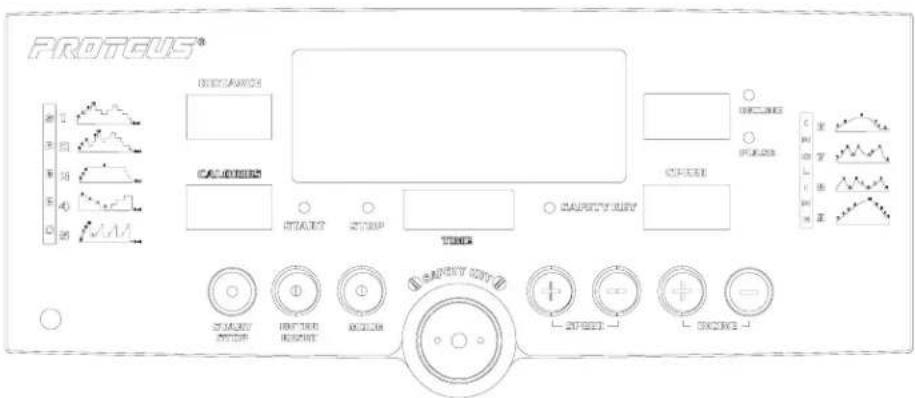
PROTEUS MTM 7800 TREADMILL MONITOR
INTRUCTION MANUAL
FRONT VIEW
text_image
PROTEGUS® 1 2 3 4 5 6 7 8 9 10 11 12 13 14 15 16 17 18 19 20 21 22 23 24 25 26 27 28 29 30 31 32 33 34 35 36 37 38 39 40 41 42 43 44 45 46 47 48 49 50 51 52 53 54 55 56 57 58 59 60 61 62 63 64 65 66 67 68 69 70 71 72 73 74 75 76 77 78 79 80 81 82 83 84 85 86 87 88 89 90 91 92 93 94 95 96 97 98 99 100SUMMARY:
This system is designed for treadmill. The monitor BC-6605II has seven buttons, 6-window display. There are 9 programs, 2 users setting and one manual function.
THE BRIEF INTRODUCTION OF MONITOR BC-6605II
A. MANUAL : User can adjust speed and incline values by themselves.
B. PROGRAM : It includes 9 program.
C. USER SETTING : 2 Users setting patterns. USER can set the program function by themselves.
FUNCTION
-
TIME : The range of time is 00:00\~99:59 in count up of the circumstances. When we set count down, the range of time is 10:00\~99:00.
-
SPEED : The range of KPH is 1.0\~16.0 and the range of MPH is 0.5\~10.0. The SPEED can only set in the MANUAL AND USER SETTING MODE.
-
DISTANCE : It indicates on the MESSAGE LED WINDOW, the counting value from 0.0\~999.9 KM/MILE, and it can be switch by the pressing the SPEED& Θ BUTTON.
-
CALORIES : It indicate on the MESSAGE LED WINDOW, the counting value from 0.0\~999.9 CAL, and it can be switch by the pressing the SPEED ☐ & ☑ BUTTON.
- PULSE : It indicates on the MESSAGE LED WINDOW, the counting value form 40\~240BPM.
- INCLINE : It is divide from 1\~12 LEVEL. It indicate on the MESSAGE LED WINDOW, and can be switch by pressing the INCLINE ☐ & ⊖ BUTTON.
ABOUT KEY
- MODE : Press the button to choose manual, program 1 to program 9 and user 1 to user 2.
2. SPEED UP
a. Press this button to increase the values of SPEED.
b. In the manual and user setting, press this button to increase DISTANCE or/and CALORIES or/and TIME or/and SPEED setting.
c. In the program 1 to 9, press this button to increase DISTANCE or/and CALORIES or/and TIME setting.
3.SPEED DOWN
a. Press this button to decrease the values of SPEED.
b. In the manual and user setting, press this button to decrease DISTANCE or/and CALORIES or/and TIME or/and SPEED setting.
c. In the program 1 to 9, press this button to decrease DISTANCE or/and CALORIES or/and TIME setting.
- START/STOP: Press this button to start or stop the treadmill.
5. ENTER/PRESET:
a. Press this button to confirm the manual, program and user setting function and SPEED setting.
b. Press this button to confirm the preset value of TIME or/and DISTANCE or/and CALORIES or/and SPEED setting.
c. Press this button 2 seconds to use RESET function.
6. INCLINE UP: Press this button to increase Incline Level.
7. INCLINE DOWN: Press this button to decrease Incline Level.
OPERATION INSTRUCTIONS
- After turning on power, then user produces beep sound and all LED display to appear KM or MILE motorize treadmill goes to flat situation and press mode button to chose the manual, program 1 to program 9 and USER SETTING user 1 to user 2. Then wait 3\~5 seconds the graphic will display.
■ In the MANUAL function—
A. a. TIME window glitter, use SPEED UP or SPEED DOWN to set up the desire exercise. Press ENTER to confirm the value of TIME, and then DISTANCE window will glitter.
b. DISTANCE window glitter, use SPEED UP or SPEED DOWN to set up the desire exercise. Press ENTER to confirm the value of DISTANCE, and then CALORIES window will glitter.
c. CALORIES window glitter, use SPEED UP or SPEED DOWN to set up the desire exercise. Press ENTER to confirm the CALORIES value, and then SPEED window will glitter.
d. Then press START to exercise. Time value will count up.
B. If you would not like to select any special function and value, just press START key to exercise. The speed value will begin from 1km/0.5mile value will count down.
--In the programs function (from program 1 to program 9) --
A. Press MODE to choose which program you would like to exercise and then press ENTER to enter this program.
B. TIME LED will glitter, press SPEED UP or SPEED DOWN to set up time value.
C. Press ENTER to confirm the value of time.
D. Press START/STOP to start exercise.
--In the USER SETTING model (user 1 to user 2) -
A. a. TIME window will glitter. Press the SPEED UP or DOWN to set how long you would like to exercise. Press the ENTER to confirm the value of TIME.
b. DISTANCE window will glitter. Press the SPEED UP or DOWN to set how far you would like to run. Press the ENTER to confirm the value of DISTANCE.
c. CALORIES window will glitter. Press the ENTER to confirm the value of CALORIES.
d. The first column of LED matrix will glitter. Press SPEED UP or DOWN to set up desire speed. Then press ENTER to confirm setting value.
e. The second column of LED matrix will glitter. Press SPEED UP or DOWN to set up desire speed. Then use ENTER to confirm setting value. Follow point 2.3. to finish the user program setting.
f. Press START to exercise, TIME value will count down.
B. As in the MANNUAL mode, if you would not like to set any function or value, just press START to exercise. The time value will count up.
☐ Any time, take away SAFETY KEY to turn off all LED and stop all function.