W650 - Watch Lorus - Free user manual and instructions
Find the device manual for free W650 Lorus in PDF.


User questions about W650 Lorus
0 question about this device. Answer the ones you know or ask your own.
Ask a new question about this device
Download the instructions for your Watch in PDF format for free! Find your manual W650 - Lorus and take your electronic device back in hand. On this page are published all the documents necessary for the use of your device. W650 by Lorus.
USER MANUAL W650 Lorus
• Hour, minutes, seconds, month, date and day of the week.
- Fully automatic calendar: Calendar adjusts automatically for odd and even months including February of leap years from the year 1995 up to the end of 2044.
• Time indication: Changeover between 12- and 24-hour indications is possible.
- Stopwatch: Measures up to 10 hours with 1100-second readout.
- 8 lap memory: Up to 9 lap times can be stored in memory.
- Countdown timer:
- Preset timer: Four different lengths of time (3, 5, 10 and 15 minutes) have been preset for the timer.
- Adjustable timer: Up to 9 hours and 50 minutes can be set in minutes.
- Auto repeat function: After the set time is up, the timer counts down the set time again as many times as necessary.
- Daily alarm: The alarm can be set to ring on a 24-hour basis. At a designated time, the display is illuminated as the alarm rings.
- Hourly time signal: Can be set to ring every hour on the hour with a single beep.
5. LORUS LITE FLORUS
The light evenly illuminates the display in the dark.
Auto Illumination function - If it is turned on in the time/ calendar setting display, the display is illuminated with each depression of a button to operate the watch. While the stopwatch or timer is counting, the display is illuminated every minute to signal the lapse of time by turning on the auto illumination function. In the stopwatch function, it is activated for the first 18 minutes. In the adjustable timer function, it is activated for the last 19 minutes of the countdown.
■ BUTTONS AND DISPLAYS
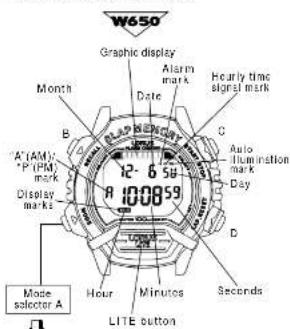
text_image
W650 Graphic display Alarm mark Hourly time signal mark Date Month B A' (AM) P (PM) mark Display marks 12-6 PM 10:08:59 Auto illumination mark Day D Seconds Hour Minutes LITE button Mode selector AMode Selection of Cal. W650
With each depression of mode selector "A", the selection of the display can be made in the following order.
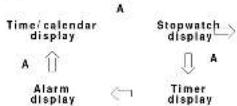
* If the confirmation sound is turned on, it beeps when the display is changed by depressing mode selector "A". * A flashing display mark indicates that the corresponding function is in use.
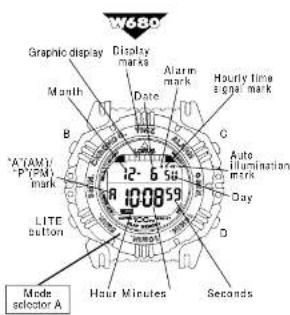
text_image
W680 Graphic display Display marks Alarm mark Hourly time single mark Month Date G B MAYAM/ P (PM) mark 12-6 50 100059 Day LITE button Hour Minutes Seconds Mode selector A1
Mode Selection of Cal. W680
The display changes by turning mode selector "A" clockwise or counterclockwise to set the desired display mark at the 12 o'clock position.
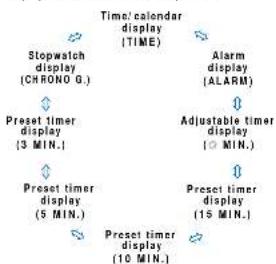
flowchart
graph TD
    A["Stopwatch display (CHRONO G.)"] --> B["Preset timer display (3 MIN.)"]
    B --> C["Preset timer display (5 MIN.)"]
    C --> D["Preset timer display (10 MIN.)"]
    D --> E["Preset timer display (15 MIN.)"]
    E --> F["Preset timer display (10 MIN.)"]
    F --> G["Time/calender display (TIME)"]
    G --> H["Alarm display (ALARM)"]
    H --> I["Adjustable timer display (MIN.)"]
A flashing display mark indicates that the corresponding function is in use.
■HOW TO SET THE TIME/CALENDAR AND AUTO ILLUMINATION
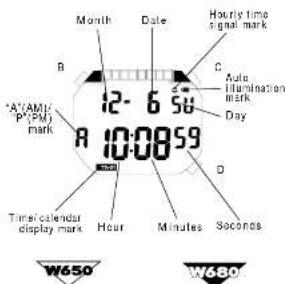
text_image
Month Date Hourly time signal mark B C A'AM1' P(PM) mark Auto H illumination mark Day R 12-6 56 10:00:59 D Time/calendar display mark Hour Minutes Soconos W650 W680- Depress mode selector "A" to show the time/calendar display.
-
Turn mode selector. "A" to set "TIME" at the 12 p'clock position.
-
Depress button 'B' for 2 to 3 seconds to show the time/ calendar setting display. "EL AUTO" is displayed together with flashing "on" mark.
-
Selection of the digits to be adjusted (flashing) is made in the following order by depressing button "G"
Auto illumination* -Seconds -Minutes -Hour (EL-AUTO on/off)
12- or 24-hour indication - Year - Month - Date
* For details, refer to "Auto Illumination Function" below
-
Depress button "D" to set the flashing digits. One digit is advanced with each depression of the button. Digits except seconds move quickly by keeping button "D" depressed.
-
After all the adjustments are completed, depress button "B" to return to the time/calen dar display.
Auto Illumination Function
With each depression of button "D" in the time/ calendar setting display, the "EL-AUTO on" and "EL-AUTO off" marks appear alternately. When the "EL-AUTO on" mark is displayed, the auto illumination function is turned on. When the "EL-AUTO off" mark is displayed, it is turned off.
When it is turned on:
-
The display is illuminated with each depression of a button to operate the watch.
-
While the stopwatch or timer is counting, the display is illuminated every minute to signal the lapse of time. In the stopwatch function, the auto illumination function is activated for the first 19 minutes. In the adjustable timer function, it is activated for the last 19 minutes of the countdown.
Seconds selling
Depress button "0" in accordance with a time signal. The seconds are react to "00" and start immediately.
When the seconds count any number from "30" to "59" and button "D" is depressed, one minute is added and the seconds are reset to "80".
Notes:
-
When setting the hour digits in the 12-hour indication, check that "A" (AM) "P" (PM) mark is set properly. In the 24-hour indication, there is no indication.
-
Once the year, month and date have been set, the day of the week is set automatically.
-
If the watch is left untouched in the timer/ calendar selling display with the digits flashing, it will automatically return to the timer/ calendar display in 2 to 3 minutes.
■ HOW TO USE THE STOPWATCH
- The stopwatch can measure up to 9 hours, 59 minutes, 58 seconds and 99 in 1/100 seconds.
- By turning on the button operation confirmation sound, a beep sounds every minute to signal the lapse of time.
By turning on the auto illumination function, the display is illuminated every minute to signal the lapse of time for the first 19 minutes. Even if the stopwatch display is changed to another while the measurement is in progress, it continues counting properly. After the stopwatch is used, however, be sure to reset it as the battery energy is consumed enormously to shorten the battery life.
* While the stopwatch is measuring, the graphic display turns on and off repeatedly.
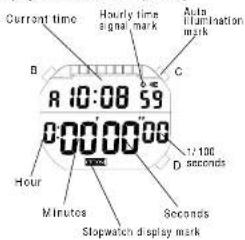
text_image
Current time Hourly time signa mark Auto Illumination mark A 10:08 59 0000000 1:100 seconds B C Hour Minutes Seconds Stopwatch display markStopwatch Operation

Accumulated elapsed time measurement
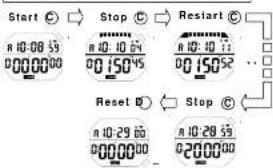
text_image
Start Ⓧ Stop Ⓧ Reset Ⓧ R 10:08 59 R 10:10 64 R 10:10 71 R 10:29 60 R 10:20 59 000000 00150°5 00150°2 Reset Ⓧ Stop Ⓧ R 10:29 60 R 10:20 59 000000 02000°**Accumulate repeatedly by depressing button "C".
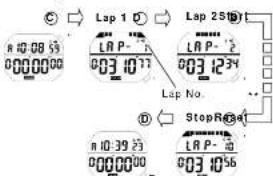
Lap time measurement
- "Lap time" refers to an elapsed time required to cover a given section of the whole distance.
text_image
Digital display control interface showing lap settings and stop controls for 125/125/250/300/350/400/450/500/550/600/650/700/750/800/850/900/950/1000/1050/1100/1150/1200/1250/1300/1350/1400/1450/1500/1550/1600/1650/1700/1750/1800/1850/1900/1950/2000/2050/2100/2150/2200/2250/2300/2350/2400/2450/2500/2550/2600/2650/2700/2750/2800/2850/2900/2950/3000/3050/3100/3150/3200/3250/3300/3350/3400/3450/3500/3550/3600/3650/3700/3750/3800/3850/3900/3950/4000/4050/4100/4150/4200/4250/4300/4350/4400/4450/4500/4550/4600/4650/4700/4750/4800/4850/4900/4950/5000/5050/5100/5150/5200/5250/5300/5350/5400/5450/5500/5550/5600/5650* Lap time measured and lap number remain displayed for 10 seconds, and then the measurement in progress and the current time appear. ** Car repeat by depressing button "D".
Notes:
-
The lap number counts up to "99". After "99", the number is displayed in two digits such as "00" for 100, "01" for 101 and so on.
-
Up to 9 lap times can be stored in memory. If more than 8 lap times are measured, the measurements over 8 will not be stored in memory.
Memory Function
- Up to 3 lap times are automatically stored in memory, and they can be recalled either during or after the measurement.
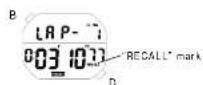
[Memory recall alter measurement]
-
Depress button "B" to show the memory recall display. The oldest measurement stored in memory is displayed.
-
Witty each depression of button "D". the stored data are recalled successively from the oldest to the newest.
[Memory recall during measurement]
-
Depress button "B" to show the memory recall display. The newest measurement stored in memory is displayed.
-
With each depression of button "D". The stored data are recalled successively from the oldest to the newest.
Note: Even if the digits are reset to "00" in the stopwatch measurement, stored data is not erased and can be recalled unless a new measurement is started.
■HOW TO USE THE TIMER
- Two types of timers (adjustable timer and preset timer) are available.
- After the set time is up, the timer counts down the set time repeatedly. After the timer is used, therefore, be sure to reset it as the battery energy is consumed enormously to shorten the battery life.
- By turning on the button operation confirmation sound, a beep sounds every minute to signal the lapse of time.
- By turning on the auto illumination function, the display is illuminated every minute to signal the lapse of time for the last 19 minutes of the countdown. If the countdown is repeated more than 10 times, however, the display will not be illuminated.
How to Use the Preset Timer
- Four different lengths of time (2, 5, 10 and 15 minutes) have been preset for the timer.
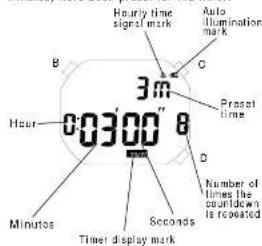
text_image
Hourly time signal mark Auto Illumination mark 3m C Proset time 00300" 8 D Number of times the clockdown is repeated Minutes Seconds Timer display markSelection of the presel time


- Depress mode selector "A" to show the timer display. The time set previously will be displayed.
Turn mode selector "A" to set the desired preset time at the 12 o'clock position.
- Depress button "D" to select the desired preset time. Selection of the preset time is made in the following order by depressing button "D". Adjusted time: 5 min.
- 15 min, 15 min.
Preset timer operation
Depress buttons in the following order.
C→ C→ C→ Time-up → C
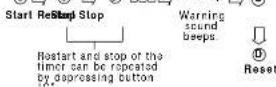
* When the set time is up, a warning sound beeps for 5 seconds as the display is illuminated. To stop them manually, depress turn mode selector "A", or depress button "B", "C", "D" or LITE button.
Notes: 1. After the countdown is repeated 99 times, the number of times the countdown is repeated is displayed in two digits such as '00' for 100, '01' for 101, and so on.
- Once the timer is set, the set time is retained and can be used repeatedly unless it is restadjusted.
How to Use the Adjustable Timer
- The adjustable timer can be set up to 9 hours and 57 minutes in minutes.
Adjustable timer setting


-
Depress mode selector "A" to show the timer display.
-
Depress button "D" to select the adjustable timer. Selection of the adjustable timer and preset timers is made in the following order by depressing button "D".
-
Turn mode selector "A" to set "MIN." at the 12 o'clock position. Then, proceed to step "3" below, skipping step "2".
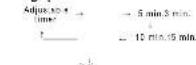
1
- Depress button "B" for 2 to 3 seconds to show the adjustable timer setting display. The hour digits start flashing.
- Selection of the digits to be adjusted [flashing] is made in the following order by depressing button "C".
Minutes Hour
-
Depress button "D" to set the digits. One digit is advanced with each depression of the button. The digits move quickly by keeping the button depressed.
-
After all the adjustments are completed, depress button 'B' to return to the timer display. The time you have set remains displayed.
Note: If the watch is left untouched in the adjustable timer setting display with the digits flashing, it will automatically return to the timer display in 2 to 3 minutes.
Adjustable timer operation
Refer to "Preset timer operation" above.
■HOW TO SET THE ALARM
- The alarm can be set to ring on a 24-hour basis. At the designated time, the display is illuminated as the alarm rings.
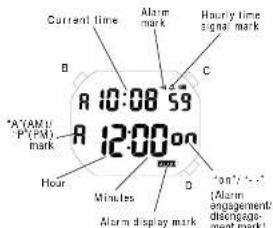
text_image
Current time Alarm mark Hourly time signal mark B C A (AM) P (PM) mark 10:08 59 12:00 on Hour Minutes D "on"/... (Alarm engagement/ disconnection mark)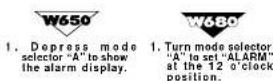
- Depress button "B" for 2 to 3 seconds to show the alarm setting display. The alarm mark and "on"/"P" mark disappear and the hour digits (and "A"/"P" mark if the time is set in the 12-hour indication) start flashing.
- Depress button "G" to select the digits to be adjusted (flashing).
Hour Minutes
1
-
Depress button "D" to set the digits. One digit is advanced with each depression of the button. The digits move quickly by keeping the button depressed.
-
After all the adjustments are completed, depress button "B" to return to the alarm display. The alarm mark and "on" mark are automatically displayed.
Notes:
-
When the time function is displayed in the 24-hour indication, the alarm is also displayed in the 24-hour indication.
-
When setting the hour digits in the 12-hour indication, check that "A" (AM)/ "P" (PM) mark is properly set. In the 24-hour indication, there is no indication.
-
If the watch is left untouched in the alarm setting display with the digits flashing, it will automatically return to the alarm display in 2 to 3 minutes.
Engagement/disengagement of the alarm
- With each depression of button "C" in the alarm display, the alarm is engaged and disengaged alternately.
| ••• | Alarm engaged |
| Alarm disengaged |
- At the designated time, the alarm rings and the display is illuminated alternately for 20 seconds and step. To step them manually, depress turn mode selector "A", or depress button "B", "C", "D" or LITE button.
Turning on/off of the hourly time signal and button operation confirmation sound and alarm test
- With each depression of button °C in the time/calendar display, the hourly time signal and confirmation sound for the button operation are turned on and off alternately.
| Hourly time signal and confirmation sound turned on | |
| Hourly time signal and confirmation sound turned off |
- The alarm can be tested by keeping buttons "C" and "D" depressed in the time/ calendar display. After the alarm sound is tested, be sure to check turning on/off of the hourly time signal and confirmation sound, as they are turned on and off alternately by depressing button "C".
■NOTE ON UNUSUAL DISPLAY
While in the time/ calendar setting display, the display as shown below will appear if both buttons "C" and "D" are depressed at the same time. This is not a malfunction. Depress/turn made selector "A", or depress button "B", "C", "D" or LITE button to return to the time/ calendar display, and then set the time/ calendar again.
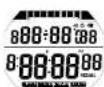
[All the segments lighting up]
■ LUMIBRITE WATCH
(dial, hands, buttons, case, bezel, strap, etc.)

- If your watch is a LORUS LUMIBRITE watch, it has following features.
LORUS LUMIBRITE watches absorb and store light energy from natural and artificial light sources and emit light in the dark. They are made of environmentally friendly material, and therefore, are harmless to human beings and the environment.
- With a full charge, LORUS LUMIBRITE watches glow in the dark hours longer than conventional luminous watches of this type. If exposed to a light of more than 500 lux (i.e., the brightness of a typical office) for approximately 10 minutes, or direct sunlight for 2 minutes, they will glow for hours.
- Since LORUS LUMIBRITE watches emit the light they store, the brightness will decrease gradually over time. The length of time they will glow may also differ slightly depending on such factors as the brightness of and distance from the light source used to charge the watch.
■ LORUS LITE

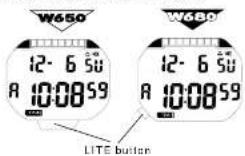
While LITE button is kept depressed in the time/ calendar, stopwatch, timer or alarm display, the electroluminescent light evenly illuminates the display for easy viewing in the dark.
Notes:
-
LORUS LITE watches work with one battery. When the electroluminescent light begins to lose its luminance, this is an indication that the battery is depleted. We recommend that you change the battery before the watch itself stops.
-
If the electroluminescent light is used continuously for a long time, the battery life may be less than the specified period.
■BATTERY CHANGE
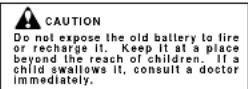
The miniature lithium battery SEIKO CR2025, SONY CR2025 or Matsushita CR2025, which powers your watch should last approximately 2 years. However, because it is inserted at the factory, the actual life of the battery once in your possession may be less than 2 years. Be sure to replace the battery to prevent any possible malfunction as soon as it runs down. To replace the battery, we recommend taking the watch to a local watch repair shop.
• Battery Life Indicator
When the battery nears its end, all the digits of the display start flashing. In that case, replace the battery as soon as possible.
Notes:
-
If the stopwatch is used for more than 10 hours a day, the timer for more than 10 hours a day, the alarm more than once a day, the illuminating light more than 3 times a day, the auto illumination more than 30 times a week and/or the confirmation sound more than 24 times a day, the battery life may be less than the specified period.
-
After the battery is replaced with a new one:


Depress made selector "A", buttons "B", "C" and "D" at the same time for 2 to 3 seconds.
Depress buttons "B", "C", "D" and LITE button at the same time for 2 to 3 seconds.
The display becomes blank, and when the mode selector and/or buttons are released, the time/calendar of "A 12:00 on 1-1 SU" is displayed. Then, set the desired time/calendar and alarm time. (See "HOW TO SET THE TIME/CALENDAR" and "HOW TO SET THE ALARM".)
■ CARE OF YOUR LORUS WATCH
• BATTERY
• WATER RESISTANT
| Condition of use indicators on the balance sets | Accidental contact-off water, such as sulphates and tail | Salimming and taking a shower | Skin riding | Souache riding |
| No indication | NO NO | NO | NO | |
| WATER RESISTANT | YES NO | NO | NO | |
| WATER RESISTANT (50 kJ or 100 m2) | YES YES | NO | NO | |
| WATER RESISTANT (100 m2)(10 BAR or above) | YES YES | YES | NO |
* If your watch is 200 M/20 BAR, 100 M/10 BAR or 50 M/5 BAR water resistant, it is so indicated on the dial/casp bank.
- Do not operate the buttons when the watch is wet
- If the watch is exposed to salt water, rinse it in fresh water and then wipe it thoroughly dry. Caution:
Leather straps are not water resistant except so indicated, even if the watch head is water resistant.
- ALLERGIC REACTION Because the case and band touch the skin directly, it is important to clean them regularly. If not, shirt sleeves may be stained and those with delicate skin may develop a rash. Please wear the watch with some play to avoid any possible allergic reaction. If you develop a rash on your wrist, step wearing and consult a physician.
• MAGNETISM
Your watch will not be affected by magnetism generated by household electric appliances.
• SHOCKS AND VIBRATIONS
Your watch may be worn for normal sports activities, but be careful not to drop it or hit it on hard surfaces.
- TEMPERATURE
Your watch is preadjusted so that constant accuracy may be insured at normal tempera-
■ SERVICE
When your LORUS watch requires repair or servicing, please see the enclosed WARRANTY/GUARANTEE.