W820 - Watch Lorus - Free user manual and instructions
Find the device manual for free W820 Lorus in PDF.


User questions about W820 Lorus
0 question about this device. Answer the ones you know or ask your own.
Ask a new question about this device
Download the instructions for your Watch in PDF format for free! Find your manual W820 - Lorus and take your electronic device back in hand. On this page are published all the documents necessary for the use of your device. W820 by Lorus.
USER MANUAL W820 Lorus
text_image
NREW820 03-2002 LORUS INSTRUCTION MANUAL CAL. W820 (RWP SERIES)CAUTION
- The compass function
a) The compress function may not work depending on the condition of use such as season, weather or obstacles intercepting view of the sun or moon.
b) For such activities as mountain climbing and oricateering which require very accurate directions, be sure to use a conventional magnetic compass together with this watch for safety's sake.
- The signal function
a) Do not use the watch as a distress signal transmitter as it is not designed for such purpose. The signal light emitted from the watch may not be perceived depending on such factors as distance to the target and angle of the watch face.
■ CHARACTERISTICS
.Time/calendar display:
Hour, minutes, seconds, month, date and
day of the week.
Fully automatic calendar: Calendar adjusts automatically for odd and even months including February of leap years from the year 1994 up to the end of 2003.
Time indication: Changover between 12-
and 24-hour indications is possible.
Daylight saving time: Daylight saving
time can be set.
- Compass: Indicates 16 directions on the basis
of the directions of the sun and moon.
Moon phase display with the age of the
Moon.
- Stopwatch: Measures up to 10 hours with
100 second reaoult.
Split time measurement
- Daily alarm: The alarm can be set to ring on
24-hour basis.
Hourly time signal: Can be set to ring
every hour on the hour with a single beep.
- Signal function: Four preset Morse code
messages can be sent by illuminating light.
- Illuminating light: The light easily illumin-
of the following image: The light overnight manne nates the display in the dark.
■ BUTTONS AND DISPLAYS
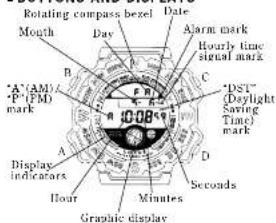
text_image
Rotating compass bezel Date Mouth Day Alarm mark Hourly time signal mark "AM" P'FMD mark C D "UST" (Daylight Saving Time) mark Display indicators A B C D A B C D Hours Minutes Seconds Graphic displayThe selection of the displays can be made in the following order with each depression of button 'A'.
Time/calendar display A Compass display A Stopwatch display
A 介 □ A
Signal display ← Alarm display
* The confirmation sound beens differently when
the time/calendar display appears, so that you can easily know the display known.
* Even if the stopwatch display is changed over
to another while the measurement is in progress, the stopwatch continues counting properly and the flashing stopwatch display indicator appears in the display.
■ HOW TO SET THE TIME/CALENDAR AND DAYLIGHT SAVING TIME
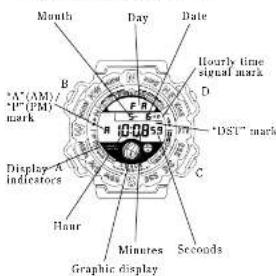
text_image
Month Day Date A*(AM)/ P(PM) mark 10.08 Hourly time signal mark D DST mark Display-A indicators C Hours Minutes Seconds Graphic display-
Depress button "A" to show the time/calendar display.
-
Depress button "R" for 2 to 3 seconds to show the time/calendar setting display. The "DST" mark starts flashing and the flashing "ON" or "OFF" mark is displayed in place of the day.
-
Selection of the digits to be adjusted (flashing) is made in the following order by depressing button "C".
Daylight saving time → → → HourMing ↑ ↓ 12- or 24-hour indication ← + YearDateMonth
-
Depress button "D" to set the hashing digits. One digit is advanced with each depression of button "D". Digits except seconds move quickly by keeping button "D" depressed.
-
After all the adjustments are completed, depress button "B" to return to the time/calca-dar display.
Seconds Setting
Depress burton "D" in accordance with a time signal. The seconds are reset to "00" and start immediately.
When the seconds count any number from "30" to "59" and button "D" is depressed, one minute is added and the seconds are reset to "08".
How to Set the Daylight Saving Time
With each depression of button "D", "ON" and "OFF" marks appear alternately. After showing "ON" mark, depress button "C" to select the hour digits, and then depress button "B" to set them one hour ahead of the regular time. "DST" mark remains displayed to indicate that the daylight saving time is shown.
Notes:
-
When setting the hour digits in the 12-hour indication, check that "A" (AM)/"P" (PM) mark is properly set. In the 24-hour indication, there is no indication.
-
Once the year, month and date have been set.
the day of the week is set automatically. 3. If the watch is left untouched in the time/calendar setting display with the digits flashing, it will automatically return to the time/calendar display in 2 to 3 minutes.
■HOW TO USE THE COMPASS
CAUTION
-
The compass function may not work depending on the condition of use such as season, weather or obstacles intercepting view of the sun or moon.
-
For such activities as mountain climbing and orientering which require very accurate directions, be sure to use a conventional magnetic compone together with this watch for safety's sake.
By setting the hemisphere and longitude of your place, the directions of the sun and moon, the age of the moon and moon phase can be displayed on the basis of the current time. When set according to the directions of the sun and moon, the rotating compass hazel indicates 16 directions.
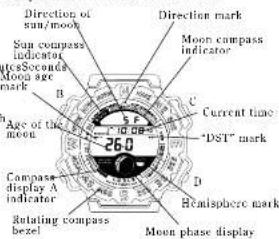
text_image
Direction of sun/moon Sun compass indicator 10S2Scored Moon age mark B C Age of the moon 26.0 D Current time "DST" mark Compass display A indicator D Healsphere mark Rotating compass bezel Moun phase displayCompass Data Setting
- Before setting the hemisphere and longitude of your place, check that the current time of your place is set correctly in the time/calendar display. (Please note that if the "ON" mark for the daylight saving time is set, the directions of the sun and moon are calculated inclusive of the one hour advanced from the regular time. If the "ON" mark is shown, therefore, check that the hour divils are advanced one hour.)
-
Depress button "A" to show the compass display.
-
Depress button "B" for 2 to 3 seconds to show the compass data setting display. The hemisphere mark starts flashing with the "LONG." (longitude) mark displayed.
-
Selection of the hemisphere, longitude and the digits to be adjusted (flashing) is made in the following order by depressing button °C".
Northern or Southern Hemisphere — East or west longitude
Longitude setting — Longitude setting (units digit)
-
Depress button "D" to set the hemisphere, longitude of your place and the flashing digits. The digits move quickly if the button is kept depressed. * To set the longitude of your place, refer to "TABLE OF LONGITUDES OF CITIES THROUGHOUT THE WORLD" below.
-
After all the adjustments are completed, depress button "B" to return to the compass display.
Flashing dots appear in the display immediately after the button is depressed, to indicate that the watch is calculating the direction and the age of the moon.
* If the watch is left untouched in the compass data setting display with the digits flashing, it will automatically return to the compass display in 2 to 3 minutes.
How to Use the Rotating Compass Bezel
-
Depress button "C" to select the sun or moon compass depending on whether you can see the sun or the moon in the sky.
-
While keeping the dial level, point the direction mark at the 12 o'clock position to the direction of the sun or moon.
-
Turn the rotating bezel so that the direction name on the bezel corresponding to the direction name shown in the uppermost row of the display aligns with the direction mark.
-
The direction names on therotating compass hazel indicate the respective directions.
Notes: 1. The rotating compass bezel can be used only
when you have a view of the sun or the moon. 2. Unless the time/calendar and the daylight saving time are set properly, the direction of the sun or moon and the age of the moon will not be displayed correctly.
(After the bartery is replaced with a new one, all the data is cleared from memory and should be reset before using the compass function.)
-
Before using the compass, check that the proper hemisphere is selected.
-
In the areas between the tropics of Cancer and Capricorn, the sun may rise directly overhead, making it difficult to find the directions. In the areas between 28.63° of north latitude and 28.63° of south latitude, the moon may rise directly overhead, making it difficult to find the directions. In those areas, use the compass function together with a conventional magnetic compass.
-
Before using the moon or sun compass, be sure to set the longitude of your place. Otherwise, the directions and moon phase may not be displayed properly.
-
If you travel or move to a place at a different longitude, reset the longitude on your watch. Otherwise, the directions of the sun and moon and the moon phase will not be displayed properly.
Table of Longitudes of Cities Throughout the World
(The longitudes are shown in degrees by rounding off the minutes.)
| Name of city | Longi-tude | Name of city | Longi-tude |
| Anchorage 150° W | Dublin | 6° W | |
| Los Angeles 118° W | Lisbon | 9° W | |
| San Francisco 122° W | Paris | 2° E | |
| Las Vegas 115° W | Milan | 9° E | |
| Vancouver 123° W | Rome | 12° E | |
| Seattle 122° W | Madrid | 4° W | |
| Denver 108° W | Amsterdam | 5° E | |
| El Paso 106° W | Hamburg | 10° E | |
| Edmonton 114° W | Stockholm | 18° E | |
| Chicago 88° W | Frankfurt 9° E | ||
| Houston 95° W | Vienna | 16° E | |
| Dallas | 97° W | Athens | 24° E |
| New Orleans | 90° W | Helsinki 25° E | |
| New York | 74° W | Perth | 116° E |
| Montreal | 74° W | Tokyo | 140° E |
| Detroit | 82° W | Sydney 151° E | |
| Miami | 80° W | Melbourne | 145° E |
| Boston | 71° W | Wellington | 175° E |
| Santiago 71° W | Christchurch | 173° E | |
| Buenos Aires 38° W | Cape Town | 18° E | |
| Azores | 25° W | Johannesburg | 28° E |
| London | 0° W |
■HOW TO USE THE STOPWATCH
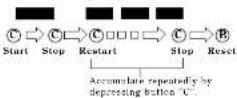
• The stopwatch can measure up to 10 hours in 1/100 seconds.
Even if the stopwatch is changed to another while the measurement is in progress, it continues counting properly. After the stopwatch is used, however, he sure to reset it as the battery energy is consumed enormously to shorten the battery life.
While the stopwatch is measuring, the graphic display turns on and off repeatedly.
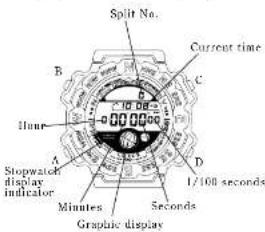
text_image
Split No. Current time B C Hune Stopwatch display indicator A D 1/100 seconds Minutes Seconds Graphic displayStopwatch Operation
Depress button "A" to show the stopwatch display.
Accumulated elapsed time measurement
Split time measurement
- "Split time" is the time that has elapsed from the start of an activity to any given stage.
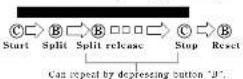
Note: The split number counts up to "99". After "99", the number is displayed in two digits such as "00" for 100, "01" for 101 and so on.
■HOW TO SET THE ALARM
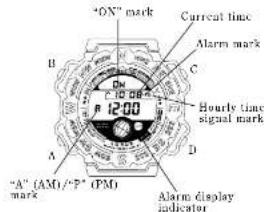
text_image
"ON" mark Current time Alarm mark C Hourly time signal mark A D "A" (AM)/"F" (PM) Alarm display indicator- Depress button "A" to show the alarm display.
-
Depress button "B" for 2 to 3 seconds to show the alarm setting display. The alarm mark and "ON"/"OFF" mark disappear and the hour digits (and "A"/"P" mark) start flashing.
-
Depress button "C" to select the digits to be adjusted (flashing).
Hour - Minutes
-
Depress button "D" to set the digits. One digit is advanced with each depression of the button. The digits move quickly by keeping the button depressed.
-
After all the adjustments are completed, depress button "B" to return to the alarm display. The alarm mark and "ON" mark are automatically displayed.
Notes:
1. When the time function is displayed in the 24-hour indication, the alarm is also displayed in the 24-hour indication.
2. When setting the hour digits in the 12-hour indication, check that "A" (AM)/"P" (PM) mark is properly set.
3. If the watch is untouched in the alarm setting display with the digits flashing, it will automatically return to the alarm display in 2 to 3 minutes.
Engagement/Disengagement of the Alarm
- With each depression of button "C" in the alarm display, the alarm is engaged and discouraged alternately.
| •1) | Alarm engaged |
| Alarm discagaged |
- The alarm rings at the designated time for 20 seconds and stop. To stop it manually, depress button "A", "B", "C" or "D".
Turning on/off of the Hourly Time Signal and Confirmation Sound; and Alarm Test
- With each depression of button "C" in the time/ calendar display, the hourly time signal and confirmation sound for the button operation are turned on and off alternately.
| Hourly time signal and confirmation sound turned on | |
| Hourly time signal and confirmation sound turned off |
- The alarm can be tested by keeping buttons "C" and "D" depressed in the time/calendar display.
* After the alarm sound is tested, he sure to check turning on/off of the hourly time signal and confirmation sound, as they are turned on and off alternately by depressing button "C".
■HOW TO USE THE SIGNAL FUNCTION
CAUTION
| Do not use the watch as a distress signal transmitter as it is not designed for such purpose. The signal light emitted from the watch may not be perceived depending on such factors as distance in the target and angle of the watch face. |
With a press of a button, 4 preset Morse code messages can be given by light automatically. Messages can also be given manually by turning on and off the illuminating light.
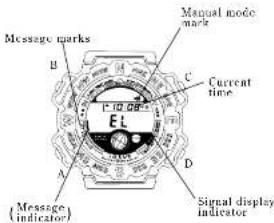
text_image
Message marks B C Current time D A Message (indicator) Signal display indicator-
Depress button "A" to show the distress signal display.
-
Selection of the four preset messages and the manual mode is made in the following order by depressing button "C".
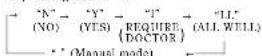
- Depress button "D" to give a desired Morse code message by light.
* The preset messages are given repeatedly while the button is kept depressed.
* Once button "D" is depressed, the preset message will be given to the end even if the
button is released before it is completed. When the grand mode is selected, the illuminating
light is turned on when button "D" is depressed.
Pattern of Light Illumination (Morse Code)
| Mra- age code | Mnaring | Patients at light illumination (orange code) | Patients of murn- sation | |||
| N | NS | NO deguolated | N | Q | E | D+or##s |
| Y | VTA | LOS Aluminated | T | S | E | D+or##s |
| I | RADUK TOCTOR | Socials in hand and z-dextrin | D | G | C | D+or##s |
| T | S | B | ||||
| LL | ALLWAL | Desslating in solid soil | W | T | F | D+or##s |
| — | MAM-AL | — | The body is true, that nandate is not determined deguolated | — | ||
*Pattern of light illumination:
-Long duration of illumination
-Short duration of illumination
■ NOTE ON UNUSUAL DISPLAY
While in the time/calendar setting display, the display as shown below will appear if both buttons "C" and "D" are depressed at the same time. This is not a malfunction. Depress button "A", "B", "C" or "D" to return to the time/calendar display, and then set the time/calendar again.
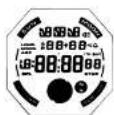
[All the segments lighting up]
■ LUMIBRITE WATCH
(dial, hands, buttons, case, bezel, straps, etc.)

☆ If your watch is a LORUS LUMIBRITE watch, it has following features.
LORUS LUMIBRITE watches absorb and store light energy from natural and artificial light sources and emit light in the dark. They are made of environmentally friendly material, and therefore, are harmless to human beings and the environment.
- With a full charge, LORUS LUMIBRITE watches glow in the dark hours longer than conventional luminous watches of this type. If exposed to a light of more than 500 lux (i.e., the brightness of a typical office) for approximately 10 minutes, or direct sunlight for 2 minutes, for example, they will glow far 3 to 5 hours.
- Since LORUS LUMIRRITE watches emit the light they store, the brightness will decrease gradually over time. The length of time they will glow may also differ slightly depending on such factors as the brightness of and distance from the light source used to charge the watch.
■ LORUS LITE
LORUS LITE
While button "D" is kept depressed in the time/calendar, compass, stopwatch or alarm display, the electroluminescent light evenly illuminates the display for easy viewing in the dark.

Notes:
- LORUS LITE watches work with one battery. When the electrical luminescent light begins to lose its luminance, this is an indication that the battery is depleted. We recommend that you change the battery before the watch itself stops.
- If the electroluminescent light is used continuously for a long time, the battery life may be less than the specified period.
■ BATTERY CHANGE
The miniature lithium battery SEIKO CR2025, SONY CR2025 or Matsushils CR2025, which powers your watch should last approximately 2 years. However, because it is inserted at the factory, the actual life of the battery once in your possession may be less than 2 years.
Be sure to replace the battery to prevent any possible malfunction as soon as it runs down. To replace the battery we recommend taking the watch to a local watch repair shop.
Notes:
- If the alarm is used for more than 20 seconds a day, the confirmation sound more than 50 times a day, the distress signal for more than 15 seconds a day, the illuminating light 5 times a day and/or the stopwatch for 10 hours a day, the battery life may be less than the specified period.
- After the battery is replaced with a new one, because to depress burrows "A", "B", "C" and "D" at the same time for 2 to 3 seconds. The display becomes blank, and when the buttons are released, the time/calendar of "A 12:00:SA 1-1" is displayed. Then, set the desired, time/calendar, compass data and alarm time. (See "HOW TO SET THE TIME/CALENDAR AND DAYLIGHT SAVING TIME", "Compass Data Setting" and "HOW TO SET THE ALARM".)
■ CARE OF YOUR LORUS WATCH
• BATTERY
| CAUTIONDo not expose the old battery to fire or recharge it. Keep it at a place beyond the reach of children. If a child swallows it, consult a doctor immediately. |
• WATER RESISTANT
| Concun/ of useIndic-tion in the 24/ case book | Asidential schools with water, such as spouses and men. | Swimming, and taking a shower | Skin living | Singles driving |
| No indication | NO NO | NO NO | ||
| WATER RESISTANT | YES | NO NO NO | ||
| WATER RESISTANT (30 M2) | YES | YES NO NO | ||
| WATER RESISTANT (15 M2 or above) | YES | YES YES NO |
If your watch is 200 M/20 BAR, 100 M/10 BAR or 50 M/5 BAR water resistant, it is so indicated on the dial/case back.
- Do not press the buttons or turn the crowns
when the watch is wet. - If the water is exposed to salt water, these it in fresh water and then wine it thoroughly dry.
Cautions:
Leather straps are not water resistant except so indicated, even if the watch head is water resistant.
• ALLERGIC REACTION
• MAGNETISM
• SHOCKS AND VIBRATIONS
Because the case and band touch the skin directly, it is important to clean them regularly. If not, shirt sleeves may be stained and those with delicate skin may develop a rash. Please wear the watch with some play to avoid any possible allergic reaction. If you develop a rash on your wrist, stop wearing and consult a physician.
Your watch will not be affected by magnetism
generated by household electric appliances.
Your watch may be worn for normal sports activities, but be careful not to drop it or hit it on hard surfaces.
• TEMPERATURE
Your watch is preadjusted so that constant accuracy may be insured at normal temperature.
■ SERVICE
When your LORUS watch requires repair or servicing, please see the enclosed WARRANTY/GUARANTEE.