JA-80X - Security Camera Joblotron - Free user manual and instructions
Find the device manual for free JA-80X Joblotron in PDF.


User questions about JA-80X Joblotron
0 question about this device. Answer the ones you know or ask your own.
Ask a new question about this device
Download the instructions for your Security Camera in PDF format for free! Find your manual JA-80X - Joblotron and take your electronic device back in hand. On this page are published all the documents necessary for the use of your device. JA-80X by Joblotron.
USER MANUAL JA-80X Joblotron
The JA-80X phone-line communicator
Installation manual
The JA-80X communicator is a component of Jablotron systems of the JA-8x series. It is designed to be installed within the control panel housing. Main features:
- Alarm voice-reporting.
o ARC (Alarm Receiving Centre) communication.
o Remote access via a telephone keypad. - Backup option for the JA-80Y GSM communicator.
The JA-80X only uses the tone dialling method.
1. Installation
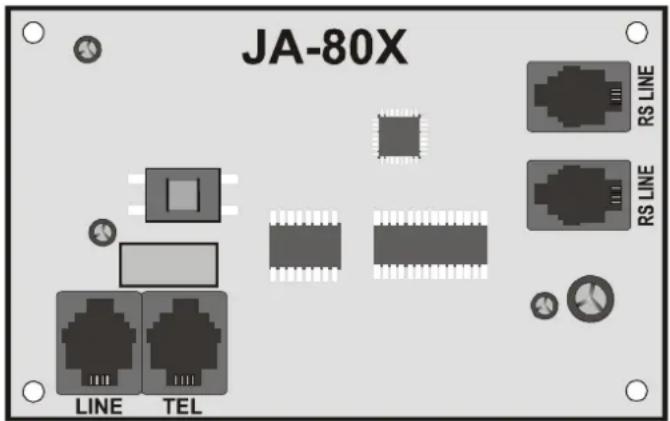
- The communicator can be connected to the control panel's digital bus via a four-cord RJ cable. Use connectors marked RS LINE on the communicator. Both RS LINE connectors have parallel wiring, thus they can also be used for splitting the control panel digital bus.
- Connect the communicator to a telephone line via the cable supplied with the package. Use a socket marked LINE on the communicator.
- Additional telephone devices (telephone, facsimile machine, modem etc.) can be connected using the connector marked "TEL".
- When the control panel is in normal stand-by mode, the phone line and any attached device will operate as normal.
- The communicator can only be connected to analogue phone line and must not be connected to a dual or a grouping extension-line.
text_image
JA-80X RS LINE RS LINE LINE TELNote: The communicator must be plugged directly into a telephone line socket. All other devices should be connected to the communicator output marked TEL.
2. Alarm voice-reporting
Depending on the type of events, the communicator is capable of sending 5 assigned alarm reports to up to 4 pre-programmed phone numbers.
- With the control panel being in the unset state, enter Service mode by keying-in *0 SC (SC=service code, 8080 by factory default) on the system keypad.
- Key-in the requested programming sequence(s). Any sequence currently being entered can be escaped from by pressing #.
- Completing a sequence entry is confirmed by a beep. After completing all the requested sequences, exit Service mode by pressing the # key.
- Depending on system configuration, telephone numbers can also be entered in operating mode.
2.1. Programming telephone numbers for voice reporting sequence 71 Mxxx...xx\*0
To program tel. numbers used for voice reporting enter:
71Mxx... xx *0
where:
M is the phone number memory 1 to 4
xx...xx is the desired phone number (max.16 digits)
Special codes can be put into the phone number:
Code : * by pressing *7
# by pressing *8
3 s pause by pressing *6
Example: Entering 712 483 123 456 *0 will store the number 483 123 456 in memory 2.
To erase a number from memory M enter:
71M\*0
where: M is memory 1 to 4
Voice reports are sent to pre-programmed phone numbers in the order they are stored. A single report to a particular tel. number starts with the number being dialled. A 6 sec waiting period follows. After this period voice message No. 1 is played (alarm system identification) followed by an event description message. This is repeated 4 times after which the communicator hangs up. Normally, voice reporting is not terminated until after all the numbers have been reported to. However, you can stop reporting by alarm cancellation or by pressing the # key on the phone which is currently being reported to.
If enabled, ARC reporting is performed prior to telephone voice reporting.
Note: Do not program emergency call numbers!
As a factory default, all phone number memories are erased.
2.2. Limited event-reporting
sequence 792x
The communicator has a special option for the 2^nd tel. number such that only INTRUSION or PANIC alarms are reported to that number (other types of alarm events like Fire, Fault or Tamper are not reported).
During the call to the 1st tel. number the user can decide whether the alarm report should be also forwarded to the remaining tel. numbers or ha can terminate further voice call reporting by pressing # on the phone keypad (e.g. in case of the false alarm).
To program the feature enter:
792x
where:
x=0 only INTRUSION or PANIC alarms are reported to the 2^nd tel. number
x=1 all events reported to all numbers
The factory default setting is 7921
This setting doesn't apply to transmissions to the ARC, which are made via voice messages.
2.3. Voice message recording
You can record voice messages via any phone using DTMF tone dialling. First, call the communicator's phone number. During the dial-up period, enter 72 on the system keypad. The communicator will answer the call which is indicated by a beep. Press a key 0 to 8 on the phone keypad according to which of the following actions you wish to perform:
0 – Replay all messages
1 – Record message No. 1 (Alarm reports) – identify your alarm system (your premises)
2 - Record message No. 2 (Intrusion)
3 - Record message No. 3 (Fire)
4 - Record message No. 4 (Tamper)
5 - Record message No. 5 (Panic)
6 - Record message No. 6 (Fault)
7 – Record message No. 7 (Welcome to OASiS) – greeting
8 - Record message No. 8 (Enter your access code)
Pressing the key invokes a timer with beep indication. Five beeps are to be heard in total with the last beep extended. After this the recording starts – you record a message by speaking into the phone's microphone. The message duration is limited to 9 sec for message No. 1, and to 3 sec for any of other messages.
After being recorded, the message is immediately re-played. A message ending is indicated by two beeps. Replaying all messages (0) can be terminated by pressing *. The recording of any message can be terminated by pressing # or by hanging up.
Recording the voice message is stopped after hanging up.
Notes:
- You can also remotely record or modify voice messages via a phone in a call to the control panel. This requires the control panel to be in Service mode (on the phone keypad, you enter 72x as described above).
- You can change recorded messages anytime using the above procedure. Messages are stored in a non-volatile memory so the JA-80X will not forget them when its power supply is disconnected.
3. ARC reporting
Contact ID (CID) protocol is used for communication with Alarm Receiving Centres (ARC). If at least one phone number is pre-programmed for ARC reporting then the communicator tries to send a report about any event detected by the control panel (as requested for ARC reporting). Events are reported in the same order as they are detected. A successfully transferred report causes a "Report sent to ARC" event report to be stored in control panel memory.
If transfer to ARC1 is not successful, the communicator starts the transfer to ARC2 depending on whether a second ARC is pre-programmed. If the transfer to ARC2 is also not successful, the communicator tries to transfer the report to ARC1 again and this is repeated four times. Unsuccessful transmission results in "Report not sent to ARC" after eight (four) attempts. Then a standard voice message is sent to the phone numbers according to the event and settings. After that there are two other attempts (cycles) to deliver the message to the ARC after 5 minutes and after 10 minutes.
An undelivered report is stored in the memory and is reported together with the next report – if possible.
Note: Contact ID protocol ensures that all the relevant events are reported automatically. An idea of the data format is provided in the table below.
3.1. ARC phone numbers
sequence 75 Mxxx...xx\*0
To program tel. numbers of requested ARCs enter:
75Mxx....x*0
where:
M is the ARC memory index: 1=main, 2=back-up
xx..x is the ARC phone number (max.16 digits)
To erase a number from memory M enter: 75M*0
3.2. Installation (alarm system) ID for ARC use
sequence 76 Mx..x\*0
The installation's ID number which is sent to an ARC with every report can be programmed with:
76x..x*0
where:
xx.x is the installation ID number which identifies your premises
If a hexadecimal form is needed for the ID specification, use digits prefixed by “*” for alphabetical characters: *1 = A to *6 = F. Example: The sequence 7615*1*5*0 will program the hexadecimal ID 15AE.
3.3. Filtering reported events
sequence 73 nx
Reported events can be filtered according to their type. To enable/disable reporting events of a particular type (or group of types) enter:
73nx
where:
n is a group of event types
1 – All events
2 – Alarm triggering events
3 – Alarm cancellations
4 – Setting/Unsetting (Arming/Disarming)
5 - Faults
6 - Maintenance events only
7 – Regular (periodical) reports
x is the Enable/Disable attribute
1 – Report
0 - No report
The factory default setting is 7311.
3.4. ARC report structure
A report to an ARC sent using CID protocol consists of: installation ID (premises identification), event code, subsystem number and the number of the source (device or code).
Report code table
| Report code | Event |
| 1130 / 3130 | Intruder alarm – instant / restored |
| 1134 / 3134 | Intruder alarm – delayed / restored |
| 1110 / 3110 | Fire alarm / restored |
| 1120 / 3120 | Panic alarm / restored |
| 1461 / 3461 | Number of incorrect code-entries exceeded alarm / restored |
| 1140 / 3140 | Alarm triggered during control panel power-up / restored |
| 1137 / 3137 | Tamper alarm / no tampering |
| 1144 / 3144 | Device tamper alarm / no tampering |
| 1406 | Alarm cancelled by user |
| 1401 / 3401 | Unsetting / setting |
| 3402 | Partial setting |
| 3408 | Codeless complete setting |
| 1354 / 3354 | External communication fault / restored |
| 1300 / 3300 | Fault (except device) / all faults restored |
| 1330 / 3330 | Device fault / all faults restored |
| 1301 / 3301 | Mains dropout longer than 30 minutes / restored |
| 1302 / 3302 | Battery fault (except devices) / all battery faults restored |
| 1384 / 3384 | Device battery fault / all battery faults restored |
| 1306 / 3306 | Switching to Service Mode / Leaving Service mode |
| 1661 / 3661 | PGX ON/OFF |
| 1662 / 3662 | PGY ON/OFF |
| 1355 | Radio communication jamming present |
| 1350 / 3350 | Internal communication fault / restored |
| 1602 | Communication test |
| 1138 | Unconfirmed alarm |
| 1351 | Communication fault to ARC1 |
| 1393 | Annual check request |
| 1551 / 3551 | Communicator blocked / restored |
List of source numbers
| Source number | Source |
| 701 | Control panel |
| 731 | Communicator |
| 741 | Wired keypad |
| 001 – 050 | Devices 01 – 50 |
| 500 | Master code |
| 599 | Service code |
| 501 – 550 | Codes 01 – 50 |
Subsystem: 01 in all reports
In a split system, for setting and unsetting: 02 = A, 03 = B
For partial setting: 02 = A, 03 = AB
3.5. ARC communication test
sequence 74
To perform the test enter:
74
After a successful transfer the keypad will display "test ok". An unsuccessful transfer is indicated by displaying "test error".
Regular reports (group No. 7) are sent 24 hours after an event has been reported.
3.6. Using the JA-80X and the JA80Y in combination
The JA-80X can be used in combination with a JA-80Y GSM communicator. The communicators can either work in parallel or the JA-80X can operate as a backup device to the JA-80Y. In this case, any unsuccessful attempt of the JA-80Y to report events via GSM is followed by JA-80X voice telephone reporting.
GSM report faults are indicated by reporting "No ARC report sent" events to the control panel memory.
Use spacing posts to install the JA-80X above the JA-80Y in the control panel.
Notes:
- This option requires the JA-80Y to be pre-programmed by instruction 081.
- Using two communicators in combination can reduce the internal antenna's working range. If this is a problem you can use some of Jablotron's external antennas designed for OASiS systems.
3.7. ARC reporting mode
sequence 791x
To program reporting mode enter:
791x
where:
x = 0 no ARC reporting from the JA-80X
x = 1 the JA-80X operates as a back-up device for ARC1 reporting
x = 2 the JA-80X operates as a back-up device for ARC2 reporting
x = 3 the JA-80X reports unconditionally (this requires the installation ID and at least one phone number to be pre-programmed)
The factory default setting is 7910.
After a JA-80X back-up report (x = 1 or 2), the JA-80Y will perform reporting as soon as GSM communication is re-established.
3.8. Telephone line monitoring
sequence 793x
If this function is enabled, the dialler will monitor readiness of the telephone line. If the line is not ready it indicates problem on the keypad and to control panel's events memory will be written a report "External communication fault".
To program the feature enter:
793x
where:
x = 0 monitoring disabled
x = 1 monitoring enabled
The factory default setting is 7930 (does not comply with EN 50131-1!)
3.9. Sensitivity to signals
sequence 794x
This setting allows you to set a higher sensitivity to the line signal. This can help in cases where the quality or level of the signal is low.
794x
where:
x-0
basic sensitivity (default)
x-1 higher sensitivity
3.10. Busy – line detection
sequence 795x
If this function is enabled, the dialler will check for the busy tone after dialling each phone number. If the line is busy it hangs up and continues dialling the other numbers.
The attempt is repeated in a standard way (eight / four attempts for communication to the ARC, four attempts for voice messages
795x
where:
x-0 detection is disabled (default)
x-1 detection is enabled
4. Remote access via a telephone line
The JA-80X communicator makes it possible to operate the system remotely via a phone line by temporarily authorizing a phone keypad. After a call request has been received, the communicator will wait for a pre-programmed ringing period and then answer the call. Subsequently, message No. 8 is replayed (Enter your access code). After then the communicator waits for 60 sec for a Service, User or MASTER code to be entered.
If an incorrect code is entered, the communicator responds with message No. 8 and still waits for a correct code to be entered. If an incorrect code is detected for the second time, the communicator responds with 4 beeps and hangs up.
A correct code entry is responded to by system status indication:
1 beep - Set (Armed)
2 beeps – Unset (Disarmed)
3 beeps – Service mode
1 long beep + 3 short beeps – Alarm state
Subsequently, the communicator replays message No. 7 "Welcome to OASiS". The system can then be operated via the phone keypad, the same way as from the system keypad. Instruction performance is confirmed by beeps:
1 beep - Setting (Arming)
2 beeps – Unsetting (Disarming)
3 beeps – Entering Service mode
4 beeps - Error
Phone calls are automatically terminated after 60 seconds of inactivity.
4.1. Ringing period
sequence 77n
To program the ringing period after which the communicator will answer a call, enter:
77n
where:
n is a number from 0 to 9 with the following meaning:
n = 1 to 8 the communicator will answer after n multiplied by 5 seconds of ringing
n = 9 answers after a second call - first there must be at least one ring, then a pause (5 to 40sec.) and then just after the first ring of the second call, the call will be answered
n = 0 the communicator will never answer
5. Communicator RESET
sequence 78080
To reset the communicator to its factory default settings enter:
78080
Note: Performing a RESET does not affect the voice message recordings.
6. Specification
Dialling method DTMF
Phone line check enable / disable
Voice message phone numbers up to 4
(voice message assigned to one of the 5 alarm types)
Digital data transmission to an ARC CID
(Alarm Receiving Centre) (Contact ID)
Complies with EN 50131-1:
Security
grade
Alarm transmission system class ATS 4
Environmental class 2 Indoor general (-10°C to +40°C)
Further standards: EN 50136-1-1, EN 50136-2-1, ANSI C63.4,
EN 55022, EN 50130-4, EN 60950-1
Analogue interface connectivity EN 301437, TBR 21

Jablotron Ltd. hereby declares that the JA-80X is in compliance with the essential requirements and other relevant provisions of Directive 1999/5/.
The original of the conformity assessment can be found on the web site www.jablotron.com, Technical Support section.

Note: Dispose of batteries safely depending on battery type and local regulations. Although this product does not contain any harmful materials we suggest you return the product to the dealer or directly to the manufacturer after use.
A brief list of programming sequences
| Function | Sequence | Options / Notes | Factory default |
| Programming telephone numbers for voice reporting | 71 M xx...x *0 | M = memory 1 to 4xx...x = tel. number (max. 16 digits)*0 is the entry terminator71M*0 erases memory M | M1 to M4 erased |
| Voice message recording | 72 | To be entered on the system keypad during the ringing period. | (English) |
| Filtering reported events | 73nx | N = Group of event types1 = All events2 = Alarm triggering events3 = Alarm cancellations4 = Setting/Unsetting (Arming/Disarming)5 = Faults6 = Maintenance events only7 = Regular (periodical) reportsx = 1 Report x = 0 No report | 7311 |
| ARC communication test | 74 | ||
| ARC phone numbers | 75Mxx...x*0 | M = 1 main ARC M = 2 backup ARC | Both M1 and M2 erased |
| Installation ID for ARC use | 76xx...x*0 | 0000 | |
| Ringing period for remote access | 77n | n = 1-8 duration in multiples of 5 secondsn = 9 the call is answered after ringing for the second timen = 0 the call is never answered | n = 0 |
| Communicator RESET | 78080 | ||
| ARC reporting mode | 791x | x = 0 no reportsx = 1 backup to ARC1x = 2 backup to ARC2x = 3 always report | 7910 |
| Limited event-reporting | 792x | x = 0 limited reports for the 2^nd tel. numberx = 1 all events reported to all numbers | 7921 |
| Telephone line monitoring | 793x | x = 0 monitoring disabledx = 1 monitoring enabled | 7930 |
| Sensitivity to signals on the telephone line | 794x | x = 0 basic sensitivityx = 1 higher sensitivity | 7940 |
| Busy – tone detection | 795x | x = 0 busy-tone detection disabledx = 1 busy-tone detection enabled | 7950 |