
PS3 Bluetooth Wireless Headset - Hi-Fi System DATEL - Free user manual and instructions
Find the device manual for free PS3 Bluetooth Wireless Headset DATEL in PDF.


User questions about PS3 Bluetooth Wireless Headset DATEL
0 question about this device. Answer the ones you know or ask your own.
Ask a new question about this device
Download the instructions for your Hi-Fi System in PDF format for free! Find your manual PS3 Bluetooth Wireless Headset - DATEL and take your electronic device back in hand. On this page are published all the documents necessary for the use of your device. PS3 Bluetooth Wireless Headset by DATEL.
USER MANUAL PS3 Bluetooth Wireless Headset DATEL
natural_image
Side profile illustration of a human head and face with an ear-shaped object inside, no text or symbols presentPS3 Bluetooth® Wireless Headset
For use with PLAYSTATION® 3
Introduction
Congratulations on your purchase of Datel's PS3 Bluetooth® Wireless Headset. Now you can take charge in PLAYSTATION® 3 games with talk or voice control features with the added benefit of wireless freedom!
Charging the Bluetooth® Wireless Headset
The PS3 Bluetooth® Wireless Headset will need charging the first time you use it. Connect the USB charge cable to a free USB port on your PS3 console and connect the other end to the charging jack on the headset.
You can continue to use the headset while it charges but try to leave it connected for at least 8 hrs the first time you charge it to condition the battery. The headset will charge more quickly when it is not in use.
Headset controls
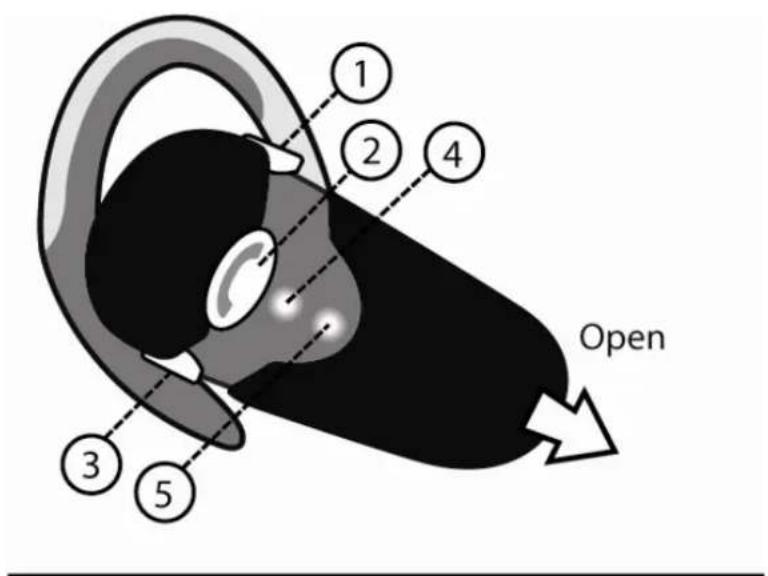
The PS3 Bluetooth Wireless Headset has three buttons, 2 LED lights and a sliding cover to expose the mouthpiece as shown in the diagram:
text_image
1 2 4 3 5 Open① Volume UP
③ Volume DOWN
⑤ Search-mode LED
② Multi-function
④ Power LED
Adjusting the volume
The position of the 'Volume UP' and 'Volume DOWN' buttons will vary depending upon the orientation of the earpiece (effectively turning the diagram upside-down) but their function is illustrated by means of a small [ + ] or [ - ] on the buttons.
When the headset is switched on press the Volume UP and Volume DOWN buttons to increase or decrease the volume of the earpiece.
The multi-function button
The ‘Multi-function’ button is used for switching the headset on and off, answering and hanging up calls (when the headset is used in conjunction with a mobile phone) and for putting the headset into Bluetooth ‘Search-mode’ when registering the headset with another Bluetooth device (see the next section).
To switch the headset on press and hold the Multi-function button for around 5 seconds until the Power LED flashes quickly then release the button. Repeat the operation to switch the headset off.
The Power LED
The Power LED will illuminate constantly when your headset is charging (via USB) and will flash intermittently when the headset is powered on but not charging.
The Power LED will not illuminate at all if the headset is switched off.
Search-mode LED
To use your headset with another Bluetooth device (like your PS3 or a mobile phone) you need to put the headset into 'Search-mode' and then register it with your Bluetooth® device. To put the headset in search mode first switch it off then press and hold the Multi-function button for 10 seconds until the Power LED and the Search-mode LED illuminate continuously. The headset should now be discoverable by your Bluetooth device.
Full instructions for registering your headset with your PS3 are given below.
Using the Headset with your PS3
The first time you use your headset with your PS3 you will need to register it with your console and then select it as an Audio Device. Follow these simple steps:
Registering the Bluetooth® Device
- Ensure the headset is either charged or connected to a USB socket on your PS3 for power.
- On your PS3's browser menu go to 'Settings' then 'Accessory Settings' and finally 'Register Bluetooth® Device'.
- Select 'Register Headset/Microphone/Headphones'. If prompted you will need to choose 'Yes' to registering a new Bluetooth® device.
- To put your headset in registration mode press and hold the multifunction button on the front of the device for around 10 seconds until 2 blue lights illuminate continuously.
Please note: You will need the slide front open in order to see the second LED.
- Press 'X' on your controller to start scanning. Your PS3 should find a device called 'PS3 MAX'. Click 'X' again to select this device.
- When prompted for a Pass Key, enter "0000" and choose 'OK'.
- Registration is now complete.
Selecting the Headset as an Audio Device
- On your PS3's browser menu go to 'Settings' then 'Accessory Settings'.
- Under 'Input Device' select the device 'PS3 MAX' as Input and Output Device and choose OK. You should see the microphone level displayed on screen confirming the headset is working correctly.
- You are now ready to start your game or chat session.
Note
Correct placement of your headset and microphone is important to using your headset successfully in your games. With the earpiece looped over your ear, angle the mouthpiece towards your mouth. The mouthpiece is designed to point the microphone towards your mouth without actually being directly in front of it. This is to ensure good pick up of your voice without picking up your breathing.
Ensure that the slide front of the headset is open for best voice pickup.

Hearing Loss
Prolonged exposure to loud volumes may result in temporary or permanent damage to your hearing. Be careful to not set the volume level too high on your headset and take regular breaks when gaming or chatting.
Consult the documentation that came with your game or console for information on how to use the chat feature in your chosen software.
Technical Support
Before contacting Datel's customer service department, please ensure that you have read through and understood the information in this manual.
Please ensure that you have information on when and where you purchased this product to hand.
DATEL CUSTOMER SERVICES EUROPE:
Customers Services,
Datel Ltd,
Stafford Road,
Stone,
STAFFS
ST15 0DG
UNITED KINGDOM
Email: support@datel.co.uk
Web: www.codejunkies.com
DATEL CUSTOMER SERVICES USA:
ATTN: Customer Services,
Datel Design & Development Inc,
33 North Garden Avenue,
Suite 900, Clearwater, FL 33755
Email: support@dateldesign.com
Customer service knowledgebase: www.datelcustomerservice.com
Main website: www.codejunkies.com
© 2007 Datel Design & Development Ltd. PS3 Bluetooth® Wireless Headset is a trademark of Datel Design and Development Ltd.
PS3 Bluetooth® Wireless Headset is a 100% unofficial product and is NOT sponsored, endorsed or approved by SONY, nor any games developer or publisher.
PLAYSTATION is a registered trademark or trademark of SONY in the United States and/or other countries.