
MPC-R5200 - Power bank MAXELL - Free user manual and instructions
Find the device manual for free MPC-R5200 MAXELL in PDF.


| Product Type | Power Bank |
| Brand | Maxell |
| Model | MPC-R5200 |
| Product Dimensions | 47 x 91 x 23 mm (without protrusions) |
| Weight | 140 g |
| Input Voltage/Current | DC 5V / 1A max |
| Output Voltage/Current | DC 5V / 2A max (total OUT1+OUT2) |
| Charging Cable Length | 20 cm |
| Charging Time (0% to 80%) | Approx. 6 hours (with DC5V/1A adapter) |
| Charging Time (0% to 100%) | Approx. 10 hours (with DC5V/1A adapter) |
| Operating Temperature | 0°C to 40°C |
| Battery Type | Lithium-ion rechargeable battery |
| Battery Capacity | 5200 mAh |
| Output Ports | 2 x USB (OUT1 and OUT2) |
| LED Indicators | 4-stage battery level indicator |
| Power Button | Yes, for checking battery level and starting charging |
| Safety Features | Overcharge protection, short-circuit protection, temperature protection |
| Included Accessories | Charger unit, charging cable, instruction booklet with warranty |
| Maintenance | Clean with neutral detergent and soft dry cloth |
| Storage | Charge every 6 months if not in use |
| Suitable For | Smartphones, tablets, and other USB devices |
| Usage | Normal consumer use only, not for industrial purposes |
Frequently Asked Questions - MPC-R5200 MAXELL
User questions about MPC-R5200 MAXELL
0 question about this device. Answer the ones you know or ask your own.
Ask a new question about this device
Download the instructions for your Power bank in PDF format for free! Find your manual MPC-R5200 - MAXELL and take your electronic device back in hand. On this page are published all the documents necessary for the use of your device. MPC-R5200 by MAXELL.
USER MANUAL MPC-R5200 MAXELL
MPC-R5200 User manual
Maxell Rechargeable Power Bank
MPC-R5200
Accessories:
Charger unit x 1
Charging cable (\~20cm) x 1
Instruction booklet with warranty sheet x 1
-This instruction manual is not allowed to be copied partially or wholly.
Unauthorized reproduction is also prohibited.
-Should there be product improvements, the product appearance or
specifications may change without prior notice.
Disclaimers:
-Maxell is not liable for the injuries due to fire accidents, earthquake, third party' activities.
- Maxell is not liable for other defects due to improper misuse of the product caused by the user.
- Maxell is not liable for any injury caused when using this product or during the connection between device to device.
- This product is designed only for Normal Consumer Use and should NOT be used for Industrial Purposes. If the product is used in this way, Maxell is NOT liable for human injury or fire accident.
Caution!
Please follow the caution below when using our product.
Danger:
Do not connect input and output conversely.
Do not take power from sources other than from the USB port.
Do not disassemble or modify the product
Do not immerse in water
Do not make short circuit to the ports
Do not leave the product in places of high temperature or under direct sunlight.
Do not throw into fire
Do not touch the product if you see any liquid leaking around
Warning!
Do not operate the product if it generates excessive heat or have abnormal smell or change in color.
If any liquid from the product comes into contact with the skin or clothes, please rinse with clean water immediately.
When the specified charge time is over, and charging is still in operation, please stop the charging immediately.
Do not drop the product.
Please allow product ventilation
Do not use the product near inflammable gases or liquids such as gasoline.
Do not touch the product with wet hands.
Do not puncture the casing of the product
Please supervise all children if allowing them to use the product.
Keep away from babies at all times.
Attention
Please be careful when placing the product down – do not drop it from a high distance or magnetic field place.
Please charge at the scope of 0 to 40 degree
Do not charge the product and discharge with other devices simultaneously, for example if you are charging the Powerbank, do not use it to charge your Smartphone or Tablet at the same time.
Please charge the product every 6 months
Parts names:
![[Main Body] MAXIM 5200 LED Power Button Output Terminal OUT1 (USB Standard-A) Input Terminal IN (USB Micro-B) OUT 1 IN OUT 2 iPad,iPhone Output Terminal OUT2 (USB Standard-A)](/content/2026/05/776540/images/f20cfdf239f07e0a374103f9467cfba5ed768793d2db4d29249c3c2523ba256f.jpg)
LED Display when Charging
| Capacity | 0~25% | 25~50% | 50~75% | 75~99% | 100% |
| LED Display |  |  |  |  | 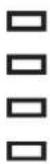 |
LED Display when Discharging/Capacity checking
| Capacity | below 1% | 1~25% | 25~50% | 50~75% | above 75% |
| LED Display |  | [73T2] | 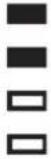 |  |  |
ON

Flash
OFF
※Press the power button, the LED will display the battery remaining level within 5 second when there is no connection.
[Charging Cable]
※The Charging Cable is for charging purposes only and not for data communication.

Operation Procedures:
Charging for this product
(Your product will come pre-charged, however to optimise the battery, please charge the battery before use after purchase)
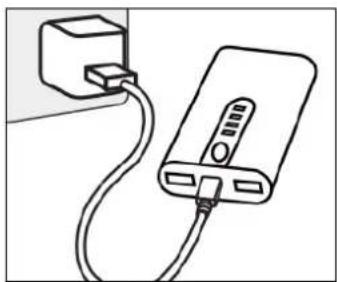
-To use the provided USB cable, input terminal connect to the USB AC adaptor or the computer USB port. During charging, the battery remaining level will display by a Flashing LED light.
-All of the LED lights will come ON when the product is fully charged.
After the product is fully charged, please disconnect the cable after charging.
natural_image
Line drawing of a power bank connected to a plug, showing cable routing (no text or symbols)-Charging time (the USB AC Adaptor DC5V / 1A)
0 to 80% : around 6hrs
0 to 100% : around 10hrs
Attention!
Please confirm the port direction before connection. Incorrect connection may damage the product. Please end charging if your device cannot be fully charged after a certain period of time. Do not charge this product when it is connected to another device as this may lead to heat generation or damage to the product. It could be that the power from the PC's USB port may not be sufficient for charging. Charge the product every 6 months even if it is not often in use, otherwise the product may fully discharge and may not be able to be charged again.
Charging the Smartphone (It is necessary to use the enclosed USB charging cable)
- Connect the output port of attached charging cable to the smartphone and start charging. (For charging iPod, iPhone, iPad, please use the original Apple charging cable in OUT2. If you connect to OUT1 when the Smartphone/Tablet battery is discharged, it will take longer to charge or may result in not being able to charge. For other non-Apple devices (Tablet or Games Consoles etc...) please use the specified charging cable and connect to OUT1
-The LED light will display the battery capacity level depending on the \% of battery charging level. Press the Power button to start charging normally.
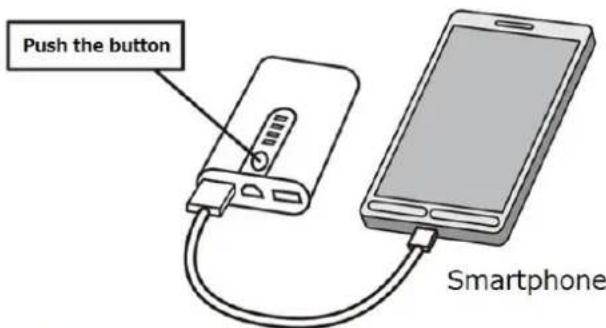
Charging Cable included (Included accessory)
-During the Charging process, please check the connected device charging display. If the charging is complete, it will stop and the LED display will turn OFF automatically. When the charging is complete or to stop it during charge, please disconnect the cable. (Please note depending on the device situation, the charging may stop automatically just before reaching 100% charge. If it is 100% fully charged, the LED lights will not turn OFF).
Attention!
When 2 Smartphones are charging simultaneously, please use a compatible cable for OUT1 connection and use the enclosed cable for OUT2 connection.
The total current output is 5V / 2A (OUT1+OUT2 ports), If the connected devices are out of this current value, it will not be enough power to fully charge the devices. When the device is at zero battery level or depending on if the device is in use whilst charging, boosting time be longer or the device may not as quickly as it should. Please check before charging. Maxell warranty does not cover any accidental loss of your data.
Maintenance:
Use cloth with neutral cleansing agent or water to remove the dirt from the product body and use a soft dry cloth to clean it. Do not use gasoline, thinner or alcohol etc.
Troubles Shooting:
Please contact the Customer Service department if below troubles cannot be solved.
| Trouble Shooting | Reasons | Countermeasures |
| Charging LED light does not come ON when this product is charging. Or, it takes longer than the specified charging time | PC is in standby mode. | Change PC from standby mode. |
| USB port does not have sufficient power | Disconnect other device from the output port. | |
| This product is charging when connecting to the device | Disconnect the device. Charge the device separately. | |
| Circumstance temperature is over the operation temperature range.Product is kept is unused for a long period and the battery is fully discharged. | The product is unable to be used.Please charge the product every 6 months. | |
| Battery is hot | Product will be warm in use, in charging and just after charging. | Please use it after a while. |
| Remaining battery level LED does not light up or all LED lights are flashing | There is no remaining battery. | Please charge the product. |
| Device cannot charge | Check cables and ports connection are inserted correctly. | Please double check the shape of input port of the devices. |
| Port connection is not perfect | Please double check the connection. | |
| Smartphone Device/Tablet is being used and charging at the same time | Please turn OFF the Smartphone/Tablet device when Charging | |
| Battery with short operation time | Remaining battery level is low. | Please charge the product. |
| Battery's life span comes to end. | Battery's life span comes to end if operation time is extremely short even it is fully charged. |
Specification:
Product size: \~47x91x23mm (without protruded parts)
Input voltage/ current: DC5V/ max. 1A
Output voltage/ current: DC5V/ max. 2A (OUT1 + OUT2)
Unit weight: \~140g
Operation temperature: 0\~40°C
Charging time: \~ 6 hours (0% to 80%)
\~ 10 hours (0% to 100%)
(The above estimation assume to use USB AC Adaptor DC5V / 1A)
The length of the Charging cable: \~20cm

Brand : MAXELL
Model : MPC-R5200
Category : Power bank