
BT330 - Hi-Fi System JABRA - Free user manual and instructions
Find the device manual for free BT330 JABRA in PDF.


| Product Type | Bluetooth Headset |
| Brand | Jabra |
| Model | BT330 |
| Connectivity | Bluetooth 1.1 / 1.2 |
| Operating Range | Up to 10 meters (33 feet) |
| Charging Time | 2 hours |
| Battery Type | Rechargeable (included AC charger) |
| Wearing Options | Right or left ear with adjustable ear grip |
| Control Buttons | Answer/end button, volume up/down buttons |
| Supported Features | Voice dialing, redial, reject call, call hold, call waiting |
| Battery Indicator | Blue LED: flashing every 3 seconds (standby), rapid flash (pairing), solid (pairing mode) |
| Low Battery Warning | Flash every 5 seconds and 5 tones every 20 seconds |
| Compatibility | Most Bluetooth phones compliant with v1.1 or 1.2 and headset/hands-free profile |
| Warranty | 1 year limited warranty (defects in material and workmanship) |
| Certifications | FCC, CE, China, Korea, Taiwan, Singapore |
| Package Contents | Jabra BT330 headset, AC charger, ear grips, user manual |
| Maintenance | Store with power off, avoid extreme temperatures, keep dry |
| Repairability | Not user-serviceable; contact authorized service center |
Frequently Asked Questions - BT330 JABRA
User questions about BT330 JABRA
0 question about this device. Answer the ones you know or ask your own.
Ask a new question about this device
Download the instructions for your Hi-Fi System in PDF format for free! Find your manual BT330 - JABRA and take your electronic device back in hand. On this page are published all the documents necessary for the use of your device. BT330 by JABRA.
USER MANUAL BT330 JABRA
www.jabra.com
Fig.

Fig.2

natural_image
Diagram of a device with two circular components and a plug, showing an arrow indicating direction (no text or symbols present)Fig.1


English 1
繁體中文 11
简体中文 21
日本語....31
중국어....41
Bahasa Malaysia 51
ภาษาไทย61
PART NUMBER BAS 31.00185
English
Thank you 2
- Check phone compatibility 3
- Charge Jabra BT330 3
- Read the Glossary 3
- "Pair" to your Bluetooth headset 4
- Turning headset on and off 4
- Choosing wearing preference .... 5
- Making a call 5
- Ending a call ....5
- Answering a call 5
- Enhanced features .... 5
- Troubleshooting & FAQ 6
- Need more help? 7
- Taking care of your headset 7
- Warranty 8
- Certification and safety approvals 9
- Glossary 10
Thank you
Thank you for purchasing the Jabra BI 330 Bluetooth™ Headset. We hope you enjoy it. This instruction manual will get you started and ready to make the most of your headset.
! Remember, driving comes first, not the call!
Using a mobile phone while driving can distract you and increase the likelihood of an accident. If driving conditions demand it (such as bad weather, high traffic density presence of children in the car, difficult road conditions), pull off the road and park before making or answering calls. Also, try to keep conversations short and do not make notes or read documents
Always drive safely and follow local laws
About your Jabra BT330
- Answer/end button with blue indicator light
- Volume control buttons
- Charging connector

BEFORE USING YOUR HEADSET
The Jabra BI 330 is designed for simple operation with a minimum number of control buttons. The answer and end buttons on the headset will provide alternative operation depending on the length of time they are pressed.
Instruction: Duration of press:
| Tap Press briefly | |
| Press Approx: 1 second | |
| Press and hold Approx: 5 seconds |
? eck phone compatibility
The Jabra BI 330 is compatible with most Bluetooth 1 see Glossary phones that are compliant with the Bluetooth version 1.1 or 1.2. Visit your phone manufacturer's website or Jabra's website (www.jabra.com) to make sure that your phone has Bluetooth capability.
3 large Jabra BT330
Your headset uses a rechargeable battery that must be charged fully before you use the headset for the first time.
- Plug the AC charger into an electrical outlet and then into the headset's charging connector. (See fig. 2)
- Charge for 2 hours and then remove the AC charger from the headset.
- Low battery is indicated by a flash every 5 seconds and 5 tones every 20 seconds.
WARNING Do not attempt to charge the headset with anything other than the AC charger provided. Using another AC charger may damage or destroy the headset.
IMPORTANT: The headset cannot be used while charging.
3 Read the Glossary
Read the glossary at the end of this document to familiarize yourself with important term
Once you have charged your Jabra 81330 you are ready to pair the headset with your mobile phone. If the headset has already been paired with your phone, then you can begin using it.
4. air" to your Bluetooth headset
Pairing 2 creates a unique wireless link between two Bluetooth devices, such as your Bluetooth phone and Bluetooth headset.
- Make sure the headset is turned off (see Turning headset on/off section).
- Press and hold the answer/end button until you see a solid blue light.
- Set your Bluetooth phone to "discover" the headset by following your phone's instruction guide. Typically, the steps involve going to a "setup", "connect", or "Bluetooth" menu on your phone and then selecting the option to "discover" a Bluetooth device
- When your phone finds the "Jabra BT330", it asks if you want to pair with it. Confirm this by selecting "yes" or "ok"
- When your phone asks for a passkey or PIN 4 , enter 0000 (4 zeros) from your keypad and then press "yes" or "ok"
IMPORTANT: If pairing is successful, the blue indicator light flashes rapidly before returning to flashing every 3 seconds. If pairing is unsuccessful, the light remains solid and you'll need to reattempt pairing (see steps 3–5 above).
BASIC OPERATIONS
5 rning headset on and off
To turn your headset on and off, press and hold the answer/end button until you see a burst of four flashes on the blue indicator light. A single tone indicates that the headset has turned on or off.
When the headset is on, the indicator light flashes. When it is off, the light is unlit.
Note : Do not hold the button down for more than 3 to 5 seconds when turning the headset on or else it may go into pairing mode and the blue indicator light will turn solid. If that happens, turn off the headset, wait 3 to 5 seconds and then repeat the process for turning the headset on.
6 Choosing wearing preference
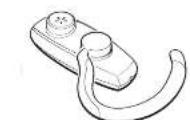
For optimal performance, wear your Jabra BT330 and your Bluetooth phone on the same side of your body. In general, you will get better performance when there are no obstructions (including parts of your body) between the headset and the phone. The headset ear grip is placed over the front of the ear. Your headset is ready to wear on the right ear, but you can adjust the ear grip to hang from your left ear. (See fig. 3)
- Hold the headset with the speaker facing you.
- Flip the ear grip down.
- Rotate the ear grip in a half-circle, counter clockwise.
- Place the headset over your left ear with the grip toward the front.
3aking a call
Make sure the headset is turned on.
Using the phone's keypad dial the number on the keypad and then press the Send key.
8ding a call
To end a call, press the answer/end button, or press the button to end a call on your phone's keypad
Answering a call
From the headset: When you hear the phone ring, press the answer/end button once. From the phone: Press the button to answer a call on your phone's keypad. Depending on your phone, you may then need to tap the answer/end button once to transfer the call to your headset.
TIPS AND SOLUTIONS
10hanced features
Enhanced features are available for phones that support the hands-free Bluetooth profile 4 , meaning you can use your headset wirelessly with your phone for some features. Check your phone's instruction guide or contact the phone manufacturer if you are not sure if your phone supports the hands-free Bluetooth profile.
1. Using voice-activated dialing
Tap the answer/end button and then say the name of the person you wish to dial. Not all Bluetooth phones support voice-activated dialing through Bluetooth. Check with your phone manufacturer. You must set the voice tags on your phone to use voice-activated dialing. For better reception, record the voice tags from the headset if your phone allows you to do so.
2. Increase or decrease call volume
Increase or decrease volume by pressing the volume buttons. The tone volume increases or decreases to match the call volume
3. Redia the last number
While the headset is in standby 5 mode, press and hold the multifunction button until you hear a series of two tones.
4. Reject an incoming call
When your phone rings, press and hold the answer/end button until you hear a series of two tones.
5. Put a call on hold
While you're on a call, press and hold the answer/end button until you hear a series of two tones. Repeat to retrieve the call.
6. Call-waiting
When you are on a call and your phone notifies you of an incoming call, press and hold the answer/end button until you hear a series of two tones.
11 Troubleshooting & FAQ
I hear crackling noises
For the best audio quality, always wear your headset on the same side of the body a your mobile phone
I cannot hear anything in my headset
• Increase the volume on the headset
- Ensure that the headset is paired with the phone
I cannot hear anything in my headset
• Increase the volume on the headset
• Ensure that the headset is paired with the phone
- Make sure that the phone is connected to the headset – if it does not connect either from the phone's Bluetooth menu or by tapping the answer/end button, follow the pairing procedure (see section 5)
I have pairing problems even though my phone indicates otherwise
You may have deleted your headset pairing connection in your mobile phone. Follow the pairing instructions in section 4
I cannot use Reject call, Call on hold, Redial or Voice dialing
These functions are dependent on your phone supporting them. Please check your phone's manual for further details.
Will the Jabra BT330 work with other Bluetooth equipment?
The Jabra BT330 is designed to work with Bluetooth mobile phones. It can also work with other Bluetooth devices that are compliant with Bluetooth version 1.1 or 1.2 and support a headset and/or hands-free profile.
12 Need more help?
- Web www.Jabra.com (for the latest support info and online User Manuals)
- Phone toll free Monday to Friday
Toll Free No:
Australia: 1-800-083-140 (10:00 - 19:00)
China: 800-858-0789 (08:00 17:00)
Hong Kong: 800-968-265 (08:00 - 17:00)
Indonesia: 001-803-852-7664 (08:00 17:00)
Japan: 0034-800-400-594 (09:00 - 18:00)
Malaysia: 1800-812-160 (08:00 17:00)
New Zealand: 0800-447-982 (12:00 - 21:00)
Singapore: 800-860-0019 (08:00 - 17:00)
Taiwan: 0080-186-3013 (08:00 - 17:00)
13 Taking care of your headset
- Always store the Jabra BT330 with power off and safely protected
- Avoid storage at high temperatures (above 60irc C / 134irc F) – such as in a hot vehicle or in direct sunlight. (Storage at high temperatures can degrade performance and reduce battery life).
- Do not expose the headset or any of its supplied parts to rain or other liquids.

arranty
Jibra (GN Netcom) warrants this product against all defects in material and workmanship for a period of one year from the date of original purchase. The conditions of this warranty and our responsibilities under this warranty are as follows:
- The warranty is limited to the original purchaser.
- A copy of your receipt or other proof of purchase is required.
- The warranty is void if the serial number, date code label or product label is removed, or if the product has been subject to physical abuse, improper installation, modification, or repair by unauthorized third parties.
- The responsibility of Jabra (GN Netcom) products shall be limited to the repair or replacement of the product at its sole discretion.
- Any implied warranty on Jabra (GN Netcom) products is limited to one year from the date of purchase on all parts, including any cords and connectors.
- Specifically exempt from any warranty are limited-life consumable components subject to normal wear and tear, such as microphone windscreens, ear cushions, decorative finishes, batteries, and other accessories.
- Jabra (GN Netcom) is not liable for any incidental or consequential damages arising from the use or misuse of any Jabra (GN Netcom) product.
- This warranty gives you specific rights and you may have other rights which vary from area to area.
- Unless otherwise instructed in the User Manual, the user may not, under any circumstances, attempt to perform service, adjustments or repairs on this unit, whether in or out of warranty. It must be returned to the purchase point, factory or authorized service agency for all such work.
- Jabra (GN Netcom) will not assume any responsibility for any loss or damage incurred in shipping. Any repair work on Jabra (GN Netcom) products by unauthorized third parties voids any warranty.

Certification and safety approvals
China
Conforms to the provisions on the Radio Regulations of China.
Republic of Korea
Certified under the provisions of Regulations on Certification of Information and Communication Equipment by Director General of Radio Research Laboratory (Ministry of Information and Communication)
Taiwan
Approved by The Directorate General of Telecommunications (Ministry of Transportation and Communications).
Singapore
Approved by the Infocomm Development Authority of Singapore (IDA) for sale and use in Singapore.
FCC
This device complies with part 15 of the FCC Rules. Operation is subject to the following two conditions: (1) This device may not cause harmful interference, and (2) this device must accept any interference received, including interference that may cause undesired operation.
CE
This product is CE marked according to the provisions of the R & TTE Directive (99/5/EC).
Bluetooth
The Bluetooth ® word mark and logos are owned by the Bluetooth SIG, Inc. and any use of such marks by Jabra is under license. Other trademarks and trade names are those of their respective owners.
16 Glossary
1 Bluetooth is a radio technology that connects devices, such as mobile phones and headsets, without wires or cords over a short distance (approx. 30 feet). Get more information at www.bluetooth.com
2 Bluetooth profiles are the different ways that bluetooth devices communicate with other devices. Bluetooth phones support either the headset profile, the hands-free profile or both. In order to support a certain profile, a phone manufacturer must implement certain mandatory features within the phone's software
3 Pairing creates a unique and encrypted link between two Bluetooth devices and lets them communicate with each other. Bluetooth devices will not work if the devices have not been paired
4 Passkey or PIN is a code that you enter on your mobile phone to pair it with your Jabra BT330. This makes your phone and the Jabra BT330 recognize each other and automatically work together
5 Standby mode is when the Jabra B1 330 is passively waiting for a call. When you 'end a call on your mobile phone, the headset goes into standby mode.
繁體中文
感謝您....12
耳機使用前的準備工作
耳机使用前的准备工作
ヘッドセットを使用する前に
헤드셋을 사용하기전의 준비작업
The Directorate General Telecommunications(Ministry of Transportation and Communication)의 승인 휴득
싱가포르:

- English
- Thank you 2
- Thank you
- ! Remember, driving comes first, not the call!
- Always drive safely and follow local laws
- About your Jabra BT330
- BEFORE USING YOUR HEADSET
- ? eck phone compatibility
- large Jabra BT330
- Read the Glossary
- air" to your Bluetooth headset
- BASIC OPERATIONS
- rning headset on and off
- Choosing wearing preference
- 3aking a call
- 8ding a call
- Answering a call
- TIPS AND SOLUTIONS
- 10hanced features
- Using voice-activated dialing
- Increase or decrease call volume
- Redia the last number
- Reject an incoming call
- Put a call on hold
- Call-waiting
- Troubleshooting & FAQ
- I hear crackling noises
- I cannot hear anything in my headset
- I have pairing problems even though my phone indicates otherwise
- I cannot use Reject call, Call on hold, Redial or Voice dialing
- Will the Jabra BT330 work with other Bluetooth equipment?
- Need more help?
- Toll Free No:
- Taking care of your headset
- arranty
- Certification and safety approvals
- China
- Republic of Korea
- Taiwan
- Singapore
- FCC
- CE
- Bluetooth
- Glossary
- 繁體中文
- 耳機使用前的準備工作
- 耳机使用前的准备工作
- ヘッドセットを使用する前に
- 헤드셋을 사용하기전의 준비작업
Brand : JABRA
Model : BT330
Category : Hi-Fi System