Wave 100 - Phone AUDIOLINE - Free user manual and instructions
Find the device manual for free Wave 100 AUDIOLINE in PDF.


User questions about Wave 100 AUDIOLINE
0 question about this device. Answer the ones you know or ask your own.
Ask a new question about this device
Download the instructions for your Phone in PDF format for free! Find your manual Wave 100 - AUDIOLINE and take your electronic device back in hand. On this page are published all the documents necessary for the use of your device. Wave 100 by AUDIOLINE.
USER MANUAL Wave 100 AUDIOLINE
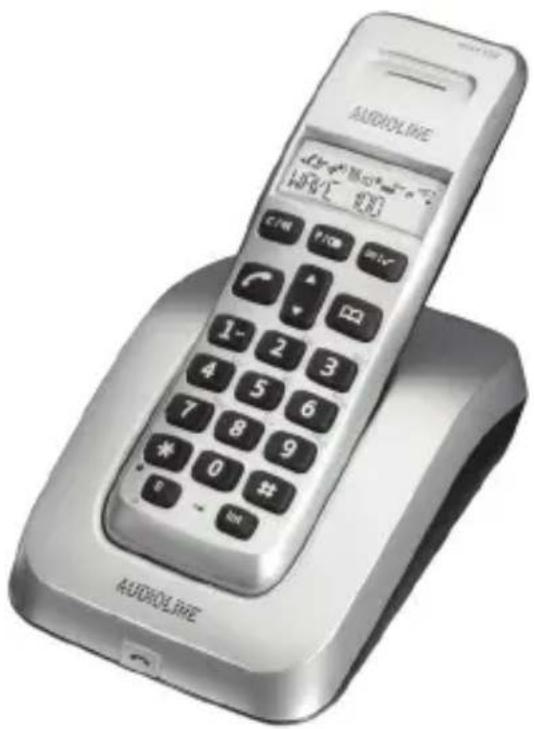
Schnurloses DECT-/GAP-Telefon Cordless DECT GAP telephone
text_image
AUDIOLIFE WAVI E 200text_image
Three recycling symbols: recycling circle, no disposal bin with cross mark, and no disposal bin with crossed-out circlenatural_image
Pure electrical circuit lines without any symbolsAkkus einlegen
flowchart
graph TD
    A["AAA"] --> B["+AAA"]
    B --> C["Device Interface"]
    C --> D["←"]
Akkus aufladen
natural_image
Simple line drawing of a rectangular frame with a central oval and two small rectangular cutouts, labeled '1' at the bottom left (no text or symbols on the diagram itself)text_image
Diagram of a device with labeled parts, showing a central button and two numbered components.text_image
✓, ▲/▼, ANMELDEN, ✓, BASIS ANMELD, ✓, BASIS1 2 3 4.text_image
▲, ▲/▼, c, LOESCHEN?, ✓.Please read this operating instruction manual thoroughly.
Intended use
The telephone is suitable for telephoning within a public telephone network system. Any other use is considered unintended use.
Unauthorised modification or reconstruction is not permitted. Under no circumstances open the device or complete any repair work yourself.
Installation location
Prevent excessive exposure to smoke, dust, vibration, chemicals, moisture, heat and direct sunlight.
Do not use the handset in potentially explosive areas.
Power adapter plug
Attention: Only use the power adapter plug supplied because other power supplies could damage the telephone. Ensure access to the power adapter plug is not obstructed by furniture or such.
Batteries
Attention: Never throw batteries into a fire. Only use batteries of the same type! Pay attention to correct polarity! If the polarity of the batteries is incorrect, there is a risk of explosion of the charging station.
Power failure
The telephone cannot be used to make calls in the event of a power failure. Always keep a cord connected telephone which operates without an external power supply available in case of emergency situations.
Safety Information
Medical equipment
Attention: Never use the telephone in the vicinity of medical equipment. Effects on such equipment cannot be fully ruled out.
DECT ^1 telephones can cause an unpleasant humming sound in hearing aids.
Disposal
In order to dispose of your device, bring it to a collection point provided by your local public waste authorities (e.g. recycling centre). The adjacent symbol indicates that the device must not be disposed of in normal domestic waste! According to laws on the disposal of electronic and electrical devices, owners are obliged to dispose of old electronic and electrical devices in a separate waste container.

Batteries must be disposed of at the point of sale or at the appropriate collection points provided by the public waste authorities.
Packaging materials must be disposed of according to local regulations.

text_image
Three symbolic icons: recycling symbol, no litter, and no trash bin with crossbones^1 DECT: Digital Enhanced Cordless Telecommunication = Standard for cordless telephones.
Putting the Telephone into Operation
2 Putting the Telephone into Operation
Safety information
Attention: It is essential to read the Safety Information in Chapter 1 before starting up.
Checking the package contents
The package contains:
| Contents | WAVE 10X | |||
| 100 102 | 1 | 1031 | 1041 | |
| Base station with power adapter plug | 1 1 1 | 1 | ||
| Charging station with power adapter plug | - 1 2 | 3 | ||
| Handset 1 2 3 4 | ||||
| Telephone connection cable | 1 1 1 | |||
| Batteries 2 4 6 8 | ||||
| Operating instructions 1 1 1 1 | ||||
Connecting the base station
Attention: Position the base station at least 1 m away from other electronic devices, otherwise there is a risk of mutual disturbance.
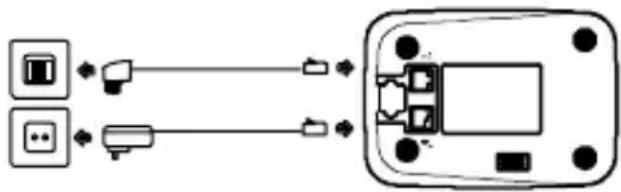
Connect the base station as illustrated in the diagram. For reasons of safety, only use the power adapter plug and telephone connection line supplied.
Telephone line socket Mains power outlet
flowchart
graph LR
    A["Device 1"] --> B["Port"]
    C["Device 2"] --> D["Port"]
    B --> E["Device 3"]
    D --> F["Device 4"]
    E --> G["External Port"]
    F --> G
    style A fill:#f9f,stroke:#333
    style C fill:#f9f,stroke:#333
    style E fill:#ccf,stroke:#333
    style F fill:#ccf,stroke:#333
^1 Refer to the www.audioline.de web site to see if this telephone set is already available.
Putting the Telephone into Operation
Connecting the charging station ^1
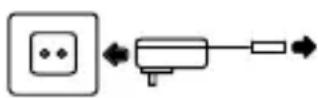
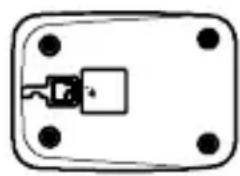
Connect the charging station as illustrated in the diagram. For safety reasons, only use the power adapter plug supplied.
Mains power outlet
natural_image
Simple diagram of a rectangular device with four corner holes and a central connector (no text or symbols)Inserting the batteries
Insert the batteries in the open battery compartment. Only use batteries of the type AAA NiMH 1,2 V. Pay attention to correct polarity. Close the battery compartment.
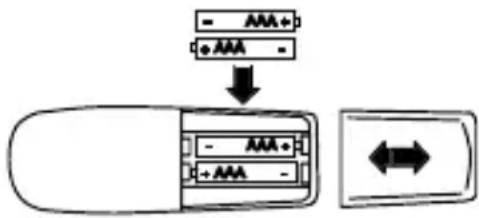
text_image
- AAA + +AAA - ↓ - AAA + +AAA -Charging the batteries
Before the handset is used for the first time, insert it in the base/charging station for at least 24 hours.
When the handset is inserted in the base/charging station properly, you will hear an acoustic confirmation signal and the charge control lamp lights up. The handset warms up during the charging process. This is normal and does not represent a risk. Do not charge the handset with charging units from other manufacturers. The current battery charge status is indicated in the display:


Full Half empty Low Empty
1 Only applies to telephone sets with at least two handsets Section "Package contents" on Page 23.
3 Operating Elements
The buttons in this operating manual are subsequently depicted with a uniform contour. Slight deviations in the appearance of the icons on the buttons compared to those depicted in this manual are possible.
Handset
1 Display
2 Pause / Redialling
3 Menu / OK button
4 Open calls log / Scroll upwards
5 Phonebook / Cancel process
6 Conference call
7 Internal call
8 R button /
Handset on/off
9 Key lock
10 Open calls log / Scroll downwards
11 Take call / End call
12 Delete / Muting
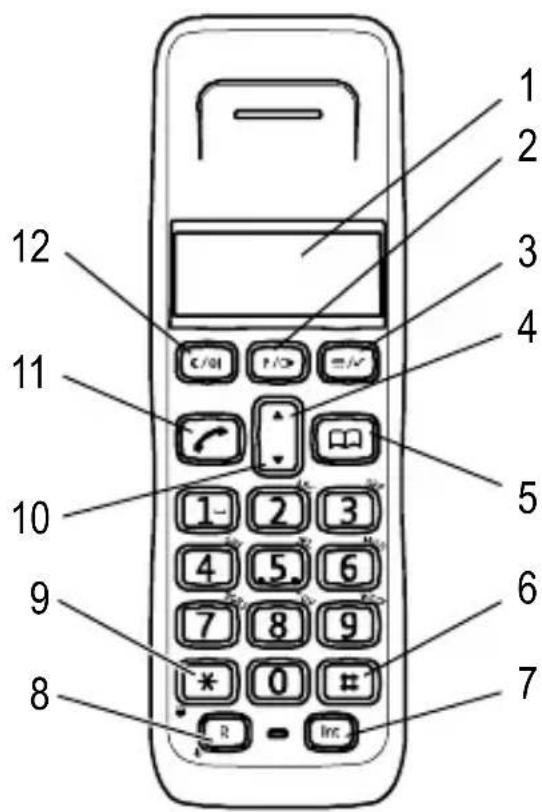
text_image
1 2 3 4 5 6 7 8 9 10 11 12 C/OI P/> R/ 1- 2 3 4 5 6 7 8 9 * 0 # R - Inc.Charging station 1
1 LED, charging control lamp
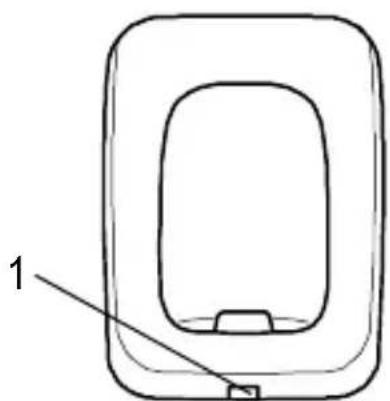
natural_image
Simple line drawing of a rectangular device with a labeled component (no text or symbols)1 Only applies to telephone sets with at least two handsets Section "Package contents" on Page 23.
Operating Elements
Base station
1 Paging button
2 LED, charging control lamp / LED, call and power indicator
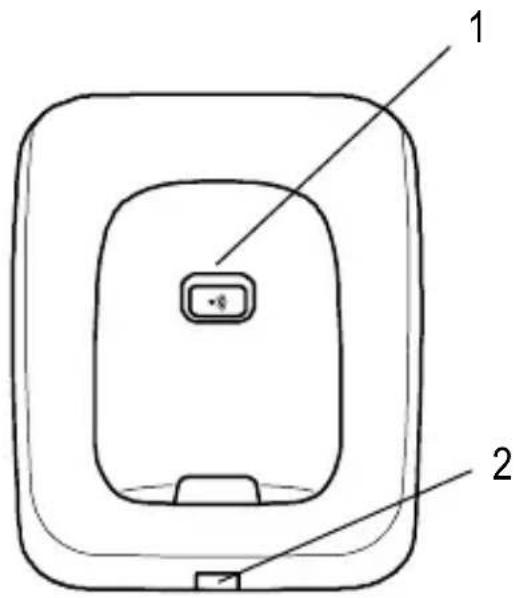
text_image
1 2GB
4 Operating the Telephone
Display and notation of operating sequences
Enter the number
Press the button depicted briefly
3 sec 📌 Press the button depicted for
3 seconds
5678
or

Digits or icon in the display
Icons in the display
Icon Description
Internally assigned call number of the handset
05: 18Timer display
EXT External call
INT Internal call

Flashing: New calls have been registered in the call log.

The key lock is activated.
MUTE The microphone is switched off (muting).

On: The connection to the base station is good.
Flashing: The connection to the base station is poor.
Operating the Telephone
Programming the basic settings
Programming the basic settings relates to adapting the various handset settings to your own personal needs. Press the 📄 button to cancel the process. If no button is pressed over a period of 15 sec., the process is automatically terminated and none of the modifications made are saved. Proceed as follows:
1. Programming the handset
√, ▲/▼, HANDSET, √,
2. Ringing volume for external calls
▲/▼, EXT RING VOL, √, ▲/▼, VOLUME OFF to VOLUME 3, √.
3. Ringing volume for internal calls
▲/▼, INT RING VOL, √, ▲/▼, VOLUME OFF to VOLUME 3, √.
4. Ringing melody for external calls
▲/▼, EXT MELODY, √, ▲/▼, MELODY 1 to MELODY 3, √.
5. Ringing melody for internal calls
▲/▼, INT MELODY, √, ▲/▼, MELODY 1 to MELODY 3, √.
6. Setting the language
▲/▼, LANGUAGE, √, ▲/▼, √.
1. Programming the setup
√, ▲/▼, SETUP, √,
2. Tone / Pulse dialling mode
▲ / ▼, DIAL MODE, √, ▲ / ▼, TONE DIAL / PULSE DIAL, √.
3. Flash (recall) time (Flash 1 = 100 ms, Flash 2 = 300 ms)
▲ / ▼, RECALL, √, ▲ / ▼, RECALL 1 / RECALL 2, √.
- Ringing volume of base

text_image
▲ / ▼, BASE VOLUME, ✓, ▲ / ▼, VOLUME OFF to VOLUME 3, ✓.- Ringing melody of base

text_image
▲/▼, BASE MELODY, ✓, ▲/▼, MELODY 1 to MELODY 3, ✓.Restoring the default settings ^1
- √, ▲/▼, SETUP, √,

text_image
▲/▼, DEFAULT, ✓, PIN?, ✓, CONFIRM?, ✓.5 Menu Structure
Menu Structure
| PHONEBOOK ADD ENTRY | DELETE ENTRYMODIFY ENTRY |
| SETUP BASE VOLUME | BASE MELODYDEL HANDSETPIN CODEDIAL MODERECALLDEFAULT |
| HANDSET BEEP | INT RING VOLEXT RING VOLINT MELODYEXT MELODYAUTO ANSWERNAMELANGUAGEKEY LOCK |
| REGISTER SELECT BASE | REG BASE |
6 Telephoning
All descriptions in this operating manual assume that the handset is in Standby mode.
| Take a call (off-hook) | |
| End a call (on-hook) | |
| Make an external call | , or, |
| Redial the number | , /▼, or, |
| Dial from calls log ▲/▼), | |
| Dial from phone number memory | , ▲/▼, |
| Make an internal call | INT, |
Internal calls
Making an internal call
INT, e.g. 2.
There must be two or more handsets registered on the base station in order to make internal calls.
Forwarding external calls internally / Conference calls
During a call: INT, 📋 e.g. 2.
After the internal party has answered, transfer the call by pressing the ↗ button.
To start a conference call, wait for the party called to answer the internal call and then press the INT button followed by the # button.
If the handset called does not answer, take the external call back by pressing the INT button.
GB
Telephoning
Other functions
| Function Button sequence | |
| Switch the handset on /off 3 sec | R |
| Key lock on 3 sec * | |
| Key lock off *, * | |
| Receiver volume | , ▲/▼ |
| Ringing melody volume | ▲/▼while phone is ringing |
| Muting/Activating micro-phone in handset | ⊗|during the call |
| Locate handset (paging) | on the base station |
Muting function
After muting the microphone, the caller can no longer hear you.
Displaying the duration of a call
The duration of a call is displayed in hours, minutes and seconds during the call.
Registering a handset
If your handset is not registered on the base station, the INT, EXT, and icons flash in the display.
To register the handset, press the ☐) button on the base station for five seconds and then proceed as follows:
√, ▲/▼, REGISTER, √, REG BASE, √, BASE 1 2 3 4.
To register a handset from a different manufacturer, refer to the operating manual supplied with the respective handset. The four-digit PIN for your base station is 0000.
Up to four handsets can be registered on your base station. However, you can only activate your handset on one base station at a time.
7 Phonebook
Up to 30 phone numbers can be stored in the phonebook.
Each entry can be customised with its own individual ringtone (3 melodies).
When the memory capacity is completely full, an existing entry must be overwritten.
Creating phone book entries
√, ▲/▼, PHONEBOOK, √, ▲/▼,
ADD ENTRY, √, NAME?, √, NUMBER?,
√, ▲/▼, MELODY 1 to MELODY 3, √.
Modifying phonebook entries
√, ▲/▼, PHONEBOOK, √, ▲/▼,
MODIFY ENTRY, √, ▲/▼, √, ⌘, √, ⌘,
√, ▲/▼, MELODY 1 to MELODY 3, √.
8 Call Log
A total of 30 phone numbers are stored in a call log.
The caller number display function is an optional service offered by telephone network providers. If this service is not offered, the incoming calls are not displayed. Contact your network provider for further information.
Displaying numbers in the call log
▲, ▲/▼.
Storing an entry in the call log in the phone number memory
▲, ▲/▼, several times if necessary √, ADD?,
√, NAME? ⚡, √, confirm number √,
MELODY 1 to MELODY 3, √.
Deleting phone numbers from the call log
▲, ▲/▼, c, DELETE?, √.
9 In Case of Problems
Service hotline
Should problems arise with the telephone, please refer to the following information first. In the case of technical problems, you can contact our hotline service, tel. 0180 5 00 13 88 (cost via Telekom at time of going to print: 14 ct/min). In the case of claims under the terms of guarantee, please contact your sales outlet. There is a 2 year period of guarantee.
Problems and solutions
Problems Solutions
| The caller number display (CLIP1) does not function | - The caller number display (CLIP) is a supplementary service offered by your telephone network provider. Contact your network provider for further information.- The caller has suppressed the transmission of their phone number. |
| The batteries are empty within a short time | - The batteries are empty or defective.- Place the handset in the base station properly. Clean the contact surfaces on the handset and base station with a soft, dry cloth.- Place the handset in the base station for 14 hours. |
| Connection is disturbed or cut off | - The handset is too far from the base station.- The base station is in an unsuitable location.- The batteries are weak |
| No telephone calls possible | - The telephone is not connected properly or is defective. Only use the telephone connection cable supplied.- Test whether the telephone connection is in order by using another telephone.- The power adaptor plug is not plugged in or there is a complete power failure.- The rechargeable batteries are empty or defective.- The handset is too far from the base station. |
10 Technical Properties
Technical data
Feature Value
Standard DECT
1-GAP2
Power supply Input: 220/230 V, 50 Hz
Output:
6.5 V DC / 300 mA,
6.5 V DC / 150 mA
Range Outdoors: Approx. 300 m
Indoors: Approx. 50 m
Standby Up to 150 h
Max. talk time Up to 10 h
Rechargeable batteries 2 x 1,2 V, size: AAA
Dialling mode Tone dialling mode
Pulse dialling mode
Permissible ambient temperature 10°C to 30°C
Permissible relative humidity 20% to 75%
Flash (Recall) function 100 ms, 300 ms
Declaration of Conformity
This device fulfils the requirements stipulated in the EU directive:
1999/5/EU directive on radio equipment and telecommunications terminal equipment and the mutual recognition of their conformity. Conformity is confirmed by the CE symbol on the device.

To view the complete Declaration of Conformity, please refer to the free download available on our web site, www.audioline.de.
^1 DECT: Digital Enhanced Cordless Telecommunication = Standard for cordless telephones.
^2 GAP: Generic Access Profile = Standard for the interoperation of handsets and base stations from other manufacturers.
11 Maintenance / Guarantee
Maintenance
- Clean the housing surfaces with a soft, fluff-free cloth.
- Never use cleaning agents or solvents.
Guarantee
AUDIOLINE equipment is produced and tested according to the latest production methods. The implementation of carefully chosen materials and highly developed technologies ensure trouble-free functioning and a long service life. The terms of guarantee do not apply where the cause of equipment malfunction is the fault of the telephone network operator or any interposed private branch extension system. The terms of guarantee do not apply to the batteries or power packs used in the products. The period of guarantee is 24 months from the date of purchase.
All deficiencies related to material or manufacturing errors within the period of guarantee will be redressed free of charge. Rights to claims under the terms of guarantee are annulled following tampering by the purchaser or third parties. Damage caused as the result of improper handling or operation, incorrect positioning or storage, improper connection or installation or Acts of God and other external influences are excluded from the terms of guarantee. In the case of complaints, we reserve the right to repair defect parts, replace them or replace the entire device. Replaced parts or devices become our property. Rights to compensation in the case of damage are excluded where there is no evidence of intent or gross negligence by the manufacturer.
If your device shows signs of defect during the period of guarantee, please return it to the sales outlet in which you purchased the AUDIOLINE device together with the purchase receipt. All claims under the terms of guarantee in accordance with this agreement can only be asserted at the sales outlet. No claims under the terms of guarantee can be asserted after a period of two years from the date of purchase and hand-over of the product.