
TFF536WNMA - Fridge TECO - Free user manual and instructions
Find the device manual for free TFF536WNMA TECO in PDF.


User questions about TFF536WNMA TECO
0 question about this device. Answer the ones you know or ask your own.
Ask a new question about this device
Download the instructions for your Fridge in PDF format for free! Find your manual TFF536WNMA - TECO and take your electronic device back in hand. On this page are published all the documents necessary for the use of your device. TFF536WNMA by TECO.
USER MANUAL TFF536WNMA TECO
natural_image
Simple line drawing of a refrigerator inside a circular frame (no text or symbols)Models : TFF536WNMA
TFF536SNMA
TFF542WNTA
TFF542SNTA
Made By TECO Taiwan
To ensure proper use of the appliance and your safety, please read the following user manual completely before use.
- Thank you for purchasing our product and thank you for placing your confidence in us.
- Read this manual carefully before use. Follow instructions and keep the manual for future reference.
- Follow the operating instructions and safety notices in this manual.
- If any trouble arise, do not attempt to fix it yourself. Please contact TECO service on 1300 660 037 (refer to Page 18).
- This refrigerator is designed and approved for use with flammable R600a refrigerant.
- The appliance is specifically constructed for domestic use and is therefore suitable for the refrigeration and storage of fresh and frozen foods and the production of ice-cubes. The appliance has not been designed or manufactured for professional use. TECO declines all responsibility for damage deriving from improper use of the appliance. The refrigerator has undergone the necessary tests on the tightness of the refrigeration circuit and complies with the safety regulations for electrical appliances.
- All images, illustrations and photos contained in this manual are for illustration purposes only and may differ from your appliance.

WARNING ICON
This symbol indicates information concerning your personal safety

CAUTION ICON
This symbol indicates information on how to avoid damaging the appliance
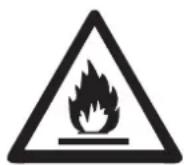
FLAMMABLE
ICON
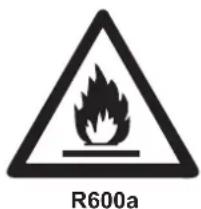
text_image
R600aR600a WARNING LABEL
TABLE OF CONTENTS
Safety Information....4.-5.
Name of Parts and Usage (TFF536WNMA/TFF536SNMA) 6
Name of Parts and Usage (TFF542WNTA/TFF542SNTA) 7
Packing List 8
Transporting the Appliance & Installation 9
Operating Instructions 10 - 12
Temperature Settings 10
Energy Saving Tips 12
Maintenance 13 - 15
Disconnection of the Appliance 16
Troubleshooting 16 - 17
Repairs, Service & Warranty 18
Specifications 19
SPECIAL FEATURES
◇ DC Inverter Compressor ◇ SOFTKEY Temp. Control
◇ Touch Control Handle ◇ Quick Freeze Function
◇ Quiet Operation ◇ Dynamic Airflow Cooling
◇ LED Lighting ◇ Antibacterial & Antifungal Gasket
◇ Twist Ice Cube Maker ◇ Silver NANO Antibacterial
◇ Independantly Controlled Chiller Deodorizing Filter Compartment
◇ Large Capacity Vegetable Drawer (TFF536 series only)
◇ Far Infrared Preservation (TFF536 series only)

R600a Isobutane Refrigerant
- Hydrocarbon refrigerants have excellent refrigerant properties and minimal low global warming potential and no ozone depletion potential.
- This appliance contains a small quantity of flammable, non-synthetic R600a refrigerant:
- Hydrocarbon refrigerants cannot be ‘retrofitted’ to the appliance that has not been designed and approved to use that type of refrigerant.
- Ensure that the tubing of the refrigerant circuit is not damaged during transportation and installation.
- Leaking refrigerant may cause eye injuries or could ignite.
- The room for installing the appliance must be at least 1m^3 per 8g of refrigerant. The amount of refrigerant in the appliance can be found on the rating plate attached to the appliance.

Risk of fi re
If the refrigerant circuit should become damaged. Avoid open flames and sources of ignition. Disconnect the appliance from the mains power. Thoroughly ventilate the room in which the appliance is situated for several minutes.
SAFETY INFORMATION
- The refrigerator is designed to operate on a single phase power supply within a voltage range of 220\~240V/50Hz.
- The refrigeration system contains refrigerant. Do not allow any sharp objects to come in contact with the refrigerant system to avoid damage the refrigerant circuit.
• This product is for indoor use only. - Do not place electrical items or cooking equipment nearby. Keep away from substances which could cause ignition and good ventilation shall be always maintained.
- Do not place objects on top of the appliance which are magnetic, heavy or filled with water.
- If the supply cord is damaged, it must be replaced by authorised TECO service personal, service agent or similarly qualified persons in order to avoid a hazard.
-
Do not store fl ammable, explosive, volatile and highly corrosive materials in the refrigerator. Containers with fl ammable gases or liquids can leak at low temperature. There is a risk of explosion or fire.
-
Do not splash water on the appliance. It may cause malfunction or electric shock.
• Always switch off and unplug appliance before cleaning. - This appliance is not intended for use by persons (including children) with reduced physical, sensory or mental capabilities, or lack of perience and knowledge, unless they have been given supervision or instruction concerning use of the appliance by a person responsible for their safety.
- WARNING: Keep ventilation openings, in the appliance enclosure or in the built-in structure, clear of obstruction.
- WARNING: Do not use mechanical devices or other means to accelerate the defrosting process, other than those recommended by the manufacturer.
- WARNING: Do not damage the refrigerant circuit.
- WARNING: Do not use electrical appliances inside the food storage compartments of the appliance.
- For appliances which use fl ammable insulation blowing gases, Please keep the products away from the fire or similar glowing substance before you dispose of the refrigerator.
- This appliance is intended to be used in household and similar applications such as:
- staff kitchen areas in shops, offices and other working environments;
- farm houses and by clients in hotels, motels and other residential type environments;
- bed and breakfast type environments;
- catering and similar non-retail applications..

WARNING
Safety of children
- Young children should be supervised to ensure that they do not play with the appliance.
- Packing (e.g. wraps, polystyrene etc.) can be dangerous. There is a risk of suffocation. Keep packaging is away from children.
- Contact your local authorities for correct method of disposal.
Dispose of all packaging in a responsible manner in accordance with local regulations.
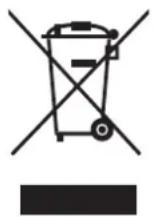
Dispose of old appliances in accordance with local regulations. Remove the doors, cut off the main cable, break or remove spring or bolt catches if fixed to prevent children getting trapped or involve themselves in other dangers.
NAME OF PARTS AND USAGE
Models: TFF536WNMA / TFF536SNMA
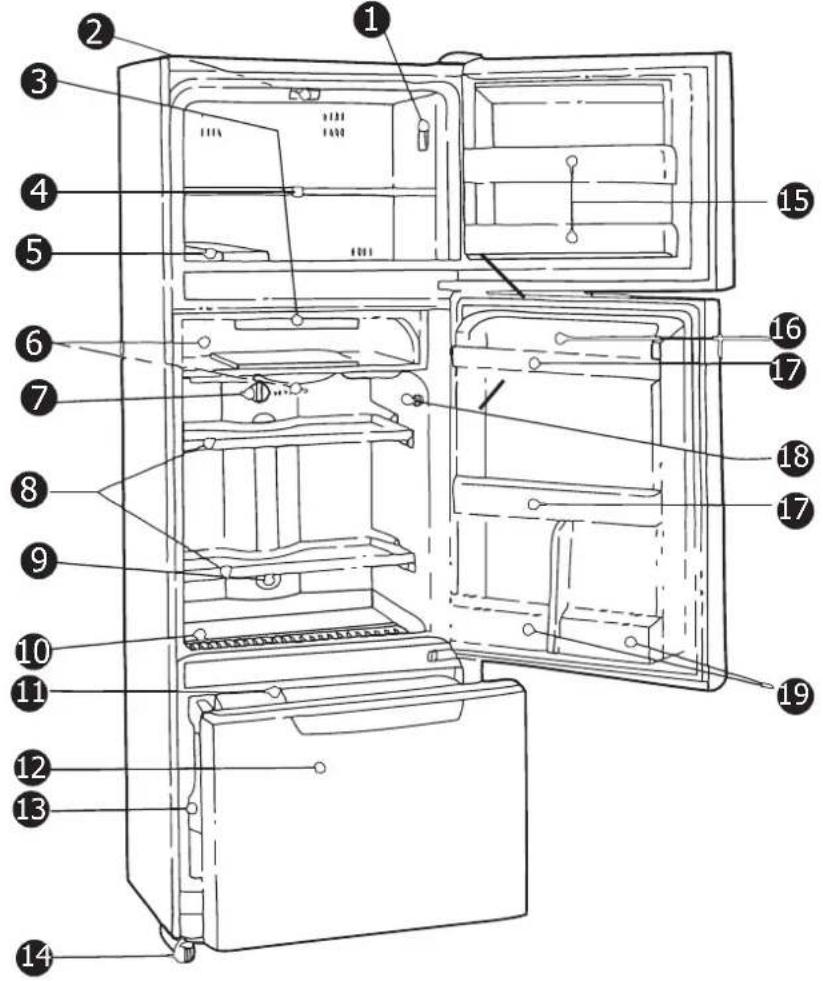
text_image
Labeled diagram of a refrigerator interior with numbered parts for identification- Freezer Section Light Switch 11. Storage Tray
- Freezer LED Light 12. Vegetable Drawer (Approx. 8 °C)
- Antibacterial Deodorizing Filter 13. Vegetable Crisper
- Freezer Tempered Glass Shelf 14. Adjustable Feet
- Twist Ice Cube Maker 15. Freezer Door Rack
- Chill Compartment & Temp. Control 16. Egg Tray
- Refrigerator Temp. Control 17. Refrigerator Door Rack
- Refrigerator Tempered Glass Shelf 18. Refrigerator Light Switch
- Refrigerator LED Light 19. 2L Bottle Rack
- Far Infrared Preservation Tray
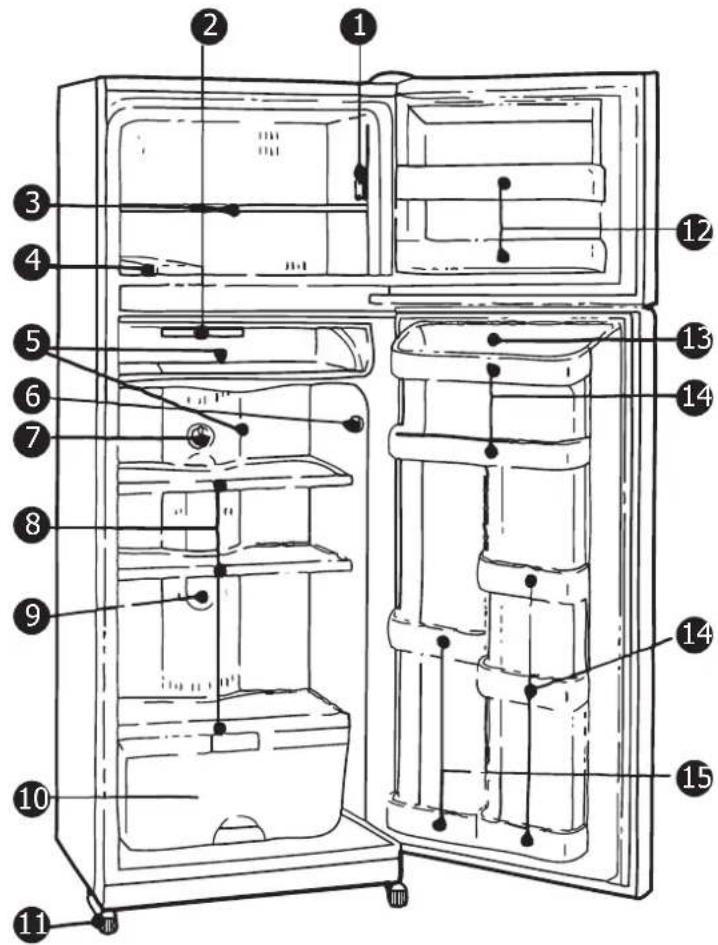
Models: TFF542WNTA / TFF542SNTA
text_image
Labeled diagram of an open refrigerator with numbered parts for identification- Freezer Fan Switch 8. Refrigerator Section Shelves
- Antibacterial Deodorizing Filter 9. Refrigerator LED Light
- Freezer Section Shelf 10. Vegetable Crisper
- Twist Ice Cube Maker 11. Adjustable Feet
- Chill Compartment & Temp. Control 12. Freezer Door Racks
- LED Light Switch 13. Egg Tray
- Refrigerator Section Temp. Control 14. Refrigerator Door Rack
15. Refrigerator Door Rack (Left)
- The refrigerator you purchased is subject to continuous improvement, which may not be completely consistent with the manual, however, the functions and operating methods will not change.
- If you use the refrigerator for the first time, remove the adhesive tapes from all surfaces, drawers, shelves, trays, etc.
- Do not pull or push the drawers and shelves forcefully during use as this may result in damage to the appliance.
PACKING LIST
Check the packing list that all items have been included.
| Part No. | Item | |
| 1 | Warranty Information Sheet | 1 Copy |
| 2 | User's Manual | 1 Copy |
Note: Product specifications are subject to change without prior notice.
TRANSPORTING THE APPLIANCE & INSTALLATION
- The appliance must be transported only in a vertical position. The packing must be intact during the transportation.
- When unpacking and re-packing the appliance, please memorise the position of each accessory of the appliance when unpacking it. When re-packing the appliance for transportation, ensure all accessories are secured before transportation.
- Do not lift or pull the doors during transportation.
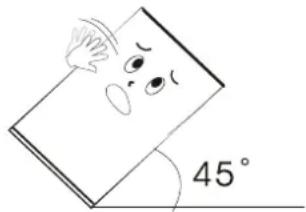
- When moving the appliance, do not tilt >45 degrees (the angle of the vertical direction). Please avoid strong vibration and impacts that could cause damage to the a
natural_image
Simple line drawing of a book with a sad face and a 45-degree angle marker (no text or symbols beyond the angle)- The refrigerator should be located on a firm and flat surface. An uneven surface may cause excess operating noise or vibration.
(a) The noise may be increased if the floor is not firm. (b) If the appliance is to be positioned on carpet flooring and heat emitted from the appliance is a concern, place a solid sheet under the appliance.
- Choose a location which is not exposed to sunlight, high temperature or humid, as humidity may cause staining or damage.
- It is recommended a clearance of at least 10mm away from objects and walls on both sides and back. Ensure the clearance above the appliance is not less than 200mm and 160° clear for the doors to swing open.
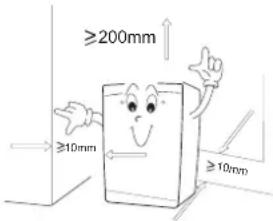
text_image
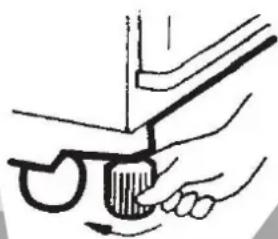
≥200mm ≥10mm ≥10mm- If the appliance is unstable, rotating either of the front two legs in a clockwise direction will raise the appliance.
- When adjusting the front legs, ensure the appliance slopes backwards slightly to keep the door closed.
- Remove all internal packaging before operating.
natural_image
Illustration of a hand using a tool to adjust or install a component, no text or symbols presentOPERATING INSTRUCTIONS
Before first use, let the refrigerator stand for 2 hours before connecting the power. Leave 4 to 5 hours after connecting power before placing fresh or frozen food into the refrigerator.
PLACEMENT OF FOOD
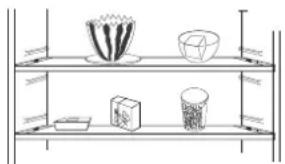
- There should always be some space between items inside for air circulation.
- Food should be kept in sealed packaging to avoid becoming dry or spoilt.
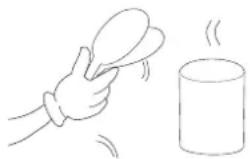
- Hot food should be cooled down before placing into the appliance. Otherwise, the interior temperature and power consumption will increase.
- Reduce opening the door frequently. This will increase the appliance efficiency and reduce power consumption.
natural_image
Illustration of a multi-tiered shelf with various objects including a plate, bowl, and cup (no text or symbols)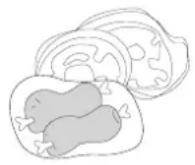
natural_image
Simple line drawing of a hand holding a tray and a cup with steam rising (no text or symbols)
WARNING
Do not use any electronic equipment inside the appliance.
Do not store objects which are costly or subject to temperature variations. e.g. medication or chemicals.
Do not adjust shelving once food has been placed on them.
TEMP. SETTINGS
Controlling the temperature of the refrigerator and freezer compartments,
locking and unlocking the panel and quick
freeze functions are set by the control panel. Refer to the descriptions below.
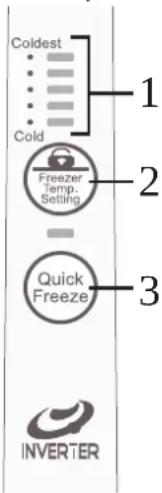
Freezer Door Handle Controls:
1) Temperature Setting Indicator
2) Panel Unlock / Freezer Temperature Setting Button
3) Quick Freeze Button
LED Display:
The LED display (1) shows the currently set temperature.
The fi ve LED lights represent the freezer temperature using
a scale from “COLD” at the bottom (minimum setting) and “COLDEST” at the top (maximum setting).
text_image
Coldest Cold Freezer Temp. Setting 2 Quick Freeze 3 INVERTERFREEZER TEMP. SETTING
Press the Freezer Temp. Setting button (2) gently to cycle through the freezer temperature settings. Each gentle press of the button will be displayed as a LED indicator (1). Each gentle press of the button will adjust the temperature setting between COLD (min.) and COLDEST (max.).
PANEL LOCK / UNLOCK
The panel will automatically lock after no button is pressed for at least 6 seconds. To unlock, press and hold the PANEL UNLOCK button for at least 2 seconds. Once the panel is locked, you must UNLOCK the panel before restoring button functionality.
QUICK FREEZE
Press the QUICK FREEZE button while the panel is unlocked. The Quick Freeze indicator will be displayed confirming the function is active. The freezer will run in this mode for approx. 3 hours and then automatically return to normal function. Quick freeze is used to rapidly cool the freezer section down. To disable this function, press the QUICK FREEZE button. The Quick Freeze indicator will no longer be illuminated, confi rming the function is no longer active.
REFRIGERATOR TEMP. SETTING
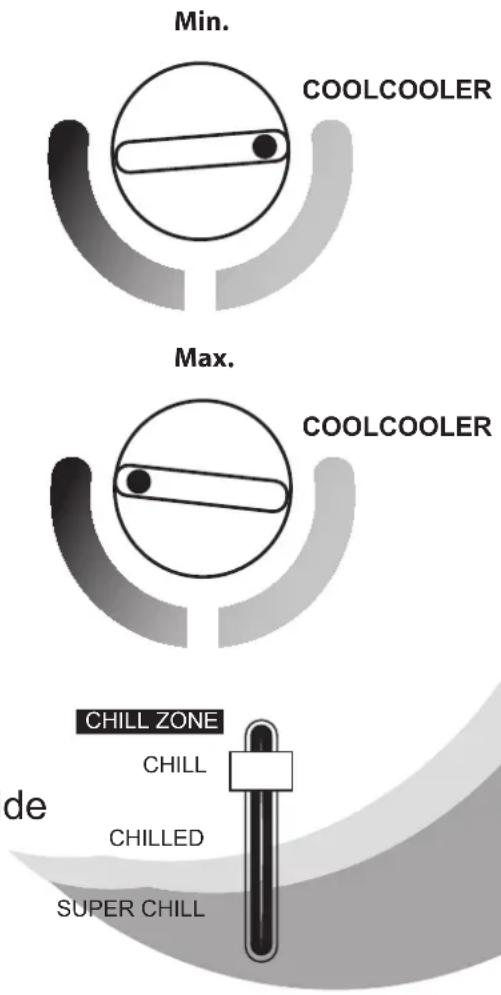
To adjust the temperature of the refrigerator section, locate the temperature control at the rear of the fresh food section. By default, the temperature is set to "Normal".
Turning the control to the left or right will decrease (COOL) or increase (COOLER) the internal temperature. Refer to images on right.
Note: Prolonged use at the COOLER (Max.) setting may cause food to freeze or frost to form.
CHILL ZONE TEMP. SETTING
To adjust the temperature of the Chill Zone, locate the temperature slider near to the refrigerator temp. setting at the rear of the fresh food compartment. Slide the control up (min.) or down (max.).
text_image
Min. COOLCOOLER Max. COOLCOOLER CHILL ZONE CHILL de CHILLED SUPER CHILLICE MAKING
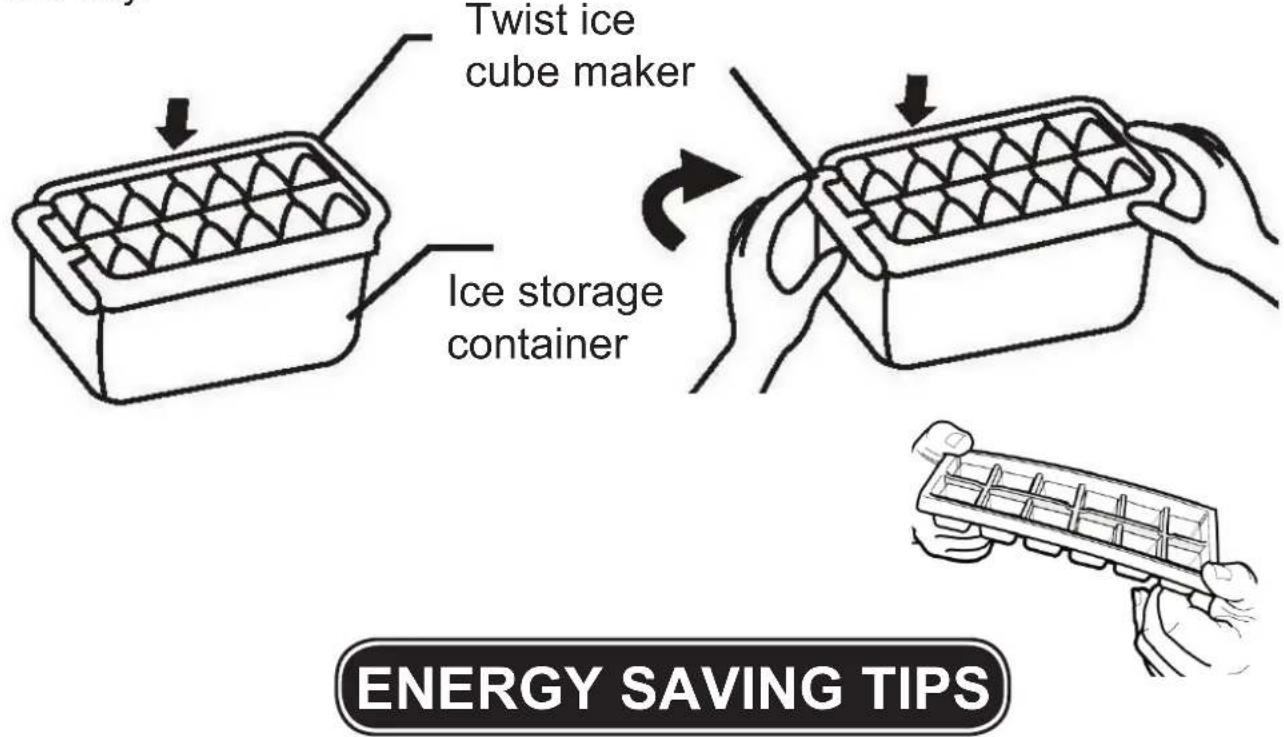
To make ice cubes, fill the twist ice cube maker using a measuring cup (not supplied) with clean drinking water (be careful not to spill). To remove ice cubes easily, twist the tray in the ice cube maker. (If you use the twist ice maker, please be careful opening and closing the freezer door until the water has frozen completely). Alternatively, fill an ice tray and place in the freezer section. Run water on the tray before gently twisting and inverting the tray.
text_image
Twist ice cube maker Ice storage container ENERGY SAVING TIPSAdjust the temperature control to a setting that is acceptable for the storage of the food. This will reduce the power consumption.
Only open the door when required and ensure all doors are closed securely. Frequently opening or doors left open will increase power consumption.
To maintain good air circulation, keep the shelves and crisper of the refrigerator as supplied, and do not block air outlets.
MAINTENANCE
The appliance should be maintained and cleaned frequently. For your safety, unplug the appliance from the mains power source before performing any maintenance.
-
Interior and exterior maintenance
-
Clean the interior of the appliance with clean water and wipe it dry with a piece of dry cloth.
- Cleansers such as soap powder, abrasive cleaning powder, alkali cleansers, chemical cloth, thinners, alcohol, acid petroleum products and hot water should not be used to clean the refrigerator as they may damage the painted cover and plastics.
- Smearing can age the interior plastic components, so remove it as soon as possible.
- Wipe the door gasket clean, it is easy to damage the door gaskets if polluted by stains, e.g. oil, sauce, etc.
- The replacement of interior light
The interior light is LED and should not be replaced. If the interior light stops working, please contact support. Refer to page 18 for more information.
- Empty the drip tray
Do not attempt to remove the drip tray from the rear of the refrigerator. Be careful not to bump the refrigeration tubing. The tray may have water in it, be careful not to spill it while removing any water in the tray. This should be carried out at least once a year. Use a sponge or towel to soak up the water from the drip tray into a bucket. Discard the water appropriately.
- Please check the points below after maintenance:
1) Is there any damage or loss of the power lead?
2) Can the power plug be inserted into the power socket correctly?
3) Is the power plug and/or lead heating up?
COMPARTMENT, DRAWER & RACK MAINTENANCE
Please be careful when handling and removing comparments, drawers and racks. Follow the steps below to remove, clean and replace each of the refrigerator items.
CHILL ZONE
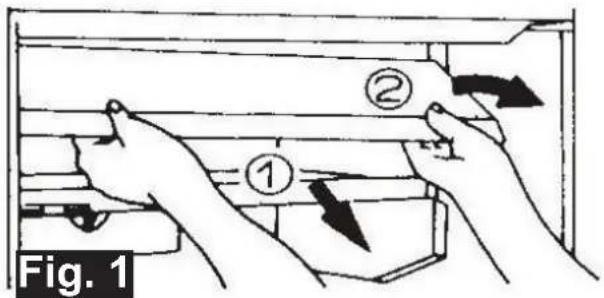
It is necessary to remove the chill zone cover before removing the drawer. Pull the cover out while tilting up on the left side. Continue to pull the cover out gently to remove completely. Refer to Fig. 1 below.
Once the cover is removed, the chill zone campartment can be removed by gently pulling the compartment forward until fully extended. Lift the drawer slightly while continuing to pull forward. The drawer should lift past the mechanism keeping it on the drawer rail. Remove the compartment and clean the drawer and cover thoroughly. Allow to dry completely before returning to original position.
To replace, first install the chill zone compartment. To do so, install by tilting the drawer back and into the rails. Once the rear of the drawer is correctly on the rail, lower and slide the chill zone drawer back into position.
Replace the chill zone lid by tilting to the left and sliding into position.
text_image
Fig. 1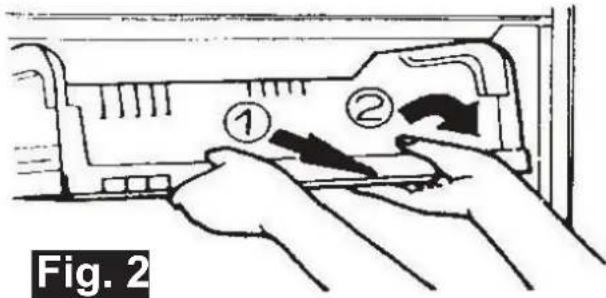
text_image
Fig. 2GLASS SHELVES & DOOR RACKS
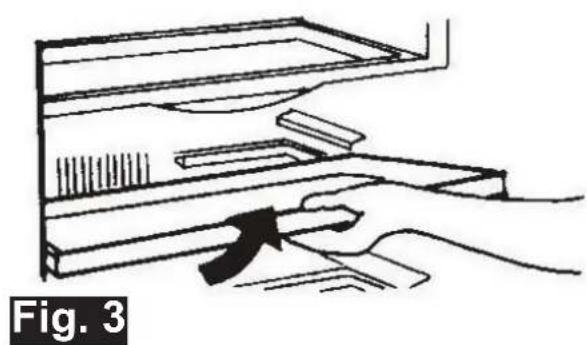
To remove glass shelves for cleaning, pull the shelf out as far as possible and then lift slightly. The shelf should lift away easily. (Refer to Fig. 3).
Clean the shelf completely, allow to dry before replacing.
To remove the door racks, grasp the rack with both hands and gently lift. Once removed, clean and allow to dry before replacing. (Refer to Fig. 4).
natural_image
Illustration of a hand using a tool to interact with a device (no text or symbols visible)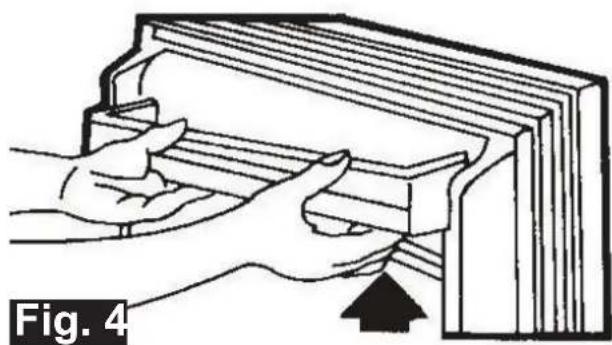
natural_image
Illustration of hands holding a book with an arrow pointing to the right page, labeled 'Fig. 4' (no text or symbols on the diagram itself)VEGETABLE CRISPER, DRAWERS & TRAYS
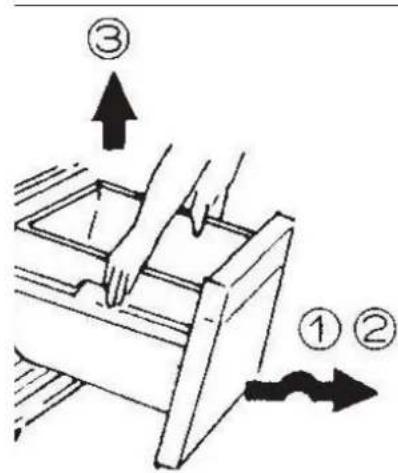
To remove the vegetable crisper, gently slide the crisper out and over the stopper. The crisper can now be lifted away for cleaning. Refer to Fig. 5 below.
text_image
Diagram showing a hand pressing down an open drawer with numbered arrows indicating process stepsFig. 5
DISCONNECTION OF THE APPLIANCE
If a power failure occurs, even in summer, the refrigerator could store food normally for some time.
1, Power failure
During a power failure, do not put additional food in the appliance and reduce opening the door frequently.
Place several ice cubes into a container if power failure is anticipated beforehand, and place it in the top of the fridge.
2, Power failure during vacation
Before departure of a short vacation, remove any items that could spoil if a power failure occurs. Ensure the door is closed firmly.
If going on a long vacation, remove all items, clean and wipe dry the internal of the appliance, prior to disconnecting the power and leave the door open.
3, Storage of appliance
If the refrigerator will be stopped for a long period of time (storage), remove all items, clean and wipe dry the internal of the appliance, unplug the appliance from the power outlet. The door should be kept open in order to prevent unpleasant odours.
CAUTION
igging the appliance from the power outlet, please at least 5 minutes before reconnection.
TROUBLESHOOTING
The following cases are not malfunctions:
- Moisture may form as condensation on the outside of the appliance during humid conditions. To remove excess moisture, wipe clean.
- The flow of refrigerant through the pipeline coil could cause gurgling, similar to water boiling. This is the normal function of the appliance.
- It is normal that the sides of the appliance will get warm as a result of the refrigeration system operation.
- The appliance operation could cause electrical interference to electrical equipment.
SYMPTOM: The refrigerator does not work.
SUGGESTION: It may not be connected to the power supply (plug, power failure or blown fuse) and switched on. Check that the temperature dial is not set to the minimum position.
SYMPTOM: The refrigerator does not work efficiently as expected. SUGGESTION: It may be caused by heavy frost, warm temperature setting, frequently opening the door or low voltage.
SYMPTOM: It makes an unusual noise.
SUGGESTION: It may be caused by an unbalanced appliance or unstable surface, bottles are incorrectly placed and rattling, vibration from an object on top of, behind or beside the appliance.
SYMPTOM: The compressor keeps working for a long period.
SUGGESTION: The environment temperature may be too high. The doors may be opened frequently or they are left open. The temperature setting may increase the working time of the compressor. Large amounts of warm food recently placed in the appliance may also cause this symptom.
SYMPTOM: Unpleasant odours.
SUGGESTION: Interior may need cleaning. Some foods produce strong odours, some containers can also cause odours. Food should be packed tightly before being placed inside the appliance. Check if any food has spoilt in the appliance.
SYMPTOM: Heavy frost occurs in the freezer compartment.
SUGGESTION: Make sure the door is correctly closed and the seal is not obstructed.
SYMPTOM: Refrigerator temperature is too cold.
SUGGESTION: Check the position of the temperature dial.
ERROR CODES Located on Freezer Door Temp. Control (see Page 10)
| DISPLAY | DESCRIPTION | ||
| LED5 | LED5 | & 4 | fl ash Communication error |
| LED4 | LED5 | & 3 | fl ash EPROM error |
| LED3 | LED5 | fl ash | Freezer sensor error |
| LED2 | LED4 | fl ash | Defrost sensor error |
| LED1 | LED2 | fl ash | Compressor start error |
| LED1 | fl ash | Compressor run error | |
REPAIRS, SERVICE & WARRANTY
It is hazardous for anyone installing, removing, altering, repairing, servicing, testing or certifying the gas system of a gas device (i.e. charging, discharging or breaking into the refrigeration system that uses hydrocarbon refrigerants).
Only an Authorised Service Person can carry out servicing or repairs to this appliance. In Queensland the authorised person must hold a Gas Work Authorisation for hydrocarbon refrigerants, before carrying out servicing or repairs which involve the removal of covers.
Individuals will need to hold appropriate refrigeration/air conditioning competencies and also training in hydrocarbon refrigerants. This type of authorisation is provided to individuals only.
IF SERVICE IS REQUIRED:
If you have a problem, and the problem persists after you have made the checks mentioned above, contact:
TECO Australia's Service on 1300 660 037
For warranty details please visit www.teco.com.au
Complete and retain the following information:
Name of retailer: ____
Date of purchase: ____
Model No.: ____
Serial No.:
MFG code: ____
Please retain proof of purchase for warranty claims.
SPECIFICATIONS
| Model Number | TFF536WNMATEBF | TFF542WNTATEBF | |
| TFF536SNMATEBF | TFF542SNTATEBF | ||
| Climate Class | T | ||
| Classification of Installation and Use | Group 5T Indoor Use Only | ||
| Rated Total Gross Volume (L) | Chill | 42 | 42 |
| Fridge | 305 | 367 | |
| Freezer | 133 | 133 | |
| Drawer | 56 | - | |
| Rated Total Storage Volume (L) | Chill | 21 | 21 |
| Fridge | 288 | 343 | |
| Freezer | 119 | 119 | |
| Drawer | 50 | - | |
| Voltage | (V) | 220~240 | |
| Frequency | (Hz) | 50 | |
| Noise Level | (dB) | 32 | |
| Refrigerant Type | R600a | ||
| Ambient Operating Temperature (°C) | 43 | ||
| Dimensions (mm) | Height | 1730 | 1730 |
| Width | 730 | 730 | |
| Depth | 807 | 807 | |
| IP Rating | IPX0 | ||
| Net Weight (Kg) | 91 | 89 | |
Note: Product specifications are subject to change without prior notice. For full specification information, please refer to the rating plate attached to the appliance.
Did you know?
TECO Australia's product range also includes:
◆ Top Load Clothes Washers
◆ Front Load Clothes Washers
♦ Twin Tub Clothes Washers
◆ Auto Sensing Condenser and Vented Clothes Dryers
◆ Refrigerators
♦ Chest and Vertical Freezers
◆ Bar Fridges
♦ Dehumidifi ers
♦ Televisions
◆ Air Curtains and Air Conditioners
Visit www.teco.com.au for our full range.