BigTel 100 - Phone AUDIOLINE - Free user manual and instructions
Find the device manual for free BigTel 100 AUDIOLINE in PDF.


| Product Type | Cordless Telephone (DECT) |
| Brand | Audioline |
| Model | BigTel 100 |
| Power Supply | Mains power adapter plug (included) |
| Battery Type | 2 x AAA 1.2V 800mAh NiMH rechargeable |
| Range (outdoor) | Up to 300 meters (ideal conditions) |
| Range (indoor) | Up to 50 meters (ideal conditions) |
| Display | Alphanumeric LCD with icons |
| Phonebook Capacity | 50 entries (max 12 letters name, 24 digits number) |
| Calls List Capacity | 30 entries |
| Redial Memory | Last 3 numbers (max 25 digits each) |
| Handsfree Mode | Yes, with 5 volume levels |
| Volume Boost | Yes, with memory function (Boost Mem) |
| Keylock | Yes (press and hold # key) |
| Ringer Melodies (Handset/Base) | 9 melodies each |
| Ringer Volume Levels | 5 levels plus off |
| Languages | English, German, French, Spanish, Italian |
| Recall Time | Short (100ms) or Long (300ms) |
| Dial Mode | Tone or Pulse |
| Auto Talk | Yes (on/off) |
| Maximum Handsets per Base | 4 |
| Conference Calls | 1 external + 2 internal |
| Guarantee Period | 24 months from date of purchase |
| CE Marking | Yes |
| Cleaning | Use a soft, fluff-free cloth; no cleaning agents or solvents |
Frequently Asked Questions - BigTel 100 AUDIOLINE
User questions about BigTel 100 AUDIOLINE
0 question about this device. Answer the ones you know or ask your own.
Ask a new question about this device
Download the instructions for your Phone in PDF format for free! Find your manual BigTel 100 - AUDIOLINE and take your electronic device back in hand. On this page are published all the documents necessary for the use of your device. BigTel 100 by AUDIOLINE.
USER MANUAL BigTel 100 AUDIOLINE
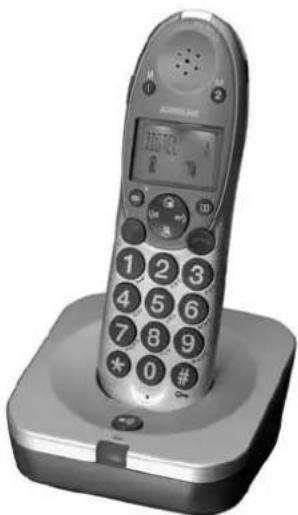
BigTel 100 Telephone and Base
natural_image
Black and white photo of a vintage mobile phone with a digital display and keypad on a square base (no visible text or symbols)Bedienungsanleitung
Operating Instructions
BIGTEL 100
AUDIOLINE
BIGTEL 100
Operating Instructions 21
Inhalt
^1 CLIP: Calling Line Identification Presentation
1 Safety Information 2 2
2 Starting Up 23
3 Your BigTel 100 Telephone and Base. . . . . . 2 4
4 Operating the Telephone....25
5 Telephoning.....27
6 Using the Menu 29
7 Phone Book 31
8 Calls List 32
9 Using Additional Handsets ..... 3 3
10 Private Branch Exchanges ..... 3 5
11 If Problems Occur ..... 3 6
12 Maintenance/Guarantee 37
13 Index. 38
Safety Information
1 Safety Information
Please read this operating instruction manual thoroughly.
Intended use
The telephone is suitable for telephoning within a public telephone network system. Any other use is considered unintended use. Unauthorised modification or reconstruction is not permitted. Under no circumstances open the device or complete any repair work yourself.
Installation location
Prevent excessive exposure to smoke, dust, vibration, chemicals, moisture, heat and direct sunlight.
Power supply

Caution: Only use the power adapter plug supplied because other power supplies could damage the telephone. Ensure access to the power adapter plug is not obstructed by furniture or such.
Power failure
This telephone cannot be used to make calls in the event of a power failure. Alternative arrangements should be made for access to emergency services.
Rechargeable batteries
Do not throw the batteries into a fire or immerse them in water.
Hearing aid compatibility
The telephone is compatible with most popular hearing aids on the market. However, due to the wide range of hearing aids available, there is no guarantee that the telephone will function 'problem free' with every model

Caution: This telephone is capable of producing very high volume levels when the 'Boost' is switched on and the volume control is set to maximum. Extreme caution should be taken if the handset is to be shared between users with normal hearing and those with hearing impairment.
Medical equipment
DO NOT use your telephone near emergency/intensive care medical equipment; if you have a pacemaker fitted or during an electrical storm.
Disposal
You are obliged to dispose of consumable goods properly in accordance with the applicable legal regulations. The adjacent symbol on the telephone indicates that electrical and electronic apparatus and batteries no longer required must be disposed of separately from domestic waste.

Electrical and electronic devices must be disposed of at suitable collection points provided by the public waste authorities.

Batteries must be disposed of at the point of sale or at the appropriate collection points provided by the public waste authorities.
Packaging materials must be disposed of according to local regulations.
Starting Up
2 Starting Up
Safety note

Caution: It is essential to read the Safety Information in Chapter 1 before preparing the telephone for use.
Check the contents of the package
The package contains:
| Content BigTel 100 | |
| Base unit 1 | |
| Cordless handset 1 | |
| Battery cover 1 | |
| Power adapter plug 1 | |
| Telephone connection cable 1 | |
| AAA 1.2V 800mAh NiMH rechargeable batteries | 2 |
| Operating manual 1 |
Connecting the base unit
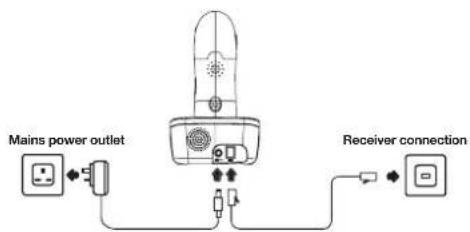
Connect the base station as illustrated in the diagram.
For reasons of safety, only use the power adaptor plug and telephone connection cable supplied.
flowchart
graph TD
    A["Mains power outlet"] --> B["Switch"]
    B --> C["Receiver connection"]
    C --> D["Switch"]
Inserting the batteries
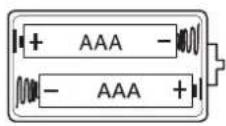
Insert the 2 x AAA 1.2V 800mAh NiMH rechargeable batteries supplied, into the handset battery compartment. Take care to note the '+' and '-' markings and position the batteries the correct way around. Close the battery compartment cover.
Charging the batteries
Place the handset in the base to charge for a minimum of 15 hours before first use.
Private branch exchanges
The information on Page 35 explains how to install your telephone on a private branch exchange.
Your BigTel 100 Telephone and Base
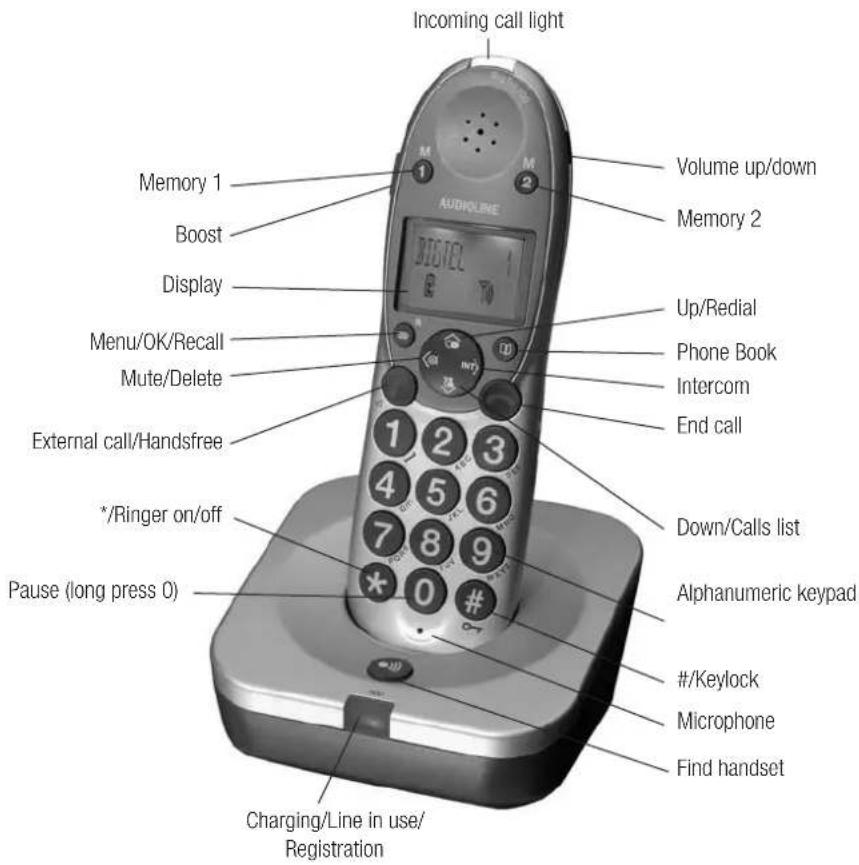
3 Your BigTel 100 telephone and base
text_image
Incoming call light Volume up/down Memory 2 Memory 1 Boost Display Up/Redial Menu/OK/Recall Mute/Delete Phone Book Intercom End call External call/Handsfree */Ringer on/off Pause (long press 0) Charging/Line in use/ Registration Down/Calls list Alphanumeric keypad #/Keylock Microphone Find handsetOperating the Telephone
4 Operating the Telephone
Display and explanation of operation sequences.
| 限 | Enter digits or letters |
| Press the button shown, briefly | |
| 2 x ★ | Press the button shown, twice briefly |
| 2 sec ★ | Press the button shown for 2 seconds |
| Press and hold ★ | Press and hold the button shown |
| Release ★ | Release button shown |
| Handset rings | |
| Base station rings | |
| External call button | |
| End a call and/or return to standby | |
| VOLUME 1 or ¥1) | Text or icon in the display |
Icons in the display
| Icon Description | |
| Phone Book mode | |
| Battery status | |
| Ringer off | |
| Keylock is on | |
| Handsfree mode | |
| Call in progress | |
| Boost receiver volume is on | |
| Handset microphone is muted | |
| You have new calls | |
| When steady indicates that the handset is in range of the base. When flashing indicates that the handset is out of range of the base. | |
| Internal call in progress | |
| Message waitingNote: This feature is not compatible with the UK 1571 service | |
Operating the Telephone
Navigating in the menu
All the handset functions can be accessed via the menu. Please refer to 'Using the menu' on page 29 for information on how to access each function.
| All descriptions in this operating manual assume that the handset is in Standby mode. | |
| ≡ | Open the main menu |
| ▲ or ▼ | Select the submenu required |
| ≡ | Open the submenu |
| ▲ or ▼ | Select the function required |
| ≡ | Open the function |
| ▲ or ▼ | Select the setting required |
| 附 | Enter digits or letters using the relevant keys |
| ≡ | Confirm the entries |
| ⊖ | Cancel and return to standby mode |
Every process is automatically cancelled if there is no input within 20 seconds. The handset will return to standby mode.
Creating phone book entries - example
This example explains how to navigate and create entries in the phone book. Proceed as in this example for all the settings.
| 2 sec | Opens add phone book entry mode | |
| 隕 | ⊖ | Enter the name (max. 12 letters) and confirm it |
| 隕 | ⊖ | Enter the phone number (max. 24 digits) and confirm it |
Storing a quick dial entry
| 2 sec M1 or M2 Opens add quick dial entry mode | ||
| 内語 | ⊖ | Enter the name (max. 12 letters) and confirm it |
| 外語 | ⊖ | Enter the phone number (max. 24 digits) and confirm it |
Telephoning
5 Telephoning
Making a call
| 限 | Enter the phone number (max. 24 digits) |
| Following incorrect input, press to delete the last digit | |
| or | Dial the phone number |
| It is also possible to press the external call button first to obtain dialling tone. The digits entered will then be dialled immediately. It is not possible to correct wrong digits individually using this dialling procedure. | |
End a call
| or | End the call |
| Take a call | |
| Take the call | |
Redial
Your telephone stores the last 3 telephone numbers dialled (max. 25 digits each).
| Open the redial list | |
| ▲,or | Select an entry and dial the number |
Calling back missed calls
Your telephone stores the last 30 incoming calls in the calls list.
| Open the calls list | |
| ▲ or ▼or 📋 | Select an entry and dial the number |
| Dialling phone numbers from the phone bookThere must be phone numbers stored in the phone book.See page 31. Your telephone can store up to 50 name and number entries in the phone book. | |
| Open the phone book | |
| ▲ or ▼or 📋 | Select an entry and dial the number |
Quick dial
Phone numbers must have been stored as quick dial numbers. See page 26.
| M1 or M2 | Press the required quick dial button |
| or | Dial the number |
Telephoning
Chain dialling
This feature is used for more complex telephone services, eg for telephone banking or calling card procedures. Several numbers stored in the phone book can be dialled successively when a connection has already been made. It is also possible to combine numbers from the phone book with numbers entered manually. Numbers stored in the phone book can be chained and transmitted as required.
| Open the phone book when a connection has been made | |
| ▲ or ▼or 📋 | Select the phone book entry and transmit the number |
Adjusting the receiver volume
The receiver volume of your BigTel 100 telephone is louder than with a standard telephone. Push up or down and release for each volume step.
| When in a call, adjust the setting with the side switch |
Boosting the receiver volume
When in a call, you can increase the loudness of each volume setting if you press the 🔗 button.
| Press the button, an icon flashes in the display |
Handsfree
Use Handsfree to listen to your caller via the loudspeaker
| 2 x 📋 | Switch on handsfree mode |
| Deactivate handsfree mode |
Adjusting the Handsfree volume
There are 5 handsfree volume levels available. The 'Boost' feature is not available in handsfree mode.

When in a call, adjust the setting with the side switch.
Talk time display
The duration of each call is displayed in minutes and seconds during the call.
Muting the microphone in the handset
The microphone in the handset can be activated and deactivated during a telephone conversation when you are in handset or handsfree mode.

Switch the microphone off (Mute).

Switch the microphone on
Ringer on/off
You can turn the bell of the ringer on and off.

Switches the bell ringer off

Switches the bell ringer on
Keylock
Calls can still be answered in the normal way when the keylock is on.

Locks the keypad

Unlocks the keypad
Using the Menu
6. Using the menu
Handset name
You can personalise your handset by naming it (max. 12 letters)
| ≡ ▲ or ,▼ ≡ | Open the Menu, select 'HS NAME' |
| <⊗ | Delete the current name |
| 隠 , ≡ | Enter new name and confirm it |
Date/Time
| -, ▲r , ▼ = | Open the Menu, select 'DATE/TIME' |
| 隠 , = | Enter the year and confirm |
| 隠 , = | Enter the month and confirm |
| 隠 , = | Enter the day and confirm |
| 隠 , = | Enter the hours (24 hour clock) and confirm |
| 隠 , = | Enter the minutes and confirm |
Handset Ringing melody
There are 9 different ringing melodies available.
| ○, ▲, ▼ | Open the Menu, select 'HS MELODY' |
| MELODY 7 The current setting is shown | |
| ▲ or ▼ | Select and confirm a ringing melody |
Handset Ringing volume
There are 5 ringing volume settings available and 'OFF'
| ≡, ▲r, ▼ ≡ | Open the Menu, select 'HS RING VOL' |
| VOLUME 5 | The current setting is shown |
| ▲ and ▼ ≡ | Select and confirm a ringing tone volume or 'OFF' |
Base Ringing melody
There are 9 different ringing melodies available.
| -,▲,▼ | Open the Menu, select 'BS MELODY' |
| MELODY 7 The current setting is shown | |
| ▲ or ▼ | Select and confirm a ringing melody |
Base Ringing volume
There are 5 ringing volume settings available and 'OFF'
| -, ▲r , ▼ ≡ | Open the Menu, select 'BS RING VOL' |
| VOLUME 5 | The current setting is shown |
| ▲ and ▼ ≡ | Select and confirm a ringing tone volume |
Boost Mem
With this feature set to 'ON', if you use the button, your handset will remember and use your last Boost setting for each call.
| -, ▲r , ▼ ≡ | Open the Menu, select 'BOOST MEM' |
| OFF The current setting is shown | |
| ▲ or ,▼ ≡ | Select and confirm 'ON' or 'OFF' |
Using the Menu
Auto talk
With this feature set to 'ON', your handset will automatically answer the call when you pick up the handset from the base. This is the default setting.

Open the Menu, select 'AUTO TALK'
ON The current setting is shown

Select and confirm 'ON' or 'OFF'
Language
There are 5 languages available, English, German, French, Spanish and Italian.

Open the Menu, select 'LANGUAGE'
ENGLISH The current setting is shown

Select and confirm a language
Phone Book
7. Phone Book
Fifty names and phone numbers can be stored in the phone book with a maximum of 12 letters and 24 digits for each entry.
* Always enter the area dialling code with each phone book entry.
* The phone book entries are managed alphabetically.
To go quickly to a phone book entry, enter the first letter of the corresponding entry.
Entering a name
The digit keys are also labelled with letters for the entry of the respective letters. Pressing the respective key the necessary number of times enables capital letters and digits to be entered.
| 1 | Space |
| <&I | Delete |
To enter the same letter twice, press the button to enter the letter. Wait until the cursor moves forward one place. Enter the letter again.
Creating phone book entries
| 2 sec | Opens add phone book entry mode | |
| 隠 ≡ | Enter the name (max. 12 letters) and confirm it | |
| 隠 ≡ | Enter the phone number (max. 24 digits) and confirm it | |
Editing phone book entries
| Open the phone book | |
| ▲ or ▼ | Select a phone book entry |
| 2 sec | Activate the editing process |
| 隕 ≡ | Edit the name (max. 12 letters) and confirm it |
| 隕 ≡ | Edit the phone number (max. 24 digits) and confirm it |
Deleting phone book entries
| Open the phone book | |
| ▲ or ▼ | Select a phone book entry |
| Activate the deletion process | |
| Confirm the deletion or Cancel |
Calls List
8. Calls List
The Calls List on your telephone works together with the Caller number display (CLIP') service supplied by your telephony network provider. Please contact your telephony network provider to arrange for subscription to this service.
The number of the caller (or name if stored in the Phone Book) appears in the display when the phone rings. If the caller has withheld their phone number, a corresponding message appears in the display. The phone number is not displayed and will not be stored in the calls list.
A total of 30 incoming calls, with a maximum of 12 letters for the name and 23 digits for the number can be stored in the calls list. The flashing indicates new calls in the calls list.
Displaying calls list entries
| Opens the calls list at most recent entry | |
| ▲ or ▼ | Select an entry |
| 1x to 2x ≡ | To display further information. |
Other messages you may see in the display are:
| WITHHELDPRIVATE | The caller has withheld their numberor the information is not available |
| INTERNATIONA The caller is dialling you | whilst abroador may be using an internet telephonyservice. |
| PAYPHONE The caller has dialled you from apublic payphone | |
| OPERATOR Call from a network operator | |
Storing calls list entries in the phone book
| A phone number stored in the calls list can be stored directly to the phone book | |
| Opens the calls list at most recent entry | |
| ▲ or ▼ | Select an entry |
| Open the phone book | |
| 隠 , ≡ | Enter the name and confirm it |
| 隠 , ≡ | Edit the number and confirm it |
Deleting calls list entries
Deleting a single calls list entry
| Opens the calls list at most recent entry | |
| ▲ or ▼ | Select an entry |
| ◇, DELETE? | Activate the deletion process |
| ≡ or ☺ | Confirm or Cancel |
Deleting all calls list entries
| Opens the calls list at most recent entry | |
| 2 sec DELETE ALL? | Activate the deletion process |
| or | Confirm or Cancel |
^1 CLIP: Calling Line Identification Presentation
Using Additional Handsets
9. Using additional handsets
Making internal calls
There must be two or more handsets (HS1, HS2) registered to a base station in order to make internal calls free of charge.
| HS1: INT, eg/2 | Dial the internal call number of the required handset |
| HS2: ⬆ | Accept the internal call on the other handset |
| HS1/HS2: ⬇ | End the internal call |
Transferring external calls internally
| HS1: INT, ed 2 | During an external call, dial the number of the required handset |
| HS2: | Accept the internal call on the other handset |
| HS1: | External call is transferred to the other handset |
| If the called handset does not answer, you can take the call back by pressing the INTERCOM button. | |
Conference calls
| You can hold a conference call between 1 external and 2internal callers. | |
| HS1: INT, e↓ 2 | During an external call, dial thenumber of the required handset |
| HS2: | Accept the internal call on the otherhandset |
| HS1: 2 sec INT | Activates conference call |
| HS1/HS2: INT | Put external call on hold |
| HS1/HS2: | End conference call |
Handset registration
| You only need to register a handset that has become deregistered from the base or if you have purchased a new handset. |
| New handsets must be fully charged before you attempt to register them. |
At the base
| 10 sec | Activate registration mode |
| At the handset | |
| Open the menu, select 'REGISTER' | |
| Enter the base number (1,2,3 or 4) | |
| Enter the PIN code and confirm | |
Using Additional Handsets
Handset deregistration
| ≡, ▲r , ▼ ≡ | Open the menu, select 'REMOVE HS' |
| 隠 , 0 0 0 0 ≡ | Enter the PIN code and confirm |
| REMOVE HS?, 隠 , ≡ | Enter the handset number and confirm |
Private Branch Exchanges
10. Private Branch Exchanges
R button on private branch exchanges
If the telephone is connected to a private branch exchange, functions as transferring calls and automatic call back can be used via the R button. Please refer to the operating manual supplied with your private branch exchange to determine which recall (Flash) time must be set in order to use these functions. The dealer where you purchased the exchange can provide information as to whether the telephone will work properly with the exchange.
Setting the Recall time
Two recall timings are available. Short 100ms and Long 300ms.
| ≡,▲,▼≡ | Open the Menu, select 'RECALL' |
| SHORT The current setting is shown | |
| ▲ or ,▼ ≡ | Select and confirm 'SHORT' or 'LONG' |
Dialling pause
In the case of private branch exchanges, it is necessary to enter an ad code to get an outside line with its corresponding dialling tone. When using some older private branch exchanges, it takes a little time before the dialling tone becomes available. Particularly in the case of such private branch exchanges, it is possible to insert a dialling pause after the number for the outside line so that the number can be dialled in a continuous process without having to wait for the dialling tone.
| 2 sec 0 | Insert a dialling pause. 'P' is shown in the display. |

The pause can also be entered with the phone number in the phone book.
URbutton and Supplementary services
Your telephone supports the supplementary services offered by your telephone network provider, such as call brokering, call waiting and conference calls. The supplementary services can be used in conjunction with the R button. Please contact your telephone network provider with regard to enabling the supplementary services and which recall time must be used.
Dial mode
Two dialling modes are available, Tone and Pulse. Only change this setting if you are advised to do so by your private branch exchange dealer.
| -, ▲r ,▼ | Open the Menu, select 'DIAL MODE' |
| TONE The current setting is shown | |
| ▲ or▼ | Select and confirm 'TONE' or 'PULSE' |
Reset to default settings
You can reset your handset to its original default settings. The phone book, calls and redial lists are not deleted when you reset the handset.
| ≡, ▲r, ▼ ≡ | Open the Menu, select 'RESET' |
| 隕, 0 0 0 0 ≡ | Enter the PIN code and confirm |
If Problems Occur
11. If Problems Occur
Service Hotline
Should problems arise with the telephone, please refer to the following information first. In the case of technical problems, you can also contact our hotline service, tel. 0180 5 00 1388 (cost via Telekom at time of going to print: 14 ct/min). In the case of claims under the terms of the guarantee, contact your sales outlet. There is a 2 year period of guarantee.
| Problem Solution | |
| No telephone calls possible The telephone line is not connected properly or is defective. Only use the telephone connection cable supplied. Test the telephone line/socket by using another telephoneThe power adaptor is not plugged in/switched on or there is a complete power failure.Ensure that you are in range of the base (300m outdoors and 50m indoors in ideal conditions) | |
| Unable to dial out Is the keylock on? Press and hold the#key to unlock the keypad. | |
| Connection is disturbed or cut off Ensure that you are in range of the base (300m outdoors and 50m indoors in ideal conditions)The base station is in an unsuitable location | |
| The handset switches itself off Place the handset in the base station to charge for 15 hours.Replace the rechargeable batteries. | |
| The system no longer responds or is in an undefined state | Reset all the functions to their default settings. See page 35 |
| The caller number display (CLIP) does not function | Check that you have this service on your telephone line. Please call your network provider.The caller has withheld their telephone number |
| The handset does not ring Check that the ringer is not set to off.See pages 28 & 29. | |
| Buzzing noise on radio, TV or computer | We recommend that you leave a distance of 1 metre from electrical equipment and mobile phones. |
Maintenance/Guarantee
12. Maintenance/Guarantee
Maintenance
• Clean the product surfaces with a soft, fluff-free cloth
• Never use cleaning agents or solvents
Guarantee
AUDIOLINE equipment is produced and tested according to the latest production methods. The implementation of carefully chosen materials and highly developed technologies ensure trouble-free functioning and a long service life. The terms of the guarantee do not apply where the cause of the equipment malfunction is the fault of the telephone network operator or any interposed private branch extension system. The terms of guarantee do not apply to the rechargeable batteries or power packs used in the products. The period of guarantee is 24 months from the date of purchase.
All deficiencies resulting from material of production faults which occur during the period of guarantee will be eliminated free of charge. Rights to claims under the terms of guarantee are annulled following intervention by the purchaser or third parties. Damage caused as a result of improper handling or operation, incorrect positioning or storing, improper connection or installation, Acts of God or other external influence are not covered by the terms of guarantee. In the case of complaints, we reserve the right to repair or replace defect parts of provide a replacement device. Replacement parts or devices become our properly.
Rights to compensation in the case of damage are excluded where there is no evidence or intent or gross negligence by the manufacturer.
If your equipment shows signs of defect during the period of guarantee, please return it to the sales outlet in which you purchased the AUDIOLINE equipment together with the purchase receipt. All rights to claims under the terms of the guarantee in accordance with this agreement must be asserted exclusively with regard to your sales outlet.
Two years after the purchase and transfer of our products, claims under the terms of guarantee can no longer be asserted.
Declaration of Conformity
This device fulfils the requirements stipulated in the EU directive: 1999/5 EU directive on radio equipment and telecommunications terminal equipment and the mutual recognition of their conformity. Conformity with the above mentioned directive is confirmed by the CE symbol on the device. To view the complete Declaration of Conformity, please refer to the free download available on our website www.audioline.de.
CE
Index
13. Index
A
Adjusting the handsfree volume, 28
Adjusting the receiver volume, 28
Adjusting the volume switch, 28
Auto talk, 30
B
Base ringing melody, 29
Base ringing volume, 29
Boost mem, 29
Boosting the receiver volume, 28
C
Calling back missed calls, 27
Calls list, 32
Chain dialling, 28
Charging the batteries, 23
Check the contents of the package, 23
Conference calls, 33
Connecting the base unit, 23
Creating phone book entries, 31
D
Date/time, 29
Declaration of Conformity, 37
Deleting calls list entries, 32
Deleting all calls list entries, 32
Deleting a single calls list entry, 32
Deleting phone book entries, 31
Dialling phone numbers from the phone book, 27
Dialling pause, 35
Dial mode, 35
Displaying calls list entries, 32
E
Editing phone book entries, 31
End a call, 27
Entering a name, 31
G
Guarantee, 37
H
Handset deregistration, 34
Handset name, 29
Handset registration, 33
Handset ringing melody, 29
Handset ringing volume, 29
Handsfree, 28
|
Icons in the display, 25
If problems occur, 36
Inserting the batteries, 23
K
Keylock, 28
L
Language, 30
M
Maintenance, 37
Making a call, 27
Making internal calls, 33
Muting the microphone in the
handset, 28
N
Navigating in the menu, 26
0
Operating the telephone, 25
P
Phone book, 31
Private branch exchanges, 35
Q
Quickdial, 27
R
R button and supplementary
services, 35
R button on private branch
exchanges, 35
Redial, 27
Reset to default settings, 35
Ringer on/off, 28
S
Safety information, 22
Setting the recall time, 35
Starting up, 23
Storing a quickdial entry, 26
Storing calls list entries in the
phone book, 32
T
Take a call, 27
Talk time display, 28
Telephoning, 27
Transferring external calls internally, 33
U
Using additional handsets, 33
Using the menu, 29
Y
Your BigTel 100 telephone and
base, 25
Nov/07 Issue: 1