
BA500 - Receiver AMPEG - Free user manual and instructions
Find the device manual for free BA500 AMPEG in PDF.


User questions about BA500 AMPEG
0 question about this device. Answer the ones you know or ask your own.
Ask a new question about this device
Download the instructions for your Receiver in PDF format for free! Find your manual BA500 - AMPEG and take your electronic device back in hand. On this page are published all the documents necessary for the use of your device. BA500 by AMPEG.
USER MANUAL BA500 AMPEG
natural_image
Front view of a black audio amplifier with control panel and BASOO branding (no visible text or symbols on body)TABLEOFCONTENTS
Introduction 3
Features 3
The Front Panel Controls and Their Use .....4
The Rear Panel ....5
Some Suggested Settings ....6
Troubleshooting 7
System Block Diagram .....7
Technical Specifications ....back cover
text_image
CAUTION RISK OF ELECTRIC SHOCK DO NOT OPEN WARNING: TO REDUCE THE RISK OF TIRE OR ELECTRIC SHOCK, DO NOT EXPOSE THIS APPARATUS TO RAIN OR MOBURE, TO REDUCE THE RISK OF ELECTRIC SHOCK, DO NOT REMOVE COVER. NO USER-SERVICABLE PARTS INSIDE. REFER SERVING TO QUALIFIED SERVICE PERSONAL.
text_image
PRECAUCION RIESGO DE CORRIENTAZO NO ABRA PRECAUCION PARA REDUCT EL RIESGO DE INDEPENDIOS O DESCRAYAS ELECTRICAS NO PER- MIDA QUE ESTE APARTO CUDE ESPUESTO LA LILVA DE LA UNIVIDAD. PARA DISMUNICER EL RIESGO DE CORRIENTAZO NO ABRA LA CUERITA NO IMPLEAS ALENTRO QUE EL JUARDO PUEO REPARAS QUE TECO INATRIMIENTO A LOS TECHNICIAS CALIFICAES
text_image
ATTENTION RISQUE ELECTRODUCTION NE PAS OUVIRIN ATTENTION: PROTEUZZ CET APAREL DE LA PUE ET DE CHUNDITE ATN D'ÉTIER TOUT RISQUE D'INCHONIE DU D'ÉLECTRODUCTION. POUR REDURE D'ÉLECTRODUCTION NE PAS ENLEYER LE COUVERCUE, AUCUNE PIECE INTERNÉ MEST REPANUE PAR LUTUSKIEUR FOURS TOUTE PÉPARATION, S'ADRESSÉ AU L'ETHNICHER QUAIFIÈREIMPORTANT SAFETY INSTRUCTIONS
- READ, FOLLOW, HEED, AND KEEP ALL INSTRUCTIONS AND WARNINGS.
- DO NOT OPERATE NEAR ANY HEAT SOURCE AND DO NOT BLOCK ANY VENTILATION OPENINGS ON THIS APPARATUS. FOR PROPER OPERATION, THIS UNIT REQUIRES 3" (75CM) OF WELL VENTILATED SPACE AROUND HEATSINKS AND OTHER AIR FLOW PROVISIONS IN THE CABINET.
- DO NOT USE THIS APPARATUS NEAR SPLASHING, FALLING, SPRAYING, OR STANDING LIQUIDS.
- CLEAN ONLY WITH LINT-FREE DAMP CLOTH AND DO NOT USE CLEANING AGENTS.
- ONLY CONNECT POWER CORD TO A POLARIZED, SAFETY GROUNDED OUTLET WIRED TO CURRENT ELECTRICAL CODES AND COMPATIBLE WITH VOLTAGE, POWER, AND FREQUENCY REQUIREMENTS STATED ON THE REAR PANEL OF THE APPARATUS.
- PROTECT THE POWER CORD FROM DAMAGE DUE TO BEING WALKED ON, PINCHED, OR STRAINED.
- UNPLUG THE APPARATUS DURING LIGHTNING STORMS OR WHEN UNUSED FOR LONG PERIODS OF TIME.
- ONLY USE ATTACHMENTS, ACCESSORIES, STANDS, OR BRACKETS SPECIFIED BY THE MANUFACTURER FOR SAFE OPERATION AND TO AVOID INJURY.
- WARNING: TO REDUCE THE RISK OF ELECTRIC SHOCK OR FIRE, DO NOT EXPOSE THIS UNIT TO RAIN OR MOISTURE.
• SERVICE MUST BE PERFORMED BY QUALIFIED PERSONNEL. - OUR AMPLIFIERS ARE CAPABLE OF PRODUCING HIGH SOUND PRESSURE LEVELS. CONTINUED EXPOSURE TO HIGH SOUND PRESSURE LEVELS CAN CAUSE PERMA- NENT HEARING IMPAIRMENT OR LOSS. USER CAUTION IS ADVISED AND EAR PROTECTION IS RECOMMENDED IF UNIT IS OPERATED AT HIGH VOLUME.
EXPLANATION OF GRAPHICAL SYMBOLS:
"REFERREZ-VOUS AU MANUAL D'UTILISATION"

An introduction To Your New Ampeg BA500 Bass Amp Combo
Thank you for making one of the best choices you will ever make for your musical career – choosing one of the finest bass amplifiers available, the Ampeg BA500.
Your new BA500 bass amp combo provides many outstanding features which make this a true performer's bass amp: 350 watts of power at four ohms, 500 watts at two ohms, a 45 degree tilt-back cabinet design, total tone control, and rugged construction.
Features
In the world of high performance bass amps, Ampeg amplifiers stand alone. In true Ampeg tradition, the BA500 offers you more power, performance and flexibility than any other bass amplifier in its class. The outstanding features of your new amplifier, features which set it apart from the competition, are listed below.
- 500 WATTS AT 2 OHMS: With the addition of a four ohm external speaker cabinet, the BA500 will deliver an astounding 500 watts of power into a two ohm load.
- 9-BAND GRAPHIC EQ: Use as a “second channel” for bass solos, or to shape your sound to your own exacting standards. Can be controlled by means of a footswitch.
- MUTE SWITCH: Allows silent tuning while on stage, or noise-free switching between instruments. Can be controlled by a footswitch.
- BALANCED LINE OUTPUT: XLR with independent level switch (20dB pad). Patch into house consoles, mixing boards, or external power amplifiers.
- EFFECTS LOOP: For increased intensity and quieter operation of external effects.
- POWER AMP IN and PREAMP OUT: Allows direct access into the power amp and a signal tap from the preamp section for even greater versatility.
- TUNER OUT JACK: Allows the use of an external tuner - even when the Mute function is active.
- BUILT-IN PROTECTION: Internal protection circuitry for short circuits, DC voltage, low voltage, and over-temperature conditions.
- CLASSIC AMPEG SOUND AND PERFORMANCE!
The Front Panel Controls and Their Use

text_image
Input Mate Pair Peak/Mate Gain Bass Ultra Mid Treble Master Unk 1 2 3 4 5 6 7 8 9 10 11 12 13 14 BA500 Graphic Equalizer BA500 Power On On-
INPUT: Connect your instrument here by means of a shielded instrument cable.
-
MUTE: This switch, when depressed, mutes the output of the amplifier to the speakers. This is excellent for tuning your bass with an electronic tuner without having to adjust any levels or turn down your stage volume. When a footswitch is used (see #19, rear panel) this switch is disabled. The Tuner Out and Bal. Out jacks (#21 and #27) are unaffected by the Mute switch.
-
PAD: This switch, when depressed, attenuates the input signal by 15dB. Attenuation allows the Gain control (#5) to be used in a more usable (higher) position. If clipping is indicated with the Gain control way down, attenuation is needed.
-
PEAK/MUTE LED: This LED flashes when the signal level into the preamp (excluding the graphic EQ) approaches clipping. Adjust the Gain control (#5) until a strong signal from your instrument causes this LED to flicker. When the Mute function is engaged this LED remains fully illuminated.
NOTE: If the LED flashes frequently with the gain at a low setting, use the Pad switch (#3) to attenuate the input signal and readjust the Gain (#5).
-
GAIN: Use this control to adjust the input level of the amplifier. For the best signal-to-noise set this control so the Peak/Mute LED (#4) flashes when you strike a string fairly hard.
-
BASS: This is the primary low frequency control. It allows for a range of 8dB of boost or 18dB of cut at 50Hz.
-
ULTRA-MID: The primary midrange control. Rotate the control to the left of center for a "contoured" sound (more distant, less midrange output) or to the right of center for a sound which really cuts through.
-
TREBLE: This is the primary high frequency control. It allows for a range of 12dB boost or 24dB of cut at 5kHz.
-
MASTER: Set the overall output level of the amplifier with this control. The Effects Loop and Balanced Out (#23-27) are not affected by the Master control.
-
LIMIT: The BA500 uses an internal Optocoupler Limiter to assist in keeping the power amplifier's output "clean" at extreme volume levels. (All amplifiers may begin to clip their output signals as they approach maximum output levels, resulting in potentially damaging distortion.) To engage the Limiter, depress the Limit switch. The adjacent LED illuminates whenever the limiter
circuit is activated. This indicates that the amplifier is nearing full output and the limiter is keeping peak signals from clipping the output.
NOTE: Playing at full power with the Limiter off will give you increased output power, but the sound may be distorted. Use discretion when playing without the Limiter.
-
EQ ON: Depress this switch to activate the Graphic EQ. The adjacent LED illuminates when the EQ is on. When a footswitch is used (see #19, rear panel) this switch is disabled.
-
GRAPHIC EQ: These sliders control the output of the frequencies indicated below each control. The center position of each control is flat (no boost or cut).
-
ON LED: This LED indicator illuminates when the POWER switch (#14) is ON.
-
POWER: This heavy-duty rocker switch applies the power to the amplifier. The amp is ON when the top of the switch is depressed, OFF when the bottom of the switch is depressed.
The Rear Panel

text_image
CAUTION AVIS: SAVE IN CIND ELECTRIDE. WARNING: TO ADD THE RAIN OF FINE IN ELECTRIC SMO, OR NOT SPRING THIS COMPÔT TO RAIN ON ROUTE AC LINE IN 15 16 17 18 21 2219 20 23 24 25 26 27 SPEAKERS 350 WATTS OF 4 DIMM 350 WATTS OF 4 DIMM 2 DIMM MINIMUM EVD POWER CE OUTSWITCH TUMEN OUT PRESMP OUT RETURN SEND POST PRE BAL OUT- FAN: The temperature controlled, variable speed fan pulls cool air through the amplifier's intake vents, forcing heat out through the fan. Never block the air intake holes or the fan opening.
NOTE: It is not uncommon for the fan to remain off when the amplifier is first powered up.
-
FUSE: The fuse protects the unit from damage due to overload conditions or power line surges. If the fuse fails, replace it only with the same size and type.
-
AC LINE IN: Firmly insert the female end of the supplied AC power cord into this socket. The grounded power cord should only be plugged into a grounded power outlet that meets all applicable electrical codes and is compatible with the voltage, power, and frequency requirements stated on the rear panel. Do not attempt to defeat the safety ground connection.
-
SPEAKERS: Use these jacks to connect the amplifier to your speaker(s) using cables terminated with the appropriate connectors. Always use high-quality speaker cables for these connections.
NOTE: When connecting multiple speaker cabinets to the amplifier, keep the overall impedance at or above two ohms! The BA500's internal speakers count as one four ohm cabinet. The following chart shows the total impedance load when connecting speaker cabinets in parallel:
| Cabinet Impedance | # of Cabs | Total Impedance |
| 4Ω | 2 | 2Ω |
| 8Ω | 2 | 4Ω |
| 8Ω | 4 | 2Ω |
| 16Ω | 2 | 8Ω |
| 16Ω | 4 | 4Ω |
-
FOOTSWITCH: Use this jack to connect a two-button footswitch for remote control of the Mute and Graphic EQ. Tip = Mute, ring = EQ, sleeve = ground. When a footswitch is used the corresponding front panel switches (#2 and #11) are disabled.
-
POWER AMP IN: This mono jack allows you to feed the preamp output of another amplifier to the input of the BA500's internal power amp. This bypasses the preamp circuitry of the amplifier.
-
TUNER OUT: Use this jack to send a signal to an electronic tuner. This jack is always "live," even when the Mute switch (#2) is engaged, allowing for "silent tuning" as well as a monitor feed which remains active when the speakers are muted.
-
PREAMP OUT: A post-EQ signal may be taken from this jack and sent to the house mixing board, recording console or external power amplifier.
-
EFFECTS LOOP RETURN: To use an external effects device, connect the OUTPUT of the device to the Return jack by means of a shielded cable. This feeds the processed signal into the Master section of the BA500.
-
EFFECTS LOOP SEND: Connect the output from the Send jack to the INPUT of your effects by means of a shielded cable. This sends a post-EQ signal to your effects.
-
-20dB/0dB: This switch, when depressed, attenuates the output level at the Bal. Out jack (#27), resulting in a signal that is more compatible with the microphone inputs on a mixer. This switch works independently from the front panel Master control.
-
POST/PRE: You can select either Pre or Post EQ for the signal at the Balanced Out jack (#27) with this switch. With the switch in the OUT position, the signal at the jacks will be Pre-EQ. This is a direct output not affected by any EQ or boost settings. When the switch is depressed, the signal is Post-EQ and is controlled and modified by the tone controls, Graphic EQ, and Effects Loop.
-
BAL. OUT: This XLR-type connector supplies a balanced preamp output signal for connecting to a house mixing board, recording console or external amplifiers with balanced inputs. The signal can be set to Pre or Post EQ by the Post/Pre switch (#26). The level can be adjusted for either mic or line type inputs using the -20dB/0dB switch (#25).
-
HF LEVEL CONTROL (cabinet back, not shown): Use this control to adjust the output level of the high frequency driver. With the control fully counter clockwise, there is no output from the high frequency driver. The output from the high frequency driver increases as you rotate this control clockwise.
Some Suggested Settings
The setting of the Gain control depends on your particular instrument. The Master should be set to produce the appropriate output volume level. The Graphic EQ can be used to tailor the amplifier to your speaker cabinets, to compensate for room acoustics and to "fine tune" your sound.
ROCK:
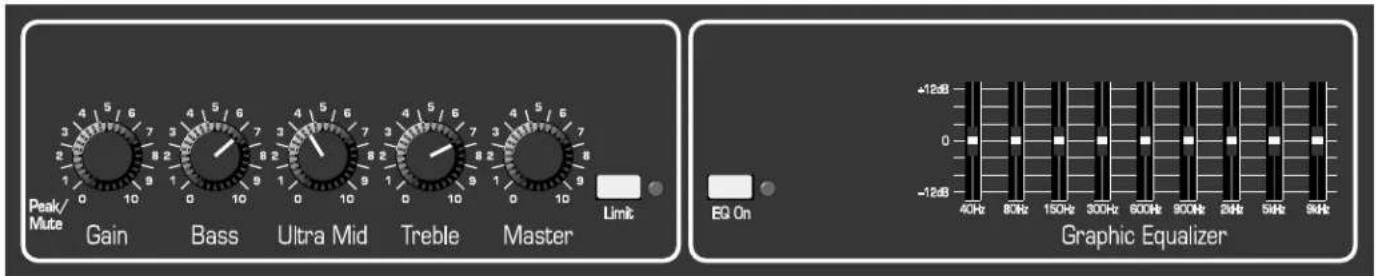
text_image
Peak/Mute Gain Bass Ultra Mid Treble Master Limit EQ On +12dB 0 -12dB 40Hz 80Hz 150Hz 300Hz 600Hz 900Hz 24Hz 54Hz 94Hz Graphic EqualizerJAZZ:
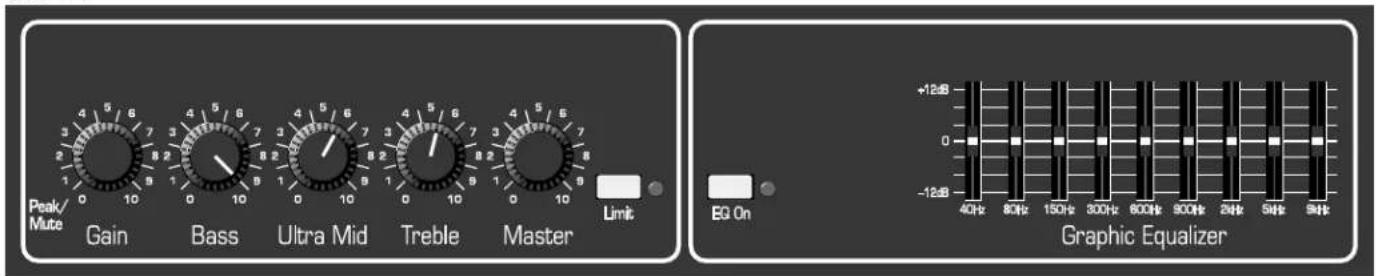
text_image
Peak/Mute Gain Bass Ultra Mid Treble Master Limit EG On Graphic Equalizer +12dB -12dB 40Hz 80Hz 150Hz 300Hz 600Hz 900Hz 24Hz 54Hz 94HzCOUNTRY:

text_image
Peak/Mute Gain Bass Ultra Mid Treble Master Limit EQ On +12dB 0 -12dB 40Hz 80Hz 150Hz 300Hz 600Hz 900Hz 2kHz 5kHz 9kHz Graphic EqualizerFUNK "POPPING:"

text_image
Peak/Mute Gain Bass Ultra Mid Treble Master Limit EG On Graphic Equalizer +12dB 0 -12dB 40Hz 80Hz 150Hz 300Hz 600Hz 900Hz 24Hz 54Hz 94HzTroubleshooting
In the unlikely event that your BA500 should stop working properly (or just stop working), take a few minutes to troubleshoot it before you call for service. You can save yourself a lot of time and sometimes money by doing it yourself, and often the cure for the problem is something quite simple.
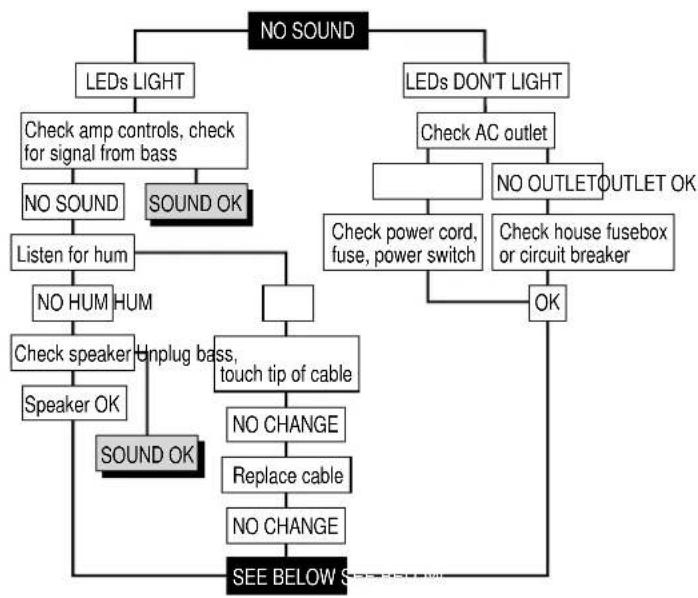
flowchart
graph TD
    A["NO SOUND"] --> B["LEDs LIGHT"]
    A --> C["LEDs DON'T LIGHT"]
    B --> D["Check amp controls, check for signal from bass"]
    D --> E["NO SOUND"]
    D --> F["SOUND OK"]
    E --> G["Listen for hum"]
    G --> H["NO HUM HUM"]
    H --> I["Check speaker"]
    I --> J["Speaker OK"]
    I --> K["SOUND OK"]
    C --> L["Check AC outlet"]
    L --> M["NO OUTLET OUTLET OK"]
    M --> N["Check power cord, fuse, power switch"]
    N --> O["OK"]
    O --> P["Check house fusebox or circuit breaker"]
    P --> Q["NO CHANGE"]
    Q --> R["Replace cable"]
    R --> S["NO CHANGE"]
    S --> T["SEE BELOW S"]
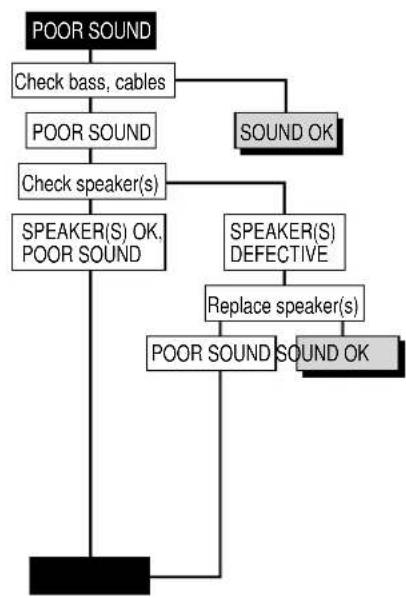
flowchart
graph TD
    A["POOR SOUND"] --> B["Check bass, cables"]
    B --> C["POOR SOUND"]
    C --> D["Check speaker(s)"]
    D --> E["SPEAKER(S) OK, POOR SOUND"]
    E --> F["SOUND OK"]
    D --> G["SPEAKER(S) DEFECTIVE"]
    G --> H["Replace speaker(s)"]
    H --> I["POOR SOUND SOUND OK"]
    I --> J["POOR SOUND"]
If the problem isn't covered above, or if the steps lead you here, then contact your Ampeg dealer for service information. Also, you should refer your amp to an authorized service center for servicing if it gets dropped, has liquid spilled into it, or sustains damage to its power cord. Regular cleaning and maintenance by your local Service Center will help extend the amplifier's useful life.
System Block Diagram
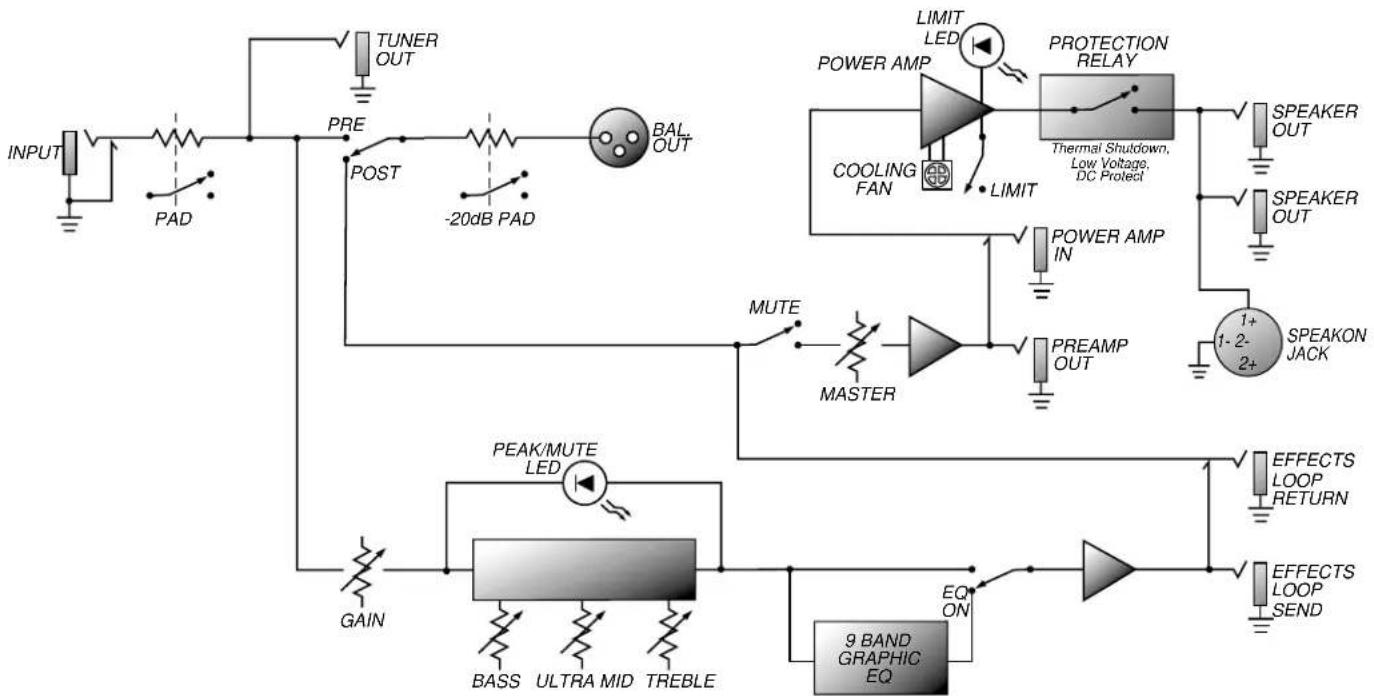
flowchart
graph TD
    INPUT["INPUT"] --> PAD["PAD"]
    PAD --> PRE["TUNER OUT"]
    PRE --> POST["POST"]
    POST --> -20dB_PAD["-20dB PAD"]
    -20dB PAD --> BAL_OUT["BAL OUT"]
    BAL_OUT --> MUTE["MUTE"]
    BAL_OUT --> MASTER["MASTER"]
    MASTER --> MUTE
    MUTE --> PEAK/MUTE_LED["PEAK/MUTE LED"]
    PEAK/MUTE_LED --> BASS["BASS"]
    PEAK/MUTE_LED --> ULTRA_MID["ULTRA MID"]
    PEAK/MUTE_LED --> TREBLE["TREBLE"]
    BAL_OUT --> EQ_ON["EQ ON"]
    EQ_ON --> 9BAND["9 BAND GRAPHIC EQ"]
    MAXIM["POWER AMP"] --> LIMIT["LIMIT LED"]
    MAXIM --> COOLING["FAN"]
    MAXIM --> POWER_AMP_IN["POWER AMP IN"]
    MAXIM --> PREAMP_OUT["PREAMP OUT"]
    MAXIM --> SPEAKER_OUT["SPEAKER OUT"]
    MAXIM --> SPEAKON_JACK["SPEAKON JACK"]
    MAXIM --> DETELE["1-2-2+ EFFECTS LOOP Return"]
    MAXIM --> EFFECTS_LOOP_SEND[" EFFECTS LOOP SEND"]
Technical Specifications
| OUTPUT POWER RATING 350 Watts RMS, 4 ohm load, 120VAC, 5% THD | |
| 540 Watts RMS, 2 ohm load, 120VAC, 5% THD | |
| TONE CONTROL RANGE Bass: +8dB / -18dB @ 50Hz | |
| Ultra Mid: ±8dB @ 500Hz | |
| Treble: +12dB / -24dB @ 5kHz | |
| GRAPHIC EQ RANGE 40Hz: ±11dB | |
| 80Hz: ±8dB | |
| 150Hz: ±8dB | |
| 300Hz: ±8dB | |
| 600Hz: ±8dB | |
| 900Hz: ±8dB | |
| 2kHz: ±8dB | |
| 5kHz: ±8dB | |
| 9kHz: ±12dB | |
| GAIN 60dB typical, tones @ center | |
| SIGNAL TO NOISE RATIO | 75dB typical |
| INTERNAL SPEAKERS | (2) 10" cast frame, 225W, 8 ohm, 2.5" voice coil diameter, 56 oz. magnet(1) 1" compression driver with L-pad control |
| POWER REQUIREMENTS 120VAC, 60Hz, 400VA | |
| 100VAC, 50/60Hz, 400VA | |
| 230VAC, 50/60Hz, 400VA | |
| SIZE AND WEIGHT | 24"W x 23.5"H x 17.25"D, 95 lbs. |
Ampeg reserves the right to change specifications without notice.