
System 10 THX Ultra 2 - Hi-Fi System Teufel - Free user manual and instructions
Find the device manual for free System 10 THX Ultra 2 Teufel in PDF.


| Product Type | Hi-Fi Home Theater System |
| Model | System 10 THX Ultra 2 |
| Brand | Teufel |
| THX Certification | THX Ultra 2 |
| Speaker Configuration | 7.1 channel |
| Amplifier Power (Total) | 1400 W RMS |
| Subwoofer Type | Active, front-firing |
| Subwoofer Driver | 12-inch |
| Satellite Speaker Drivers | 4-inch woofer, 1-inch tweeter |
| Center Speaker Drivers | Dual 4-inch woofers, 1-inch tweeter |
| Frequency Response | 28 Hz - 20 kHz |
| Impedance | 4-8 ohms |
| Connectivity | RCA, Optical, Coaxial, Speaker terminals |
| Supported Audio Formats | Dolby TrueHD, DTS-HD Master Audio |
| Dimensions (Subwoofer) | 450 x 450 x 500 mm |
| Dimensions (Satellite) | 200 x 300 x 250 mm |
| Dimensions (Center) | 500 x 150 x 200 mm |
| Weight (Subwoofer) | 25 kg |
| Weight (Satellite each) | 5 kg |
| Weight (Center) | 8 kg |
| Power Consumption (Standby) | < 0.5 W |
| Power Consumption (Max) | 1600 W |
| Input Voltage | 110-240 V AC, 50/60 Hz |
| Cleaning | Wipe with dry cloth; avoid liquids |
| Safety Features | Overload protection, thermal shutdown |
| Spare Parts Availability | Contact Teufel support |
| Warranty | 2 years |
Frequently Asked Questions - System 10 THX Ultra 2 Teufel
User questions about System 10 THX Ultra 2 Teufel
0 question about this device. Answer the ones you know or ask your own.
Ask a new question about this device
Download the instructions for your Hi-Fi System in PDF format for free! Find your manual System 10 THX Ultra 2 - Teufel and take your electronic device back in hand. On this page are published all the documents necessary for the use of your device. System 10 THX Ultra 2 by Teufel.
USER MANUAL System 10 THX Ultra 2 Teufel
Technical Description and Operating Instructions
natural_image
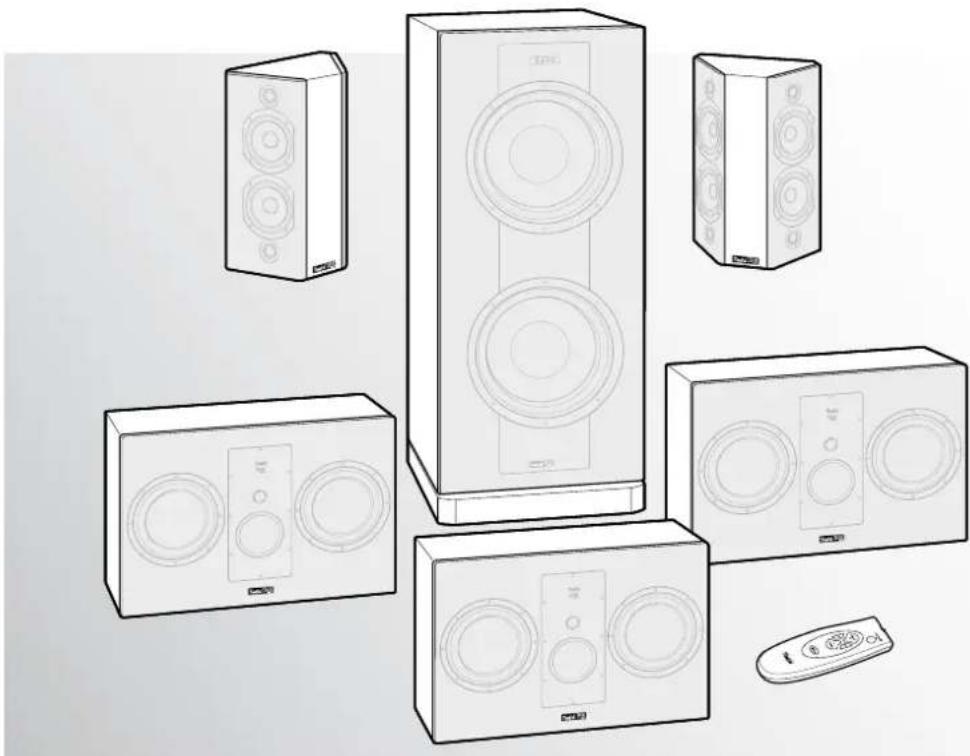
Line drawing of various household audio speakers and devices including a multi-tiered tower, speaker chamber, and remote control (no text or symbols)System 10 THX Ultra 2
5.1 Home Theater Speaker Set with THX Ultra 2 Certificate
Teufel
Contents
General notes and information ....3
Safety notes....4
Overview 5
Control elements and connections ......6
Subwoofer back side....6
Subwoofer front side 6
Rear speakers back side 6
Remote control....6
Remote control....7
Assembly 7
Setup 8
Location tips 8
Center speakers....8
Front speakers 8
Subwoofer 8
Rear speakers....8
Connecting....9
Subwoofer 9
Speakers....9
Connecting to a power supply.... 10
Adjusting....11
Adjusting the AV receiver....11
Non-adjustable AV receiver 11
Rear speakers....11
Operation 12
Care and cleaning....12
Troubleshooting....13
Protecting the environment ....14
Batteries and rechargeable batteries.... 14
Disposing of the unit.... 14
Technical data....14
Notes....15
Notice
The information in this document may change without prior notice and in no way constitutes any liability on the part of Lautsprecher Teufel GmbH.
No part of these instructions may be reproduced in any form or be broadcasted in any way electronically, mechanically, by photocopy or recording without the written permission of Lautsprecher Teufel GmbH.
THX and the THX logo are trademarks of THX Ltd. which are registered in some jurisdictions. All rights reserved.
Original packaging
If you wish to exercise your eight-week right of return, we ask that you be absolutely sure to hold onto the packaging. We can only accept the return of the speakers WITH THE ORIGINAL PACKAGING.
Empty boxes are not available!
Complaints
In case of complaint we will need the following information to process your enquiry:
1. Invoice number
Can be found on the sales slip (enclosed with the product) or on the order confirmation received as a PDF document, e.g. 4322543
2. Series number and batch number respectively
Located on the back side of the unit, e.g. serial number: S10....
Many thanks for your support!
Contact
For questions, suggestions or criticism please contact our customer service department:
10783 Berlin (Germany)
Phone 00800 - 200 300 40 (free of charge)
Fax: +49 (0)30 / 300 930 930
E-mail: service@teufelaudio.com
www.teufelaudio.com
Proper use
Use the unit only as described in these operating instructions. Any other use is considered improper and may result in damage to property or even injury to persons.
The manufacturer assumes no liability for damages caused by improper use.
The unit is intended for private use.

Before operating the unit for the first time please read the safety notes and operating instructions carefully. Only in this way, will you be able to
use all functions in a safe and reliable manner.
Keep the operating instructions safe and pass them on to anyone who may own the unit after you.
Caution icons
The following caution symbols are used in these instructions:

High risk!
Failure to observe the warning may result in severe personal injury or death.
Attention

Moderate risk!
Failure to observe the warning may result in property damage.

Minor risk!
Points which should be observed when handling the unit.
Safety notes

Risk of electric shock!
Faulty installation of electrical equipment or mains voltage which is too high can cause
electric shocks.
- The unit is only suitable for use with a power supply voltage of 230 V\~/50 Hz. Make sure that the mains voltage is correct. For more information, refer to the nameplate.
- Check the unit regularly for damage. If the unit's case or mains cable is defective or shows other signs of visible damage, disconnect the mains adapter immediately from the socket and do not operate the unit.
- The standby button does not disconnect the unit from the power supply. For this reason, connect it to an easily accessible socket so that you can quickly disconnect it from the power supply in the event of faults.
- If the unit emits smoke or smells of burning or other unusual odours, disconnect it immediately from the power supply and do not operate it.
- Never open the unit housing. Repairs may only be carried out by an authorised specialist workshop. In the process, only parts may be used, which correspond to the original unit data. There are electrical and mechanical parts in this unit which are essential in order to avoid exposure to sources of danger.
- Do not insert any object through the vent slots in the housing.
- Only use the unit in indoor areas.
- Do not operate the unit in moist areas and protect it from drops of water or splash water. Ensure that no vases or other vessels containing liquids are on the unit or in its vicinity so that no liquid penetrates the housing. Should water or any other foreign object penetrate the unit, immediately disconnect the mains plug and, if applicable, remove any batteries present. Then send the unit to our service address.
- Never touch the mains plug with wet hands.
Danger
Danger to children!

Children can become trapped in the packing film when playing and suffocate.
- Do not allow children to play with the unit or the packaging film. Danger of suffocation exists.
- Ensure that children do not remove small parts from the unit or take them off of the unit (e.g. control knobs or plug adapters). They could swallow the parts and choke.
Never allow children to operate electrical units unsupervised.
Danger to hearing
Extended listening at high volumes may lead to hearing loss.
- To avoid damage to health, avoid extended listening at high volumes.
- When the volume is set high, always keep a certain distance from the unit and never place your ear directly on the speaker.
- Particularly when the subwoofer has been set to maximum volume and the unit is activated, very high noise pressure may suddenly be produced. This may have psychological consequences and also cause physical injury. Children and pets are particularly at risk. Set your signal source unit volume control to a low setting before turning on the power,
Danger
Danger of chemical burns!

Leaking battery acid may lead to chemical burns.
- Do not allow battery acid to come into contact with skin, eyes or mucus membranes. In case of contact with acid rinse the affected locations immediately with plenty of plain water and (if necessary) see a doctor.
Danger
Danger of injury/damage!
Incorrect location may result in damage.
- Never use the unit unmounted in vehicles, in instable locations, on wobbly stands or furniture, with attachment fixtures that are too small etc. The unit could topple over or fall, injuring persons or causing damage to the unit itself.
- Set up the speakers so that there is no risk of them tipping over and the cables don't represent a tripping hazard.
- Ensure that any wall mounting is performed in a professional manner.
- Only use suitable wall brackets for mounting. Check the carrying capacity of the walls.
- Do not place the unit near sources of heat (e.g. heaters, ovens, other heat generating equipment such as amplifiers etc.).
Attention Fire hazard!

Improper use may lead to damage or fire.
- Do not place open flames such as burning candles or similar on the unit.
- Ensure sufficient ventilation.
- Do not place the unit in direct sunlight.
- Do not cover the ventilation slots with curtains, cloths, newspapers or similar. Heat build-up inside the unit can shorten the lifetime of the unit.
Attention Risk of damage!

Power overload due to lightning strike may damage or destroy the unit.
- If the unit is to be left unsupervised for a long period (e.g. during a holiday), or if a thunderstorm is forecast, disconnect it from the mains power supply.
Overview
①
natural_image
Line drawing of a two-tiered speaker tower (no text or symbols)②
natural_image
Illustration of a white rectangular electronic device with two circular speakers and a central speaker (no text or symbols)③
④
⑤
⑥
Product contents
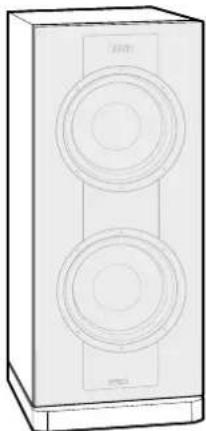
① 1 x active subwoofer
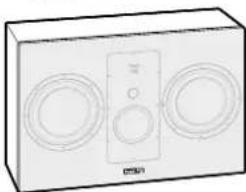
② 3 x front speakers
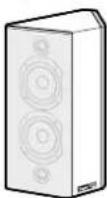
③ 2 x dipole rear speakers
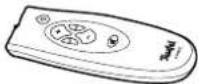
④ 1 x remote control
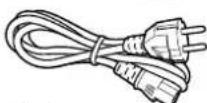
⑤ 1 x power cord for subwoofer
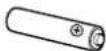
⑥ 2 x battery for remote control
* The Concert Set 5.1 does not contain any two separate dipole rear speakers, but five identical front speakers.

Connector cables
Due to differing customer requirements, the
System 10 THX Series system is shipped without
connector cables. You can find suitable cables in our webshop (www.teufelaudio.com) in the "Accessories" area. You can also purchase support feet for the speakers there.
Check to be sure
- Check that all items have been delivered and that nothing is damaged.
- If the delivery is incomplete or you find damage sustained in transit, do not operate the unit but contact our service department (see page 3).
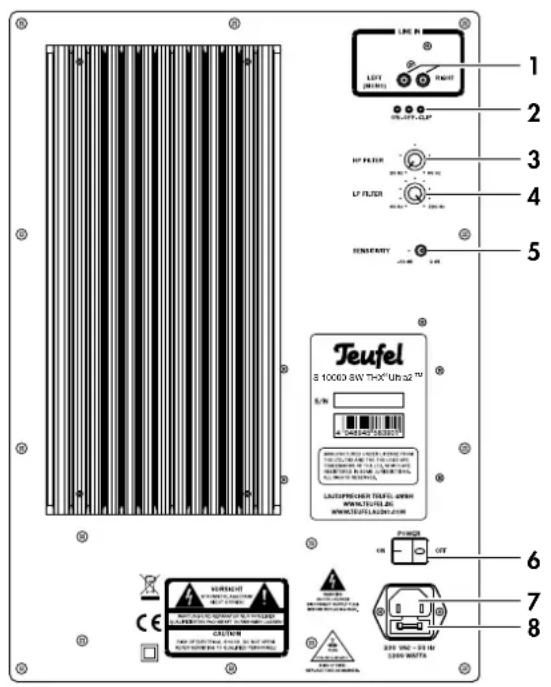
Subwoofer back side
text_image
LINE IN LEFT (01281) RIGHT ON/OFF-CLIP HP FILTER LF FILTER SENSIFERTY TEUFL S 10000 SW "D-X" Un a 70 5 W 4 MΩ 6 P/W OFF 6 7 8 CACTUM CAB OF SWITCH, S/INT, 3.5 V/10000000000000000000000000000000000000000000000000000000000000000000000000000000000000000 CE 1 2 3 4 5 LEAF/PEAF/PEAF/PEAF/PEAF/PEAF/PEAF/PEAF/PEAF/PEAF/PEAF/PEAF/PEAF/PEAF/PEAF/PEAF/PEAF/PEAF/PEAF/PEAF/PEAF/PEAF/PEAF/PEAF/PEAF/PEAF/PEAF/PEAF/PEAF/PEAF/PEAF/PEAF/PEAF/PEAF/PEA LEAF/PFACER TEUFL, C/WW WWW.TEUFEL.DG. WWW.TEUFEL.DG.A2911.CWW POWER ON OFF 2.5V 15.5V 2.5V 1.5V 1.5V 1.5V 1.5V 1.5V 1.5V 1.5V 1.5V 1.5V 1.5V 1.5V 1.5V 1.5V 1.5V 1.5V 1.5V 1.5V 1.5V 1.5V 1.5V 2.5V 2.5V 2.5V 2.5V 2.5V 2.5V 2.5V 2.5V 2.5V 2.5V 2.5V 2.5V 2.5V 2.5V 2.5V 2.5V 2.5V 2.5V 2.5V 2.5V 3.5V 3.5V 3.5V 3.5V 3.5V 3.5V 3.5V 3.5V 3.5V 3.5V 3.5V 3.5V 3.5V 3.5V 3.5V 3.5V 3.5V 3.5V 3.5V 3.5V 4.5V 4.5V 4.5V 4.5V 4.5V 4.5V 4.5V 4.5V 4.5V 4.5V 4.5V 4.5V 4.5V 4.5V 4.5V 4.5V 4.5V 4.5V 4.5V 4.5V 6 8 8 8 8 8 8 8 8 8 8 8 8 8 8 8 8 8 8 8 8 8 8 8 8 8 8 8 8 8 8 8 8 8 8 8 8 8 8 8 8 8 8 8 8 8 8 8 8 8 8 6Subwoofer front side
text_image
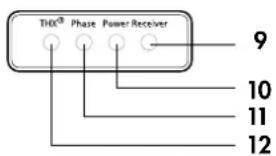
THX® Phase Power Receiver 9 10 11 12Rear speakers back side
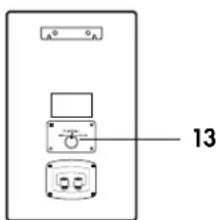
text_image
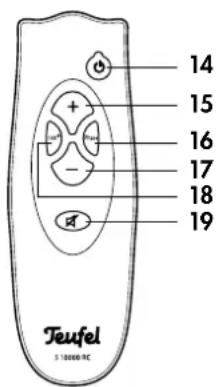
A 13Remote control
text_image
14 15 16 17 18 19 Teufel S 10000/RCPos Name Description
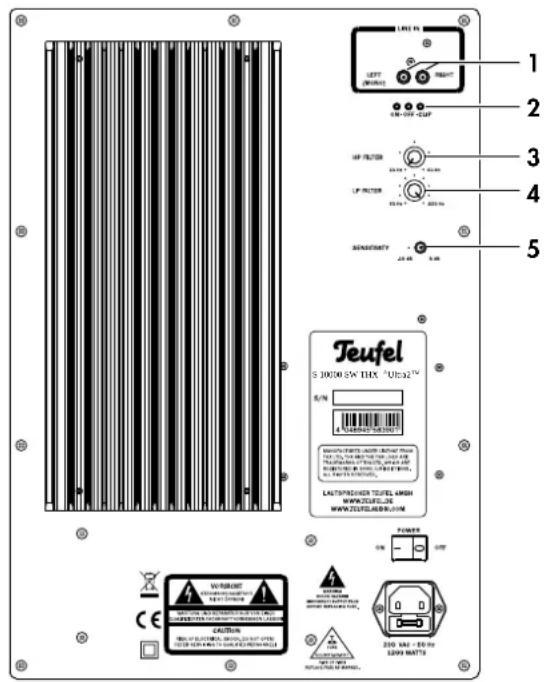
1 Line In Audio input jacks
2 On • Off • Clip Power LEDs
On: Subwoofer on
Off: Subwoofer off/overloaded
Clip blinks: Input is overloaded
Clip illuminated: Speaker protec-
tive circuit has been triggered
3 HP FILTER High pass filter
4 LP FILTER Low pass filter
5 SENSITIVITY Sensitivity
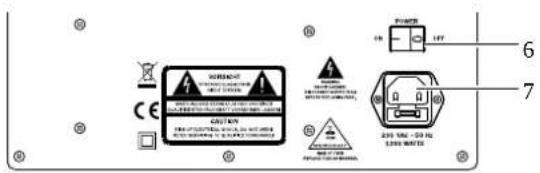
6 POWER Mains switch
7 - Connector jack for power cord ⑤
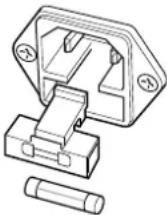
8 - Mains fuse
Pos Name Description
| 9 | Receiver | Infrared receiver for remote control |
| 10 | Power | Power LED: Red = Standby, Green = Operation |
| 11 | Phase | Green = Phase shifting active |
| 12 | THX | Red = Volume corresponds to THX requirements |
Pos Name Description
| 13 | - | Switch bipole/dipole/monopole |
Pos Name Description
| 14 | + | Turn the subwoofer on or to standby |
| 15 | + | Increase subwoofer volume |
| 16 | Phase | Activate/deactivate phase shifting (180°) |
| 17 | - | Reduce subwoofer volume |
| 18 | THX ^ | Set the subwoofer volume to the THX level |
| 19 | Mute the speakers |
Remote control
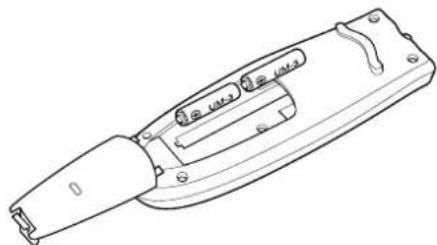
In order to operate the remote control, you will need two type AAA micro batteries with 1.5 volt (included in the product contents.
Inserting batteries
- Push the small lever on the cover of the battery compartment on the back of the remote control and remove the lid by lifting it off upwards.
- If applicable, remove any old batteries (please observe the notes on page 14).
- Insert the batteries in the battery compartment as shown in the figure.
- Place the cover back on the compartment and push it closed.
Functionality
The remote control transmits infrared control signals. To do so, it is necessary that you point the remote control towards the front of the subwoofer. Ensure that no objects are in the way of the infrared signal.
natural_image
Line drawing of a mechanical tool or device with handle and lever (no text or symbols)Assembly
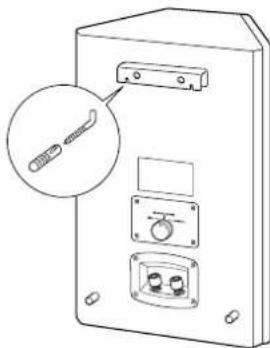
The brackets on the back side (see graphic) are used for mounting the rear speakers on a wall.
Threaded holes are located on the bottom side for mounting the front speakers on a speaker stand.
You can purchase mounting materials specially designed for these speakers (cords, speaker stands and resonance dampers) in our webshop (www.teufelaudio.com) in the "Accessories" area.
Cover grill
The cover grills protect the sensitive speaker membranes and do not affect the sound. Depending on your taste, you can simply pull the grids off to the front and then put them back on the same way.
natural_image
Technical line drawing of a device with labeled ports and an inset showing a connector (no text or symbols present)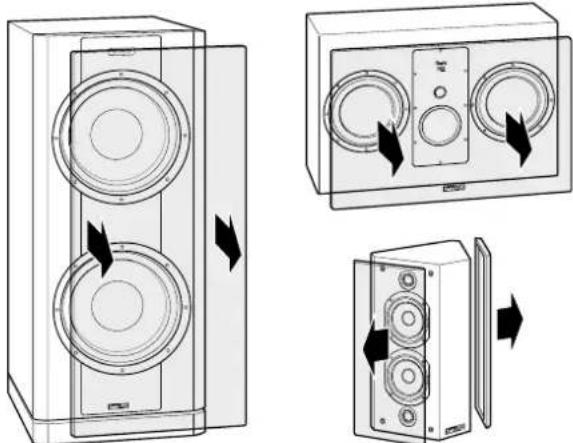
natural_image
Diagram showing three views of a speaker tower with circular speakers and directional arrows indicating rotation (no text or labels)Setup
Location tips
- Select a stable, level base.
- Make sure that the environment is clean and free from dust.
- Avoid placing the unit close to sources of heat or in direct sunlight.
- Do not place any heavy objects on the cables or the speakers.
The following specifications concern an “ideal home cinema”, in which the viewer and listener respectively sits in a central position at a sufficient distance in front of the television and screen respectively (see the adjacent graphic) and no objects (tables or the like) are located in between. Unfortunately, the room, furnishings or one’s partner do not always allow for optimum arrangement.
Modern AV receivers offer a variety of possibilities for electronically compensating losses associated with the arrangement. Generally speaking, the following rule applies: You can always use our recommendations as a base to experiment with what works best acoustically and optically in your home. Let your ears (and eyes) decide!
Center speakers
Place one of the three front speakers ② in a central position, directly under the screen and/or silver screen.
Front speakers
The two remaining front speakers ② are set up or hung to the right and left of the screen at a height of approximately 40 to 120 cm. They should be in line with the center speaker and form an equilateral triangle with the listener – the so-called stereo triangle (distance from the listener = distance between the speakers). The speakers should project sound directly into the room or slightly towards the listener.
Subwoofer
The location of the subwoofer ① can be freely selected and does not influence the other speakers. However, do not place it in the corner of a room as this may cause uncontrollable frequency overloads. A location between the front speakers is often ideal.
Rear speakers
The two rear speakers ③ project sound at a 45-degree angle towards the front into the room and towards the back against the walls. This way, the speakers produce the desired THX diffusivity. They are set up or hung to the side of the listener and at head level (140 to 210 cm). There should be at least 10 cm of space to the back wall of the room.
You can also set up the rear speakers behind the listener at a height of 140 to 210 cm. Experiment and sample the sound at different distances to determine the ideal distance to the side wall.
②
TV
②
Subwoofer
①
②
Front FrontCenter
Stereo triangle
③
③
Rear
Rear
Rear
Rear
Danger Danger of injury/damage!

Arrange the cables so that they do not pose a trip hazard.
- Pull the mains plug of your AV receiver out of the socket to prevent accidental activation.
Subwoofer
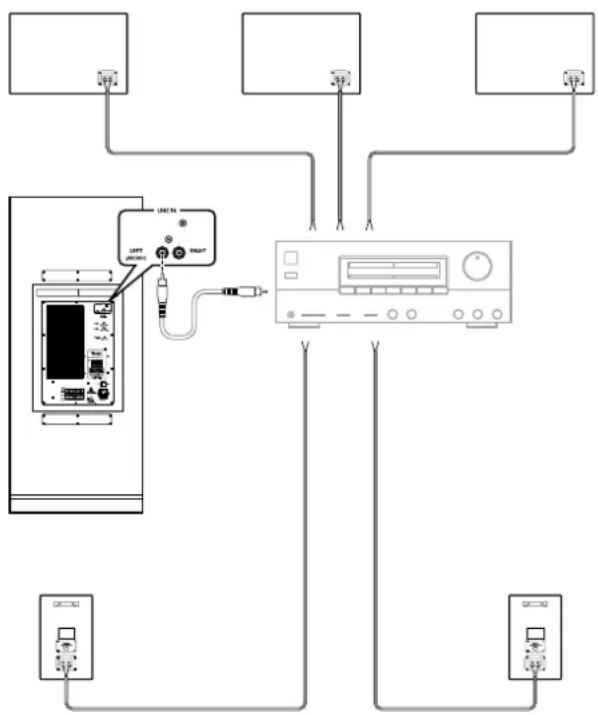
- Ideally, the subwoofer is connected to the subwoofer jack of the AV receiver with a mono RCA cable.
- Normally, only the RCA jack 1 "LEFT MONO" on the back side of the subwoofer is used for this purpose.
- The RCA jack 1 "RIGHT" is only occupied if you use a Y adapter for the connection. This increases the subwoofer level slightly.
- You will find more information on this in the operating instructions of your receiver.
- If your receiver does not have a connection for a subwoofer, connect an available speaker outlet with an RCA jack 1 of the subwoofer using a voltage reducer and an RCA cable. We offer voltage reducers on our website in the "Accessories" area.
Speakers
- Lay the speaker cables from your AV receiver to each of the speakers. This cable should be high-quality double-wire speaker cable with marked strands. The diameter should amount to at least 2.5 mm ^2 .
Tip: Label the cables on the receiver side – this will help when taking down and setting up the receiver. - A connector terminal with two terminal clips is located on the back side of each speaker. You can connect the speaker cables directly or using pin plugs. We only describe the direct connection here.
- The terminal clips are each marked red (+) and black (-).
!
Make sure that the polarity is correct!
Connect the like coloured terminals with one another. Otherwise the sound quality will suffer.
The speaker connectors of your AV receiver should have similar markings. The strands of the speaker cables are marked with different colours or shapes.
flowchart
graph TD
    A["Device"] --> B["Switch"]
    A --> C["Power Supply Unit"]
    B --> D["Output"]
    C --> D
    D --> E["Input"]
    style A fill:#f9f,stroke:#333
    style B fill:#ccf,stroke:#333
    style C fill:#ccf,stroke:#333
    style D fill:#cfc,stroke:#333
    style E fill:#fcc,stroke:#333
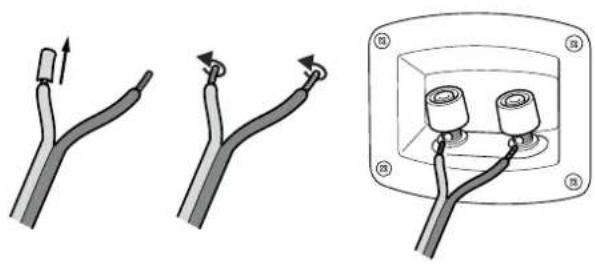
- Split the single wire on both ends up to approximately 30 mm and remove approximately 10 mm of insulation on each piece. Twist the single wire so that no strands are protruding.
- Turn the connector terminal counterclockwise until loose. Run the stripped cable into the hole that is now visible. Turn the terminal clockwise until closed. The cable has now been clamped into place.
- Connect all cables to the speakers in this way.
- Connect the speaker cables to your AV receiver. You will find notes on this in the operating instructions of the unit.
Connecting to a power supply
- Make sure that the mains switch 6 is turned off (position "0").
- Connect the mains connector jack 7 with a mains socket using the mains cord (5).
- Also plug the mains plug of your AV receiver back into the socket.
natural_image
Three-step diagram showing cable installation steps: straight, curved, and rectangular (no text or symbols)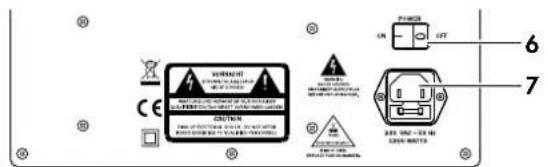
text_image
WARNING ON OUT 6 7 CAUTION 120V AC 350 V AC 350 V AC 350 V AC 350 V AC 350 V AC 350 V AC 350 V AC 350 V AC 350 V AC 350 V AC 350 V AC 350 V AC 350 V AC 350 V AC 350 V AC 120V AC 350V AC 350V AC 350V AC 350V AC 350V AC 350V AC 350V AC 350V AC 350V AC 350V AC 350V AC 350V AC 350V AC 350V AC 350V AC 350V AC 350V ACAdjusting the AV receiver
Most AV receivers feature a menu with speaker settings (referred to as "Speaker Setup" or the like). If this is the case, you should make the following settings:
- Size of the front, center and rear speakers are set to "normal" or "small" – not "large"
- "Subwoofer" to "on"
• Crossover frequency for subwoofer to 80 Hz
• Volume of the subwoofer to more than 75 %
Set the subwoofer volume to the THX level. For this, push the button 18 "THX" on the remote control while the subwoofer is on. The display 12 "THX" illuminates in red.
These settings ensure that the subwoofer is used optimally and you can do the final fine tuning via the automatic calibration function or the menu of your AV receiver.
Non-adjustable AV receiver
If your AV receiver does not provide the above options, you can make the most important settings directly on the subwoofer. To do so, you will need a CD or DVD with adequate, powerful sound.
!
Note
The setting elements on the back side of the subwoofer only work when THX mode is turned off (the display 12 "THX" is off).
- Set the separation frequency with the control 4 "LP FILTER" to approx. 80 Hz (second dash). This way, you specify that the subwoofer only plays sounds up to this frequency (adjustment range: 60–220 Hz).
- With the control 3 "HP FILTER" you can block low frequencies (adjustment range: 20–60 Hz).
- With the switch 5 "SENSITIVITY", soft signal sources can be amplified by 10 dB (switch setting: left).
- Once you have set the best sound, switch phase shifting on and off several times with the button 16 "Phase" (display 11 "Phase" is green). Then select the setting at which the subwoofer sounds as loud and precise as possible.
- Optimise the settings with other CDs/DVDs and different volumes.
Rear speakers
The rotary switch on the back of the rear speakers should normally be set to the intermediate position "DIPOL" (for professionals: the baffle boards then project sound with the phase shift).
If used as a rear center speaker, "BIPOL" must be selected (baffle boards project sound in phase). If two rear center speakers are used, "MONOPOL" is deactivated for each baffle board and the speakers are set up with the silent sides facing one another.
text_image
LINE IN LEFT (NM/IN) RIGHT 0.0-1.0V 0.0-1.0V UP FLU/TOR 25.0kV 0.0-1.0V UP FLU/TOR 25.0kV 0.0-1.0V SANSOETHY 24.0kV 0.0-1.0V 1 2 3 4 5 Teufel S 10000 kW THX "UE32" R/N www.teufel.com Copyright: SAUDI, SAUDI, SAUDI, SAUDI, SAUDI, SAUDI, SAUDI, SAUDI, SAUDI, SAUDI, SAUDI, SAUDI, SAUDI, SAUDI, SAUDI, SAUDI, SAUDI, SAUDI, SAUDI, SAUDI, SAUDI, SAUDI, SAUDI, SAUDI, SAUDI, SAUDI LATS/PREDENER TEUFEL AMEN WWW.TEUFEL.COM POWER OFF OFF CAUTION CAUTION 250 KM - 80 kV 5000 NATTS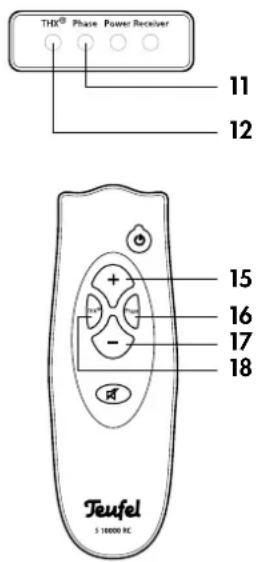
text_image
THX® Phase Power Receiver 11 12 15 16 17 18 Teufel S 10000 RC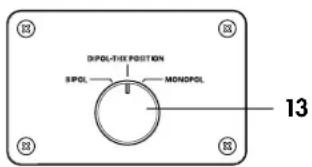
text_image
DIPOL-THE POSITION SPOL —— MONDPOL 13Operation
Activating and deactivating
- With the switch 4 turn the mains voltage on and off respectively. After activation the subwoofer is in standby and the power LED 10 "Power" is red. Once the subwoofer is activated, the Power LED is green.
You can control all other functions with the remote control:
- Turning on or entering standby mode: Push the button 14 "
- Increasing the volume: Push the button 15 "+"
- Decreasing the volume: Push the button 17 "-"
- Setting the volume to the THX level: Push the button 18 "THX", the display 12 "THX" is red.
- Muting the subwoofer (mute): Push the button 19 "The Power LED 10 "Power" blinks green.
- Reactivating the sound: Push the button 19 " again or change the volume.
text_image
WIRENC CE CAUTEN 200 Vdc - 20 Hz 5000 WATU 6 7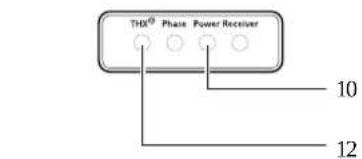
text_image
THQ® Phase Power Receiver 10 12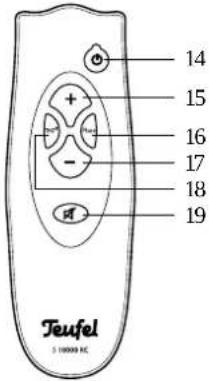
text_image
14 15 16 17 18 19 Teufel 3 10000 HCCare and cleaning
Clean the subwoofer and the satellites regularly with a soft, damp microfiber cloth. In the process, be sure to observe the following notes:
Danger

Risk of electric shock!
In contact with live parts, water can lead to electric shock or short circuit.
• Make sure that no liquid penetrates the unit.
- Disconnect the mains plug before cleaning.
Attention
Risk of damage!
Using the wrong cleaning materials may damage the delicate surface of the case.
- If possible only use plain water without any cleaning products. In case of stubborn marks, a mild soap solution may be used.
- In no circumstances should caustic cleaning products, white spirit, thinners, petrol or similar be used for cleaning.
The following notes and further detailed information on our website should help you to rectify malfunctions. If this does not lead to success, please contact our hotline 200800 - 200 300 40 (free of charge). Please also observe the warranty notes.
| Problem Possible cause Solution | ||
| The subwoofer isn't active, the Power LED 10 "Power" is not on. | The subwoofer is off or doesn't have any power. | Turn the switch 6 on ("I"). Check the mains cord and socket. |
| Fuse is defective. Replace the fuse: Discon- | 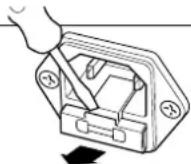 | |
 | ||
| The subwoofer is not working but the Power LED 10 "Power" is green. | The volume has been set too low or the mute function is on. | Increase the volume with the button 15. |
| The subwoofer hums. The subwoofer is connected to another circuit than the rest of the system. | Connect the subwoofer and AV receiver to the same circuit. | |
| The buzzing is caused by problems with the power supply. | Buy a line filter and connect both units to it. | |
| The buzzing is caused by a multi-outlet power strip. | Use another multi-outlet power strip or plug the subwoofer directly into the wall socket. It may help to insert the plug into the socket the other way round. | |
| Playback is noisy. Generally speaking, the 10 THX system is a very low-noise system. In the high range area, very good-quality high-resolution speaker systems can expose the poor quality of a signal source (e.g. from MP3 files). | Ensure that the source is sending a clean signal. | |
| The sound seems dull. Satellite has been connected with incorrect polarity. | Make sure the speaker cables of all satellites are connected properly. | |
Batteries and rechargeable batteries
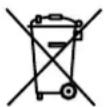
Batteries and rechargeable batteries must not be disposed of with household waste!
Every consumer is required by law to bring all batteries and rechargeable batteries, whether
they contain harmful substances*) or not, to a collection point run by the communal authority or borough or run commercially, so that they can be disposed of in an environmentally friendly manner.
Please only hand in fully discharged batteries!
*) labelled: Cd = cadmium, Hg = mercury, Pb = lead
Disposing of the unit
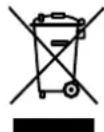
Used units must not be disposed of with household waste
If the unit is no longer operational, every consumer is required by law to dispose of used devices separate from household waste,
e. g. at a collection point run by the communal authority borough. In this way, used devices can be recycled and waste materials disposed of in an environmentally friendly manner.
For this reason, electrical equipment is labelled with the displayed symbol
Technical data
Front/center speakers
Power handling: Longterm 540 W/shortterm 720 W
Impedance: 4–8 Ohm
Dimensions (W x H x D): 650 x 445 x 235 mm (without cover grills)
Net weight: 23.7 Kg
Rear speakers
Power handling: Longterm 130 W/shortterm 180 W
Impedance: 4–8 Ohm
Dimensions (W x H x D): 304 x 466 x 200 mm
Net weight: 7.4 Kg
Subwoofer
Operating voltage: 230V\~/50 Hz
Output power: 750 W
Max. power consumption: 1200 W
Dimensions (W x H x D) in mm: 500 x 1268 (including wheels) x 540 (590 including plugs)
Net weight: 85.1 Kg
Technical changes reserved!

This product conforms with Council of the European Union guidelines 2004/108/EC and 2006/95/EC.