
EVS-6000BT - Hi-Fi System FRANKLIN - Free user manual and instructions
Find the device manual for free EVS-6000BT FRANKLIN in PDF.


| Product Type | Mobile Amped Audio System |
| Brand | Franklin |
| Model | EVS-6000BT Roadie™ Unplugged |
| Dimensions | 3.6 x 2.5 x 2.5 in (92 x 64 x 64 mm) |
| Weight | 15.5 oz (440 g) |
| Frequency Range | 40 Hz – 20 kHz |
| Power Supply | Built-in rechargeable Li-ion battery or USB (5V) via USB cable or AC adapter (not included) |
| Battery Type | Rechargeable lithium-ion |
| Bluetooth | Version 2.1+EDR, profiles A2DP, AVRCP, HSP 1.0, range up to 10 m (33 ft) |
| Impedance | Satellite 4 ohms + subwoofer 2 ohms |
| Audio Inputs | Bluetooth, 3.5 mm audio cable |
| Special Features | Surface speaker (turns any hard surface into a speaker), HD sound mode, microphone for phone calls, magnetic modular connection |
| Microphone | Built-in with mute function for phone calls |
| EQ Modes | Normal and High Definition (HD) |
| Magnetic Modules | Two modules held together by magnets; keep away from magnetic sensitive items |
| Rubber Stand | Removable, washable, with protective tape and cover |
| Operating Temperature | 32 to 95°F (0 to 35°C) |
| Storage Temperature | 23 to 122°F (-5 to 50°C) |
| Product Care | Clean with soft cloth or damp chamois; no solvents; not waterproof |
| Safety | Do not open; battery precautions; keep away from moisture and static; magnets present |
| Warranty (US) | 1 year limited warranty |
| Warranty (EU & Switzerland) | 2 years limited warranty |
| Compliance | FCC Part 15, IC, CE (R&TTE 1999/5/EC) |
Frequently Asked Questions - EVS-6000BT FRANKLIN
User questions about EVS-6000BT FRANKLIN
0 question about this device. Answer the ones you know or ask your own.
Ask a new question about this device
Download the instructions for your Hi-Fi System in PDF format for free! Find your manual EVS-6000BT - FRANKLIN and take your electronic device back in hand. On this page are published all the documents necessary for the use of your device. EVS-6000BT by FRANKLIN.
USER MANUAL EVS-6000BT FRANKLIN
Roadie™ Unplugged Mobile Amped Audio System
User's Guide
Mode d'emploi
Bedienungsanleitung
Guida all'uso
Manual del usuario
- Introduction 2
- Battery Precautions 2
- Getting Started 3
- Installation 3
- Bluetooth® Connections 4
- Battery Charging 5
- General Operations 6
- Using as a Microphone for Phone Calls 6
- Using the Audio Cable 6
- Troubleshooting Tips 7
- Product Care 7
- Product Registration 8
- Specifications 8
- Hearing Protection 8
- Operating and Storage Temperatures 9
- Recycling and Disposal 9
- FCC Notice (U.S. only) 9
- IC notice 10
- EU notice 10
- Disclaimer of Warranties 10
- Limited Warranty (U.S.) 11
- Limited Warranty (EU & Switzerland) 12
- Limited Warranty (outside U.S., EU & Switzerland) 12
- Limited Warranty (Australia) 12
Please read the following safety warnings and precautions before using your device.
1. Introduction
Thank you for purchasing Roadie™ Unplugged Mobile Amped Audio System - a small portable music player, speaker and amplifier. You can turn any hard surface such as wooden desk or glass table into a speaker by simply placing this device on its surface. This device can be easily connected with any audio or video devices, smartphones, etc. via Bluetooth® connection or audio cable for your traveling or daily needs.
2. Battery Precautions
The device can be powered by a built-in rechargeable lithium battery. Please charge the battery for at least 8 hours before your first use of the device.
- If the device is not used for a long period of time, the battery may lose its charge. Please recharge the battery.
- Rechargeable batteries are only to be charged under adult supervision.
- Use only the supplied USB cable or a standard 5V USB AC adapter (not supplied) to recharge the battery. Improperly charging a battery may damage it or the device.
- Do not use an unauthorized battery.
- Never open the device by yourself. For replacement of battery please contact our technical support (www.franklin.com). Opening the device by yourself will invalidate the warranty.
- Do not attempt to open the rechargeable battery or battery pack. There are no user serviceable parts inside.
- Should a battery leak, the device may become damaged. Clean the battery compartment immediately, avoiding contact with your skin.
- Keep batteries out of reach of small children. If swallowed, consult a physician immediately.
- Leaving the battery in hot or cold places, such as in a closed car in summer or winter conditions, will reduce the capacity and lifetime of the battery. Always try to keep the battery between 15°C and 25°C (59°F and 77°F). A device with a hot or cold battery may not work temporarily, even when the battery is fully charged.
- Do not dispose of batteries in a fire as they may explode. Batteries may also explode if damaged. Dispose of batteries according to local regulations. Do not dispose as household waste.
3. Getting Started
General Controls
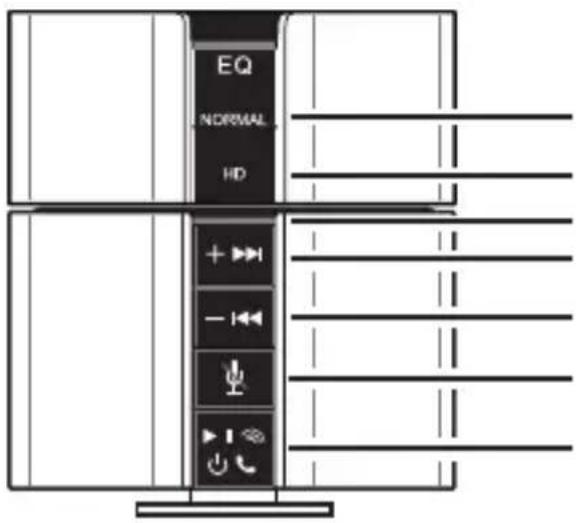
Normal Sound
High Definition Sound
Battery indicator
Volume Up/Next
Volume Down/Previous
Microphone Mute
Power On/Off; Bluetooth Setup/
Play/Pause
(Press and hold to turn on/off)
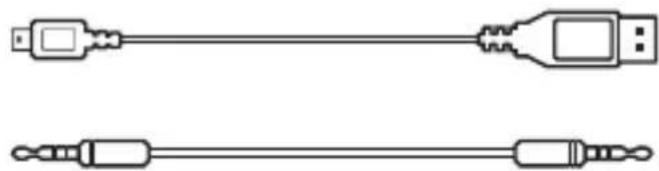
Cables
natural_image
Two schematic line drawings of USB connectors, one with a connector and the other with a connector (no text or symbols)Power Cable
Audio Cable
4. Installation
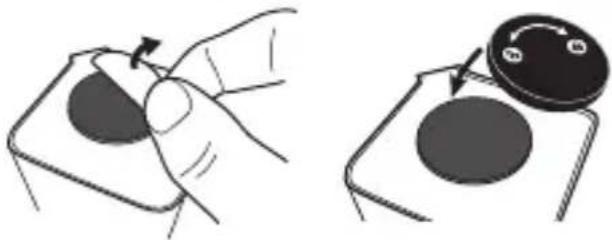
Rubber Stand
Remove the protective tape at the bottom of the device to reveal the rubber stand.
When the rubber stand is dirty, wash it with water.
Replace the protective
tape to protect the rubber stand from dust when not in use.
Alternatively, use the provided protective cover to do so.
Protective tape Protective cover
natural_image
Illustration showing a hand pressing a button on a device, with a close-up of the button being turned (no text or symbols present)Magnets
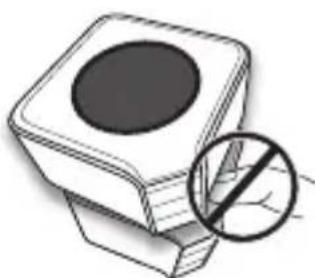
The device contains two modules that are connected together with magnets. Keep magnetic field sensitive products such as credit cards and video screens away from this device to avoid damage or malfunction.
To avoid injuries, do not put fingers between modules when joining them together.
natural_image
Illustration of a square electronic component with a circular top and a magnified inset showing a leaf symbol (no text or labels)Flat and Hard Surface
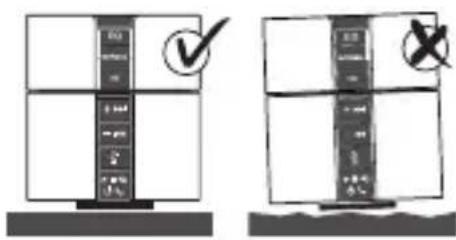
5. Bluetooth® Connections
Connect the speaker with a smartphone
- Turn on the Bluetooth function of your smartphone.
- On the device, press and hold to turn on the device and the Bluetooth feature.
- A long beep sound can be heard when the speaker is turned on, then followed by two low-pitched sounds when the Bluetooth feature is turned on.
- The button keeps blinking when no Bluetooth connection is made.
- On your mobile phone look for the device "Franklin Roadie" and connect it with your phone.
• No password is required.
- You hear two low-pitched sounds when the connection is successful.
- The button stays lit when the Bluetooth connection is established.
Connect the speaker with a computer
- Add a Bluetooth adapter to your computer.
- This is usually done by plugging the adapter into a USB port. (If a Bluetooth adapter is already built in or attached to your computer, ignore this step.)
-
On the device, press and hold to turn on the speaker and the Bluetooth feature.
-
A long beep sound can be heard when the speaker is turned on, then followed by two low-pitched sounds when the Bluetooth feature is turned on.
-
The button keeps blinking when no Bluetooth connection is made.
-
Open the Control Panel of your computer, then locate and click "Bluetooth Devices".
- Click "Add" and then follow the instructions on the computer to connect the device with the computer.
- Look for the device "Franklin Roadie".
- In case a password is required, enter "0000".
- You hear a low-pitched sound when the connection is successful.
- The button stays lit when the Bluetooth connection is established.
6. Battery Charging
The device has a built-in rechargeable lithium-ion battery which can be charged by connecting with the USB port* of your computer.
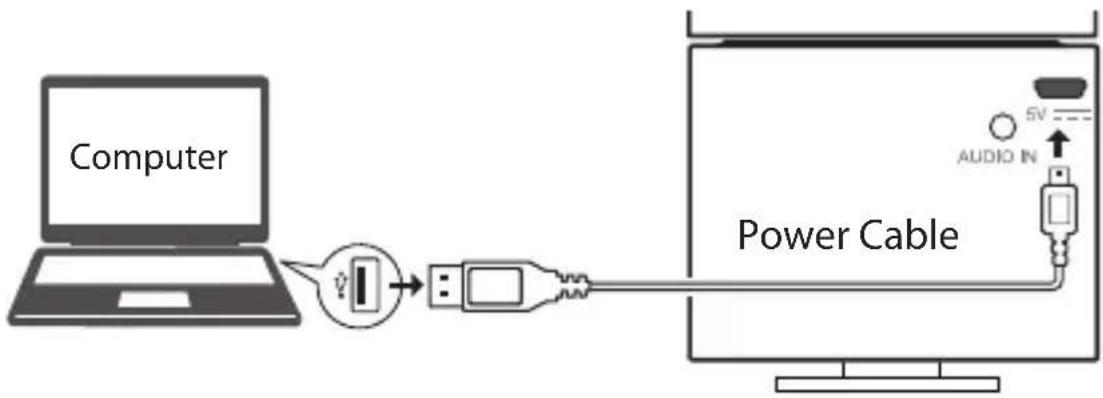
flowchart
graph LR
    A["Computer"] -->|USB| B["Power Cable"]
    B --> C["TV Signal"]
    style A fill:#f9f,stroke:#333
    style B fill:#ccf,stroke:#333
    style C fill:#cfc,stroke:#333
    note right of B: AUDIO IN
    note left of A: Computer
Refer to the battery indicator (above the + button) for the charging status.
→Indicator Charging status →
Blinking Charging in progress
Stays lit Charging completed
After charging, the device can be used without the power connection. Charge the device again when you see the battery indicator blinking quickly.
*The device can also be powered by a 5V AC adapter (not provided).
Note: Due to the used enclosure material, the device shall only be connected to a USB Interface of version 2.0 or higher. The connection to the so-called power USB is prohibited.
7. General Operations
- Press and hold to switch on or off the device. You hear a long beep sound when the device turns on or off.
- Press and hold +▶▶or - ◀◀◀ to adjust the volume.
- Press HD to obtain high definition sound. Press NORMAL to restore to normal sound.
- When listening to music, press to start, pause or resume playback. Press -◀◀◀ or +▶▶▶ to skip to the previous or next song.
8. Using as a Microphone for Phone Calls
You can use the device as a microphone to make phone calls. During a phone call, press mute the microphone. Press again to deactivate the mute function.
Making Calls via Internet Phone
For Skype or other IP calls via the speaker, all controls (including making calls and hang up) have to be done on your computer.
9. Using the Audio Cable
You may also use the supplied audio cable for audio input from computer, smartphone or audio device. All playback controls must be made on the respective device.
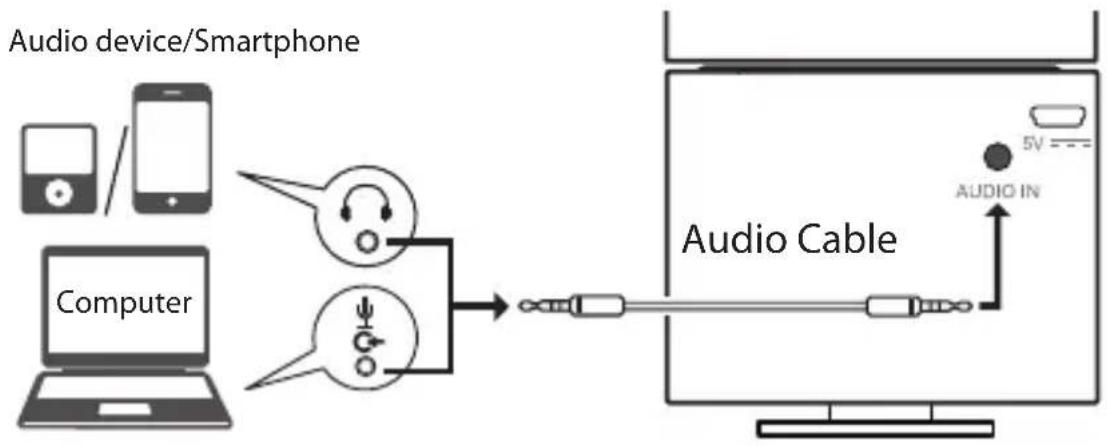
flowchart
graph LR
    A["Computer"] --> B["Audio Cable"]
    C["Smartphone"] --> B
    D["Mobile Device"] --> B
    B --> E["5V"]
    B --> F["AUDIO IN"]
-
I cannot connect the device with my smartphone or computer via Bluetooth connection.
-
Make sure you have turned on the Bluetooth feature on your smartphone or computer.
- Make sure you have turned on the Bluetooth feature (or pairing mode) on the device (you hear two low-pitched sounds and the button keeps blinking before pairing).
-
Make sure the battery level of the device is not too low (charging indicator is blinking quickly).
-
I cannot turn on the device again after switch off.
- The device requires some time for complete switch off. Please wait for 5-10 seconds before you turn on the device again.
- I cannot skip to the previous or next song by pressing
-
|◀+ . ▶▶|
-
Make sure you are playing a series of songs on a playlist instead of only playing a single music file.
-
All playback controls must be made on your computer or smartphone when you are using an audio cable for playback.
-
There is no sound or distorted sound when using the Bluetooth connection.
- Make sure that this device is not too far (within 10 meters or 33 feet) from the audio source, or the device is not having interference from wireless LAN, other 2.4 GHz wireless device, or microwave oven.
11. Product Care
Your device is designed to be light, compact and durable. However, it is an electronic device and must be treated carefully. Putting unnecessary pressure on it or striking the device against other objects can cause damage. To avoid damage to your device, please:
- Do not drop, crush, bend, or apply excessive force to the device.
- Do not expose your device to moisture, extreme or prolonged heat, cold, humidity, or other adverse conditions. Avoid storing it in damp, humid or wet places. It is not waterproof.
- Do not operate or store unit in places with frequent static electricity or electrical noise (e.g. speaker, TV set).
- Clean the unit with a soft cloth or a damp chamois leather. Never use solvents.
-
The unit must only be opened by qualified personnel.
-
Please keep plastic bags away from babies and children to avoid danger of suffocation.
- This device contains magnets. Keep magnetic field sensitive products such as credit cards and video screens away from this device to avoid damage or malfunction.
12. Product Registration
Visit www.franklin.com for product registration.
13. Specifications
Model EVS-6000BT Roadie™ Unplugged Mobile Amped Audio System
Size: 3.6 x 2.5 x 2.5 in (92 x 64 x 64 mm)
Weight: 15.5 ounce (440 g)
Frequency range: 40Hz - 20KHz
Power supply: Built-in lithium-ion battery/USB cable
Impedance: Satellite 4 ohms + subwoofer 2 ohms
Bluetooth: Noise Blackout Extreme, operating range up to 10 meters.
Maximum operating range may vary depending on obstacles (such as person, metal, wall, etc.) or electromagnetic environment (such as wireless LAN).
© 2012 Franklin Electronic Publishers, Inc. Burlington, N.J. 08016-4907 U.S.A. All rights reserved. Patent pending.
Imported to the European Community by: Franklin Electronic Publishers GmbH, Kapellenstr. 13, 85622 Feldkirchen, Germany.

0700

N681
FCC ID: CK2-EVS1000ABT IC: 10137A-EVS1000ABT
Bluetooth
The new Bluetooth and logos are owned by Bluetooth SIG, Inc. and any use of such marks by Franklin Electronic Publishers Inc. is under license. Other trademarks and trade names are those of their respective owners.
Compatibility
This device is compliant with Bluetooth Specification 2.1 + EDR supporting A2DP, AVRCP, HSP1.0. Please check with the manufacturers of other devices to check for their compatibility with this device.
14. Hearing Protection
Protect your hearing from long exposure of loud sounds at high volume. Set the volume to an appropriate level in different environments. Do not
15. Operating and Storage Temperatures
Do not use or store the device in environments that exceed the recommended temperatures listed below. Otherwise, the device may become hot and could result in serious injury, death, or damage to property. Keep also the device accessories away from heat sources.
• Device operating 32 to 95°F (0 to 35°C)
• Device storage 23 to 122°F (-5 to 50°C)
• Travel charger operating 41 to 95°F (5 to 35°C)
16. Recycling and Disposal
Device Disposal

This device should be disposed through your local electronic product recycling system - do not throw in trash bin.
Packaging Disposal
Please save this User's Guide and all packing materials, as they contain important information. In case of disposal, please refer to your local recycling system.
Battery Disposal

Do not dispose of batteries with normal household waste. Please obey your local regulations when disposing of used batteries. Please visit www.franklin.com/eu to contact Franklin or its distributors to get information for battery disposal and/or replacement. However, shipping and handling expenses might apply.
This unit may change operating modes, lose information stored in memory, or fail to respond due to electrostatic discharge or electrical fast transients. Normal operation of this unit may be re-established by pressing ⏻.
17. FCC Notice (U.S. only)
This device complies with Part 15 of the FCC Rules. Operation is subject to the following two conditions: (1) This device may not cause harmful interference, and (2) This device must accept any interference received, including interference that may cause undesired operation.
Warning: Changes or modifications to this unit not expressly approved by the party responsible for compliance could void the user's authority to operate the equipment.
Note: This equipment has been tested and found to comply with the limits for a Class B digital device, pursuant to Part 15 of the FCC Rules. Under the influence of electrostatic phenomenon, the product may malfunction and require user to reset. These limits are designed to provide reasonable protection against harmful
interference in a residential installation. This equipment generates, uses and can radiate radio frequency energy and, if not installed and used in accordance with the instructions, may cause harmful interference to radio communications. However, there is no guarantee that interference will not occur in a particular installation. If this equipment does cause harmful interference to radio or television reception, which can be determined by turning the equipment off and on, the user is encouraged to try to correct the interference by one or more of the following measures:
1) Reorient or relocate the receiving antenna. 2) Increase the separation between the equipment and receiver. 3) Connect the equipment into an outlet on a circuit different from that to which the receiver is connected. 4) Consult the dealer or an experienced radio/TV technician for help.
Note: This unit was tested with shielded cables on the peripheral devices. Shielded cables must be used with this unit to ensure compliance with the Class B FCC limits. Note: The manufacturer is not responsible for any radio or TV interference caused by unauthorized modifications to this equipment. Such modifications could void the user's authority to operate the equipment.
FCC Radiation Exposure Statement :
This equipment complies with FCC RF radiation exposure limits set forth for an uncontrolled environment. This transmitter must not be co-located or operating in conjunction with any other antenna or transmitter.
18. IC notice
This product is CE marked according to the provisions of the R & TTE Directive(1999/5/EC). Hereby, Franklin Electronic Publishers Inc., declares that this product is in compliance with the essential requirements and other relevant provisions of Directive 1999/5/EC. A copy of the Declaration of Conformity is attached on the last page of the manual.
CE 0700
20. Disclaimer of Warranties
Except as specifically provided herein, Franklin makes no warranty of any kind, express or implied, with respect to this product.
LIMITED WARRANTY, DISCLAIMER OF WARRANTIES, AND LIMITED REMEDY
FRANKLIN WARRANTS TO THE ORIGINAL PURCHASER THAT THIS PRODUCT WILL BE FREE FROM DEFECTS IN MATERIALS AND WORKMANSHIP FOR A PERIOD OF ONE (1) YEAR FROM THE ORIGINAL DATE OF PURCHASE AS EVIDENCED BY A COPY OF THE SALES RECEIPT. THIS LIMITED WARRANTY DOES NOT COVER DAMAGE DUE TO ACTS OF GOD, ACCIDENT, MISUSE, ABUSE, NEGLIGENCE, MODIFICATION, UNSUITABLE ENVIRONMENT, OR IMPROPER MAINTENANCE. THE SOLE OBLIGATION AND LIABILITY OF FRANKLIN, AND THE EXCLUSIVE REMEDY UNDER THIS LIMITED WARRANTY, IS REPAIR OR REPLACEMENT AT THE SOLE OPTION OF FRANKLIN AND THIS REMEDY APPLIES ONLY IN THE CASE IN WHICH FRANKLIN DETERMINES THAT THE PRODUCT WAS DEFECTIVE AND THAT THE DEFECT AROSE WITHIN THE DURATION OF THE LIMITED WARRANTY. THIS REMEDY IS THE EXCLUSIVE REMEDY FOR BREACH OF THIS WARRANTY. THIS WARRANTY GIVES YOU CERTAIN RIGHTS; YOU MAY ALSO HAVE OTHER RIGHTS THAT MAY VARY FROM JURISDICTION TO JURISDICTION.
EXCEPT FOR THE LIMITED WARRANTY EXPRESSLY RECITED ABOVE, THIS FRANKLIN PRODUCT IS PROVIDED ON AN "AS IS" BASIS, WITHOUT ANY OTHER WARRANTIES, EXPRESS OR IMPLIED, INCLUDING, BUT NOT LIMITED TO, WARRANTIES OF MERCHANTABILITY QUALITY, MERCHANTABILITY, OR FITNESS FOR A PARTICULAR PURPOSE, OR THOSE ARISING BY LAW, STATUTE, USAGE OF TRADE, OR COURSE OF DEALING. THIS WARRANTY APPLIES ONLY TO PRODUCTS MANUFACTURED BY OR FOR FRANKLIN AND SPECIFICALLY DOES NOT INCLUDE BATTERIES, CORROSION OF BATTERY CONTACTS OR ANY OTHER DAMAGE CAUSED BY BATTERIES. FRANKLIN SHALL NOT HAVE ANY LIABILITY TO THE PURCHASER OR ANY OTHER PERSON OR ENTITY FOR ANY INDIRECT, INCIDENTAL, SPECIAL, OR CONSEQUENTIAL DAMAGES WHATSOEVER, INCLUDING, BUT NOT LIMITED TO, LOSS OF REVENUE OR PROFIT, LOST OR CORRUPTED DATA, OR OTHER COMMERCIAL OR ECONOMIC LOSS, EVEN IF FRANKLIN HAS BEEN ADVISED OF THE POSSIBILITY OF SUCH DAMAGES, OR EVEN IF OTHERWISE FORESEEABLE. FRANKLIN IS NOT RESPONSIBLE FOR CLAIMS BY A THIRD PARTY. FRANKLIN'S MAXIMUM AGGREGATE LIABILITY SHALL NOT EXCEED THE AMOUNT PAID FOR THE PRODUCT AS EVIDENCED BY THE SALES RECEIPT. SOME STATES/JURISDICTIONS DO NOT ALLOW THE EXCLUSION OR LIMITATION OF LIABILITY FOR CONSEQUENTIAL OR INCIDENTAL DAMAGES, SO THE ABOVE LIMITATION MAY NOT APPLY TO YOU. IF THE LAWS OF THE RELEVANT JURISDICTION DO NOT PERMIT FULL WAIVER OF IMPLIED WARRANTIES, THEN THE DURATION OF IMPLIED WARRANTIES AND CONDITIONS ARE LIMITED TO THE DURATION OF THE EXPRESS WARRANTY GRANTED HEREIN.
Warranty Service: If you think your product is defective, call Franklin's Customer Service Desk, 1-800-266-5626, to request a return merchandise authorization ("RMA") number, before returning the product (transportation charges prepaid) to:
Franklin Electronic Publishers, Inc.
Attn: Service Department, One Franklin Plaza
Burlington, NJ 08016-4907
If you return a Franklin product, please include your name, address, telephone number, a brief description of the defect and a copy of your sales receipt as proof of your original date of purchase. You must also write the RMA prominently on the package if you return the product; otherwise there may be a lengthy delay in the processing of your return. Franklin strongly recommends using a trackable form of deliver to Franklin for your return.
22. Limited Warranty (EU & Switzerland)
Notwithstanding the disclaimer of warranties above, this product, excluding batteries and liquid crystal display (LCD), is guaranteed by Franklin to be free of defects in materials or workmanship for a period of two years from the date of purchase. It will be repaired or replaced with an equivalent product (at Franklin's option) free of charge for any defect in workmanship or materials during that time. This warranty explicitly excludes defects due to misuse, accidental damage, or wear and tear. This warranty does not affect the consumer's statutory rights.
23. Limited Warranty (outside U.S., EU & Switzerland)
Notwithstanding the disclaimer of warranties above, this product, excluding batteries and liquid crystal display (LCD), is guaranteed by Franklin to be free of defects in materials or workmanship for a period of one year from the date of purchase. It will be repaired or replaced with an equivalent product (at Franklin's option) free of charge for any defect in workmanship or materials during that time.
Products purchased outside the United States, the European Union and Switzerland that are returned under warranty should be returned to the original vendor with proof of purchase and description of fault. Charges will be made for all repairs unless valid proof of purchase is provided.
This warranty explicitly excludes defects due to misuse, accidental damage, or wear and tear. This warranty does not affect the consumer's statutory rights.
24. Limited Warranty (Australia)
Our goods come with guarantees that cannot be excluded under the Australian Consumer Law. You are entitled to a replacement or refund for a major failure and compensation for any other reasonably foreseeable loss or damage. You are also entitled to have the goods repaired or replaced if goods fail to be of acceptable quality and the failure does not amount to a major failure. This product, excluding batteries and liquid crystal display (LCD), is guaranteed by Franklin to be free of defects in materials or workmanship for a period of one year from the date of purchase. If you think your product is defective, please contact Franklin to arrange for repair or replacement:
FRANKLIN ELECTRONIC PUBLISHERS (AUST) PTY LTD.
Unit 4, 25 Gibbs Street, Chatswood, NSW 2067, Australia
Contact person: Service Manager
Tel: 1800 882 588
Email: service_au@franklin.com
Charges will be made for all repairs unless valid proof of purchase is provided. Your product will be repaired or replaced with an equivalent product (at Franklin's option) free of charge for any defect in workmanship or materials during that time. The repair of your goods may result in the loss of any user-generated data. Please ensure that you have made a copy of any data saved on your goods. Goods presented for repair may be replaced by refurbished goods of the same type rather than being repaired. Refurbished parts may be used to repair the goods. This warranty explicitly excludes defects due to misuse, accidental damage, or wear and tear. This warranty does not affect the consumer's statutory rights.
Franklin®
Franklin Electronic Publishers, Inc.
One Franklin Plaza, Burlington, NJ 08016-4907, USA
TEL: 1-800-266-5626 URL: http://www.franklin.com
DECLARATION OF CONFORMITY
We, Franklin Electronic Publishers, Inc., One Franklin Plaza, Burlington, NJ 08016-4907, U.S.A. declare under our sole responsibility that the product:
Model: EVS-6000BT
to which this declaration refers conforms with the following standards:
EMC:
EN 301489-1: V1.8.1
EN 301489-17: V2.1.1
EN 55013:2001+A1:2003+A2:2006
EN 55020:2007
SAFETY:
EN 60065:2002+A1:2006+A11:2008
SPECTRUM:
EN 300328: V1.7.1
RF EXPOSURE:
EN 50371:2002
According to the Directive in 1999/5/EC(R & TTE): Article 3.1a, 3.1b, 3.2
The conformity assessment procedure referred to in Article 10 and detailed in Annex IV of Directive 1999/5/EC has been followed with the involvement of the following Notified Body:
PHOENIX TESTLAB GmbH, Köningswinkel 10, 32825, Blomberg, Germany
The product is marked with the CE mark and Notified Body number according to the Directive 1999/5/EC:
CE 0700
Place Of Issue: Hong Kong
Date Of Issue: February 27, 2012
Product Development Authorization:

Signature:
Name: Pang Lee
Position: Vice President
Product Development