
PlasmaSync 42VP4DG - Monitor NEC - Free user manual and instructions
Find the device manual for free PlasmaSync 42VP4DG NEC in PDF.


| Product Type | Plasma Monitor |
| Model | PlasmaSync 42VP4DG |
| Brand | NEC |
| Screen Size | 42 inches |
| Resolution | 852 x 480 pixels |
| Contrast Ratio | 3000:1 (typical) |
| Brightness | 1000 cd/m² (typical) |
| Input Connectors | BNC (x3), RGB (D-Sub 15-pin), HD (RCA), Composite Video, S-Video, Audio (RCA) |
| RS-232C Control | D-Sub 9-pin male, baud rate 9600, odd parity |
| Power Consumption | Typical 300W, Standby < 3W |
| Power Supply | AC 100-240V, 50/60Hz |
| Dimensions (W x H x D) | Approx. 1048 x 622 x 99 mm |
| Weight | Approx. 29.5 kg (without stand) |
| VESA Mount | 400 x 400 mm |
| Orbiter (Screen Shift) | Auto/Manual, reduces image retention |
| Picture Modes | Normal, Theater1, Theater2, Default |
| Color Temperature | Low, Middle, High, Middle Low |
| Cleaning | Use a soft dry cloth; do not use liquid cleaners |
| Safety Precautions | Do not block vents; avoid magnetic fields; unplug during storms |
| Spare Parts Availability | Contact NEC service for replacement modules |
Frequently Asked Questions - PlasmaSync 42VP4DG NEC
User questions about PlasmaSync 42VP4DG NEC
0 question about this device. Answer the ones you know or ask your own.
Ask a new question about this device
Download the instructions for your Monitor in PDF format for free! Find your manual PlasmaSync 42VP4DG - NEC and take your electronic device back in hand. On this page are published all the documents necessary for the use of your device. PlasmaSync 42VP4DG by NEC.
USER MANUAL PlasmaSync 42VP4DG NEC
natural_image
Isometric technical drawing of a layered electronic component or housing (no text or symbols)A
B
A AC IN (Netzeingang)
natural_image
Diagram showing a mechanical clamp or spring with directional arrows indicating movement (no text or symbols)STROMVERSORGUNG (POWER)
natural_image
Geometric pattern with concentric circles and intersecting lines, no text or symbols presentnatural_image
Geometric diagram with four circles arranged in a square pattern, no text or symbols presentnatural_image
Geometric diagram with five circles arranged in a cross pattern within a rectangle (no text or symbols)natural_image
Geometric pattern with a central circle and four surrounding circles, no text or symbols present.natural_image
Geometric diagram with a circle inscribed in a rectangle and two diagonal lines crossing at the center (no text or symbols)natural_image
Pure geometric diagram with intersecting circles and diagonal lines inside a rectangle (no text or symbols)natural_image
Geometric pattern with four circles and diagonal lines forming a cross (no text or symbols)natural_image
Geometric diagram with four circles arranged in a cross pattern within a rectangle (no text or symbols)natural_image
Geometric diagram with concentric circles and intersecting lines, no text or symbols presentnatural_image
Pure geometric diagram with intersecting circles and diagonal lines inside a rectangle (no text or symbols)Information
- Once the setting is completed... Press the EXIT button to return to the main menu. To delete the main menu, press the EXIT button once more.
Information
■ BNC SIGNAL
PLE (Peak Luminance Enhancement) AUTO
→1 DOT ← 2 DOT ← ..... ← 19 DOT ← 20 DOT ←
• V-LINE
→1 LINE ↔ 2 LINE ↔ ..... ↔ 19 LINE ↔ 20 LINE ←
• ZEIT
→1 M ← 2 M ← 3 M ← 4 M ← 5 M
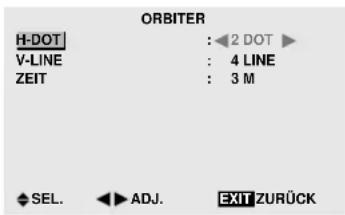
Information
| NO. 1 | NO. 2 |
| NO. 4 | NO. 3 |
9 Monitore
| NO. 7 | NO. 8 | NO. 9 |
| NO. 10 | NO. 11 | NO. 12 |
| NO. 13 | NO. 14 | NO. 15 |
DISP MODE
flowchart
graph TD
    A["Display 1"] --> B["No.1 No.2"]
    A --> C["No.3 No.4"]
    D["Display 2"] --> E["No.1 No.2"]
    D --> F["No.3 No.4"]
    G["Display 3"] --> H["No.1 No.2"]
    G --> I["No.3 No.4"]
    B --> J["REMOTE OUT"]
    C --> K["REMOTE IN"]
    E --> L["REMOTE OUT"]
    F --> M["REMOTE IN"]
    H --> N["REMOTE OUT"]
    I --> O["REMOTE IN"]
(for PX-50XM3/PX-42XM2/PX-42VP4)
Application
These specifications are applicable to NEC plasma monitors and communications control from external equipment.
"Please also support the command of VP series and refer to the manual of the conventional model about specification."
Connections
Connections should be made as described below.
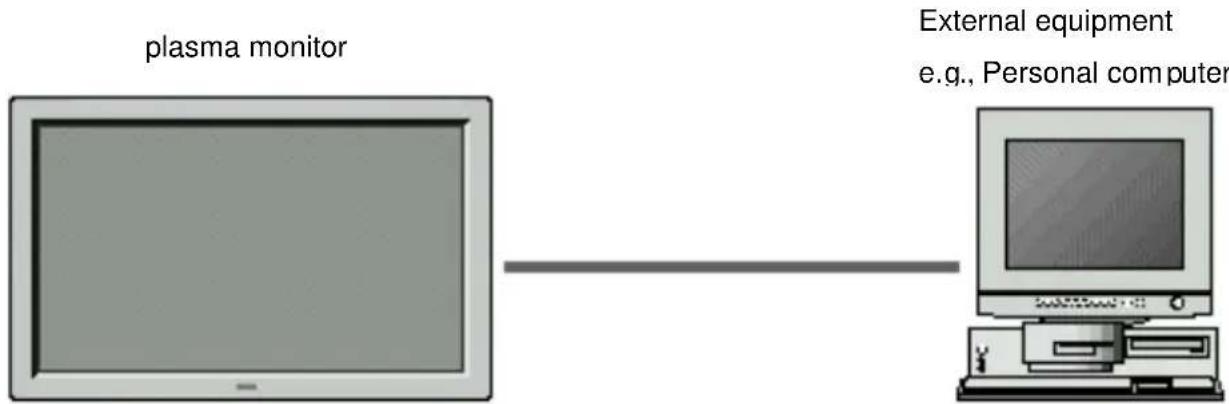
1) Connector on the plasma monitor side: EXTERNAL CONTROL connector. Type of connector: D-Sub 9-pin male
| No. | Pin Name |
| 1 | No Connection |
| 2 RXD (Receive data) | |
| 3 TXD (Transmit data) | |
| 4 DTR (DTE side ready) | |
| 5 | GND |
| 6 DSR (DCE side ready) | |
| 7 RTS (Ready to send) | |
| 8 CTS (Clear to send) | |
| 9 | No Connection |
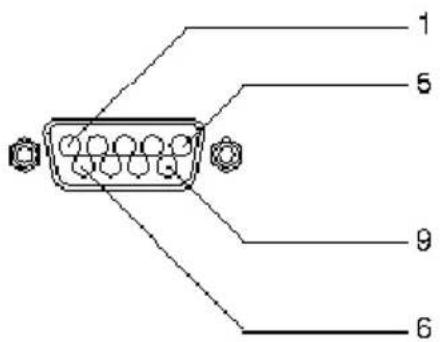
2) Connector on the external equipment side: Serial port (RS-232C) connector. See the specifications of the equipment that is to be connected for the type of connector and the pin assignment.
3) Wiring
Use a crossed (reverse) cable.
Wire the cable so that each pair of data lines cross between the two devices. These data line pairs are RXD (Receive data) and TXD (Transmit data), DTR (DTE side ready) and DSR (DCE side ready), and RTS (Ready to send) and CTS (Clear to send).
Communication Parameters
(1) Communication system Asynchronous
(2) Interface RS-232C
(3) Baud rate 9600 bps
(4) Data length 8 bits
(5) Parity Odd
(6) Stop bit 1 bit
(7) Communication code Hex
Communication Format
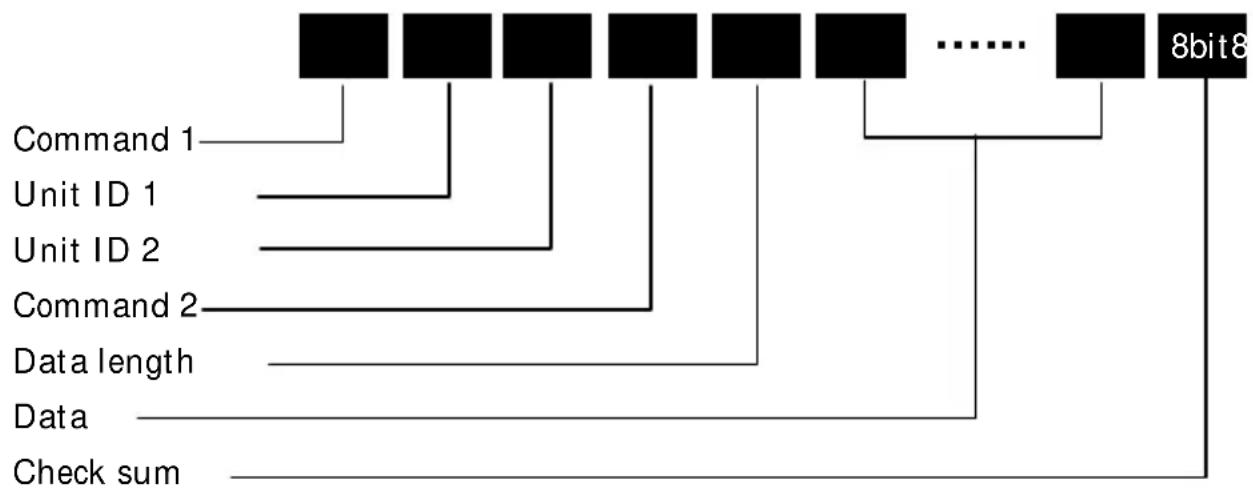
flowchart
graph TD
    A["Command 1"] --> B["Unit ID 1"]
    B --> C["Unit ID 2"]
    C --> D["Command 2"]
    D --> E["Data length"]
    E --> F["Data"]
    F --> G["Check sum"]
    H["..."] --> I["8bit8"]
Command1
Command 1, along with command 2, is a number used to distinguish each command.
When making it operate using ID, bit1 and bit0 are set up as follows.
Bit1,Bit0 Unit ID distinction bit
11B :Usually, a form (with no ID)
10B :Usually, a form (with no ID)
01B :Set ID
00B :Video wall ID
In the case of ACK, when the lower order 4 bits is FH (as in 3FH an 7FH), this indicates that the commands and data of the supported equipment have been received. When the lower order 4 bits is BH (as in 3BH and 7BH), this indicates that unsupported commands and data have been received.
Unit ID1,2 (UA1,UA2)
Unit ID 1 and unit ID 2 are numbers used to identify the equipment that is to be connected.
60H is used for the plasma monitor and 80H is used for external control equipment such as a personal computer.
1) Unit ID 1: Indicates the equipment sending the signal. When supporting Set ID by the command 1, 4 bits of low ranks of Set ID are set up.
2) Unit ID 2: Indicates the equipment receiving the signal. When supporting Set ID by the command 1, 4 bits of higher ranks of Set ID are set up.
* Set ID : it is the apparatus number assigned to each plasma monitor.
Command 2
Command 2, along with command 1, is a number used to distinguish each command.
Check Sum (CKS), Error Processing, and ACK
1) The check sum described below and RS-232C odd parity are used together for a check of the received data. The check sum is the lower order 8 bits of one frame of sent or received data comprising the sum total of Command 1, Unit ID 1 and 2, Command 2, Data Length, and Data.
Check Sum Example
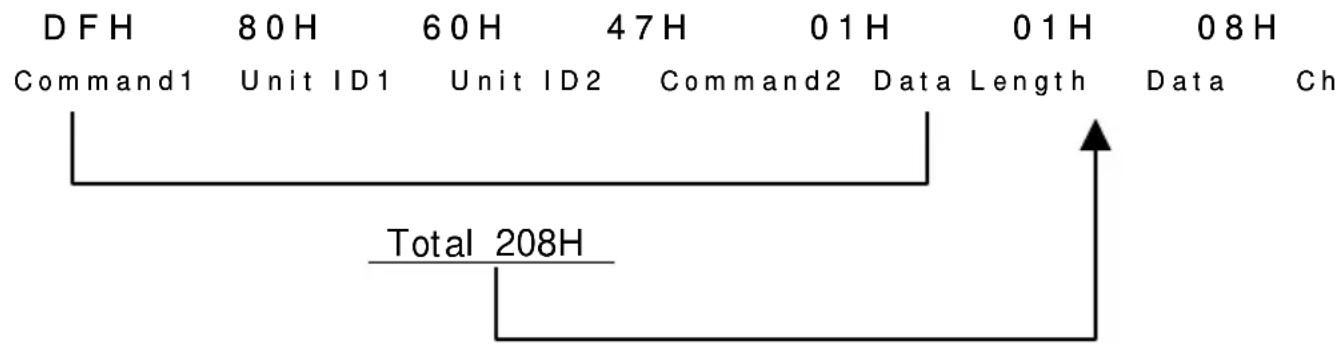
other
| Command | Duration | |-------------|----------| | Command1 | 80H | | Unit ID1 | 60H | | Unit ID2 | 47H | | Command2 | 01H | | Data Length | 01H | | Data | 08H | | Ch | Total |2) Error Processing
- When the communication interval is vacant for more than 4 ms, thereafter a received Command 1 will be recognized. If, at this time, meaningful data cannot be recognized, that data will not be recognized (as valid data).
- An ACK will not be returned unless the receive data error, the check sum error, and the receive data are all taken in.
The control method of the set by Set ID
When controlling two or more sets of plasma monitors, if the command using Set ID is used, it will become controllable individually.
The example of the POWER ON command to the plasma monitor which set ID as "5" is shown below.
It is not based on ID but is the POWER ON command to all sets.
9F 80 60 4E 00 CD
In ID="5", the value of ID-1=4 is set up.
9D 84 60 4E 00 CF
The example of a change in the single mode of a 4th page multi-system configuration and the multi-mode is shown below.
ID of the set used as a master(etc PC) is set to 50, and it assumes that ID is shaken by AUTO ID to each set. ID shaken at each set is as follows.
Upper left set (master) ID = 50 = 32h
Upper right set ID = 51 = 33h
Lower right set ID = 52 = 34h
Lower left set ID = 53 = 35h
Transmission Data
| DD | 81 | 63 | 03 | 03 | 03 | 01 | 00 | CB |
| DD | 82 | 63 | 03 | 03 | 03 | 02 | 00 | CD |
| DD | 83 | 63 | 03 | 03 | 03 | 03 | 00 | CF |
| DD | 84 | 63 | 03 | 03 | 03 | 04 | 00 | D1 |
Transmission of the above command performs a 4th page multi SPLIT display. Moreover, the following commands are published in order to change a 4th page multi-display into a single mode display.
DF 80 60 03 03 01 01 00 C7
All sets become a single mode display by the above-mentioned command.
Since this command does not specify Set ID, all sets execute it.
*:Control by ID may not be able to be performed depending on connection with external control apparatus.
Command Reference List
| CMD1 | CMD2 | LEN | |||
| 01 | Power ON 9FH 4EH 00H | ||||
| 02 | Power OFF 9FH 4FH 00H | ||||
| 03 | Input Switch Change DFH 47H 01H | ||||
| 04 | VOLUME Gain Data DFH 7FH 03H | ||||
| 05 | AUDIO Mute ON 9FH 3EH 00H | ||||
| 06 | AUDIO Mute OFF 9FH 3FH 00H | ||||
| 07 | CONTRAST Gain Data DFH 7FH 03H | ||||
| 08 | BRIGHT Gain Data DFH 7FH 03H | ||||
| 09 | SHARPNESS Gain Data DFH 7FH 03H | ||||
| 10 | Color Gain Data DFH 7FH 03H | ||||
| 11 | TINT Gain Data DFH 7FH 03H | ||||
| 12 | PICTURE MODE Select DFH 0AH 01H | ||||
| 13 | COLOR TEMP SELECT DFH 00H 01H | ||||
| 14 | RED Gain Data DFH 7FH 04H | ||||
| 15 | GREEN Gain Data DFH 7FH 04H | ||||
| 16 | BLUE Gain Data DFH 7FH 04H | ||||
| 17 | NR MODE Set DFH C0H 01H | ||||
| 18 | BASS Gain Data DFH 7FH 03H | ||||
| 19 | TREBLE Gain Data DFH 7FH 03H | ||||
| 20 | BALANCE Gain Data DFH 7FH 03H | ||||
| 21 | SCREEN MODE Select DFH 51H 01H | ||||
| 22 | V.POSITION Gain Data DFH 7FH 03H | ||||
| 23 | H.POSITION Gain Data DFH 7FH 03H | ||||
| 24 | V-HEIGHT Gain Data DFH 7FH 03H | ||||
| 25 | H-WIDTH Gain Data DFH 7FH 03H | ||||
| 26 | AUTO PICTURE Select DFH 7FH 03H | ||||
| 27 | PHASE Gain Data DFH 7FH 03H | ||||
| 28 | CLOCK Gain Data DFH 7FH 03H | ||||
| 29 | OSM Select DFH 58H 01H | ||||
| 30 | OSM ADJ. Gain Data DFH 1AH 02H | ||||
| 31 | POWER MGT Select DFH 1AH 02H | ||||
| 32 | GRAY LEVEL Set DFH C6H 01H | ||||
| 33 | CINEMA MODE Set DFH C1H 01H | ||||
| 34 | LONG LIFE Set DFH 6BH 03H | ||||
| 35 | INVESE Set DFH C7H 03H | ||||
| 36 | SCREEN WIPER Set DFH C8H 04H | ||||
| 37 | RESET 1FH 54H 00H | ||||
| 38 | Audio Select Set DFH 70H 02H | ||||
| 39 | BNC INPUT DFH 8CH 01H | ||||
| 40 | RGB Select DFH 8BH 01H | ||||
| 41 | HD Select DFH 8AH 01H | ||||
| 42 | LANGUAGE Select DFH 5BH 01H | ||||
| 43 | COLOR SYSTEM Select DFH 5CH 01H | ||||
| 44 | FREQUENCY Request 1FH 26H 00H | ||||
| 45 | Input MODE Request 1FH 41H 00H | ||||
| 46 | VIDEO ADJ Request 1FH 45H 00H | ||||
| 47 | Audio Select Request 1FH 6FH 00H | ||||
| 48 | Failure Mode Request 1FH 3FH 00H | ||||
| 49 | MODEL NAME Request 1FH 17H 00H | ||||
| 50 | D-SUB INPUT DFH 8DH 01H | ||||
| 51 | TIMER SWITCH DFH 02H 01H | ||||
| 52 | LOW TONE DFH 0CH 01H | ||||
| 53 | COLOR TUNE DFH 0DH 08H | ||||
| 54 | TIMER PROGRAM SETTING DFH 30H 08H | ||||
| 55 | PRESENT TIME SETTING DFH 31H 03H | ||||
| 56 | MULTI MODE Select DFH 03H 03H | ||||
| 57 | MULTI MODE Request 1FH 3BH 00H | ||||
| 58 | AUTO ID SET START 5FH F0H 01H | ||||
| 59 | PLE LINK DFH F1H 03H | ||||
| 60 | VIDEO WALL SETTING DFH F3H 02H | ||||
| 61 | POWER DELAY ON DFH F2H 01H | ||||
| 62 | GAMMA Gain Data DFH 13H 04H | ||||
| 63 | Running Sense 1FH 88H 00H | ||||
| 64 | ORBITTER SET DFH 1EH 04H | ||||
| 65 | OSM OBITER DFH 5FH 01H | ||||
| 66 | OSM ANGLE DFH 60H 01H | ||||
| 67 | Input Skip 5FH 61H 01H | ||||
| 68 | PICTURE Size DFH 62H 01H | ||||
| 69 | OPTION Select DFH 63H 04H | ||||
| 70 | REPEAT Timer DFH 64H 06H | ||||
| 71 | SERIAL No. Request 1FH 15H 00H | ||||
01. Power ON
Function
The external control equipment switches on the power of the plasma monitor.
Transmission Data
9FH 80H 60H 4EH 00H CKS
ACK
The plasma monitor returns the following ACK when the power is switched on.
3FH 60H 80H 4EH 00H CKS
NOTE: Do not set the Power ON or Power OFF command continuously.
02. Power OFF
Function
The external control equipment switches off the power of the plasma monitor.
Transmission Data
9FH 80H 60H 4FH 00H CKS
ACK
The plasma monitor returns the following ACK when the power is switched off.
3FH 60H 80H 4FH 00H CKS
NOTE: Do not set the Power ON or Power OFF command continuously.
03. Input Switch Change
Function
The external control equipment switches the input of the plasma monitor.
Transmission Data
| DFH | 80H | 60H | 47H | 01H | DATA00 | CKS |
The plasma monitor returns the following ACK when the input is switched.
3FH 60H 80H 47H 00H CKS
04. VOLUME Gain Data
Function
The external control equipment changes the VOLUME gain data of the plasma monitor.
Transmission Data
| DFH 80H 60H 7FH 03H DATA00 DATA01 DATA02 CKS | |||
| DATA00: USER SOUND Gain Flag | 05H | ||
| DATA01: VOLUME Gain Flag | 01H | ||
| DATA02: VOLUME Gain | 00H: Step0 | ||
| : | |||
| 0AH: Step10 (Default) | |||
| : | |||
| 2AH: Step42 | |||
ACK
| 7FH 60H 80H 7FH 02H DATA00 DATA01 CKS | |||||
| DATA00: USER SOUND Gain Flag | 05H | ||||
| DATA01: VOLUME Gain Flag | 01H | ||||
05. AUDIO Mute ON
Function
The external control equipment switches on AUDIO Mute of the plasma monitor.
Transmission Data
The external control equipment switches off AUDIO Mute of the plasma monitor.
Transmission Data
| 9FH | 80H | 60H | 3FH | 00H | CKS |
| ACK | |||||
| 3FH | 60H | 80H | 3FH | 00H | CKS |
07. CONTRAST Gain Data
Function
The external control equipment changes the CONTRAST gain data of the plasma c
Transmission Data
DFH 80H 60H 7FH 03H DATA00 DATA01 DATA02 CKS
DATA00 : USER PICTURE Gain Flag 01H
DATA01 : CONTRAST Gain Flag 07H
The external control equipment changes the BRIGHT gain data of the plasma monitor.
Transmission Data
DFH 80H 60H 7FH 03H DATA00 DATA01 DATA02 CKS
DATA00 : USER PICTURE Gain Flag 01H
DATA01 : BRIGHT Gain Flag 08H
DATA02 : BRIGHT Gain E0H : -32
:
FFH : -(
00H : 0
01H : +1
:
20H : +;
ACK
7FH 60H 80H 7FH 02H DATA00 DATA01 CKS
DATA00 : USER PICTURE Gain Flag 01H
DATA01 : BRIGHT Gain Flag 08H
09. SHARPNESS Gain Data
Function
The external control equipment changes the SHARPNESS gain data of the plasma monitor.
Transmission Data
| DFH 80H 60H 7FH 03H DATA00 DATA01 DATA02 CKS | |||||||
| DATA00: USER PICTURE Gain Flag 01H | |||||||
| DATA01: SHARPNESS Gain Flag 06H | |||||||
| DATA02: SHARPNESS Gain F0H:-16 | |||||||
| : | |||||||
| FFH:-01 | |||||||
| 00H:0 | |||||||
| 01H:+01 | |||||||
| : | |||||||
| 10H:+16 | |||||||
Only when a RGB signal is connected
DATA02 : SHARPNESS Gain 01H : 1
02H : 2
03H : 3
04H : 4
05H : 5
ACK
| 7FH 60H 80H 7FH 02H DATA00 DATA01 CKS | |||
| DATA00 : USER PICTURE Gain Flag 01H | |||
| DATA01 : SHARPNESS Gain Flag 06H |
10. COLOR Gain Data
Function
The external control equipment changes the COLOR gain data of the plasma monitor.
Transmission Data
| DFH 80H 60H 7FH 03H DATA00 DATA01 DATA02 CKS | |||
| DATA00: USER PICTURE Gain Flag 01H | |||
| DATA01: COLOR Gain Flag 04H | |||
| DATA02: COLOR Gain E0H:-32 | |||
| : | |||
| * COLOR Gain is from -22 (EAH) to +22 (16H) only during video. | FFH:-0100H:0 | ||
| 01H:+01 | |||
| : | |||
| 20H:+32 | |||
ACK
| 7FH | 60H | 80H | 7FH | 02H | DATA00 | DATA01 | CKS |
| DATA00 : USER PICTURE Gain Flag | 01H | ||||||
| DATA01 : COLOR Gain Flag | 04H | ||||||
11. TINT Gain Data
Function
The external control equipment changes the TINT gain data of the plasma monitor.
Transmission Data
| DFH 80H 60H 7FH 03H DATA00 DATA01 DATA02 CKS | |
| DATA00:USER PICTURE Gain Flag 01H | |
| DATA01:TINT Gain Flag | 05H |
| DATA02:TINT Gain | E0H:-32 |
| : | |
| * TINT Gain is from -22 (EAH) to +22 (16H) only during video. | FFH:-0100H:0 |
| 01H:+01 | |
| : | |
| 20H:+32 | |
ACK
7FH 60H 80H 7FH 02H DATA00 DATA01 CKS
DATA00 : USER PICTURE Gain Flag 01H
DATA01 : TINT Gain Flag 05H
12. PICTURE MODE Select
Function
The external control equipment sets the picture mode of the plasma monitor.
Transmission Data
DFH 80H 60H 0AH 01H DATA00 CKS
DATA00: 01H : NORMAL
02H : THEATER1(It cannot choose in the still picture input of a personal computer.)
03H : THEATER2(It cannot choose in the still picture input of a personal computer.)
04H : Default
ACK
7FH 60H 80H 0AH 01H DATA00 CKS
DATA00: 01H : NORMAL
02H : THEATER1
03H : THEATER2
04H : Default
13. COLOR TEMP SELECT
Function
The external control equipment changes the COLOR TEMP of the plasma monitor.
Transmission Data
DFH 80H 60H 00H 01H DATA00 CKS
DATA00: 00H:low
01H: middle
02H: high
03H: middle low
ACK
7FH 60H 80H 00H 01H DATA00 CKS
DATA00: 00H:low
01H: middle
02H: high
03H: middle low
14. RED Gain Data
Function
The external control equipment changes the RED Gain Data of the plasma monitor.
Transmission Data
DFH 80H 60H 7FH 04H DATA00 to DATA03 CKS
DATA00 : USER PICTURE Gain Flag 01H
DATA01 : RED Gain Flag 01H
DATA02 : RED Gain1(Bias) D8H : -40
FFH : -01
00H : 0
01H : +01
1EH : +30
DATA03: RED Gain2(Drive) D8H : -40
FFH : -01
00H : 0
01H : +01
1EH : +30
ACK
7FH 60H 80H 7FH 02H DATA00 DATA01 CKS
DATA00:USER PICTURE Gain Flag 01H
DATA01 : RED Gain Flag 01H
15. GREEN Gain Data
Function
The external control equipment changes the GREEN Gain Data of the plasma monitor.
Transmission Data
| DFH 80H 60H 7FH 04H DATA00 to DATA03 CKS | |||
| DATA00: USER PICTURE Gain Flag 01H | |||
| DATA01: GREEN Gain Flag 02H | |||
| DATA02: GREEN Gain1(Bias) D8H : -40 | |||
| : | |||
| FFH : -01 | |||
| 00H : 0 | |||
| 01H : +01 | |||
| : | |||
| 1EH : +30 | |||
| DATA03: GREEN Gain2(Drive) D8H : -40 | |||
| : | |||
| FFH : -01 | |||
| 00H : 0 | |||
| 01H : +01 | |||
| : | |||
| 1EH : +30 | |||
ACK
| 7FH 60H 80H 7FH 02H DATA00 DATA01 CKS | ||
| DATA00: USER PICTURE Gain Flag | 01H | |
| DATA01: GREEN Gain Flag | 02H | |
16. BLUE Gain Data
Function
The external control equipment changes the BLUE Gain Data of the plasma monitor.
Transmission Data
| DFH 80H 60H 7FH 04H DATA00 to DATA03 CKS | |||
| DATA00: USER PICTURE Gain Flag 01H | |||
| DATA01: BLUE Gain Flag 03H | |||
| DATA02: BLUE Gain1(Bias) D8H :-40 | |||
| : | |||
| FFH:-01 | |||
| 00H:0 | |||
| 01H:+01 | |||
| : | |||
| 1EH:+30 | |||
| DATA03: BLUE Gain2(Drive) D8H :-40 | |||
| : | |||
| FFH:-01 | |||
| 00H:0 | |||
| 01H:+01 | |||
| : | |||
| 1EH:+30 | |||
ACK
| 7FH 60H 80H 7FH 02H DATA00 DATA01 CKS | ||
| DATA00: USER PICTURE Gain Flag | 01H | |
| DATA01: BLUE Gain Flag | 03H | |
17. NR MODE Set
Function
The external control equipment sets the NR (Noise Reduction) mode of the plasma monitor.
Transmission Data
DFH 80H 60H COH 01H DATA00 CKS
DATA00: 01H : NROFF
02H : NR-1
03H : NR-2
04H : NR-3
ACK
7FH 60H 80H COH 01H DATA00 CKS
DATA00: 01H : NROFF
02H : NR-1
03H : NR-2
04H : NR-3
18. BASS Gain Data
Function
The external control equipment changes the BASS gain data of the plasma monitor.
Transmission Data
DFH 80H 60H 7FH 03H DATA00 DATA01 DATA02 CKS
DATA00 : USER PICTURE Gain Flag 05H
DATA01 : BASS Gain Flag 03H
DATA02 : BASS Gain F3H : -13
:
FFH : -01
00H : 0
01H : +01
:
0DH : +13
ACK
7FH 60H 80H 7FH 02H DATA00 DATA01 CKS
DATA00: USER PICTURE Gain Flag 05H
DATA01: BASS Gain Flag 03H
19. TREBLE Gain Data
Function
The external control equipment changes the TREBLE gain data of the plasma monitor.
Transmission Data
| DFH 80H 60H 7FH 03H DATA00 DATA01 DATA02 CKS | |||||||
| DATA00: USER PICTURE Gain Flag 05H | |||||||
| DATA01: TREBLE Gain Flag 04H | |||||||
| DATA02: TREBLE Gain F3H:-13 | |||||||
| : | |||||||
| FFH:-01 | |||||||
| 00H:0 | |||||||
| 01H:+01 | |||||||
| : | |||||||
| 0DH:+13 | |||||||
ACK
| 7FH | 60H | 80H | 7FH | 02H | DATA00 | DATA01 | CKS |
| DATA00: USER PICTURE Gain Flag | 05H | ||||||
| DATA01: TREBLE Gain Flag | 04H | ||||||
20. BALANCE Gain Data
Function
The external control equipment changes the BALANCE gain data of the plasma monitor.
Transmission Data
| DFH 80H 60H 7FH 03H DATA00 DATA01 DATA02 CKS | |||
| DATA00 : USER PICTURE Gain Flag 05H | |||
| DATA01 : BALANCE Gain Flag 02H | |||
| DATA02 : BALANCE Gain EAH : -22 | |||
| : | |||
| FFH : -01 | |||
| 00H : 0 | |||
| 01H : +01 | |||
| : | |||
| 16H : +22 | |||
ACK
| 7FH | 60H | 80H | 7FH | 02H | DATA00 | DATA01 | CKS |
| DATA00: USER PICTURE Gain Flag | 05H | ||||||
21.SCREEN MODE Select
Function
The external control equipment switches the screen mode of the plasma monitor.
Transmission Data
DFH 80H 60H 51H 01H DATA00 CKS
DATA00 02H : STADIUM
03H : ZOOM
04H : NORMAL
05H : FULL
06H : REAL
08H : UNDERSCAN
09H : 14:9
ACK
7FH 60H 80H 51H 01H DATA00 CKS
DATA00 02H : STADIUM
03H : ZOOM
04H : NORMAL
05H : FULL
06H : REAL
08H : UNDERSCAN
09H : 14:9
22. V.POSITION Gain Data
Function
The external control equipment changes the V. POSITION gain data of the plasma monitor.
Transmission Data
DFH 80H 60H 7FH 03H DATA00 DATA01 DATA02 CKS
DATA00 : USER PICTURE Gain Flag 03H
DATA01 : V.POSITION Gain Flag 01H
DATA02 : V.POSITION Gain COH : -64
:
FFH : -01
00H : 0
01H : +01
:
40H : +64
ACK
7FH 60H 80H 7FH 02H DATA00 DATA01 CKS
DATA00: USER PICTURE Gain Flag 03H
DATA01: V.POSITION Gain Flag 01H
23. H.POSITION Gain Data
Function
The external control equipment changes the H. POSITION gain data of the plasma monitor.
Transmission Data
| DFH 80H 60H 7FH 03H DATA00 DATA01 DATA02 CKS | |||||||
| DATA00: USER PICTURE Gain Flag 03H | |||||||
| DATA01:H.POSITION Gain Flag 02H | |||||||
| DATA02:H.POSITION Gain 80H:-128 | |||||||
| : | |||||||
| FFH:-01 | |||||||
| 00H:0 | |||||||
| 01H:+01 | |||||||
| : | |||||||
| 7FH:+127 | |||||||
ACK
| 7FH 60H 80H 7FH 02H DATA00 DATA01 CKS | |
| DATA00: USER PICTURE Gain Flag | 03H |
| DATA01: H.POSITION Gain Flag | 02H |
24. V-HEIGHT Gain Data
Function
The external control equipment changes the V-HEIGHT gain data of the plasma monitor.
Transmission Data
| DFH 80H 60H 7FH 03H DATA00 DATA01 DATA02 CKS | |||
| DATA00 : USER PICTURE Gain Flag | 03H | ||
| DATA01 : V-HEIGHT Gain Flag | 07H | ||
| DATA02 : V-HEIGHT Gain | 00H : 0 | ||
| : | |||
| 40H : +64 | |||
ACK
| 7FH 60H 80H 7FH 02H DATA00 DATA01 CKS | ||
| DATA00: USER PICTURE Gain Flag | 03H | |
| DATA01: V-HEIGHT Gain Flag | 07H | |
25. H-WIDTH Gain Data
Function
The external control equipment changes the H-WIDTH gain data of the plasma monitor.
Transmission Data
| DFH 80H 60H 7FH 03H DATA00 DATA01 DATA02 CKS |
| DATA00:USER PICTURE Gain Flag 03H |
| DATA01:H-WIDTH Gain Flag 08H |
| DATA02:H-WIDTH Gain 00H:0 |
:
40H : +1
ACK
| 7FH 60H 80H 7FH 02H DATA00 DATA01 CKS | ||||||
| DATA00: USER PICTURE Gain Flag 03H | ||||||
| DATA01: H-WIDTH Gain Flag 08H |
26. AUTO PICTURE Select
Function
The external control equipment switches on or off the AUTO PICTURE of the plasma monitor.
Transmission Data
| DFH 80H 60H 7FH 03H DATA00 DATA01 DATA02 CKS | |||
| DATA00:USER PICTURE Gain Flag | 03H | ||
| DATA01:AUTO PICTURE Select Flag | 09H | ||
| DATA02 00H:ON | |||
| 01H:OFF | |||
ACK
| 7FH 60H 80H 7FH 03H DATA00 DATA01 DATA02 CKS | |||
| DATA00:USER PICTURE Gain Flag | 03H | ||
| DATA01:AUTO PICTURE Select Flag | 09H | ||
| DATA02 00H:ON | |||
| 01H:OFF | |||
27. PHASE Gain Data
Function
The external control equipment changes the PHASE gain data (Phase) of the plasma monitor.
Transmission Data
| DFH 80H 60H 7FH 03H DATA00 DATA01 DATA02 CKS |
| DATA00:USER PICTURE Gain Flag 03H |
| DATA01:PHASE Gain Flag 03H |
| DATA02:PHASE Gain 00H:0 |
:
2CH : +
ACK
| 7FH 60H 80H 7FH 02H DATA00 DATA01 CKS | |||||
| DATA00: USER PICTURE Gain Flag | 03H | ||||
| DATA01: PHASE Gain Flag | 03H | ||||
28. CLOCK Gain Data
Function
The external control equipment changes the CLOCK gain data (ratio of frequency division) of the plasma monitor.
Transmission Data
| DFH 80H 60H 7FH 03H DATA00 DATA01 DATA02 CKS | |||||||
| DATA00:USER PICTURE Gain Flag 03H | |||||||
| DATA01:CLOCK Gain Flag 04H | |||||||
| DATA02:CLOCK Gain COH:-64 | |||||||
FFH : - (
00H : 0
01H : +
:
40H : +1
ACK
| 7FH 60H 80H 7FH 02H DATA00 DATA01 CKS | ||
| DATA00: USER PICTURE Gain Flag | 03H | |
| DATA01: CLOCK Gain Flag | 04H | |
29. OSM Select
Function
The external control equipment switches on or off the on-screen menu (OSM) of the plasma monitor.
Transmission Data
DFH 80H 60H 58H 01H DATA00 CKS
DATA00: 01H: On-Screen menu On
02H: On-Screen menu Off
ACK
7FH 60H 80H 58H 01H DATA00 CKS
DATA00: 01H: On-Screen menu On
02H: On-Screen menu Off
*Operation is as described in the table below.
| Operation | On-Screen Menu (OSM) | |||
| Display of items and adjustments on the menu | Volume display, input display, and screen size display | |||
| When screen menu is ON | When screen menu is OFF | When screen menu is ON | When screen menu is OFF | |
| Remote control operation | Yes | Yes | Yes | No |
| Personal computer control operation | No | No | Yes | No |
30. OSM ADJ. Gain Data
Function
The external control equipment sets the position of the OSM menu of the plasma monitor.
Transmission Data
DFH 80H 60H 1AH 02H DATA00 DATA01 CKS
DATA00 : OSM ADJ. Gain Flag 02H
DATA01
01H : 1
:
06H : 6
ACK
7FH 60H 80H 1AH 01H DATA00 CKS
DATA00 : OSM ADJ. Gain Flag 02H
31. POWER MGT Select
Function
The external control equipment switches on or off the POWER MANAGEMENT of the plasma monitor.
Transmission Data
DFH 80H 60H 1AH 02H DATA00 DATA01 CKS
DATA00 : POWER MGT Select 03H
DATA01
01H : ON
02H : OFF
ACK
7FH 60H 80H 1AH 02H DATA00 DATA01 CKS
DATA00 : POWER MGT Select 03H
DATA01
01H : ON
02H : OFF
32. GRAY LEVEL Set
Function
The external control equipment sets the GRAY LEVEL of the plasma monitor.
Transmission Data
DFH 80H 60H C6H 01H DATA00 CKS
DATA00: GRAY LEVEL 00H:0
:
0FH : 15
ACK
7FH 60H 80H C6H 01H DATA00 CKS
DATA00 : GRAY LEVEL 00H : 0
:
0FH : 15
33. CINEMA MODE Set
Function
The external control equipment switches on or off the CINEMA MODE of the plasma monitor.
Transmission Data
The external control equipment sets the PLE, ORBITER, and INVERSE (inverse of image brightness) of the plasma monitor.
Transmission Data
| DFH 80H 60H 6BH 03H DATA00 DATA01 DATA02 CKS | |
| DATA00 : PLE 01H : AUTO | |
| 02H : LOCK1 | |
| 03H : LOCK2 | |
| 04H : LOCK3 | |
| DATA01 : INVERSE | 01H : ON |
| 02H : OFF | |
| 03H :WHITE | |
| DATA02 : ORBITER (PICTURE SHIFT) | 01H : AUTO1 |
| 02H : OFF | |
| 03H : AUTO2 | |
ACK
The plasma monitor returns the following ACK when setting the PLE, ORBITER, and INVERSE (inverse of image brightness):
3FH 60H 80H 6BH 00H CKS
35. INVERSE Set
Function
The external control equipment sets the INVERSE (inverse of image brightness) and the WHITE of the plasma monitor.
Transmission Data
DFH 80H 60H C7H 03H DATA00 DATA01 DATA02 CK
DATA00: INVERSE/WHITE 00H : No operation
01H : ON (INVERSE)
02H : OFF
03H : WHITE
DATA01 : WORKING TIME 00H : ON
01H: 03M (minutes)
02H: 06M (minutes)
:
FFH: 12H (hours) and 45M (minutes)
DATA02 : WAITING TIME 01H: 03M (minutes)
02H: 06M (minutes)
:
FFH: 12H (hours) and 45M (minutes)
ACK
3FH 60H 80H C7H 00H CKS
NOTE: The WORKING TIME and the WAITING TIME can be set in units of 3 minutes.
Example: 03H=9 minutes
1 E H = 1 hour and 30 minutes
36. SCREEN WIPER Set
Function
The external control equipment sets the SCREEN WIPER of the plasma monitor.
Transmission Data
DFH 80H 60H C8H 04H DATA00 to DATA03 CKS
DATA00 : SCREEN WIPER 00H : No operation
01H : ON
02H : OFF
DATA01 : WORKING TIME 00H : ON
01H: 03M (minutes)
02H: 06M (minutes)
:
FFH: 12H (hours) and 45M (minutes)
DATA02 : WAITING TIME 01H: 03M (minutes)
02H: 06M (minutes)
:
FFH: 12H (hours) and 45M (minutes)
DATA03 : SPEED 01H : 1
:
05H : 5
ACK
3FH 60H 80H C8H 00H CKS
NOTE: The WORKING TIME and the WAITING TIME can be set in units of 3 minutes.
Example: 03H=9 minutes
1EH=1 hour and 30 minutes
37. ALL RESET
Function
The external control equipment resets the user adjustment of the plasma monitor.
Transmission Data
| 1FH | 80H | 60H | 54H | 00H | CKS |
| ACK | |||||
| 3FH | 60H | 80H | 54H | 00H | CKS |
38. Audio Select Set
Function
The external control equipment sets combinations of audio and video inputs for the plasma monitor.
Transmission Data
| DFH 80H 60H 70H 02H DATA00 DATA01 CKS |
| DATA00 : AUDIO INPUT 01H : AUDIO1 |
| 02H : AUDIO2 |
| 03H : AUDIO3 |
| DATA01 : VISUAL INPUT 01H : VIDEO1 |
| 02H : VIDEO2 |
| 03H : VIDEO3 |
| 05H : HD(HD1orDTVorDTV1) |
| 06H : HD2(DTV2) |
| 07H : RGB1/PC1 |
| 08H : RGB2/PC2 |
| 0CH : RGB3/PC3 |
| 0DH : HD3(SCART3) |
ACK
The plasma monitor returns the following ACK when the input is switched.
3FH 60H 80H 70H 00H CKS
* The plasma monitor returns “Not Available” when selecting the video input same as the one set at one of the AUDIO 1 to 3.
Example:
The plasma monitor returns “Not Available” when selecting the VIDEO1 for AUDIO2 or VIDEO3 after VIDEO1 has been set to AUDIO1.
39. BNC INPUT
Function
The external control equipment sets the BNC SELECT of the plasma monitor.
Transmission Data
DFH 80H 60H 8CH 01H DATA00 CKS
The plasma monitor returns the following ACK when setting the BNC SELECT:
7FH 60H 80H 8CH 01H DATA00 CKS
The external control equipment sets the RGB SELECT of the plasma monitor.
Transmission Data
| DFH 80H | 60H 8BH 01H | DATA00 | CKS |
| DATA00 | 01H : AUTO | ||
| 02H : STILL | |||
| 03H : MOTION | |||
| 04H : WIDE1 | |||
| 05H : WIDE2 | |||
| 06H : DTV | |||
| 07H : WIDE3 |
ACK
| 7FH 60H | 80H 8BH 01H DATA00 CKS |
| DATA00 | 01H : AUTO |
| 02H : STILL | |
| 03H : MOTION | |
| 04H : WIDE1 | |
| 05H : WIDE2 |
06H : DTV
07H : WIDE3
41. HD Select
Function
The external control equipment sets the HD SELECT of the plasma monitor.
Transmission Data
DFH 80H 60H 8AH 01H DATA00 CKS
DATA00 01H : 1035I
02H : 1080A
03H : 1080B
ACK
7FH 60H 80H 8AH 01H DATA00 CKS
DATA00 01H : 1035I
02H : 1080A
03H : 1080B
42. LANGUAGE Select
Function
The external control equipment sets the LANGUAGE SELECT of the plasma monitor.
Transmission Data
DFH 80H 60H 5BH 01H DATA00 CKS
DATA00: 01H : ENGLISH
02H : GERMAN
03H : FRENCH
04H : SPANISH
05H : ITALIAN
06H : SWEDISH
07H : JAPANESE
0AH : CHINESE
ACK
7FH 60H 80H 5BH 01H DATA00 CKS
DATA00: 01H : ENGLISH
02H : GERMAN
03H : FRENCH
04H : SPANISH
05H : ITALIAN
06H : SWEDISH
07H : JAPANESE
0AH : CHINESE
NOTE: As for the change to JAPANESE (07H), SHIP needs to be set as "J." When SHIP is "J", a setup of CHINESE (0AH) cannot be performed.
43. COLOR SYSTEM Select
Function
The external control equipment sets the COLOR SYSTEM of the plasma monitor.
Transmission Data
DFH 80H 60H 5CH 01H DATA00 CKS
DATA00: 01H : 3.58NTSC
02H : 4.43NTSC
03H : PAL
04H : SECAM
0AH : AUTO
0BH : PAL60
0DH : PAL-M
0EH : PAL-N
ACK
7FH 60H 80H 5CH 01H DATA00 CKS
DATA00: 01H : 3.58NTSC
02H : 4.43NTSC
03H : PAL
04H : SECAM
0AH : AUTO
0BH : PAL60
0DH : PAL-M
0EH : PAL-N
44. FREQUENCY Request
Function
The external control equipment inquires the Horizontal frequency, Vertical frequency, Horizontal sync polarity, Vertical sync polarity, Mode, and Resolution of the plasma monitor.
Transmission Data
1FH 80H 60H 26H 00H CKS
ACK
7FH 60H 80H 26H 0BH DATA00 to DATA0A CKS
Horizontal frequency
DATA00: Integer part 00H: 0 (No signal: 00H)
:
FFH : 256
DATA01: One decimal place 00H: 0 (No signal: 00H)
:
09H : 9
Vertical frequency
DATA02: Integer part 00H: 0 (No signal: 00H)
:
FFH : 256
DATA03: One decimal place 00H: 0 (No signal: 00H)
:
09H : 9
Horizontal sync polarity
DATA04 00H : -
01H : Positive
02H : Negative
Vertical sync polarity
DATA05 00H : -
01H : Positive
02H : Negative
MODE
| DATA06 | 00H | No signal | - |
| 01H to 80HRGB signal | Identification number of PC | ||
| mode | |||
| 81H | Video signal | 3.58NTSC | |
| 82H | : | 4.43NTSC | |
| 83H | : | PAL | |
| 84H | : | PAL-M | |
| 85H | : | PAL-N | |
| 86H | : | PAL60 | |
| 87H | : | SECAM | |
| 88H | : | B/W60 | |
| 89H | : | B/W50 | |
| A 0 H | HD/DVD/DTV signal | 480I | |
| A1H : | 480P | ||
| A2H : | 576I | ||
| A3H | : | 576P | |
| A4H : | 720P | ||
| A5H | : | 1035I | |
| A6H | : | 1080I | |
RESOLUTION
| DATA07: Dots (Low-order byte) 00H: 0 (No signal: 00H) | |
| : | |
| FFH | 256 |
| DATA08: Dots (High-order byte) 00H: 257 (No signal: 00H) | |
| : | |
| FFH | |
| DATA09: Lines (Low-order byte) 00H: 0 (No signal: 00H) | |
| : | |
| FFH | 256 |
| DATA10: Lines (High-order byte) 00H: 257 (No signal: 00H) | |
| : | |
| FFH | |
45. Input MODE Request
Function
The display returns the current input information by the external control equipment's request.
Transmission Data
1FH 80H 60H 41H 00H CKS
ACK
7FH 60H 80H 41H 01H DATA00 CKS
The display returns the video adjustments information by the external control equipment's request.
Transmission Data
1FH 80H 60H 45H 00H CKS
ACK
7FH 60H 80H 45H 0CH DATA00 to DATA0B CKS
DATA00: RED Gain (Bias) D8H : -40
:
FFH : -01
00H : 0
01H : +01
:
1EH : +30
DATA01: GREEN Gain (Bias) D8H : -40
FFH : -01
00H : 0
01H : +01
:
1EH : +30

DATA02: BLUE Gain (Bias) D8H : -40
:
FFH : -01
00H : 0
01H : +01
:
1EH : +30

DATA03: COLOR Gain E0H : -32
:
* COLOR Gain is from -22 (EAH) to FFH : -01
+22 (16H) only during video. 00H : 0
01H : +01
:
20H : +32

DATA04: TINT Gain E0H : -32
:
* TINT Gain is from -22 (EAH) to FFH : -01
+22 (16H) only during video. 00H : 0
01H : +01
:
20H : +32

DATA05: SHARPNESS Gain F0H : -16
:
FFH : -01
00H : 0
01H : +01
:
10H : +16

DATA06: CONTRAST Gain CCH : -52
The external control equipment inquires the current combinations of audio and video inputs for the plasma monitor.
Transmission Data
1FH 80H 60H 6FH 00H CKS
ACK
The plasma monitor returns the following ACK:
7FH 60H 80H 6FH 03H DATA00 DATA01 DATA02 CKS
DATA00: AUDIO1
01H-0CH : VISUAL INPUT DATA
DATA01: AUDIO2
01H-0CH : VISUAL INPUT DATA
DATA02: AUDIO3
01H-0CH : VISUAL INPUT DATA
01H : VIDEO1
02H : VIDEO2
03H : VIDEO3
The external control equipment inquires the detection of failures of the plasma monitor.
Transmission Data
1FH 80H 60H 3FH 00H CKS
ACK
The plasma monitor returns the following ACK:
7FH 60H 80H 3FH 02H DATA00 DATA01 CKS
DATA00: FAILURE MODE 1
Bit 0 : PDP MODULE
0: Abnormal
1: Normal
Bit 1:1: fixed (backup)
Bit 2 : TEMPERATURE
0: Abnormal
1: Normal
Bit 3 : FAN
0: Abnormal
1: Normal
Bit 4 : TEMPERATURE SENSOR
0: Abnormal
1: Normal
Bit 5:1: fixed (backup)
Bit 6 : 1: fixed (backup)
Bit 7:1: fixed (backup)
DATA01: FAILURE MODE 2
Bit 0-7 : 1: fixed (backup)
49. MODEL NAME Request
Function
The external control equipment inquires the product code of the plasma monitor.
Transmission Data
1FH 80H 60H 17H 00H CKS
ACK
The plasma monitor returns the following ACK:
7FH 60H 80H 17H 0CH DATA00 to DATA11 CKS
DATA00 : 1st character of the product code
DATA01 : 2nd character of the product code
:
DATA11 : 12th character of the product code
Received data 00 H - 09 H : 0 - 9
80H : - (Hyphen)
96H : (Blank)
10H-29H : A-Z
| Corresponding character | A | B | C | D | E | F | G | H | I | J |
| Received data (H) | 10 | 11 | 12 | 13 | 14 | 15 | 16 | 17 | 18 | 19 |
| Corresponding character | K | L | M | N | O | P | Q | R | S | T |
| Received data (H) | 1A | 1B | 1C | 1D | 1E | 1F | 20 | 21 | 22 | 23 |
| Corresponding character | U | V | W | X | Y | Z |
| Received data (H) | 24 | 25 | 26 | 27 | 28 | 29 |
If there are fewer than 12 characters in the product code, product code would be padded right with blanks.
Example: If the product code of your plasma monitor is "PX-42VP4G", the returned codes would be as follows.
DATA00:1FH, DATA01:27H, DATA02:80H, DATA03:04H, DATA04:02H,
DATA05:25H, DATA06:1FH, DATA07:04H, DATA08:16H, DATA09:96H,
DATA10:96H, DATA11:96H
50. D-SUB INPUT
Function
The external control equipment sets the D-SUB SELECT of the plasma monitor.
Transmission Data
DFH 80H 60H 8DH 01H DATA00 CKS
The plasma monitor returns the following ACK when setting the D-SUB SELECT:
7FH 60H 80H 8DH 01H DATA00 CKS
The external control equipment sets the timer reservation of the plasma monitor.
Transmission Data
DFH 80H 60H 02H 01H DATA00 CKS
DATA00: 00H : Reservation OFF
01H : Reservation ON
ACK
7FH 60H 80H 02H 01H DATA00 CKS
DATA00: 00H : Reservation OFF
01H : Reservation ON
52. LOW TONE
Function
The external control equipment sets the dithering processing or error diffusion processing of the plasma monitor.
Transmission Data
DFH 80H 60H 0CH 01H DATA00 CKS
DATA00: 00H:AUTO
01H: dithering processing(MOTION)
02H: dithering processing (STILL)
03H: error diffusion processing
ACK
7FH 60H 80H 0CH 01H DATA00 CKS
DATA00: 00H:AUTO
01H: dithering processing (MOTION)
02H: dithering processing (STILL)
03H: error diffusion processing
53.COLOR TUNE
Function
External control equipment can adjust RGB each color which a plasma monitor wants to emphasize.
Transmission Data
| DFH 80H 60H 0DH 07H DATA00 to DATA06 CKS | |||
| DATA00:RED | 00H : -32 | ||
| 40H : 0 | |||
| 80H : +32 | |||
| DATA01:GREEN | 00H : -32 | ||
| 40H : 0 | |||
| 80H : +32 | |||
| DATA02:BLUE | 00H : -32 | ||
| 40H : 0 | |||
| 80H : +32 | |||
| DATA03:YELLOW | 00H : -32 | ||
| 40H : 0 | |||
| 80H : +32 | |||
| DATA04:MAZENTA | 00H : -32 | ||
| 40H : 0 | |||
| 80H : +32 | |||
| DATA05:CYAN | 00H : -32 | ||
| 40H : 0 | |||
| 80H : +32 | |||
| DATA06:RESET | 00H : OFF | ||
01H : ON
ACK
7FH 60H 80H 0DH 00H CKS
54. TIMER PROGRAM SETTING
Function
External control apparatus sets up the timer program of a plasma monitor.
Transmission Data
DFH 80H 60H 30H 08H DATA00 to DATA07 CKS
DATA00 PROGRAM No
01H\~07H :No1\~No7
DATA01 DATE
01H\~07H : Sunday - Saturday
08H : Every day
09H\~0FH : Every week Sunday - every week Saturday
FFH : - (with No Setup)
DATA02 ON time (HOUR)
00H\~09H :00\~09
10H\~19H :10\~19
20H\~23H :20\~23
FFH : - (with No Setup)
DATA03 ON time (MIN)
00H\~09H :00\~09
10H\~19H :10\~19
20H\~29H :20\~29
30H\~39H :30\~39
40H\~49H :40\~49
50H\~59H :50\~59
FFH : - (with No Setup)
DATA04 OFF time (HOUR)
00H\~09H :00\~09
10H\~19H :10\~19
20H\~23H :20\~23
FFH : - (with No Setup)
DATA05 OFF time(MIN)
00H\~09H :00\~09
10H\~19H :10\~19
20H\~29H :20\~29
30H\~39H :30\~39
40H\~49H :40\~49
50H\~59H :50\~59
FFH : - (with No Setup)
DATA06 INPUT
01H : Video1
02H : Video2
03H : Video3
04H : HD1(HD1 or DTV or DTV1)
05H : HD2(DTV2 or SCART1/SCART2)
06H : RGB1
07H : RGB2
08H : RGB3
09H : HD3(SCART3)
FFH : - (with No Setup)
DATA07 MODE
01H : OBIT
02H : INV
03H : WT
04H : WIPER
FFH : - (with No Setup)
ACK
7FH 60H 80H 30H 00H CKS
55.PRESENT TIME SETTING
Function
External control apparatus sets up the present time of a plasma monitor.
Transmission Data
DFH 80H 60H 31H 03H DATA00 to DATA02 CKS
DATA00 Day of the week 01H-07H : 1-7 (Sunday - Saturday)
DATA01 HOUR 00H-09H:00-09
10H\~19H:10\~19
20H\~23H:20\~23
DATA02 minutes 00H-09H:00-09
10H\~19H:10\~19
20H\~29H:20\~29
30H\~39H:30\~39
40H\~49H:40\~49
50H\~59H:50\~59
ACK
7FH 60H 80H 31H 00H CKS
56.MULTI MODE Select
Function
External control apparatus changes MULTI MODE of a plasma monitor.
Transmission Data
DFH 80H 60H 03H 03H DATA00 DATA01 DATA02 CKS
DATA00 (SCREEN DIVIDER SETTING)
01H : Single mode
02H : Multi mode 1 screens
03H : Multi mode 4 screens
04H : Multi mode 9 screens
DATA01 (POSITION OF DIVIDE)
01H : Upper left selected (4 screens)
02H : Upper right selected (4 screens)
03H : Lower right selected (4 screens)
04H : Lower left selected (4 screens)
07H : Top left selected (9 screens)
08H : Top middle selected (9 screens)
09H : Top right selected (9 screens)
0AH : Middle left selected (9 screens)
0BH : Middle centerselected (9 screens)
0CH : Middle rightselected (9 screens)
0DH : Bottom leftselected (9 screens)
0EH : Bottom middle selected (9 screens)
0FH : Bottom right selected (9 screens)
DATA02 (DISP MODE)
00H : SPLIT
01H : BRANKING
ACK
7FH 60H 80H 03H 03H DATA00 DATA01 DATA02 CKS
DATA00 (SCREEN DIVIDER SETTING)
01H : Single mode
02H : Multi mode 1 screens
03H : Multi mode 4 screens
04H : Multi mode 9 screens
DATA01 (POSITION OF DIVIDE)
01H : Upper left selected (4 screens)
02H : Upper right selected (4 screens)
03H : Lower right selected (4 screens)
04H : Lower left selected (4 screens)
07H : Top left selected (9 screens)
08H : Top middle selected (9 screens)
09H : Top right selected (9 screens)
0AH : Middle left selected (9 screens)
0BH : Middle centerselected (9 screens)
0CH : Middle rightselected (9 screens)
0DH : Bottom leftselected (9 screens)
0EH : Bottom middle selected (9 screens)
0FH : Bottom right selected (9 screens)
DATA02 (DISP MODE)
00H : SPLIT
01H : BRANKING
57.MULTI MODE Request
Function
External control apparatus can know the MULTI MODE information on a plasma monitor.
Transmission Data
1FH 80H 60H 3BH 00H CKS
ACK
7FH 80H 60H 3BH 02H DATA00 DATA01 DATA02 CKS
DATA00 (SCREEN DIVIDER SETTING)
01H : Single mode
02H : Multi mode 1 screens
03H : Multi mode 4 screens
04H : Multi mode 9 screens
DATA01 (POSITION OF DIVIDE)
01H : Upper left selected (4 screens)
02H : Upper right selected (4 screens)
03H : Lower right selected (4 screens)
04H : Lower left selected (4 screens)
07H : Top left selected (9 screens)
08H : Top middle selected (9 screens)
09H : Top right selected (9 screens)
0AH : Middle left selected (9 screens)
0BH : Middle centerselected (9 screens)
0CH : Middle rightselected (9 screens)
0DH : Bottom leftselected (9 screens)
0EH : Bottom middle selected (9 screens)
0FH : Bottom right selected (9 screens)
DATA02 (DISP MODE)
00H : SPLIT
01H : BRANKING
58. AUTO ID SET START
Function
External control apparatus sets up ID automatically to two or more plasma monitors.
Transmission Data
5FH 80H 60H F0H 01H DATA00 CKS
DATA00 00H\~FFH: ID of a master ^*1 is set up.
*: when you use it by the multi-system, please remove the link input of a master ^1 .
*1: "Master" means the 1st set of PDP at the time of cable connection at the time of AUTO ID execution.
59.PLE LINK
Function
External control apparatus sets up equally PLE between two or more plasma monitors.
Transmission Data
DFH 80H 60H F1H 03H DATA00 to DATA02 CKS
DATA00 00H:PLE LINK ON
01H:PLE LINK OFF
DATA01 FFH
DATA02 FFH
*: This command is premised on the system configuration of two or more plasma monitor being a multi-system. When renewal of the PSC data based on this command is not carried out during a certain fixed period (about 2 seconds) during PLE LINK enforcement, each plasma monitor sets PSC data as FFH. Since this command is one-way traffic, there is no ACK.
*DATA01: Please set up FFH, when you publish this command from external control apparatus. A master ^1 sets up its own PSS data. As compared with its own PSS data, the plasma monitor after the master which received this command sets up the data of the larger one, and equips the output of a command with it.
*DATA02: Please set up FFH, when you publish this command from external control apparatus. The 1st round which PSS data has not decided is FFH.
*1: "Master" means the 1st set of PDP at the time of cable connection at the time of AUTO ID execution.
60. VIDEO WALL SETTING
Function
External control apparatus sets 4 screens or 9 screens as a video wall.
Transmission Data
DFH 80H 60H F3H 03H DATA00 DATA01 DATA02 CKS
DATA00:
01 H : 1 screen
(Matrix display function does not work.)
04H : 4 screens (2*2 video wall)
09H : 9 screens (3*3 video wall)
DATA
0100H-FFH : Master's I^1D
DATA
02: 01H : Video1
02H : Video2
03H : Video3
04H : HD (HD1 or DTV or DTV1)
05H : HD2 (DTV2)
06H : HD3 (DTV3)
07H : RGB1 / PC1
08H : RGB2 / PC2
09H : RGB3 / PC3
*: This command is used to following system.
- The system configuration is video wall system (4screens or 9screens).
- The ID number from a master ^1 display is set the continuous number.
DATA00: Specify the composition of a multi-system.
DATA01: Set master's ID ^4 .
*1: "Master" means the 1st set of PDP at the time of cable connection at the time of AUTO ID execution.
61. POWER DELAY ON
Function
External control apparatus attaches a time lag to two or more plasma monitors, and turns on a power supply.
Transmission Data
DFH 80H 60H F2H 01H DATA00 CKS
DATA00:
00H-FFH: Delay time (second)
*: This command is premised on two or more plasma monitor system composition being multi-systems. In command issue of master ^1 OSD operation, the value of DATA00 is 01H (1 second). This command does not have ACK for one-way traffic.
*1: "Master" means the 1st set of PDP at the time of cable connection at the time of AUTO ID execution.
62. GAMMA GAIN Data
Function
External control apparatus changes Gamma of a plasma monitor.
Transmission Data
DFH 80H 60H 13H 02H DATA00 DATA01 CKS
DAGAMMA FLAG 01H : Gamma change
DATA01GAMMA 00H :1
01H :2
02H :3
03H :4
ACK
7FH 60H 80H 13H 01H DATA00 CKS
DAGAOMA FLAG 01H : Gamma change
63. Running Sense
Function
External control apparatus grasps the power supply state of a plasma monitor. A plasma monitor is made to recognize connection of PC CONTROL.
Transmission Data
1FH 80H 60H 88H 00H CKS
ACK
7FH 60H 80H 88H 01H DATA CKS
DATA: Bit0:Connect Condition
0: No connection
1: Connected
Bit1 0: Fixed
1:-
Bit2:Power Status
0:POWER ON
1:POWER OFF(STANBY)
Bit3 0: Fixed
Bit4 0: Fixed
Bit5 0: Fixed
Bit6 0: Fixed
Bit7 0: Fixed
64.ORBITER SET
Function
A picture shift function is set up. (*1)
Transmission Data
DFH 80H 60H 1EH 04H DATA00 to DATA03 CKS
DATA00: Mode 00H : OFF
01H : Auto 1 (*2)
02H : Auto 2 (*3)
03H : Manual (*4)
DATA01: The horizontal amount of movements
1 dot : 01H
t o : -
20 dot : 14H
DATA02: The vertical amount of movements
One line : 01H
to : -
20 line : 14H
DATA03: Interval of operation 1 - 5 minutes : 01H - 05H
ACK
7FH 60H 80H 1EH 01H DATA00 CKS
DATA00: Mode 00H : OFF
01H : Auto 1
02H : Auto 2
03H : Manual
(*1)A picture shift function is a function which is made to carry out rotation movement of the image, and mitigates printing on a screen.
(*2)At the time of PC input, after reducing an image, a picture shift is performed. Reduction of an image does not carry out at the time of an animation input.
(*3) At the time of PC input, after expanding an image, a picture shift is performed. Expansion of an image does not carry out at the time of an animation input.
(*4) It is not concerned with PC input and an animation input, and expansion reduction of an image is not performed. It operates at intervals of the horizontal and vertical amount of movements specified by DATA 01-03, and operation.
65. OSM OBITER
Function
In order to decrease printing of a screen by OSM display, whenever it displays OSM, shift operation of the OSM is carried out.
Transmission Data
DFH 80H 60H 5FH 01H DATA00 CKS
DATA00 01H : OBITER ON
02H : OBITER OFF
ACK
7FH 60H 80H 5FH 01H DATA00 CKS
DATA00 01H : OBITER ON
02H : OBITER OFF
66. OSM ANGLE
Function
The vertical display of OSM and a horizontal display are chosen.
Transmission Data
DFH 80H 60H 60H 01H DATA00 CKS
DATA00 01H : Horizontal display
02H : Vertical display
ACK
7FH 60H 80H 60H 01H DATA00 CKS
DATA00 01H : Horizontal display
02H : Vertical display
67. Input Skip
Function
In a monitor's key "an input change", when there is no signal, it flies and shifts to the following channel.
Transmission Data
DFH 80H 60H 61H 01H DATA00 CKS
DATA00 01H : ON
02H : OFF
ACK
7FH 60H 80H 61H 01H DATA00 CKS
DATA00 01H : ON
02H : OFF
68. PICTURE Size (Only 50/61 inch)
Function
Screen mode selection.
Transmission Data
DFH 80H 60H 62H 01H DATA00 CKS
DATA00 01H : ON
02H : OFF
ACK
7FH 60H 80H 62H 01H DATA00 CKS
DATA00 01H : ON
02H : OFF
69. OPTION Select
Function
Power-on mode, a control lock, loop out, and IR remote are set up.
Transmission Data
DFH 80H 60H 63H 04H DATA00 to DATA03 CKS
External control apparatus sets up the repeat timer of a plasma monitor.
Transmission Data
DFH 80H 60H 64H 07H DATA00 to DATA06 CKS
DATA00 00H :REPEAT Timer OFF
01H :REPEAT Timer ON
DATA01 PROGRAM 1
01H :DIVIDER 1
02H :DIVIDER 4
03H :DIVIDER 9
DATA02 SOURCE 01H :Video1
02H :Video2
03H :Video3
05H :HD (HD1 or DTV-or-DTV1)
06H :HD2 (DTV2 or SCART1/SCART2
07H : RGB1 / PC1
08H : RGB2 / PC2
0CH : RGB3 / PC3
0DH : HD3 (SCART3)
DATA03 WORK TIME
01 H-FFH:1 - 255 minutes (1 minute - 4 hours and 15 minutes)
DATA04 PROGRAM 1
01H :DIVIDER 1
02H :DIVIDER 4
03H :DIVIDER 9
DATA05 SOURCE 01H :Video1
02H :Video2
03H :Video3
05H :HD (HD1 or DTV-or-DTV1)
06H :HD2 (DTV2 or SCART1/SCART2
07H : RGB1 / PC1
08H : RGB2 / PC2
0CH : RGB3 / PC3
0DH : HD3 (SCART3)
DATA06 WORK TIME
01 H-FFH:1 - 255 minutes (1 minute - 4 hours and 15 minutes)
ACK
7FH 60H 80H 64H 00H CKS
71. SERIAL No. Request
Function
External control apparatus read the serial number of the set recorded by EEPROM of a plasma display.
Transmission Data
1FH 80H 60H 15H 00H CKS
ACK
7FH 60H 80H 15H 0CH DATA00 to DATA11 CKS
Even DATA00-DATA11 is set up as follows.
Setting value 00H-09H : 0 - 9
96H Blank:
10H-29H : A-Z of Alphabet
- A AC IN (Netzeingang)
- STROMVERSORGUNG (POWER)
- Information
- ■ BNC SIGNAL
- DISP MODE
- Application
- Connections
- 3) Wiring
- Communication Parameters
- Communication Format
- Command1
- Unit ID1,2 (UA1,UA2)
- Command 2
- Check Sum (CKS), Error Processing, and ACK
- Check Sum Example
- The control method of the set by Set ID
- Power ON
- Function
- Transmission Data
- ACK
- Power OFF
- Input Switch Change
- VOLUME Gain Data
- AUDIO Mute ON
- CONTRAST Gain Data
- SHARPNESS Gain Data
- COLOR Gain Data
- TINT Gain Data
- PICTURE MODE Select
- COLOR TEMP SELECT
- RED Gain Data
- GREEN Gain Data
- BLUE Gain Data
- NR MODE Set
- BASS Gain Data
- TREBLE Gain Data
- BALANCE Gain Data
- 21.SCREEN MODE Select
- V.POSITION Gain Data
- H.POSITION Gain Data
- V-HEIGHT Gain Data
- H-WIDTH Gain Data
- AUTO PICTURE Select
- PHASE Gain Data
- CLOCK Gain Data
- OSM Select
- OSM ADJ. Gain Data
- POWER MGT Select
- GRAY LEVEL Set
- CINEMA MODE Set
- INVERSE Set
- SCREEN WIPER Set
- ALL RESET
- Audio Select Set
- Example:
- BNC INPUT
- HD Select
- LANGUAGE Select
- COLOR SYSTEM Select
- FREQUENCY Request
- Input MODE Request
- MODEL NAME Request
- D-SUB INPUT
- LOW TONE
- 53.COLOR TUNE
- TIMER PROGRAM SETTING
- DATA06 INPUT
- DATA07 MODE
- 55.PRESENT TIME SETTING
- 56.MULTI MODE Select
- 57.MULTI MODE Request
- AUTO ID SET START
- 59.PLE LINK
- VIDEO WALL SETTING
- POWER DELAY ON
- GAMMA GAIN Data
- Running Sense
- 64.ORBITER SET
- OSM OBITER
- OSM ANGLE
- Input Skip
- PICTURE Size (Only 50/61 inch)
- OPTION Select
- SERIAL No. Request
Brand : NEC
Model : PlasmaSync 42VP4DG
Category : Monitor