
Cinebar 21 Mk2 - Pregnant Teufel - Free user manual and instructions
Find the device manual for free Cinebar 21 Mk2 Teufel in PDF.


User questions about Cinebar 21 Mk2 Teufel
0 question about this device. Answer the ones you know or ask your own.
Ask a new question about this device
Download the instructions for your Pregnant in PDF format for free! Find your manual Cinebar 21 Mk2 - Teufel and take your electronic device back in hand. On this page are published all the documents necessary for the use of your device. Cinebar 21 Mk2 by Teufel.
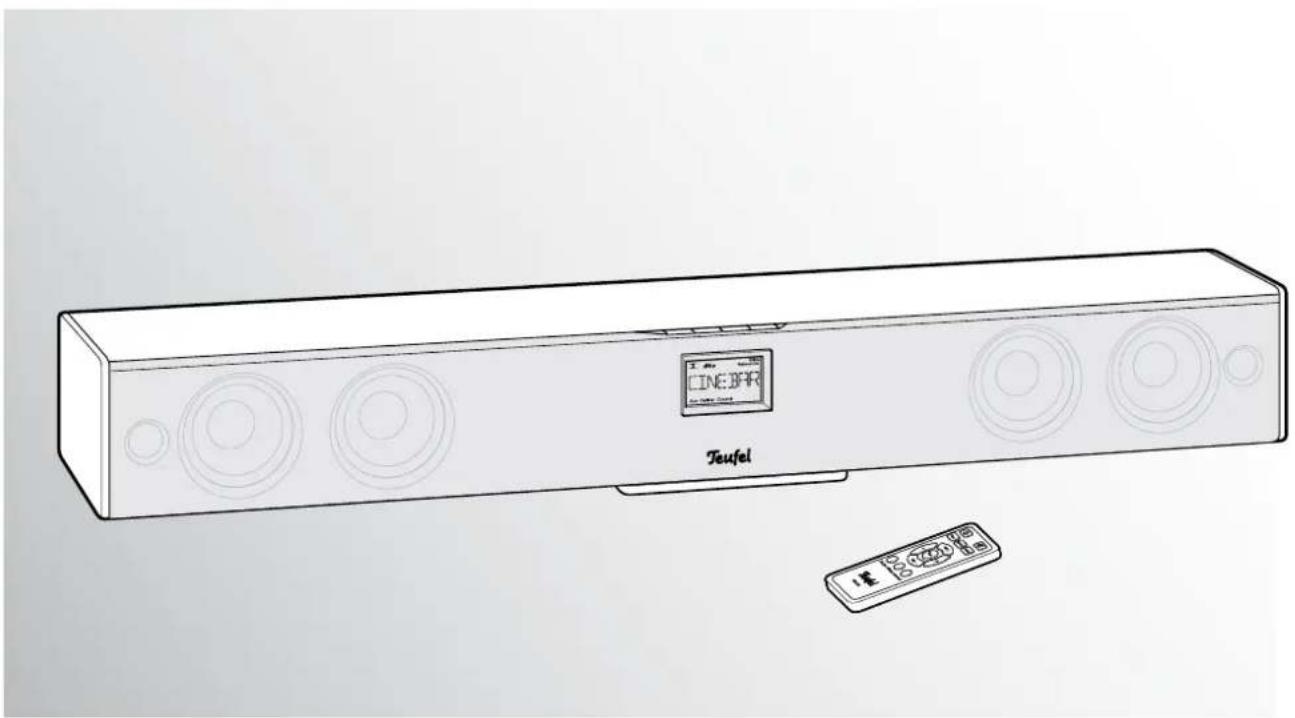
USER MANUAL Cinebar 21 Mk2 Teufel
Technical Description and Operating Instructions
natural_image
Line drawing of a Teufel audio streaming device with circular sound waves and a digital display (no text or symbols on the device itself)Cinebar® 21 Mk2
2.1 Soundbar
Teufel
General notes and Information 3
Notice 3
Original packaging....3
Trademarks 3
Dolby 3
DTS 3
Complaints 3
Contact....3
Proper use....3
Safety notes....4
Caution icons 4
Safety notes....4
Overview....6
Product contents 6
Check to be sure....6
Setup/wall mounting 7
Setup location....7
Cinebar ^® 21 Mk2 ....7
Subwoofer....7
Location tips....7
Wall mounting....7
Control elements and connections 8
Connection example .... 10
Settings....11
Basic functions ...... 11
Activating and deactivating....11
Selecting a source 11
Adjust the volume 11
Mute (switching to mute)....11
Adjust the sound....11
Selecting sound effects ....11
Adjusting bass and high-range tones....12
Adjusting the subwoofer volume....12
Display brightness....12
Lip Sync 12
Energy-saving function....12
Care and cleaning 13
Protecting the environment 13
Batteries and rechargeable batteries......13
Disposing the unit....13
Technical data 14
Troubleshooting....14
Notice
The information in this document may change without prior notice and in no way constitutes any liability on the part of Lautsprecher Teufel GmbH.
No part of these instructions may be reproduced in any form or be broadcasted in any way electronically, mechanically, by photocopy or recording without the written permission of Lautsprecher Teufel GmbH.
If you wish to exercise your eight-week right of return, we ask that you be absolutely sure to hold onto the packaging. We can only accept the return of the device with ORIGINAL-PACKAGING.
Empty boxes are not available!
Trademarks
© All trademarks are the property of their respective owners.

DOLBY.
DIGITAL
VIRTUAL SPEAKER
Dolby
Manufactured under license from Dolby Laboratories.
Dolby and the double-D symbol are trademarks of Dolby Laboratories.

dts®
Digital Surround
DTS
Manufactured under license under U.S. Patent Nos: 5,956,674; 5,974,380; 6,487,535 & other U.S. and worldwide patents issued & pending. DTS, the Symbol, & DTS and the Symbol together are registered trademarks & DTS Digital Surround and the DTS logos are trademarks of DTS, Inc. Product includes software. © DTS, Inc. All Rights Reserved.
Complaints
In case of complaint we will need the following information to process your enquiry:
1. Involve Number
Can be found on the sales slip (enclosed with the product) or on the order confirmation received as a PDF document, e.g. 4322543.
2. Serial number or batch number
Located on the back side of the unit,
e.g. serial #: IL30009440122A-123
Many thanks for your support!
Contact
For questions, suggestions or criticism please contact our customer service department:
10783 Berlin (Germany)
Phone 00800 - 200 300 40 (free of charge)
Fax +49 (0)30 / 300 930 930
E-mail: service@teufelaudio.com
www.teufelaudio.com
Proper use
The speaker set is designed for audio signal play-back. Use the unit only as described in these operating instructions. Any other use will be deemed as not in accordance with the instructions and may lead to damage of property or even persons.
The manufacturer accepts no liability for damage caused by use not in accordance with the instructions.
The unit is intended for private use.

Before operating the unit for the first time please read the safety notes and operating instructions carefully. This is the only way to
use all functions safely and reliably.
Keep the operating instructions safe and pass them on to anyone who may own the unit after you.
Caution icons
You will find the following caution icons in these instructions:

Danger! Indicates a hazardous situation which, if not avoided, will result in death or serious injury.

Warning! Indicates a hazardous situation which, if not avoided, could result in death or serious injury.

Caution! Indicates a hazardous situation which, if not avoided, may result in minor or moderate injury.

These notes provide useful additional information for the assembly or operation.
Safety notes

Risk of electric shock!
Faulty installation of electrical equipment or mains voltage which is too high can
cause electric shocks.
- The device is only suitable for use with a power supply voltage of 230 V \~ / 50 Hz. Make sure that the mains voltage is correct. For more information, refer to the nameplate.
- Check the unit regularly for damage. If the unit's case or mains cable is defective or shows other signs of visible damage, disconnect the power plug immediately from the socket and do not operate the device.
- This device is disconnected from the mains by unplugging the power cord. Therefore, ensure that the plug is accessible at all times.
- Immediately disconnect the AC adapter plug and discontinue using the device if the device emits smoke, you notice burning odour, unusual noises, if the case or the mains adapter is defective or exhibits visible damages.
- If the unit emits smoke or smells of burning or other unusual odours, disconnect it immediately from the power supply and do not operate it.
- Place the device so that no ventilation holes are blocked.
-
The standby button does not disconnect the unit from the power supply. For this reason, connect it to an easily accessible socket so that you can quickly disconnect it from the power supply in the event of faults.
-
Never open the unit's housing.
Repairs may only be carried out by an authorised specialist workshop. Only parts which conform with the original unit specifications may be used in this case. There are electrical and mechanical parts in this unit which are necessary in order to avoid exposure to sources of danger. - Use only accessories specified by the manufacturer.
- Do not insert any objects through the vent slots in the housing.
- Only use the unit in indoor areas.
- Do not operate the unit in damp areas and protect it from drops of water or splash water.
Also take care not to stand vases or other containers filled with liquid on or near the speaker in order to avoid liquid getting into the case. If water or other foreign objects penetrate the case, immediately disconnect the power plug and if applicable, remove any batteries. Send the unit to our service address in this case. - Never touch the power plug / mains adapter with damp hands.

Danger to hearing
Extended listening at high volumes may lead to hearing loss.
- To avoid damage to health, avoid extended listening at high volumes.
- When the volume is set high, always keep a certain distance from the unit and never place your ear directly on the speaker.
- Particularly when the subwoofer has been set to maximum volume and the unit is activated, very high noise pressure may suddenly be produced. This may have psychological consequences and also cause physical injury. Children and pets are particularly at risk. Set your signal source unit volume control to a low setting before turning on the power.

Fire hazard!
Improper use may lead to damage or fire.
- Do not place open flames such as burning candles or similar on the unit.
- Ensure sufficient ventilation.
- Do not place the unit in direct sunlight.
- Only use the unit in indoor areas.
- Do not operate the unit in moist areas and protect it from drops of water and splash water. Also take care not to stand vases or other containers filled with liquid on or near the unit in order to avoid liquid getting into the housing.

Danger of chemical burns!
Leaking battery acid may lead to chemical burns.
- Do not allow battery acid to come into contact with skin, eyes or mucus membranes. In case of contact with acid rinse the affected part immediately with plenty of plain water and if necessary see a doctor.

Danger to children!
Children can become trapped in the packing film when playing and suffocate.
- Do not allow children to play with the unit or the packing film. Danger of suffocation.
- Ensure that children do not remove small parts from the unit or take them off of the unit (e.g. control knobs or plug adapters). They could swallow the parts and choke. Never allow children to operate electrical devices unsupervised.

Danger of injury/damage!
Incorrect location may result in damage.
- Never use the unit unmounted in vehicles, in unstable locations, on wobbly stands or furniture, on under dimensioned brackets etc. The speakers could tip or fall down and cause injury to persons or be damaged.
- Place the speakers in such a way that they cannot be knocked over unseen and make sure that the cables do not pose a trip hazard.
- Carefully follow the installation instructions.
- If mounting the speakers on the wall, make sure that the job is carried out by a professional.
- Only use suitable wall holders to mount the speakers. Verify the carrying capacity of the walls.
- Do not place the unit near sources of heat (e.g. heaters, ovens, other heat generating equipment such as amplifiers etc.).

Risk of damage!
External influences may damage or destroy the device.
- If the unit is to be left unsupervised for a long period (e.g. during a holiday), or if a thunderstorm is forecast, disconnect the mains plug from the power socket. Otherwise, a sudden overvoltage may cause a defect.
- Leaked batteries may damage the remote control. In case of prolonged absence, remove any batteries from the remote control.
- If the device is subjected to warm temperatures after being cold (e.g. after transport), condensation may occur inside of it. In this case, wait at least 2 hours before you connect and activate it.

Risk of injury
An unstable base may cause the unit to tip and injure or even kill persons, children are particularly at risk. You can prevent many accidents by taking the following precautions.
- Only place the subwoofer on the floor.
- If you want to use underframes or speaker stands, only use those recommended by the manufacturer.
- When storing the product, also ensure that it stands safely and that it cannot be knocked down or over.

Danger of explosion!
Batteries (particularly lithium batteries) can explode if used improperly.
- Never attempt to recharge batteries.
- Only use batteries of the same or equivalent type.
- Do not heat or short circuit batteries or rechargeable batteries and do not dispose them in fire.
- Do not expose batteries and storage batteries to direct sunlight.
①
natural_image
Illustration of a rectangular electronic device with circular components and a label reading 'Tianfu' (no other text or symbols)Product contents
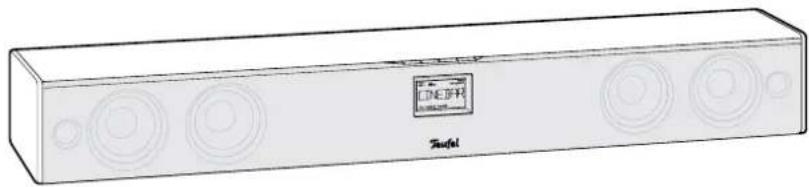
① 1xCinebar ^® 21 Mk2
② 1x stand for Cinebar ^® 21 Mk2
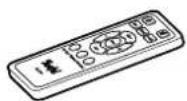
③ 1 x remote control CB 21 RC
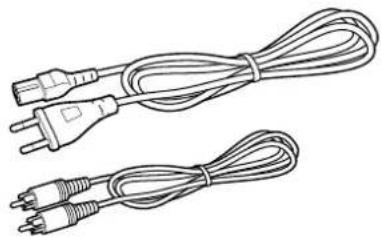
④ 1x power cord
⑤ 1 x RCA cable for Cinebar subwoofer connection
The active subwoofer is delivered separately. Here you will also find the relevant user manual.
Check to be sure
- Check that all items have been delivered and that nothing is damaged.
- If the delivery is incomplete or you find damage sustained in transit, please contact our service department (see page 3).
- Never operate a damaged unit.
②

③
④
natural_image
Line drawing of two types of electrical plug wires, one with a terminal plug and the other with three leads (no text or symbols)⑤
Setup location
Clnebar® 21 Mk2
A location directly under the TV set is ideal. Hang the Cinebar ^® 21 Mk2 either directly to the wall or place it on the stand b below the TV set.
Subwoofer
If possible, you should also place the subwoofer on the floor close to the television. However, you can also set it up in another location in the room as the listener's ears are unable to locate lower tones. Operating the device in the corner of a room is not recommended.
Location tips
- Select a stable, level base.
Please consider the following chapter when mounting the device on the wall. - Make sure that the environment is clean and free from dust.
- Avoid placing the unit close to sources of heat or in direct sunlight.
- Arrange the connector cables so that they do not pose a trip hazard.
- Do not place any heavy objects on top of the cables or the units.
Wall mounting
You will need the following material for wall mounting on a solid stone wall:
- 2 x dowels (ø 8 mm)
- 2x screws, 5x50 mm
(screw head = ∅ 10-12 mm)

Risk of damage and electrical shock!
Proceed with caution when mounting the device on the wall and follow the instruc-
tions provided below.
- Only skilfull persons may mount the Cinebar ^® 21 Mk2 on the wall.
- The product may only be mounted on a suitable, solid wall. Special dowels or brackets may be necessary for walls with a lightweight construction. Consult a professional.
-
Make sure that no cables or pipes are located in the areas where you are drilling. Use a metal detector to check the areas before drilling.
-
Mark the hole distance between the two wall mounting profiles of 61.25 cm on the wall where you intend to install the Cinebar® 21 Mk2. Use a folding rule, pencil and level for this purpose.
- Use a metal detector to ensure that there are no cables or pipes in the areas where you intend to drill. If necessary, select another place for installation.
- With an 8 mm masonry drill, drill a hole that is approx. 45 mm deep at each of the marked positions.
- Insert 2 dowels ( 8 mm) completely in the drill holes.
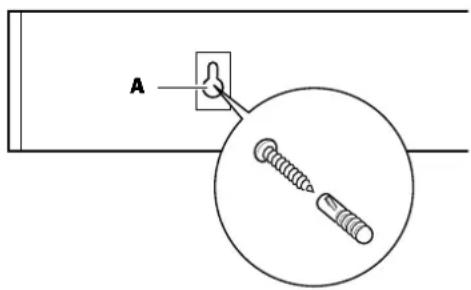
- Screw one screw (5 x 50 mm) into each of the dowels until the distance between the wall and screw head is approx. 4 mm.
text_image
A-
Push the Cinebar ^® 21 Mk2 up against the wall so that the screws disappear into the holes (A). Now pull the Cinebar ^® 21 Mk2 down so that the screws slip into the narrow slot.
-
If necessary, turn the screws further into or out of the holes until the Cinebar ^® 21 Mk2 is firmly mounted on the wall.
Control elements and connections
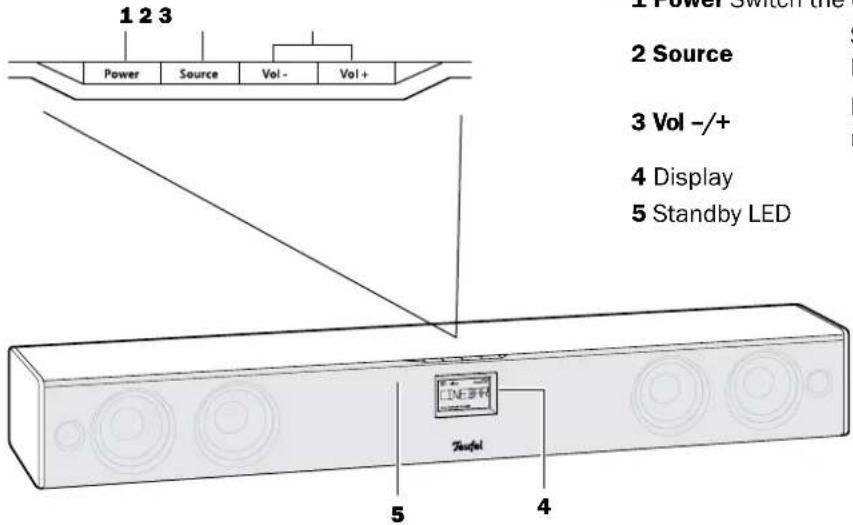
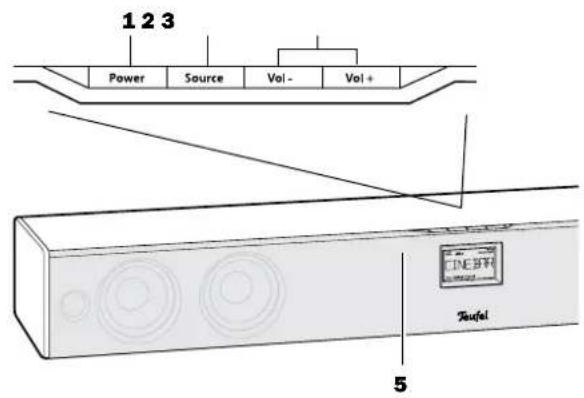
Clinebar® 21 Mk2 - Top and front slide
text_image
1 2 3 Power Source Vol- Vol+ 2 Source 3 Vol -/+ 4 Display 5 Standby LED 5 4Item Name Description
1 Power Switch the device on or to standby
2 Source Select an input jack (Aux In, Digital In Optical, Digital In Coaxial
3 Vol -/+ Increase (+) / reduce (-) volume
4 Display
5 Standby LED
Clinebar® 21 Mk2 - Back slide

natural_image
Front view of a rectangular electronic device with indicator lights and ports (no visible text or symbols)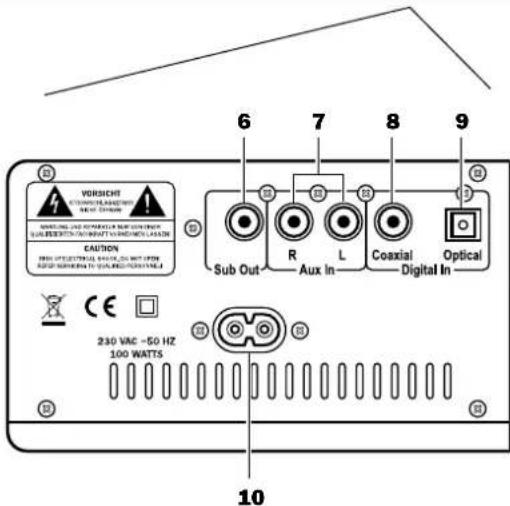
text_image
VORISHENT STOCKS & LAYOUT CAUTION 230 VAC ~50 Hz 100 WATTS Sub Out Aux In L Coaxial Digital In Optical 6 7 8 9 10Item Name Description
6 Sub Out RCA output jack for subwoofer
7 Aux In R/L RCA Input jacks for analogue audio signals from external players
8 Digital In RCA input jacks for digital audio Coaxial signals from external players
9 Digital In Optical TOSLINK input jack for digital (optical) audio signals from external players
10 230V-50Hz Euro 8 jack for power cord e
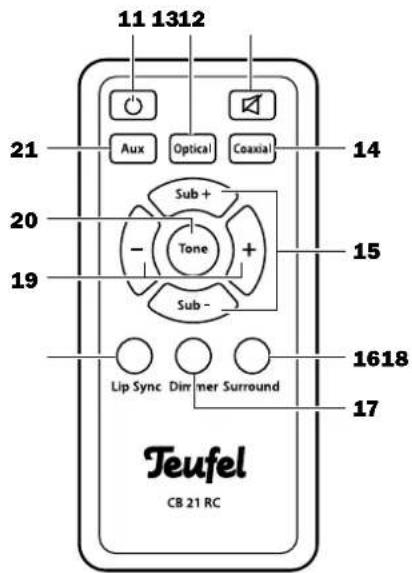
Remote control
text_image
11 1312 Aux Optical Coaxial Sub + Tone Sub - Lip Sync Dirmer Surround Teufel CB 21 RC 14 15 1618 17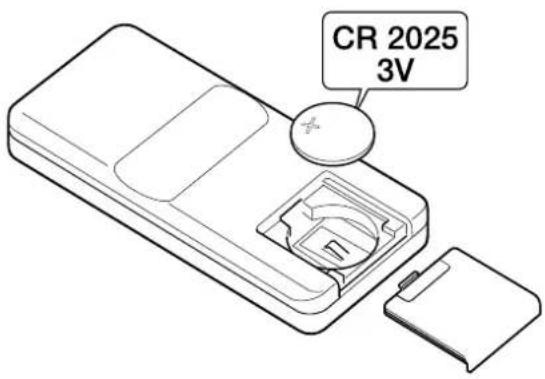
text_image
CR 2025 3V
Verätzungsgefahr!
| 11 | Switch the Cinebar® 21 Mk2 on/ to standby |
| 12 Optical | Select Digital In Optical (9) as a source |
| 13 | Mute the speakers |
| 14 Coaxial | Select Digital In Coaxial (8) as a source |
| 15 Sub +/- | Reduce subwoofer volume |
| 16 Sur-round | Activate and deactivate surround sound effects |
| 17 Dimmer | Adjust the display brightness |
| 18 Lip sync | Synchronise speech and film |
| 19 + / - | Increase (+) / decrease (-) volume |
| 20 Tone | Increase / decrease bass and high range tones |
| 21 Aux | Select Analog In (7) as a source |
The battery
An insulating strip has been affixed between the battery and the contact in order to preserve the entire battery capacitance for delivery. Simply pull this strip out.
Changing the batteries
The battery should be replaced if the remote control stops functioning properly or no later than after 2 years. Battery type: CR 2025 LITHIUM BATTERY. Remove the battery compartment cover from the remote control and replace the batteries in order to change the batteries.
Make sure that the polarity is correct!

Explosionsgefahr!
text_image
TV set Cinch audio cable AUDIO OUT R L DVD-Player Cinebar® 21 Mk2 Sub Out Aux In Coaxial Digital In Optical Optical cable Cinch-coaxial cable Subwoofer Sat-ReceiverThis connection example only provides a few possibilities for connecting the device. There are often different connecting methods possible for a device. Please consult the operating instructions of the respective device for more information in this regard. If your TV set does not have separate audio output jacks, you can relay the sound to the Cinebar ^® 21 Mk2 using a scart/RCA adapter.
Once you have connected all devices, you can also connect the Cinebar ^® 21 Mk2 and the subwoofer to the power supply using the enclosed power cord.
Make sure that the sockets are easily accessible. If you have connected and activated the devices as described in this example, you must set the Cinebar® 21 Mk2 as follows:
| Device audio Transfer Cinebar setting | ||
| TV set analogue | Aux | |
| DVD player digital | Optical | |
| Sat receiver digital | Cooxial | |
Table 1
Basic functions
Activating and deactivating
- With the Power (1) button or ⏻(11), you can switch your Cinebar ^® 21 Mk2 on or to standby. The standby indicator (5) will illuminate in red in standby mode.
Selecting a source
Also see page 10, table 1.
- Push the device button Source (2) until the connector jack of the desired source appears on the display.
- On the remote control, select the source with the buttons Aux (21) or Optical (12) or Coaxial (14). The respective setting will appear on the display.
Adjust the volume
- On the device: Push the buttons Vol +/- (3).
- Using the remote control: Push the buttons +/- (19).
Mute (switching to mute)
- You can activate or deactivate the sound by pushing the button ⚠(13) repeatedly.
Adjust the sound
You can only adjust the sound settings with the remote control only.
Selecting sound effects
Your Cinebar® 21 Mk2 is equipped with Dolby Virtual Speaker technology. This simulates the audio impression of a 5.1 surround sound system using the soundbar.
Two sound effects are possible:
- The surround sound effect: Reference
- An effect that makes the distance between the speakers appear greater: Wlde
- If necessary, push the Surround (16) button several times to set the desired sound effect.
The respective setting will appear on the display.
- If no surround sound effect has been selected, then the audio will be emitted in stereo.
text_image
1 2 3 Power Source Vol- Vol+ Tuefa 5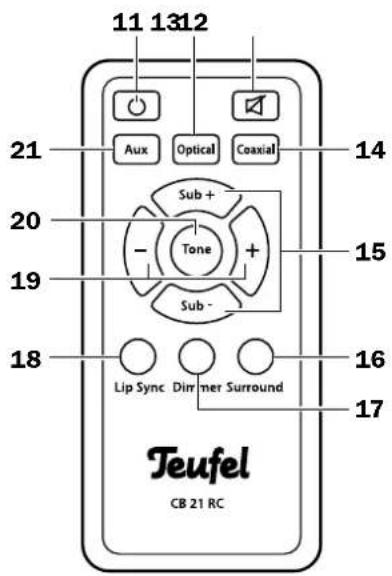
text_image
11 1312 Aux Optical Coaxial Sub + Tone + Sub - Lip Sync Dimmer Surround Teufel CB 21 RC 14 15 16 17Adjusting bass and high-range tones
In addition to the sound effects, you can also increase or decrease the bass and high-range tones individually.
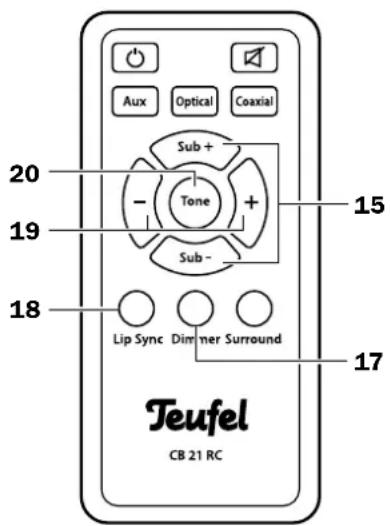
- Push the button Tone (20) several times if necessary. You will either see the setting for the bass tones (e.g. BASS +2) or for the high-range tones (e.g. TREB -1) on the display.
- With the buttons +/ - (19), adjust the respective setting to your taste.
Adjusting the subwoofer volume
- Adjust the subwoofer volume with the buttons Sub +/- (15).
Display brightness
- Push the button Dimmer (17) several times if necessary in order to set one of the display's 3 brightness levels.
Lip Sync
During playback of movies, the picture and sound are not synchronous sometimes. You can eliminate this bothersome effect with your Cinebar ^® 21 Mk2.
- Push the button Lip Sync (18) and then adjust the delay between the picture and sound using the buttons +/- (1.9). Values can be adjusted between 0 and 200 ms.
Energy-saving function
- If the Cinebar® 21 Mk2 does not receive a signal for more than 20 minutes, it will automatically switch to standby. Then it consumes less than 0.5 watts.
text_image
Aux Optical Coaxial Sub + Tone Sub - 15 19 18 Lip Sync Dimmer Surround 17 Teufel CB 21 RCClean your Cinebar® 21 Mk2 regularly with a soft, damp microfibre cloth. When doing so, please be absolutely sure to observe the following instructions:

Risk of electric shock!
In contact with live parts, water can lead to electric shock or short circuit.
- Ensure that no liquid penetrates the unit.
- Disconnect the mains plug before cleaning.

Risk of damage!
Using the wrong cleaning materials may damage the delicate surface of the case.
- If possible, only use plain water without any additives. In case of stubborn marks, a mild soap solution may be used.
- In no circumstances should caustic cleaning products, white spirit, thinners, petrol or similar be used for cleaning.
Protecting the environment
Batteries and rechargeable batteries

Batteries and rechargeable batteries must not be disposed of with household waste!
Every consumer is required by law to bring all batteries and rechargeable batteries, whether they contain harmful substances*) or not, to a collection point run by the communal authority or borough or run commercially, so that they can be disposed of in an environmentally friendly manner.
Please only hand in fully discharged batteries and rechargeable batteries!
*) labelled with: Cd = Cadmium, Hg = Mercury, Pb = Lead
Disposing the unit

Used units must not be disposed of with household waste.
If the unit is no longer operational, every consumer is required by law to dispose of used devices separately from household waste, e.g. at a collection point run by the communal authority borough. In this way it is ensured, that used devices are properly recycled and that negative consequences on the environment are avoided.
For this reason, electrical equipment is labelled with the displayed symbol.
| Dimensions (WxHxD) 91,8 x 11 | 1,5 x 11,0 cm |
| Weight 6,6 kg | |
| Operating voltage: 230 V~/50 Hz | |
| Max. power consumption | 100 watts |
CE This product conforms with Council of the European Union guidelines 2004/108/EC and 2006/95/EC.
For further technical information, please view the product description on our website at www.teufelaudio.com.
Technical changes reserved!
Troubleshooting
The following notes and further detailed information on our website should help you to rectify malfunctions. If this does not lead to success, please contact our hotline 00200 - 200 300 40 (free of charge). Please also observe the warranty notes.
| Problem Possible cause Solution | ||
| The device emits no sound. | Wrong source selected. Select the right source (see page 11). | |
| Device has been set to “mute”. | Push the button ☑ or adjust the volume. | |
| Volume is set to “0”. Increase the volume. | ||
| The sound is not optimal. The settings are not correct. Adjust the sound settings as described on page 11. | ||
| Playback is noisy. Generally | speaking, the Cinebar® 21 Mk2 is a very low-noise system. In most cases, the speaker system with exceptional resolution in the high range area can expose the poor quality of a signal source (e.g. from MP3 files). | Ensure that the source is sending a clean signal to the Cinebar® 21 Mk2. |