
AS5544.03V - Switch JUNG - Free user manual and instructions
Find the device manual for free AS5544.03V JUNG in PDF.


User questions about AS5544.03V JUNG
0 question about this device. Answer the ones you know or ask your own.
Ask a new question about this device
Download the instructions for your Switch in PDF format for free! Find your manual AS5544.03V - JUNG and take your electronic device back in hand. On this page are published all the documents necessary for the use of your device. AS5544.03V by JUNG.
USER MANUAL AS5544.03V JUNG
Universal automatic switch 180° 2.20 m
Art.-No.: AS..1280-1..
Operating instructions
1 Safety instructions
Electrical equipment may only be installed and fitted by electrically skilled persons.
Failure to observe the instructions may cause damage to the device and result in fire and other hazards.
Danger of electric shock. Always disconnect before carrying out work on the devise or load. At the same time, take into account all circuit breakers that supply dangerous voltage to the device or load.
Danger of electric shock. Device is not suitable for disconnection from supply voltage. The load is not electrically isolated from the mains even when the device is switched off.
Do not press on the sensor window. Device can be damaged.
Disconnect before mounting the cover, malfunction possible.
Keep button cells out of reach of children! If button cells are swallowed, get medical help immediately.
Risk of explosion! Do not throw batteries into fire.
Risk of explosion! Do not recharge batteries.
The device is not suitable for use as a burglar alarm or other alarm.
These instructions are an integral part of the product, and must remain with the end customer.
2 Device components
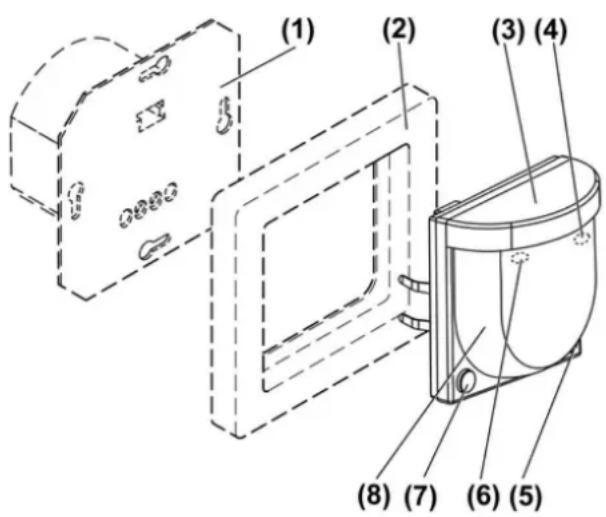
- Automatic switching of light, depending on heat motion and ambient brightness
- Operation with concealed insert for dimming, switching or extension insert, 3-wire
- Mounting indoors or outdoors on concealed insert
Product characteristics
- Adjustable functions with IR remote control
- Extension of the detection area in combination with the 3-wire extension insert
- Operation with IR remote control, buttons on the motion sensor, 2-wire extension or installation button
- Teach function for adjustment of the brightness threshold in combination with IR remote control
- Switch-on brightness permanently storable, with dimming insert
- Dimmable light with dim insert
- Dimming function, with dimming insert
- Short time operation, e.g. for controlling acoustic alarms, with switching insert
- Display LED
- Creep zone protection
- Presence simulation
- Night light function
- Run-on time limit
Automatic operation
The motion detector detects heat motions of people, animals and objects.
- The light is switched on if a person enters the detection area and the brightness is below the set threshold.
The run-on time restarts with each detected motion. - The light is switched off if no motion is detected in the detection area and the run-on time has elapsed or the run-on time limit is reached.
To avoid any light swings caused by a cooling illuminant, the motion detector does not evaluate any motion signals for a brief lockout time after switching off. The motion detector adjusts itself to the ambient conditions to keep the time as short as possible.
The day/night switchover takes place after a delay of 30 seconds. Switching over is thus prevented by briefly illuminating or shadowing to the day/night operation.
Short time operation
The motion detector is combined with a switching insert. Depending on motion and ambient brightness a short pulse is triggered The pulse is cyclically repeated as long as motions are detected.
Dimming phase
If the motion detector is combined with a dimming insert, the light is dimmed to minimum brightness after the run-on time and then switched off. The time from the start of dimming until switching off is approx. 30 seconds. If a motion is detected during the dimming phase, the motion detector switches the light to the saved switch-on brightness again.
Run-on time limit
The light is switched off after 90 minutes at the latest even if there is constant motion in the detection area. The light is only switched on again if the brightness drops below the threshold and motions are detected.
Exception: After switching off the continuous On or On for 2 hours operating modes, the lighting is switched off after 30 minutes at the latest.
Presence simulation
In automatic operation, the motion detector continuously saves times for which the lighting was switched on or off. A maximum of 120 switching operations are saved over a period of 7 days. If more switching operations take place, the oldest ones are overwritten respectively. If the presence simulation is activated, the motion detector performs the saved switching operations. If not enough switching operations are saved, random switching operations are performed. Detected motions prolong the run-on time or the light is switched on depending on brightness. Times are not saved.
i A motion detector on a 3-wire extension insert does not save any times.
i With the HVAC insert, the function is only performed for channel 1.
Night light function
The motion detector is combined with a dimming insert. If the night light function is activated, the light is switched between two brightness values. In idle state, the brightness is 20 % of the maximum brightness. If motions are detected, the light is switched to the switch-on brightness.
i If the Off for 2 hours function or continuous Off function is active, the light is switched off.
Behaviour after a mains failure
- Less than 0.2 seconds: the old switching position is restored after mains return.
- 0.2 seconds until approx. 2 seconds: The light is switched on for the run-on time after mains return.
- Longer than 2 seconds: The motion detector goes through a self-test for approx. 40 seconds after mains return. The light is first switched on. After approx. 10 seconds, the light is switched off. After the end of the self-test, the light is switched on for the duration of the run-on time. The motion detector is in automatic operation.
4 Operation on a main unit
Display LED
Behind the lens (8) are a red (4) and a yellow (6) LED (Figure 1) for indicating different operating states.
| Red LED Yellow LED Signalling | ||
| off on Light switched on continuously | ||
| on off Light switched off continuously | ||
| flashed in rhythm of the detection | off Detection of motion, for outdoor use | |
| flashes off Receipt of IR signals | ||
| off on for 1 second IR signal detected | ||
The operation and necessary settings are carried out using the IR remote control. Some settings are carried out one time during the commissioning and should only be changed if the ambient conditions change.
Switching on and dimming can also be carried out via 2-wire extension inserts. Switching on is also possible with an installation button.
Function buttons IR remote control
| Button Function | |
| ON ▲ Pressing for less than 0.4 seconds Continuous on | |
| ON ▲ Pressing for longer than 0.4 seconds Only dimming inserts: Dimming until maximum brightness | |
| AUTO Automatic operation | |
| OFF ▲ Pressing for less than 0.4 seconds Continuous off | |
| OFF ▲ Pressing for longer than 0.4 seconds | Only dimming inserts: Dimming until minimum brightness |
| 2H ON On for 2 hours | |
| 2H OFF Off for 2 hours | |
| ⚠ Pressing for longer than 10 seconds Presence simulation | |
| MEM √ Pressing for less than 0.4 seconds Only dimming inserts: Switching on for run-on time | |
| MEM √ Pressing for longer than 3 seconds Only dimming inserts: Saving switch-on brightness | |
| TEST Test setting | |
| RESET Pressing for less than 10 seconds Switch off from: Presence simulation, night light function, dimming phase, use outdoors, short time operation, test | |
| RESET Pressing for longer than 10 seconds Restoring factory settings | |
Adjustable buttons IR remote control
| Button Function | |
| 25 %, 50 %, 75 %, 100 % Pressing for longer than 10 seconds | Setting the sensitivity |
| PIR▼, PIR▼, PIR▼ Pressing for longer than 10 seconds | Adjusting detection angle |
| C Brightness threshold approx. 1 lux, night | operation |
| ※ Brightness threshold approx. 10 lux, switching takes place during twilight | |
| ↑ Brightness threshold 150 lux, setting for | stairways according to DIN EN12464-1, 2003-03 |
| ※ Day operation, switching is brightness-dependent | |
| TEACH Saving ambient brightness as brightness threshold | |
| 1SEK ▼ Pressing for longer than 10 seconds | Short time operation |
| 30 SEK ▼ Run-on time 30 seconds | |
| 2 MIN ▼ Run-on time 2 minutes | |
| 5 MIN ▼ Run-on time 5 minutes | |
| 30 MIN ▼ Run-on time 30 minutes | |
| START/STOP Setting individual run-on time | |
| ON/OFF ▼ | Switching dimming phase on/off |
| ECO▼ Pressing for longer than 10 seconds | Switching on night light function |
| ▲ Pressing for longer than 10 seconds | Adjustment for use outdoors |
If the motion detector is combined with a dimmer insert, the light is always switched on to the saved switch-on brightness
Switching on light for the duration of the run-on time
A 2-wire extension or an installation button is connected.
- Press 2-wire extension or installation button, with dimming inserts alternative MEM √ button, for less than 0.4 seconds. Light is switched on depending on brightness and motion. Motions are evaluated further and prolong the run-on time.
i The light cannot be switched off manually.
In short time operation, cyclic pulses take place whilst the 2-wire extension or installation button is pressed.
Light On for 2 hours
i This function is not adjustable in short time operation.
■ Press 2H ON button of the IR remote control.
Light is switched on for 2 hours. The motion detector is in automatic operation again after the 2 hours have elapsed. If no motions are detected, the light stays on for a run-on time of 4 minutes. If motions are detected, the light stays on for the duration of the set run-on time.
With the HVAC insert, only output Kanal 1 is switched on, output HLK continues switching motion-dependent.
Light Continuous on
i This function is not adjustable in short time operation.
- Press ON button for less than 0.4 seconds or button (7) on the motion detector.
Light is switched on continuously. The yellow LED lights up.
With the HVAC insert, only output Kanal 1 is switched on, output HLK continues switching motion-dependent.
Switching off On for 2 hours or Continuous on
- Press AUTO button, for Continuous on function press alternative button (7) on the motion detector. Automatic operation is set. If no motions are detected, the light stays on for a run-on time of 4 minutes. If motions are detected, the light stays on for the duration of the set run-on time.
Light Off for 2 hours
Motions are not evaluated during this time. It is not possible to switch on via a 2-wire extension or installation button.
■ Press the 2H OFF button.
Light is switched off for 2 hours. After the time has elapsed, the motion detector is in automatic operation again.
With the HVAC insert, output Kanal 1 is switched off immediately, output HLK is switched off after the set run-on time has elapsed.
Light Continuous off
Motions are not evaluated It is not possible to switch on via a 2-wire extension insert or installation button.
- Press OFF button for less than 0.4 seconds or button (5) on the motion detector. Light is switched off continuously. The red LED lights up.
With the HVAC insert, output Kanal 1 is switched off immediately, output HLK is switched off after the set run-on time has elapsed.
Switching off Off for 2 hours or Continuous off
- Press AUTO button, for function Continuous off press alternative button (5) on the motion detector. Automatic operation is switched on.
Adjust the brightness
Motion detector is combined with a dimming insert.
With the IR remote control, alternatively via the 2-wire extension, the light can be dimmed temporarily. The next time the light is switched on, it is switched on again to the switch-on brightness
Light is switched on.
- Press ON button or 2-wire extension above for longer than 0.4 seconds.
The light gets brighter up to maximum brightness.
- Press OFF button or 2-wire extension below for longer than 0.4 seconds.
Light gets darker to minimum brightness.
i An installation button cannot be used to adjust the brightness.
Switching the light on with minimum brightness
Motion detector is combined with a dimming insert.
Light is off.
■ Press OFF button or 2-wire extension below for longer than 0.4 seconds.
The light is switched on with minimum brightness for the duration of the run-on time.
i An installation button cannot be used to switch on to minimum brightness.
If the ON button or 2-wire extension above is pressed for longer than 0.4 seconds, the light is switched on to minimum brightness and then brighter.
Save switch-on brightness
Motion detector is combined with a dimming insert.
■ Set light to the required brightness.
- Press MEM √ button or 2-wire extension insert over entire surface for longer than 3 seconds.
Switch-on brightness is saved. For confirmation, the light is switched off briefly and switched on again.
i In the state as supplied the maximum switch-on brightness is saved.
i An installation button cannot be used to save the switch-on brightness.
Switching on presence simulation
■ Press the ⚪ button for longer than 10 seconds.
Presence simulation is switched on.
i This function is not adjustable in pulse operation.
i By pressing the AUTO button the automatic operation is switched on again.
Setting the sensitivity
■ Press 25 %, 50 %, 75 % or 100 % button for longer than 10 seconds.
Sensitivity is set.
Limiting the detection area
The detection area of the motion detector can be limited by switching off a sensor. Both sensors cannot be switched off at the same time. Since the detection areas of both sensors overlap, there is no distinct demarcation of the blocked out detection area.
■ Press PIR or PIR button for longer than 10 seconds.
Detection area is limited.
i Using the PIR button, both sensors are switched on again.
Setting brightness threshold
One of four predefined brightness thresholds (see table on adjustable buttons) or one individual brightness threshold can be set (see Saving ambient brightness as brightness threshold).
■ Press (, ⚙, 🖱 or ⚙ button.
Saving ambient brightness as brightness threshold
The ambient brightness can be saved as brightness threshold with the aid of the teach function.
i Do not shadow the motion detector during the measuring process.
Motion detector is in automatic operation.
■ Press TEACH button.
Teach function is activated. For confirmation, the switched on light is switched off. If the light is switched off, this is switched on for approx. 1 second.
After 30 seconds, the motion detector measures the brightness and saves it. For confirmation, the light is switched on for the duration of the run-on time.
If a value greater than 200 lux is saved, the motion detector switches to day operation independent of the brightness.
Setting fixed run-on time
■ Press 30 SEK , 2 MIN , 5 MIN or 30 MIN button.
Setting individual run-on time
The individual run-on time can be set within a range of 10 seconds to 60 minutes. One of the fixed run-on times can be set again at any time.
■ Press START button.
Run-on time starts.
■ When the required run-on time is reached, press STOP button.
Motion detector saves the run-on time.
Switching on short time operation
■ Press the 1SEK button for longer than 10 seconds.
i No run-on time is set in short time operation.
i With the HVAC insert, the function is only executed for Kanal 1 output.
To switch off short time operation, press Reset button for less than 10 seconds.a
Switching on dimming phase
The motion detector is combined with a dimming insert.
Dimming phase is switched off.
■ Press ON/OFF button.
Dimming phase is switched on. If pressed again, the dimming phase is switched off again.
Switching on night light function
The motion detector is combined with a dimming insert.
The light is switched between two brightness values (see chapter 3. Function).
■ Press the ECO button for longer than 10 seconds.
To switch off the night light function, press Reset button for less than 10 seconds.
Configuring the motion detector for use outdoors
The motion detection is switched accordingly for use outdoors in order to minimise faulty switching.
■ Press the 🔊 button for longer than 10 seconds.
The motion detection is optimized for use outdoors. If a motion is detected, the red LED (4) flashes.
To reactivate the motion detection for indoors, press Reset button for less than 10 seconds.
Switch on test operation
The test operation is used for testing the detection area.
■ Press TEST button.
Test operation is switched on for 5 minutes, afterwards the motion detector switches to automatic operation again.
| Function Value | |
| Sensitivity 100 % | |
| Detection area 180 ° | |
| Brightness threshold Day mode | |
| run-on time 1 second |
i By pressing the AUTO button, you can switch to automatic operation at any time.
Performing a reset
During a reset, the motion detector is reset to the factory settings.
■ Press the RESET button for longer than 10 seconds.
| Function Value | |
| Sensitivity 100 % | |
| Detection angle 180 ° | |
| Brightness threshold 10 lux | |
| run-on time 30 seconds | |
| Operating location Indoors | |
| Night light function Switched-off | |
| Presence simulation Switched-off |
If the RESET button is pressed for less than 10 seconds, only a few functions are terminated (see chapter 4. Operation on a main unit).
5 Operation on a 3-wire extension insert
Only a few settings are possible in combination with a 3-wire extension insert.
- Setting sensitivity (see Chapter Operation on a main unit)
- Use outdoors (see Chapter Operation on a main unit)
- Extension Off for 2 hours or Continuous off
3-wire extension insert Off for 2 hours
■ Press 2H OFF button of the IR remote control.
Extension is switched off for 2 hours. The extension is in automatic operation again after the time has elapsed.
By pressing the AUTO button of the IR remote control, you can switch to automatic operation at any time.
3-wire extension insert Continuous off
- Press OFF button of the IR remote control, alternatively press button (5) on the motion sensor.
Extension is switched off continuously. The red LED lights up.
By pressing the AUTO button of the IR remote control, alternative button (5) on the motion detector, you can switch to automatic operation at any time.
6 Information for electrically skilled persons
6.1 Fitting and electrical connection

DANGER!
Electrical shock when live parts are touched.
Electrical shocks can be fatal.
Before carrying out work on the device or load, disengage all the corresponding circuit breakers. Cover up live parts in the working environment.
Selecting the installation location
When choosing the installation location, the following points must be considered.
■ Select a vibration-free installation location. Vibrations can lead to unwanted switching.
■ Avoid interference sources in the detection area. Interference sources such as heaters, fans, air-conditioners and cooling illuminants can lead to unwanted switching.
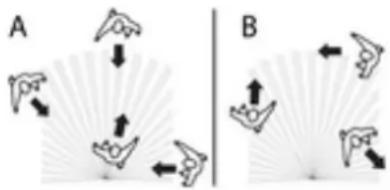
Motions crosswise to the motion detector (figure 2) B can be detected more easily than motions approaching the motion detector (figure 2) A. Thus, the cross walking range is greater than the walk to walking range.
■ Take direction of motion into account.
natural_image
Two diagrams (A and B) showing directional arrows around stylized objects, no text or symbols present.Figure 2
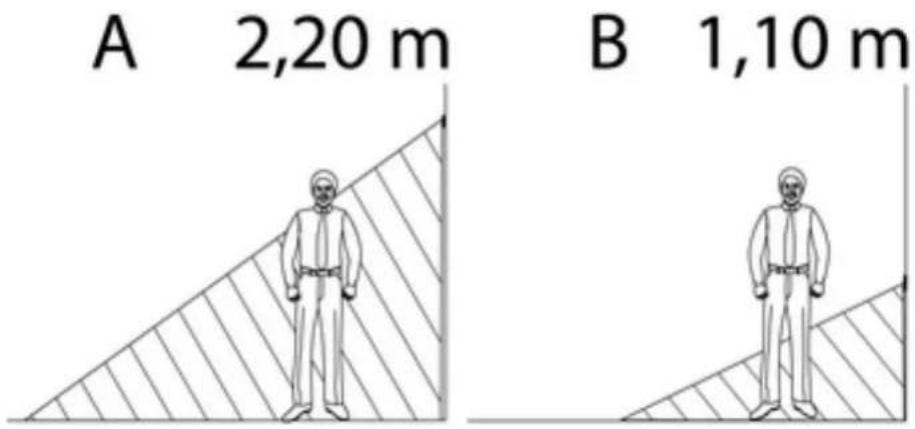
All information regarding the range (figure 3) applies to an installation height of 2.2 m. In the case of a deviating installation height, the range changes (figure 4).
■ Determine installation height.

text_image
ca. 12 m ca. 6 m ca. 6 mFigure 3
text_image
A 2,20 m B 1,10 mFigure 4
Installing the motion detector
The concealed insert is connected and installed correctly (see Concealed insert instructions).
i Further installation steps are necessary to ensure the protection rating IP 44 (see Seal set instructions)
■ Mount the motion detector with the frame onto onto concealed insert.
Expanding the detection area
To expand the detection area, connect a 3-wire extension insert with motion detector cover. The motion detector of the main unit also evaluates motion signals of the extension and, if necessary, switches the lighting on.
The concealed insert is connected and installed correctly (see Concealed insert instructions).
■ Mount the motion detector with the frame onto the concealed insert.
i Do not connect any main units in parallel. This can lead to light swings
6.2 Commissioning
Insert battery into IR remote control
i Keep contacts of batteries and device free of grease.

WARNING!
Risk of chemical burns.
Batteries can burst and leak.
Replace batteries only with an identical or equivalent type.
■ Insert the supplied battery with correct polarity (see IR remote control imprint)
Checking the detection area
■ Switch on test operation, only possible at the main unit.
■ Measure the detection area. Pay attention to reliable detection and interference sources.
■ Limit detection area as required.
■ Adjust sensitivity as required.
Configuring the motion detector
For details see Chapter on Operation.
The IR remote control is operational.
- Carry out optional adjustment for use outdoors.
■ Switching on optional night light function
■ Configure dimming phase optionally in combination with dimming inserts.
■ Configure short time operation optionally in combination with switching inserts.
■ Set brightness threshold.
■ Set follow-up time.
7 Appendix

Remove empty batteries immediately and dispose of in an environmentally friendly manner. Do not throw batteries into household waste. Consult your local authorities about environmentally friendly disposal. According to statutory provisions, the end consumer is obligated to return used batteries.
7.1 Technical data
Ambient temperature -15 ... +45 °C
Protection rating IP 20
Brightness setting approx. 1 ... 200 lx (and day operation)
run-on time approx. 10 s ... 60 min
Sensitivity 25 ... 100 %
Lockout time approx. 0.3 ... 4 s
Installation height 1.10 / 2.20 m
Detection angle 180°
cross walking range approx. 12 x 6 m
walk to walking range approx. 8×4 m
Short time operation
pulse duration approx. 0.3 s
pulse stop approx. 2.7 s
IR remote control
Battery type 1×lithium CR 2025
7.2 Troubleshooting
Motion detector does not switch on
Cause 1: The ambient brightness is greater than the set brightness value.
Set brightness value.
Cause 2: Motion detector does not detect any motions.
Increase sensitivity.
Switch on all sensors.
Switch on motion detector on 3-wire extension insert.
Cause 3: Off for 2 hours or Continuous off is activated
Switch on automatic mode.
Motion detector switches on without motions.
Cause 1: Presence simulation is activated. Motion detector switches to saved times.
Switch on automatic mode.
Cause 2: Interference sources in the detection area.
Remove interference sources if possible.
Reduce sensitivity.
Limit detection area.
Motion detector constantly switches on and off during motion.
Cause 1: Test operation is switched on.
Cause 2: Short time operation is switched on.
Switch on automatic mode.
Motion detector switches off despite motion
Cause 1: The motion detector does not detect any motions.
Increase sensitivity.
Cause 2: Detection area is limited because a sensor was switched off.
Switch on all sensors.
Cause 3: Motion detector is switched off on 3-wire extension insert.
Switch on motion detector.
Cause 4: Run-on time limit is reached.
Motion detector does not switch off
Cause 1: Interference sources in the detection area, motion detector detects motions constantly.
Remove interference sources if possible.
Reduce sensitivity.
Limit detection area.
Cause 2: On for 2 hours or Continuous on is activated.
Switch on automatic mode.
Cause 3: Night light function is switched on. The light stays on at 20% brightness.
Switch off night light function.
Motion detector does not respond to IR remote control, red LED does not flash.
Cause 1: IR remote control out of range.
Go closer to the motion detector.
Cause 2: Battery in IR remote control is empty.
Change battery (see back of the IR remote control)
Motion detector does not respond to IR remote control, red LED flashes, yellow LED does not.
Cause : Motion detector is receiving an IR signal. Function or setting cannot be executed. The motion detector is mounted on a concealed insert that does not support the function.
7.3 Accessories
Sealing kit for automatic switch 180° 2.20 m Art.-No.: AS 50 DS
7.4 Warranty
We reserve the right to make technical and formal changes to the product in the interest of technical progress.
We provide a warranty as provided for by law.
Please send the unit postage-free with a description of the defect to our central customer service office:
ALBRECHT JUNG GMBH & CO. KG
Service Center
Kupferstr. 17-19
D-44532 Lünen
Service-Line: +49 (0) 23 55 . 80 65 51
Telefax: +49 (0) 23 55 . 80 61 89
mail.vka@jung.de
General equipment
Service-Line: +49 (0) 23 55 . 80 65 55
Telefax: +49 (0) 23 55 . 80 62 55
mail.vkm@jung.de
KNX equipment
Service-Line: +49 (0) 23 55 . 80 65 56
Telefax: +49 (0) 23 55 . 80 62 55
mail.vkm@jung.de
The C€ symbol is a free trade symbol, which is solely intended for the authorities and does not guarantee any properties.
ALBRECHT JUNG GMBH & CO. KG
Vollmestraße 1