
GE24NU30 - Uncategorized LG - Free user manual and instructions
Find the device manual for free GE24NU30 LG in PDF.


| Product Type | External DVD Writer |
| Model | GE24NU30 |
| Brand | LG |
| Interface | USB 2.0 |
| Supported Disc Formats | DVD-ROM (SL/DL), DVD-RW, DVD-R, DVD+RW, DVD+R, DVD+R DL, DVD-R DL, DVD-RAM, M-Disc (DVD+R SL), CD-R, CD-RW, CD-ROM, Video CD, etc. |
| Maximum Write Speed (DVD±R) | 24X |
| Maximum Read Speed (DVD-ROM) | 16X |
| Buffer Capacity | 2 MB |
| Dimensions (W x H x D) | 160 x 50 x 230 mm |
| Weight | 1.2 kg |
| Power Supply | AC adapter: Input 100-240V AC, 50-60Hz; Output 12V DC, 3A |
| Operating Temperature | 5°C to 40°C |
| Operating Humidity | 15% to 85% |
| Storage Temperature | -30°C to 60°C |
| Storage Humidity | 10% to 90% RH |
| MTBF | 100,000 hours |
| Laser Class | Class 1 |
| Country of Origin / Compliance | FCC Class B, CE |
| Special Features | Buffer Under Run Protection, Emergency Eject, Region Playback Control Phase II |
| LightScribe Support | No |
| System Requirements (PC) | Windows 7, Vista, XP SP2+; Mac OS X 10.5.4+; USB 2.0 port; Pentium IV 3.4 GHz; 256 MB RAM; 20 GB HDD |
| Included Accessories | USB cable, AC adapter, software CD (Windows), quick guide |
| Repair / Maintenance | No user-serviceable parts. Refer to qualified service. Clean with dry cloth. |
Frequently Asked Questions - GE24NU30 LG
User questions about GE24NU30 LG
0 question about this device. Answer the ones you know or ask your own.
Ask a new question about this device
Download the instructions for your Uncategorized in PDF format for free! Find your manual GE24NU30 - LG and take your electronic device back in hand. On this page are published all the documents necessary for the use of your device. GE24NU30 by LG.
USER MANUAL GE24NU30 LG
Hardware Installation
NOTES
- Please pay attention to handling Electrostatic Sensitive Devices, you may use anti-static products such as wrist straps, heel straps, mats to protect your body from electrostatic.
- Make sure you have a personal computer with an open USB port before connecting the drive to your computer.
- Power for all device should be turn off before attaching the cables.
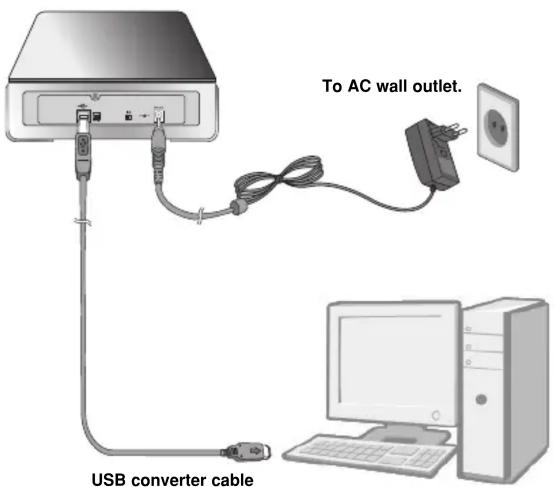
Connecting to computer
Connect the drive to the computer as shown in figure.

Connect the USB converter cable to the External DVD Writer.

Connect the other end of the USB converter cable to your computer.

Connect the AC adapter plug to the power connector at the rear of the drive. Attach the AC adapter to the AC wall outlet.

Make sure the power switch is turned on. When the computer is ready, confirm that the drive is detected. And then, insert the supplied software CD into the External DVD Writer and install the software.
NOTES
- Please do not connect the AC adapter and USB 2.0 converter cable by any means other than specified above.
- "Use only power supplies listed in the user instructions" or "For applicable power supplies see user instructions". Adapter information
- Model name: WA-36A12S
- Manufacturer: Asian Power devices Inc.
- Rating: 36 W (3.0 A, 12 V)
- The appliance is not intended for use by young children or infirm persons without supervision.
- Young Children should be supervised to ensure that they do not play with appliance.
- If the appliance is supplied from a cord extension set or an electrical portable outlet device, the cord extension set on electrical portable outlet device must be positioned so that it is not subject to splashing or ingress of moisture.
Location and function of controls
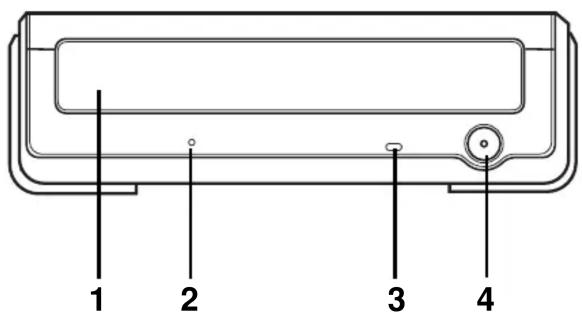
This following is the general figure of the design of the drive.
The drive's appearance and specifications may change without prior notice.
Front
- Disc Tray
- Emergency Eject Hole
- Drive activity indicators
The LED used to indicate the operation of External DVD Writer. - Stop/Eject Button
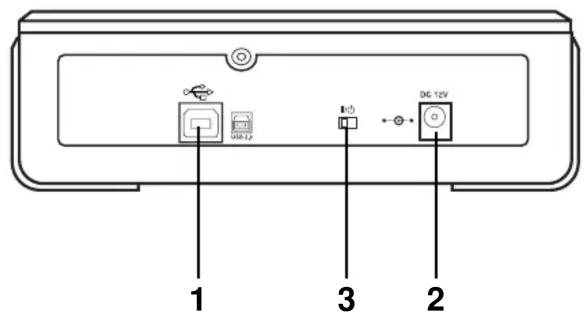
Rear
- USB Connector
This connector is used to connect to the USB converter cable. - Power Connector
This connector is used to connect to the AC Power adapter cord. - Power Switch
Use this switch to turn the drive on and off.
Removing the USB converter cable
The drive supports the plug and play(not swap) function of Windows, and can be removed and inserted by performing the following operation.
- Stop the application software being currently used.
- Click the icon “💡” of the taskbar located on your screen’s bottom right side.
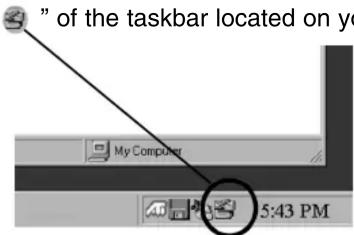
- Click "Safely Remove USB Mass Storage Device-Drive[x:]".
- Click "Ok" and then remove the USB converter cable.
NOTE
Don't remove the USB converter cable when the busy indicator on the drive blinks, or during computer startup.
To install of your product, please read this guide manual carefully and completely. For the detailed owner's manual of the drive, please refer to the CD manual.
Features
- Universal Serial Bus (USB) 2.0 interface for high-speed data transfer.
• Buffer Under Run error protection technology
• Emergency eject support - Combination of CD-R/RW, DVD-R/RW, DVD+R/RW, DVD+R DL, DVD-R DL and DVD-RAM drive functions into one drive.
• Supports region playback control Phase II. - Supports LightScribe Direct Label Printing Technology - *Optional.
* You can use a variety of Drive
| GE24LU30 | GE24NU30 | |
| Light Scribe | ● | X |
| I/F | USB 2.0 only | USB 2.0 only |
Package Items
| Item Quantity | |
| - External DVD Writer 1 | |
| - USB 2.0 converter cable | 1 |
| - AC Power Adapter | 1 |
| - Software CD (For Windows only/Not support Mac OS) 1 | |
| - Quick Guide for Drive | 1 |
Cautions
System meeting the following requirements is needed in order to use USB 2.0 operation with this drive.
- Computer that is equipped with a USB 2.0 – compliant USB connector or PCI adapter card, and on which the USB 2.0 EHCI (Enhanced Host Controller Interface) driver software 1) has been installed.
1) The USB 2.0 EHCI driver software is supplied with currently available PCI adapter cards that conform to USB 2.0. Further, Microsoft has released the USB 2.0 EHCI driver software for Windows XP, therefore it is also possible to use this driver software with Windows XP.
If you want to know in detail, please contact your USB 2.0 adapter dealer or consult your PC manufacturer, or consult the Microsoft Corporation Web site.
System Environment
Computer
This unit can be operated in the system environment explained here.
| System requirements | CPU | Pentium IV 3.4 GHz or higher. |
| Memory | 256 MB or larger (Recommended: 1 GB). | |
| Hard disk | 20 GB or more free space. (The free space needed for writing depends on the quantity of data.) | |
| Interface | USB 2.0 port | |
| CD-ROM drive | For Software installation | |
| Software Required OS | Windows 7, Windows Vista TM (32 bit, 64 bit), Windows XP (SP2 or higher), Mac OS X v.10.5.4 or higher | |
| Recommended Media manufacturer | CD-R : LG, Mitsubishi Kagaku Media, Verbatim, That's, TDK, Ritek, HPCD-RW : LG, Mitsubishi Kagaku Media, VerbatimDVD-R : Mitsubishi Kagaku Media, Maxell, That's DVD-RW : Victor. JVC, Mitsubishi Kagaku Media, TDK DVD+R : Mitsubishi Kagaku Media, That's, Maxell DVD+RW : TDK, Mitsubishi Kagaku Media, Ricoh DVD-RAM : Maxell, Mitsubishi Kagaku MediaM-Disc (DVD+R SL) : Millenniata DVD+R DL : Mitsubishi Kagaku Media, Verbatim, Ritek DVD-R DL : Mitsubishi Kagaku Media, Verbatim | |
* For Optimal 24x writing, below CPU and Software are recommended.
CPU : Pentium ® IV 3.4 GHz or higher
[24x writing: intel ICHIO (G45, P45) chipset or higher]
Software : USBFast ("Please install USBFast Program with LG external Drive for DVD±R 24x writing." - not support on Mac OS)
* For Mac System: Mac Pro, Mac mini
* Compatibility problem in write/read function may occur with some media depending on the media manufacturing quality.
* To achieve maximum Record & Write speed your system may require data to be copied first to the computer's hard drive rather than directly from another source disc or drive.
* Please visit http://www.millenniata.com to learn more about the M-DISC™.
Specifications
Supported Discs
| DVD-ROM(Single/Dual), DVD-RW, DVD-R, DVD+RW, DVD+R, DVD+R Double layer, DVD-R Dual layer, DVD- RAM, M-Disc (DVD+R SL), CD-Digital Audio & CD-Extra, CD-Plus, CD-ROM, CD-ROM XA-Ready, CD-I FMV, CD-TEXT, CD-Bridge, CD-R, CD-RW, Photo-CD (Single & Multi-Session), Video CD, DVD-VIDEO |
Dimensions (WxHxD) 160 x 50 x 230 (mm)
Weight About 1.2 Kg
Interface USB 2.0
Read/Write Speed
Write : CD-R : 16X, 24X, 32X, 40X, 48X
CD-RW : 4X, 10X, 16X, 24X, 32X
DVD-R : 2X, 4X, 6X, 8X, 16X, 18X, 22X, 24X
DVD-RW : 1X, 2X, 4X, 6X
DVD+R : 2.4X, 4X, 6X, 8X, 12X, 16X, 18X, 22X, 24X
DVD+RW : 2.4X, 4X, 6X, 8X
DVD-RAM: 2X, 3X, 5X, 6X, 8X, 12X (Ver. 2.0 & higher)
DVD+R DL: 2.4X, 4X, 6X, 8X
DVD-R DL: 2X, 4X, 6X, 8X
* The drive's appearance and specifications may change without prior notice.
- The maximum data transfer rate varies according to the performance capabilities of the PC.
- For the sake of periodic improvements, specifications and appearance are subject to change without notice.
- We have taken all possible measures to assure the quality of our products, but we cannot be responsible for the consequences if defect occurs.

Data transfer rate
| Sustained CD-ROM : 7200 kB/s (48X max) |
| DVD-ROM : 22160 kB/s (16X max) |
| Average Access CD-ROM : 125 ms (Typical) |
| Time (Random) | DVD-ROM : 145 ms (Typical) |
| DVD-RAM : 270 ms (Typical) |
| Buffer capacity 2 MB |
| MTBF 100,000 Power On Hours (POH) |
| Writing Methods CD:Disc-at-once, Track-at once, Session at once, Packet Write |
| DVD:Random write, Sequential write |
Power Requirement AC Adapter
| Input 100-240 Vac, 50~60 (Hz) |
Output 12 Vdc 3 A
Operating Environment
| Temperature 5 °C to 40 °C |
Humidity 15 % to 85 %
Storage Environment
| Temperature -30 °C to 60 °C |
Humidity 10 % to 90 % RH
Software
Install the appropriate CD Recording Authoring Software before using this unit. * Please uninstall any previous CD burning software you may have loaded on your PC in order to prevent possible compatibility issues. Once you have installed the application software, you may (if you wish) begin to reinstall previous software, taking note for errors. We recommend using the drive with the latest software as some problems encountered when using the drive can be solved by updating the software.
Please visit www.lgservice.com and install the program,
"LG ODD Online F/W update." By using the program,
you can automatically check the latest information about FirmWares and update the FirmWare.
Worldwide support ; http://www.LGservice.com
Worldwide corporate site : http://www.LG.com
Safety Instructions
CAUTION: The laser used in the External DVD Writer can damage your eyes. Do not attempt to open the cover. To reduce the risk of electric shock, do not remove the cover (or back).
There are no user-serviceable parts inside. Refer servicing to qualified service personnel. Use of controls or performance of procedures other than those specified herein may result in hazardous radiation exposure.
⚠ WARNING: To reduce the risk of fire or electric shock, do not expose this appliance to rain or moisture.a
LG Electronics hereby declares that this/these product(s) is/are in compliance with the essential requirements and other relevant provisions of Directive 2004/108/EC, 2006/95/EC, and 2009/125/EC.
European representative : LG Electronics Inc. - EU Representative Krijgsman 1, 1186 DM Amstelveen The Netherlands
CLASS 1 LASER PRODUCT KLASSE 1 LASER PRODUKT LUOKAN 1 LASER LAITE KLASS 1 LASER APPARAT CLASE 1 PRODUCTO LÁSER CLASSE 1 PRODOTTO LASE
CAUTION : CLASS 3B VISIBLE AND INVISIBLE LASER RADIATION WHEN OPEN. AVOID EXPOSURE TO THE BEAM.
ADVARSEL : KLASSE 3B SYNLIG OG USYNLIG LASERSTRÅLING VED ÅBNING. UNDGÅ UDSÆTTELSE FOR STRÅLING.
ADVARSEL : KLASSE 3B SYNLING OG USYNLIG LASERSTRÅLING NÅR DEKSEL ÅPENS. UNNGÅ EKSPONERING FOR STRÅLEN.
VARNING : KLASSE 3B SYNLING OCH OSYNLIG LASERSTRÅLNING NÄR DENNAL DEL ÄR ÖPPNAD. STRÅLEN ÄR FARLIG.
VARO! : KURSSI 3B NÄKYVÄ JA NÄKYMÄTÖN AVATTAESSA OLET ALTTIINA LASERSÄTEILYLLE. ÄLÄ KATSO SÄTEESEN.
■ Microsoft ® and Windows ® are trademarks registered in the United States and other countries by the Microsoft Corporation.
■ The company names and product names written in this manual are trademarks or registered trademarks of the respective companies.
Industry Canada requirement
Note : This equipment has been tested and found to comply with the limits for a Class B digital device, pursuant to Part 15 of the FCC Rules. These limits are designed to provide reasonable protection against harmful interference in a residential installation. This equipment generates, uses, and can radiate radio frequency energy and, if not installed and used in accordance with the instructions, may cause harmful interference to radio communications. However, there is no guarantee that interference will not occur in a particular installation. If this equipment does cause harmful interference to radio or television reception, which can be determined by turning the equipment off and on, the user is encouraged to try to correct the interference by one or more of the following measures:
- Reorient or relocate the receiving antenna.
- Increase the separation between the equipment and receiver.
- Connect the equipment into an outlet on a circuit different from that to which the receiver is connected.
- Consult the dealer or an Authorized Service Center for help.
- FCC WARNING
Changes or modifications not expressly approved by the party responsible for compliance could void the user's authority to operate the equipment.
- This External DVD Writer is for use only with UL listed personal computers that have installation instructions detailing user-installation of card cage accessory.
WARNING: This product contains chemicals known to the State of California to cause birth defects or other reproductive harm. Wash hands after handling.


Brand : LG
Model : GE24NU30
Category : Uncategorized