
CR1200 - Uncategorized IFM - Free user manual and instructions
Find the device manual for free CR1200 IFM in PDF.


| Product Type | Process and dialogue module PDM360 NG-12 |
| Display | 12.1" TFT LCD, 1024 x 768 pixels, LED backlight, ≥500 cd/m², contrast ≥500:1 |
| Dimensions (W x H x D) | 324 x 245 x 62 mm |
| Panel Cutout (W x H) | 315 +1 x 235 +1 mm, corner radius R10 mm |
| Weight | approx. 2.8 kg |
| Housing Material | Die-cast aluminium, powder coating (RAL 9005) |
| Protection Rating | IP67 (with mounted connectors or protective caps) |
| Operating Temperature | -30…65 °C |
| Storage Temperature | -30…80 °C |
| Operating Voltage | 10…32 V DC, overvoltage protection up to 34 V |
| Current Consumption | approx. 750 mA (at 24 V DC, no external load) |
| Processor | MPC5121, 32-bit, 400 MHz |
| Memory (RAM / Flash / Mass Storage) | 256 MB RAM / 128 MB flash / 1 GB internal |
| Interfaces | 4 x CAN (CANopen, SAE J1939), 1 x Ethernet (10/100 Mbit/s), 2 x USB 2.0 (Host), 2 x analogue video inputs (PAL/NTSC) |
| Function Keys | 13 freely programmable backlit function keys (silicone, tactile feedback) |
| Navigation Keys | Cursor keys (up/down/left/right) with central pushbutton |
| Programming System | CODESYS V2.3 or ≥V3.5 SP8 (IEC 61131-3) |
| Real-Time Clock | Battery-buffered with CR2032 (3 V, 230 mAh) |
| Status LED | RGB LED, programmable via application software |
| Buzzer | Integrated, tone duration and pitch programmable |
| Brightness Adaptation | Automatic via integrated light sensor |
| Cleaning Instructions | Use soft, dry cloth (no chemicals); microfibre recommended |
| Safety Standards | SELV, EMC class A, E1 (UN/ECE-R10) |
| Mounting Options | Panel mounting with installation kit (EC2117) or surface mounting with RAM® mount system (EC1410..EC1414) |
Frequently Asked Questions - CR1200 IFM
User questions about CR1200 IFM
0 question about this device. Answer the ones you know or ask your own.
Ask a new question about this device
Download the instructions for your Uncategorized in PDF format for free! Find your manual CR1200 - IFM and take your electronic device back in hand. On this page are published all the documents necessary for the use of your device. CR1200 by IFM.
USER MANUAL CR1200 IFM
Installation instructions
Process and dialogue module
PDM360 NG-12
UK
CR1200
CR1201
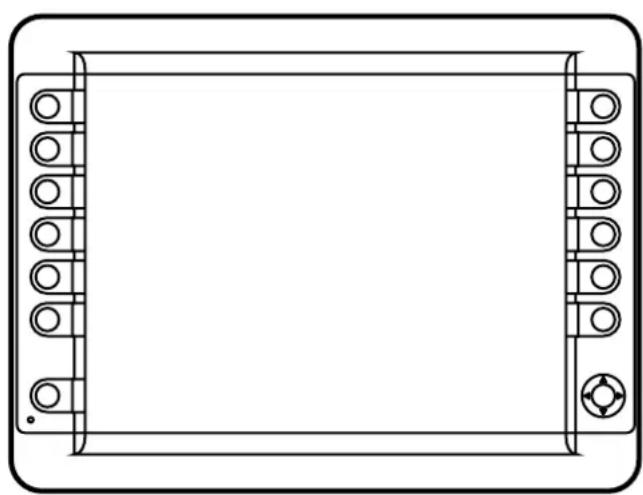
natural_image
Front view of a rectangular electronic device with circular and square components on both sides (no text or symbols)Contents
1 Preliminary note 4
1.1 Symbols used.... 4
1.2 Warning signs used 4
2 Safety instructions 5
2.1 General....5
2.2 Target group 5
2.3 Electrical connection 5
2.4 Tampering with the device 5
2.5 Electromagnetic compatibility.... 5
3 Functions and features 6
3.1 Application example 6
3.2 Overview of the common characteristics 7
3.3 Distinctive features 7
4 Installation....8
4.1 Mounting accessories....8
4.2 General installation instructions 8
4.2.1 Locator for mounting accessories 8
4.2.2 Orientation of the device with panel and surface mounting ..... 9
4.2.3 Photoelectric sensor 9
4.2.4 Protective film for the touch screen (CR1201) 9
4.3 Panel mounting with installation kit 10
4.3.1 Panel cut-out 10
4.3.2 Mounting steps....11
4.4 Surface mounting with RAM ^® mount system 12
4.4.1 Mounting steps.... 12
5 Electrical connection.... 13
5.1 Connection accessories 13
5.2 General wiring information 13
5.2.1 Cover all unused connectors 13
5.3 Operating voltage and fuses 14
5.4 Ground connection 14
5.5 Ethernet interface 14
5.5.1 Ethernet cameras.... 15
5.6 Analogue video inputs 15
5.7 USB interfaces 16
5.7.1 USB connection via M12 connector.... 16
5.7.2 Short-circuit protection 17
5.7.3 USB connection behind the service cover 17
6 Set-up.... 18
6.1 General.... 18
6.2 First steps.... 18
6.3 Set-up.... 18
6.4 Required documentation 19
7 Technical data.... 20
7.1 CR1200 20
7.2 CR1201 25
8 Maintenance, repair and disposal. 30
8.1 Battery change 30
8.2 Cleaning the display surface 30
8.3 Cleaning the housing surface.... 31
8.4 Repair.... 31
8.5 Disposal 31
9 Approvals/standards.... 31
This document is the original instructions.
Licences and trademarks
All trademarks and company names are subject to the copyright of the respective companies.
1 Preliminary note
This document applies to devices of the type "PDM360 NG-12". These instructions are an integral part of the device.
This document is intended for specialists. These specialists are people who are qualified by their appropriate training and their experience to see risks and to avoid possible hazards that may be caused during operation or maintenance of the device. The document contains information about the correct handling of the device.
Read this document before use to familiarise yourself with operating conditions, installation and operation. Keep this document during the entire duration of use of the device.
Adhere to the safety instructions.
1.1 Symbols used
▶ Instruction
Reaction, result
[...] Designation of keys, buttons or indications
→ Cross-reference

Important note
Non-compliance may result in malfunction or interference.

Information
Supplementary note
1.2 Warning signs used
WARNING
Warning of serious personal injury.
Death or serious irreversible injuries may result.
CAUTION
Warning of personal injury.
Slight reversible injuries may result.
NOTE
Warning of damage to property.
2 Safety instructions
2.1 General
These instructions contain texts and figures concerning the correct handling of the device and must be read before installation or use.
Observe the operating instructions. Non-observance of the instructions, operation which is not in accordance with use as prescribed below, wrong installation or incorrect handling can seriously affect the safety of operators and machinery.
2.2 Target group
These instructions are intended for authorised persons according to the EMC and low-voltage directives. The device must only be installed, connected and put into operation by a qualified electrician.
2.3 Electrical connection
Disconnect the device externally before handling it. If necessary, also disconnect any independently supplied output load circuits.
If the device is not supplied by the mobile on-board system (12/24 V battery operation), it must be ensured that the external voltage is generated and supplied according to the criteria for safety extra-low voltage (SELV) as this voltage is supplied without further measures to the connected controller, the sensors and the actuators.
The wiring of all signals in connection with the SELV circuit of the device must also comply with the SELV criteria (safety extra-low voltage, safe electrical isolation from other electric circuits).
If the supplied SELV voltage is externally grounded (SELV becomes PELV), the responsibility lies with the user and the respective national installation regulations must be complied with. All statements in this document refer to the device the SELV voltage of which is not grounded.
The connections may only be supplied with the signals indicated in the technical data and/or on the device label and only the approved accessories of ifm electronic gmbh may be connected.
2.4 Tampering with the device
In case of malfunctions or uncertainties please contact the manufacturer. Any tampering with the device can seriously affect the safety of operators and machinery. This is not permitted and leads to the exclusion of any liability and warranty claims.
2.5 Electromagnetic compatibility
This is a class A product. It can cause radio interference in domestic areas. In this case the operator is requested to take appropriate measures.
3 Functions and features
The PDM360 NG-12 process and dialogue module is a programmable graphic display for controlling, parameter-setting and operation of mobile machines and plants.
Communication with other system components, e.g. decentralised I/O modules, is handled via a CAN interface using the CANopen protocol.
For service purposes, additional interfaces such as Ethernet, USB or 3 further CAN interfaces are available. Together with the Linux operating system they form a universal platform for networking and communication with other CAN devices, networks or PCs.

WARNING
The PDM360 NG-12 process and dialogue module is not approved for any personnel related safety tasks.
3.1 Application example
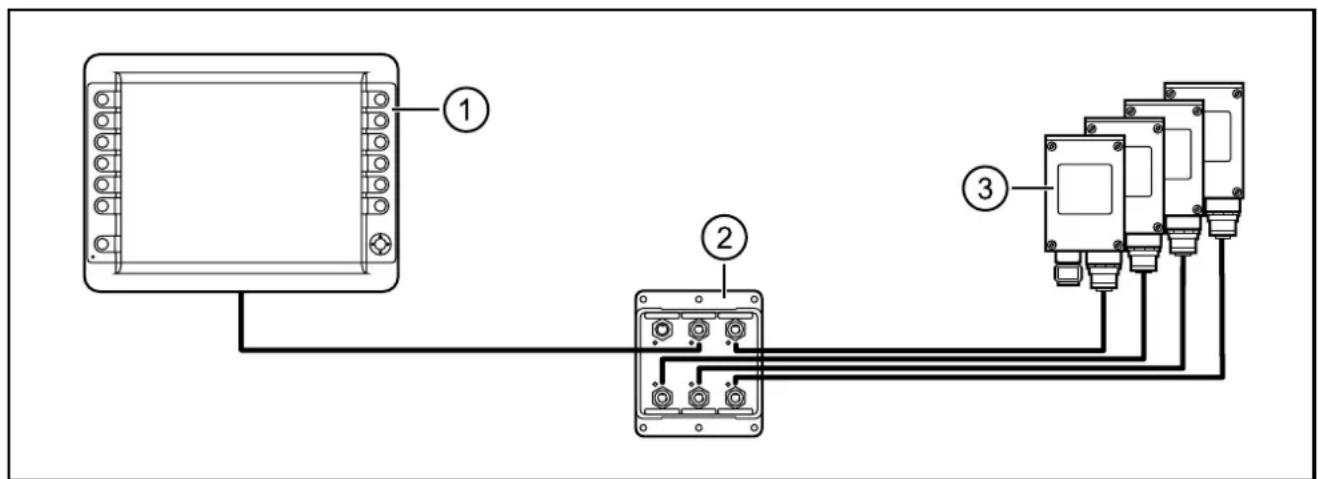
Network of 4 Ethernet cameras with one PDM360 NG-12
- PDM360 NG-12 (e.g. CR1200)
- Ethernet switch (e.g. EC2095)
- Ethernet cameras (e.g. 4 x O2M11x)
3.2 Overview of the common characteristics
• 12.1" colour display
- Programmable backlit function keys
- Closed metal housing suitable for panel mounting and surface mounting outside or in the cabin
- Freely programmable to IEC 61131-3 with target visualisation
- 32-bit controller and Embedded Linux operating system
- CAN interfaces with CANopen and SAE J 1939 protocol.
- Ethernet and USB interfaces
- Multi-function input (digital/analogue)
- Switching output (digital)
3.3 Distinctive features
| CR1200 CR1201 |  | ||
| Function keys (number) 13 13 | |||
| Encoder -- | |||
| Navigation keys ● ● | |||
| Analogue video input ● ● | |||
| Touch screen - ●* | |||
- = available
*) Protective film for the touch screen supplied with the unit
4 Installation
4.1 Mounting accessories
The device is supplied without mounting accessories.
Depending on the intended location and type of mounting the following mounting accessories are available:
• EC2117, installation kit for panel mounting
- EC1410..EC1414, RAM® mount system for surface mounting
You can find more information about the available accessories at: www.ifm.com → Data sheet search → e.g. CR1200 → Accessories
4.2 General installation instructions
4.2.1 Locator for mounting accessories
The back of the unit has been prepared for fixing the mounting accessories.
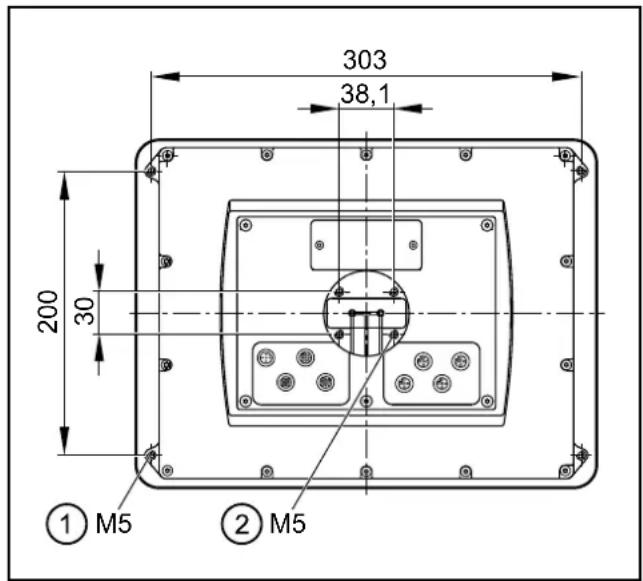
1: 4 x M5 for mounting frame
2: 4 x M5 for RAM ^® mount system
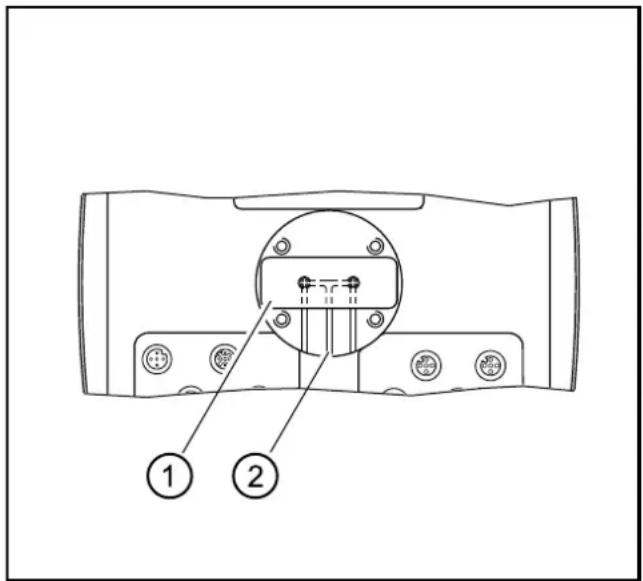
1: type labels
2: ventilation ducts
NOTE
A pressure compensation element is located under the type label. Use of elastic materials to seal or close the associated ventilation ducts may cause damage to the device.
▶ Do not use any sealing materials in the area around the ventilation ducts.
4.2.2 Orientation of the device with panel and surface mounting
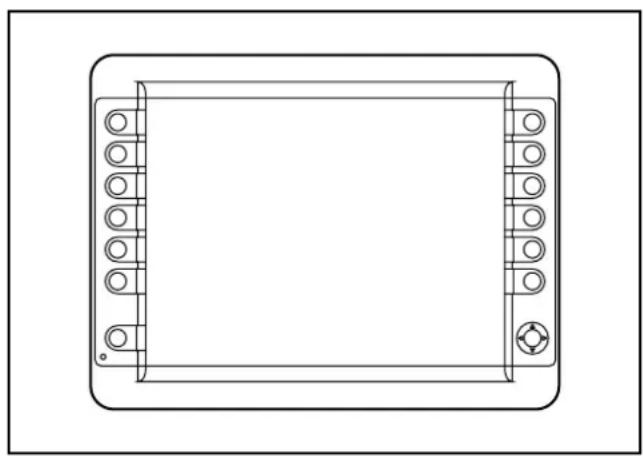
natural_image
Line drawing of a rectangular electronic device with mounting holes and a central screen (no text or symbols)Horizontal orientation for panel and surface mounting
UK
4.2.3 Photoelectric sensor
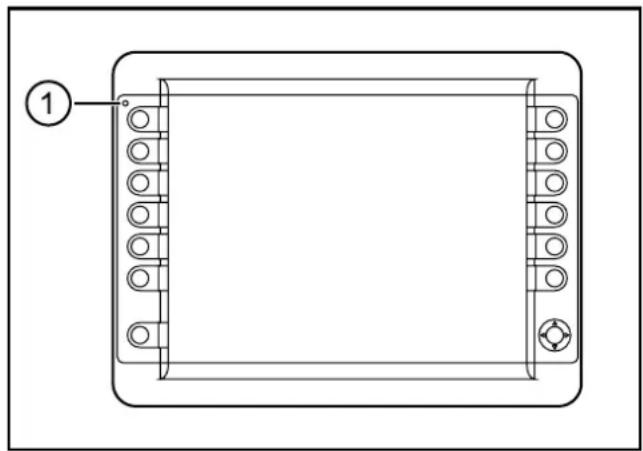
The device is equipped with a light sensor. It is used for automatic brightness adaptation of the display and the operating elements to the ambient brightness.
natural_image
Technical line drawing of a rectangular electronic component with mounting holes and a labeled pin (no text or symbols beyond the label)1: Photoelectric sensor
▶ Do not cover up the light sensor by construction measures.
4.2.4 Protective film for the touch screen (CR1201)
The unit is designed for use in harsh conditions in mobile machines. Nevertheless, the integrated glass touch screen cannot be used under all operating conditions.
Therefore, a protective film (type CR120x) is supplied that can be applied to the front glass before the unit is put into operation. It supplies additional protection for the touch screen in case of increased strain of the surface.
We recommend a timely replacement of the protective film in cases of damage or heavy wear. Further protective films can be purchased at www.Schutzfolien24.com by indicating the type of unit CR120x.
4.3 Panel mounting with installation kit
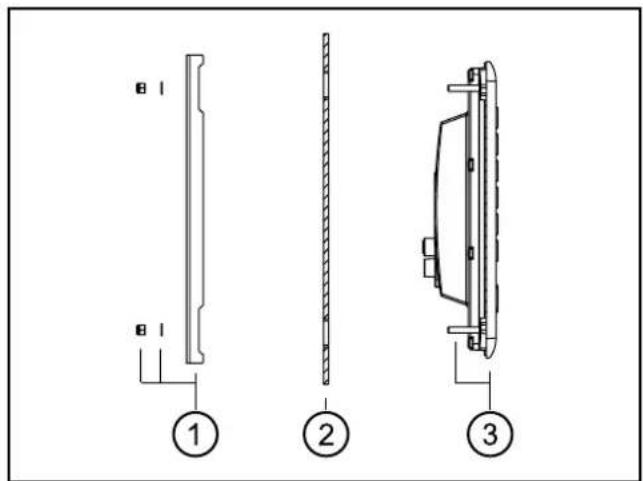
The installation kit enables horizontal, vertical or overhead mounting of the device in a panel cut-out.
This type of installation is suited for materials with a thickness from 1 to 10 mm.
The M5 hexagon nuts, washers, M5 set screws and adhesive damping strips are supplied with the installation kit.
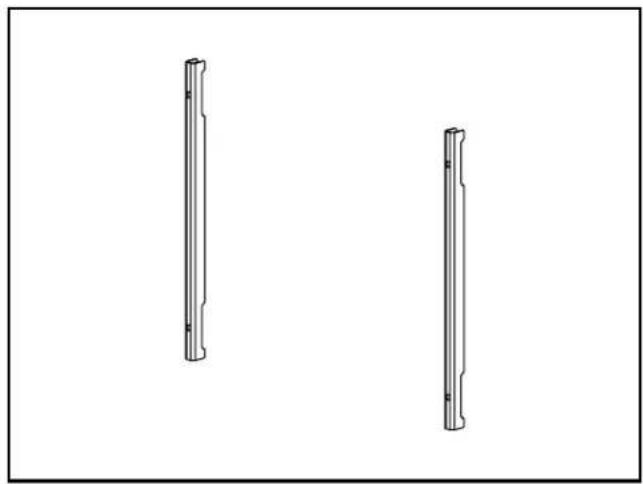
natural_image
Two vertical cylindrical mechanical components with flanges, shown from different angles (no text or symbols)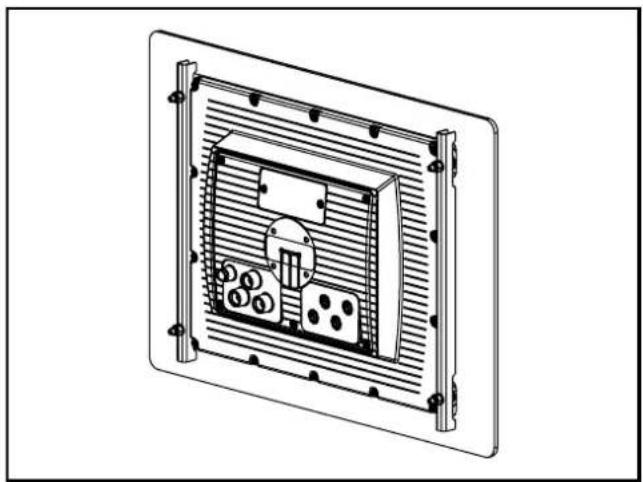
natural_image
Technical line drawing of a rectangular electronic device with internal components and mounting brackets (no text or symbols)Fixing profiles of the installation kit Dialogue module with mounted installation kit

Only insert the fixing profiles from the installation kit in combination with the damping strips.
4.3.1 Panel cut-out
▶ Make a cut-out.
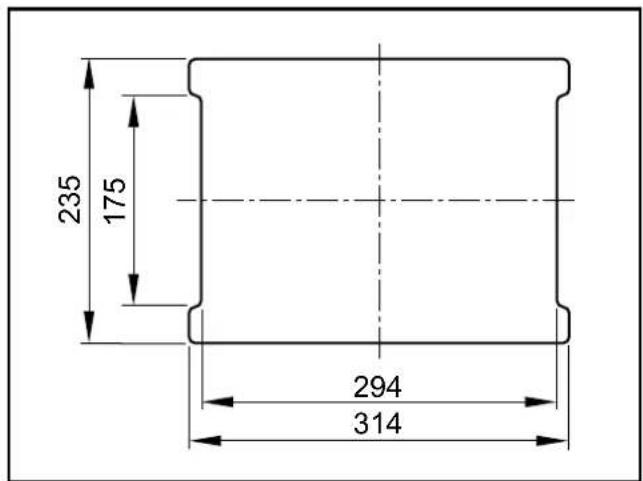
Panel cut-out
Radii: R5
Tolerances: ± 0.5 mm
4.3.2 Mounting steps
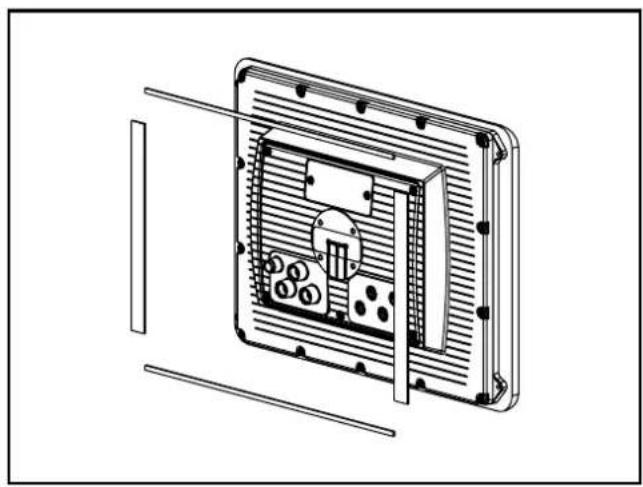
▶ Attach damping strips to the device.
natural_image
Technical line drawing of a mechanical or electronic component with internal components and mounting holes (no text or symbols)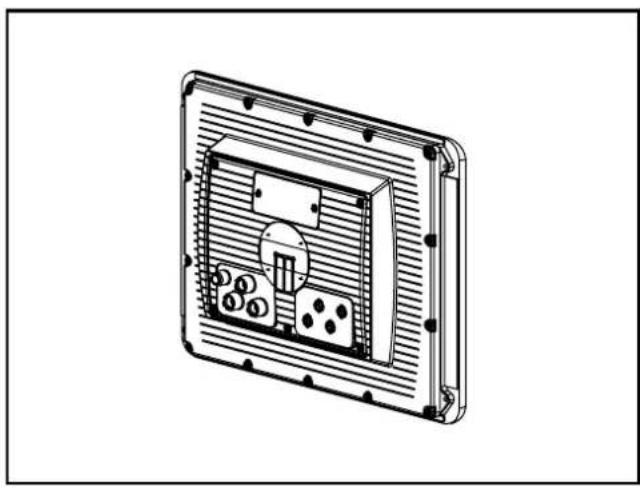
natural_image
Technical line drawing of a rectangular electronic device with internal components and mounting holes (no text or symbols)Damping strips Attached damping strips
▶ Screw the set screws into the M5 thread on the back of the device. (→ 4.2.1 Locator for mounting accessories)
Select the set screws in accordance with the panel thickness.
| Panel thickness Set screws | |
| 1...5 mm M5 x 35 | |
| >5...10 mm M5 x 40 |
▶ Insert the device into the cut-out.
▶ Screw the fixing profiles to the back of the device.
Tightening torque of the M5 hexagon nuts: 5 ± 0.5 Nm
natural_image
Technical line drawing of a mechanical component with dimension label A (no text or symbols present)Mounting principle
1: M5 hexagon nuts, washers and fixing profiles
2: Panel cut-out
3: Dialogue module with attached damping strips and tightened set screws
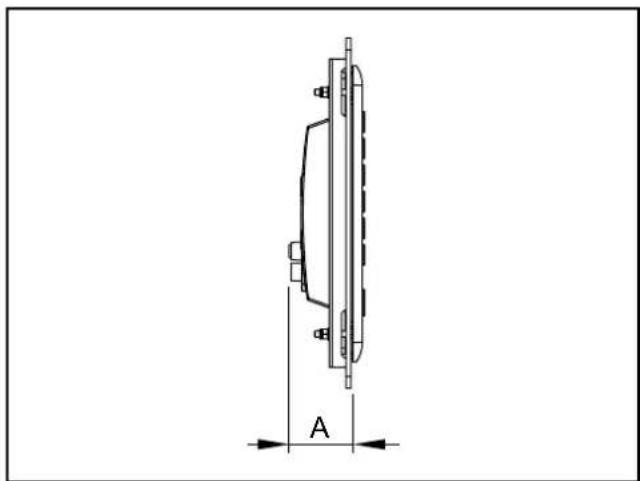
Installation depth A = device depth (approx. 53 mm)
The fixing profiles and set screws from the installation kit do not protrude from the device.
4.4 Surface mounting with RAM ^® mount system
Using the RAM ^® mount components, available as accessories, the dialogue module can be used as a firmly mounted desktop unit. Two balls allow a variable orientation of the unit.
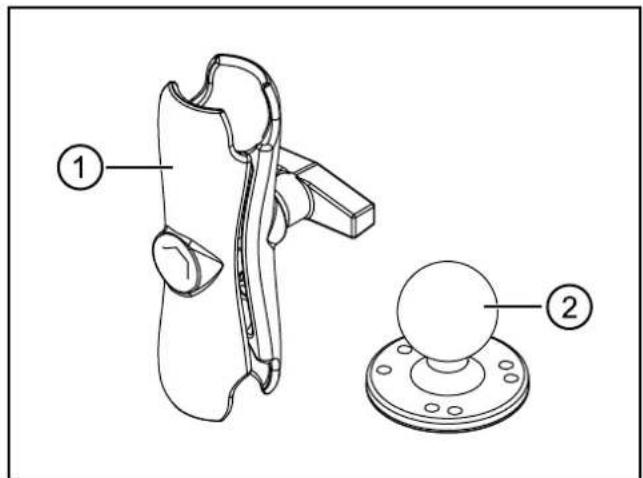
RAM ^® mount components
1: Mounting arm with fastening screw
2: Mounting plate with ball
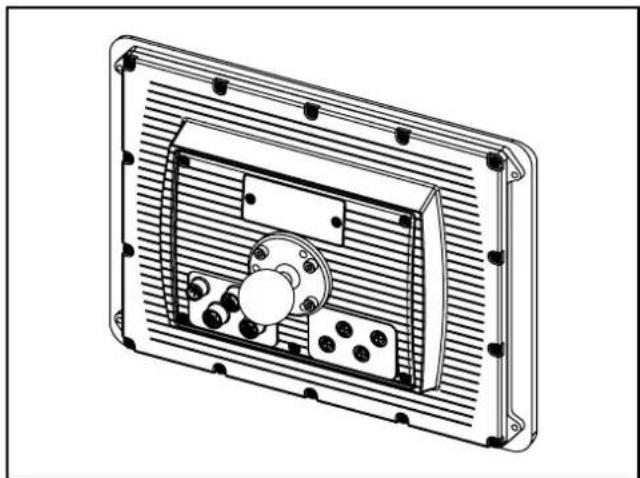
natural_image
Technical line drawing of a rectangular electronic device with internal components and mounting holes (no text or symbols)dialogue module with mounted RAM mount system
4.4.1 Mounting steps
▶ Screw the mounting plate onto an even surface.
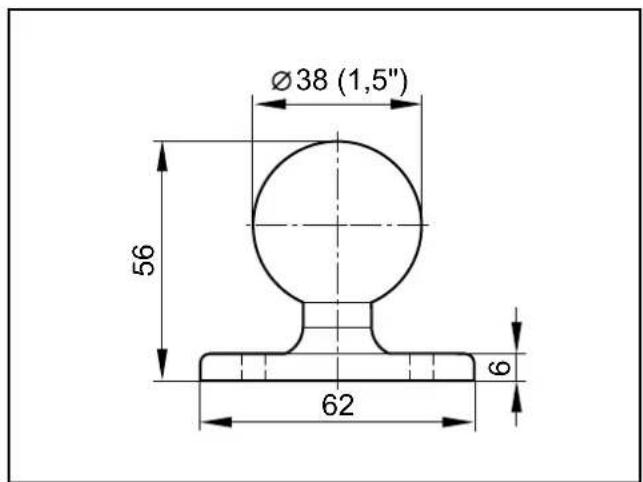
Mounting plate with ball Hole dimensions
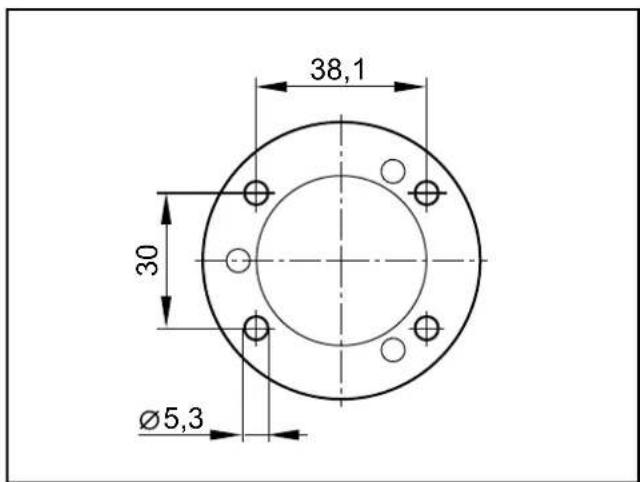
Tightening torque: 5 ±0.5 Nm
▶ Screw the second mounting plate to the back of the device.
Usable M5 thread depth: ≤ 8 mm
Tightening torque M5: 5 ±0.5 Nm
▶ Slightly loosen the fastening screw of the mounting arm.
▶ Place the mounting arm onto the balls and tighten the fastening screw.
You can find more information about the available RAM® mount components at: www.ifm.com → Data sheet search → e.g. CR1200 → Accessories
5 Electrical connection
5.1 Connection accessories
You can find more information about the available accessories at: www.ifm.com → Data sheet search → e.g. CR1200 → Accessories or www.ifm.com → Products → Accessories → Connection technology
5.2 General wiring information
Wiring of the M12 connectors ( 7 Technical data)
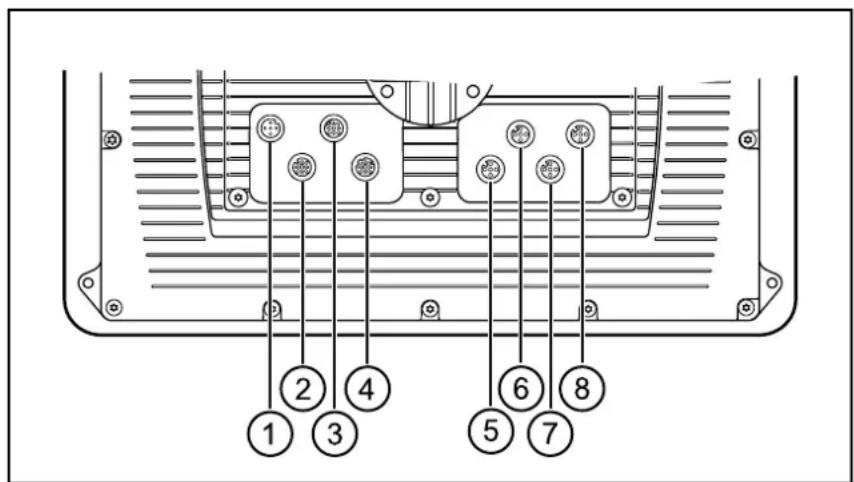
M12 connectors (back of the unit)
1: Supply, input/output
2: CAN1
3: USB
4: Ethernet
5: CAN2
6: CAN3/4
7: Analogue video input
8: N/A
NOTE
Wrong connection may cause damage to the device.
▶ Observe the safety instructions.
NOTE
The short-circuit / reverse polarity protection of the device applies to the operating voltage connections. A short circuit between operating voltage (+24 V DC) and CAN_GND damage the device.
▶ Basically all supply and signal cables must be laid separately.
▶ Lay supply and signal cables away from the device using the shortest possible route.
▶ All connected cables must be provided with a strain relief.
5.2.1 Cover all unused connectors
NOTE
Moisture penetrating through unused or unprotected connectors may destroy the device.
▶ Cover unused connectors with protective caps.
5.3 Operating voltage and fuses
▶ To protect the device use fuses for the operating voltages.
| Description Potential | Connector 1 Fuse | ||
| Operating voltage terminal 30 | 10...32 V DC positive directly from the battery | pin 1 max. 5 A | |
| Operating voltage terminal 15 | 10...32 V DC connected positive from the ignition-starter switch | pin 5 max. 5 A |
Terminal designation to DIN 72552
5.4 Ground connection

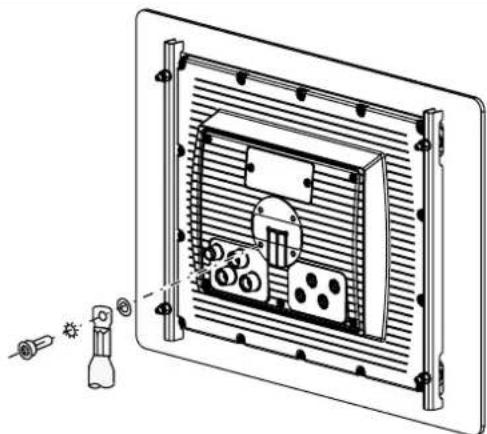
To ensure the protection of the device against electrical interference and to ensure the safe function of the device, the housing has to be connected to the body / GND of the supply using the shortest possible route.
▶ Establish the connection between the device and the ground of the vehicle using the intended screw for RAM® Mount installation.
natural_image
Technical line drawing of a mounted device with internal components and a flashlight, no text or symbols presentGND connection

To avoid contact corrosion on the shield connection of the device, do not use any copper or nickel-plated materials for the bolting elements!
In very corrosive environments such as extremely salty air, use screws with surface finishing on a zinc/nickel basis with thick-film passivation and sealing.
5.5 Ethernet interface
▶ Use a shielded CAT5 cable.
STP, shielded twisted pair, to EIA/TIA-568.
Max. length 25 m

The max. cable length depends for example on the bus topology, the selected operating mode (10/100 Mbits/s) or the quality of the connectors.
▶ Use screened connector housings and connect the screen of the Ethernet cable to the connector housing.
▶ Do not lay the Ethernet cable in parallel to live cables.

Interference due to external influences
Faulty or insufficient radio interference suppressors in other electrical equipment, such as inverters or generators, as well as voltage fluctuations when switching on/off electric loads may lead to problems with the data transmission.
5.5.1 Ethernet cameras
The device supports ifm Ethernet cameras (e.g. O2M110) firmware 5.1001 or higher.
Network example ( 3.1 Application example)
5.6 Analogue video inputs
▶ When using the analogue video inputs, please provide all connection cables with ferrite sleeves.
Recommendation: Impedance 321 Ω (100 MHz)

The ferrite sleeves ensure CE/E1 conformity and suppress conducted interference.
5.7 USB interfaces

The USB interfaces are used for the temporary connection of an external keyboard, a mouse or a USB memory stick.
They are not intended for actual operation.
▶ Remove the USB devices after their use.
5.7.1 USB connection via M12 connector
Wiring ( 7 Technical data)
This USB interface is connected to a USB connector in the control panel or in the dashboard.
It is used for the temporary connection of operating devices (USB mouse / keyboard) and storage media (e.g. USB memory stick).
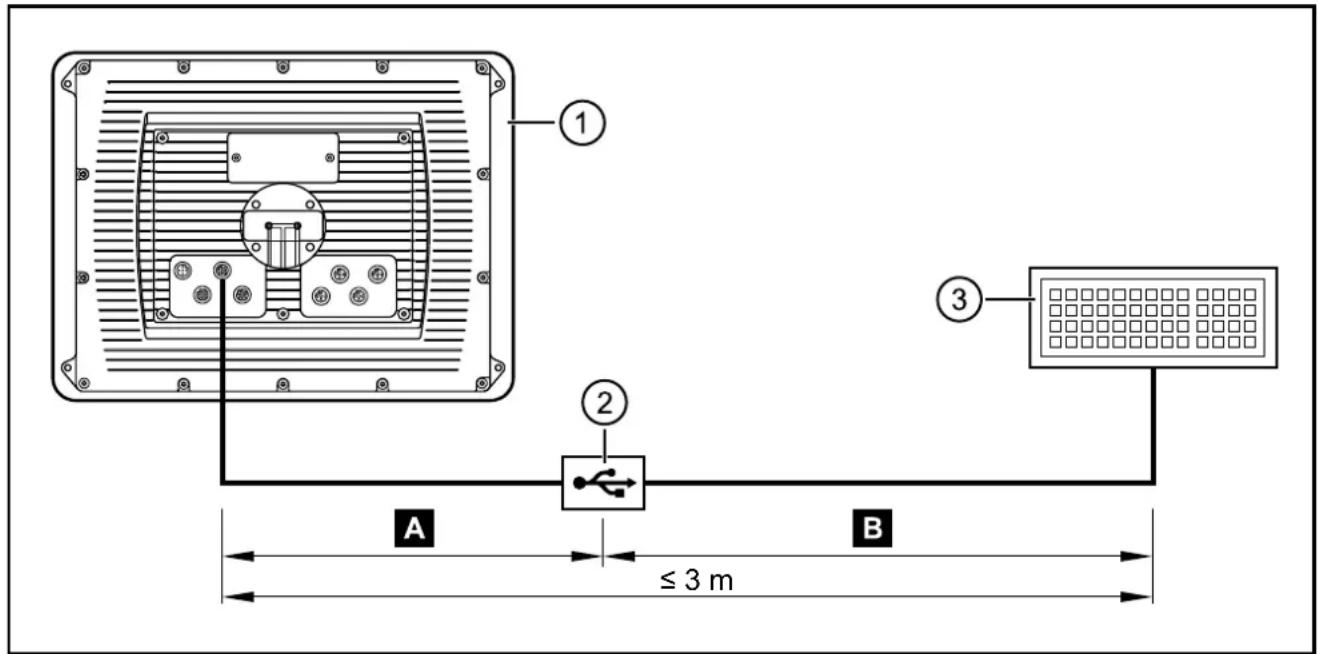
USB connection via M12 connector
1: Dialogue module
2: USB connector, for example in the control panel or in the dashboard
3: USB keyboard, mouse or memory stick

Permanent connection: dialogue module – USB connector
▶ Use a prewired cable.
(e.g. art. no. EC2099, M12 connector, B-coded on USB socket, type A, watertight, cable length 1.5 m, wires twisted and screened)
▶ Use only cables with twisted and screened wires for individual wiring. Keep length "A" as short as possible and position the USB connector in immediate vicinity to the dialogue module. The length "A" considerably influences the quality of the USB data transmission.
B Temporary connection: USB connector – USB device
▶ Use a connection cable with the designation "Full Speed/High Speed" (= USB connection cable with twisted and screened cores).
▶ Do not make a connection using several USB connection cables.
▶ Remove the connection cable after the programming or service works.
5.7.2 Short-circuit protection
NOTE
The USB interface (M12 connector) is not protected against short circuits with a live wire outside the following voltage ranges:
-Data 0.3...3.6 V DC (3: pin 2)
+Data 0.3...3.6 V DC (3: pin 3)
ID 0.3...3.6 V DC (3: pin 4)
A short circuit will destruct the USB interface.
5.7.3 USB connection behind the service cover
▶ Remove the service cover on the back of the unit.
(2 pcs. M3 socket head screws)
▶ Connect the USB keyboard, mouse or memory stick with the USB interface.
▶ Remove the USB devices after their use and close the service cover again.
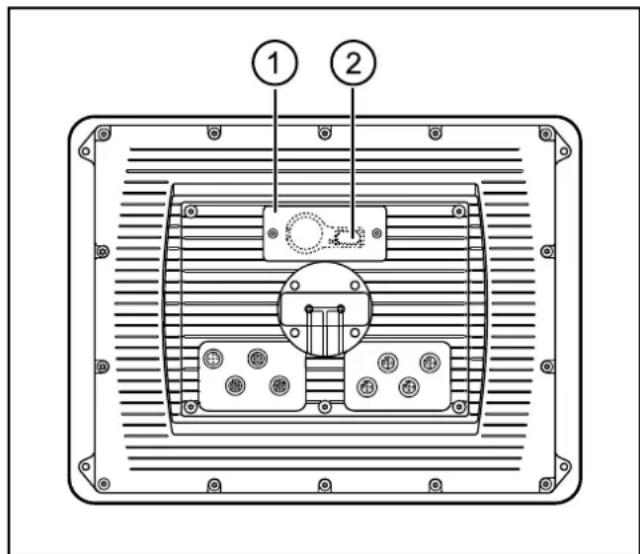
1: service cover
2: USB socket, type A
6 Set-up
6.1 General
As delivered the device is prepared for programming with CODESYS version 2.3 or higher.
Factory setting:
IP address: 192.168.82.247
Subnet mask: 255.255.255.0

The user is responsible for the safe function of the application programs which he created himself. If necessary, he must additionally carry out an approval test by corresponding supervisory and test organisations according to the national regulations.
6.2 First steps
▶ Connect the device to the notebook/PC via the Ethernet interface.
▶ Switch on the notebook/PC; check the IP settings of the notebook/PC and change them if necessary.
Internet protocol: TCP/IP
IP address: 192.168.82.xxx (except for .247, s.a.)
Subnet mask: 255.255.255.0
Gateway IP address: 192.168.100.1
▶ Switch on the operating voltage to the dialogue module.
Shortly after switch-on of the unit the start image is shown for approx. 10 to 15 seconds.
During this time booting is running in the background.
After booting the set-up program opens automatically.
6.3 Set-up
The set-up allows the setting of the device parameters.
The menu items are selected using the function keys or via a connected USB keyboard.
| Function keys USB keyboard Description | |||
| Left SELECT | TAB Select menu item | ||
| SAVE | F3 | Save entries | |
| Right | UP | Arrow up | Increase value or variable |
| DOWN | Arrow down | Decrease value or variable | |
| ENTER | ENTER | Open selected menu item | |
| EXIT | ESC | Leave set-upLeave menu itemEntries will not be saved | |
After leaving the setup a project can be loaded.
Libraries (.lib) are available for the use of the operating elements, interfaces and other internal functions of the device. They have to be integrated into the application program.
6.4 Required documentation
In addition to the CODESYS programming system, the following documents are required for programming and set-up of the device:
- Programming manual CODESYS V2.3
(alternatively as online help)
- System manual PDM360 NG-12
(alternatively as online help)
The manuals can be downloaded from the internet:
www.ifm.com → Data sheet search → e.g. CR1200 → More information
CODESYS and PDM360 NG-12 online help:
www.ifm.com → Service → Download → Control systems*
*) Download area with registration
7 Technical data
7.1 CR1200
CR1200
Process and dialogue module PDM360 NG-12
12.1" colour screen
13 freely programmable backlit function keys
Rocker switch with pushbutton
Analogue video input
1 output / 1 input
10...32 V DC
CE
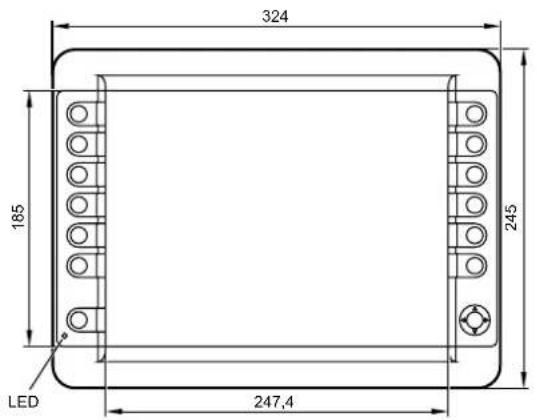
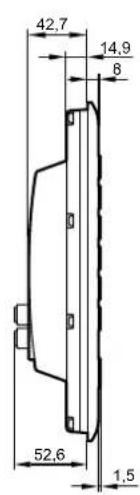
| Display |
| Display TFT LCD colour screen |
| Format 4:3, 245.8 x 184.3 mm, 12.1" diag |
| Resolution 1024 x 768 pixels |
| Alignment horizontal |
| Surface glass, anti-refl ective (coating) ba |
| Colours 262.144 (18 bits) |
| Background illumination LED (life cycle ≥ |
| Brightness ≥ 500 cd/m2, typically 600 cd/ |
| Contrast ratio |
| Character sets |
| Touch screen |
| Mechanical data |
| Mounting variants |
| Dimensions (W x H x D) |
| Cutout for panel mounting (W x H) |
| Housing material die-cast aluminium hou |
| Pushbuttons |
| Navigation keys |
| Background illumination operating elements |
| Protection rating |
| Operating temperature |
| Storage temperature |
| Weight |
display for controlling, parameter-setting and operation of mobile machines and plants
| 50,000 h) |
| n2(adjustable 10...100 %, increments 1 %) |
| ≥ 500:1, typically 700:1 |
| can be uploaded individually and is freely scalable preinstalled: ifm ISO fonts with vehicle-specific symbols, Arial, Courier |
| - |
| panel mounting with mounting frame surface mounting with RAM® mount system (mounting accessories not included) |
| 324 x 245 x 62 mm |
| 315 ^+1 x 235 ^+1 mm, corner radius R10 mm |
| sing, powder coating (RAL 9005) |
| 13 function keys (silicone keyboard) with tactile feedback freely programmable (softkey function) life cycle ≥ 1,000,000 activations |
| cursor function (up, down, left, right) with tactile feedback and with central mechanical pushbutton life cycle ≥ 1,000,000 activations |
| LED (brightness adjustable 0...100%, individual control) |
| IP 67 (with mounted connectors and/or protective caps) |
| -30...65°C |
| -30...80°C |
| approx. 2.8 kg |
ifm electronic gmbh • Friedrichstraße 1 • 45128 Essen
We reserve the right to make technical alterations without prior notice! 18.04.2017CR1200 / page 1
| CR1200 Technical data | |
| Electrical data | |
| Operating voltage 10...32 V DC | |
| Overvoltage detection | if U_B < 32 V |
| Overvoltage switch-off | if U_B > 34 V (hysteresis 1 V, i.e. switch-on again at U_B < 33 V) |
| Undervoltage detection | if U_B < 10 V |
| Undervoltage shutdown | if U_B < 8 V (hysteresis 1 V, i.e. switch-on again at U_B > 9 V) |
| Accuracy | 3 % FS |
| Short-circuit protection / reverse polarity protection | electronic |
| Current consumption approx. 750 mA (without external load at 24 V DC) | |
| Processor MPC5121, 32 bits, 400 MHz | |
| Memory (total) 256 Mbyte RAM / 128 Mbyte flash / 1 Gbyte internal mass storage | |
| Memory allocation see system manual PDM360 NG-12www.ifm.com → Data sheet search → CR1200 → More information | |
| Interfaces | |
| CAN 1...4 CAN interface 2.0 A/B, ISO 11898 | 50 Kbits/s...1 Mbit/sCANopen, CiA DS 301 version 4, CiA DS 401 version 1.4or SAE J 1939 or free protocol (Raw CAN)max. current load VBB_c ≤ 400 mA (protected by multi fuse) |
| Ethernet transmission rate 10/100 Mbits/s | |
| USB 2 x USB 2.0 full speed, transmission rate up to 12 Mbit/s | USB master operation (service and maintenance connection for keyboard, mouse etc.)output current per interface ≤ 500 mA |
| Analogue video input 2 FBAS inputs, 1 Vss, 75 ohms (inputs selectable)supported video standards: PAL and NTSCcable length: ≤ 30 m | |
| Input confi gurable | digital for positive / negative sensor signalsanalogue 0...10, 0...32 V, 0...20 mA, ratiometric |
| Output digital, positive-switching (high side), supply via terminal 30 | |
| Input characteristics Resolution | 8 bits |
| Accuracy ± 3 % FS | |
| Current input 0...20 mA | Input resistance 390 Ω |
| Input frequency 10 Hz | |
| Voltage input 0...10 V | Input resistance 65.6 kΩ |
| Input frequency 10 Hz | |
| Voltage input 0...32 V Input resistance | 50.7 kΩ |
| Input frequency 10 Hz | |
| Voltage input ratiometric | Input resistance 50.7 kΩ |
| Input frequency 10 Hz | |
| Digital input | Input resistance 3.2 kΩ |
| Input frequency 10 Hz | |
| Switch-on level > 0.7 U_B | |
| Switch-off level < 0.3 U_B | |
| Output characteristics | Switching voltage 10...32 V DC |
| Switching current ≤ 1 A | |
| Free wheel diodes integrated | |
ifm electronic gmbh • Friedrichstraße 1 • 45128 Essen
We reserve the right to make technical alterations without prior notice! 18.04.2017CR1200 / page 2
CR1200 Technical data
Software/Programming
operating system Embedded Linux 2.6
Programming system CODESYS version
Graphic functions via integrated target visualisation
Other features
Acoustic signal output integrated buzzer,
Temperature monitoring 2 integrated ser
Brightness adaptation light sensor in the
Clock / battery real-time clock (RTC), bat
Status LED RGB LED, colours and state
Operating states (preset)
2.3 or CODESYS from version 3.5 SP8 (IEC 61131-3)
sualisation
tone duration and pitch programmable
sors for measuring the temperature inside the housing
front of the device to adapt the brightness of the display and the operating elements
tery-buffered / CR2032 (3 V, 230 mAh)
is programmable by means of the application software
| Colour Status | Description | |
| - | permanently off | no operating voltage |
| green | 5 Hz | boot process application |
| 2 Hz | application running (RUN) or set-up running | |
| permanently on | application has stopped (STOP) or no project available | |
| red | 2 Hz | application is running with an error (RUN with error) |
| permanently on | system error (fatal error), device is in reset (e.g. internal voltage error) | |
| red/orange | 2 Hz colour change | overtemperature/undertemperature, device is in reset until temperature in normal range |
| orange | 5 Hz | boot process system recovery/update |
| 2 Hz | system recovery/update running | |
| briefly on | system reset |
| CR1200 Technical data | |
| Test standards and regulations | |
| CE marking EN 61000-6-2 Electromagnetic compatibility (EMC) | Immunity |
| EN 61000-6-4 Electromagnetic compatibility (EMC)Emission standard | |
| E1 marking UN/ECE-R10 Emission standard | Immunity with 100 V/mAnalogue video input 30 V/m |
| Electrical tests ISO 7637-2 Pulse 1, severity level: IV; function state C | Pulse 2a, severity level: IV; function state APulse 2b, severity level: IV; function state CPulse 3a, severity level: IV; function state APulse 3b, severity level: IV; function state APulse 4, severity level: IV; function state APulse 5, severity level: III; function state CData valid for the 24 V system |
| Climatic tests EN 60068-2-30 Damp heat, cyclic | Upper temperature 55°C, number of cycles: 6 |
| EN 60068-2-78 Damp heat, steady stateTest temperature 40°C / 93% RH,Test duration: 21 days | |
| EN 60068-2-52 Salt spray testSeverity level 3 (vehicle) | |
| Mechanical tests ISO 16750-3 Test VII; Vibration, random | Mounting location: vehicle body |
| EN 60068-2-6 Vibration, sinusoidal10...500 Hz; 0.72 mm/10 g; 10 cycles/axis | |
| ISO 16750-3 Bumps30 g/6 ms; 24,000 shocks | |
ifm electronic gmbh • Friedrichstraße 1 • 45128 Essen
We reserve the right to make technical alterations without prior notice! 18.04.2017CR1200 / page 4
CR1200 Technical data
Back of the unit
M12 connector
Wiring
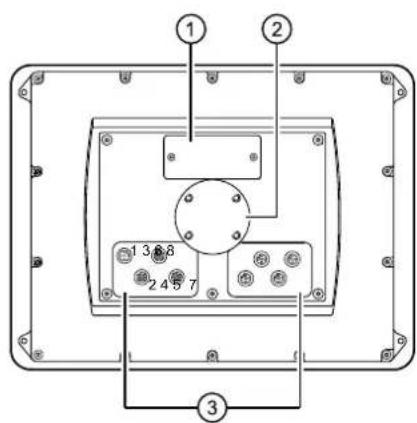
1: Service cover for USB connection, battery and watchdog reset
2: locator for the RAM ^® mount system
3: M12 connector (fig. shows max. number of connectors)
| 1 2, 5, 6, 7, 8 3 4 | |||
| ConnectorA-coded, 5 poles | SocketA-coded, 5 poles | SocketB-coded, 5 poles | SocketD-coded, 4 poles |
 |  |  |  |
| (1) Supply, input/output (2) CAN1 | |
| 1 | 10...32 V DC (terminal 30) (IN) |
| 2 | IN |
| 3 | GND (terminal 31) (IN) |
| 4 | OUT |
| 5 | 10...32 V DC (terminal 15) (IN) |
| (3) USB (4) Ethernet | |
| 1 | +5 V DC |
| 2 | -Data |
| 3 | +Data |
| 4 | ID |
| 5 | GND |
| 1 | screen |
| 2 | VBBc(OUT) |
| 3 | CAN1_GND (OUT) |
| 4 | CAN1_H |
| 5 | CAN1_L |
| (5) CAN2 | |
| 1 | screen |
| 2 | VBBc (OUT) |
| 3 | CAN2_GND (OUT) |
| 4 | CAN2_H |
| 5 | CAN2_L |
| 1 | TxD+ |
| 2 | RxD+ |
| 3 | TxD- |
| 4 | RxD-housing = screen |
| (7) analogue video input | |
| 1 | screen |
| 2 | GND (video 2) |
| 3 | GND (video 1) |
| 4 | FBAS1 (video 1) |
| 5 | FBAS2 (video 2) |
| (6) CAN3/4 | |
| 1 | CAN3_H |
| 2 | CAN3_L |
| 3 | CAN3/4_GND (OUT) |
| 4 | CAN4_H |
| 5 | CAN4_L |
| (8) N/A | |
| 1 | |
| 2 | |
| 3 | |
| 4 | |
| 5 | |
7.2 CR1201
CR1201
Process and dialogue module PDM360 NG-12
12.1" colour display, touch screen
13 freely programmable backlit function keys
Rocker switch with pushbutton
Analogue video input 1 output / 1 input
10...32 V DC
CE
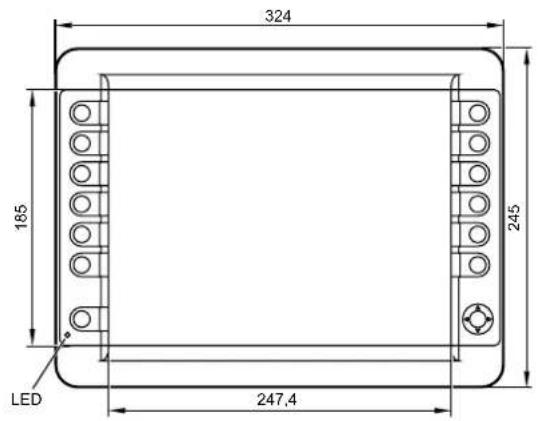
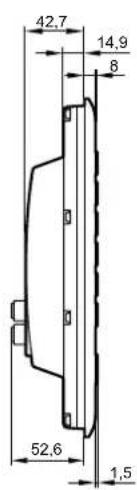
| Display |
| Display TFT LCD colour screen |
| Format 4:3, 245.8 x 184.3 mm, 12.1" diag |
| Resolution 1024 x 768 pixels |
| Alignment horizontal |
| Surface glass |
| Colours 262.144 (18 bits) |
| Background illumination LED (life cycle ≥ Brightness ≥ 500 cd/m2, typically 600 cd/ |
| Contrast ratio ≥ 500:1, typically 700:1 |
| Character sets can be uploaded individua |
| Touch screen |
| Mechanical data |
| Mounting variants |
| Dimensions (W x H x D) |
| Cutout for panel mounting (W x H) |
| Housing material |
| Pushbuttons |
| Navigation keys |
| Background illumination operating elements |
| Protection rating |
| Operating temperature |
| Storage temperature |
| Weight |
display for controlling, parameter-setting and operation of mobile machines and plants
| 50,000 h) |
| ^2 (adjustable 10...100 %, increments 1 %) |
| Ily and is freely scalable preinstalled: ifm ISO fonts with vehicle-specifi c symbols, Arial, Courier |
| 5-wire, resistive input tool: fi nger |
| panel mounting with mounting frame surface mounting with RAM® mount system (mounting accessories not included) |
| 324 x 245 x 62 mm |
| 315 ±1 x 235±1 mm, corner radius R10 mm |
| die-cast aluminium housing, powder coating (RAL 9005) |
| 13 function keys (silicone keyboard) with tactile feedback freely programmable (softkey function) life cycle ≥ 1,000,000 activations |
| cursor function (up, down, left, right) with tactile feedback and with central mechanical pushbutton life cycle ≥ 1,000,000 activations |
| LED (brightness adjustable 0...100%, individual control) |
| IP 67 (with mounted connectors and/or protective caps) |
| -30...65°C |
| -30...80°C |
| approx. 2.8 kg |
ifm electronic gmbh • Friedrichstraße 1 • 45128 Essen
We reserve the right to make technical alterations without prior notice! 18.04.2017CR1201 / page 1
| CR1201 Technical data | |
| Electrical data | |
| Operating voltage 10...32 V DC | |
| Overvoltage detection | if U_B < 32 V |
| Overvoltage switch-off | if U_B > 34 V (hysteresis 1 V, i.e. switch-on again at U_B < 33 V) |
| Undervoltage detection | if U_B < 10 V |
| Undervoltage shutdown | if U_B < 8 V (hysteresis 1 V, i.e. switch-on again at U_B > 9 V) |
| Accuracy | 3 % FS |
| Short-circuit protection / reverse polarity protection | electronic |
| Current consumption approx. 750 mA (without external load at 24 V DC) | |
| Processor MPC5121, 32 bits, 400 MHz | |
| Memory (total) 256 Mbyte RAM / 128 Mbyte flash / 1 Gbyte internal mass storage | |
| Memory allocation see system manual PDM360 NG-12www.ifm.com → Data sheet search → CR1201 → More information | |
| Interfaces | |
| CAN 1...4 CAN interface 2.0 A/B, ISO 11898 | 50 Kbits/s...1 Mbit/sCANopen, CiA DS 301 version 4, CiA DS 401 version 1.4or SAE J 1939 or free protocol (Raw CAN)max. current load VBB_c ≤ 400 mA (protected by multi fuse) |
| Ethernet transmission rate 10/100 Mbits/s | |
| USB 2 x USB 2.0 full speed, transmission rate up to 12 Mbit/sUSB master operation (service and maintenance connection for keyboard, mouse etc.)output current per interface ≤ 500 mA | |
| Analogue video input 2 FBAS inputs, 1 Vss, 75 ohms (inputs selectable)supported video standards: PAL and NTSCCable length: ≤ 30 m | |
| Input confi gurable | digital for positive / negative sensor signalsanalogue 0...10, 0...32 V, 0...20 mA, ratiometric |
| Output digital, positive-switching (high side), supply via terminal 30 | |
| Input characteristics Resolution | 8 bits |
| Accuracy ± 3 % FS | |
| Current input 0...20 mA | Input resistance 390 Ω |
| Input frequency 10 Hz | |
| Voltage input 0...10 V | Input resistance 65.6 kΩ |
| Input frequency 10 Hz | |
| Voltage input 0...32 V Input resistance | 50.7 kΩ |
| Input frequency 10 Hz | |
| voltage input ratiometric | Input resistance 50.7 kΩ |
| Input frequency 10 Hz | |
| Digital input | Input resistance 3.2 kΩ |
| Input frequency 10 Hz | |
| Switch-on level > 0.7 U_B | |
| Switch-off level < 0.3 U_B | |
| Output characteristics | Switching voltage 10...32 V DC |
| Switching current ≤ 1 A | |
| Free wheel diodes Integrated | |
ifm electronic gmbh • Friedrichstraße 1 • 45128 Essen
We reserve the right to make technical alterations without prior notice! 18.04.2017CR1201 / page 2
CR1201 Technical data
Software/Programming
operating system Embedded Linux 2.6
Programming system CODESYS version
Graphic functions via integrated target visualisation
Other features
Acoustic signal output integrated buzzer,
Temperature monitoring 2 integrated ser
Brightness adaptation light sensor in the
Clock / battery real-time clock (RTC), bat
Status LED RGB LED, colours and state
Operating states (preset)
2.3 or CODESYS from version 3.5 SP8 (IEC 61131-3)
sualisation
tone duration and pitch programmable
sors for measuring the temperature inside the housing
front of the device to adapt the brightness of the display and the operating elements
ery-buff ered / CR2032 (3 V, 230 mAh)
is programmable by means of the application software
| Colour Status | Description | |
| - | permanently off | no operating voltage |
| green | 5 Hz | boot process application |
| 2 Hz | application running (RUN) or set-up running | |
| permanently on | application has stopped (STOP) or no project available | |
| Red | 2 Hz | application is running with an error (RUN with error) |
| permanently on | system error (fatal error), device is in reset (e.g. internal voltage error) | |
| red/orange | 2 Hz colour change | overtemperature/undertemperature, device is in reset until temperature in normal range |
| orange | 5 Hz | boot process system recovery/update |
| 2 Hz | system recovery/update running | |
| briefly on | system reset |
| CR1201 Technical data | |
| Test standards and regulations | |
| CE marking EN 61000-6-2 Electromagnetic compatibility (EMC) | Immunity |
| EN 61000-6-4 Electromagnetic compatibility (EMC)Emission standard | |
| E1 marking UN/ECE-R10 Emission standard | Immunity with 100 V/mAnalogue video input 30 V/m |
| Electrical tests ISO 7637-2 Pulse 1, severity level: IV; function state C | Pulse 2a, severity level: IV; function state APulse 2b, severity level: IV; function state CPulse 3a, severity level: IV; function state APulse 3b, severity level: IV; function state APulse 4, severity level: IV; function state APulse 5, severity level: III; function state CData valid for the 24 V system |
| Climatic tests EN 60068-2-30 Damp heat, cyclic | Upper temperature 55°C, number of cycles: 6 |
| EN 60068-2-78 Damp heat, steady stateTest temperature 40°C / 93% RH,Test duration: 21 days | |
| EN 60068-2-52 Salt spray testSeverity level 3 (vehicle) | |
| Mechanical tests ISO 16750-3 Test VII; Vibration, random | Mounting location: vehicle body |
| EN 60068-2-6 Vibration, sinusoidal10...500 Hz; 0.72 mm/10 g; 10 cycles/axis | |
| ISO 16750-3 Bumps30 g/6 ms; 24,000 shocks | |
ifm electronic gmbh • Friedrichstraße 1 • 45128 Essen
We reserve the right to make technical alterations without prior notice! 18.04.2017CR1201 / page 4
CR1201 Technical data
Back of the unit
M12 connector
Wiring
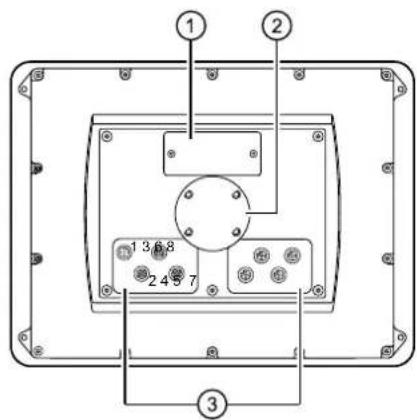
1: Service cover for USB connection, battery and watchdog reset
2: locator for the RAM ^® mount system
3: M12 connector (fig. shows max. number of connectors)
| 1 2, 5, 6, 7, 8 3 4 | |||
| Connector A-coded, 5 poles | Socket A-coded, 5 poles | Socket B-coded, 5 poles | Socket D-coded, 4 poles |
 |  |  |  |
| (1) Supply, input/output (2) CAN1 | |
| 1 | 10...32 V DC (terminal 30) (IN) |
| 2 | IN |
| 3 | GND (terminal 31) (IN) |
| 4 | OUT |
| 5 | 10...32 V DC (terminal 15) (IN) |
| (3) USB (4) Ethernet | |
| 1 | +5 V DC |
| 2 | -Data |
| 3 | +Data |
| 4 | ID |
| 5 | GND |
| 1 | screen |
| 2 | VBBc(OUT) |
| 3 | CAN1_GND (OUT) |
| 4 | CAN1_H |
| 5 | CAN1_L |
| (5) CAN2 | |
| 1 | screen |
| 2 | VBBc (OUT) |
| 3 | CAN2_GND (OUT) |
| 4 | CAN2_H |
| 5 | CAN2_L |
| 1 | TxD+ |
| 2 | RxD+ |
| 3 | TxD- |
| 4 | RxD-housing = screen |
| (7) analogue video input | |
| 1 | screen |
| 2 | GND (video 2) |
| 3 | GND (video 1) |
| 4 | FBAS1 (video 1) |
| 5 | FBAS2 (video 2) |
| (6) CAN3/4 | |
| 1 | CAN3_H |
| 2 | CAN3_L |
| 3 | CAN3/4_GND (OUT) |
| 4 | CAN4_H |
| 5 | CAN4_L |
| (8) N/A | |
| 1 | |
| 2 | |
| 3 | |
| 4 | |
| 5 | |
8 Maintenance, repair and disposal
8.1 Battery change
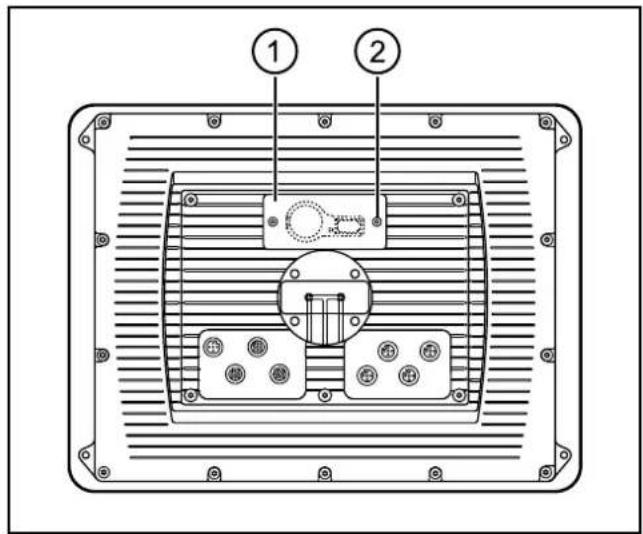
1: service cover
2: socket head screws
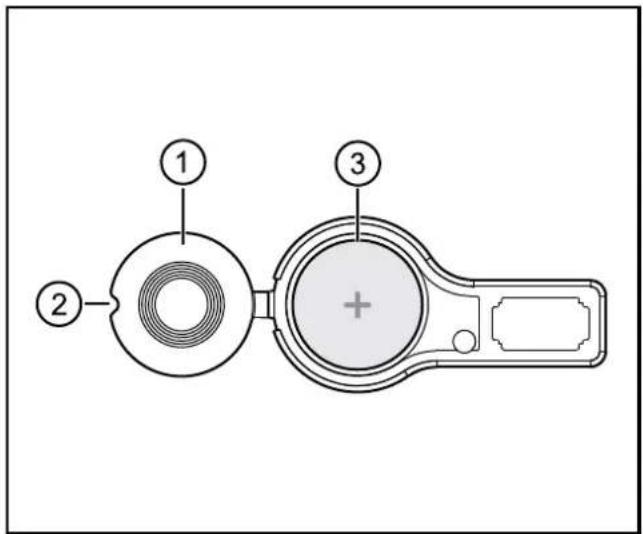
1: battery cover
2: indentation for opening
3: battery case
▶ Remove the service cover on the back of the unit.
(2 pcs. M3 socket head screws)
▶ Open the battery compartment using a pointed object (e.g. a screwdriver).
▶ Remove the battery and replace it with a new one.
Observe the polarity: positive side up (see marking on the cover)
Battery type ( 7 Technical data)
Disposal of used batteries ( 8.5 Disposal)
8.2 Cleaning the display surface

Unsuitable cleaning agents and chemicals can damage the display surface.
The following agents are not suited for cleaning the display:
- chemicals dissolving plastics such as methylated spirit, benzine, thinner, alcohol, acetone or ammonia.
• paper towels, crepe paper etc.
- abrasive cleaners
- polish or wax
▶ Clean the device from dirt using a soft, chemically untreated and dry cloth.
▶ In case of heavy dirt, use a damp cloth.

Micro-fibre cloths without chemical additives are recommended.
8.3 Cleaning the housing surface
▶ Disconnect the device.
▶ Clean the device from dirt using a soft, chemically untreated and dry cloth.
▶ In case of heavy dirt, use a damp cloth.
8.4 Repair
▶ The device must only be repaired by the manufacturer.
Observe the safety instructions ( 2.4 Tampering with the device)
8.5 Disposal
▶ Dispose of used batteries in accordance with the national environmental regulations.
Do not dispose of used batteries with household waste.
▶ Dispose of the device in accordance with the national environmental regulations.
9 Approvals/standards
Test standards and regulations ( 7 Technical data)
The EC declaration of conformity and approvals can be found at:
www.ifm.com → Data sheet search → e.g. CR1200 → Approvals