
NEO iDSD - Receiver iFi Audio - Free user manual and instructions
Find the device manual for free NEO iDSD iFi Audio in PDF.


| Brand | iFi Audio |
| Model | NEO iDSD |
| Product Type | Balanced USB and Bluetooth DAC/amplifier |
| Digital Inputs | USB 3.0 B (USB 2.0 compatible), S/PDIF coaxial, optical, Bluetooth 5.0 |
| Analog Outputs | Balanced XLR, unbalanced RCA, balanced 4.4mm headphone, single-ended 6.3mm headphone |
| Supported Audio Formats | DSD512/256/128/64, DXD up to 768kHz, PCM up to 768kHz, MQA, Bluetooth up to 24/96 |
| Bluetooth Codecs | aptX, aptX HD, aptX Adaptive, aptX LL, LDAC, LHDC/HWA, AAC, SBC |
| Maximum Output Power (Headphone) | Balanced: >1040mW @ 32Ω; Unbalanced: >295mW @ 32Ω |
| THD+N | <0.0015% @ 0dBFS |
| Signal-to-Noise Ratio (SNR) | -112dB(A) @ 0dBFS (unbalanced/balanced) |
| Dynamic Range (DNR) | >116dB(A) @ -60dBFS |
| Output Impedance (Headphone) | <1Ω (balanced/unbalanced) |
| Volume Control | Pure analog volume control, variable/fixed mode |
| Display | OLED display showing audio format, sampling rate, volume, input |
| MQA Support | Full MQA decoding for MQA files and streams |
| Power Supply | DC 5V/2.5A (iPower adapter included) |
| Power Consumption | ~0.5W (no signal), ~2.5W (max signal) |
| Dimensions (W x D x H) | 214 x 146 x 41 mm (8.4 x 5.7 x 1.6 inches) |
| Weight | 970 g (2.14 lbs) |
| Chassis Material | Custom aviation-grade aluminum base |
| Warranty | 12 months |
Frequently Asked Questions - NEO iDSD iFi Audio
User questions about NEO iDSD iFi Audio
0 question about this device. Answer the ones you know or ask your own.
Ask a new question about this device
Download the instructions for your Receiver in PDF format for free! Find your manual NEO iDSD - iFi Audio and take your electronic device back in hand. On this page are published all the documents necessary for the use of your device. NEO iDSD by iFi Audio.
USER MANUAL NEO iDSD iFi Audio
Thank you for purchasing the iDSD from Neo series. The NEO iDSD is a balanced USB and Bluetooth DAC/amplifier.
FEATURES:
- First DAC to support all Hi-Res: DSD512, PCM768, MQA384kHz and Bluetooth 96kHz.
- Completely purist design without any DSP.
- Bluetooth 5.0 (aptx, aptX HD, aptX Adaptive, aptX LL, LDAC, HWA/LHDC, AAC and SBC) up to 24/96kHz.
- Fully-balanced differential DAC/amplifier with >1,040mW output.
- Ultra-fast USB interface with 16 logic cores and up to 2000MIPS 512KB SRAM.
- Audiophile-grade components designed to reproduce music without any distortion or colouration.
- Native DSD/PCM Burr-Brown® 4-channel DAC chipset.
- Perfectly natural sound pleasing even the most demanding audio connoisseurs with the built-in MQA file decoding.
- Extremely low THD: <0.0015 % and ultra-high SNR: >120 dB.
- Digital inputs: USB3.0 B (USB2.0 compatible)/S-PDIF (coaxial/optical)/Bluetooth 5.0. ^TM
- The special custom aviation-grade aluminium base matched to the NEO iDSD.
ifi
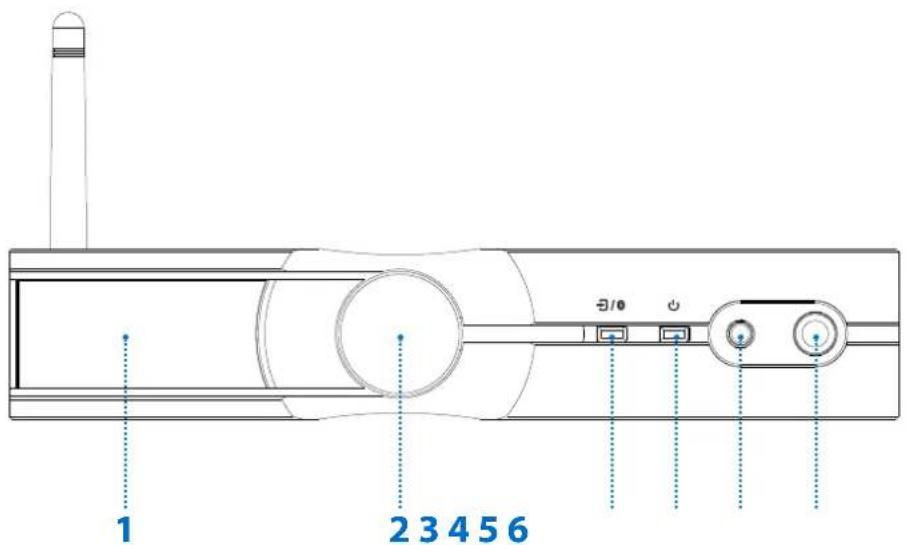
- OLED display P.4 4. Power On/Off P.6
- Multi-function knob P.4-5 5. Balanced 4.4mm analogue output P.6
- Input channel selector/Bluetooth pairing button P.5-6 6. Single-ended 6.3mm analogue output P.6
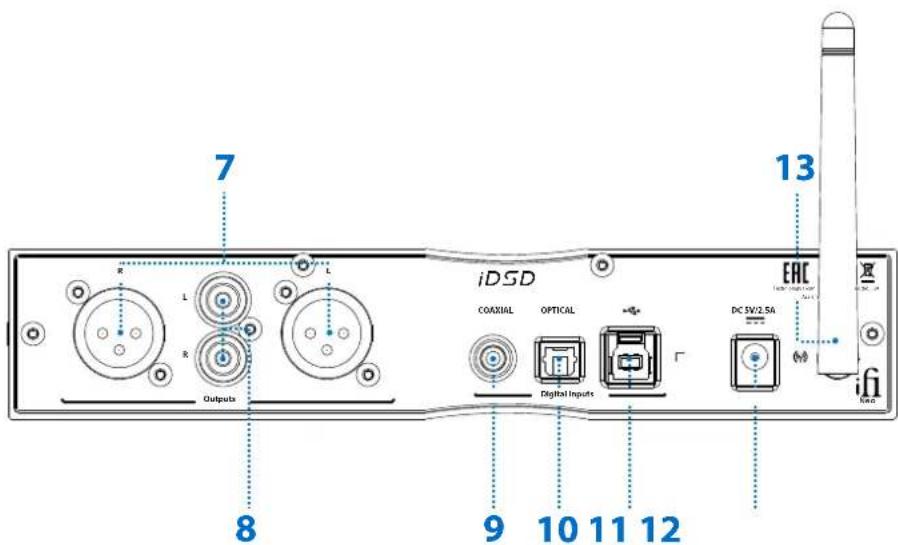
- XLR balanced analogue output 11. USB audio input P.7P.6
- RCA single-ended analogue output P.7 12. DC 5V power input P.7
- Coaxial digital input P.7 13. Antenna P7
- Optical digital input P.7

1. OLED display
The OLED display shows the audio format, sampling rate, volume and input mode.
Note: OLED screen is on left side when iDSD is lying flat.
2. Multi-function knob
This knob controls:
- Variable/Fixed mode (use with power button)
- Analogue volume control (turn)
- Mute (short press)
- Brightness (long press)
I) Variable/Fixed mode selection
This mode will determine whether or not the NEO iDSD analogue volume control is used.
The NEO iDSD must first be switched off to allow mode selection when powering on.
Hold down the knob first, and then press the power button to enter the Variable/Fixed mode selection. Turn the knob to cycle between the two modes. Release to accept.
Tip: If no mode is selected the NEO iDSD will automatically select the previously used mode.
ii) Analogue volume control
The analogue volume control in the NEO iDSD is superior to any digital volume control. When set to 'Variable', it can be used to control the headphone or the pre-amplifier volume. If the mode is set to 'Fixed', the volume control is bypassed.
Note: The NEO iDSD uses ONLY a pure analogue volume control.
iii) Mute
Press the rotary knob to mute. To unmute, press it again or turn the rotary knob.
iv) Brightness
Press and hold the knob (3 seconds) to enter brightness selection. Rotate the knob to cycle through the three brightness modes and press to accept.
Note: With the 'high' and 'low' brightness modes, the OLED will remain on. With the brightness mode 'off', if no operation is performed, the OLED will go to sleep after three seconds.
3. Input channel selector/Bluetooth pairing
This button cycles through 4 inputs:


Coaxial Optical USB Bluetooth
Note: Please select the input channel according to your audio source input mode. For example, when using USB input, you need to switch the input channel to "USB".
The NEO iDSD receives Bluetooth signals via aptX, aptX HD, aptX Adaptive, aptX LL, LDAC, LHDC/HWA, AAC and SBC.

Bluetooth pairing
From selecting the Bluetooth input, the NEO iDSD's OLED will flash searching for the previously paired device. If it cannot find the stored device, it will automatically enter pairing mode and flash.
To enter pairing mode, press and hold the button (for three seconds) until the Bluetooth icon flashes. To pair, find the iFi Hi-Res Audio Bluetooth device from the nearby devices list on your phone.
The NEO iDSD can store up to 8 paired Bluetooth devices.
4. Power On/Off
Press the power switch to power on/off the NEO iDSD.
5. Balanced 4.4mm analogue output
Connect balanced 4.4mm headphones.
Tip: As the NEO iDSD is a balanced design, we recommend the 4.4mm balanced output.
6. Single-ended 6.3mm analogue output
Connect single-ended 6.3mm headphones. With single-ended 3.5mm headphones, connect using a 3.5mm to 6.3mm adapter.
7. XLR balanced analogue output
Balanced analogue signal output to an amplifier.
8. RCA unbalanced analogue output
Single-ended signal output to an amplifier.
9. Coaxial Digital input
Connect an S/PDIF source such as Apple TV, Google Chromecast, PS4, a high-end CD transport, etc.
10. Optical Digital input
Connect an S/PDIF source such as Apple TV, Google Chromecast, PS4, Xbox, a high-end CD transport, etc.
11. USB audio input
This is a USB 3.0 B input (USB2.0 compatible). For a superior connection to a computer, use the enclosed USB3.0 cable. It connects the NEO iDSD to the computer audio source.
12. DC 5V power input
Please connect the NEO iDSD to the enclosed power supply, the super-silent iPower. The NEO iDSD must ONLY be powered by 5 volts.
Tip: For best performance upgrade iPower to an ultra-low noise iPower X 5V power supply.
13. Antenna
Please attach the enclosed antenna for maximum reception quality.

MQA
The NEO iDSD includes MQA(*) technology, which enables you to play back MQA(*) audio files and streams, delivering the sound of the original master recording.

MOA
The NEO iDSD includes MQA technology, which enables you to play back MQA audio files and streams. 'MQA' or 'MQA.' indicates that the product is decoding and playing an MQA stream or file, and denotes provenance to ensure that the sound is identical to that of the source material. 'MQA.' indicates it is playing an MQA Studio file, which has either been approved in the studio by the artist/producer or has been verified by the copyright owner.
MQA and the Sound Wave Device are registered trade marks of MQA Limited.© 2016
*MQA
1) Listen to MQA (Master Quality Authenticated) files straight out of the box.
2) For MQA tracks, simply connect to Tidal and check the options to stream MQA.
3) Visit mqa.co.uk for more information.
Specifications
Digital Inputs: USB3.0 B (USB2.0 compatible)/S-PDIF (coaxial/optical)/Bluetooth 5.0 (AAC, SBC, aptX, aptX ^TM ID, aptX Adaptive, aptX LL, LDAC, LHDC/HWA Codec)
Formats: DSD512/256/128/64, Octa/Quad/Double/Single-Speed DSD DXD (768/705.6/384/352.8kHz), Double/Single-Speed DXD PCM (768/705.6/384/352.8/192/176.4/96/88.2/48/44.1kHz) MQA Bluetooth 96kHz
Line Section
Outputs:
Balanced XLR: 6.3V / 7.7V max. (variable) 4.4V fixed UnBAL RCA: 3.2V / 3.9V max. (variable) 2.2V fixed
Zout:
Balanced: <= 100Ω UnBAL:: <= 50Ω
SNR: -112dB(A) @ 0dBFS (UnBAL/BAL)
DNR: >116dB(A) @ -60dBFS (UnBAL/BAL)
THD + N: <0.0015% @ 0dBFS (UnBAL/BAL)

Headphone Section
Output:
Balanced: 2V / 6.2V max. 12Ω - 600Ω Headphone
UnBAL: 1V / 3.3V max. 12Ω - 300Ω Headphone
Output Power:
Balanced: >6.4V/68.6 mW (@ 600Ω)
5.77V/1040 mW (@ 32Ω)
UnBAL: >3.25V/17.6 mW (@ 600Ω)
3V/295 mW (@ 32Ω)
Output Impedance: <1Ω (UnBAL/BAL)
SNR: -112dBA (3.3V UnBAL/6.2V BAL)
DNR: -120dB(A)
THD + N: <0.0015% (125mW @ 32Ω)
Power consumption: No Signal \~0.5W
Max Signal \~2.5W
Input voltage: DC 5V/2.5A, AC 100 -240V, 50/60Hz (with iPower)
Dimensions: 214 x 146 x 41 mm
8.4" x 5.7" x 1.6"
Weight: 970 g (2.14 lbs)
Warranty period: 12 months
*Specifications are subject to change without notice.




Balmoral Lodge, 139-141 Cambridge Road, Churchtown, Southport, PR9 7LN. UK. www.ifi-audio.com


- FEATURES:
- ifi
- OLED display
- Multi-function knob
- I) Variable/Fixed mode selection
- ii) Analogue volume control
- iii) Mute
- iv) Brightness
- Input channel selector/Bluetooth pairing
- Bluetooth pairing
- Power On/Off
- Balanced 4.4mm analogue output
- Single-ended 6.3mm analogue output
- XLR balanced analogue output
- RCA unbalanced analogue output
- Coaxial Digital input
- Optical Digital input
- USB audio input
- DC 5V power input
- Antenna
- MQA
- MOA
- Specifications
- Line Section
- Outputs:
- Zout:
- Headphone Section
- Output:
- Output Power:
Brand : iFi Audio
Model : NEO iDSD
Category : Receiver