
PureStar E20 - Vacuum Cleaner TESLA - Free user manual and instructions
Find the device manual for free PureStar E20 TESLA in PDF.


| Product Type | Cordless Stick Vacuum Cleaner |
| Model | Tesla PureStar E20 |
| Dimensions (approx.) | 1100 x 250 x 150 mm |
| Weight (approx.) | 2.5 kg |
| Battery Type | Lithium-ion, rechargeable |
| Battery Voltage | 22.2 V |
| Battery Capacity | 2200 mAh |
| Charging Time | Approx. 4–5 hours |
| Runtime (Standard Mode) | Up to 30 minutes |
| Runtime (MAX Mode) | Up to 15 minutes |
| Dust Tank Capacity | 0.6 L |
| Filtration System | Cyclone filter with anti-static pre-filter and washable cyclone filter |
| Power Modes | Standard and MAX |
| Brush Head | Turbo brush with LED headlight |
| Charging Adapter Input | 100–240 V, 50/60 Hz |
| Charging Adapter Output | 26 V, 0.5 A |
| Maximum Input Power | 150 W |
| Noise Level | ≤ 78 dB(A) |
| Material | ABS plastic and metal tube |
| Color | White and gray |
| Warranty | 2 years (EU) |
| Included Accessories | Turbo brush, crevice tool, wall mounting bracket, charging adapter, user manual |
Frequently Asked Questions - PureStar E20 TESLA
User questions about PureStar E20 TESLA
0 question about this device. Answer the ones you know or ask your own.
Ask a new question about this device
Download the instructions for your Vacuum Cleaner in PDF format for free! Find your manual PureStar E20 - TESLA and take your electronic device back in hand. On this page are published all the documents necessary for the use of your device. PureStar E20 by TESLA.
USER MANUAL PureStar E20 TESLA
- Tlačidlo zapnutia/vypnutia/MAX
- Nabíjací konektor
- Poistka zásobníka na nečistoty
- Indikátor stavu nabitia batérie
- Zásobník na nečistoty
- Telo vysávača
- Uvolňovacie tlačidlo veka zásobníka na nečistoty
- Uvolňovacie tlačidlo trubice
- Trubica
- Uvolňovacie tlačidlo čistiacej hlavy
- Hlavica turbokeyf
- LED svetlo
NABÍJANIE BATÉRIE
VAŽNA SIGURNOSNA UPOZORENJA
PROIZVOD JE NAMIJENJEN SAMO ZA UPORABU U KUĆANSTVU.
natural_image
Symbol of a trash bin crossed with a diagonal line, no text or numbers presentAko je proizvodu pridružen simbol prekrižene kante za smeće, to znači da se na proizvod odnosi europska direktiva 2002/96/EZ. Molimo vas da se informirate o lokalnom sustavu odvojenog prikupljanja električnih i elektroničkih proizvoda. Pridržavajte se lokalnih propisa i ne odlazite stare proizvode u komunalni otpad. Ispravno odlaganje starih proizvoda pomaže spriječiti potencijalne negativne posljedice za životno okruženje i zdravlje ljudi.
S obzirom na to da se proizvod razvija i poboljšava, zadržavamo pravo na prilagodbu korisničkog priručnika. Važeću verziju korisničkog priručnika uvijek ćete naći na www.tesla-electronics.eu.
Dizajn i specifikacije mogu se izmijeniti bez prethodnog upozorenja. Moguće su tiskarske pogreške.
RO
Stimate client,
Thank you for choosing the TESLA PureStar E20.
Please read the rules of safe use carefully before using the appliance and follow all usual safety rules.
IMPORTANT SAFETY WARNINGS
PRODUCT DESIGNED FOR HOUSEHOLD USE ONLY.
This appliance is a complex electromechanical device, please note the following instructions:
- The manufacturer and importer to the EU bears no liability for improper use or use at variance with the instructions. Such use is not covered by the warranty.
- The appliance is intended for indoor use only at room temperature (max. 40°C), store indoors in a dry place.
- Do not use the appliance if its dust bin is full.
- Do not use the appliance without filters or if the filters are wet, dirty or damaged.
- Never leave the appliance switched on unattended.
- Keep the suction nozzle or the end of the tube away from the eyes or ears.
- Do not vacuum wet surfaces, water or liquid of any nature, hot or very fine substances (gypsum, cement or ash, etc.), large sharp fragments (glass shards), harmful products (solvents or paint strippers, etc.), aggressive substances (acids or cleaning agents), flammable and explosive substances (petrol or alcohol based).
- Never immerse the appliance in water, spray water onto it or rinse it under running water.
- This appliance may be used by children aged 8 and over and persons without sufficient experience or knowledge, or by persons with reduced physical, sensory or mental capabilities, provided that they have been instructed and advised in the safe use of the appliance and are aware of the potential risks.
- User cleaning and maintenance must not be performed by unsupervised children. Keep the appliance and its power cord out of the reach of children. Children must not be allowed to play with the appliance.
- Use only original accessories which are designed for this model.
- If the appliance falls over and exhibits any visible damage or malfunctioning, do not use it and contact an authorised service centre.
- Do not open or repair the appliance. You run the risk of electric shock and loss of the warranty.
• If the power cord is damaged, do not use the appliance and contact an authorised service centre.
- The plastic bags used to package this appliance can be dangerous. Keep these bags out of the reach of children to avoid the risk of suffocation. These bags are not toys.
- The manufacturer and the importer to the European Union is not liable for any damage caused by operation of the appliance such as injury, scalding, fire or damage to other items, etc.
PACKAGE CONTENTS
Carefully check that you have unpacked all of the accessories supplied. We recommend keeping the original cardboard box, user manual and packaging materials for the duration of the warranty period.
DESCRIPTION OF APPLIANCE
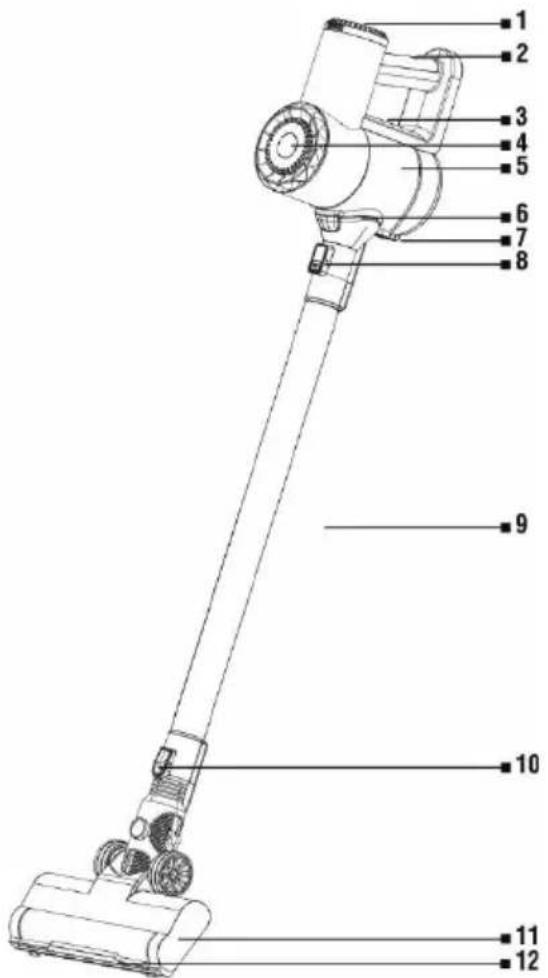
- On/Off/MAX button
- Charging connector
- Dust tank lock
- Battery charge status indicator
- Dust tank
- Body of vacuum cleaner
- Release button for the lid of dust tank
- Release button for the tube
- Tube
- Release button for the cleaning head
- Turbo brush head
- LED light
CHARGING THE BATTERY
Make sure the vacuum cleaner is switched off. Connect the charging adapter to the mains and then insert the adapter connector into the charging connector on the vacuum cleaner. Charging progress is displayed on the battery charge status indicator, and 100% is displayed when fully charged. Avoid draining the battery completely.
TIP - for longer battery life, we recommend recharging the battery no later than when the capacity drops to 30%.
ASSEMBLING THE VACUUM CLEANER
Connect the turbo brush head to the tube and then insert it into the body of the vacuum cleaner. You can attach the vacuum attachment directly to the body of the vacuum cleaner or to the tube.
- Before using the appliance, press the dust bin lock and turn the dust bin to the "O" position (on the left side of the vacuum cleaner/dust bin) and check that both filters are inserted. The antistatic filter must be inserted with the side marked with a label facing up.
- Turn the dust bin to the "lock" position.
- Connect the tube (the side without the button) to the dust bin.
- Connect the turbo brush to the tube (side with the button).
-
If you want to start cleaning, press the "On/Off" button. Press the "+/-" button to increase the power - "MAX" mode. Press the "+/-" to switch the power to "Standard" mode. To switch the appliance off, press the "On/Off" button again.
-
Fix the bracket firmly to the wall at a height of about 1 metre from the ground (measure the exact position according to the location of the vacuum cleaner) near a mains socket. The direction of the arrow indicates the top side. Attach the power cord from the right side of the bracket. Place the vacuum cleaner vertically in the bracket and store it securely.
EMPTYING THE DUST TANK
To ensure proper hygiene, we recommend emptying the dust bin and cleaning the filters every time you use the appliance. To empty the dust bin, press the lid release button and empty its contents into the waste bin.
ACCESSORIES
Choose the right attachment for cleaning according to the nature of the area you want to clean.
MAINTENANCE
Perform regular cleaning after your finish using the appliance to maintain vacuuming performance. Clean the surface of the vacuum cleaner and adapter with a soft damp cloth, do not use harsh and aggressive cleaning agents.
CLEANING THE BRUSHES
Always visually check the brushes for dirt every time you finish vacuuming. Remove things like hair and animal hair which have become caught on the turbo brush. For easier cleaning, you can remove the turbo brush from the plastic frame - move the button on the right side of the cleaning head to the open lock position. After cleaning the turbo brush, push it back into the cleaning head.
CLEANING THE FILTERS
Switch off the vacuum cleaner.
- Press the "Dust tank lock" button on the vacuum cleaner, turn the dust tank to the "O" position and remove the dust tank.
- Pull the antistatic filter out of the body of the cyclone filter.
- For a quick clean, gently tap the dirt from the antistatic filter into the dust tank.
- Pull the cyclone filter out of the dust tank.
- Both filters can also be rinsed under lukewarm running water. Allow the filters to dry thoroughly before using them again.
- Insert both filters back in their original position and fit the dust tank.
Replace the antistatic filter filter with a new one in the event of heavy soiling or poor vacuum performance. We recommend replacing it every 4 to 6 months.
IMPORTANT never use the vacuum cleaner without the filters installed!
- Neglecting to clean or replace the filters can lead to a defect in the vacuum cleaner!
• Always insert the antistatic filter with the side marked with a label facing up. - Do not use any aggressive detergents or hot water to clean the filters and do not clean them in a dishwasher.
- Replace the filters if they can no longer be cleaned properly or are damaged.
- Ensure that contact areas and sealing elements are clean and functional.
- Make sure that the filters are completely dry before reinserting them into the appliance (ideally wait 24 hours).
All the above-mentioned instructions are very important if you feel that the vacuum cleaner has poor suction power or is not vacuuming dirt from the floor properly. This condition is a clear indication that the vacuum cleaner's filtration system requires cleaning or the filter needs to be replaced.
MAINS ADAPTOR
If the mains adaptor for the appliance is damaged, it must be repaired by a service engineer or similarly qualified person to prevent any dangerous situations arising.
NOTE: Use only the mains adapter supplied with this vacuum cleaner to charge the battery.
- The vacuum cleaner must only be powered with a safe small voltage which matches the parameters indicated for the appliance.
- Only use the mains adapter indoors.
- The mains adapter supplied with the vacuum cleaner is intended only for this appliance. Do not use it for any other purposes.
- The power cord for the adapter must not be damaged by sharp or hot objects or a naked flame and must not be immersed in water or bent over any sharp edges.
- If you need to use an extension cable, it must not be damaged in any way and must comply with the applicable standards.
- If you do not use the appliance for a long time, we recommend charging the battery once every three months The network adapter will heat up while the battery is charging. Always switch off the vacuum cleaner while charging the battery and after use.
- Do not use the appliance if the mains adapter is damaged. This could lead to a dangerous situation arising, damage to the appliance or fire.
• Regularly check the condition of the power cord on the mains adapter.
WARRANTY REPAIR
For warranty repair, contact the dealer where you purchased the TESLA product.
The warranty DOES NOT APPLY to:
• use of the appliance for purposes other than those it was designed for
• standard wear and tear
- failure to observe the "Important Safety Instructions" contained in the user manual
• electrical or mechanical damage caused by improper use or neglected maintenance
• damage caused by natural elements such as water, fire, static electricity or power surges, etc.
• damage caused by unauthorised repair
- appliances with an illegible serial number
DECLARATION OF CONFORMITY
We, INTER-SAT LTD, org. složka, declare that this appliance complies with the basic requirements and other relevant provisions of the standards and regulations relevant to the given type of equipment.

This product meets the requirements of the European Union.
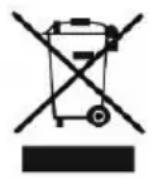
When this crossed-out wheeled bin symbol is attached to a product it means that the product is covered by European Directive 2002/96/EC. Please obtain information about the local separate collection system for electrical and electronic products. Please act in accordance with your local regulations and do not dispose of your old products together with your regular household waste. Correct disposal of your old product helps to prevent potential negative consequences for the environment and human health.
Due to the fact that the product is subject to development and improvement, we reserve the right to alter the user manual. The current version of this user manual can always be found at www.tesla-electronics.eu.
Design and specifications may be subject to change without prior notice, printing errors reserved.
- NABÍJANIE BATÉRIE
- VAŽNA SIGURNOSNA UPOZORENJA
- RO
- Stimate client,
- IMPORTANT SAFETY WARNINGS
- PACKAGE CONTENTS
- DESCRIPTION OF APPLIANCE
- CHARGING THE BATTERY
- ASSEMBLING THE VACUUM CLEANER
- EMPTYING THE DUST TANK
- ACCESSORIES
- MAINTENANCE
- CLEANING THE BRUSHES
- CLEANING THE FILTERS
- IMPORTANT never use the vacuum cleaner without the filters installed!
- MAINS ADAPTOR
- WARRANTY REPAIR
- The warranty DOES NOT APPLY to:
- DECLARATION OF CONFORMITY
Brand : TESLA
Model : PureStar E20
Category : Vacuum Cleaner