
MW-900 V2 - Mouse HAMA - Free user manual and instructions
Find the device manual for free MW-900 V2 HAMA in PDF.


Pick your language and provide your email: we'll send you a specifically translated version.
| Product Type | Wireless Mouse |
| Model | MW-900 V2 |
| Brand | Hama |
| Connectivity | 2.4 GHz Wireless via USB Receiver |
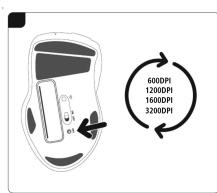
| DPI Resolution | 600 / 1200 / 1600 / 3200 DPI (adjustable) |
| Buttons | 6 buttons (including scroll wheel, programmable via driver) |
| Power Supply | 1x AA battery (not included) or built-in rechargeable battery (via USB) |
| Battery Life | Approximately 12 months (typical usage) |
| Dimensions (L x W x H) | 110 x 65 x 38 mm |
| Weight | 85 g (including battery) |
| Compatibility | Windows, macOS, Linux |
| Driver Software | Available for download at www.hama.com |
| Special Features | Programmable buttons, DPI switch, energy-saving mode |
| Cleaning | Wipe with a soft, dry cloth. Do not use liquids or abrasives. |
| Storage Conditions | Keep dry and at room temperature (0°C to 40°C) |
| Package Contents | Mouse, USB receiver, user manual |
| Repair | No user-serviceable parts. Contact Hama support for issues. |
Frequently Asked Questions - MW-900 V2 HAMA
How do I pair the MW-900 V2 mouse with my computer?
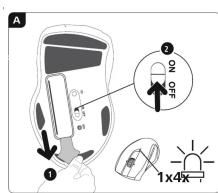
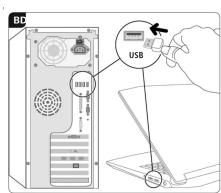
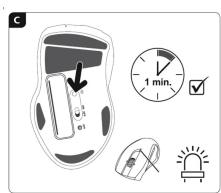
Insert the USB receiver into a free USB port on your computer. Turn on the mouse using the power switch. The mouse will automatically connect. If not, press the connect button (if available) or restart the computer.
What type of battery does the mouse use?
The mouse uses one AA battery (not included). Alternatively, if your model has a rechargeable battery, charge it via the USB cable provided for about 1 hour until full.
How can I change the DPI settings?
Press the DPI button located on the top of the mouse to cycle through the available DPI levels: 600, 1200, 1600, and 3200 DPI. The current DPI is indicated by a color or LED pattern (refer to manual).
Can I program the buttons on this mouse?
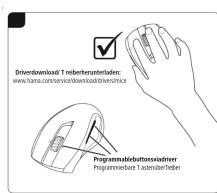
Yes, download the Hama driver software from www.hama.com. Install it and you can assign custom functions (e.g., shortcuts, macros) to the extra buttons.
Why is the mouse cursor not moving?
Check that the mouse is turned on and the USB receiver is properly inserted. Try changing the battery or charging it. Ensure there is no interference between the mouse and receiver (keep within 10 meters).
How do I clean the mouse?
Use a soft, lint-free cloth slightly dampened with water or mild detergent (wring well). Wipe the surface gently. Do not use alcohol, abrasive cleaners, or immerse in water.
Is the mouse compatible with Mac?
Yes, the Hama MW-900 V2 works with macOS. Basic functions are supported without driver installation. For full customization, check if the Hama driver is available for Mac.
What should I do if the USB receiver is lost?
Contact Hama customer service for a replacement receiver. The mouse uses a specific receiver; generic ones may not work. Alternatively, if the mouse supports Bluetooth (check specs), you can pair via Bluetooth.
How long does the battery last?
With typical usage, a single AA battery lasts about 12 months. Power-saving features activate after periods of inactivity. Rechargeable models last similar time per charge.
Where can I find the latest driver or manual?
Visit www.hama.com and navigate to the support/downloads section. Enter the model number MW-900 V2 to find the latest driver software, user manual, and FAQ.
User questions about MW-900 V2 HAMA
0 question about this device. Answer the ones you know or ask your own.
Ask a new question about this device
No questions yet. Be the first to ask one.
Download the instructions for your Mouse in PDF format for free! Find your manual MW-900 V2 - HAMA and take your electronic device back in hand. On this page are published all the documents necessary for the use of your device. MW-900 V2 by HAMA.
USER MANUAL MW-900 V2 HAMA
hama
Hana GmbH Co KG B0652 Moehelm/ Germany
www.homo.com
图
人
www.hi
All listed


Table of contents
Click a title to access it
Manual assistant
Powered by Anthropic
Waiting for your message
Product information
Brand : HAMA
Model : MW-900 V2
Category : Mouse