H25B - Système de sonorisation publique Adastra - Free user manual and instructions
Find the device manual for free H25B Adastra in PDF.


| Product Type | Portable PA system with VHF wireless microphone |
| Brand | Adastra |
| Model | H25B |
| Dimensions (Main Unit) | 155 x 183 x 285 mm |
| Dimensions (VHF Bodypack) | 100 x 65 x 35 mm |
| Weight (Main Unit) | 2.74 kg |
| Weight (VHF Bodypack, no battery) | 68.2 g |
| Power Supply (Main Unit) | Mains or internal rechargeable battery |
| Power Supply (VHF Bodypack) | 3V DC (2 x AA alkaline or NiMH) |
| Output Power (Max) | 25W |
| RF Carrier Frequency | 174.1 MHz |
| RF Power | 10 mW |
| Frequency Response | 100 Hz - 12 kHz |
| Signal-to-Noise Ratio | >60 dB |
| VHF Operating Distance | 35 m |
| Battery Life (Main Unit) | Up to 8 hours (depending on usage) |
| Charging Time | Approximately 4.5 hours |
| Media Playback | USB, Bluetooth, FM tuner |
| Bluetooth Device ID | LS101 |
| Audio Inputs | 6.3mm microphone jack, 3.5mm aux input |
| Audio Output | 3.5mm headphone/line out |
| Included Accessories | VHF bodypack transmitter, neckband microphone, shoulder strap |
| Cleaning | Use soft cloth with neutral detergent; avoid solvents |
| Safety | Keep away from moisture, heat, and impact; no user serviceable parts except battery |
Frequently Asked Questions - H25B Adastra
User questions about H25B Adastra
0 question about this device. Answer the ones you know or ask your own.
Ask a new question about this device
Download the instructions for your Système de sonorisation publique in PDF format for free! Find your manual H25B - Adastra and take your electronic device back in hand. On this page are published all the documents necessary for the use of your device. H25B by Adastra.
USER MANUAL H25B Adastra
Handheld PA with VHF Neckband Mic, USB & Bluetooth
Item ref: 952.412UK
User Manual
natural_image
Black-and-white photo of a portable electronic device with earphones and a speaker, no visible text or symbols.Version 1.1

Caution: Please read this manual carefully before operating
Damage caused by misuse is not covered by the warranty
Introduction
Thank you for choosing the Adastra H25B portable PA system. This all-in-one unit is designed to offer convenient and reliable portable amplification for a wide range of small public address applications. Please read this manual before using this equipment to avoid damage through incorrect operation and to get the best performance from your purchase.
Contents
Please take care when unpacking this product. Inspect for any damage and ensure you have the following components...
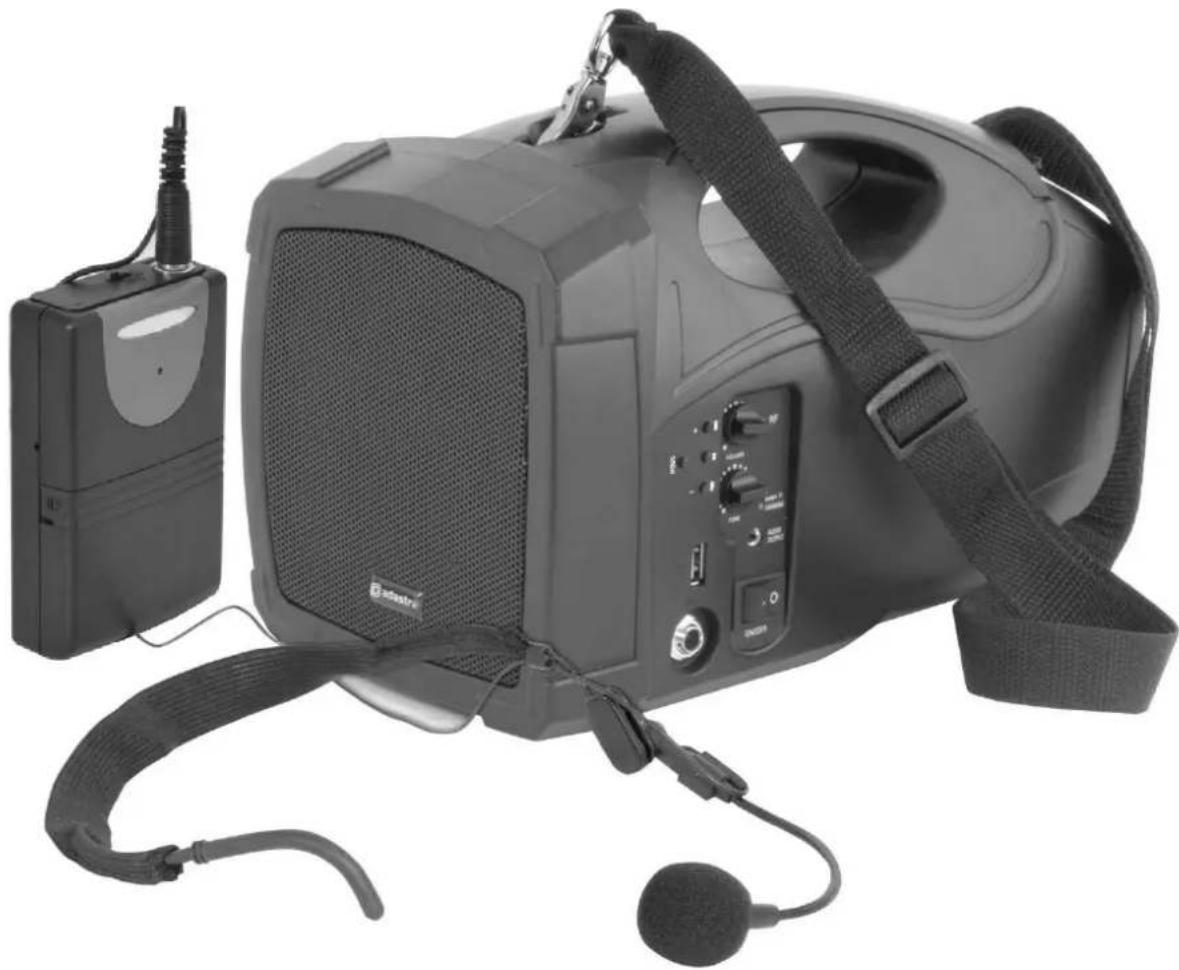
• H25B Handheld PA speaker unit
• VHF bodypack transmitter
- Neckband microphone
- Shoulder strap
Warning
To prevent the risk of fire or electric shock, do not expose any of the components to rain or moisture.
If liquids are spilled on any component, stop using immediately, allow unit to dry out and have checked by qualified personnel before further use.
Avoid impact or heavy vibration to any of the components, dropping the microphone can cause capsule failure.
No user serviceable parts inside transmitter or receiver except for battery/charging access - refer servicing to qualified service personnel.
Safety
• Ensure that mains supply voltage is correct for charging via the integral lead.
- Avoid ingress of water or particles into the unit or bodypack transmitter.
• Use alkaline or NiMH batteries in the transmitter and remove if unused for long periods.
- Observe the correct polarity when replacing batteries.
- Do not attempt to charge USB devices from the type 'A' connector.
Placement
- Keep all components out of direct sunlight and away from heat sources.
- Avoid impact or crushing of components.
- Keep all components away from damp or dusty environments.
Cleaning
• Use a soft cloth with a neutral detergent to clean the outside of each component.
• Lightly damp sterile wipes may be used on the microphone head for hygiene purposes.
• To avoid damage, do not use solvents to clean the components.
Specifications
| Power supply: main unit | Mains or internal rechargeable battery |
| Power supply: VHF bodypack | 3Vdc (2 x AA battery) |
| Output power: max | 25W |
| RF carrier frequency | 174.1MHz |
| RF power | 10mW |
| Frequency response | 100Hz - 12kHz |
| S/N ratio | >60dB |
| VHF operating distance | 35.0m |
| VHF tuning stability | 0.005% quartz crystal locked |
| Dimensions: VHF bodypack | 100 x 65 x 35mm |
| Weight: VHF bodypack | 68.2g (no battery) |
| Dimensions: main unit | 155 x 183 x 285mm |
| Weight: main unit | 2.74kg |
Control panel
text_image
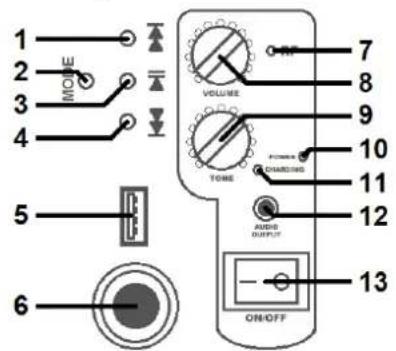
1 2 3 4 5 6 VOLUME TIME 7 8 9 10 11 12 AUDIO OUTPUT ON/OFF 131 Next track (hold for volume up)
2 MODE (USB or Bluetooth)
3 Play / pause track
4 Previous track (hold for volume down)
5 USB type A socket
6 6.3mm microphone input
7 VHF indicator
8 VOLUME control
9 TONE control
10 POWER indicator
11 CHARGING indicator
12 3.5mm AUDIO OUTPUT
13 Power ON/OFF switch
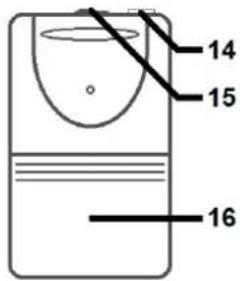
Bodypack Transmitter
14 Slide switch - OFF/ON
15 Microphone input - 3.5mm threaded jack
16 Battery compartment
text_image
14 15 16Operation
The H25B handheld PA unit can be operated from its internal rechargeable battery, which can be recharged by using the power lead that is stored inside the rear compartment. When connected to a mains outlet (ensuring correct voltage), the H25B operates from mains power when switched on (13) and charges the internal battery when switched off. Full charging from empty takes approximately 4½ hours.
An indicator LED (10) shows when power is on and another (11) shows when the battery is being charged. When not connected to the mains supply, the H25B is powered by the internal battery and should offer up to 8 hours operation from a full charge, depending upon the usage and output volume.
To operate the wireless microphone, open the front cover of the beltpack transmitter to reveal the battery compartment (16). (Open this by squeezing the sides inward and lever the flap forward).
Place 2 alkaline or NiMH AA batteries inside (ensure + and - are the correct way around) and then fold the front cover back into place until it clicks shut. Plug in the supplied neckband microphone and screw in the thread until fully connected (14). Slide the OFF/ON switch (15) to the ON position.
The built-in receiver in the H25B unit is controlled by 2 rotary controls on the control panel. When the VOLUME control (8) is turned fully off, the VHF receiver is powered down. Turning this control up activates the receiver and gradually increases the level. When the receiver detects the signal from the bodypack transmitter, the RF indicator (7) will illuminate. Adjust the VOLUME level to the required output.
Below the VOLUME control is a TONE (9) control for the wireless microphone. Turning the tone down can help avoid "squealing" feedback from excessive treble content or turning up will add more treble for clearer speech. Also, a wired microphone or wireless receiver may be connected to the MIC IN 6.3mm jack socket (6) to be used instead of, or in addition to, the built-in wireless set.
Care should be taken to avoid "line-of-sight" positioning of the H25B speaker and any microphones being used, which can cause feedback (howling or squealing caused by the microphone 'hearing' its own output through the speaker). Furthermore, the H25B should not be positioned too close to the microphone(s) being used for this same reason.
When the wireless microphone is not in use, turn down the OFF/ON/VOLUME control fully down to power down the VHF receiver and then switch off the bodypack transmitter. Remove the batteries if not being used for long periods.
A 3.5mm jack (10) can accept a wired input from any line level audio source, such as an mp3 or CD player.
This input is always active, regardless of the media player mode and is not affected by the main VOLUME rotary control (8)
Media player
The H25B has an internal USB mp3 player, FM tuner and Bluetooth receiver, which are selected by pressing the MODE button (2)
Insert a USB drive with mp3 files stored on it to the USB A socket (5) to start playback. If playback does not start, press the MODE button repeatedly until it is in USB mode. Track navigation is controlled via buttons for Next Track, Play/Pause, Previous Track (1, 3, 4)
The FM tuner function is another option accessible by pressing the MODE button until a radio station can be heard. If no stations are tuned, there may be just white noise and the auto-tuning process will need to be completed first. To do this, press and hold the Play/Pause button (3) for 3 seconds and the auto-tuning process will start (the LED inside the USB port will flash more rapidly). Once tuned in, stepping through the radio stations is possible using the Next Track and Previous Track buttons (1, 4). Pressing the Play/Pause button briefly will mute or unmute the FM radio output.
The H25B also has an inbuilt Bluetooth receiver which can be activated by pressing the MODE button (2) to switch from USB mode to Bluetooth mode. Search for "LS101" device ID in your smart phone Bluetooth menu and select to pair to play tracks wirelessly from the smart phone to the H25B. An audible notification is played when a smart phone or other sending device is connected. Once paired, the device can be automatically re-connected when the H25B is in Bluetooth mode and the device is within reception range. Track navigation is controlled via buttons for Next Track, Play/Pause, Previous Track (1, 3, 4)
In any of the Bluetooth, USB or FM modes pressing and holding the Next Track and Previous Track buttons (1, 4) will increase or decrease the output level of the media player.
Troubleshooting
| "POWER/CHARGING" LED not lit when using mains power | Check for correct voltage and that outlets are switched on |
| Check if mains fuse has blown | |
| "POWER/CHARGING" LED not lit when using battery power | Check POWER switch is switched on |
| Battery may be fully discharged, connect to mains if available | |
| "POWER/CHARGING" LED is on, but "RF" LED is not lit | Ensure transmitter is switched ON with a good battery installed |
| Check that bodypack transmitter is not out of reception range | |
| Check that VHF OFF/ON/LEVEL control is not switched off | |
| "POWER/CHARGING" and "RF" LEDs are lit but no mic output | Check if bodypack transmitter switch is in OFF position |
| Check if neckband microphone is properly connected to bodypack | |
| Ensure transmitter has good / charged batteries | |
| Check if there is another nearby transmitter with the same frequency | |
| Microphone output is very loud or distorted | Turn down LEVEL control on bodypack transmitter |
| Turn down OFF/ON/LEVEL control on the H25B to a reduced level | |
| Microphone output is very low | Turn up LEVEL control on bodypack transmitter |
| Turn up OFF/ON/LEVEL control on the H25B | |
| Check transmitter batteries | |
| USB player will not play audio files | Check that file type is standard mp3 format |
| Check USB memory device on different equipment to ensure working properly | |
| Press PLAY button or jump to other tracks to make sure file is not corrupt | |
| Remove and replace USB device to check if connected properly | |
| USB player output very low | Press and hold the VOL + button to increase volume level |
| Check that audio file is not recorded at a very low gain level - if so, correct this on a PC/Mac | |
| USB player output very high or distorted | Press and hold the VOL – button to decrease volume level |
| Check that audio file is not recorded at a very high gain level - if so, correct this on a PC/Mac | |
| No playback through Bluetooth | Ensure that the smart phone is connected to "LS101" device in the Bluetooth menu |
| Ensure that the volume on the smart phone (or another sending device) is turned up |



Disposal: The "Crossed Wheelie Bin" symbol on the product means that the product is classed as Electrical or Electronic equipment and should not be disposed with other household or commercial waste at the end of its useful life. The goods must be disposed of according to your local council guidelines.
Hereby, AVSL Group Ltd. declares that the radio equipment type 952.412UK is in compliance with Directive 2014/53/EU
The full text of the EU declaration of conformity is available at the following internet address:
http://www.avsl.com/assets/exportdoc/9/5/952412UK%20CE.pdf
Errors and omissions excepted. Copyright© 2021.
AVSL Group Ltd. Unit 2-4 Bridgewater Park, Taylor Rd. Manchester. M41 7JQ
AVSL (EUROPE) Ltd, Unit 3D North Point House, North Point Business Park, New Mallow Road, Cork, Ireland.