
U300-EU - Uncategorized Winix - Free user manual and instructions
Find the device manual for free U300-EU Winix in PDF.


| Product Type | Air Purifier |
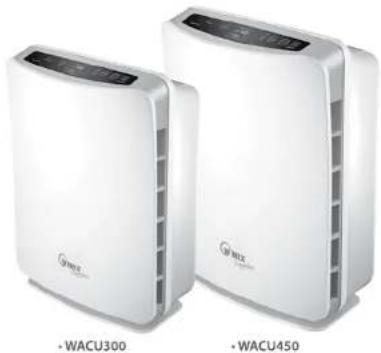
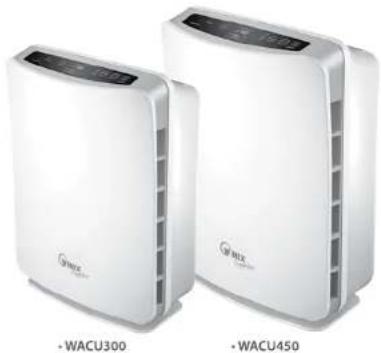
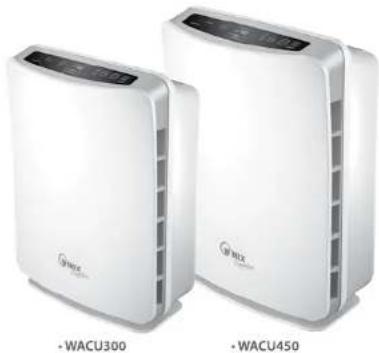
| Model Numbers | WACU300, WACU450 |
| Room Size (AHAM Verified) | 30 m² (WACU300), 45 m² (WACU450) |
| Recommended Max Room Size | 66 m² (WACU300), 96 m² (WACU450) |
| Power Supply | AC 220V / 50Hz |
| Power Consumption | Low: 4W, Turbo: 60W (WACU300); Low: 11W, Turbo: 110W (WACU450) |
| Fan Speeds | 4 (Quiet, Med, High, Turbo) |
| Control Type | Auto / Manual |
| Remote Control | Yes (with CR2025 battery) |
| Air Quality Sensor | Yes |
| Light Sensor | Yes (Sleep Mode) |
| Filter System | Washable Pre-Filter, True HEPA (99.97%), AOC Carbon Filter, PlasmaWave™ |
| CADR (Smoke/Dust/Pollen) | 197/197/214 (WACU300); 291/298/343 (WACU450) |
| Dimensions (LxWxH) | 220 x 550 x 415 mm (WACU300); 280 x 650 x 440 mm (WACU450) |
| Weight | 7 kg (WACU300), 8 kg (WACU450) |
| Warranty | 2 years limited (excluding filters) |
| Certifications | AHAM, UL, ECARF, Energy Star |
| Filter Life (Pre/HEPA/Carbon) | 12 months; clean every 3 months |
| Noise Level | Quiet operation (low speed ideal for nighttime) |
Frequently Asked Questions - U300-EU Winix
User questions about U300-EU Winix
0 question about this device. Answer the ones you know or ask your own.
Ask a new question about this device
Download the instructions for your Uncategorized in PDF format for free! Find your manual U300-EU - Winix and take your electronic device back in hand. On this page are published all the documents necessary for the use of your device. U300-EU by Winix.
USER MANUAL U300-EU Winix
Model : WACU300, WACU450
Winix Air Cleaner
Made in Korea
Contact Us
WINIX USA 120 Prahe Lake Road, Unit D East Duncoe, Illinois 30' 18 www.wrikin.com E-Mail: info@winxrc.com Tel: -1.847.551.9900
WINIX Europe 100gcorddeel 74, 1°013G Amsterdam www.wrikeu.com Tel. -311020-3532107
natural_image
Two white industrial air purifiers labeled WACU300 and WACU450, shown side by side (no additional text or symbols visible on the devices themselves)CAUTION:
Read and follow all safety rules and instructions before operating this equipment
Read and follow all safety rules and instructions before operating this equipment. Please keep this manual for future reference.
TABLE OF CONTENTS
| Warranty | 2 |
| Package Contents 2 | |
| Instructions | 3 |
| Safety Instructions 7 | |
| Product Specifications 8 | |
| Air Cleaner Features 9 | |
| Air Cleaner Set Up 10 | |
| Control Panel 11 | |
| Operations | 11 |
| Filter Replacement and Cleaning 11 | |
| Filter Replacement 12 | |
| Remote Control 13 | |
| Troubleshooting | 14 |
LIMITED PRODUCT WARRANTY
WINIX SIGNATURE™ AIR CLEANERS LIMITED WARRANTY
Limited Warranty: Winix warrants the parts of the machine to be free of defects in material and workmanship and provides service and support for two (2) years from the date of purchase by the original consumer.
If any part is found to be defective during the warranty period, your sole and exclusive remedy will be repair or replacement, at Winix's option and expense, of the defective part.
This warranty does not apply in cases of abuse, mishandling, failure to comply with product usage standards, operation using an improper power supply (other than listed on the label), or unauthorized repair.
Winix reserves the right to charge the consumers for any additional costs incurred by Winix to provide parts or services outside of the country where the air purifier is initially sold by an authorized reseller. This warranty does not include the air cleaner's replaceable filters, this is an expendable part that can wear out from normal use before one the warranty expires. ANY IMPLIED WARRANTY, INCLUDING THAT OF MERCHANTABILITY OR FITNESS FOR A PARTICULAR PURPOSE, IS HEREBY LIMITED IN DURATION TO THE APPROPRIATE WARRANTY PERIOD SET FORTH ABOVE.
In no event shall Winix be liable for any consequential or incidental damages attributable to this product.
This warranty gives you specific legal rights. The duration, terms, and conditions of this warranty are valid worldwide, except where different limitations, restrictions, or conditions may be required by local law.
For more details or to obtain service under this warranty, please contact your dealer.
PACKAGE CONTENTS
Models WACU300 AND WACU450
• Winix Air Purifier (Qty.1)
- Filters cassette including
- Washable Pre-Filter (Qty.1)
- True HEPA Filter (Qty.1)
- Advanced Color Control
Washable Carbon Filter (Qty. 1)
• Use & Care Guide (Qty.1)
- Remote control (Qty. 1)
• 3V Lithium Battery
(CR2025 installed in remote)
INSTRUCTIONS
WARNING: SAFETY INSTRUCTIONS
| WARNING / NOTICE DIRECTION | |
| WARNINGFollow these instructions to avoid any risk of personal injury, property damage, electrical shocks or fire hazards. | PROHIBITED |
| DO NOT DISASSEMBLE | |
| NOTICEFailure to follow the safety instructions can lead to personal injury or property damage. | Must Follow |
| Ground connection protecting from electrical shock | |

Warning
Power Cord
DON'T unplug the unit by pulling on its power cord.
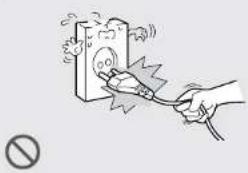
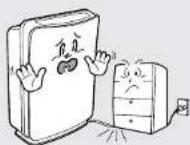
DON'T band or place heavy object on the power cord.

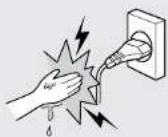
DON'T touch the plug with wet hands.

DON'T replace or modify the power cord. If the power cord/plug is damaged, it must be replaced by the manufacturer or a qualified technician.
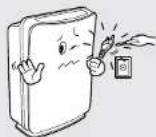


Warning
Power
DO connect the power cord to only proper power outlet with a ground connection.
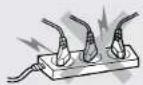

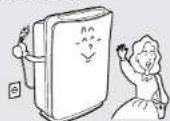
DO unplug air cleaner when not in use to save energy consumption.

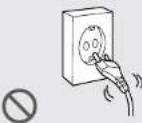
DON'T plug power cord into loose or damaged electrical outlet. (Can lead to overheating or electrical shock.)

Warning
▶ Operation
DON'T attempt to repair, alter or disassemble the air cleaner.
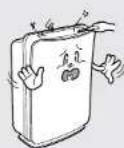

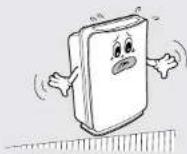
DON'T operate air cleaner on an uneven surface.
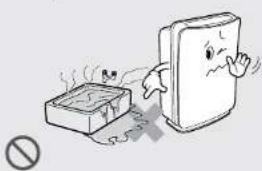
DON'T operate the air cleaner if standing water is present.
natural_image
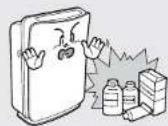
Illustration of a firecracker and a damaged document with a warning symbol (no text or labels)DON'T operate air cleaner near flammable materials.



Note
Power
DON'T disconnect the power cord during operation.
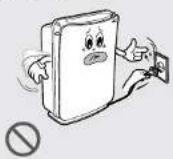
DON'T unplug the power cord before air cleaner has cooled down.
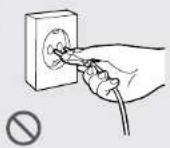
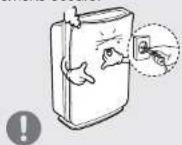
DO unplug the unit and contact your service dealer if any irregular noise or smoke occurs.

Note
Operat
DON'T Insert ANYTHING into the air inlet or outlet.


DON'T place hands or any body parts near the air outlet during operation.
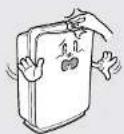

DON'T place the air cleaner near heater.
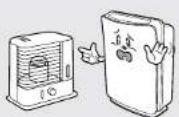

DON'T place the air cleaner near curtains or other materials that can block the vents of the unit.
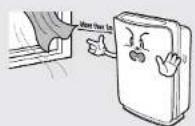


Note
▶ Operation
DON'T strike or drop the air cleaner.

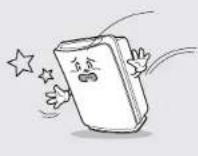
DON'T fill the air cleaner with hot water.

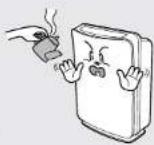
DON'T use flammable material (such as benzene or alcohol) to clean the air cleaner.

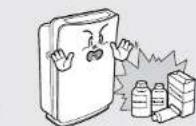
DON'T place clothes and towels on top of air cleaner while operating.

DON'T allow children to play on or near the air cleaner.

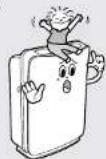

DON'T install the unit under direct light.

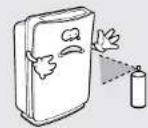
DON'T spray liquids directly into air cleaner during cleaning.
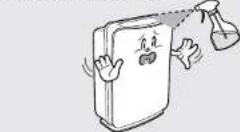
⚠ SAFETY INSTRUCTIONS
Thank you for purchasing a Winix air cleaner. Please read this manual carefully before using. This product is for household use only.
IMPORTANT CAUTIONS FOR USING YOUR AIR CLEANER
WARNING: Follow the instructions in this manual to reduce the risk of electric shock, short circuit, and/or fire:
- Do not repair or modify the unit unless specifically recommended in this manual. All other repairs should be completed by a qualified technician.
- The plug for this unit is polarized with one blade wider than the other. Do not force the plug into an electrical outlet. Do not alter the plug in any way. If the plug dose not fit into the outlet, reverse the plug. If it still dose not fit, contact a qualified technician to install a proper outlet.
- Do not use if the power cord or plug is damaged or the connection to the wall outlet is loose.
• Use AC 220 V AC / 50Hz only. - Do not damage, break, forcefully bend, pull, twist, bundle, coat, pinch, or place heavy objects on the power cord.
- Periodically remove dust from the power plug. This will reduce the risk of shock due to humidity build up.
- If the power plug is damaged, it must be replaced by the manufacturer or a qualified technician
- Remove the power plug from the outlet before cleaning the unit. When removing the power plug, grasp by holding the plug itself, never hold by the cord.
- Remove the power plug from the outlet when not in use.
- Do not handle the power plug with wet hands.
- Do not operate the unit when using indoor smoke-generating insecticides.
- Do not clean unit with benzene or paint thinner. Do not spray insecticides on the unit.
- Do not use the unit where it is humid or where the unit may become wet, such as in a bathroom.
- Do not insert fingers or foreign objects into the air intake or outlet.
- Do not use the unit near flammable gases. Do not use near cigarettes, incense, or other spark-creating item
- Unit will not remove carbon monoxide emitted from heating appliances or other sources.
IMPORTANT PRECAUTIONS FOR USING YOUR AIR CLEANER
- Do not block the intake or outlet vents.
- Do not use near hot objects, such as a stove.
- Do not use where the unit may come into contact with steam.
- Do not use the unit on its side.
- Keep away from products that generate oily residue, such as a deep fryer.
- Do not use detergent to clean the unit.
- Do not operate without a filter.
- Hold the handle on the back of the unit to transport.
- Do not hold by the front panel.
PRODUCT SPECIFICATIONS
Model WACU300 WACU450
| Room Size | AHAM Verified at 30 m2 | AHAM Verified at 45 m2 |
| Recommended Maximum Room Size | 66 m2 | 96 m2 |
| Power Supply AC 220V/50(Hz) | AC 220V/50(Hz) | |
| Power Rate Low: 4W, Turbo: 60W | Low: 11W, Turbo :110W | |
| Fan Speeds 4 4 | ||
| Display Digital Digital | ||
| Control Type | Auto / Manual | Auto / Manual |
| Remote Control | Yes | Yes |
| Air Quality Sensor | Yes | Yes |
| Light Sensor | Yes | Yes |
| AHAM Certified | Yes | Yes |
| UL Listed | Yes | Yes |
| ECARF certified | Yes | Yes |
| Energy Star Qualified | Yes | Yes |
| Check Filter Indicator | Yes | Yes |
| Cleaning System | ||
| - Washable Anti-Bacterial Pre-Filter | Yes | Yes |
| - CleancaleTM Anti-Microbial Filter Protection | Yes | Yes |
| - 99.97% effective True HEPA Filter | Yes | Yes |
| - Advanced Odor Control (AOC) Carbon Filter | Yes | Yes |
| - PlasmaWaveTM | Yes | Yes |
| CADR | Smoke / Dust / Pollen | Smoke / Dust / Pollen |
| 197 / 197 / 214 291 / 298 / 343 | ||
| Unit Size (mm, LxWxH) | 220x550x415 | 280x650x440 |
| Unit Weight (kg) | 7 kg | 8 kg |
Warning: Change or modifications to this unit not expressly approved by the party responsible for compliance could void the user's authority to operate the equipment.
NOTE: This equipment has been tested and found to comply with the limits for a Class B digital device, pursuant to Part 15 of the FCC Rules. These limits are designed to provide reasonable protection against harmful interference in a residential installation. This equipment generates, uses and can radiate radio frequency energy and, if not installed and used in accordance with the instructions, any cause harmful interference to radio communications. However, there is no guarantee that interference will not occur in a particular installation. If this equipment does cause harmful interference to radio or television reception, which can be determined by turning the equipment off and on, the user is encouraged to try to correct the interference by one or more of the following measures:
• Reorient or relocate the receiving antenna.
- Increase the separation between the equipment and receiver.
- Connect the equipment into an outlet on a circuit different from that to which the receiver is connected.
- Consult the dealer or on experienced radio/TV technician for help.
AIR CLEANER FEATURES
CAUTION: Fully assemble air filter before using (See Air Cleaner Set-Up on following page). Note: Features vary according to model.
- Quiet Operation
This Winix air cleaner has a four-speed fan with quiet operation that is ideal for night time use.
• Air Quality Sensor
This Winix air cleaner has an AIR Quality sensor that detects the presence of various pollutants in the air. The unit automatically increases fan speed to clean more air volume and remove the impurities quickly.
• Light Sensor
The built-in light sensor allows undisturbed sleep with a very smart 'Sleep Mode' option. When Sleep Mode is selected the light sensor will detect when the room is dark and automatically dim the control panel lights and lower the fan speed to the whisper quite setting. Lights will remain dim and fan will remain at the low speed until the room is light.
• Multi-Stage Cleaning
The air passes through multiple stages of cleaning before returning to the room.
- PlasmaWave™ Technology Safely breaks apart odor, allergens, chemical vapors and other pollutants at the molecular level - without producing harmful ozone.
- True HEPA Filter
Captures 99.97% of airborne pollutants, pet dander and allergens as small as 0.3 microns and can be safely washed when washing the washable pre-filter and carbon filters.

- Washable AOC™ (Advanced Odor Control) Carbon Filter Especially formulated to capture offensive Pet Odors; as well as Smoke, Cooking and other Household Odors.

- Washable Pre-Filter
The Washable Anti-Bacterial Pre-filter extends the life of your filter by capturing Pet Hair and larger airborne particles and makes housecleaning easier.

Advanced PlasmaWave™ Technology
PlasmaWave™ breaks apart airborne pollutants at the molecular level.
In a fraction of a second, PlasmaWave™ combines with naturally occurring water molecules in the air (H₂O) to create billions of Hydroxyl Radical molecules (OH).
OH is an unstable molecule that seek equilibrium by stealing hydrogen atoms from adjacent molecules containing hydrogen (the pollutants), thereby reforming them into harmless molecules of water, carbon dioxide, and other acceptable molecules.
The result is a measurable reduction of pollutants after the air passes through the Plasma Generator (PlasmaWave™).
By reforming molecules, PlasmaWave™ technology can reduce odors, as well as VOCs (chemicalvapors). It is also effective at reducing airborne.
The PlasmaWave™ technology is harmless and the OH molecule only lives for a nanosecond while it reforms surrounding molecules. Most importantly-unlike old style ion technology-PlasmaWave™ dose not produce high levels of ozone as a by-product.
When combined with a fan-and-filter air cleaning system, PlasmaWave™ offers an effective and efficient way of cleaning the air of unwanted pollutants including dust, smoke, and pollen, as well as VOCs, allergens, and odors.
AIR CLEANER SET-UP
Set-Up Procedure
- Remove protective film from the control panel.
- Remove the front panel by pulling gently on the lower portion of the panel. Do not force, the panel should remove easily.
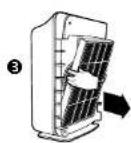
- Grasp tabs located on each side of filter and pull out the filter gently.
- Remove the plastic wrap from the filter.
- Return the filter to the air cleaner unit.
- Cover the front panel after pressing the filter change reset button.
- Plug the power cord into a wall outlet.
- Press and hold the POWER button until a short "beep" sounds.
- The air cleaner will take 3-4 minutes to calibrate the AIR QUALITY sensor. During this time the sensor lights will flash on and off. Once the sensor has calibrated, the lights will begin in AUTO mode.
- Remove tab from remote control (WACU300 / WACU450 only.)
Note: For best results and to maximize air flow:
- Place unit at least 2 feet away from the wall.
- Place the unit away from drafty areas, as the sensors may not react accurately.
- Do not place near curtains, furniture, or other items that might inhibit airflow.
- Place the unit on a stable surface.
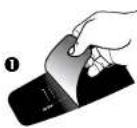
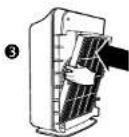
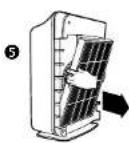
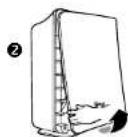
CONTROL PANEL
A. AIR QUALITY SENSOR: Automatically monitors the air quality level and adjusts fan speed accordingly in Auto.
B. AUTO Mode: Changes the mode setting to AUTO.
C. RESET: Resets the CHECK FILTER indicator light.
D. CHECK FILTER: Signals when to replace filters.
E. PlasmaWave™: Shows that PlasmaWave™ Technology is active.
F. AIR QUALITY: Green, yellow, and red lights indicate the quality of the air.
G. Turbo / High / Med / Quiet: Shows current fan speed setting.
H. SPEED: adjusts fan speed to QUIET, MED, HIGH or TURBO.
I. ☎: Turns the unit On and Off.
J. LIGHT SENSOR: dims the control panel lights and sets the fan speed to QUIET when the room is dark.

OPERATIONS
AUTO Mode: The unit is set to AUTO mode when it is first turned on. The air cleaner will actively monitor the air and adjust the fan speed accordingly to quickly remove any impurities detected. When the room is dark, the light sensor will automatically switch the unit to QUIET fan speed and dim the control panel lights.
MANUAL OPERATION: After you turn on the unit, you can switch to manual operation by using the SPEED button. To go back to the automatic operation press AUTO.
QUIET, MED OR HIGH: These levels are recommended for standard daytime use. HIGH will activate automatically when sensors detect poor air quality in AUTOMATIC OPERATIONS. Use the SPEED button to select the required level.
TURBO: This is the highest fan speed. It can be activated manually for maximum air purification by pushing the SPEED button until the light by Turbo is illuminated.
PlasmaWave™: Push the Auto button for 3 seconds to turn on or off.
Filter Replacement and Cleaning
| Filter Service life Cleaning Cycle How to clean | |||
| Washable Pre filter | 12 month | every 3 month | Clean with vacuum cleaner or soft brush, Use a lukewarm water when the filter is very dirty |
| Washable HEPA filter | 12 month | every 3 month | Put the filter into the lukewarm water for 30 minutes and dry it out in the shade for 24 hours |
| Washable AOC ^TM Carbon filter | 12 month | every 3 month | Put the filter into the lukewarm water for 30 minutes and dry it out in the shade for 24 hours |
| Filter Cassette | 12 month | - | - |
FILTER REPLACEMENT
Filter Replacement
- The CHECK FILTER indicator will signal when to replace the entire Filter Cassette. The replacement period will vary depending on the hours of usage, air quality, and location of the unit. However, in most cases of normal use the filter will need to be replaced annually.
- Change the Filter Cassette when the CHECK FILTER indicator is on.
- This filter should be disposed of when changed.
CAUTION: Turn off the air cleaner and unplug the electrical cord before performing any maintenance.
Filter Cassette Replacement
- Turn off the air cleaner and unplug the electrical cord.
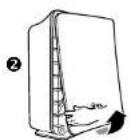
- Remove the front panel by pulling gently from the lower portion of the panel. Do not force, the panel should remove easily.
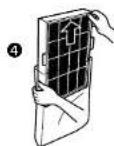
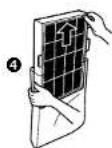
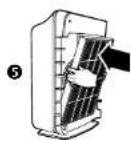
- Remove the Filter Cassette by gently pulling out from the bottom and down from the top.
- Remove the plastic wrap from the filter.
- Install the Filter Cassette by inserting tabs up into the air cleaner and gently pushing in at the bottom tab until the frame fits into place snuggly.
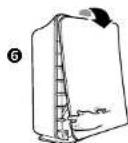
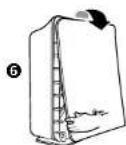
- Replace the front panel by hooking the panel on the top of the unit. Swing the panel in by pushing gently on each side of the unit and then lock it into place.
- Plug in air cleaner and press POWER button until short "beep" sounds.
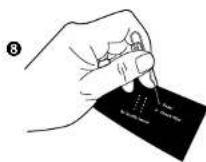
- Press the RESET FILTER button by gently inserting a paperclip into the RESET FILTER hole on the control panel. The light will flash 5 times before a "beep" sounds to indicate the filter has been reset. See figure C on page 8 or Diag. 9 to the right.
The air cleaner will take 3-4 minutes to calibrate the AIR QUALITY sensor. During this time the sensor lights will flash on and off. Once the sensor has calibrated, the lights will stop flashing and the unit will begin in AUTO mode.
REMOTE CONTROL
BATTERY REPLACEMENT
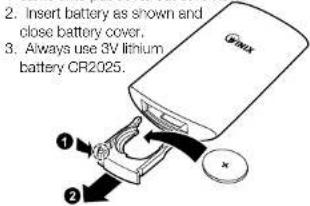
- Squeeze tabs of battery cover and at the same time pull cover out of remote.
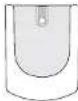
CRADLE: The remote control has a separate wall-mountable storage cradle that can be conveniently attached to any wall using a screw.
BATTERY USE
• Always use 3V lithium battery CR2025
- Incorrect battery usage may cause
battery fluid leakage and/or damage.
- When not using remote control for an extended period, remove the battery.
- Avoid dropping or damaging the remote control.
PROPER OPERATING CONDITIONS
- Operate the remote control facing the air cleaner.
- Operate within 20 feet of the air cleaner.
IMPROPER OPERATING CONDITIONS
- Any location where there is inverter lighting equipment or electronic spontaneous lighting equipment.
- When objects or furniture are located between the remote and the air cleaner.
- When air cleaner unit is located in direct sunlight, as sunlight may interfere with the infrared sensor.
• In areas where fluorescent lighting is flickering due to worn-out bulbs. - Keep remote control away from direct sunlight or heaters.
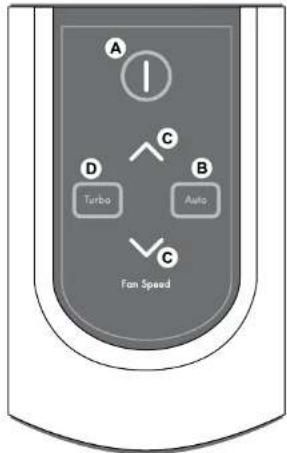
A. POWER: Use the power button to turn the power on and off. A short "beep" will sound when the unit turns on o off.
B. AUTO Mode: Use the AUTO button to eput air cleaner in AUTO mode.
C. FAN SPEED: By pressing up or down, the unit will change fan speeds and enter into manual mode.
D. TURBO: Use this button to switch from automatic operation and begin the maximum amount of room air cleaning and air movement and will remain in Turbo speed until changed into Auto or Manual mode.
TROUBLESHOOTING
Before You call
Solutions to Common Problems
Before you call for service, review the list below. This list covers problems that are not the result of defective materials or workmanship.
OCCURRENCE POSSIBLE CAUSE / SOLUTION
| The remote control dose not work. | Make sure the remote control battery is inserted correctly, close not work.Replace a worn-out battery.Make sure that the remote control has a clear line of slight to the air cleaner. |
| The unit has stopped removing odors effectively, or seems to be emitting an odor. | Make sure the AIR QUALITY sensor is not blocked or clogged.Move the unit closer to the offending odors.Replace the filters as they may have reached their capacity to absorb pollutants. You may need to replace filters more frequently. |
| The AIR QUALITY LEVEL indicator is orange or red, but the air seems clean. | Clear the AIR QUALITY sensor with a vacuum cleaner as it may be blocked or clogged. |
| Unit interferes with radio or television reception. | Because this unit radiates radio frequency energy, try one or more of the following suggestions:Reorient or relocate the receiving antenna.Increase the distance between the equipment and the air cleaner.Connect the air cleaner to an outlet on a circuit different from that to which the equipment is connected.Consult an experienced television/radio technician. |
| The CHECK FILTER indicator remains lit after replacing the Filter Cassette. | Press the RESET FILTER button by gently inserting a paper-clip into the RESET FILTER button hole. Hold for 3-5 seconds until a “boep” sounds to indicate the unit has been reset. |
| The unit does not remove smoke and odors in the air. | Make sure the sensor is not blocked or clogged.- The filters may need replacement |
| The unit seems to produce odors. | Move the unit closer to the offending odors.- Replace the filter |
| OCCURRENCE POSSIBLE CAUSE / SOLUTION | |
| The air quality light is green, but there is still dust/odor in the air. | Replace the filters as needed. |
| The air quality light is yellow or red, but the air seems clean. | Clear the sensor with a vacuum cleaner, as it may be blocked or clogged.Sometimes a compressed can of air may unclog the dust in the sensor. |
| Unit makes a ticking sound. | This is caused by the PlasmaWaveTM. technology, it may come and go depending on the environment, but as long as the PlasmaWaveTM light is on, the function is working. |
| Unit interforces with radio or television reception. | Because this unit radiates radio frequency energy, we suggest you try one or more of the following:For better reception, adjust the television/radio antenna.Move the unit away from the affected television/radio.Plug the unit power cord into an outlet different from the television/radio power cord. |
| The Remote Control Does Not Work | Make sure the battery is installed properly.Make sure the battery may not need replacing due to being worn out.Make sure the remote has a clear line of sight to the air cleaner. |
| There is still some dust you can see in the air or on my furniture | The unit will capture most dust and particles, however with opening doors, windows, central HVAC etc... there may still be some level of dust that you can see. |
| There is nothing holding the filters in place | The filters are meant to rest inside the unit. Once the unit is turned on, the force of air pulled through the machine will create a tight seal of the filters. |
| I can hear revving of the fan motor | This is normal, especially at night when all environmental sounds are quiet, you may hear the motor running in repetition. |
| The unit is running on high all the time. | Clear the sensor with a vacuum cleaner, as it may be blocked or clogged.Sometimes a compressed can of air may unclog the dust in the sensor. |
| OCCURRENCE POSSIBLE CAUSE / SOLUTION | |
| The unit is running on high all the time. | Clear the sensor with a vacuum cleaner, as it may be blocked or clogged.- Sometimes a compressed can of air may unclog the dust in the sensor. |
| Can I vacuum my filter? | NO - vacuuming will only spread the dust back into the air. If you think the filter is too dirty, it may be time to replace. |
| There is an odor coming from the unit and I just opened it. | The unit has been concealed in a tightly wrapped package of currogated cardboard and plastic. Because this has a fan and pulls air through it, it may give off some "new" odors. Depending on sensitivity, this should wear off in several days or perhaps a week depending on how much it is used. |
| I am not sure what filter to buy? | Go to www.winixinc.com to see which filter options are available for your unit by reviewing the reference chart. |
| Will this clean a bigger area than what it is rated for? | CADR ratings are provided from a controlled testing environment, if that environment changes, it can affect the performance. However if you have a slightly larger room than what the CADR rating is, it will still help improve the air, but may take a bit longer to do so. |
| Where should I place the unit? | At least 2 feet away from the wall to allow proper circulation around the unit. If there are doors or narrow hallways it may reduce the airflow to the air cleaner, but will eventually circulate near the machine. |
| Can I turn off the sleep mode? | No, however you can manually push what fan speed you prefer which will stay at that speed until you change it. |
| The unit has stopped removing odors effectively, or seems to be emitting an odor. | Make sure the AIR QUALITY sensor is not blocked or clogged.Move the unit closer to the offending odors.Replace the filters as they may have reached their capacity to absorb pollutants. You may need to replace filters more frequently. |
Notes Notes
Model : WACU300, WACU450
Winix-Luftreiniger
Made in Korea
Kontakt
WINIX USA 120 Prahe Lake Road. Unit E East Dundee, Illinois 30' 18 www.wrihnc.com. E-Mail: info@winxrc.com Tel: -1.847.551.9930
WINIX Europe Hotspordoneel 74, 110° BG, Amsterdam Niederlande www.eriikeu.com Tel: -31 202602107
natural_image
Two white WACU devices labeled WACU300 and WACU450, showing front and back views (no additional text or symbols visible)ACHTUNG:
natural_image
Illustration of a book character standing beside a steaming box, with no text or symbols present.Model : WACU300, WACU450
Winix-luchtreiniger
Gemaakt in Korea
Contact
WINIX USA 120 Prahe Lake Road, Unit D East Duncoe, Illinois 30' 18 www.wrikin.com E-Mail: info@winxrc.com Tel: -1.847.551.9900
WINIX Europe Hotspordreal 74, 110° BG, Amsterdam www.wrikeu.com Tel. -311020-3832107
natural_image
Two white industrial air purifiers labeled WACU300 and WACU450, shown from different angles (no additional text or symbols visible)LET OP:
Productspecifications 8
BEPERKTE PRODUCTGARANTIE
DEPERKTE GARANTIE VOOR WINIX SIGNATURE™-LUCHTREINIGERS
Model WACU300 EN WACU450
• Winix-luchtreiniger (1 stuks)
• Filtercassettemet:
WAARSCHUWING: VEILIGHEIDSVOORSCHRIFTEN WAARSCHUWING / OPMERKING AANWIJZING
natural_image
Illustration of a hand using a tool to test electrical shock hazard (no text or symbols)natural_image
Cartoon illustration of a smiling book character standing on a ruler, with no text or symbols present.Gebruik
natural_image
Illustration of a book character being stopped by a box, with no text or symbols presentnatural_image
Cartoon illustration of a distressed open book with a surprised expression, accompanied by smaller bottles and a prohibition symbol (no text or labels)
Opmerking
▶ Stroom
Model WACU300 WACU450
- Contact Us
- CAUTION:
- LIMITED PRODUCT WARRANTY
- PACKAGE CONTENTS
- Models WACU300 AND WACU450
- INSTRUCTIONS
- Warning
- Power Cord
- Power
- ▶ Operation
- Note
- Operat
- ⚠ SAFETY INSTRUCTIONS
- IMPORTANT CAUTIONS FOR USING YOUR AIR CLEANER
- IMPORTANT PRECAUTIONS FOR USING YOUR AIR CLEANER
- PRODUCT SPECIFICATIONS
- AIR CLEANER FEATURES
- - Quiet Operation
- • Air Quality Sensor
- • Light Sensor
- • Multi-Stage Cleaning
- - True HEPA Filter
- - Washable Pre-Filter
- Advanced PlasmaWave™ Technology
- AIR CLEANER SET-UP
- Set-Up Procedure
- CONTROL PANEL
- OPERATIONS
- FILTER REPLACEMENT
- Filter Cassette Replacement
- REMOTE CONTROL
- BATTERY REPLACEMENT
- BATTERY USE
- PROPER OPERATING CONDITIONS
- IMPROPER OPERATING CONDITIONS
- TROUBLESHOOTING
- Before You call
- Solutions to Common Problems
- Notes Notes
- Kontakt
- ACHTUNG:
- Contact
- LET OP:
- BEPERKTE PRODUCTGARANTIE
- DEPERKTE GARANTIE VOOR WINIX SIGNATURE™-LUCHTREINIGERS
- Model WACU300 EN WACU450
- Opmerking
- ▶ Stroom
Brand : Winix
Model : U300-EU
Category : Uncategorized