
OperaView - Binoculars Carson - Free user manual and instructions
Find the device manual for free OperaView Carson in PDF.


| Product Type | Binoculars |
| Brand | Carson |
| Model | OperaView |
| Focus System | Center focus wheel with independent right diopter adjustment |
| Eyecup Type | Fold-down or twist-up (depending on model) |
| Interpupillary Adjustment | Rotating barrels |
| Diopter Adjustment | Independent right eyepiece |
| Lens Cleaning | Use microfiber cloth and lens cleaning fluid; avoid abrasives |
| Lens Cover | Not included (some models) |
| Water Resistance | Non-waterproof; avoid excessive moisture |
| Safety Warning | Do not view the sun to prevent permanent eye damage |
| Customer Service (US) | info@carson.com |
| Customer Service (UK) | uksupport@carson.com |
| Customer Service (EU) | eusupport@carson.com |
| Warranty Information | www.carson.com/warranty |
| Manufacturer Address | Carson Optical, 2070 5th Avenue, Ronkonkoma, NY 11779 |
| Approximate Weight | 350 g (estimated) |
| Approximate Dimensions | 160 x 120 x 50 mm (estimated) |
Frequently Asked Questions - OperaView Carson
User questions about OperaView Carson
0 question about this device. Answer the ones you know or ask your own.
Ask a new question about this device
Download the instructions for your Binoculars in PDF format for free! Find your manual OperaView - Carson and take your electronic device back in hand. On this page are published all the documents necessary for the use of your device. OperaView by Carson.
USER MANUAL OperaView Carson
Congratulations on selecting your new Carson Binocular! In order to achieve optimum performance, please follow instructions for proper use and care.
natural_image
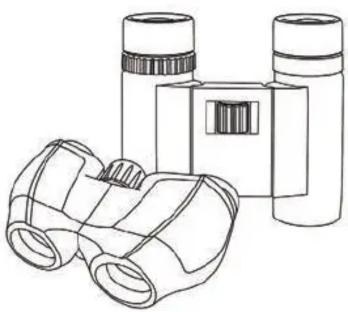
Line drawing of binoculars and a box (no text or symbols)EYE ADJUSTMENTS: HOW TO ADJUST FOR DISTANCE BETWEEN THE EYES
The distance between the eyes, interpupillary distance, varies from person to person. To achieve perfect alignment of lens to eye:
- Hold binoculars in normal viewing position.
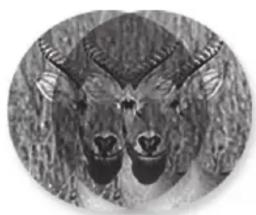
- Rotate barrels closer or farther apart until you see a single circular field.
Single Circular Field
natural_image
Close-up grayscale image of a deer's head with horns and beak (no text or symbols)
natural_image
Black-and-white circular portrait of a deer with antlers (no text or symbols)INDIVIDUALLY ESTABLISHING LEFT/RIGHT EYE FOCUS:
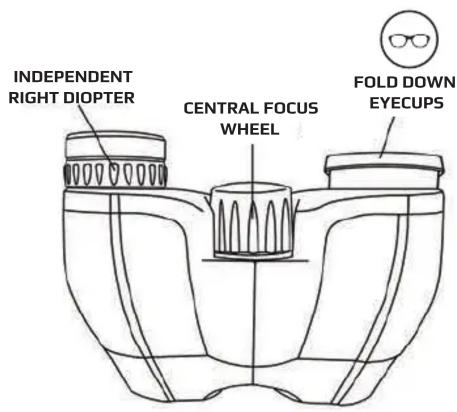
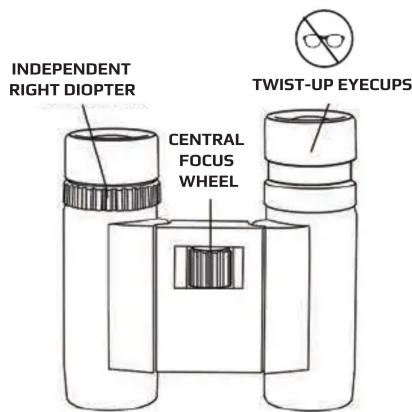
Most binoculars have a center focus wheel and an independent right diopter eyepiece to account for small differences in the strength of each eye. Please follow the steps below to focus properly:
- Eyecups should be fully extended if you don't wear glasses. If you wear glasses, twist/roll down eyecups to bring your eyes closer to the binocular lens.
- With right eye closed, rotate the central focusing kwheel until the image in the left eyepiece is sharp.
- With left eye closed, rotate the independent right diopter eyepiece until the image is sharp.
- Image should now be focused to your individual eye strength and will retain setting for future use.
Note: If you still cannot focus, rotate adjustable right diopter to reset by lining up symbols (triangle, line, circle, etc.) on diopter eyepiece and barrel. Then repeat Focusing Steps 2 and 3.
FOCUSING YOUR BINOCULARS:
While viewing an image, adjust the center focus wheel for distance.
CLEANING AND CARE:
Cleaning must be done safely and carefully to avoid scratching the lenses and permanently damaging your binoculars. Safe cleaning can be accomplished by following the procedure below:
- Blow away any dust or debris on the lens (or use a soft lens brush).
- To remove dirt, grease, or fingerprints, clean with a microfiber cloth, rubbing in a circular motion. Use of a coarse cloth may scratch the lens surface and eventually cause permanent damage.
- For a more thorough cleaning, photographic type lens cleaning fluid may be used. Always apply the fluid to the cleaning cloth, never directly to the lens. Do not use any abrasives, chemical cleaners, or solvents.
- Never attempt to clean your binoculars internally or try to take them apart. This may cause the internal optical components of your binoculars to become misaligned resulting in a double image when looking through them.
- Keep the lens cover (not included with some models) on the lenses when binoculars are not in use.
- Non-waterproof models should not be exposed to excessive moisture.
Caution: Do not view the sun with this binocular. Viewing the sun can cause permanent eye damage.
Customer Service: If you experience any difficulties, please contact us and we will be happy to help you.


info@carson.com


uksupport@carson.com


eusupport@carson.com
For warranty information, visit www.carson.com/warranty
www.carson.com
Carson Optical 2070 5th Avenue, Ronkonkoma, NY 11779 | Tel: 631-963-5000

Brand : Carson
Model : OperaView
Category : Binoculars