WAT-910HX MBD - Security Camera Watec - Free user manual and instructions
Find the device manual for free WAT-910HX MBD Watec in PDF.


User questions about WAT-910HX MBD Watec
0 question about this device. Answer the ones you know or ask your own.
Ask a new question about this device
Download the instructions for your Security Camera in PDF format for free! Find your manual WAT-910HX MBD - Watec and take your electronic device back in hand. On this page are published all the documents necessary for the use of your device. WAT-910HX MBD by Watec.
USER MANUAL WAT-910HX MBD Watec
This operation manual covers safety, camera functions, installation and the correct operating procedure for the WAT-910HX MBD. First, we ask you to read this operation manual thoroughly, then install and operate the WAT-910HX MBD as advised. In addition, for future reference, we also advise safekeeping of this manual.
Please contact the distributor or dealer from which the WAT-910-HX MDD was purchased, if you do not understand the installation, operation or safety instructions laid out in this manual. Not understanding the contents of the Operation Manual sufficiently may cause damage to the camera.
Guide to the Safety Symbols
The definitions of the symbols used in this operation manual are:

When you do not adhere to or take notice of the "Danger" sign, it may lead to a serious accident such as death or injury caused by fire or electric shock.

When you do not adhere to or take notice of the "Warning sign, it may cause severe damage such as a physical injury. When you do not adhere to or take notice of the "Caution" sign, it may incur injury and cause damage to peripheral objects in the immediate surroundings.

Cautions for Safety
The WAT-910HX MBD is designed to be used safely; however, it may lead to a physical accident caused by fire and electric shock if not used correctly. Therefore, please keep and read the "Cautious for safety" below for protection against accidents.
- Do not disassemble and/or modify the WAT-910HX MBD. - Do not operate the WAT-910HX MBD with wet hands.

Use a stabilized power adaptor designed for DC+12V±10%, with a current capacity of more than 250mA for the WAT-910HX MBD.
The recommended voltage is DC-12V±10%
- Do not expose the WAT-910HX MBD to wetness or high moisture conditions.
The WAT-910HX MBD is designed and approved for indoor use only. The WAT-910HX MBD is not water-resistant or waterproof. If the location of the camera is outdoors or in an outdoor like environment, we recommend that you use an outdoor camera housing.
- Protect the WAT-910HX NBD from condensation.
Keep the WAT-913HX MBD dry at all times during storage and operation.
- Should the camera not work properly, switch off the power immediately. Then, check the camera according to the [Problems and Trouble Shooting] section.

Avoid the striking of hard objects or dropping the WAT-910HX MBD. The WAT910HX MBD uses high quality electrical parts and precision components.
- Do not connect any power supply directly to the video out terminal of the unit.
Do not connect the WAT-910HX MBD with any monitor using a video/power single transmission terminal. The WAT-910HX MBD is not designed for use with this type of equipment. We also advise you to read the operation manual at the men for you plan to use before any connections are made.
- Do not install the WAT-910HX MBD in a position subject to direct sunlight.
Sunlight shining directly onto the WAT-910HX MBD lens can cause damage to the CCD.
- Select a stable place for installation of the WAT-910HX MBD. Always fix the camera securely. See 'Mounting Holes' section.
- Do not move the WAT-910HX MBD with theables connected.
Before moving the WAT 9'0HX MBD, always remove the video cable and power cable from the rear of the camera first.
- Avoid using the WAT-910HX MBD near any strong electromagnetic field. After installing into main equipment, if the WAT-910HX MBD is exposed to electromagnetic waves causing the monitored image to become distorted, we recommend the camera be shielded by appropriate protective casing.
Problems and Trouble Shooting
If any of the following problems occur when using the WAT-910HX MBD.
* An optimal picture cannot be obtained, after checking that all the cables and connections are correctly in place
• Smoke or any unusual odor emerges from the WAT910HXMED
* An object becomes embedded or a quantity of liquid soaps into the camera housing
* More than the recommended voltage brand amperage has been applied to the WAT-910HX MBD by mistake
- Anything unusual occurring to any equipment connected to the WAT910HX MBD.
Disconnect the camera immediately according to the following procedures:
①Switch off the main power supply to the camera.
Remove the power and video cables connected to the WAT-910HX MBD.
Contact the distributor or dealer from which the WAT-910HX MBD was purchased
Contents
Using the contents figures below, check to make sure all parts are present before use.

WAT 910HX MBD
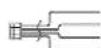
Power and Video Cable
Description of Parts
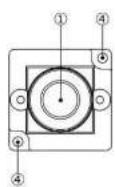
① LENS FRONT FACE
The light receiving face of the lens (lit, water or oil deposits on the lens will cause an unclear picture on the monitor. Attach the lens cap to protect the lens from contamination and damage.)
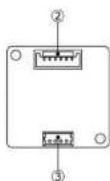
22 OSD | On Screen Display | CONNECTOR
The terminal designed for connection with remote control for setting the functions on the screen.
POWER INVIDEO OUT
The terminal for power input and video signal output. Use the attached power and video cable for this purpose
④ MOUNTING HOLES
Four 2.2mm diameter holes in each corner for mounting the camera.
Power Supply and Wiring
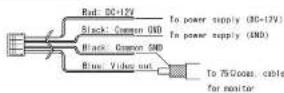
Use a stabilized power adaptor designed for DC-12V±10%, with a current capacity of more than 250mA
The wiring on the connector must be exact.
Be careful not to touch the other terminal while wiring. Protect the wiring portion by using insulation tape after wiring. If the above case and attention is not adhered to, damage to the WAT-910HX MBD and power adaptor may occur or may cause tire.
Power and Video Cable
Mounting Holes
As shown in the figure on the right. The WAT-910HX MBD provides two mounting holes, one in each corner of the circuit board. Fix the unit securely using M2 screws. Once the board is secured proceed with the following steps below:

Set-up and Operation
1) Referto the "Power Supply and the wring" must be exact
2) Join the video out cable with the video in cable of the monitor or peripheral equipment.
3) Join the power supply using the correct procedure.
4) Make sure that a picture can be seen on the monitor:
5) To focus, turn the lens clockwise or counterclockwise while observing the picture on the monitor. Take case when focusing not to scratch or damage the lens.
Options
To purchase these options, please contact the distributor or dealer from which you purchased the WAT-910HX MBD.

Remote Controller(RC 01)
Remote control for controlling the On Screen Display menu to change camera settings.

Cable with BNC, socket and connector (GB-01)
The cable with BNC/DC socket. (Cable Length: 1m)
Specifications
| Model | WAT-910HX MBD (EIA) | WAT-910HX MBD (CCBF) | |
| Pick up Element | 1/3 inch interline transstr CCD image sensor | ||
| Number of Total Pixels | 611(H)x507(V) | 795(H)x585(V) | |
| Number at Effective Pixels | 768(H)x494(V) | 752(H)x582(V) | |
| Unit Cell Size | 6.5um(Φ)x7.5um(V) | 6.5um(H)x6.3um(V) | |
| Sync. System | Internal | ||
| Scanning System | 2.1 Interface | ||
| Video Output | Composite video, 1.0 Vp. p) 750 (Urbanized) | ||
| Resolution (H) | More than 570TVL (Center) | ||
| Minimum Illumination | 0.00000 b. F1.8 (AGC: 48dB, SENS UP ON) | ||
| S/N | More than 50dB | ||
| Function settings | OSD(On Screen Display) operated by optional remote controller | ||
| AC Mode | EI | 1/60~1/10000 sec. | 1/50~1/10000 sec. |
| x6~1/130000 sec. | |||
| Fixed | x2, x4, x8, x16, x32, x41, x126, x256 (field) | ||
| 1/50, 1/120 sec. | 1/50, 1/100 sec. | ||
| 1/250, 1/500, 1/1000, 1/2000, 1/4000, 1/10000 sec. | |||
| AGC | 0 -42dB (Up to 48dB) | ||
| MOC | 6~48dB (6dB select) | ||
| Noise Reduction | Level selectable | ||
| ATR | ON/OFF | ||
| Motion Detection | ON/OFF | ||
| Back Light Compensation | OFF/BLC/HLC | ||
| Delog | ON/OFF | ||
| Digital Zoom | x1-x256 | ||
| Privacy mask | 15 marks | ||
| Mirror Image | OFF/V/H/HV | ||
| White Biomish Correction | Up to 64 dots | ||
| Power Supply | DC+12V+13% | ||
| Power Consumption | 0.9BW (80mA) | ||
| Operating Temperature | -10 -50°C | ||
| Operating Humidity | Less than 95% RH (Without condensation) | ||
| Storage Temperature | -30 ~+70°C | ||
| Storage Humidity | Less than 95% RH (Without condensation) | ||
| Lens Lens | M12 P=0.5 | ||
| LENS | G3.7(=3.7mm, F1.8)/P3.5(=3.3mm, F2.4) | ||
| Size | 23Wx23(H)x37(D) (mm) | ||
| Weight | G3.7:约14g, P3.5:约10g | ||
- Design and specifications are subject to change without notice.
*Walec is not responsible for any inconvenience or the attendant damages to the video and monitoring recording equipment caused by misuse, miss operation or improper wiring of our equipment.
- If for any reason the WAT-910HX MBD does not work properly, or if you have any questions regarding installation or operation, please contact the distributor or dealer from which it was purchased.
Contact information

Watec Co., Ltd.
Add: 254.2 Nbronicki, Dalchi, Taurupis, Shi
Yamagata Ken, 997-0017 Japan
TEL: +81 235 20 4400 FAX +11 235 20 4409
Email: irloc@wdec.co.jp
URL http://www.atec.co.jp
1673200 Y2000001