
SmartTenne 2 HD - TV Antenna TECHNISAT - Free user manual and instructions
Find the device manual for free SmartTenne 2 HD TECHNISAT in PDF.


| Product Type | TV Antenna |
| Brand | TechniSat |
| Model | SmartTenne 2 HD |
| Frequency Range | VHF: 87.5-230 MHz; UHF: 470-790 MHz |
| Gain | 28 dB |
| Max Output Level | 100 dBμV |
| Power Supply | DC 5V 40mA (via set-top box) or DC 12V 200mA (via AC/DC adapter) |
| Impedance | 75 ohms |
| Connector | F-type |
| Noise Figure | ≤3 dB |
| Receiving Range | FM, VHF, UHF |
| LTE Filter | Built-in |
| Amplifier | Built-in high gain, low noise |
| Housing | Anti-UV coating, waterproof |
| Mounting Options | Wall or pole mount (brackets included) |
| Indoor/Outdoor Use | Both |
| Compatibility | DVB-T, ISDB-T, DMB-T/H, ATSC, DAB radios |
| Included Accessories | Antenna main unit, pole mounting accessories, indoor stand, AC/DC adapter, power insert, coaxial cable |
| Installation Power Options | Powered by set-top box (5V) or included AC/DC adapter (12V) |
Frequently Asked Questions - SmartTenne 2 HD TECHNISAT
User questions about SmartTenne 2 HD TECHNISAT
0 question about this device. Answer the ones you know or ask your own.
Ask a new question about this device
Download the instructions for your TV Antenna in PDF format for free! Find your manual SmartTenne 2 HD - TECHNISAT and take your electronic device back in hand. On this page are published all the documents necessary for the use of your device. SmartTenne 2 HD by TECHNISAT.
USER MANUAL SmartTenne 2 HD TECHNISAT
Installation powered by AC/DC Adapter
(step 1) Connect the coaxial cable with antenna and the power insert (the side with "antenna" text mark).
(step 2) Connect the other side of power insert to DTV set-top-box.
(step 3) Connect the DTV set-top-box to your TV
(step 4) Connect the power adapter DC output jack to the DC input connector of the Power insert, and then plug the AC/DC power adapter into the AC power socket.
(step 5) Adjust the antenna in the best position that can get clear TV picture, then fix the antenna
(step 6) Organize the Coaxial Cable for neat, tidy and safety.
Contact:
e-mail: biuro@technisat.com

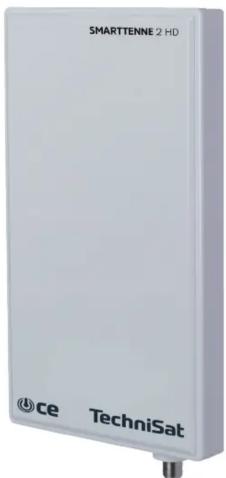
SMARTTENNE 2 HD
Antenna for digital terrestrial TV broadcasting reception with LTE filter.

ce
TechniSat
INTRODUCTION
This is a special designed antenna for digital terrestrial TV broadcasting reception with LTE filter. It is the best solution for home reception and digital portable TV reception without LTE frequency's. The antenna SMARTTENNE 2 HD is an active antenna that can be used with TV or Set-top-box which can be powered by coaxial cable or external power adaptor. Complete accessories are included for wall or polel mounting. With the anti-UV and water proof housing, it can be used both indoor and outdoor.
Technical Data:
• Frequency range: VHF: 87.5-230MHz; UHF: 470-790MHz
- Gain: 28dB
• Max. Output level: 100dBμV
• Power supply: by set-top box (DC 5V 40mA) or AC/DC adapter (DC 12V 200mA)
- Impedance: 75
- Connector: F connector
• Noise figure: ≤3dB
• Receiving range: FM/VHF/UHF
- LTE filter
Features:
Note: For the best reception, please check the following conditions
-
Keep the antenna away from the sources of interference: keep the antenna away from those big power consumption devices, such as air conditioner, elevator, hair dryer and microwave oven...ect.
-
Place the antenna near windows when use the antenna in indoor environment.
-
Install the antenna as high as possible: in digital terrestrial reception, if there are some interceptions between antenna and transmission tower, it will cause the signal loss temporary. So if the antenna is installed as high as possible, those interceptions will be reduced.
Product Features:
• Built-in LTE Filter
• Stylish and compact size design
• Shielded for minimum interference.
• Built-in high gain and low noise amplifier
- Portable for mobile use (camping, boating, etc)
• Anti-UV coating and waterproof design for durability
- Powered by DTV set-top box or included separate power adapter.
- Specially Compatible with HDTV of various digital terrestrial signal (DVB-T, ISDB-T, DMB-T/H, ATSC) and DAB radios.
Scope of delivery:
Before start your installation, please check the contents.
- Antenna main unit
- pole mounting accessories
- Supporter for indoor use
- AC/DC power adaptor
- DC power insert
- Coaxial cable
Mounting the antenna:
This antenna can be used outdoor, with the included mounting accessories, it can be mounted on the wall or the pole.
(step 1) use the pole mounting accessories to fix the antenna on the pole.
(step 2) use the wall mounting accessories to fix the antenna on the wall.
(step 3) connect the "F" male connector of the coaxial cable to the "F" female connector of the antenna, and wear the water-proof cap to the end of the connected "F" connector.
Note: After the antenna mounting is finished, please move the antenna to a best reception position and then fix it. Please take reference of following 2 different positioning way to adjust the antenna position.
(step 4) through the fixing screw A to adjust the SmartTenne 2HD position in vertical direction
(step 4) through the fixing screw B to adjust the antenna position left or right in horizontal direction
Installation powered by DTV set-top-box
Please be noticed, in this installation, you need to make sure that your set-top-box can support coaxial cable 5V DC powering via the IEC or F connector to antenna.
(step 1) Connect the coaxial cable with antenna and DTV set-top-box
(step 2) Connect the DTV set-top-box to your TV. Please make sure the coaxial cable powering function of your STB is ON. (Please check The operational manual of your STB for coaxial cable powering function)
(step 3) Adjust the antenna in the best position that can get clear TV picture, then fix the antenna
(step 4) Organize the Coaxial Cable for neat, tidy and safety.
Brand : TECHNISAT
Model : SmartTenne 2 HD
Category : TV Antenna