
BFit2 - Sports Watch Lamax - Free user manual and instructions
Find the device manual for free BFit2 Lamax in PDF.


| Product Type | Sports Watch / Fitness Tracker |
| Brand | Lamax |
| Model | BFit2 |
| Display | 0.96" Color Screen |
| Dimensions (Body) | 44 mm × 18 mm × 12 mm |
| Weight | 22 g |
| Battery | 90 mAh Li-ion (up to 10 days depending on usage) |
| Charging | USB 5V / 500 mA (1-2 hours) |
| Water Resistance | IP67 (up to 1 meter for 30 minutes) |
| Connectivity | Bluetooth 4.0 (BLE) |
| Compatibility | Android 5.1+ & iOS 8.0+ |
| Main Functions | Step counter, heartbeat monitor, sleep monitor, alarm, stopwatch, calorie tracker, caller ID, SMS notifications, camera remote control, weather forecast, GPS support via phone, stretch reminder, movement tracking |
| Controls | Capacitive button and wrist gesture |
| Heart Rate Monitoring | Manual, interval, or automatic measurement; logs in app |
| Sleep Monitoring | Automatic detection; detailed phases, start/end times; daily/weekly/monthly data in app |
| Camera Remote | Shake bracelet to activate; 3-second countdown then photo |
| Notifications | Incoming calls, SMS, and app notifications (configurable in app) |
| Spare Parts / Repairability | Removable body for charging; band replacement possible |
| Care & Maintenance | Keep device monitored while charging; avoid extreme temperatures; clean with soft cloth; do not expose to water beyond IP67 rating |
| Safety | Do not disassemble; avoid impact; keep away from children; charge with specified adapter only; remove if skin irritation occurs |
Frequently Asked Questions - BFit2 Lamax
User questions about BFit2 Lamax
0 question about this device. Answer the ones you know or ask your own.
Ask a new question about this device
Download the instructions for your Sports Watch in PDF format for free! Find your manual BFit2 - Lamax and take your electronic device back in hand. On this page are published all the documents necessary for the use of your device. BFit2 by Lamax.
USER MANUAL BFit2 Lamax
LAMAX BFit2 meets the most frequent requirements of today, such as: Color screen
-Reliable firmware and first-class apps
-GPS support via a Weather forecast
Charging and replacing the bracelet
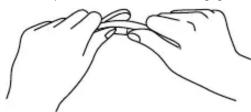
Remove the body of the bracelet from the band as depicted on the picture. Charge the bracelet before its first use – connect it to a USB charger or the USB port of your computer. Touching the capacitive button will display information about the charging process. Recharging the whole battery takes about 1–2 hours. Keep track of the device while it is charging.
Initial installation of the mobile app and pairing the bracelet
The bracelet is compatible with Android 5.1 and higher & iOS 8.0 and higher. The mobile app used to control and pair the bracelet is available at the following link:


https://www.lamax-electronics.com/download/lamax-bfit2/app
Activate Bluetooth on your phone. Turn your bracelet on by keeping the capacitive button pressed for 3 seconds. You can pair the bracelet with the phone: a) via the mobile app by going to the Profile tab, selecting Pair Device under the icon and then clicking on the name of the Bluetooth device (BFit2), or
b) when starting the app for the first time, there will be a prompt asking to pair devices, and there it suffices to choose the device titled BFit2. If the bracelet is not paired and in search mode, there will be an CX icon next to the battery status in the upper left part of the screen. After pairing, the icon changes to .
Controls
The bracelet can be controlled with your wrist or by touch. Turning the wrist with the bracelet horizontally activates the screen, which will then display the current time, date, day, battery status, weather forecast (if the given screen mode allows it) and active connection to your mobile.
Touching the bracelet button controls the following activities:
| Activity | Gesture |
| Turn the brace - let on | Press the capacitive button for at least 3 seconds. BFit2 will turn on and display the start screen, and will also respond by vibrating. |
| Turn the screen on | Press the capacitive button or turn the wrist into horizontal position. |
| Switch between items | Press the capacitive button. |
| Confirm | Press and hold the capacitive button. |
| Go back | Press and hold the capacitive button. Careful – for interactive icons this will take you to the advanced function of the icon. |
| Turn the bracelet off | To turn the bracelet off, go to the 📊 icon. Seek out the off icon + and confirm the selection by pressing and holding. |
Bracelet functions
| -Date and time | -Camera remote control |
| -Weather forecast | -Stretch reminder |
| -Sleep monitor | -Alarm |
| -Step counter | -Stopwatch |
| -Calorie burned indicator | - Display of caller's identity and of incoming messages (Call, SMS) |
| -Heartbeat monitor |
Pulse rate monitoring
Seek out the icon (symbolizing the measurement of the pulse rate) among the bracelet functions. Keep your hand with the bracelet in a steady position and wait for the measurement to complete. The app allows switching between manual, interval-based or automatic measurements, which measure the pulse rate automatically in regular intervals and provides continuous data. The measurement log is available in the mobile app.
Monitoring of movement activity
The bracelet keeps track of the number of taken steps whenever it is worn. Based on the obtained data, it can then calculate distance traveled, amount of time spent in motion and burned calories. The measurement logs are available in the app, on the main page. To access the data, click on the circle showing the current number of steps.
Sleep monitoring
The bracelet will automatically detect the start and end of sleep. In the app, it is then possible to display data on sleep phases, the time of start and end of sleep, all under the Sleep tab. Clicking on the circle with the last sleep measurement will display an offer with detailed data which you can monitor on a daily, weekly and monthly basis.
Alarm clock
In the app, go to the smart alarm clock settings. Choose the time you want to wake up, snooze time and number of vibrations during the alarm. At the specified time, the bracelet will start gently waking you up with mild vibrations.
Stretch reminder
In the app you can easily set a time after which BFit2 will notify you via vibrations that you should stretch a little.
Remote control for a phone camera
Go to the settings in the app and click on Remote Camera Controls. The photo mode will be displayed on the phone's screen. The camera will only be activated when you shake BFit2. Activation starts a 3-second countdown, after which a photo is taken.
Displaying notifications of incoming calls and messages
Go to the settings in the app. In the upper part of the screen, select Notifications and select which notifications should be displayed on the bracelet's screen. If even after activating them you're not receiving the expected notifications, your phone might not support this function or you need to provide the required permissions to the applications in your phone.
Monitoring of sports activities and GPS
In the upper right corner on the homepage of the app, click on the icon under which you'll find a tool for monitoring sports activities via synchronization of GPS data from your phone. There you can monitor your routes, GPS signal, speeds, times and distances traveled.
Technical specifications
| Bluetooth 4.0 (BLE, Bluetooth Low Energy) | |
| Screen 0.96" color screen | |
| Total weight | 22 g |
| Dimensions of the body of the bracelet | 44 mm × 18 mm × 12 mm |
| Charging | USB 5 V / 500 mA |
| Battery | 90 mAh Li-lon (about 10 days, depending on usage)* |
| Water-tightness | As per IP67, up to 1 meter for 30 minutes |
The latest version of the manual is available at:

https://www.lamax-electronics.com/download/bfit2/manual/
LAMAX BFit2

https://www.lamax-electronics.com/download/bfit2/manual/
LAMAX BFit2

https://www.lamax-electronics.com/download/bfit2/manual/
LAMAX BFit2

https://www.lamax-electronics.com/download/bfit2/manual/
LAMAX BFit2

https://www.lamax-electronics.com/download/bfit2/manual/
LAMAX BFit2

https://www.lamax-electronics.com/download/bfit2/manual/

Brand : Lamax
Model : BFit2
Category : Sports Watch