
RoboStar iQ300 - Vacuum Cleaner TESLA - Free user manual and instructions
Find the device manual for free RoboStar iQ300 TESLA in PDF.


| Product Type | Robotic Vacuum Cleaner & Mopper |
| Brand | TESLA |
| Model | RoboStar iQ300 |
| Power Adapter Input | 100–240 V AC, 50/60 Hz |
| Power Adapter Output | 19 V, 0.6 A, 11.4 W |
| Battery Type | Li-Ion, high capacity, no memory effect |
| Navigation | Advanced gyro navigation |
| Cleaning Modes | SMART, spot, scheduled, along walls, maximum performance |
| WiFi Connectivity | 2.4 GHz only |
| Smartphone App | TESLA RoboStar iQ300 (Android & iOS) |
| Remote Control | Included with LCD display, range 5 m |
| Filtration System | Primary filter, HEPA filter, sponge filter |
| HEPA Filter Replacement | Every 6 months |
| Main Central Brush | Removable, clean weekly |
| Side Brushes | 2 (left and right), clean weekly |
| Mopping Function | Water tank with mop cloth, vacuum off during mopping |
| Sensors | Anti-drop (infrared cliff sensors), bumper, infrared charging |
| Charging Station | Automatic return, continuous power recommended |
| Virtual Barriers | Magnetic tape included |
| Firmware Updates | Via app over WiFi |
Frequently Asked Questions - RoboStar iQ300 TESLA
User questions about RoboStar iQ300 TESLA
0 question about this device. Answer the ones you know or ask your own.
Ask a new question about this device
Download the instructions for your Vacuum Cleaner in PDF format for free! Find your manual RoboStar iQ300 - TESLA and take your electronic device back in hand. On this page are published all the documents necessary for the use of your device. RoboStar iQ300 by TESLA.
USER MANUAL RoboStar iQ300 TESLA
natural_image
Line drawing of a circular device with labeled parts (1, 2, 3), no text or symbols present.NABÍJECÍ ZÁKLADNA
natural_image
Line drawing of a circular vacuum cleaner with attached components and a hand pointing to the lid (no text or symbols)natural_image
Technical line drawing of a mechanical housing or enclosure with lid and internal components (no text or symbols)natural_image
Line drawing of a hand inserting a small component into a curved mechanical housing (no text or symbols)natural_image
Line drawing of a circular device with a handle and mounting bracket (no text or symbols)natural_image
Line drawing of a vacuum cleaner device with a circular housing and mounting bracket (no text or symbols)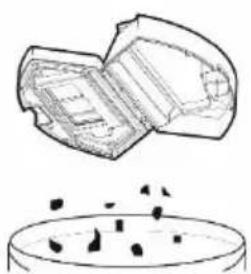
natural_image
Simple line drawing of a container with particles inside, no text or symbols present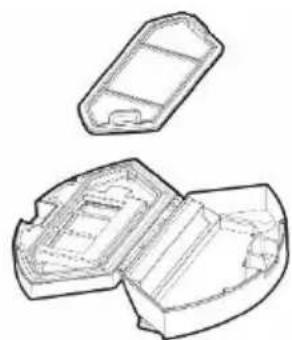
natural_image
Technical line drawing of two open plastic housing compartments (no text or symbols)natural_image
Three technical line drawings of a device interior with internal compartments and components, showing no text or symbols.natural_image
Technical line drawings of a device housing and internal components (no text or symbols)natural_image
Two technical diagrams showing internal components of a device, one with arrows indicating movement and the other with an arrow (no text or symbols present)natural_image
Technical diagram of a vehicle's front and rear assembly with labeled components (L, R), no readable text or symbols present.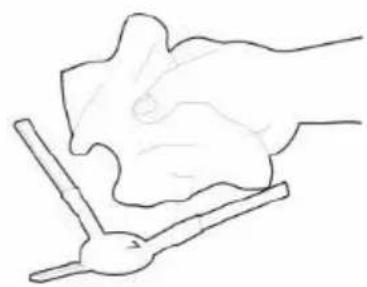
natural_image
Simple line drawing of a hand holding a small object, possibly a tool or device, with no text or symbols present.natural_image
Line drawing of a circular device with labeled parts (1, 2, 3), no text or symbols present.ZÁSOBNÍK NA VODU
NABÍJACIA ZÁKLADŇA
1 Primárny filter
2 HEPA filter
3 Penový filter
4 Kryt nádoby na nečistoty
natural_image
Line drawing of a circular vacuum cleaner with attached components and a hand pointing to the lid (no text or symbols)natural_image
Technical line drawing of a mechanical housing or enclosure with lid and internal components (no text or symbols)natural_image
Line drawing of a hand holding a small mechanical component, no text or symbols presentnatural_image
Line drawing of a circular vacuum cleaner with attached circuit breakers and a base plate (no text or symbols)natural_image
Line drawing of a handheld device with a handle and screen (no text or symbols)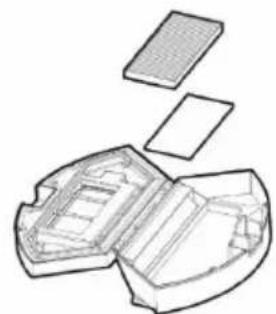
natural_image
Exploded view diagram of a mechanical component showing internal structure and top plate (no text or labels)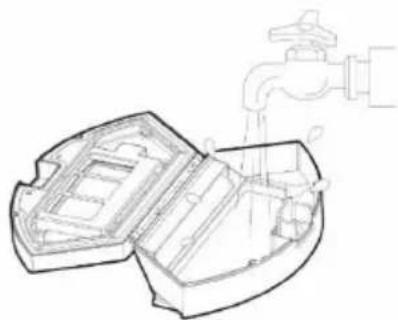
natural_image
Technical line drawing of a mechanical component with a faucet pouring liquid into it (no text or symbols)natural_image
Technical line drawings of a mechanical housing and component, showing open and closed views with internal compartments (no text or symbols)natural_image
Top-down schematic of a device rear panel with measurement scales and directional arrows (no text or symbols)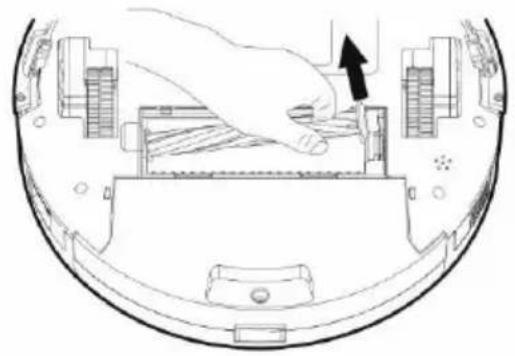
natural_image
Diagram of a hand pressing down on a computer monitor (no text or symbols visible)natural_image
Technical diagram of a vehicle's front and rear compartments, showing L and R components with no visible text or symbols.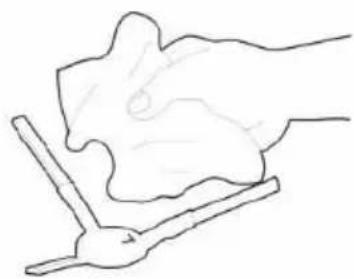
natural_image
Simple line drawing of a hand holding a piece of bread or cheese (no text or symbols)natural_image
Line drawing of a circular device with labeled parts (1, 2, 3), no text or symbols present.ZBIORNIK NA WODĘ
STACJA LADOWANIA
natural_image
Line drawing of a circular vacuum cleaner with attached sensors and a handle (no text or symbols)ROZWIĄZYWANIE PROBLEMÓW Z APLIKACJĄ
natural_image
Technical line drawing of a mechanical housing or enclosure with lid and internal compartments (no text or symbols)natural_image
Line drawing of a hand holding a small mechanical component, no text or symbols presentnatural_image
Line drawing of a circular device with internal components and mounting points (no text or symbols)natural_image
Line drawing of a circular mechanical component with a base and mounting bracket (no text or symbols)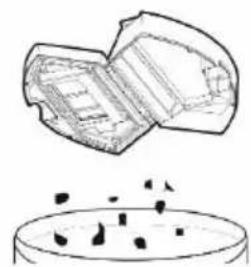
natural_image
Simple line drawing of a container with particles inside, no text or symbols present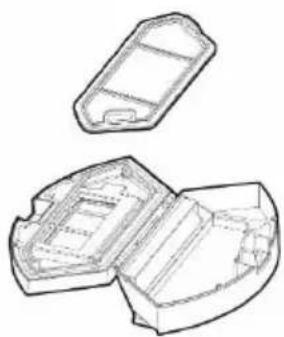
natural_image
Technical line drawing of two open plastic housing compartments (no text or symbols)natural_image
Three technical line drawings of a device with open and closed sections, showing internal components and a faucet (no text or symbols)natural_image
Technical line drawing of a device's internal components including housing, casing, and filter (no text or symbols)natural_image
Two technical diagrams showing internal components of a device, one with arrows indicating movement or force, the other with an arrow pointing to a component (no text or symbols present)natural_image
Technical diagram of a device rear view showing labeled components (L and R) with no readable text or symbols beyond labels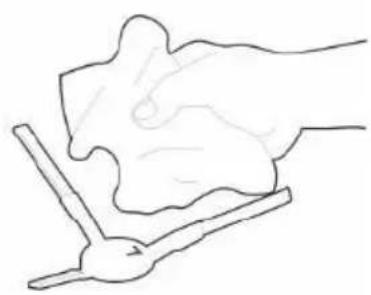
natural_image
Simple line drawing of a hand holding a piece of paper or tool, no text or symbols presentGWARANCJA NIE POKRYWA:
natural_image
Line drawing of a circular vacuum cleaner with labeled parts (1, 2, 3), no text or symbols present.A TÖLTŐÁLLOMÁS
natural_image
Line drawing of a circular vacuum cleaner with attached doors and buttons (no text or symbols)natural_image
Line drawing of a mechanical housing or enclosure with lid and internal compartments (no text or symbols)natural_image
Line drawing of a hand holding a small component into a curved mechanical housing (no text or symbols)natural_image
Line drawing of a circular vacuum cleaner with attached circuit breakers and a handle (no text or symbols)natural_image
Line drawing of a vacuum cleaner device with a circular housing and attached components (no text or symbols)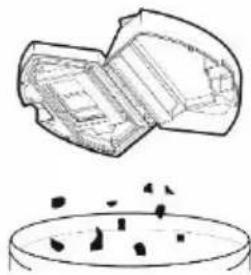
natural_image
Diagram showing a container with particles and a lid of plastic material (no text or symbols)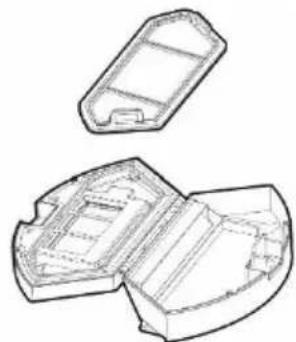
natural_image
Technical line drawing of a mechanical housing or enclosure with open and closed sections (no text or symbols)natural_image
Line drawing of a handheld device with a handle and base (no text or symbols)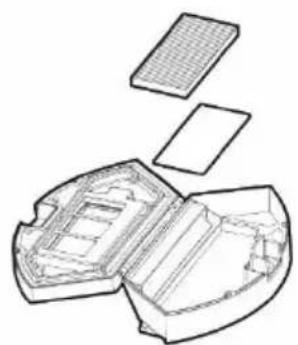
natural_image
Exploded view diagram of a mechanical component showing internal structure and plate (no text or labels)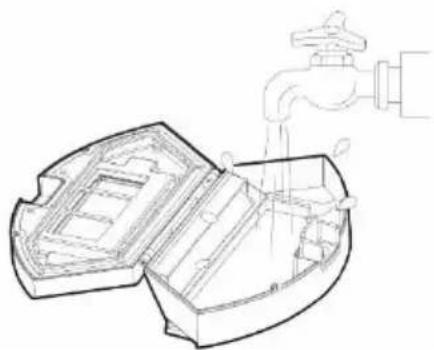
natural_image
Technical line drawing of a water drain with faucet and internal compartments (no text or symbols)natural_image
Technical line drawings of a mechanical housing and component, showing open, side, and cross-sectional views (no text or symbols)natural_image
Two technical diagrams showing internal components of a device, one with arrows indicating movement or force, the other with an arrow pointing to a component (no text or symbols present)natural_image
Line drawing of a circular device with labeled parts (1, 2, 3), no text or symbols present.POLNILNA POSTAJA
1 Primarni filter
2 HEPA filtr
3 Penasti filter
4 Pokrov vsebnika za umazanijo
natural_image
Line drawing of a circular vacuum cleaner with attached doors and a handle (no text or symbols)Vklop: stikalo za vklop premaknite v položaj ON (I)
Izklop: stikalo za vklop premaknite v položaj OFF (o)
- Med polnjenjem počasi utripa gumb ▶II. Ko je baterija napolnjena do konca, ta gumb preneha utripati.
- Stisnite gumb ▶II na robotskem sesalniku ali na daljinskem upravljalniku, stisnite gumb 2 ali 3. Po vklopu čiščenja, se sesalnik mora vedno nahajati v polnilni postaji.
- Če želite čiščenje z robotskim sesalnikom prekiniti/izklopiti, ponovno stisnite gumb ▶|| ali na daljinskem upravljalniku stisnite gumb "3".
ČIŠČENJE PROSTORA
natural_image
Line drawing of a handheld electronic device with a handle and screen (no text or symbols)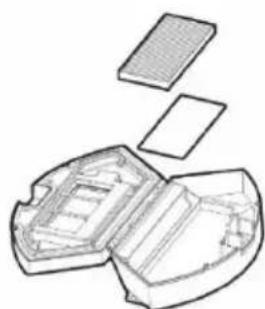
natural_image
Exploded view diagram of a device showing internal components (no text or labels)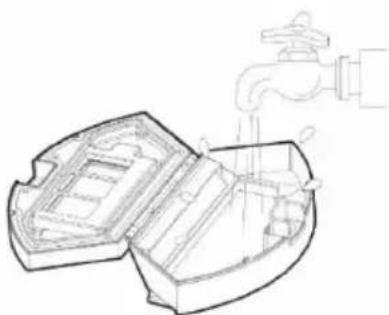
natural_image
Technical line drawing of a mechanical component with a faucet and water spray (no text or symbols)natural_image
Technical line drawings of a multi-section mechanical housing with internal compartments and a grid-patterned base (no text or symbols)GLAVNA SREDINSKA ČISTILNA ŠČETKA IN STRANSKI ČISTILNI ŠČETKI - čiščenje enkrat na teden
natural_image
Technical line drawing showing two views of a device interior with internal components and directional arrows (no text or symbols)SPREDNJE POMIČNO KOLESCE – čistite enkrat tedensko
Vedno mora biti brez las in prahu. Sredinsko vodilno kolesce odstranite s sesalnika tako, da ga izvlečete iz telesa sesalnika. Prav tako očistite os kolesca in ga nato namestite nazaj v robotski sesalnik.
REŠEVANJE TEŽAV
VAŽNA SIGURNOSNA UPOZORENJA
natural_image
Line drawing of a circular device with labeled parts (1, 2, 3), no text or symbols present.1 Gumb za vađenje spremnika iz usisavača
SPREMNIK ZA VODU
BAZA ZA PUNJENJE
1 Glavni filtar
2 Zračni filtar visoke učinkovitosti
3 Filtar za pjenu
4 Poklopac spremnika za prljavštinu
1 Gumeni čep
2 Spremnik za vodu
3 Krpa za brisanje
natural_image
Line drawing of a circular vacuum cleaner with attached components and a hand pointing to the lid (no text or symbols)Uključivanje: pritisnite prekidač u položaj ON (I).
Isključivanje: pritisnite prekidač u položaj OFF (o).
natural_image
Technical line drawing of a mechanical housing or enclosure with lid and internal components (no text or symbols)Postavite mokru krpu za brisanje na donji dio spremnika za vodu. Navlažite malo krpu za brisanje vodom za brže i neometanije brisanje. Pažljivo skidajte krpu s držača da ne biste brzim pokretom oštetili suhu traku na čičak na držaču.
natural_image
Line drawing of a hand holding a small mechanical component on a curved base (no text or symbols)Otklopite plastični poklopac i ulijte vodu u spremnik za vodu. Dodajte vodu u spremnik za brisanje vodom samo nakon što ste spremnik izvadili iz usisavača. Pri rukovanju spremnikom za brisanje vodom može doći do laganog curenja, npr. ostatka vode. U tom slučaju poliveno mjesto odmah obrišite suhom krpom.
natural_image
Line drawing of a circular vacuum cleaner with attached circuit breakers (no text or symbols)natural_image
Three technical line drawings of a mechanical device with internal components, showing open and closed views (no text or symbols)natural_image
Technical line drawings of a device's internal components, including a closed casing, rectangular housing, and flat panel (no text or symbols)GLAVNA SREDIŠNJA ČETKA ZA ČIŠĆENJE I BOČNE ČETKE ZA ČIŠĆENJE - čišćenje jedanput tjedno
natural_image
Technical line drawing of a device interior showing front and side views with no visible text or symbolsGlavnu središnju četku za čišćenje skinite tako da pritisnete oba držača na poklopcu četke. Za uklanjanje kose omotane oko glavne četke upotrijebite pribor za čišćenje. Pazite da na središnjoj četki za čišćenje nema veće količine kose, prašine, niti od tkanine i sl.
natural_image
Technical diagram of a vehicle's front and rear assembly showing steering wheel, dashboard, and engine components (no text or labels)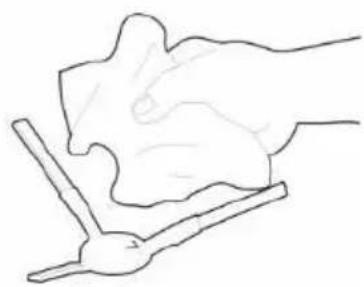
natural_image
Simple line drawing of a hand holding a tool, no text or symbols presentnatural_image
Technical line drawing of a circular device with labeled components (no text or symbols beyond labels)REZERVOR DE APĂ
Stația de încărcare
natural_image
Line drawing of a circular vacuum cleaner with attached components and a hand pointing to the lid (no text or symbols)natural_image
Line drawing of a mechanical housing or enclosure with lid and internal compartments (no text or symbols)natural_image
Line drawing of a hand holding a small mechanical component, no text or symbols presentnatural_image
Line drawing of a circular device with a handle and mounting bracket (no text or symbols)natural_image
Line drawing of a vacuum cleaner (no text or symbols)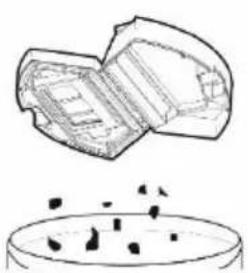
natural_image
Simple line drawing of a container with particles inside, no text or symbols present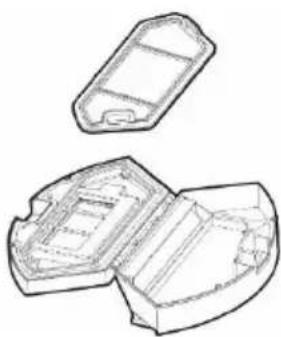
natural_image
Technical line drawing of a mechanical housing or enclosure with two open compartments (no text or symbols)natural_image
Three technical line drawings of a device with internal components, showing open and closed views (no text or symbols)natural_image
Technical line drawing of a device interior with open and closed views, showing internal compartments and a grid-patterned panel (no text or symbols)natural_image
Top-down schematic of a device rear view showing internal components and directional arrows (no text or labels)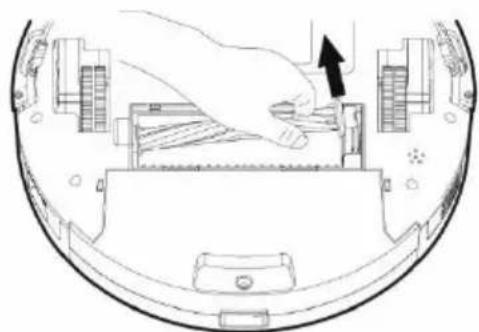
natural_image
Diagram of a hand pressing down on a device component with an arrow indicating the process (no text or symbols present)natural_image
Line drawing of a circular device with labeled components (no text or symbols beyond numbers)1 Gummiabdeckung
2 Wassertank
3 Wischtuch
LADESTATION
natural_image
Line drawing of a circular vacuum cleaner with attached components and a hand pointing to the lid (no text or symbols)natural_image
Technical line drawing of a mechanical housing or enclosure with open lid and internal compartments (no text or symbols)natural_image
Line drawing of a hand holding a small mechanical component, no text or symbols presentnatural_image
Line drawing of a circular robotic vacuum cleaner with visible internal components and mounting bracket (no text or symbols)natural_image
Line drawing of a vacuum cleaner (no text or symbols)
natural_image
Technical line drawing of a mechanical component with open and closed sections (no text or symbols)natural_image
Line drawing of a mechanical device with a lever and base (no text or symbols)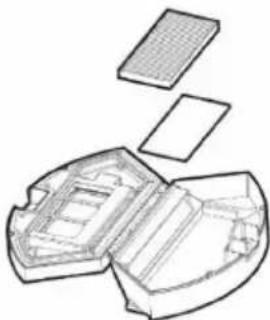
natural_image
Exploded view diagram of a battery pack showing internal compartments and casing (no text or labels)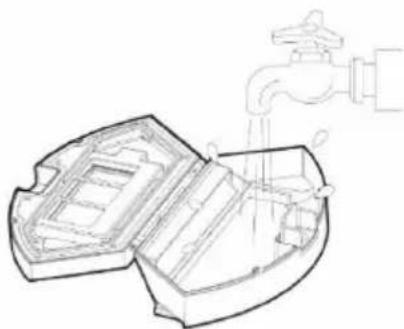
natural_image
Diagram of a water drain system with faucet and pipe (no text or symbols)natural_image
Technical line drawing of a mechanical housing or casing with internal compartments and mounting brackets (no text or symbols)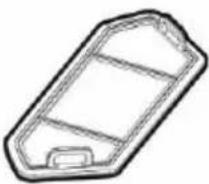

natural_image
Top-down schematic of a device rear view showing internal components and directional arrows (no text or labels)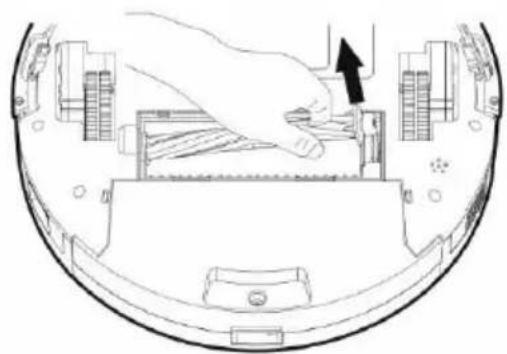
natural_image
Diagram of a hand inserting a component into a device casing, showing internal structure and a black arrow indicating direction (no text or symbols present)natural_image
Technical diagram of a device rear view showing two circular components labeled L and R, with no readable text or symbols beyond labels.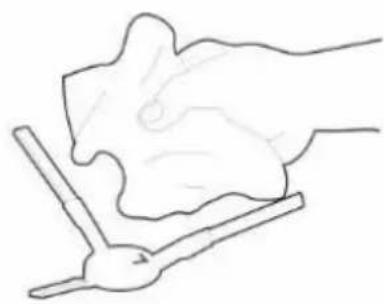
natural_image
Simple line drawing of a hand holding a small object, possibly a tool or device, with no text or symbols present.Thank you for choosing the TESLA RoboStar iQ300.
Please, read the safety rules carefully and follow all common safety rules before using a robotic vacuum cleaner.
IMPORTANT SAFETY WARNINGS
This device is a complex electromechanical device, please, pay attention to the following guidelines:
• The appliance is intended for indoor use only at room temperature (max. 40°C).
- The appliance is not intended for outdoor use even in commercial or industrial environments.
• Use the vacuum cleaner as often as possible for the maximum cleaning effect.
• Before using, make sure that the dust bin and filter are installed correctly.
- Use only original accessories that are designed for this model.
- Only use the accessories provided by the robot vacuum cleaner to charge. Use of non-genuine accessories can damage the robotic vacuum cleaner, electric shock or fire.
- Do not touch the parts that are plugged into the mains if you have wet hands.
- Do not leave the appliance unattended in the presence of children, do not use it in the room where the baby is asleep.
- Do not allow children to use a robotic vacuum cleaner even under the supervision of an adult.
- Do not sit on a robotic vacuum cleaner or place other objects on it.
- Do not use the appliance if the power cord is damaged.
- Do not open or repair the unit, risking electric shock and loss of warranty.
- Do not use the device if you have wet hands or feet.
- Keep it out of the reach of flammable and volatile substances.
- Do not use the appliance in a warm, dusty or damp environment.
- Avoid heat radiation on the plastic surface of the device.
- Do not use it near objects with water that could damage it, for example by overflowing the water container.
- Avoid splashing the vacuum cleaner or its interior with liquid that could damage it.
- Do not clean the vacuum cleaner with water.
• The vacuum cleaner is not waterproof.
- Do not use the vacuum cleaner on a wet floor.
- Do not expose fluids, burning cigarettes, matches, combustible substances, shards, sharp objects, flour, cement, plaster, loose materials, larger pieces of paper, plastic bags or other items that can damage the vacuum cleaner
• An electrostatic charge may occur when vacuuming can be dangerous to the user.
• Inform the roommate about the use of the vacuum cleaner to avoid injury.
- Do not use a robotic vacuum cleaner if its dust tank is full.
- The appliance is not intended for use on elevated places without barriers - built-in floor, stairs, balcony, furniture and more. The device is equipped with anti-fall sensors, but there may be circumstances when the control system evaluates the situation incorrectly (dirty sensor, current sensor failure, light reflection, trapped dirt, etc.) and does not prevent a fall (does not stop the device). In these cases, the seller cannot accept any claims of the buyer for such damage to the device.
• The manufacturer and importer to the European Union is not responsible for any damage caused
by the operation of the device, such as injuries, scalding, fire, injury, damage to other things.
PACKAGE CONTENT
Carefully check you have unpacked all accessories, we recommend keeping the original paper box, user manual and packaging materials for the warranty period.
DESCRIPTION
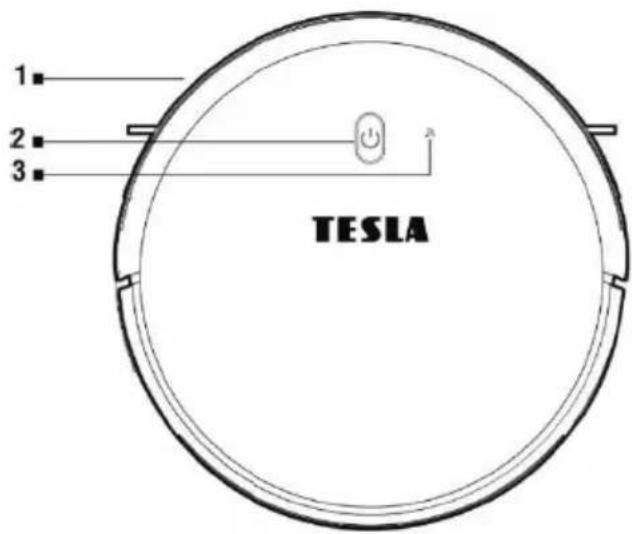
1 Front bumper
2 Control button
3 WiFi indicator
4 Front wheel
5 Charging connectors
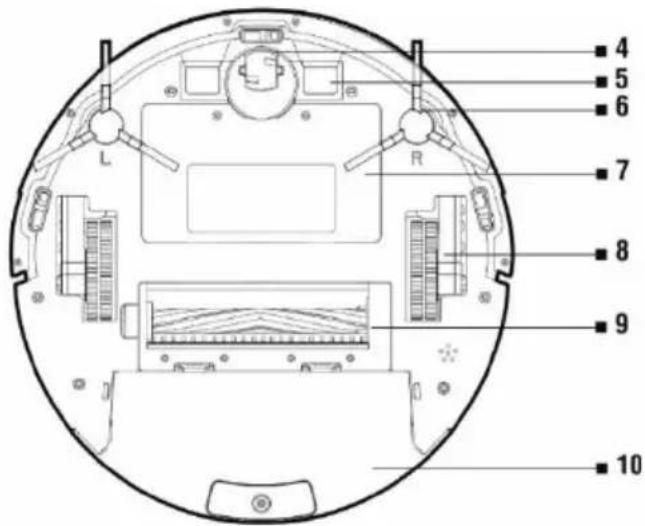
6 Side cleaning brush
7 Battery cover
8 Wheel
9 Central cleaning brush
10 Dust tank/Water tank
natural_image
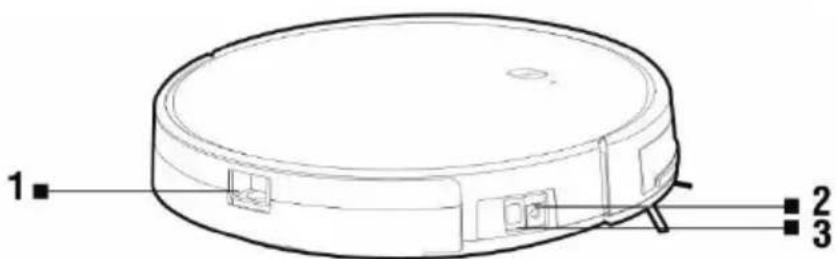
Line drawing of a circular device with labeled parts (1, 2, 3), no text or symbols present.1 Button for removing the container from the vacuum cleaner
2 Power connector
3 Main power switch
DUST TANK
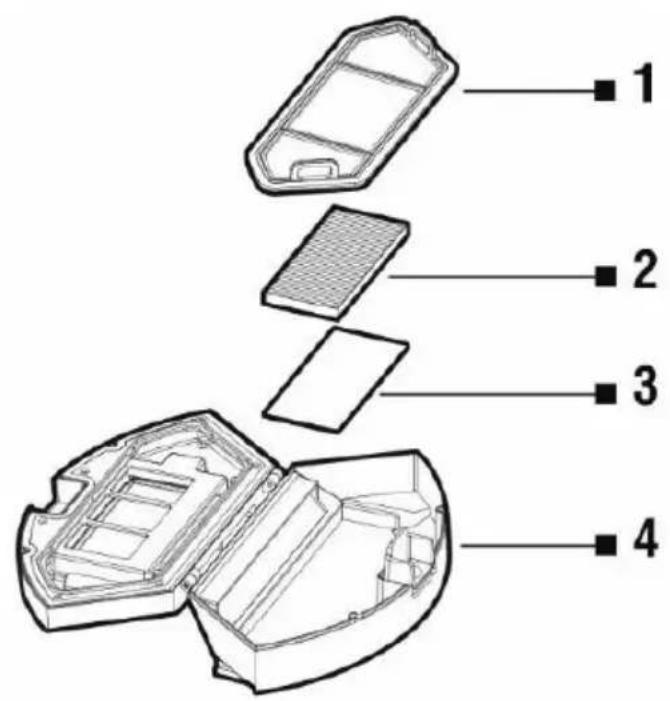
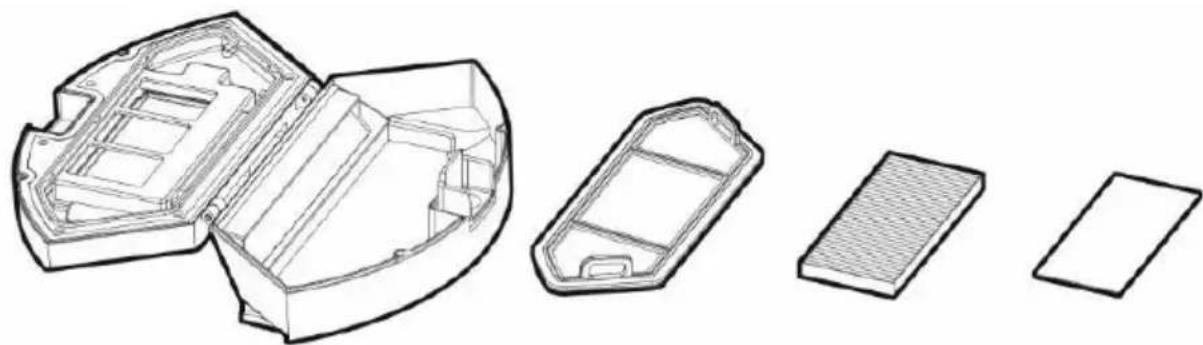
1 Primary filter
2 HEPA filter
3 Sponge filter
4 Dust tank lid
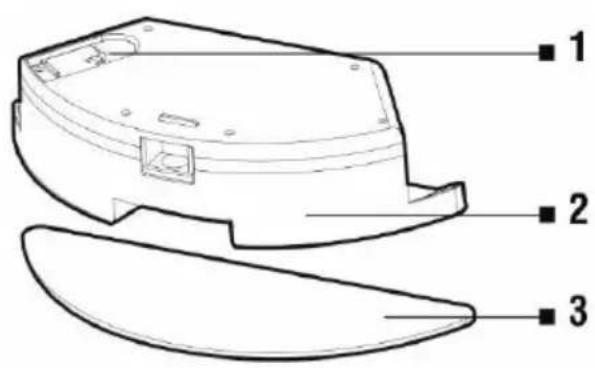
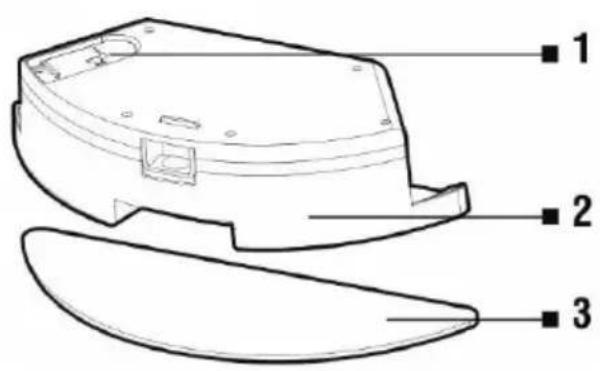
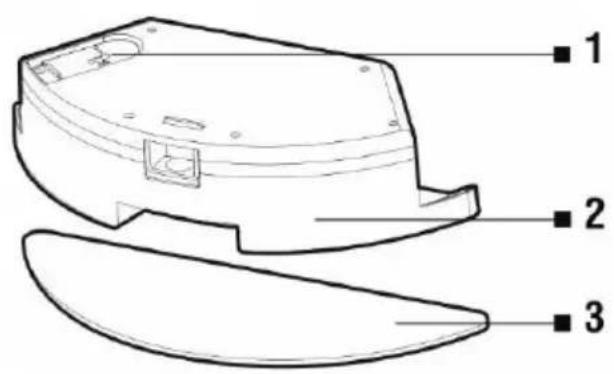
WATER TANK
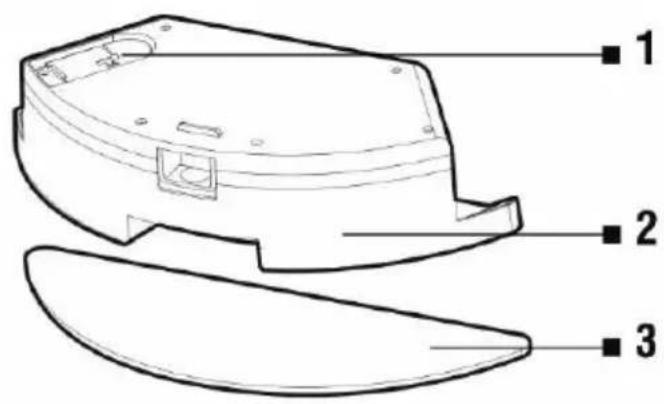
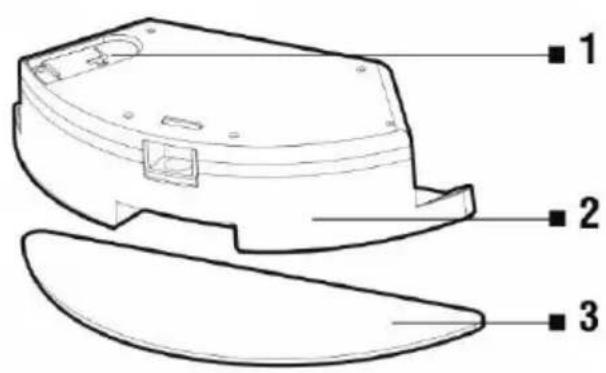
1 Rubber cover
2 Water tank
3 Mopping cloth
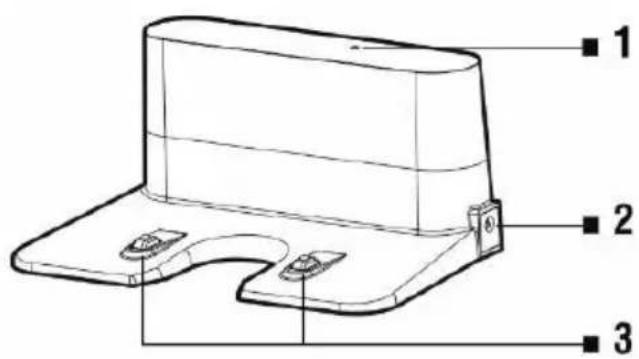
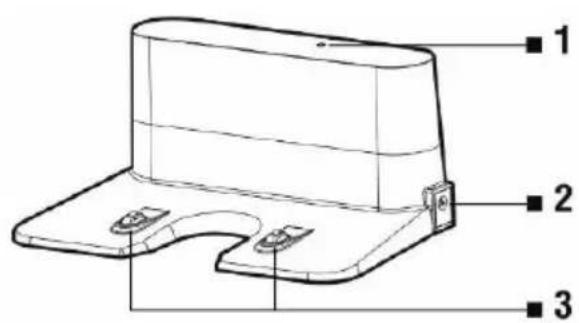
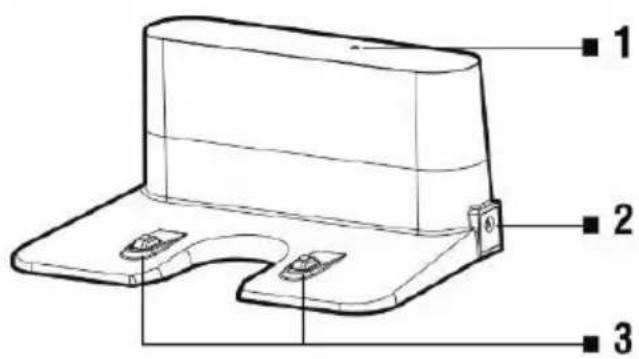
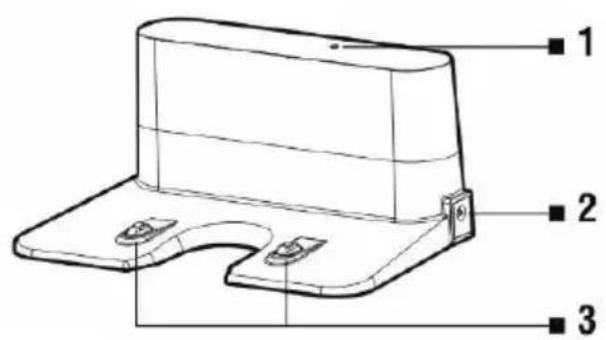
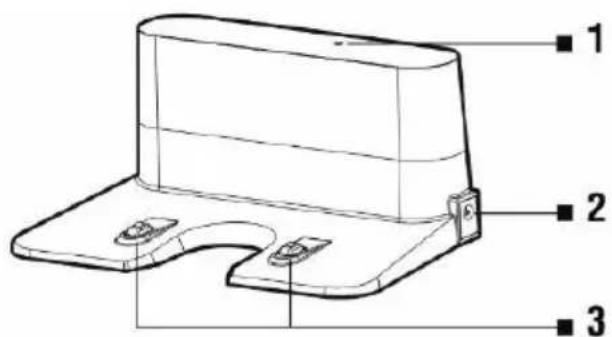
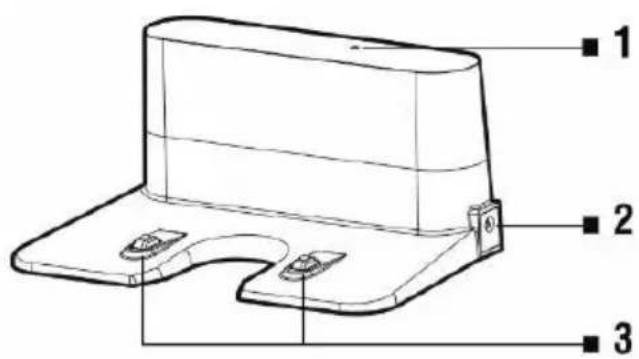
CHARGING STATION
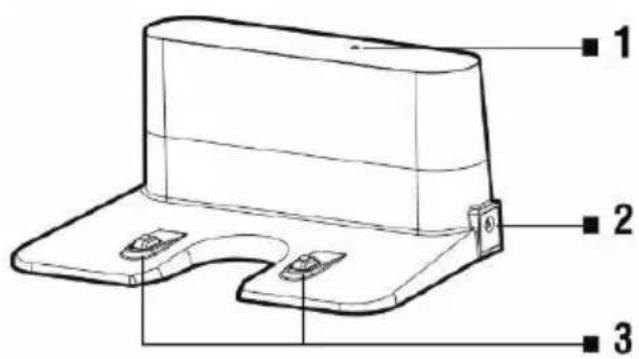
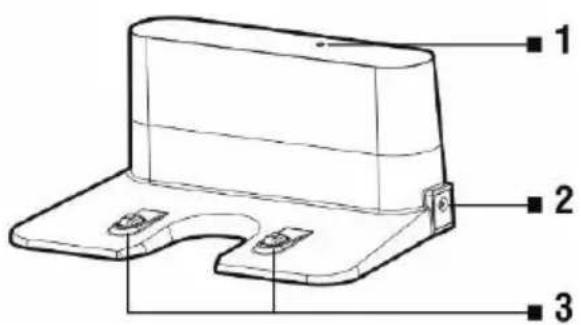
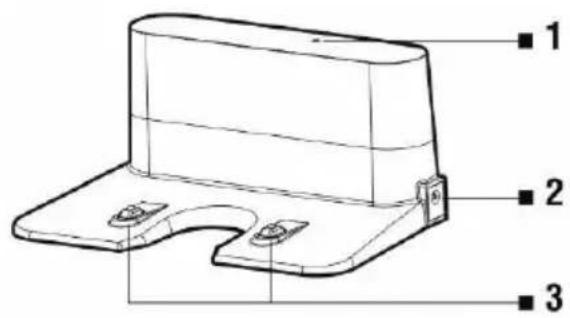
1 Connection indicator
2 Charging input 230 V
3 Charging connectors
REMOTE CONTROLLER
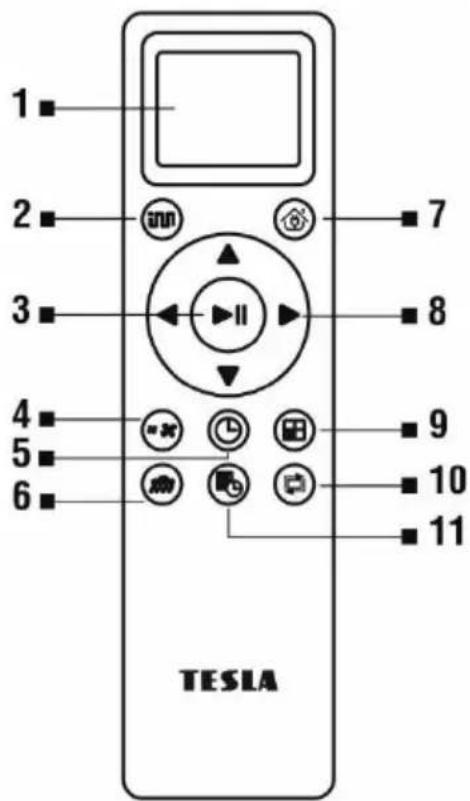
1 Display
2 SMART cleaning
3 Start/Pause cleaning
4 Adjusting suction power
5 Time setting
6 Water moping
7 Return to charging station
8 Direction buttons
9 SMART cleaning with maximum performance
10 Cleaning along the walls
11 Planned cleaning
BEFORE FIRST CLEANING
- Remove the two foam stops located on the bumper of the vacuum cleaner.
- Remove all obstacles that can prevent effective cleaning.
- Also remove objects that can damage the robotic vacuum cleaner.
- The carpet must be secured so the robot cannot get on it when mopping. If the mopping pad with the water container is installed on the vacuum cleaner, it may interrupt the cleaning process or cause unwanted soaking of the carpet.
- Direct sunlight may cause a reduced sensitivity of the infrared sensors of the vacuum cleaner, please avoid direct sunlight light.
- Black furniture may not be properly detected due to the physical nature of infrared sensors. This may cause a slight impact, which will be reduced by the front bumper.
- The top of the vacuum cleaner is tempered glass. Although toughened glass is safer and stronger than standard glass, please handle it carefully so as not to scratch or break it.
Ideal location of the charging base
There must be no obstacles within 2 meters in front and 1 meter on the sides from the charging station. The charging station must be placed on a flat surface, we also recommend to fix the station to the wall or floor with a double-sided adhesive tape. Place the power cord so it does not get entangle in the cleaning brushes of the vacuum cleaner. A mirror or other objects with strong reflection can not be placed in the area of the charging base 15 cm above the ground. The base should not be exposed to direct sunlight.
- Insert the batteries into the remote control, observing the correct polarity.
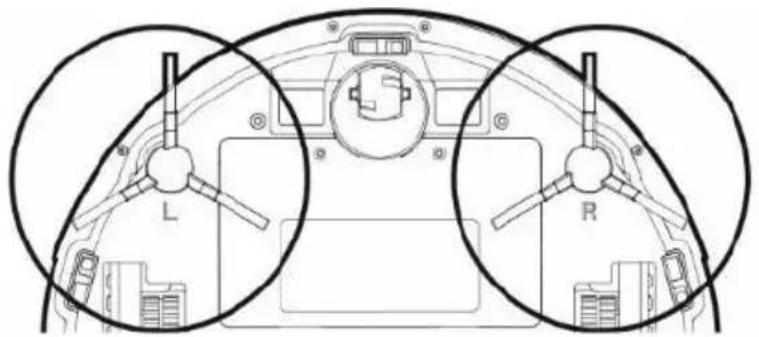
- Install the cleaning brushes, left (L) and right (R) as indicated.
-
Connect the charging station to a power outlet using the 230 V AC adapter
-
Place the vacuum cleaner in the charging station and the vacuum cleaner battery will start charging automatically.
FIRST START SMART CLEANING
- This is the most commonly used method of cleaning. The device uses advanced gyro navigation and moves along a cleaning route that is optimized for the best possible floor cleaning.
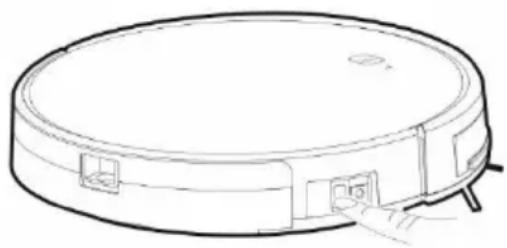
- Switch on the robotic vacuum cleaner by switching the „Main power switch (3)“.
natural_image
Line drawing of a circular vacuum cleaner with attached doors and a handle (no text or symbols)Turn on: set the switch button to the position ON (I)
Turn off: set the switch button to the position OFF (o)
- The ▶|| button flashes slowly while charging, this button stops flashing when the battery is fully charged.
- Press „Control button (2)“ or press on the remote control button „2“ nebo „3“. The vacuum cleaner should always be in the charging station when cleaning is started.
- To stop cleaning/pause the robotic vacuum cleaner, press ▶|| button or press on the remote control button „3“.
SPOT CLEANING
Place the robotic vacuum cleaner at the location you want to clean and select in the mobile app „Spot cleaning“.
SMART CLEANING WITH MAXIMUM PERFORMANCE
Press the button on the remote control. The robotic vacuum cleaner starts SMART cleaning with maximum suction power.
TIME SETTING
Press the button Ⓛ on the remote control to enter the „Time Setting“ mode. First set the hour with the buttons ∧ and ∨. Then press > and set the minutes in the same way. Confirm the set values by pressing Ⓛ.
SCHEDULED CLEANING
The robotic vacuum cleaner can be programmed to clean automatically once a day at a specified time, even when no one is home.
Press the button 📄 on the remote control. First set the hour with the buttons ∧ and ∨. Then press > and set the minutes in the same way. Confirm the set values by pressing . The robotic vacuum cleaner will vacuum every day at the time you set. To cancel the scheduled cleaning, press the button

for 3 seconds. If you switch off the robotic vacuum cleaner with the main switch on the side, your scheduled cleaning will be deleted.
RETURN TO CHARGING STATION
After pressing the button on the remote control, the robotic vacuum cleaner finds the charging station and starts charging automatically.
MAGNETIC TAPE
To prevent cleaning of the selected part, use the magnetic tape included in the TESLA RoboStar iQ300 package. Before starting cleaning, lay it down or even better (double-sided tape) where you do not want the robotic vacuum cleaner to run in. For example, you can prevent passage into the next room, prevent the carpet from reaching high hair, protect fragile objects, etc.
ROBOTIC VACUUM CLEANER CONTROL WITH SMARTPHONE
- Switch off the robotic vacuum cleaner with the „Main switch (3)“ on the side of the appliance.
- Install the robotic vacuum cleaner control application on your smartphone and follow the wizard to connect your smartphone and the robotic vacuum cleaner.
Android: search for „TESLA RoboStar iQ300“ on Google Play Apple: search for „TESLA RoboStar iQ300“ in the Apple Store
- Connect your mobile phone to your WiFi network and turn on GPS.
- Create your account.
- Click „+“ in the application and select „TESLA RoboStar iQ300“ in the device list.
- Select your WiFi network (your WiFi router) and enter the password to connect to this WiFi network.
- Switch on the robotic vacuum cleaner with the „Main switch (3)“ on the side of the device.
- Press the upper button for 3 seconds. An acoustic signal sounds and the WiFi indicator on the robotic vacuum cleaner starts flashing.
- Press the „Next“ button and the robotic vacuum cleaner will start the process of pairing with the WiFi network.
- After successful pairing, you can control selected functions of the robotic vacuum cleaner with your mobile phone.
TROUBLESHOOTING PROBLEMS WITH APPLICATION
- Make sure that WiFi coverage for your smartphone and robotic vacuum cleaner is good quality and strong enough. Perform the first setup of the robotic vacuum cleaner near your WiFi router.
- Make sure the GPS on your smartphone is turned on.
- Make sure that a third-party application (VPN, antivirus, firewall, etc.) does not block access to your mobile phone.
- Try connecting to another WiFi router or WiFi Hotspot on another mobile phone to eliminate the error on the Internet connection side.
- You have too many devices connected to your WiFi router or the ability to connect a new device to it is blocked.
- Turn the WiFi router On and Off.
- Sometimes it is possible to manually connect to its WiFi network labeled „ROBOT ####“ while
trying to connect to a robotic vacuum cleaner.
Note: Make sure the charging station is within range of a high quality and strong WiFi signal from your WiFi router so that it can connect to a WiFi network while charging. The robotic vacuum cleaner also needs this WiFi connection during its charging to be properly oriented and available to start cleaning. Only 2.4 GHz WiFi is supported.
ROBOTIC VACUUM CLEANER FIRMWARE UPDATES
The firmware of the robotic vacuum cleaner is continually improved. If a new firmware version is available, you will be offered to download the update in the TESLA application and install it in a robotic vacuum cleaner.
WATER WIPING
Switch off the robotic vacuum cleaner with the „Main switch (3)“ and place it away from the charging station.
natural_image
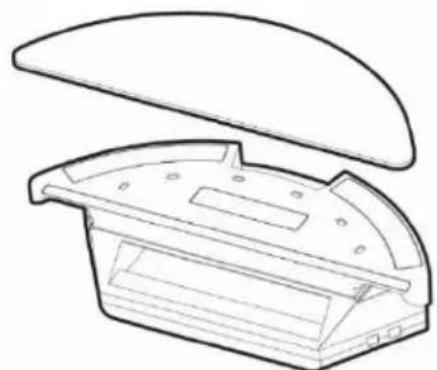
Line drawing of a mechanical component with a curved top and rectangular base (no text or symbols)Install the blue mop cloth on the bottom of the water tank. Slightly moisten the mop cloth with water for faster and smoother water wiping.
When removing the mop from the holder, be careful not to damage the velcro fastener on the holder quickly.
If the mop is dirty after cleaning, you can wash it carefully in lukewarm water.
natural_image
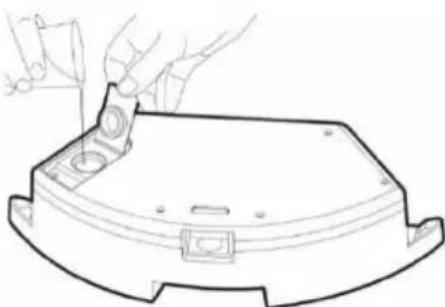
Line drawing of a hand using a tool to cut or install a component on a curved base (no text or symbols)Open the plastic cap and collect water into the water tank. Only add water to the wiping container after removing the container from the vacuum cleaner.
A slight leak of residual water may occur when handling the water tank. In this case, wipe the spilled area immediately with a dry cloth.
We recommend wiping the floor with clean water, as the detergent may cause foaming and make the water drip onto the mop or cause smudges on the floor after it has dried.
natural_image
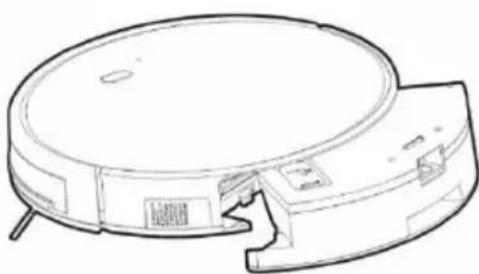
Line drawing of a circular vacuum cleaner with attached circuit board (no text or symbols)Carefully insert the water tank into the body of the robotic vacuum cleaner. Do not spill the robotic vacuum cleaner or its internal part with water; the vacuum cleaner is not waterproof.
Connect it to the charging station. For best results when wiping with water, we recommend using this function in one room and then moving to another room.
Press the button on the remote control to wipe with water. In this mode, vacuuming is off, only the side scrub brushes and the main center brush work. Do not leave the robotic vacuum cleaner unnecessarily stationary or with water residue in the water tank.
- Do not use wet wiping on the carpet.
- Keep enough water in the water tank for wiping.
• Always remove the water tank after wiping, rinse and dry the mop cloth. - For safety reasons, do not charge the battery with the water tank inserted. Remove the container from the vacuum cleaner after cleaning or immediately after returning to the charging station.
MAINTENANCE
ATTENTION! Regular maintenance is recommended for the most efficient cleaning. LACK OF MAINTENANCE MAY CAUSE DAMAGE TO THE ROBOTIC VACUUM CLEANER AND LOSS OF WARRANTY.
Before carrying out cleaning and maintenance work, switch off the robotic vacuum cleaner with the „Main power switch (3)“. Wipe the top cover of the robotic vacuum cleaner with a soft dry or slightly moistened cloth. Do not use cleaning agents to clean the surface of the robotic vacuum cleaner as this may damage the surface.
DUST TANK - cleaning after each cleaning
• Empty the dust tank regularly.
- The dust capacity of the dust tank significantly affects the suction power of the robotic vacuum cleaner and the quality of cleaning.
• Empty the dust tank after cleaning.
- If you use water to clean the dust tank, dry it carefully before reinstalling it in the robotic vacuum cleaner.
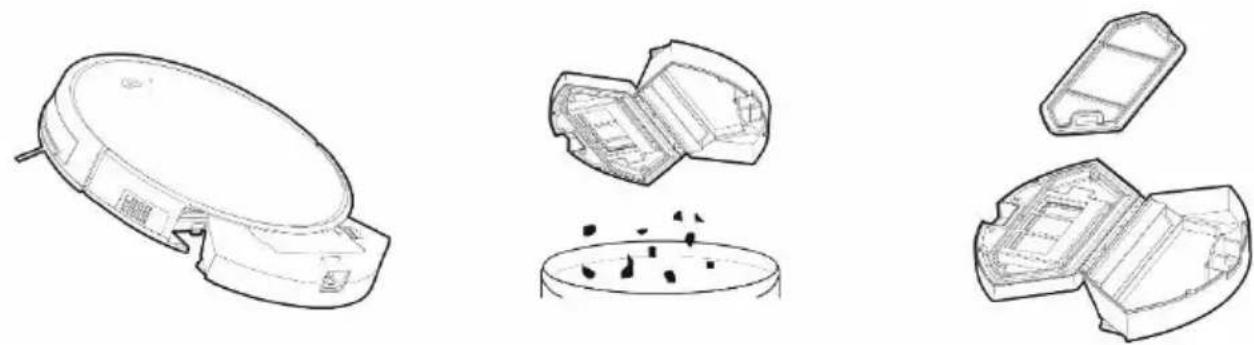
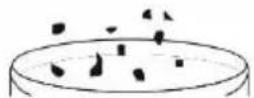
Press the release button to remove the dust tank and empty the dirt into the waste bin. We recommend washing the „Primary filter“ with clean water every 14 days.
natural_image
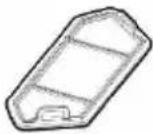
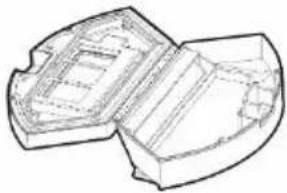
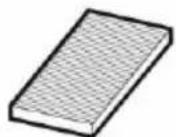
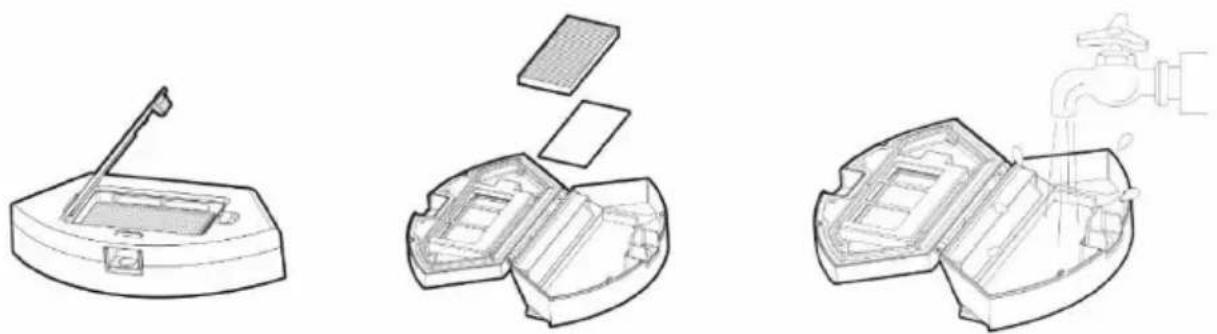
Three technical line drawings of a device with open and closed sections, showing internal components and a faucet (no text or symbols)Clean the HEPA filter regularly according to the degree of its contamination, at least once a week, with a dust brush or vacuum it with a standard vacuum cleaner.
- Do not clean the HEPA filter with your fingers or a brush, only with a stream of clean water (do not use cleaning agents).
- Allow the HEPA filter to dry thoroughly, never install a wet HEPA filter in the robotic vacuum cleaner!
- Vacuuming with a dirty HEPA filter or without a HEPA filter inserted can damage the robotic vacuum cleaner.
• We recommend replacing the HEPA filter every 6 months.
You can clean the dust tank with clean water.
natural_image
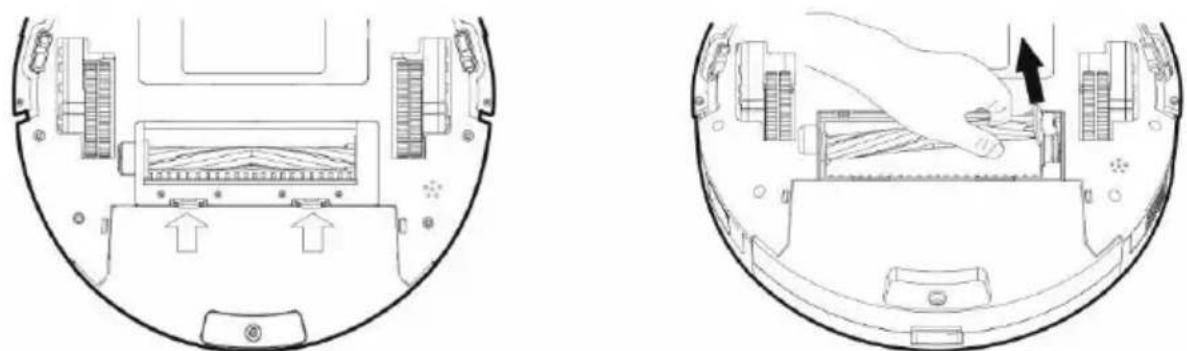
Technical line drawings of a multi-compartment electronic device with open and closed compartments, showing internal structure and exterior panels (no text or symbols)MAIN CENTRAL CLEANING BRUSH AND SIDE CLEANING BRUSH - cleaning once a week
natural_image
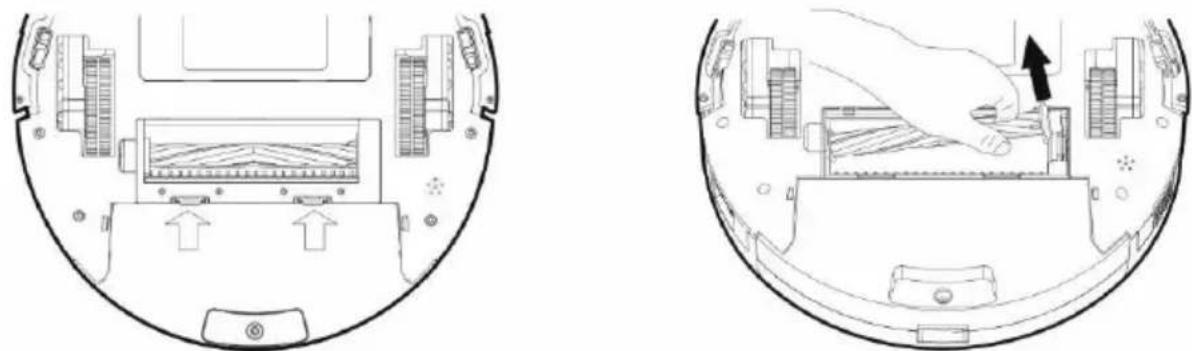
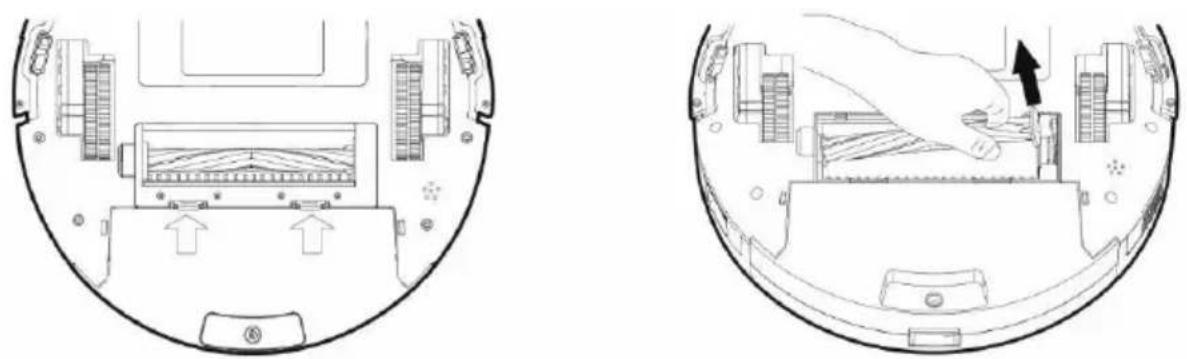
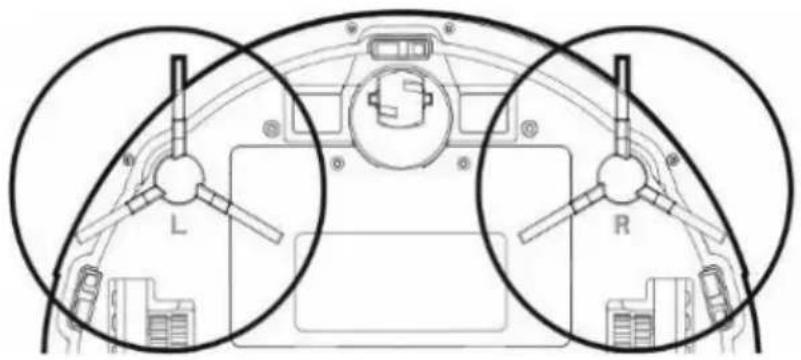
Two technical line drawings of a device interior showing internal components and a hand inserting a component (no text or symbols present)To remove the main central cleaning brush, press both tabs on the brush cover. Use a cleaning tool to remove hair entangled in the main central brush. Keep the central cleaning brush free of much hair, dust, cotton, etc.
natural_image
Technical diagram of a vehicle interior showing two circular components labeled L and R, with no readable text or symbols.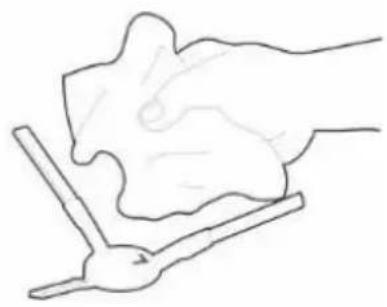
natural_image
Simple line drawing of a hand holding a piece of paper or tool, no text or symbols presentCheck both side cleaning brushes together with the air intake opening according to the intensity of the contamination, at least once a week, and remove tangled hairs and other dirt.
SENSORS, CHARGING CONTACTS AND CHARGING BASE - cleaning once a week
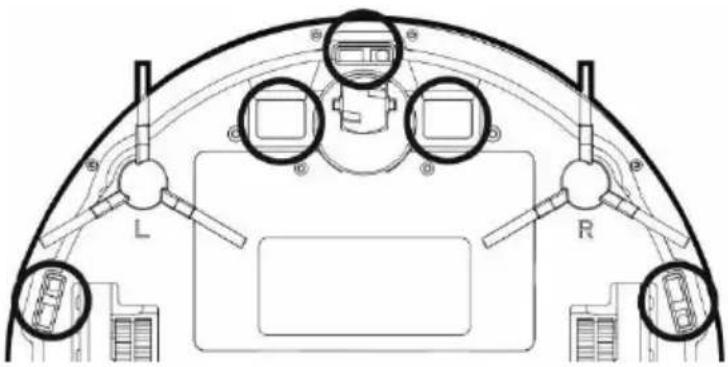
Clean the sensors on the bottom (see pic) of the robotic vacuum cleaner once a week with a soft, dry cloth. Verify that the front bumper under which the impact sensor is located is not blocked.
Clean the contacts on the underside (see pic) of the robotic vacuum cleaner and the contacts on the charging base with a soft cloth.
FRONT WHEEL - cleaning once a week
Keep it free of hair and dust. Remove the cfront wheel from the vacuum cleaner, also clean the wheel axis, and then reinstall it in the robotic vacuum cleaner.
TROUBLESHOOTING
| Problem | Solution |
| The robotic vacuum cleaner behaves „chaotic“. | Always place the vacuum cleaner in the charging station and then start cleaning. |
| After installing the application and pairing the mobile phone with the robotic vacuum cleaner, the vacuum cleaner is not connected. | Turn your WiFi router on and off, remove your robotic vacuum cleaner in „TESLA RoboStar iQ300“ and try pairing again. We recommend that you always be close to the WiFi router during pairing. |
| The robotic vacuum cleaner does not start cleaning. | 1. The robotic vacuum cleaner has a weak battery. Charge the battery to its full capacity before cleaning.2. The battery is too warm. Use a robotic vacuum cleaner at 0°C ~ 40°C. |
| The robotic vacuum cleaner cannot be charged. | 1. The charging station is not connected to the mains. Make sure the power cord is properly connected.2. The charging electrodes have poor contact with the robotic vacuum cleaner. Clean the electrodes on the robotic vacuum cleaner and on the charging base. |
| The robotic vacuum cleaner will not return to the charging base. | Make sure there is enough space around the charging station and the charging station's detection zone is clean. |
| The robotic vacuum cleaner is offline (not connected to the WiFi router). | Make sure your WiFi network is properly set up and fully functional. The robotic vacuum cleaner should always be within range of a high quality and strong WiFi signal from your WiFi router. |
| Vacuuming is very loud. | Clean the main center brush, side brushes, wheels, underside of the robotic vacuum cleaner and front bumper. |
| There is a squeaking noise during vacuuming. | Remove the front wheel and clean the center line of hair and dust. If necessary, you can lubricate the wheel axis. |
| Poor cleaning quality. | Empty the dust tank. Clean or replace the HEPA filter and clean the central cleaning brush. |
| The robotic vacuum cleaner does not start the scheduled cleaning. | 1. If the battery of the robotic vacuum cleaner is low, cleaning will not start. Please charge the battery to full capacity.2. The scheduled cleaning will not be properly synchronized between the robotic vacuum cleaner and your mobile phone if the robotic vacuum cleaner is disconnected from the WiFi network. Keep your robotic vacuum cleaner always within reach of a high quality and strong WiFi signal from your WiFi router. |
| Problem | Cause | Solution | |
| 1 | The vacuum cleaner battery cannot be charged | The vacuum cleaner is not parked correctly in the charging base | Make sure the charging contacts are properly connected when parked in the charging base |
| The charging base is not connected to the mains and the vacuum cleaner is switched on by the main switch. | The charging base should always be connected to the mains, do not turn it off. The vacuum cleaner is then always ready for cleaning with a fully charged battery. | ||
| The battery is completely discharged. | Connect the robotic vacuum cleaner directly. Plug the power cord from the 230 V supply into the charging connector on the device body. | ||
| 2 | Vacuum cleaner stuck during cleaning. | The vacuum cleaner is stuck in a small space, wrapped loose objects such as curtains, carpet, etc. on the cleaning brushes. | The vacuum cleaner automatically tries to release it if it is unable to do so, please clear the obstacle yourself. |
| 3 | The vacuum cleaner stops cleaning and returns to the charging base prematurely. | If the battery level decreases, the vacuum cleaner will automatically switch to charging dock and return to the charging base. | Normal condition, charge the vacuum cleaner to its full capacity and start cleaning again. |
| The operating time varies depending on the floor surface, the complexity of the room and the cleaning mode selected. | Normal state, there is no need to solve. | ||
| 4 | The vacuum cleaner will not start cleaning as scheduled. | The vacuum cleaner is switched off or the battery is low. | Turn on the vacuum cleaner and charge the battery. |
| You have not saved the scheduled cleaning in the vacuum cleaner memory. | Re-enter the time and day in the vacuum cleaner memory and make sure that the vacuum cleaner is fully charged. | ||
| The vacuum cleaner is blocked. | Switch off and clean the vacuum cleaner. | ||
| 5 | Remote control does not work (RC range is 5 meters) | Weak batteries in remote control. | Replace the batteries, observing the correct polarity when inserting them. |
| The vacuum cleaner is not switched on or the battery is not sufficiently charged to start cleaning. | Make sure the vacuum cleaner is turned on and recharge the vacuum cleaner battery. | ||
| The infrared sensor on the remote control is dirty or the infrared sensor on the vacuum cleaner is dirty. | Clean the remote control and vacuum cleaner. | ||
| There is interference between the remote control and the vacuum cleaner. | Avoid using near other infrared devices. |
If this does not solve the problem, check that the battery is fully charged and then turn the vacuum cleaner off and on using the „Main power switch“.
BATTERY CARE
- In case of low battery detection during cleaning, the vacuum cleaner automatically searches the charging station and starts charging
- Keep the charging station switched on continuously, if it is not turned on, the vacuum cleaner can not find it.
- If you are carrying a robotic vacuum cleaner or you will not be using it for a long time, turn it off with the main switch.
• If you do not use the device for a long time, remove the batteries from the remote control. - The robotic vacuum cleaner is equipped with a high-capacity, modern Li-Ion battery, without memory effect, so don't worry about multiple battery charging and discharging.
• The vacuum cleaner is equipped with a special protection that stops supplying power after
charging and prevents overcharging, so the battery does not require frequent replacement.
- In standby mode, the robotic vacuum cleaner consumes very little power, so we recommend that you do not switch off the power supply. If you do not use the robotic vacuum cleaner for a long time, switch it off and disconnect the charging station from the mains. However, you should fully charge the vacuum cleaner every three months to prevent the battery from completely discharging.
WARRANTY REPAIR
For warranty repair, contact the seller where you purchased the TESLA product.
THE WARRANTY DOES NOT APPLY TO:
• using the device for other purposes than it was designed to
• normal wear and tear
- failure to observe the "Important safety instructions" stated in the user manual
• electrical or mechanical damage caused by improper use
- damage caused by natural elements such as water, fire, static electricity, power surges etcetera
• damage caused by an unauthorized repair
- unreadable serial number
- the battery capacity drops after 6 months of using (6-months battery life warranty)
DECLARATION OF CONFORMITY
We, INTER-SAT LTD, org. složka, declare that this device complies with the essential requirements and other relevant provisions of the standards and regulations relevant to the type of equipment.
This product complies with the requirements of the European Community.
When this crossed-out wheeled bin symbol is attached to a product it means that the product is covered by the European Directive 2002/96/EC. Please inform yourself about the local separate collection system for electrical and electronic products. Please act according to your local rules and do not dispose of your old products with your normal household waste. Correct disposal of your old product helps to prevent potential negative consequences for the environment and human health.
Due to the fact that the product is being developed and improved, we reserve the right to edit the user manual. You can always find the latest version of the this user manual at www.tesla-electronics.eu.
Design and specification may be changed without prior notice, print errors reserved.
Adaptor information (EU) 2019/1782
Manufacturer's name or trade mark, commercial registration number and address.
Dongguan Yingju Power Co., Ltd.
| Model identifier | YJS015F-1900600G |
| Input voltage | 100-240V (AC) |
| Input AC frequency | 50/60HZ |
| Output voltage | 19 V |
| Output current | 0.6A |
| Output power | 11.4W |
| Average active efficiency | >82.96% |
| No-load power consumption | <0.075W |
Percentage of nameplate output current:
0\~0.6A
- NABÍJECÍ ZÁKLADNA
- ZÁSOBNÍK NA VODU
- NABÍJACIA ZÁKLADŇA
- ZBIORNIK NA WODĘ
- STACJA LADOWANIA
- ROZWIĄZYWANIE PROBLEMÓW Z APLIKACJĄ
- GWARANCJA NIE POKRYWA:
- A TÖLTŐÁLLOMÁS
- POLNILNA POSTAJA
- ČIŠČENJE PROSTORA
- GLAVNA SREDINSKA ČISTILNA ŠČETKA IN STRANSKI ČISTILNI ŠČETKI - čiščenje enkrat na teden
- SPREDNJE POMIČNO KOLESCE – čistite enkrat tedensko
- VAŽNA SIGURNOSNA UPOZORENJA
- SPREMNIK ZA VODU
- BAZA ZA PUNJENJE
- REZERVOR DE APĂ
- Stația de încărcare
- LADESTATION
- IMPORTANT SAFETY WARNINGS
- PACKAGE CONTENT
- DUST TANK
- WATER TANK
- CHARGING STATION
- REMOTE CONTROLLER
- BEFORE FIRST CLEANING
- Ideal location of the charging base
- FIRST START SMART CLEANING
- SPOT CLEANING
- SMART CLEANING WITH MAXIMUM PERFORMANCE
- TIME SETTING
- SCHEDULED CLEANING
- RETURN TO CHARGING STATION
- MAGNETIC TAPE
- ROBOTIC VACUUM CLEANER CONTROL WITH SMARTPHONE
- TROUBLESHOOTING PROBLEMS WITH APPLICATION
- ROBOTIC VACUUM CLEANER FIRMWARE UPDATES
- WATER WIPING
- MAINTENANCE
- DUST TANK - cleaning after each cleaning
- SENSORS, CHARGING CONTACTS AND CHARGING BASE - cleaning once a week
- FRONT WHEEL - cleaning once a week
- BATTERY CARE
- WARRANTY REPAIR
- THE WARRANTY DOES NOT APPLY TO:
- DECLARATION OF CONFORMITY
- Adaptor information (EU) 2019/1782
Brand : TESLA
Model : RoboStar iQ300
Category : Vacuum Cleaner