
SSS 6500N - Hi-Fi SENCOR - Free user manual and instructions
Find the device manual for free SSS 6500N SENCOR in PDF.


Pick your language and provide your email: we'll send you a specifically translated version.
| Product Type | Micro Hi-Fi System |
| Brand | Sencor |
| Model | SSS 6500N |
| Dimensions (W x H x D) | 200 mm x 250 mm x 300 mm |
| Weight | 4.2 kg |
| Power Supply | AC 230V ~ 50Hz |
| Power Consumption | 40 W (max) |
| Speaker Output | 2 x 20 W RMS |
| Supported Media | CD, CD-R, CD-RW, MP3 |
| Tuner Bands | FM (87.5-108 MHz), AM (531-1602 kHz) |
| Bluetooth Version | 4.2 |
| USB Playback | Yes (MP3, up to 32 GB) |
| AUX Input | Yes (3.5 mm stereo jack) |
| Headphone Output | Yes (3.5 mm jack) |
| Remote Control | Included (CR2025 battery) |
| Display | LCD with white backlight |
| Equalizer Presets | Rock, Pop, Jazz, Classic, Flat |
| Care Instructions | Wipe with a soft, dry cloth; avoid solvents |
| Safety Notes | Do not expose to moisture; unplug during storms |
| Spare Parts Availability | Contact Sencor service center |
Frequently Asked Questions - SSS 6500N SENCOR
How do I connect my smartphone via Bluetooth?
Press the Source button repeatedly until 'BT' appears on the display. Enable Bluetooth on your phone and select 'Sencor SSS 6500N' from the list. Pairing is complete once the BT icon stops flashing.
Why is there no sound from the speakers?
Check that the speakers are properly connected to the main unit. Ensure the volume is turned up and not muted. Also verify that the correct source (e.g., CD, BT) is selected.
How do I set the clock?
Press and hold the Clock button until the time digits flash. Use the +/- buttons to adjust hours and minutes. Press Clock again to confirm.
Can I play music from a USB flash drive?
Yes, insert a USB drive (FAT32, up to 32 GB) into the USB port. Press Source to select 'USB'. Use the navigation buttons to browse and play MP3 files.
The CD skips or doesn't play. What can I do?
Ensure the CD is clean and free of scratches. Try a different CD. If the issue persists, open the disc tray and gently clean the laser lens with a CD lens cleaner.
How do I improve FM radio reception?
Extend the FM antenna (wire) fully and reposition it for best signal. Avoid placing the system near metal objects or other electronic devices that may cause interference.
The remote control doesn't work. What should I check?
First, replace the battery (CR2025) with a new one. Make sure there are no obstacles between the remote and the system. If it still fails, try resetting the remote by removing the battery for 10 seconds.
How do I connect external audio devices?
Use a 3.5 mm audio cable to connect your device (e.g., smartphone, MP3 player) to the AUX IN jack on the front panel. Press Source to select 'AUX'.
How should I clean the system?
Turn off and unplug the system. Wipe the exterior with a soft, dry cloth. Do not use alcohol, ammonia, or abrasive cleaners. For the display, a microfiber cloth is recommended.
What is the maximum power consumption?
The maximum power consumption is 40 watts. In standby mode, it consumes less than 1 watt. For energy saving, unplug the system when not in use for extended periods.
User questions about SSS 6500N SENCOR
0 question about this device. Answer the ones you know or ask your own.
Ask a new question about this device
No questions yet. Be the first to ask one.
Download the instructions for your Hi-Fi in PDF format for free! Find your manual SSS 6500N - SENCOR and take your electronic device back in hand. On this page are published all the documents necessary for the use of your device. SSS 6500N by SENCOR.
USER MANUAL SSS 6500N SENCOR
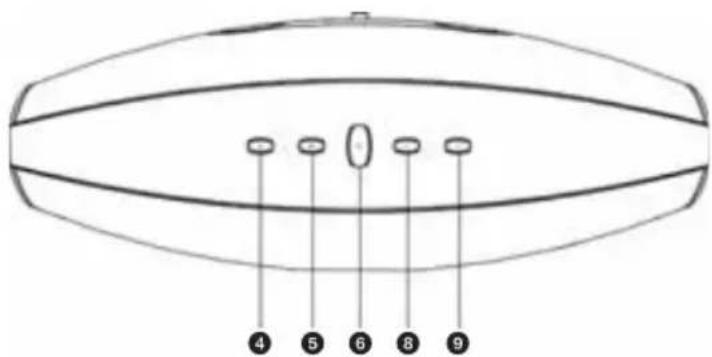
b) Horní panel
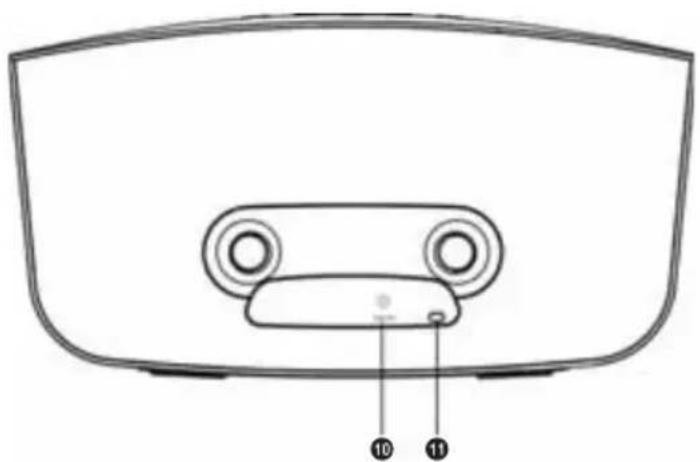
c) Zadní strana
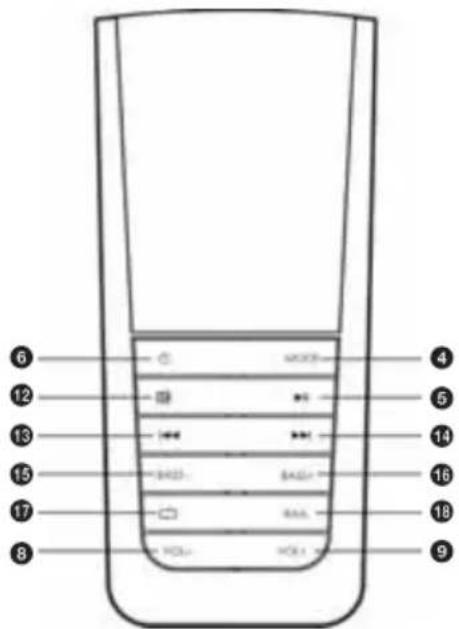
d) Dálkové ovládání


Manual assistant
Powered by Anthropic
Waiting for your message
Product information
Brand : SENCOR
Model : SSS 6500N
Category : Hi-Fi