
Sphere2 Mini - Charging Station / Docking Station Lamax - Free user manual and instructions
Find the device manual for free Sphere2 Mini Lamax in PDF.


| Brand | Lamax |
| Model | Sphere2 Mini |
| Product Type | Charging station / Docking station |
| Color Options | Black, White |
| Input Power | 5V/2A or 9V/2A via USB-C |
| Wireless Output Power | Up to 15W (compatible with Qi fast charging) |
| Number of Charging Devices | 1 device at a time |
| Charging Technology | Qi standard wireless charging |
| Compatibility | Smartphones and earbuds supporting Qi |
| Dimensions | Approx. 100 mm diameter, 10 mm height |
| Weight | Approx. 150 g |
| Cable Type | USB-C to USB-A (included) |
| LED Indicator | Yes, shows charging status |
| Overcharge Protection | Yes |
| Temperature Control | Yes |
| Foreign Object Detection | Yes |
| Material | Plastic with silicone pad |
| Cleaning Instruction | Wipe with a soft, dry cloth |
| Safety Certifications | CE, FCC |
| Package Contents | Charging pad, USB-C cable, user manual |
| Warranty | 2 years |
| Repair Information | No user-serviceable parts; contact support |
Frequently Asked Questions - Sphere2 Mini Lamax
User questions about Sphere2 Mini Lamax
0 question about this device. Answer the ones you know or ask your own.
Ask a new question about this device
Download the instructions for your Charging Station / Docking Station in PDF format for free! Find your manual Sphere2 Mini - Lamax and take your electronic device back in hand. On this page are published all the documents necessary for the use of your device. Sphere2 Mini by Lamax.
USER MANUAL Sphere2 Mini Lamax
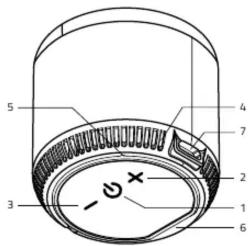
Controls
| 1 POWER | On/off (hold),Play/pause (press),Answer/end call (press), reject call (hold),redial last number called (double-press in quick succession) |
| 2 VOL + | Volume up (press), next track (hold) |
| 3 VOL - | Volume down (press), previous track (hold) |
Other
| 4 | LED |
| 5 | Microphone |
| 6 | Micro SD slot |
| 7 | Micro USB |
LED Indicators
| Flashing blue (fast) | Ready for pairing |
| Solid blue light | Paired with Bluetooth/Micro SD card |
| Flashing blue (slow) | Playing |
Charging indicator
Lights up red when charging, off when fully charged.
On/Off
To turn on the speaker, hold down the POWER button. The LED lights up and an audio alert sounds. Hold down the same button to turn off the speaker.
Pairing
-
Press and hold the POWER button to turn on the speaker. The LED starts flashing blue and the speaker is ready to pair.
-
Activate Bluetooth connectivity on your phone or similar device. Select "LAMAX Sphere2 Mini" from the list of available devices. If a pairing code is required, enter "0000" and confirm. Upon successful pairing, the speaker will beep and the LED will turn blue.
-
Playback can be controlled either with a paired device or by directly using the speaker. During playback, the LED will flash blue.
TWS
To pair two speakers with each other, switch on the two speakers, and ensure that they are not paired with any other multimedia devices. On one of them, which will act as the main one, press POWER button twice in quick succession, a beep will sound. When pairing is successful, a second beep sounds and the main speaker acts as the left channel. To unpair the two speakers, turn off Bluetooth on your phone or other device and press POWER twice quickly. An audio alert sounds when the devices have been successfully unpaired.
Warning:
If you do not turn off Bluetooth on your phone or other device before unpairing and press the POWER button twice quickly, the speakers will not unpair but instead dial the last number called. If you insert a Micro SD card into one of the speakers, the speakers will automatically unpair and the speaker will play from the Micro SD card. Upon removing the Micro SD card, the speakers automatically pair again.
Handsfree
When the phone is paired via Bluetooth, the Handsfree function is activated. To answer/end a call, press the POWER button; reject an incoming call by holding the POWER button; quickly press the POWER button twice to redial the last number dialed.
Charging
The speaker can be charged using the included USB cable from a suitable USB device - e.g., an adapter, PC, or power bank. Do not charge the speaker with an input voltage higher than 5V, as the speaker may be damaged. An audio alert will sound when the battery is running low. The LED lights up red during charging. When fully charged, the red LED switches off.
Parameters
| Speaker parameters | 5 W, Φ 40 mm, 150 Hz-20 kHz |
| Battery type | Li-Ion 400 mAh |
| Battery life | up to 15 hours at 50% volume |
| Talk time | 4-5 hours |
| Charging time | 1.5 hours |
| Playback options | Bluetooth, Micro SD card |
| Wireless technology | Bluetooth 5.1 |
| Pairing distance | up to 10 m |
| Dimensions | 48 × 46 mm |
| Weight | 71 g |
Printing errors reserved.
The current version of the user manual can be downloaded here: https://www.lamax-electronics.com/downloads/lamax-sphere2-mini/manual

LAMAX Sphere2 Mini

Steuerung
https://www.lamax-electronics.com/downloads/lamax-sphere2-mini/manual

LAMAX Sphere2 Mini
Ovládání
https://www.lamax-electronics.com/downloads/lamax-sphere2-mini/manual

LAMAX Sphere2 Mini

Ovládanie
https://www.lamax-electronics.com/downloads/lamax-sphere2-mini/manual

LAMAX Sphere2 Mini

Kontrola
https://www.lamax-electronics.com/downloads/lamax-sphere2-mini/manual

LAMAX Sphere2 Mini

Vezérlés
https://www.lamax-electronics.com/downloads/
lamax-sphere2-mini/manual

LAMAX Sphere2 Mini

Upravljanje
https://www.lamax-electronics.com/downloads/
lamax-sphere2-mini/manual

LAMAX Sphere2 Mini

Upravljanje
| 1 POWER | Uključenje/isključenje (držanje),Reprodukcija/stanka (pritisak),Prihvačanje/završavanje poziva (pritisak), odbijanje poziva (držanje), ponovno pozivanje zadnjeg pozvanog broja (dvostruki brzi pritisak) |
| 2 VOL + | Povećanje glasnoće (pritisak), slijedeća pjesma (držanje) |
| 3 VOL - | Smanjenje glasnoće (pritisak), prethodna pjesma (držanje) |
Drugo
| 4 | LED |
| 5 | Mikrofon |
| 6 | Micro SD utor |
| 7 | Micro USB |
LED signalizacija
| Trepće plavo (brzo) | Spreman za uparivanje |
| Svijetli plavo | Uparen s BT/Micro SD kartica |
| Trepće plavo (sporo) | Reprodukcija |
Pokazateli punienia
https://www.lamax-electronics.com/downloads/lamax-sphere2-mini/manual


Brand : Lamax
Model : Sphere2 Mini
Category : Charging Station / Docking Station