
TRUCK-G800 - Gps ALPINE - Free user manual and instructions
Find the device manual for free TRUCK-G800 ALPINE in PDF.


| Product Type | GPS Navigation System for Trucks |
| Brand | Alpine |
| Model | TRUCK-G800 |
| Dimensions (W x H x D) | 150 mm x 90 mm x 20 mm |
| Weight | 200 g |
| Display | 5-inch Touchscreen, 800x480 pixels |
| Power Supply | 12V/24V DC (vehicle cigarette lighter) |
| Battery | Rechargeable Li-Ion, 1500 mAh |
| GPS Chipset | SiRFstar IV, 48-channel |
| Map Coverage | Europe, preloaded with truck-specific routes |
| Navigation Features | Turn-by-turn voice guidance, lane assist, speed limit alerts, truck-optimized routing (height, weight, length restrictions) |
| Connectivity | Bluetooth 4.0 for hands-free calling, microUSB for updates |
| Traffic Information | Real-time TMC (Traffic Message Channel) via FM |
| Memory | 8 GB internal, microSD slot up to 32 GB |
| Operating Temperature | -20°C to 60°C |
| Included Accessories | Windshield mount, car charger, USB cable, quick start guide |
| Maintenance & Cleaning | Clean with a soft, dry cloth. Avoid harsh chemicals. |
| Safety | Do not obstruct driver's view. Mount securely. |
| Spare Parts & Repairability | Contact Alpine authorized service center for repairs. Spare parts available through retail. |
Frequently Asked Questions - TRUCK-G800 ALPINE
User questions about TRUCK-G800 ALPINE
0 question about this device. Answer the ones you know or ask your own.
Ask a new question about this device
Download the instructions for your Gps in PDF format for free! Find your manual TRUCK-G800 - ALPINE and take your electronic device back in hand. On this page are published all the documents necessary for the use of your device. TRUCK-G800 by ALPINE.
USER MANUAL TRUCK-G800 ALPINE
TRUCK-G800
Instalační manuál
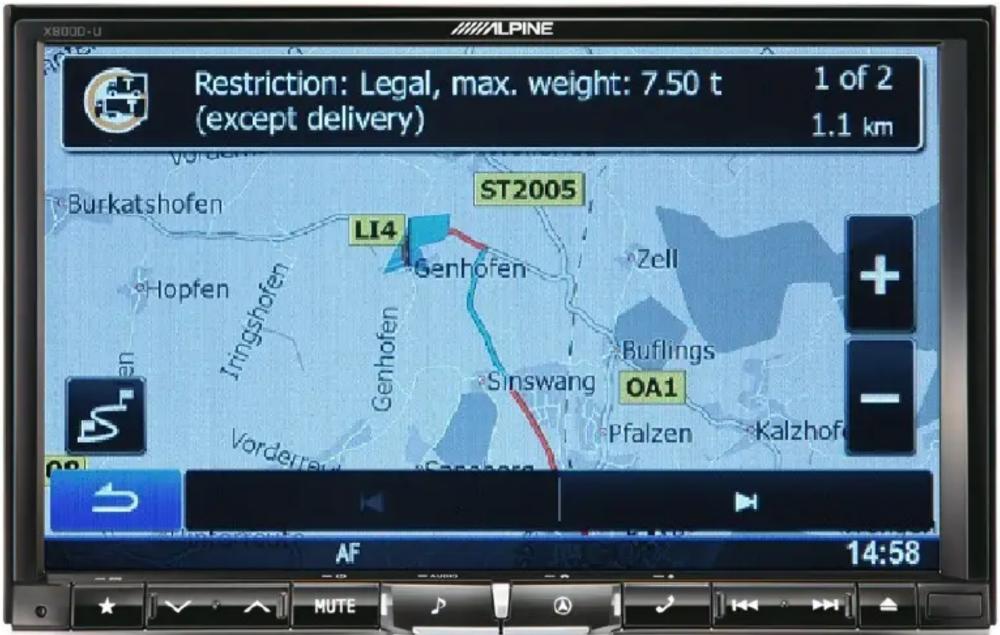
Naváděcí software pro
INE-W987D / X800D-U / X800D-ML
Čeština
Zaří 2014, Verze 1.0
Instalační manuál pro INE-W987D / X800D-U / X800D-ML:
SD karta se softwarem TRUCK-G800 zlepší vaší INE-W987D a X800D-U / X800D-ML jednotku. Může být také použit pro obytné automobily a karavany.
1) Zapněte navigační přístroj.
2) Stiskněte klávesu "Otevřít", pak stiskněte kontextové tlačítko "SD".
3) Odstraňte ochranný kryt SD karty a vyjměte SD kartu.
4) Vložte SD kartu TRUCK-G800 a nasad'te ochranný kryt.
5) Stiskněte kontextové tlačítko "Zavřít".
6) Vypněte ACC a počkejte chvilku.
Navigační přístroj je tedy připraven k okamžitému použití.
Vezměte prosím na vědomí:
Ujistěte se, že vkládáte TRUCK-G800 SD kartu, než vstoupíte na https://alpine.naviextras.com pro mapy a aktualizace obsahu. Poté, co vložíte SD kartu, bude k dispozici na https://alpine.naviextras.com mapa a konkrétní aktualizace.
Jak nastavit konkrétní automobil v nastavení:
1) Stiskněte klávesu "Navigace" a dotkněte se symbolu "Nastavení" v hlavním menu navigace.
2) Stiskněte "Nastavení trasy", a pak stiskněte "Vozidlo".
3) U obytných automobilů a karavanů: Vyberte "Výchozí auto". Pro nákladní automobily (těžká nákladní vozidla): Vyberte možnost "Výchozí nakladní automobil".
4) Klepněte na ikonu "Nastavení" ve "Výchozí auto" / "Výchozí nakladní automobil " a přizpůsobte a upravte hodnoty platné pro vaše vozidlo.
Brand : ALPINE
Model : TRUCK-G800
Category : Gps