Tell me More Performance - Logiciel photo / vidéo Auralog - Free user manual and instructions
Find the device manual for free Tell me More Performance Auralog in PDF.


| Product Type | Language Learning Software |
| Brand | Auralog |
| Model | Tell me More Performance |
| Version | Performance |
| Platform | DVD-ROM (Windows/Mac) |
| Languages Available | English, Français, Deutsch, Español, and more (selectable user language) |
| Lesson Modes | Free-to-Roam, Guided, Dynamic |
| Speech Recognition | Yes, state-of-the-art technology |
| Audio Export | Audio CD and MP3 compatible |
| Reference Tools | Grammar explanations, conjugation tool, glossary, cultural texts, maps |
| User Accounts | Multiple accounts per computer, password optional |
| Print Support | Every page printable |
| Activity Levels | Level 1 to Level 4 |
| Technical Support | Toll-free: 888-388-3535, Phone: 602-470-0300, Email: supportretail@auralog.com |
| Maintenance | Software updates via official website (if applicable) |
| Safety | No hazards when used as intended |
| Environmental Information | Recyclable packaging (assumed) |
Frequently Asked Questions - Tell me More Performance Auralog
User questions about Tell me More Performance Auralog
0 question about this device. Answer the ones you know or ask your own.
Ask a new question about this device
Download the instructions for your Logiciel photo / vidéo in PDF format for free! Find your manual Tell me More Performance - Auralog and take your electronic device back in hand. On this page are published all the documents necessary for the use of your device. Tell me More Performance by Auralog.
USER MANUAL Tell me More Performance Auralog
Thank you for purchasing TELL ME MORE® Performance. This Quick Start Guide will help you to better utilize our award-winning language software.
To begin, insert the DVD-ROM into your computer's drive.
CREATING AN ACCOUNT
text_image
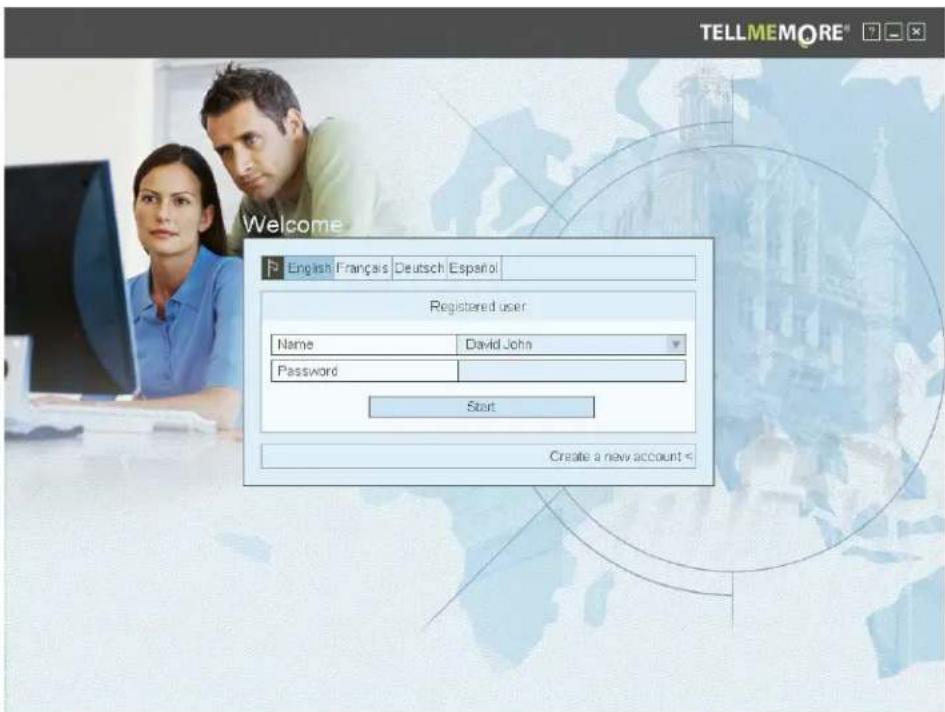
TELLMEMORE® Welcome English Français Deutsch Español Registered user Name Davidson John Password Start Create a new accountWhen you first use TELL ME MORE ^ , you will have to create your own account. You can create as many usernames and passwords as you wish on the same computer. In that sense, your entire family can use TELL ME MORE ^ and keep track of the progress for each account.
Step one is to choose your username, and then choose a password. It is not necessary to create a password; you can leave that field blank and just use your username to log in. The user language is the language in which the explanations, translations will be given (choose English by default).
CHOOSING A LEVEL
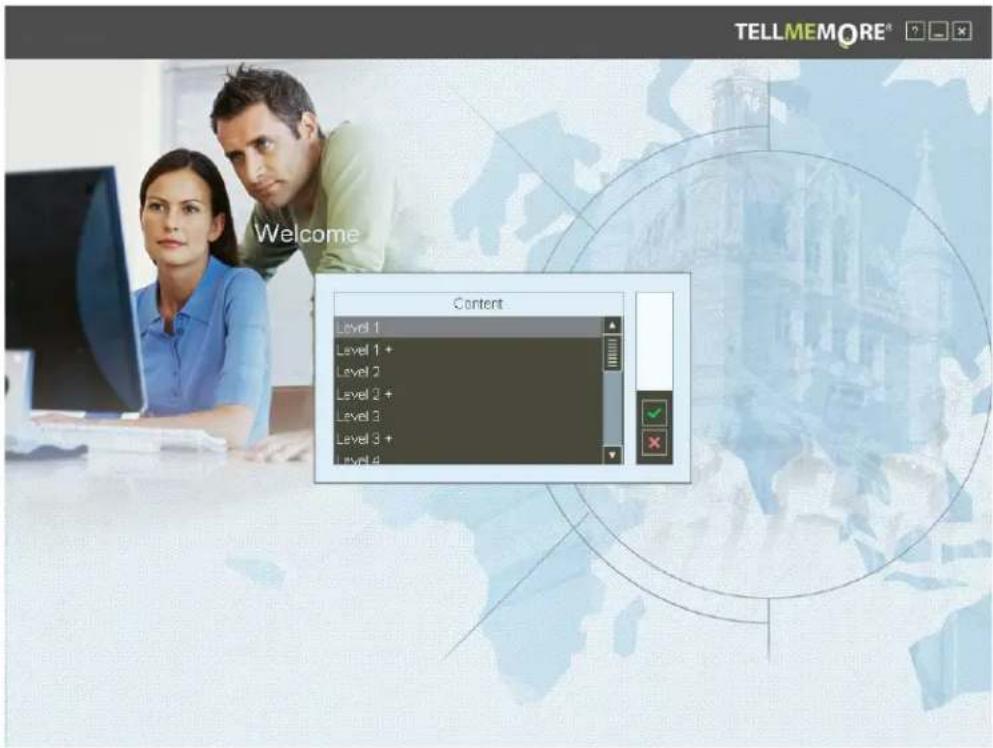
Once you have created an account, your next step is to choose a level to begin your studies. Simply choose the level that you wish to begin at, and then click on the green "check" arrow.
text_image
TELLMEMORE® Welcome Content Level 1 Level 1 + Level 2 Level 2 + Level 3 Level 3 + Level 4CHOICE OF FUNCTION MODE FOR TELL ME MORE®
text_image
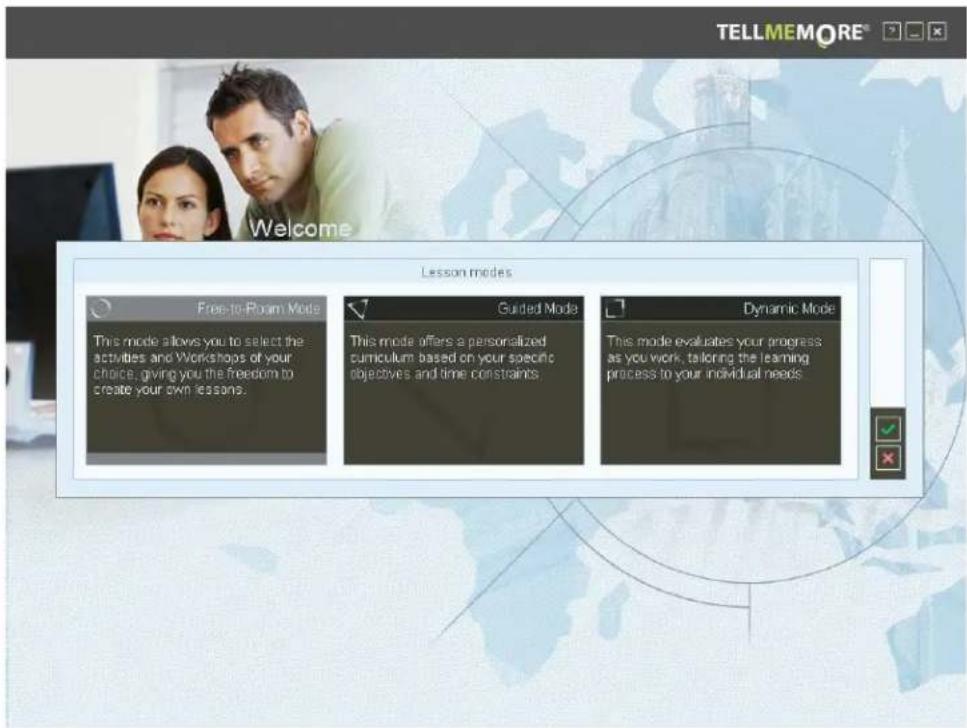
TELLMEMORE® Welcome Lesson modes Free-to-Room Mode This mode allows you to select the activities and Workshops of your choice, giving you the freedom to create your own lessons. Guided Mode This mode offers a personalized curriculum based on your specific objectives and time constraints. Dynamic Mode This mode evaluates your progress as you work, tailoring the learning process to your individual needsIn TELL ME MORE ^® , three different lesson modes are available. If you are a Beginner and/or never used TELL ME MORE ^® , start with the Guided Mode.
1-FREE-TO-ROAM MODE
This mode is organized by workshops according to skills/topics:
- Lesson Workshop
- Cultural Workshop
- Oral Workshop
- Vocabulary Workshop
- Grammar Workshop
- Written Workshop
Free-to-Roam Mode gives you more freedom in navigation and allows you to change the options of different activities (e.g. the level for speech recognition.)
2-GUIDED MODE
Different Learning Paths are offered in this lesson mode; they are already organized in a pedagogical way. Most options cannot be changed from the default settings.
3- DYNAMIC MODE
In this mode, the student can choose to work according to the objectives offered, after which point TELL ME MORE ^® adapts the linguistic content to help students work on the skills that they need to improve the most, as calculated by their performance in each activity.
GUIDED MODE
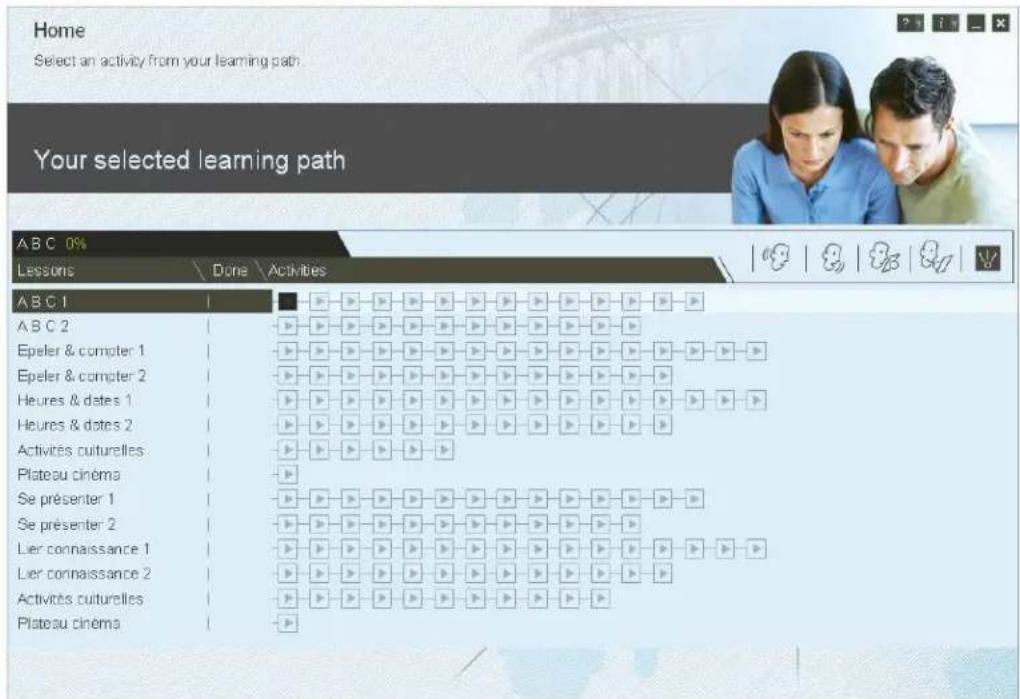
The name of the lessons for each level appears on the left of your screen.
The different activities associated with each lesson appear on the right of your screen (squares).
For each lesson, the easiest activity is on the left and the hardest ones are at the very right. You should go through each activity for each lesson, starting with the first square and moving towards the last one, left to right.
Once you go through a lesson, move on to the next one.
To begin, click on the first activity of the first lesson: Dialogue Explore
GUIDED MODE: DIALOGUE EXPLORE
text_image
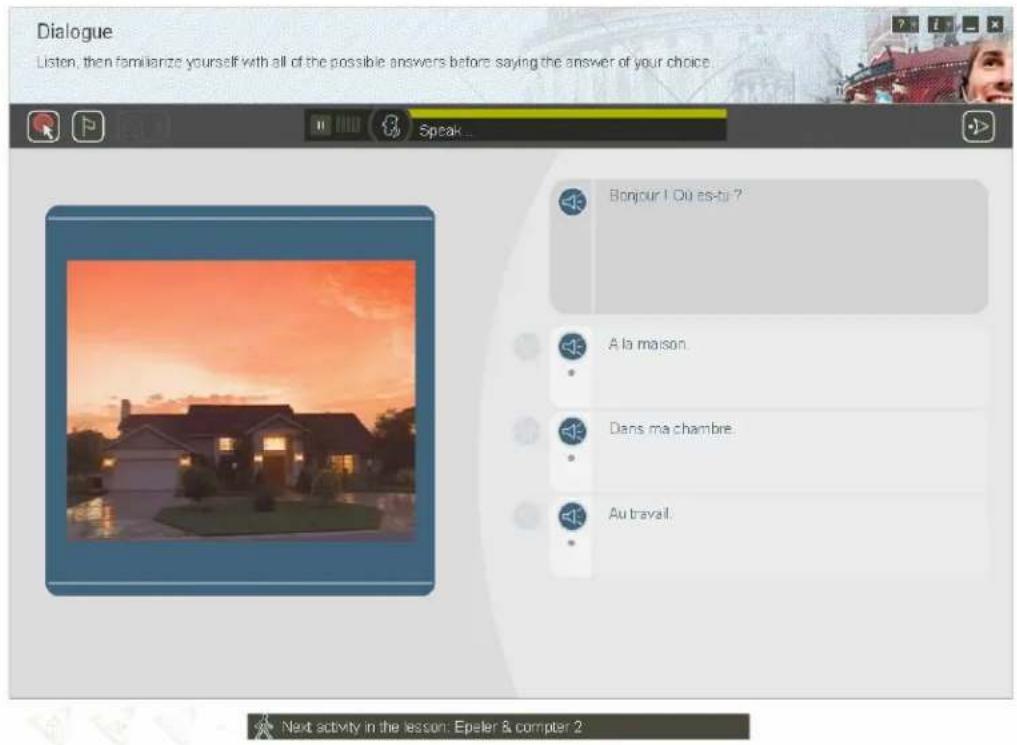
Dialogue Listen, then familiarize yourself with all of the possible answers before saying the answer of your choice. Speak... Bonjour ! Où es-ti ? A la maison. Dans ma chambre. Au travail. Next activity in the lesson: Epeler & compter 2The instructions always appear on the top left for each activity.
The principle of TELL ME MORE ^4 is immersion, which is the proven best way to learn a language. It is the same as if you were to go abroad to learn the language.
At first, you will listen to words/sentences to get familiar with the sounds of the language, and look at the translation of these words/sentences. Then you will be given the opportunity to speak these words/sentences using our state-of-the-art speech recognition technology.
After listening and practicing these words, you will improve your comprehension of the language.
The first activity is the Dialogue Explore.
In this first activity, there are no right or wrong answers. You just need to click on any of the three answers and move on to the next dialogue.
The purpose here is to get you familiar with the sounds of the language (click on the loudspeaker next to the sentence to hear it as many times as you wish), and look at the translation of the words/sentences to understand their meaning. These same words and sentences will appear in the next activities, reinforcing your learning.
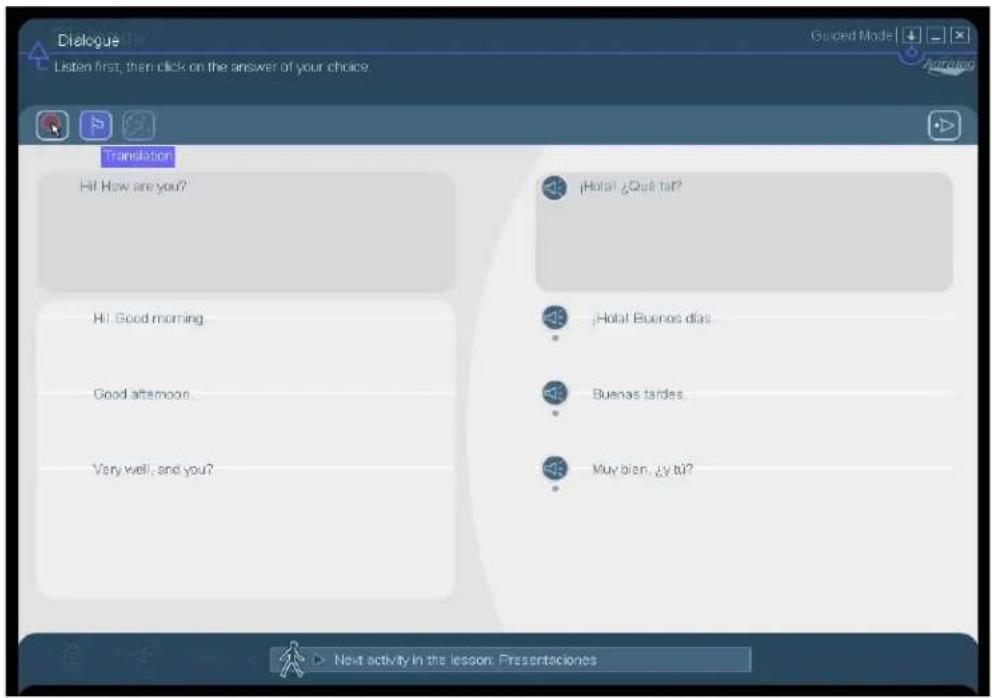
To get the translation of each sentence, please click on the flag icon at the top left of your screen (see below).
text_image
Dialogue Listen first, then click on the answer of your choice Translation Hi! How are you? ¡Hotel ¿Que tar? Hi! Good morning. ¡Hotel Buenos días Good afternoon. Buenas tardes Very well, and you? Muy bien, ¿y tu? Next activity in the lesson: Presentaciones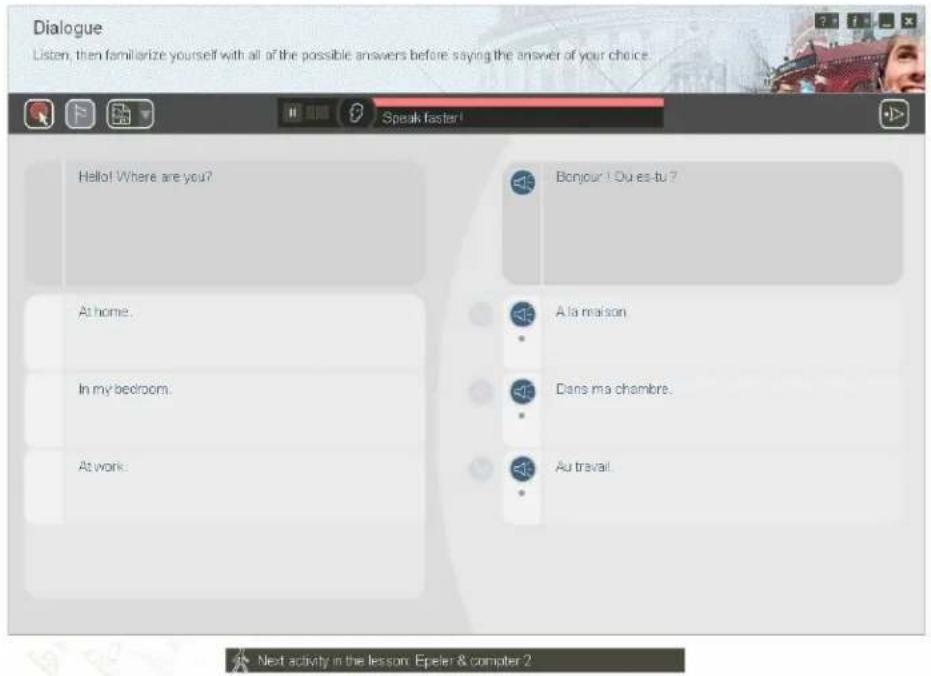
text_image
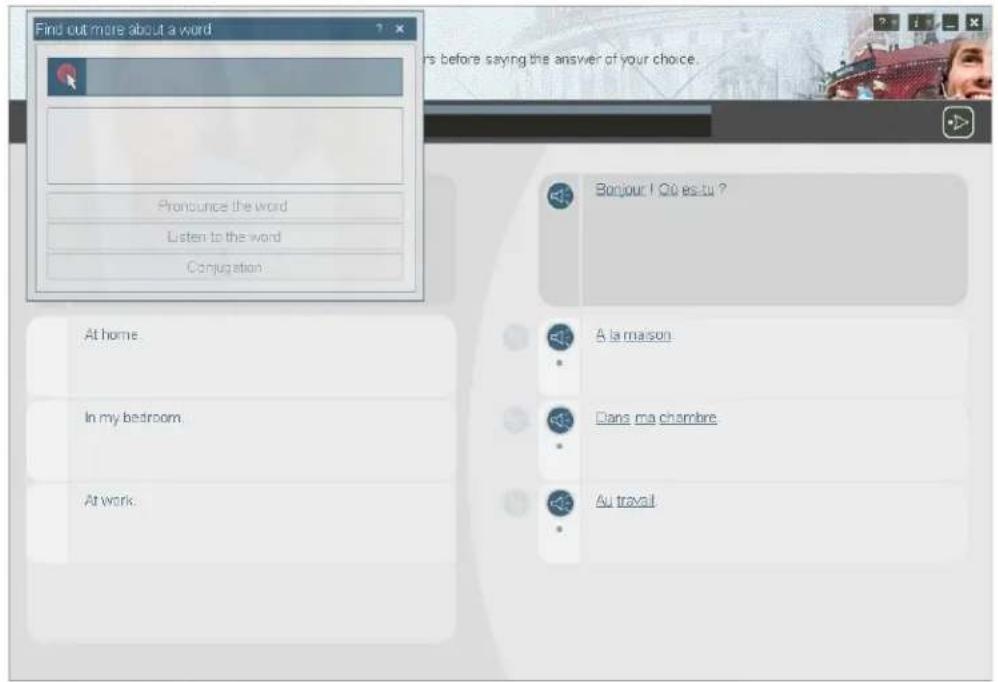
Dialogue Listen, then familiarize yourself with all of the possible answers before saying the answer of your choice. Speak faster! Hello! Where are you? At home. In my bedroom. At work: Bonjour ! Ou es-tu ? A la maison Dans ma chambre. Au travail Next activity in the lesson Epeler & compter ?You can also use the icon “Find out more about a word” (the circle and arrow icon on the top left of your screen). This icon will be very important throughout the software. When you click on that icon, several words/sentences will be highlighted on the screen. You can click on each highlighted word and will be able to: get the translation, listen to the word, pronounce it, pronounce the sentence (when appropriate), as well as having a link to the conjugation or dictionary (when appropriate).
text_image
Find out more about a word Pronounce the word Listen to the word Conjugation At home. In my bedroom. At work. Bonnour ! Où estu ? A la maison. Dans ma chambre. Au travailCREATE AN AUDIO CD (IN GUIDED MODE ONLY)
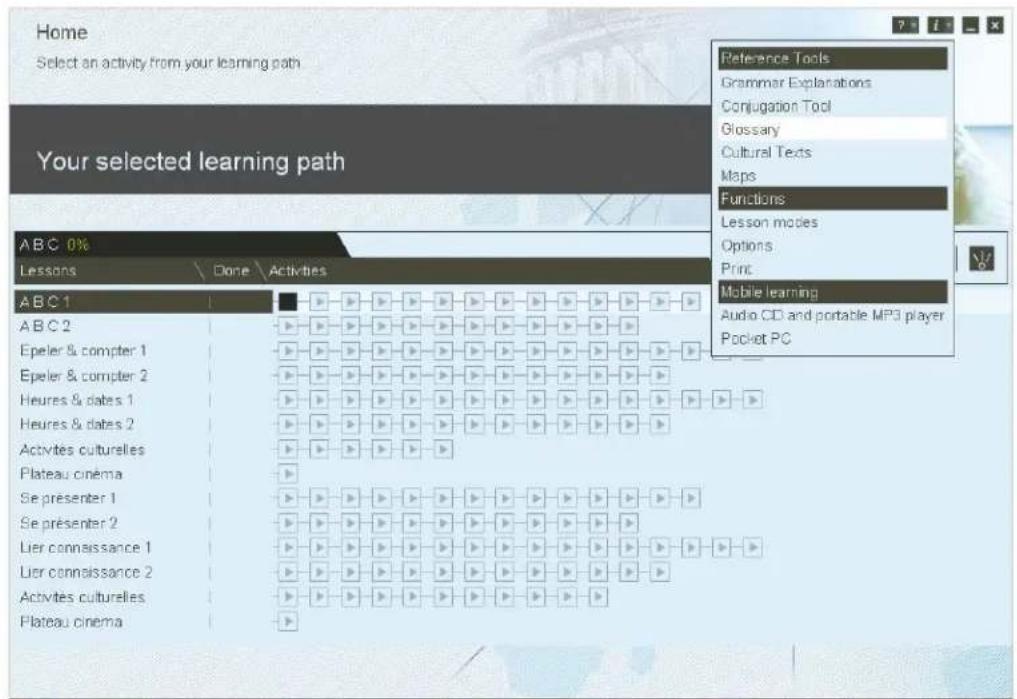
You can export the audio content of TELL ME MORE ^® (dialogues, videos,...) onto your hard drive, and then burn your own audio CDs, or import the files onto your MP3 players (if you have the ability to convert our audio files onto MP3).
To do so, click on the upside-down question mark icon on the top right of your screen.
Then select Audio CD at the very bottom.
text_image
Home Select an activity from your learning path Your selected learning path ABC 0% Lessons Done Activities Reference Tools Grammar Explanations Conjugation Tool Glossary Cultural Texts Maps Functions Lesson modes Options Print Mobile learning Audio CD and portable MP3 player Pocket PC ABC1 ABC2 Epeler & compter 1 Epeler & compter 2 Heures & dates 1 Heures & dates 2 Activités culturelles Plateau cinéma Se présenter 1 Se présenter 2 Lier connaissance 1 Lier connaissance 2 Activités culturelles Plateau cinéma
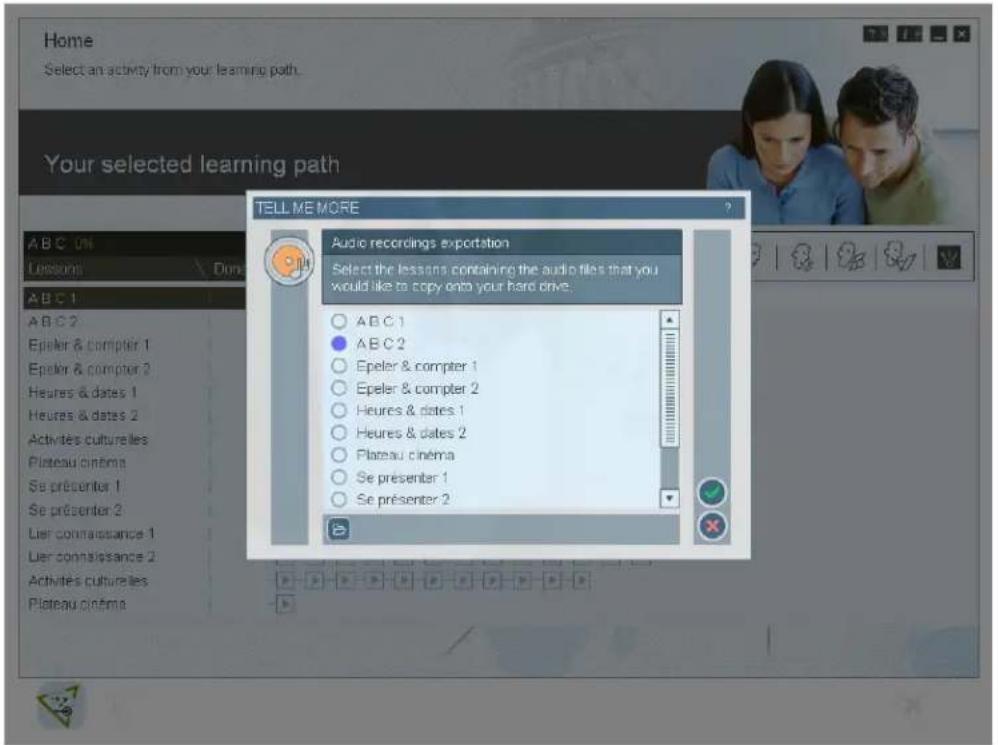
Next, select the lesson containing the audio files you would like to copy to your hard drive.
text_image
Home Select an activity from your learning path. Your selected learning path TELL ME MORE A B C 0% Lessons Don A B C 1 A B C 2 Epeler & compter 1 Epeler & compter 2 Heures & dates 1 Heures & dates 2 Activités culturelles Plateau cinéma Se présenter 1 Se présenter 2 Lier consissance 1 Lier consissance 2 Activités culturelles Plateau cinéma Audio recordings exportation Select the lessons containing the audio files that you would like to copy onto your hard drive. A B C 1 A B C 2 Epeler & compter 1 Epeler & compter 2 Heures & dates 1 Heures & dates 2 Placeau cinéma Se présenter 1 Se présenter 2TOOLS AND INFO ICON
text_image
Home Select an activity from your learning path Your selected learning path ABC 0% Lessons Done Activities ABC 1 ABC 2 Epeler & compter 1 Epeler & compter 2 Heures & dates 1 Heures & dates 2 Activités culturelles Plateau cinéma Se présenter 1 Se présenter 2 Lier connaissance 1 Lier connaissance 2 Activités culturelles Plateau cinéma Reference Tools Grammar Explanations Conjugation Tool Glossary Cultural Texts Maps Functions Lesson modes Options Print Mobile learning Audio CD and portable MP3 player Pocket PC
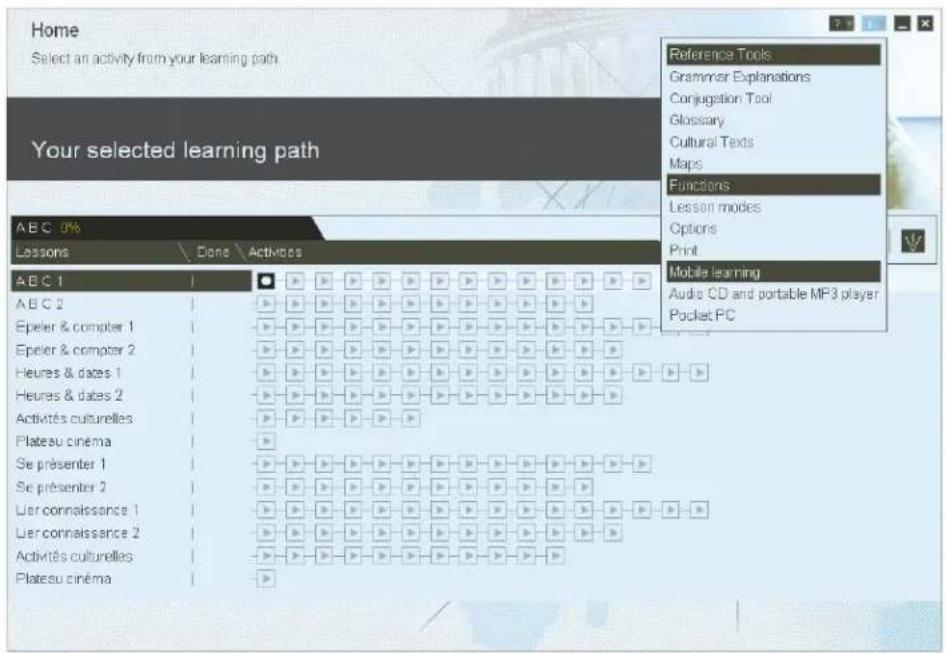
The tools and info (upside-down question mark) icon is located on the top right of your screen. It is available on every page, and it enables you to have access to:
-Reference Tools: Grammar Explanations, Conjugation Tool, Glossary, Cultural Texts and Maps
-Help: Using the current screen, navigating, using speech recognition
-Functions:
-Lessons Modes: change lesson modes between Guided, Free-to-roam and dynamic modes
-Options
-Print: every page of TELL ME MORE ^® is printable
-Audio CD: see above (only in Guided mode)
If you have any more questions or need technical support, feel free to contact us at:
Auralog
3710 E University Drive, Suite 1
Phoenix, AZ 85034
Toll-free: 888 388 3535
Phone: 602 470 0300
Fax :602 470 0311
supportretail@auralog.com