EonStor DS 1024 Gen2 - NAS Infortrend - Free user manual and instructions
Find the device manual for free EonStor DS 1024 Gen2 Infortrend in PDF.


User questions about EonStor DS 1024 Gen2 Infortrend
0 question about this device. Answer the ones you know or ask your own.
Ask a new question about this device
Download the instructions for your NAS in PDF format for free! Find your manual EonStor DS 1024 Gen2 - Infortrend and take your electronic device back in hand. On this page are published all the documents necessary for the use of your device. EonStor DS 1024 Gen2 by Infortrend.
USER MANUAL EonStor DS 1024 Gen2 Infortrend
Expansion Enclosure Guide
Version: 7.3
Updated: April 2019
Abstract:
This guide contains instrucons and system limitaons for adding expansion enclosures to Infortrend storage system without aecng its existing storage operaons.
Contents
Contents 2
Introducon....3
Overview of Maximum Drives ....3
Hybrid Expansion Enclosures....4
Expansion Enclosure Number......4
Expansion Enclosure Connecons 6
SAS 12 Gb/s Storage System ....6
SAS 6 Gb/s Storage System ....8
Model Classicaon (Single and Redundant)....9
Expansion Enclosure On-line Expanding....10
-
Seng the expansion enclosure ID .... 10
-
Installing the newly-added expansion enclosure ....10
-
Reconnecng the redundant SAS path (for redundant models only)....11
-
Connecng new SAS cable....11
-
Turning on the newly-added expansion enclosure....11
-
Installing the newly added drives....12
EonStor DS 1000/2000/3000 & GS/GSe 1000 SAS 6Gb/s Model Expansion Table ...... 13
Previous G7/G7i Model Expansion Table.... 14
Previous G6 Model Expansion Table.... 15
Introducon
Infortrend storage systems are made of high quality and durable components based on a high-scalable hardware design, providing support in terms of scalability and upgradeability. You also have the opon to expand your storage system's capacity with Infortrend's expansion enclosures in dierent form factors, allowing you more storage and provide quicker and more efficient storage services without downme.
The seconds in this chapter list the expansion rules that you must follow when conguring the expansion enclosures with SAS 12 Gb/s drive-side models.
Overview of Maximum Drives
Infortrend provides various form factors that you can select for storage systems and expansion enclosures. The maximum number of drives can be calculated based on the dierent models. Infortrend always uses SAS expansion technology to implement massive drive scalability. Most of the products have onboard SAS ports to connect expansion enclosures and some models support SAS expansion board to connect more expansion systems.
Take a look at the table below for Infortrend's products, the maximum number of drives, and their supported interfaces:
| Hybrid SAS Interface | Storage System Drives | On-board SAS Ports | SAS Expansion Board | Maximum Drives |
| EonStor DS Family (SAS 12Gb/s) | 448 within 15 mixed expansion enclosures | N/A | 448 | |
| EonStor GS 1000 Gen2 EonStor GSe 1000 Gen2 | 448 within 15 mixed expansion enclosures | N/A | 448 | |
| EonStor GS 2000/3000/4000 EonStor GSe 2000/3000 EonStor GSc 2000/3000 | 448 within 15 mixed expansion enclosures | 448 within 15 mixed expansion enclosures | 896 (448 + 448) | |
| EonStor GS 5000 EonStor GSc 5000 | N/A | N/A | [896 within 15 mixed expansion enclosures] x 2 expansion boards | 1792 (896 + 896) |
| Hybrid SATA Interface | Storage System Drives | On-board SAS Ports | SAS Expansion Board | Maximum Drives |
| EonStor GSe Pro 100/200 | 5 bay, 8 bay | N/A | 32 with 4 expansion enclosures | 37 (5+32), 40 (8+32) |
| EonStor GSe Pro 1000 | 4 bay, 8 bay | N/A | N/A | 8 |
| EonStor GSe Pro 3000 | 8 bay, 12 bay, 16 bay | N/A | 448 within 15 mixed expansion enclosures | 448 |
| All Flash SAS Interface | Storage System Drives | On-board SAS Ports | SAS Expansion Board | Maximum Drives |
| EonStor GSa 2000 | 24 bay | 360 with 15 x JB3024 | 360 with 15 x JB3024 | 744 (24 + 360 + 360) |
| EonStor GSa 3000 | 25 bay | 375 with 15 x JB3025 | 375 with 15 x JB3025 | 775 (25 + 375 + 375) |
| EonStor GSa 5000 | N/A | N/A | [375 with 15 x JB3025] x 2 expansion boards | 750 (375 + 375) |
| AI Appliance | Storage System Drives | On-board SAS Ports | SAS Expansion Board | Maximum Drives |
| EonStor GSi 3016 | 16 bay | 224 with 14 x JB 3016 or 300 with 5 x JB 3060 | N/A | 316 (16 + 300) |
| EonStor GSi 5016 | 16 bay | 224 with 14 x JB 3016 or 420 with 7 x JB 3060 | N/A | 436 (16 + 420) |
| Storage Server | Storage System Drives | On-board SAS Ports | SAS Expansion Board | Maximum Drives |
| EonServ 4012 | 12 bay | N/A | 168 with 14 x JB 312 or 300 with 5 x JB 360 | 312 (12 + 300) |
| EonServ 4016 | 16 bay | N/A | 224 with 14 x JB 316 or 300 with 5 x JB 360 | 316 (16 + 300) |
| EonServ 5012 | 12 bay | 168 with 14 x JB 312 or 300 with 5 x JB 360 | N/A | 312 (12 + 300) |
| EonServ 5016 | 16 bay | 224 with 14 x JB 316 or 300 with 5 x JB 360 | N/A | 316 (16 + 300) |
| EonServ 7012 | 12 bay | 168 with 14 x JB 312 or 420 with 7 x JB 360 | N/A | 432 (12 + 420) |
| EonServ 7016 | 16 bay | 224 with 14 x JB 316 or 420 with 7 x JB 360 | N/A | 436 (16 + 420) |
Table 1: Maximum Drives of Current Models
Hybrid Expansion Enclosures
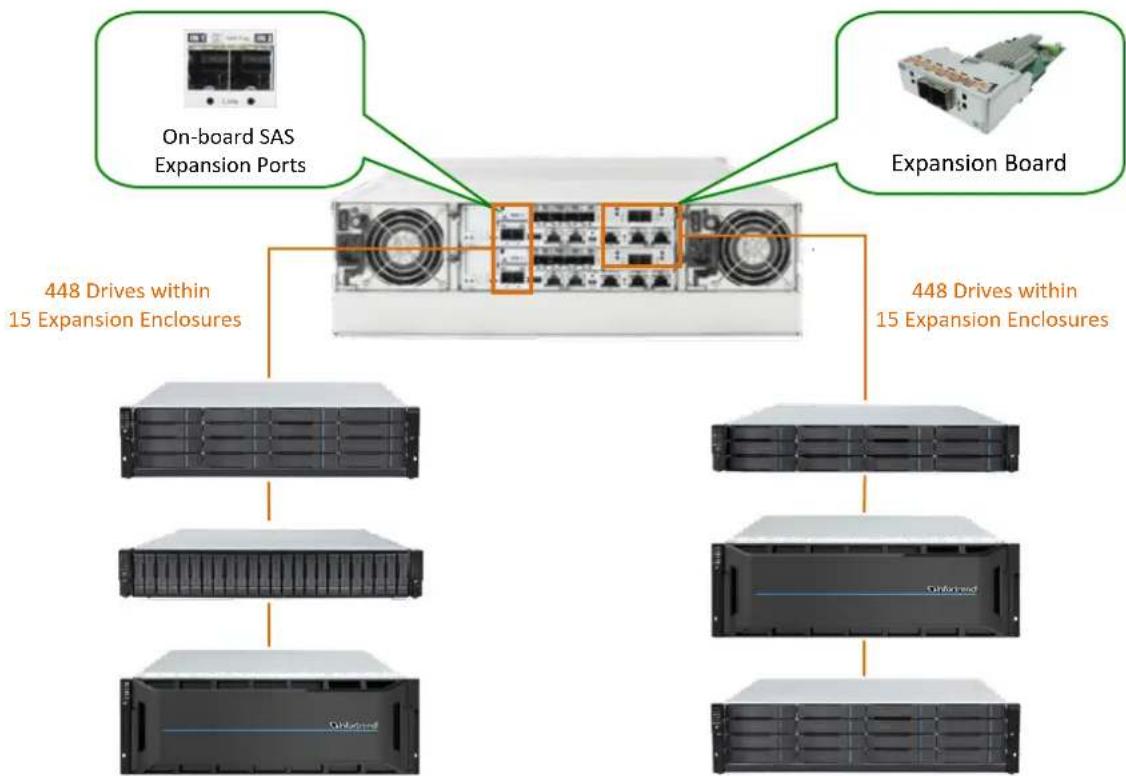
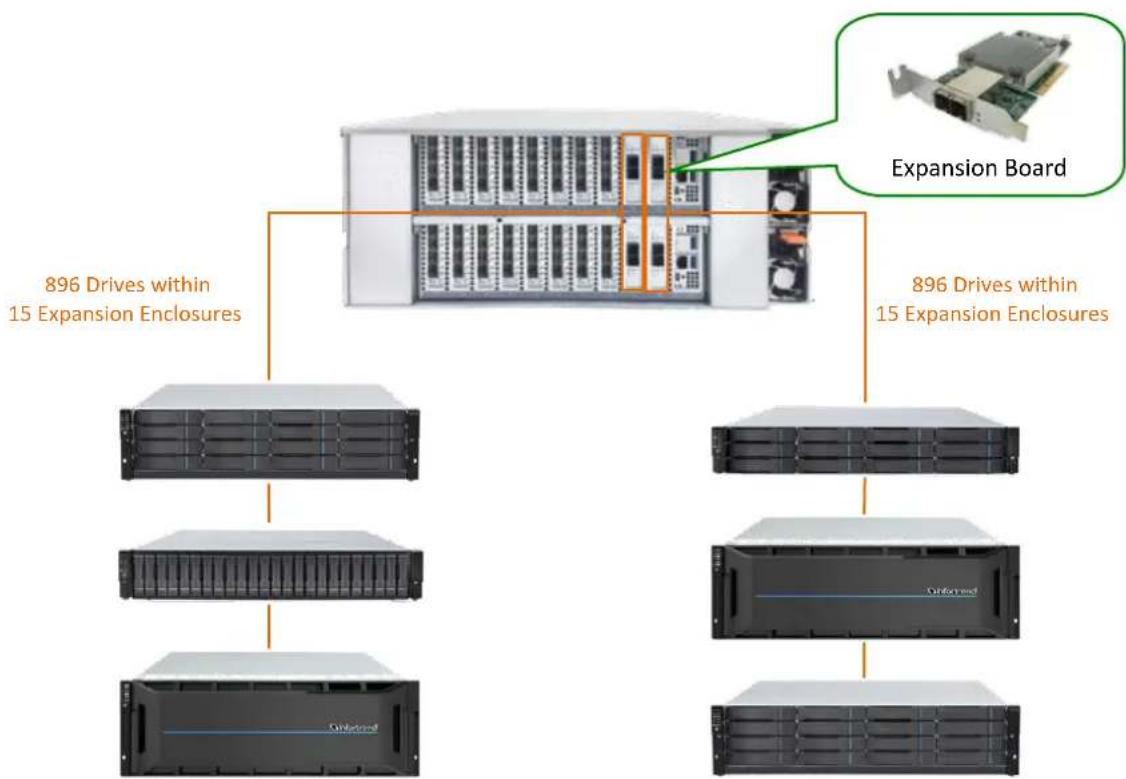
Infortrend allows some models to support hybrid expansion enclosure conneccons. The onboard SAS expansion port (either dual or single port) supports up to 448 drives for each expansion chain, which is limited by the SAS chip used. Infortrend also oers SAS 12 Gb/s expansion board for some models, which uses the same SAS chip as the onboard expansion ports. You can use twice the supported number of drives of up to 896 (1792 for EonStor GS/GSc 5000) by cascading the second expansion chain via the expansion host boards. Do note that not every model supports hybrid expansion enclosures conguraon.
For the supported number of drives, see secon Overview of Maximum Drives.
Systems that support hybrid expansion enclosures:
● EonStor DS/GS/GSe family (12 Gb/s SAS drive-side models)
EonStor GSc family
● EonStor GSe Pro 3000 series
Systems that do not support hybrid expansion enclosures:
EonStor DS/GS/GSe family (6 Gb/s SAS drive-side models)
- EonStor GSa family
EonStor GSi family
EonServ family
● EonStor GSe Pro 100/200/1000 series
Expansion Enclosure Number
Before seng up an extra expansion enclosure to an exisng conguraon, you must set the rotary ID switch using a flat-blade screwdriver. Do note that each expansion enclosure must have a unique ID within an expansion chain. Currently, the expansion enclosure's rotary ID switch is numbered from 1 to 15, which means you can only connect up to 15 expansion enclosures per expansion chain.
IMPORTANT!
To prevent any ID conicts, ensure that you set a unique ID to each expansion enclosure when connecng in a mul-array environment.

natural_image
Front view of a rack-mounted server unit with a dial indicator (no text or symbols on the device itself)Figure 1: Expansion Enclosures ID switch
flowchart
graph TD
    A["On-board SAS Expansion Ports"] --> B["448 Drives within 15 Expansion Enclosures"]
    C["Expansion Board"] --> B
    B --> D["448 Drives within 15 Expansion Enclosures"]
    D --> E["Server 1"]
    D --> F["Server 2"]
    D --> G["Server 3"]
    D --> H["Server 4"]
Figure 2: Hybrid Expansion Enclosures
flowchart
graph TD
    A["896 Drives within 15 Expansion Enclosures"] --> B["Server Rack"]
    A --> C["Server Rack"]
    A --> D["Server Rack"]
    A --> E["Server Rack"]
    F["Expansion Board"] --> G["Server Rack"]
    F --> H["Server Rack"]
    F --> I["Server Rack"]
    style F fill:#f9f,stroke:#333,stroke-width:2px
Figure 3: Hybrid Expansion Enclosures of EonStor GS/GSc 5000
Expansion Enclosure Connecons
The seconds in this chapter discuss the connexons between expansions and storage systems with SAS 6 Gb/s and SAS 12 Gb/s technologies. Since the SAS drive-side protocol technology has been upgraded from SAS 6 Gb/s to SAS 12 Gb/s, the operang storage system can use dierent SAS protocol for expansion.
SAS 12 Gb/s Storage System
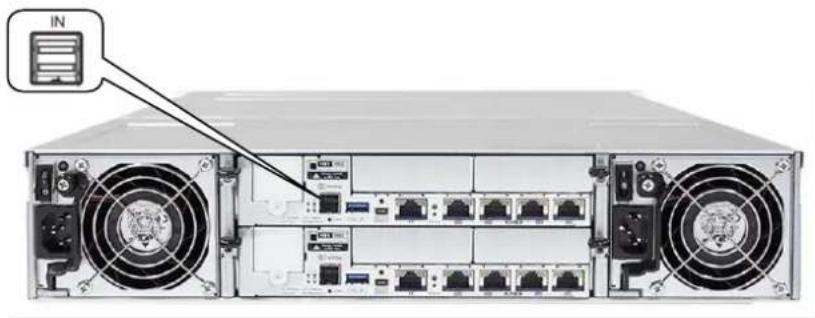
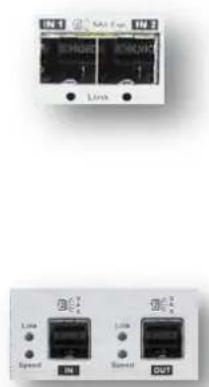
For Infortrend storage systems with SAS 12 Gb/s drive-side, the onboard SAS expansion ports are marked as IN.
natural_image
Front view of a server rack with multiple ports and ventilation fans (no visible text or labels)Figure 4: SAS 12 Gb/s Storage System Onboard Expansion Port
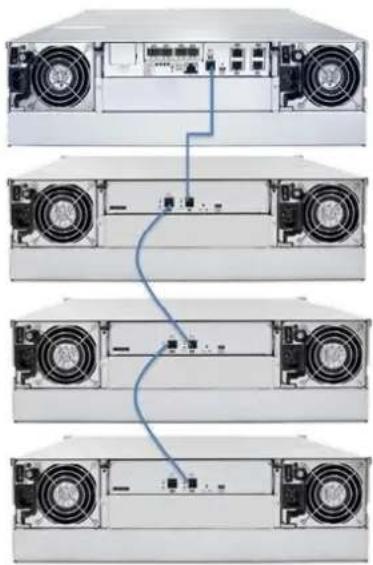
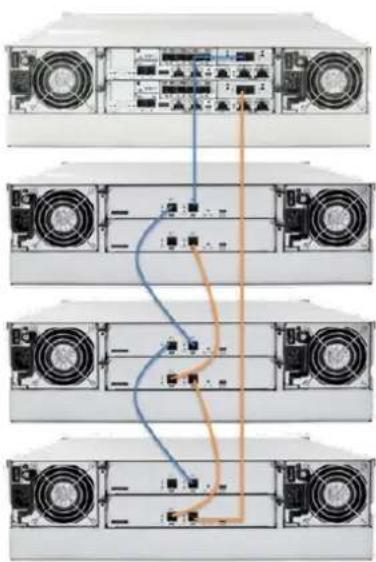
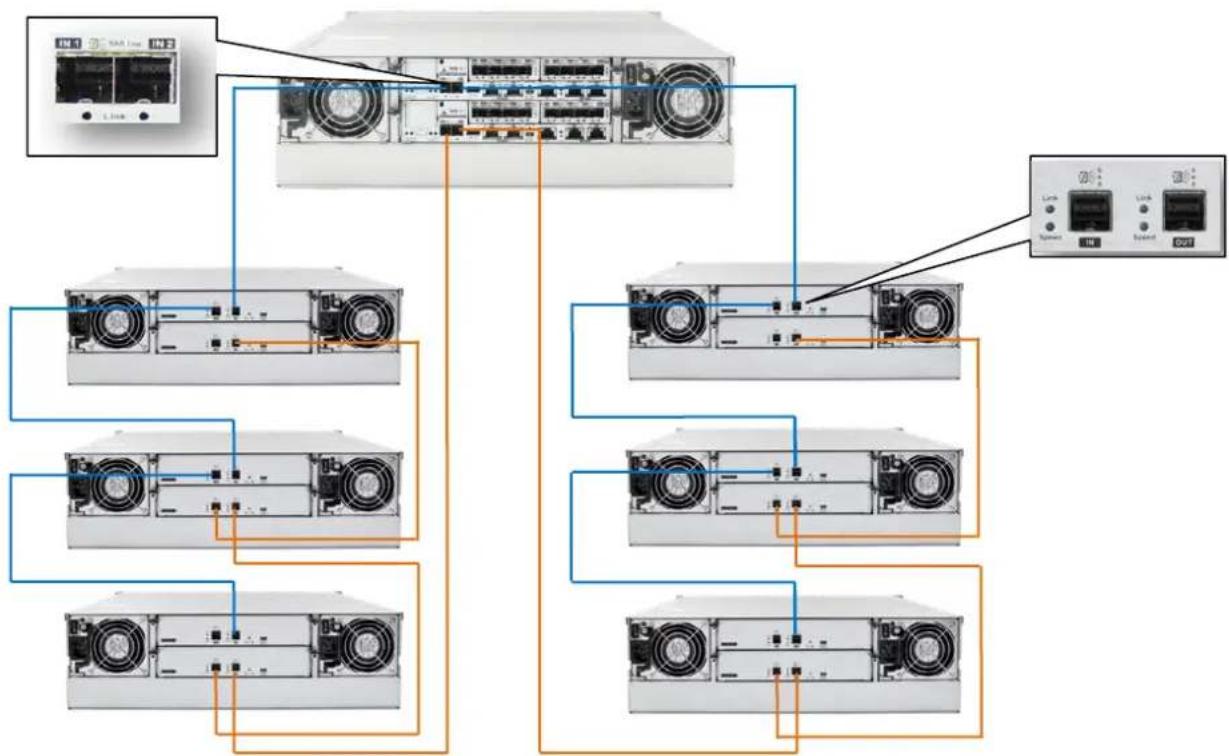
For any type of expansion enclosure, connect a SAS cable (blue) from the primary controller's SAS expansion port of the storage system to the primary controller's OUT SAS port of the rst expansion enclosure.
To congregate the redundant paths in two daisy-chain topology, connect a SAS cable (orange) from the second controller's SAS expansion port of the storage system to the second controller's SAS OUT port of the last expansion enclosure. Basic conncon rule when connecng systems in this conncon type is IN to OUT, from the last expansion enclosure to the rst expansion enclosure.
natural_image
Four-panel diagram of a server rack with front, rear, top, and side views showing internal components and connections (no text or labels)Figure 5: Connecng single-controller expansions using the onboard SAS 12 Gb/s expansion ports.
natural_image
Back view of a multi-chamber server rack with multiple front-mounted fans and internal components (no visible text or labels)Figure 6: Connecng dual-controller expansions using host board's SAS 12Gb/s expansion ports.
text_image
EN 1 SAS Exp EN 2 Line Line Speed Switch OUT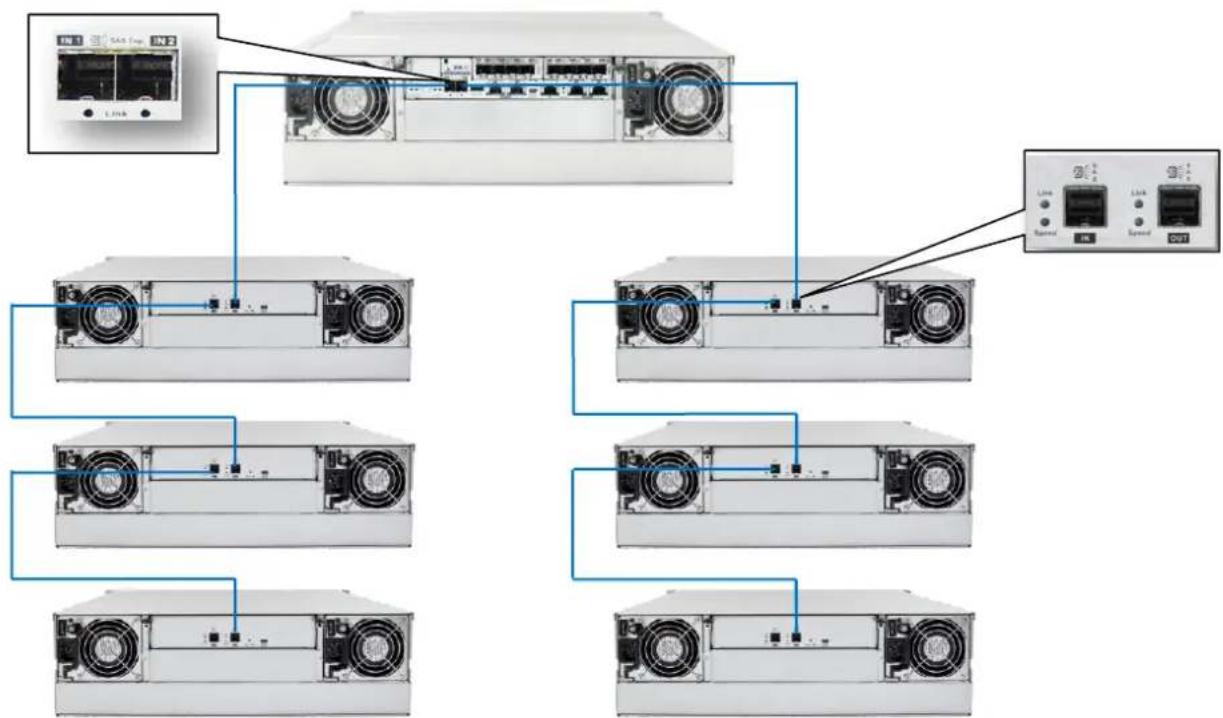
text_image
Diagram showing network topology with labeled components including server, switch, and network portsFigure 7: Connecng single-controller expansions using the onboard SAS 12Gb/s expansion ports
flowchart
graph TD
    A["Server Rack"] --> B["Client Rack 1"]
    A --> C["Client Rack 2"]
    A --> D["Client Rack 3"]
    A --> E["Client Rack 4"]
    A --> F["Client Rack 5"]
    A --> G["Client Rack 6"]
    A --> H["Client Rack 7"]
    A --> I["Client Rack 8"]
    A --> J["Client Rack 9"]
    A --> K["Client Rack 10"]
    style A fill:#f9f,stroke:#333
    style B fill:#ccf,stroke:#333
    style C fill:#ccf,stroke:#333
    style D fill:#ccf,stroke:#333
    style E fill:#ccf,stroke:#333
    style F fill:#ccf,stroke:#333
    style G fill:#ccf,stroke:#333
    style H fill:#ccf,stroke:#333
    style I fill:#ccf,stroke:#333
    style J fill:#ccf,stroke:#333
    style K fill:#ccf,stroke:#333
Figure 8: Connecng dual-controller expansions using the onboard SAS 12Gb/s expansion ports
SAS 6 Gb/s Storage System
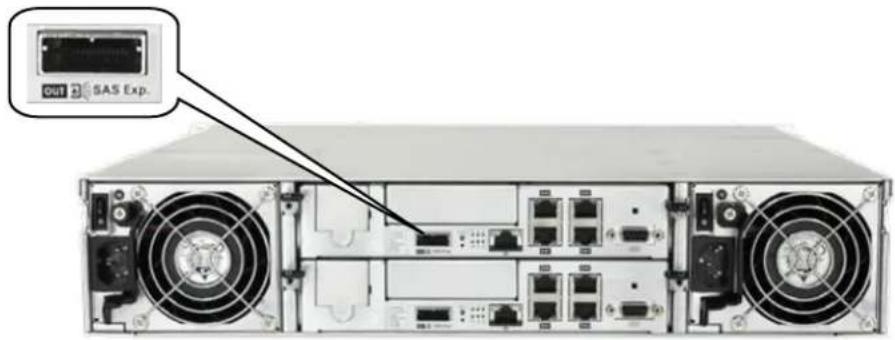
For SAS 6 Gb/s drive-side storage system, the SAS expansion ports are marked as OUT.
text_image
OUT SAS Exp.Figure 9: SAS 6 Gb/s Storage System Onboard Expansion Port
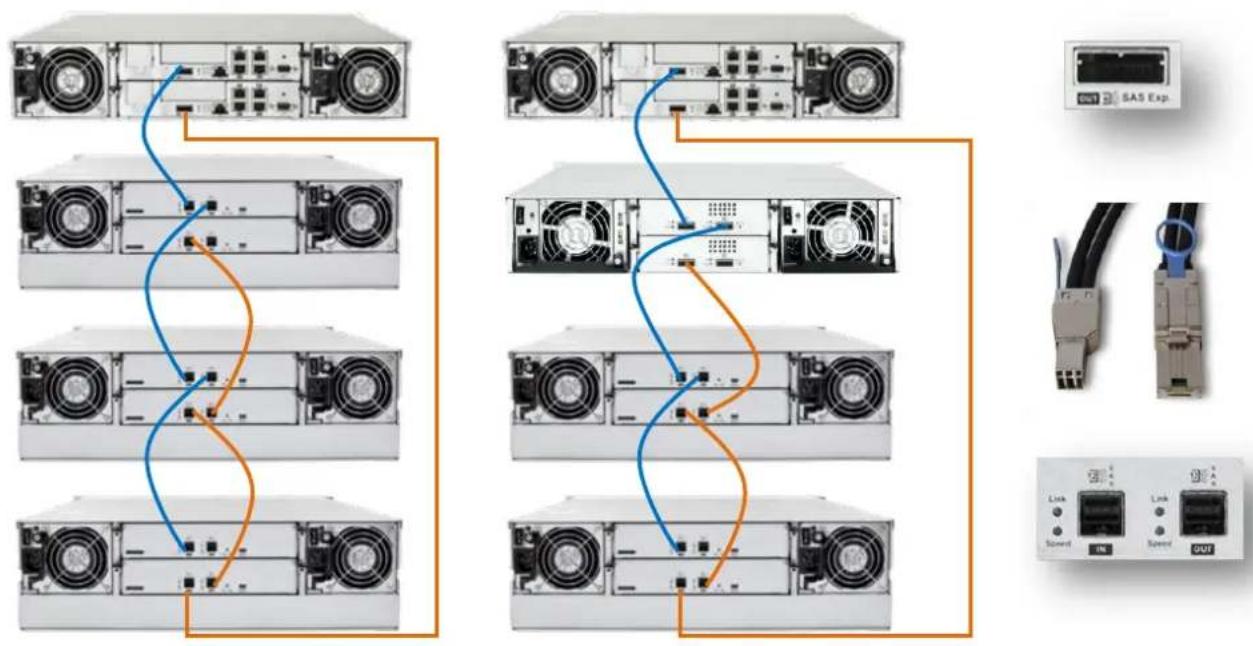
For any type of expansion enclosure, each a SAS cable (blue) from the primary controller's SAS OUT port of the storage system to the primary controller's IN SAS port of the expansion enclosure.
To ensure redundancy in two daisy-chain topology, connect a SAS cable (orange) from the second controller's SAS expansion port of the storage system to the second controller's IN SAS port of the last expansion enclosure. Basic conncon rule when connecng systems in this conncon type is OUT to IN, from the last expansion enclosure to the rst expansion enclosure.
flowchart
graph TD
    subgraph Server 1
        A["Server 1"] --> B["Server 2"]
        C["Server 3"] --> D["Server 4"]
        E["Server 5"] --> F["Server 6"]
        G["Server 7"] --> H["Server 8"]
    end

    subgraph Server 2
        I["Server 1"] --> J["Server 2"]
        K["Server 3"] --> L["Server 4"]
        M["Server 5"] --> N["Server 6"]
        O["Server 7"] --> P["Server 8"]
    end

    subgraph Network
        Q["SAS Exp."] --> R["Device"]
        S["Link"] --> T["Switch"]
        U["Link"] --> V["Switch"]
    end

    style Server 1 fill:#f9f,stroke:#333
    style Server 2 fill:#f9f,stroke:#333
    style Network fill:#ccf,stroke:#333
Figure 10: SAS 6 Gb/s Storage System Expansion Connecon
NOTE:
- SAS 6 Gb/s to 12 Gb/s cables are required for SAS 12 Gb/s expansion enclosure connecon.
- Currently this conguraon is only supported by the model that is newer than EonStor DS 1000. For G6 and G7/G7i models, please refer to Previous G7/G7i Model Expansion Table and Previous G6 Model Expansion Table.
Model Classicaon (Single and Redundant)
Infortrend products, especially the high-availability models, are also classified by the number of controllers: single and redundant. Redundant storage models are expandable via the redundant expansion enclosure. Single storage models, on the other hand, are expandable via the single expansion enclosures. All single models of storage and expansion enclosures are indened by two leers: S and G. G models are not upgradeable to redundant (R) models, while S models are upgradeable to redundant (R) models by installing a second S model controller. Take note that not every product supports S model. For more informaon, refer to the table below:
| High Availability Models | Single Model | Redundant Model | Upgradable | |
| EonStor DS 1000/2000 | G Model | R Model | No | |
| EonStor DS 3000 | DS 3024/3024B | S Model | R Model | Yes |
| DS 3012/3016 | G Model | R Model | No | |
| EonStor DS 4000 | DS 4024/4024B | S Model | R Model | Yes |
| DS 4016 | S & G Model | R Model | Yes(No for G Model) | |
| EonStor GS 1000/2000/3000/4000EonStor GSc 2000/3000EonStor GSa 2000/3000(Except 4U60 form factor) | S Model | R Model | Yes | |
| EonStor GS 3060EonStor GSc 3060 | G Model | R Model | No | |
| EonStor GS 5000EonStor GSc 5000EonStor GSa 5000 | N/A | R Model | N/A | |
| JB 3000(Except 4U60 form factor) | S Model | R Model | Yes | |
| JB 3060 | G Model | R Model | No | |
| Single Models | Single Model | Redundant Model | Upgradable | |
| EonStor GSe Family | G Model | N/A | N/A | |
| EonStor GSe Pro Family | G Model | N/A | N/A | |
| EonStor GSi Family | G Model | N/A | N/A | |
| EonServ Family | G Model | N/A | N/A | |
| JB Pro 200 | G Model | N/A | N/A | |
| JB 300 | G Model | N/A | N/A | |
Table 2: Single and Redundant Models

natural_image
Two views of a server rack showing front and rear ports with ventilation fans and switches (no text or labels visible)Figure 11: Upgrade from S Model to R Model
Expansion Enclosure On-line Expanding
This chapter details the steps of adding expansion enclosures to an already present storage system setup.
flowchart
graph LR
    A["Storage System"] --> B["Expansion enclosure 1"]
    B --> C["Expansion enclosure 2"]
    C --> D["Expansion enclosure 3 (Newly added)"]
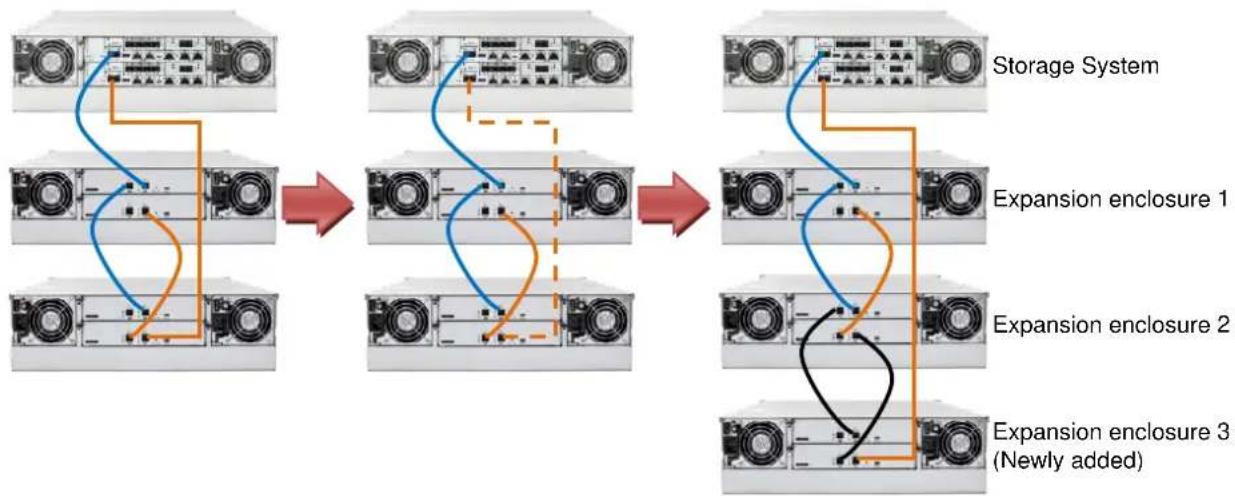
Figure 12: Adding an expansion enclosure
1. Seng the expansion enclosure ID
The expansion enclosure ID is located at the front panel of the expansion enclosure. When seng expansion IDs, always set them in order: Set the rst expansion to 1, the second expansion ID in 2, and so on. The newly-added expansion enclosures must be connected aer the current setup's last expansion enclosure. Do take note that the enclosure IDs must be dierent from each other.

natural_image
Front view of a rack-mounted server unit with a control panel and indicator dial (no text or symbols visible)Figure 13: Expansion enclosure ID
2. Installing the newly-added expansion enclosure
Due to the expansion enclosure's heavy weight, we recommend you to install the hard drives to the expansion enclosure aer the enclosure is already installed to the rack. Aer the ID assignment and installaon of the expansion enclosures to the rack, you can now connect the added expansion enclosures to the current system assembly via SAS cables.
In connecng the newly-added enclosures, ensure that the SAS cables are long enough to reach between SAS ports. The longest cable is used to connect the storage system and the last expansion enclosure. In some cases, the expansion enclosures are not directly installed on top or boom of the storage system, so the cabling routes may vary. In most cases, at least one long SAS cable is required.
Infortrend Expansion Guide
3. Reconnecng the redundant SAS path (for redundant models only)
Unplug the SAS cable from the current last expansion controller (see doed orange conncon in Figure 9), then connect it to the SAS port of newly-added last expansion's second controller (see longest orange cable conncon in Figure 9). A longer SAS cable may be required.
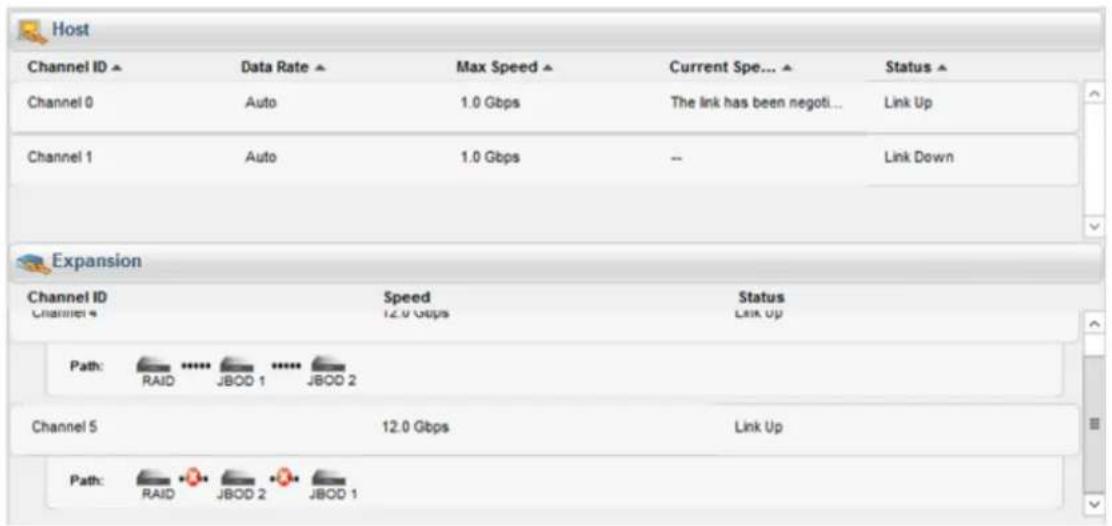
This step involves disconnecting one of the SAS cables, so critical events on storage system such as reports of drive-side redundant path failure are expected. You will get nocaon events from the management GUI, LCD panel, LEDs, and other means of nocaon alerts.
text_image
Host Channel ID ▲ Data Rate ▲ Max Speed ▲ Current Spe... ▲ Status ▲ Channel 0 Auto 1.0 Gbps The link has been negoti... Link Up Channel 1 Auto 1.0 Gbps -- Link Down Expansion Channel ID Speed Status Channel 4 12.0 Gbps Link Up Path: RAID **** JBOD 1 **** JBOD 2 Channel 5 12.0 Gbps Link Up Path: RAID **** JBOD 2 **** JBOD 1Figure 14: Redundant path failure of expansion enclosures in SANWatch
4. Connecng new SAS cable
Connect new SAS cables (see black conncon) from the current last expansion to the newly-added expansion enclosure. Ensure to follow the SAS conncon's IN to OUT rule described in Expansion Enclosure Connecons.
NOTE:
The sample diagram is only for SAS 12 Gb/s storage system.
5. Turning on the newly-added expansion enclosure
Press the power buon to turn on the expansion enclosure, then wait for the storage management GUI to display the additional expansion enclosure. Once the added subsystem is successfully working with the system assembly, the storage system's status on the management, GUI, LCD panel, LED panel, and other status features are back to normal.
Do take note that adding a newly-added expansion enclosure also sets the Hot-Add feature, which may cause delay or pause for about 10-20 seconds on the host I/O. The delay/pause me may vary depending on the operang system, drivers, and other factors.
6. Installing the newly added drives
We recommend you to install the drives into the newly-added expansion enclosure aer the enclosure is successfully recognized by the storage system. Aer installing the drives to the enclosure, check the drives' status in the storage management GUI. Once the drives appeared on the GUI, you can already use them in storage provisioning. For more details, refer to the sware manual.
IMPORTANT!
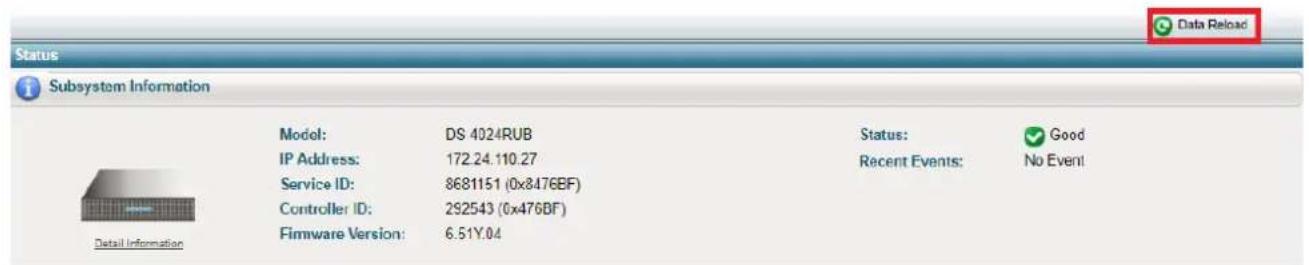
If SANWatch or Embedded RAIDWatch is used as a management tool for DS family, you must reload the menoned management tool aer connecng the new expansion enclosure. If the management tool does not display the newly-added enclosures, click Data Reload from the upper-right corner of the GUI to refresh the screen.
text_image
Status Subsystem Information Model: DS 4024RUB Status: Good IP Address: 172.24.110.27 Recent Events: No Event Service ID: 8681151 (0x8476BF) Controller ID: 292543 (0x476BF) Firmware Version: 6.51Y.04Figure 15: Data Reload buon on Embedded RAIDWatch
EonStor DS 1000/2000/3000 & GS/GSe 1000
SAS 6Gb/s Model Expansion Table
| Model Name | Expansion Enclosure |
| DS1012 (SAS 6Gb/s) | 14 x JB 2012 / JB 3012 |
| DS2012 (SAS 6Gb/s) | 5 x JB 2048 |
| DS3012 (SAS 6Gb/s) | 5 x JB 2060(L) / JB 3060(L) |
| DS1016 (SAS 6Gb/s) | 14 x JB 2016 / JB 3016 |
| DS2016 (SAS 6Gb/s) | 5 x JB 2048 |
| DS3016 (SAS 6Gb/s) | 5 x JB 2060(L) / JB 3060(L) |
| DS1024 (SAS 6Gb/s) | 14 x JB 2016 / JB 3016 |
| DS2024 (SAS 6Gb/s) | 5 x JB 2048 |
| DS3024 (SAS 6Gb/s) | 5 x JB 2060(L) / JB 3060(L) |
| DS1024B (SAS 6Gb/s) | 14 x JB 2024B / JB 3024B |
| DS2024B (SAS 6Gb/s) | 5 x JB 2048 |
| DS3024B (SAS 6Gb/s) | 5 x JB 2060(L) / JB 3060(L) |
| DS1036B (SAS 6Gb/s) | 13 x JB 2024B / JB 3024B |
| 9 x JB 2036B | |
| 5 x JB 2060(L) / JB 3060(L) | |
| DS3048 (SAS 6Gb/s) | 5 x JB 2048 |
| 5 x JB 3060(L) | |
| DS3060 (SAS 6Gb/s) | 5 x JB 2060(L) / JB 3060(L) |
| GS1012 (SAS 6Gb/s) | 14 x JB 2012 / JB 3012 |
| GSe1012 (SAS 6Gb/s) | 5 x JB 2060(L) / JB 3060(L) |
| GS1016 (SAS 6Gb/s) | 14 x JB 2016 / JB 3016 |
| GSe1016 (SAS 6Gb/s) | 5 x JB 2060(L) / JB 3060(L) |
| GS1024 (SAS 6Gb/s) | 14 x JB 2016 / JB 3016 |
| 5 x JB 2060(L) / JB 3060(L) | |
| GS1024B (SAS 6Gb/s) | 14 x JB 2024B / JB 3024B |
| 5 x JB 2060(L) / JB 3060(L) |
Previous G7/G7i Model Expansion Table
| ESDS Model Name | Expansion Enclosure | Mixed Expansion Enclosure |
| B24F-R2852-6B24F-R2652-4 | 9 x ESDS B24S-J2000-R (3U) | |
| B24F-G2852-6B24F-G2652-4 | 9 x ESDS B24S-J2000-G (3U) | |
| S12F-R2651S12F-R2851S12E-R2251 | 8 x ESDS S12S-J2000-R/ JB 2012R (2U)6 x ESDS B24S-J2000-R (3U)4 x ESDS S48S-J2000-R (4U) | 5 x ESDS S12S-J2000-R/ JB 2012R + 3 x ESDS S48S-J2000-R2 x ESDS S12S-J2000-R/ JB 2012R + 4 x ESDS S48S-J2000-R |
| S12F-G2651S12F-G2851S12E-G2251 | 8 x ESDS S12S-J2000-G/ JB 2012S (2U)6 x ESDS B24S-J2000-G (3U)4 x ESDS S48S-J2000-G (4U) | 5 x ESDS S12S-J2000-G/ JB 2012S + 3 x ESDS S48S-J2000-G2 x ESDS S12S-J2000-G/ JB 2012S + 4 x ESDS S48S-J2000-G |
| S16F-R2652-4S16F-R2651S16F-R2852-6S16F-R2851S16E-R2251S16E-R2152-6S16S-R2250 | 8 x ESDS S16S-J2000-R/ JB 2016R (3U)6 x ESDS B24S-J2000-R (2U)4 x ESDS S48S-J2000-R (4U) | 5 x ESDS S16S-J2000-R/ JB 2016R + 3 x ESDS S48S-J2000-R2 x ESDS S16S-J2000-R/ JB 2016R + 4 x ESDS S48S-J2000-R |
| S16F-G2652-4S16F-G2651S16F-G2852-6S16FG2851S16E-G2251S16E-G2152-6S16S-G2250 | 8 x ESDS S16S-J2000-S/ JB 2016S (3U)6 x ESDS B24S-J2000-G (2U)4 x ESDS S48S-J2000-G (4U) | 5 x ESDS S16S-J2000-S/ JB 2016S + 3 x ESDS S48S-J2000-G2 x ESDS S16S-J2000-S/ JB 2016S + 4 x ESDS S48S-J2000-G |
| S24F-R2651S24F-R2851 | 8 x ESDS S16S-J2000-R/ JB 2016R (3U)6 x ESDS B24S-J2000-R (2U)4 x ESDS S48S-J2000-R (4U) | 5 x ESDS S16S-J2000-R/ JB 2016R + 2 x ESDS S48S-J2000-R1 x ESDS S16S-J2000-R/ JB 2016R + 4 x ESDS S48S-J2000-R |
| S24F-G2651S24F-G2851 | 8 x ESDS S16S-J2000-S/ JB 2016S (3U)6 x ESDS B24S-J2000-G (2U)4 x ESDS S48S-J2000-G (4U) | 5 x ESDS S16S-J2000-S/ JB 2016S + 2 x ESDS S48S-J2000-G1 x ESDS S16S-J2000-S/ JB 2016S + 4 x ESDS S48S-J2000-G |
| S48F-R2852-6S48F-R2652-4 | 4 x ESDS S48S-J2000-R | |
| S48F-G2852-6S48F-G2652-4 | 4 x ESDS S48S-J2000-G |
Previous G6 Model Expansion Table
| ESDS Model Name | Expansion Enclosure |
| B12F-G2840-4 | 6 x ESDS B12S-J2000-G (1U) |
| B12E-G2140-4 | 6 x ESDS S12S-J2000-G/ JB 2012S (2U) |
| B12S-G2240 | 6 x ESDS S16S-J2000-S/ JB 2016S |
| B12F-R2840-4 | 6 x ESDS B12S-J2000-R (1U) |
| B12E-R2140-4 | 6 x ESDS S12S-J2000-R/ JB 2012R (2U) |
| B12S-R2240 | 6 x ESDS S16S-J2000-R/ JB 2016R |
| B24F-G2840-4 | |
| B24F-G2842-6 | 5 x ESDS B24S-J2000-S (2U) |
| B24E-G2142-6 | 5 x ESDS S12S-J2000-G/ JB 2012S (2U) |
| B24S-G2242-4 | 5 x ESDS S16S-J2000-S/ JB 2016S |
| B24S-G2240 | |
| B24F-R2840-4 | |
| B24F-R2842-6 | 5 x ESDS B24S-J2000-R (2U) |
| B24E-R2142-6 | 5 x ESDS S12S-J2000-R/ JB 2012R (2U) |
| B24S-R2242-4 | 5 x ESDS S16S-J2000-R/ JB 2016R |
| B24S-R2240 | |
| S12F-S2840N | 6 x ESDS S12S-J2000-SN (2U) |
| S12F-R2840N | 6 x ESDS S12S-J2000-RN (2U) |
| S12F-G2840-4 | |
| S12E-G2140-4 | 6 x ESDS S12S-J2000-G/ JB 2012S (2U) |
| S12S-G2240-4 | |
| S12S-G2240 | |
| S12F-R2840-4 | |
| S12E-R2140-4 | 6 x ESDS S12S-J2000-R/ JB 2012R (2U) |
| S12S-R2240-4 | |
| S12S-R2240 | |
| S16F-G2840-4 | |
| S16F-G2842-6 | 6 x ESDS S16S-J2000-S/ JB 2016S |
| S16E-G2142-6 | |
| S16E-G2240 | |
| S16S-G2242-4 | |
| S16S-G2240-4 | |
| S16S-G2240 | |
| S16F-R2840-4 | |
| S16F-R2842-6 | 6 x ESDS S16S-J2000-R/ JB 2016R |
| S16E-R2142-6 | |
| S16E-R2240 | |
| S16S-R2242-4 | |
| S16S-R2240-4 | |
| S16S-R2240 | |
| S24F-G2840-4 | |
| S24E-G2142-6 | 5 x ESDS S16S-J2000-S/ JB 2016S |
| S24S-G2240-4 | |
| S24S-G2240 | |
| S24F-R2840-4 | 5 x ESDS S16S-J2000-R/ JB 2016R |
| S48F-G2842-6 | 4 x ESDS S48S-J2000-G (4U) |
| S48F-R2842-6 | 4 x ESDS S48S-J2000-R (4U) |