
MiVue 700 - Caméra auto NAVMAN - Free user manual and instructions
Find the device manual for free MiVue 700 NAVMAN in PDF.


| Product Type | Dashboard Camera |
| Brand | Navman |
| Model | MiVue 700 |
| Video Resolution | Full HD 1080p (1920x1080) at 30fps |
| Lens | Wide-angle 130 degrees |
| GPS | Built-in GPS for speed and location logging |
| G-Sensor | Built-in 3-axis G-sensor for impact detection |
| Parking Mode | Supports parking surveillance with motion detection |
| Display | 2.4-inch LCD screen |
| Storage | Supports microSD card up to 128GB (Class 10 or higher) |
| Power Supply | 12V car cigarette lighter adapter; built-in supercapacitor |
| Dimensions | Approximately 5.5 x 4.0 x 3.0 cm |
| Weight | Approximately 80 grams |
| Maintenance | Clean lens with a soft microfiber cloth; avoid solvents |
| Safety | Use only the included power adapter and accessories |
| Spare Parts | Replacement mount, power cable, and adhesive pads available |
| Repairability | Non-user-serviceable; contact Navman support for repairs |
| General Information | Designed for reliable, high-definition recording while driving |
Frequently Asked Questions - MiVue 700 NAVMAN
User questions about MiVue 700 NAVMAN
0 question about this device. Answer the ones you know or ask your own.
Ask a new question about this device
Download the instructions for your Caméra auto in PDF format for free! Find your manual MiVue 700 - NAVMAN and take your electronic device back in hand. On this page are published all the documents necessary for the use of your device. MiVue 700 by NAVMAN.
USER MANUAL MiVue 700 NAVMAN
Precautions and notices
- For your own safety, do not operate the controls of the product while driving.
A window mount is needed when using the dash cam in a car. Make sure that you place the dash cam in an appropriate place, so as no. In Bhutul the driver's view at denipment of airports.
Make sure that no object is blocking the camera lens and no reflective material appears near the lens. Please
If the car's windsarden is started with a coating, it may impact the recording quality
Safety precautions
About charging
- Use only the charger supplied with your device. Use of another type of charger may result in malfunction and/or danger.
This product is intended to be supplied by a LISTED Power Unit marked with "LPS", "Limited Power Source" and output ratio + 5 V dc / 1 A.
Use a specified battery in the equipment
About the charger
- Do not use the charger in a high moisture environment. Never touch the charger when your hands or feet are wet.
Allow adequate ventilation around the charger when using it to operate the device or charge the battery. Do not cover the charger with paper or other objects that will reduce cooling. Do not use the charger while it is inside a carrying case.
Connect the charger to a proper power source. The voltage requirements are found on the product case and/or packaging.
Do not use the charger if the cord becomes damaged.
Do not attempt to service the unit. There are no serviceable parts inside. Replace the unit if it is damaged or exposed to excess moisture.
About the battery
CAUTION! This unit contains a non-replaceable internal Lithium Ion battery. The battery can burst or explode, releasing hazardous chemicals. To reduce the risk of fire or burns, do not chaisenble, crush, puncture, or close of in fire or water.
Use a specified battery in the equipment.
Important instructions (for service personnel only)
- Caution! Risk of explosion if battery is replaced by an incorrect type. Dispose of used batteries according to the instructions.
- Replace only with the same or equivalent type recommended by the manufacturer.
• The battery must be recycled or disposed of properly.
• Use the battery only in the specified equipment
• Battery clause safety information
Your Newman uses a Lithium-ion battery. It is important to follow the guidelines set out regarding this type of battery.
Electronic devices using a kiln battery such as Mobile phones. CIPs and comens are designed to operate at a temperature range of approximately 0^ C to 50^ C. Beyond these temperature limits, there may be a risk of battery failure, when these electronic goods are exceeded to extreme heat conditions for long periods. It is recommended that you do not use your Navman in a hammet, wet and/or corrosive environment. Do not put, store or leave your product or in near-cash source, in a high temperature location, in strong electric sunlight and do not expose it to temperatures over 60^ C (140°F). Failure to follow these guidelines may cause the thin implant battery to lock acid because hot, explosive or light and cause injury or damage. Do not pierce, open or disassemble the battery. If the battery leads and you come into contact with the leaflet fluids, raise thoroughly with water and seed medical attention immediately. For safety reasons, and to proving the lifetime of the battery charging should not occur at new ( 0^ C/ ^32 ) or high ( 0^ C/ ^32 ) or high ( 0^ C/ ^32 ) temperatures.
THE LITHIUM ION BATTERY CONTAINED IN THE PRODUCT MUST BE RECYCLED OR DISPOSED OF PROPERLY.
IT IS HIGHLY RECOMMENDED YOU USE YOUR NAVMAN ONLY WITH AC ADAPTER (HOME CHARGER) OR THE SUPPLIED DC POWER LEAD (CAR CHARGER/BATTERY CABLE) FOR BATTERY CHARGING.
For more information on how to recycle your old electronic devices, please contact your initial council office. You can also visit www.novman.com.au / www.novman.cc.sg to view our latest trade-in offers.
Caring for your device
Taking good care of your device will ensure trouble-free operation and reduce the risk of damage.
- Keep your device stay from excessive measure and extreme temperatures.
- Avoid exposing your device to direct sunlight or strong ultraviolet light for extended periods of time.
• Do not place anything on top of your device or snap objects on your device.
• Do not drop your device or subject, it is severe shock.
- Do not subject your device to sudden and severe temperature changes. This could cause moisture condensation inside the unit, which could damage your device. In the event of moisture condensation, a low the device to cry out completely before use.
The screen surface can easily be searched. Avoid touching it with sharp objects. Non-adhesive generic screen protectors designed socially for use on portable devices with LCD panels may be used to help protect the screen from mini scratches.
- Never clean your device with it powered on. Use a soft, lint-free cloth to wipe the screen and the exterior of your device.
• Do not use paper towels to clean the screen.
- Never attempt to disassemble, repair or make any modifications to your device. Disassembly, modification or any attempt at repair could cause damage to your device and even badly injury or property damage and will void any warranty.
- Do not store or carry flammable liquids, gases or explosive materials in the same compartment as your device, its parts or accessories.
• To discourage theft, do not leave the device and accessories in plain view in an unattended vehicle.
• Overheating may damage the device.
Revision: HCD
(1/2017)
Trademarks
All brand and product frames are trademarks or registered, trademarks of their respective companies.
Disclaimer
Specifications and documents are subject to change without notice. Navman does not warrant this document in error-free. Navman assumes no liability for damage incurred directly or indirectly from errors, emissions, or documents by unknown risk disposal and the loss amounts.
Notes
Not all models are available in all regions.
Depending upon the specific model purchased, the colour and lack of your device and accessories may not exactly match the graphics shown in this document.
Regulatory Information
For regulatory identification purposes, Nasman DDB MVATM 700 is assigned a model number of N510. Marking labels located on the exterior of your device and rate the regulations that your model composes with. Please check the marking labels on your device and refer to the corresponding statements in this section. Some notices apply to specific models only. The user needs to switch off the device when exposed to areas with potentially explosive atmospheres such as peristations, chemical storage depots and bleaching operations.
WEEE
This product must not be disposed of as normal household waste, in
accordance with the LU directive for waste electrical and electronic
Equitylink (A. LEE - 2012/15/20). In basis, it should be disposed of by returning it to the point of sale, or to a municipal recycling collection point.
This product must not be disposed of as normal household waste, in
accordance with the LU directive for waste electrical and electronic

DDR MiVue
700
User Manual
9. GOVERNING LAW.
This document is governed by the laws of New South Wales (except where a Customer ordinarily resides in New Zealand, in which case this document is governed by the laws of New Zealand), in each case without reference to that, jurisdiction's conflict or law provisions on the U.N. Convention or Contracts for the International Sale of Goods, and shall benefit Nwazman, its successors and assigns. This warranty does not affect a person's statutory rights under applicable laws in force in their jurisdiction, or rights against the dealer or reseller arising from their sale or purchase contract.
-
NAVMAN'S CONTACT DETAILS. To obtain warranty service directly from Navman:
-
Contact Navman to obtain a Return Materials Authorization number. You can reach Navman using the Contact Details obtained at 3 below or above with your upper and Navman cover.
- Pack the product, a copy of your dated purchase receipt, your address and telephone number, and any other information havman requests as part of the return authorization process (such as any return authorization form you request) in charge packing material.
- Ship the product and the other required items to Newman (Attention: Warranty Manager) at the address specified in the Contact Details below on or up to the end of the Warranty Period. You should retain proof of shipping to evidence the date of shipment.
- Contact Navman to obtain a Return Materials Authorization number. You can reach Navman using the Contact Details obtained at 3 below or above with your upper and Navman degree.
- Pack the product, a copy of your dated purchase receipt, your address and telephone number, and any other Information Navman requests as part of the return authorization process (such as any return authorization form you request) in study packing material.
- Ship the product and the other required items to Newman (Attention: Warranty Manager) at the address specified in the Contact Details below on or up to the end of the Warranty Period. You should retain proof of shipping to evidence the date of shipment.
Contact Details:
le d'austratiu
Contact address for returned products:
Unit 4.43 St Colony System
Chardouille NS100
7512
(in New Zealand)
Contact address for returned products:
MITAC Australia Pty Ltd
TEO MAYA
1300628676
www.chinastock.com.cn
La Austraville
MUSCA
(1) 2017年1月1日
Navman Technologies NZ Ltd
ISO GU NAVM
(0501466785)
www.nsemsupport.co.nz
La Austraville
MUSCA
(1) 2017年1月1日
in New Zealand
Service Plus (Navman repair)
MITAC Australia Pty Ltd
TIDO NAVAM
1130678626
www.nuyniappart.com.au
La Austraville
MUSCA
(1) 2017年1月1日
in New Zealand
Service Plus Wisconsin Service
Unit 5.43.51 Colony 5
Cinderville NSMI
7512
650 Great South Rose
Portesse
Auckland 1051
When returning products directly to Navman you must set out.
Sandra's name
(1) 本报告书
SHEDU S ADRESS
Standard phone:
Sonder's email
RMA number (compulsary - please call the support number above for your RMA number)
If you claim under your warranty by returning the product, directly to Newman, you must pay for shopping and any insurance to get the product to Newman of the applicable access. Except where otherwise provided by Consumer Guarantees (as defined below), you assume all risk of loss or damage to the product and it arrives at Newman's facility. Newman will pay for ground shipping of the owner's repaid product back to you on attributes of the company. If you need to pay a premium for the product, you may pay for a higher price of the company to buy an address at your specialty. You must request, and pay for any different pricing method. Except where otherwise required by Consumer Guarantees (as defined below), if Newman reasonably determines that the product has not failed to meet the standards of the warranty, you will be liable for the cost of return on investment to you, Newman may require payment of such costs before returning the product to you, and the risk of loss or damage will remain with your responsibility. The company is responsible for this product. The Warranty Fee will help you spend on the day you and the product in New York. The agenda of the Warranty Fee will give me again what it requires a replacement product, arrives at the address you specify.
1-Year Limited Warranty
1. DEFINED TERMS
(a) "Australian Consumer Law" means the Australian Consumer Law set out in Schedule 2 to the Competition and Consumer Act 2010 (Cth).
(b) "Consumer Guarantees" means the consumer guarantees which apply to the supply of products or services under (A) the Australian Consumer Law, as amended from time to time, or other similar legislation of a state or territory of Australia; and (B) the New Zealand Consumer Law or other similar legislation.
(c) "Customer" means the purchaser of a Nishman product, (d) "No non-Homehold interest rate in section 1."
(c) "New Zealand Consumer Law" means the Consumer Guarantees Act 1993 and Fair Tracing Act 1985, as amended from time to time.
2. NAVMAN WARRANTY
(a) The Newman Warranty provides benefits which are in addition to other rights and remedies the Customer has underlaw. This document does not limit, restrict or exclude any rights that a person has because of the Consumer Guarantee.
(b) In addition to any rights that a Customer or any other person has become of the Consumer Guarantees, and subject to section 5 of this document, MITAC Australia Pty Ltd, in Australia, and Newman Technology, NJ Ltd, in New Zealand, which "Nagman" warrants that
(ii) The hardware device ("Hardware") will be free of defects in material and workmanship and will conform to their published specifications; and
(i) its software products and software provided with the Hardware (not only, "Software") will be free. From media details and will substantially conform to the information, user documentation provided with the Software including updates thereof in each case for a period of one year from the date of original purchase ("Warranty Period"), the "Newman Warranty").
(c) Where Hardware or Software is repaired or replaced under this Navman Warranty, the Navman Warranty will apply to the repaired or replaced Hardware or Software for the longer of:
(1) 90 days from the date of return shipment or that repaired or replaced Hardware; and
(ii) the balance of the original Warranty Period applying in that Hardware or Software for the Hardware or Software in members.
(d) Customers must make their own enquiries to determine whether the Software will meet their requirements,
(3) Navman does not warrant that the Software will meet a Customer's requirements or that its operation will be unknown, what is not making any act.
(4) Customers assume the entire risk of using the Software:
3. CUSTOMER'S REMEDY
In addition to any rights under the Consumer Guarantees, it
(3) the Hardware of Software is defective in contravention of the Newman Warranty or otherwise fails to
(i) on or before the last day of the Warranty Period, the Customer sends the affected product to Navman (an equity pool of support).
Navman will (at Navman's optional repair or replace the affected product. This is a Customer's so e remedy for contravention of the Navman Warranty, although you may have other rights or remedies under applicable laws [including the Consumer Guarantee]).
(a) You will be required to show proof of purchase when you return a product to Navman for repair or replacement under the Navman Warranty. A complete and legible copy of the original sales receipt will be required. Any repairs undertaken by a service centre which is not an Authorised Navman Service Centre will void this warranty.
(c) Except to the extent that the Consumer Guarantees require otherwise:
(1) Naiman may refuse to repair or replace products under the Naiman Warranty it. (A) the sales receipt is not provided; (B) the information contained in it is incomplete or illegible; or (C) the serial number of the product has been altered or removed; and
(1) Navman will not be responsible for any losses or damage to products incurred while the product is being shipped by a Customer to Navman. Issuance is recommended.
(4) No-man recommends the use of a tracolite shipping method when reducing a product under the No-man Warranty and that you retain proof of the date you ship, post or otherwise return a product under the No-man Warranty.
(e) The repair or replacement of products may result in loss of data. Customers are responsible for creating back-up copies of all of their data stored on a product before returning that product to Navman. If a Customer fails to create adequate back-ups of their data, Navman will not be responsible for the loss of this data caused by the results obtained such as replacement of our product.
4. EXCLUSION OF IMPLIED WARRANTIES
(a) Except for the Consumer Guarantees, Navman excludes all other guarantees, warranties and conditions implied by statute, at law, in fact or otherwise (including, if applicable, implied warranties under Article 35 of the United Nations Commerce on Councils for the International Sale of Canada).
(b) This section meets our exclude, revised or mostly the application of any statute, whereby guarantee, right or remedy conferred by or implied under any provision of any statute where to co so would:
(1) contravene that statute; cf
(i) cause any part of this section 4 to be void.
5. EXCLUSIONS
(a) This section 5 sets out exclusions and Emitations which apply to the Newman Warranty. It does not affect the rights of any person under the Consumer Guarantees. The Newman Warranty does not cover:
(1) periodic maintenance and repair or replacement of parts due to normal wear and tear.
Oil batteries,
(1) finishes;
(v) any damage caused by: (A) shipping, mouse, abuse, negligence, tampering, moisture, liquids, proximity or exposure to heat, or improper use; (B) disasters such as fire, flood, wind, and lightning; or (C) unauthorized attachments or modification;
(20) service performed or attempted by anyone other than an authorised Navman Service Centre;
(b) any claim in relation to infringement of any patent, trademark copyright or other proprietary rights, including trade secrets. If the product was purchased for the purposes of a business, the provisions of the New Zealand Consumer Law do not apply in accordance with section 45(2) of the Consumer Guarantees Act 1993.
(c) The opening, dismantling or repair of this product by anyone other than an authorised Newman Service Centre will void the Newman Warranty.
6. EXCLUSION OF INCIDENTAL OR CONSEQUENTIAL DAMAGES
Except where otherwise required by the Consumer Guarantees, Navman shall not be liable to any Customer or any other person for any indirect, incidental or consequential damages whatsoever, including but not, limited to lost profits, damages arising from a delay or loss of use, or out of the breach of the Navman Warranty or any implied warranty, even if caused by the negligence or another fault of Navman or out of the legal issue of a product. In no event will Navman be held responsible for such damages (expense, where otherwise required by the Consumer Guaranties).
7. APPLICABLE CONSUMER LAW
Our goods come with guarantees that cannot be excluded under the Australian Consumer Law and the New Zealand Consumer Law (as applicable). You are entitle to a replacement or refund for a major failure and for compensation for any other reasonably foreseeable loss or damage. You are also entitled to have the goods repaired or replaced if the goods fail to be of acceptable quality and the failure does not amount to a major failure.
8. COMPLETE AGREEMENT.
This document is the complete, final and exclusive agreement setting out the terms of the Navman Warranty between Navman and the Customer with respect to the quality and performance of the Customer's Navman products. It does not affect the rights of any person under the Consumer Guarantees (other than as specified in section 5(b) of the document).
Revision: HCD
(1/2017)
Trademarks
All 0-3m a and product names are trademarks of registered, listed as of the respective companies.
Disclaimer
specifiers and in documents are subject to change without notice. Navman uses for what it is document is error-free. Navman assumes no liability for damage incurred directly or indirectly from errors, emissions, or otherwise between loss and the documents.
Notes
Not all models are available in all regions.
Depending upon the specific model purchased, the colour and lack of your device and accessories may not exactly match the graphics shown in this document.
For regulatory identification purposes, Nasman DDB MVATM 700 is assigned a model number of N510. Marking labels located on the exterior of your device and rate the regulations that your model composes with. Please check the marking labels on your device and refer to the corresponding statements in this section. Some notices apply to specific models only. The user needs to switch off the device when exposed to areas with potentially explosive atmospheres such as peristations, chemoar storage depots and bleaching operations.
WEEE
— returning it to the point of sale, or to a municipal recycling collection point.

1615N3C0017 RDO
9. GOVERNING LAW.
This document is governed by the laws of New South Wales (except where a Customer ordinarily resides in New Zealand. In which case this document is governed by the laws of New Zealand). In each case witness, reference to that jurisdiction's conflict or law provisions in the U.N. Convention on Contracts for the International Sale of Goods, and shall benefit Newman, its successors and assigns. This warranty does not affect a person's statutory rights under applicable laws in force in their jurisdiction, or rights against the dealer or reseller arising from their sales/vacce contract.
- NAVMAN'S CONTACT DETAILS. To obtain warranty service directly from Navman:
Contact Details:
la austraia
Contact address for returned products:
630 Great South Base
EORTUNE
Aurck
7111
When returning products directly to Newman you must set out
Sandra's name
(1) 本报告书
SHENJ SAUCES
Standard price
Sonder's email
RMA number (compulsary - please call the support number above for your RMA number)
If you claim under your warranty by returning the product, directly to Newman, you must pay for shopping and any insurance to get the product to Newman of the applicable access. Except where otherwise provided by Consumer Guarantees (as defined below), you assume all risk of loss or damage to the product until it arrives at Newman's facility. Newman will pay for ground shipping of the revenue repaid product back to you and elsewhere. If you need to pay a premium for the product, you may be able to pay more money. If you are not willing to buy a product, you should pay a higher price if you are in connection with a purchase you specify. You must request, and pay for any different pricing method. Except where otherwise required by Consumer Guarantees (as defined below), if Newman reasonably determines that the product has not failed to make the standards of the warranty, you will be liable for the cost of return to service to you, Newman may require payment of such costs before returning the product to you, and the risk of loss or damage will remain with your own or equivalent products. If you have a purchase price, we shall be paid up on the day, you will sell the product. In Newman, The remainder of the Warranty Park will be given matters which will be lost or replacement product, arrives at the address you specify.
Getting to know your dash cam
Note: The screenshots and other presentations shown in this manual may differ from the areas generated by the actual product.
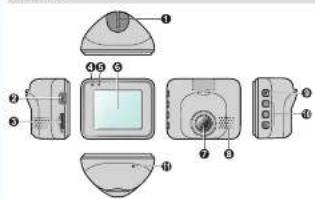
text_image
Exploded view diagram of a computer monitor with labeled parts in Chinese① Device mount socket
2 Min-USB connector
① Memory card slot
System indica Microphone
⑥ LCD screen
Camerasolo
⑧ Specker
⑨ Power human!
Function keys
Shukwenbutilon
Power button
Press and hold for 2 seconds to manually turn the down cam on and off.
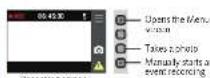
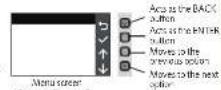
Function keys
The device provides our hard an keys to control the corresponding icons displayed on the LCD screen. The keys function may vary on different screens.
System Icons
Various system icons on the status bar at the top of the screen provide the status information of your device. The display count will vary depending on your device model and sale.
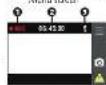
Recording indicator
② Time display
③ Morphome status
Using your dash cam in a vehicle
Note:
• Transure the highest quality continuity, you are advised to plan the dash care system the use view minor.
- Select an appropriate local, on lot mounting the device in a vehicle. Never place, the device where the owner's field of vision is blocked.
The presentation of the future future structure was also present at the degree we can be driven.
- The insurance vehicle is a full year held in the United States. The schedule will be further extended, but very depending on the vehicle mode. If you encounter any problems resulting in evaluation, contact a skilled installer such as
as the service personnel of the vehicle for assistance.
- The system will automatically calibrate the G sensor of the device during start-up. To avoid G sensor function, the system is a device on 51MHz low voltage input for vehicle property.
In addition, we may find the value of 10 years in the E. coli property.
-
Make sure that your car is parked on the ground
-
Follow the instructions below to security menu, your dash ram in a vehicle.
When adjusting the angle of mounting, make sure that the camera's view is parallel with the level ground and the ground/sky ratio is close to 5/4.
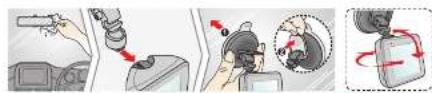
text_image
Diagram illustrating car fuel injection and fuel transfer process with labeled components and directional arrowsConnect the car charger to the cigarette lighter. Found the
Cable's group/the loadening and the N plant so that it is a root of input driving. Also we that one can install some
If interfere with driving, make sure that the cable is standard, on does not interfere with the vehicles airbags or other safety features.
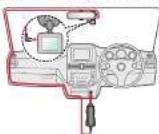

Formatting a card
If you need to formal a monetary code (all data will be processed), press ■ select Format
Note:
• DO NOT apply pressure to the centre of the memory card.
- Newman does not guarantee the product's compatibility with memory cards from all manufacturers.
- Before you start recording, please format the memory card to avoid malfunction caused by files not created by
the dream
• You are advised to turn the device off before removing the memory card.
Operating basics
Turning the dash cam on
Complete the installation according to the instructions in the "Using your cash car in a vehicle" section. Once the vehicle engine is started, the cash car automatically turns on
Note: You compress and hold on 2 seconds to manually turn the down command and call. I the system does not
turn-off by keeping the Power button pressed, you can force it to shut down by inserting a small rod (such as a straightened paper-cut into the Shutdown button.
- Signa: Cipri, 2017; doi: 2-0185-936000
Setting the date and time
To make sure that the date and time of your recordings are correct, check the settings before you begin recording.
-
Press to access the Settings Menu.
-
Select System > Date / Time and press √
-
Let be a structure of the common surface and set the very small fields in place
-
Use +1, -25 ajustt le vence of c le se élec. etc., press → and repeux the step cini et ténés have been
changed. When completed, press √
Continuous recording
By default, the system will automatically begin continuous recording in a few seconds after start-up. The recording may be divided into several video clips; recording will not stop between video clips.
When continuous recording is in progress, you can manually stop recording by pressing. Press return
to the recording screen, the system will start continuous recording automatically. The continuous recordings can be found in the "Video" category for file playback.
Event recording
By default, I am exact happens as a sudden impact, high speed driving, an aggressive vehicle or an accidental crash driving continuous norcing the G-wave will remain the crash car. A unit norcing the event. If you want
to manually start an event recording while sons, mucous rescuing is in progress, press the Event to issue
The event sometimes can be found in the "Event" company for the playback
Note: You can change the sensitivity level (6 levels, 4 am low to high) of the G sensor by selecting □ > Video Recording > G-Sensor Sensitivity.
Camera mode
The devices allows you to take a photo. If the recording is in progress, press to take a photo. The phones can be found in the "Photo" category for the playcards.
Playback mode
To select a video or photo for playback
File Playback
- Select the desired type: Video Event of Photo
← / → select the desired file from the list and then press √ 1 playback.
- During playback, you are
• Write playing voice, press 📄 to be presta.nes, value
- While viewing objects press, it is a very small photo
- 1. In a moving process, the L = 0 is a previous line price.
• Press
+ Press ...sp by the popup menu to select
• Play/Pause: Starts or pauses the playback.
- Move to Event: Moves the file to the "Event" category
- Delete: Deletes the He
System settings
To customize the system settings, prev ■ Depending on your model, certain setting options may not be available.
- File Playback
Plays the recorded videos and photos
• Sound Recording
Sets if you want to include sound in the recordings. The default, setting is On
- Video Recording
Changes the settings of the recordings, including
- Video Clip Length: Sets the length of each video clip for a participant receding 11 min, 3 min or 5
min)
- WDR Enables or disables the Wide Dynamic Range (WDR) function of the device to provide better image.
with higher contrast of light and dark. The default setting is On.
- EV. Sets the proper exposure level (-1 - +1) to adjust the brightness of the image. The actual setting is 0.
• Frequency: The options are 50 Hz and 60 Hz.
• G-Sensor Sensitivity: Sets the sensitivity level to levels, from Low to High of the G sensor that allows
a. formal, single of the case of recording with certain status recording in progress.
- Text Stamp: Displays the customised incims on or the recorded video.
- System
Allows you to change the system settings of the device.
- Date/Time: Sets the system data and time
- System Sound: Endless et disables system notifications en suards.
• Volume: Adjusts the volume level.
- LCD Standby: So owns Always On to keep the LCD on or sets the timer for the LCD to turn off automatically
(10 sec 1 min or 3 min) after opening shots. Selecting HUD will watch the display mode to only display
the time in sacrificed time
• Language: Sets the language.
• Storage Allocation: The system provides a default memory configuration to store the video (including
continua s soundings and event recordingy and photos. Select the proper rengution based on your usage
- Restore to Defaults: Restore the system settings in battery defaults
• Version: Displays the software information
+ Format
Formally a memory card. (All data will be crossed.)
MiVue™ Manager
Mivus Manager™ is a heat for you to view the video recorded on a MVus dash can.
Notes: Not all features are available for every month.
Installing MiVue Manager
Download the Setup file from http://www.narman.com.au/cars-gas-devices/mapping/ or http://www.narman.
co. org/car gas devices/mapping). Choose a click Schup.exe and follow the or screen prompts to install MWus
Manager.
IMPORTATE! You may be prompted to install the MOV and AVI codecs for video playback if they are missing on your computer. Search online to install the required codects.
Playing the recording files
- Remove the memory card from the card.com and access the card on the computer via a card reader. You are
examined to copy the recording files to your computer for backup and playback.
Start NVue Manager on the computer.
- By default, M. Vuc Manager shows the calendar and the first list on the right
- When a recording test exists, you will see the data marked with "." Click that date to display the key that
were recorded on that date.
• You can choose the file type to display: Event / Normal / Parking
• To display all files in the current folder, click All. to return to the calendarview, click Calendar
Note: Your model may not support all file types
-
Double-click the desired file on the file list to start playback.
-
The payback controls are described as follows:

① Skips to the previous/next file on the list.
Starts or pauses the playback.
② Changes the playback speed to 1/4x, 1/2x, 1x (default), 1.5x, or 2x
Notes of unmuters the volume.
② Adjust the volume level.
⑤ Plays the video in full screen
● Displays the playback progress. You can click on a point along the track bar to move directly to a different
location for the playspace.
During practice, you can check more driving information from the dashboard panel and the C sensor chat.
hat are displayed below the video playback screen.
• On the dashed panel, click 'OK' else the map screen
• The Google chat displays data in 3 basis points about the car's skill (e.g. background, 16), in the
tightly, hard upward/downward (2).
Note: The company may not check for what the company is not warranted to the interest or when you
M'ue model does not support the GPS function.
- The tool bar allows you to do the following:

① Selects the folder that stores the recording files.
② Previews and prints the current video image.
② Saves the selected files to the specified location on your computer.
③ Captures and assess the current, value image to the specified location on your computer
● Opera: the Se...nps Menu. The Sel..mp. Items are described as follows:
- Change Language: Sets the display language of MNue Manager
- Change Skine Sets the colour scheme of Mivue Manager.
- Check for Update: Checks if there is any new version of MPVue Manager, Internet access is
required for this feature.
- About: Displays the version and copyright information of Miree Manager
- Exports the CFS information of the selected file in the XML format to the specified location on your computer
⑦ Up reads the selected file to Facebook
⑤ Up cards the selected file to YouTube®