
Mi LED TV 4A PRO - Television Xiaomi - Free user manual and instructions
Find the device manual for free Mi LED TV 4A PRO Xiaomi in PDF.


| Product Type | LED TV |
| Brand | Xiaomi |
| Model | Mi LED TV 4A PRO (L43M5-AN) |
| Screen Size | 108 cm (43 inches) |
| Resolution | FHD 1920 x 1080 |
| Refresh Rate | 60 Hz |
| CPU | Quad-core CA53 |
| RAM | 1 GB DDR |
| Storage | 8 GB eMMC |
| GPU | Mali-450MP |
| Operating System | Android TV |
| HDMI Inputs | 3 (1 with ARC) |
| USB Ports | 3 x USB 2.0 |
| Ethernet Port | 1 |
| Wi-Fi | 2.4 GHz 802.11 b/g/n |
| Bluetooth | 4.2 |
| Audio Output | Digital audio (S/PDIF), Headphone |
| Supported Audio Formats | FLAC, AAC, OGG, DTS-HD |
| Supported Video Formats | MPEG 1/2/4, H.263, H.264, H.265, VC1 |
| Power Consumption | 75 W |
| Voltage | 100-240 V ~ 50/60 Hz |
| Voice Assistant | Google Assistant built-in |
| Screen Mirroring | Chromecast built-in |
| Accessories Included | Remote control, 4 screws, user manual |
| Energy Rating | BEE Star (Home Mode) |
Frequently Asked Questions - Mi LED TV 4A PRO Xiaomi
User questions about Mi LED TV 4A PRO Xiaomi
0 question about this device. Answer the ones you know or ask your own.
Ask a new question about this device
Download the instructions for your Television in PDF format for free! Find your manual Mi LED TV 4A PRO - Xiaomi and take your electronic device back in hand. On this page are published all the documents necessary for the use of your device. Mi LED TV 4A PRO by Xiaomi.
USER MANUAL Mi LED TV 4A PRO Xiaomi
TV Safety Notice and Installation Guide
- Installation
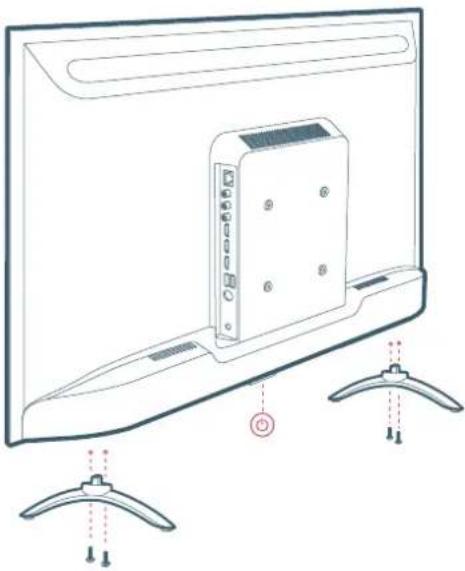
01 Installation (Table Top)
Insert Left/Right Stand Base to TV as shown in the picture and fasten them using screws.
Note: 1) For Installation on wall, Kindly contact customer care for help.
2) Wall Mount Bracket is not a part of standard accessory.
02 Turn On the TV
Connect TV's power cord to ac power outlet carefully.
Push the power button located at bottom of TV (or press power button on remote.) to turn it on.
Follow screen instructions of quick start guide to setup TV.
Great things are going to happen!
- Accessories
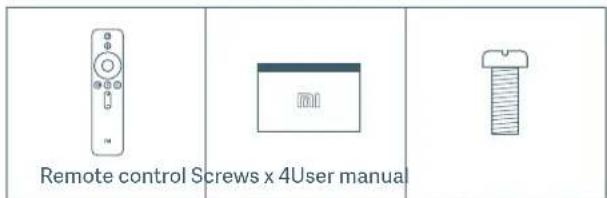
Note:
1) Accessory Items may vary depending upon model.
2) Specifications may change without prior notice. Recommended visiting website (www.mi.com) for latest updates.
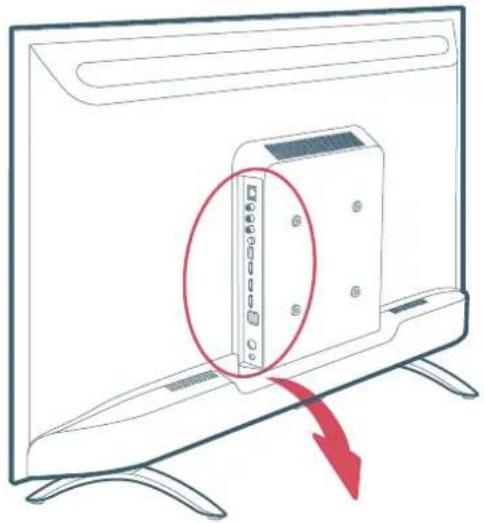
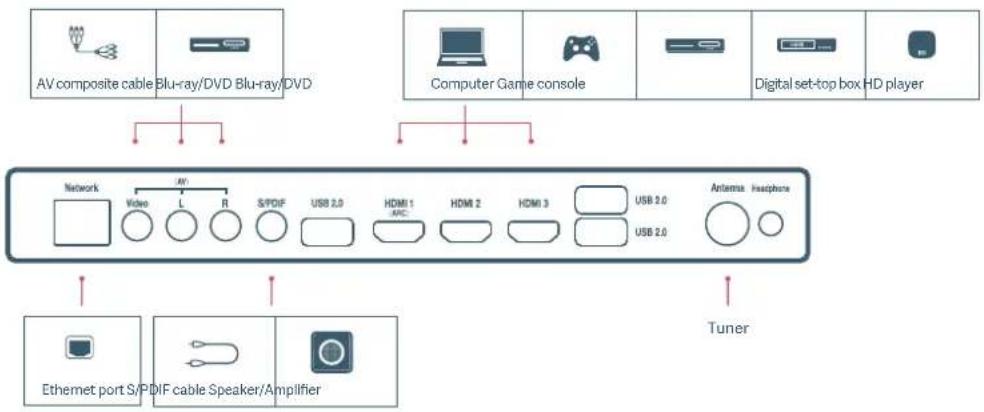
- TV interface
ATTENTION
This product is qualified for the BEE Star rating in the 'Home' Mode. The Objectives of Star Labeling Program is designed to promote energy efficient products and practices. When the television is initially set up, it is designed to meet the BEE Star Labeling requirements while maintaining optimum picture quality.
- Changes to certain functionalities of this television (TV Guide, Picture/sound etc) may change the power consumption.
- Depending upon such changed setting (eg., Retail mode), the power consumption may vary which possibly could exceed the stated energy consumption.
To reset the television to Star rating qualified settings, select 'Home' mode from the initial set-up procedure in 'factory settings' under the 'Set-up' menu.
• Using the remote control
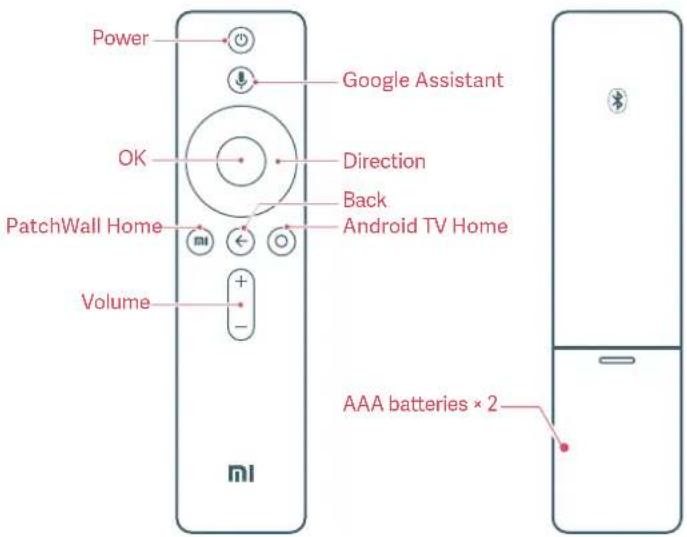
Power: Short press to power On/Off TV; Long press to select Power Off or Restart TV.
Google Assistant: Short press and release to talk to Google Assistant.
OK: Press to confirm current selection during navigation. You can pause/play the current video during playback, except Live Channels(Set-Top Box or RF).
Android TV Home: Short press to quickly return to the Android TV Home screen.
PatchWall Home: Short press to quickly return to the PatchWall Home screen.
Direction: Navigate up/down or left/right through content. During playback use left/right buttons to rewind/fast-forward.
Back: Go back to the previous level.
- Specs
| Basic Specs | Screen size: 108cmScreen resolution: FHD (1920x1080)Refresh rate: 60Hz |
| Hardware Specs | CPU: Quad-core CA53RAM: 1GB DDRFlash memory: 8GB eMMCGraphics processor: Mali-450MP |
| Ports | Input interface: HDMI x 3(1 port with ARC support);AV x 1; Antenna x 1Output interface: Digital audio output (S/PDIF) x 1;Headphone x 1Data interface: USB2.0 x 3;Ethernet port x 1 |
| Wireless Connectivity | Wi-Fi: 2.4GHz (802.11 b/g/n)Bluetooth: BT4.2 |
| Audio and Video Encoding | Audio formats: FLAC; AAC; OGG; DTS-HDVideo formats: MPEG 1/2/4; H.263; H.264; H.265; VC1 |
| Model | Android TVModel: L43M5-ANVoltage: 100-240V~ 50/60HzRating power: 75W |
- Important precautions
Installation
- The TV should be installed near an AC power outlet that can be easily plugged and unplugged.
- Place the TV on a smooth, flat surface to avoid the TV falling and causing injury, or damaging the TV.
- If you intend to install a TV wall mount, we recommend that you use an authorized TV wall mount. For details, please contact the Xiaomi service hotline.
- The diameter and length of the screws will vary depending on the wall mount model. Failure to use the correct screws may cause the TV to fall or lead to internal damage.
Moving
- Disconnect all cables before moving the TV.
- Large TV need 2 or more people to move safely. Avoid applying pressure to the LED panel when moving the TV. Avoid shaking the TV or exposing it to excessive vibrations.
- When moving the TV to a new location or to carry out repairs, package the TV using the original box and packaging materials.
Ventilation
- Do not cover the ventilation holes or insert any objects into the case.
- Keep a space for ventilation around the TV.
Wall mounting
In order to ensure proper ventilation and prevent the buildup of dust or dirt:
- Do not mount the TV flat, upside-down, or backwards, or side mount the TV.
- Do not place the TV on a shelf, carpet, bed, or closet.
- Do not cover the TV with fabric (such as curtains) or other materials (such as newspapers).
AC power cord
Use the AC power cord and socket according to the instructions below to avoid fire, electric shock, damage, or personal injury:
- Insert the plug completely into the AC outlet.
- Use the TV with a 100-240V AC power source.
- When connecting cables, the AC power cord should be unplugged for safety reasons. Be careful not to trip over cables.
- Before carrying out work or moving the TV, disconnect the AC power cord from the AC power outlet.
-
Keep the AC power cord away from heat.
-
Un plug the AC power plug and clean it regularly. If the plug is covered with dust and has water vapor, its insulation quality may deteriorate, producing a fire risk.
- Avoid excessive pinching, bending, modifying, or twisting of the AC power cord, otherwise the wires may become exposed or broken.
- Do not place any heavy objects on the AC power cord.
- Do not pull the AC power cord when disconnecting the power.
- Do not connect too many devices on the same AC power outlet.
- Do not use unsuitable AC power outlets.
Children
- Do not let children climb the TV.
- Place small objects out of the reach of children in order to avoid swallowing.
Optional items
- Keep optional accessories or any devices that emit electromagnetic radiation away from the TV in order to avoid image distortion or noise.
In case of the following problems ...
• The AC power cord is damaged
• The AC power outlet is not suitable
- The TV is damaged due to a drop or impact
- Any liquid or solid object falls into the case through an outlet, turn off the TV and immediately unplug the AC power cord. Ask the Xiaomi service center to dispatch qualified service personnel to investigate.
Usage restrictions
Do not install/use the TV in the following places, environments, or conditions, otherwise the TV may malfunction and cause a fire, electric shock, damage, or personal injury.
- Places:
Outdoors (in direct sunlight), by the sea, in a ship or other vessel, inside a car, in a medical institution, at an unstable location, next to water, or in a place exposed to rain, moisture, or mildew. If the TV is placed in the dressing room of a public bath or spa, it may be damaged by the sulfide in the air.
- Environment:
Hot, damp, or dusty places; places where insects may enter; places that may be exposed to mechanical shock; next to flammable objects (such as candles). The TV should not be exposed to dripping or splashing water, and do not place any items containing liquid such as flower vases on top of the TV. Do not place the TV in a damp or dusty place, or in a room with steam or fumes (near a stove or humidifier) to avoid fire, electric shock, or deformation. Do not boil water, heat, cook noodles, or use mosquito coils near the TV.
- Conditions:
Do not use the TV when your hands are wet, when the case is open, or with accessories that are not authorized by the manufacturer. In the case of a lightning storm, disconnect the TV from the AC power cord and AC outlet. Do not install the TV in an open-air location. Failure to follow these conditions may result in personal injury or damage, or cause objects to strike the TV.
• Damage to Mi TV screen
Do not throw any objects toward the TV, otherwise the screen may be broken due to the impact and cause serious injury. In case of damage to the surface of the TV, do not touch the TV before the AC power cord has been unplugged, otherwise electric shock may occur.
- Operating conditions:
Operating temperature: 0°C–45°C Humidity: 20%–80% Storage temperature: -15°C–40°C Relative humidity: <80%
Precautions
- Watch TV in appropriate lighting conditions. Watching TV in insufficient light or for long periods can damage your eyesight.
- The screen and case will get hot when the TV is working. This is normal.
- Not support the decoding of DTS-CD bitstream coming in from HDMI IN.
Using and cleaning the screen/case of the Mi TV
Before cleaning the LED TV, ensure that the AC power cord is disconnected from the AC power outlet. In order to avoid deterioration of the casing materials or corroding the screen coating, please observe the following precautions.
- Wipe with a soft cloth to remove any dust on the surface of the screen/case. If there is still dust, wipe with a soft cloth that has been moistened with a mild detergent.
- Do not spray water or detergent directly onto the TV. It may drip to the base of the screen or external parts, causing malfunction.
- Do not use scrub pads, alkaline/acid cleaners, scouring powder, or volatile liquids, such as alcohol, volatile oils, thinners, or insecticides. The use of the above materials or prolonged contact with rubber or vinyl products may cause damage to the screen surface and casing materials. It is recommended that you regularly clean the vents to ensure proper ventilation.
- When adjusting the angle of the TV, slowly move the TV to prevent it moving or slipping from the base.
Advertising
This TV displays advertising when it is switched on and off. The advertising that is displayed when the TV is switched on and off cannot be removed or altered, and we have no control over the content of third party advertising.
E-Waste
Xiaomi products are in conformity with the requirements of the reduction of hazardous substances of the E-waste Rules 2016. The content of hazardous substance with the exemption of the applications listed in SCHEDULE II of the E-waste Rules:
- Lead (Pb) – not over 0.1% by weight;
- Cadmium (Cd) – not over 0.01% by weight;
- Mercury (Hg) – not over 0.1% by weight;
- Hexavalent chromium (Cr6+) – not over 0.1% by weight;
- Polybrominated biphenyls (PBBs) – not over 0.1% by weight;
- Polybrominated diphenyl ethers(PBDEs) – not over 0.1% by weight.
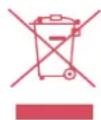
For the purpose of recycling to facilitate effective utilization of resources, please return this product to a nearby authorized Collection Centre, registered Dismantler or Recycler, or Xiaomi Service Centre when disposing of this product.
What the Wheelie Bin symbol means: The symbol says don't dispose your e-waste into the municipal waste collection bins. That's because these wastes are hazardous in nature and need to be recycled in a special way.
How to dispose this product
Carry it to nearest service centre of Xiaomi OR Call the Toll Free Number: 1800 103 6286 OR Write to us on service.in@xiaomi.com. Instructions of handling the product during and after its use and Do's and Dont's with respect to handling the product;
Do's:
a. Always look for information on the catalogue with your product for end-of-life equipment handling.
b. Ensure that only Authorized Recyclers repair and handle your electronic products.
c. Always call Authorized E-waste Recyclers to Dispose products that have reached end-of life.
d. Always drop your used electronic products, batteries or any accessories when they reach the end of their life at your nearest Authorized E-Waste CollectionCenter / Collection Point.
e. Wherever possible or as instructed, separate the packaging material according to responsible waste disposal options and sorting for recycling.
Don'ts:
a. Do not dismantle your electronic Products on your own.
b. Do not throw electronics in bins having "Do not Dispose" sign.
c. Do not give e-waste to informal and unorganized sectors like Local Scrap Dealer/Rag Pickers.
Google Assistant The Mi LED TV has the Google Assistant built in. Ask it questions, and tell it to do things. The more you use it, the more useful it gets. It's your own personal Google, always ready to help.
Chromecast built-in Cast your favorite entertainment apps - movies & TV shows, music, games, sports and more - from your Android or iOS device, Mac or Windows computer, or chromebook to Mi TV. Find Chromecast-enabled apps at g.co/castapps.
dts-HD Manufactured under license from DTS Licensing Limited. DTS, the Symbol, DTS and the Symbol together, DTS-HD, and the DTS-HD logo are registered trademarks and/or trademarks of DTS, Inc. in the United States and/or other countries.. DTS, Inc. All Rights Reserved.
HDMI® The terms HDMI and HDMI High-Definition Multimedia Interface, and The HDMI Loogo are trademarks or registered trademarks of HDMI Licensing Administrator, Ind. in the United States and other countries.
For more accessories, please visit www.mi.com/in
Mi Customer Service: www.mi.com/in/service

- TV SAFETY NOTICE AND INSTALLATION GUIDE
- INSTALLATION
- INSTALLATION (TABLE TOP)
- TURN ON THE TV
- ACCESSORIES
- NOTE
- TV INTERFACE
- ATTENTION
- USING THE REMOTE CONTROL
- SPECS
- IMPORTANT PRECAUTIONS
- MOVING
- VENTILATION
- WALL MOUNTING
- AC POWER CORD
- CHILDREN
- OPTIONAL ITEMS
- IN CASE OF THE FOLLOWING PROBLEMS
- USAGE RESTRICTIONS
- PLACES
- ENVIRONMENT
- CONDITIONS
- DAMAGE TO MI TV SCREEN
- OPERATING CONDITIONS
- PRECAUTIONS
- USING AND CLEANING THE SCREEN/CASE OF THE MI TV
- ADVERTISING
- E-WASTE
- HOW TO DISPOSE THIS PRODUCT
- DO'S
- DON'TS
Brand : Xiaomi
Model : Mi LED TV 4A PRO
Category : Television