
SD-502 - Receiver GLOBALSAT - Free user manual and instructions
Find the device manual for free SD-502 GLOBALSAT in PDF.


User questions about SD-502 GLOBALSAT
0 question about this device. Answer the ones you know or ask your own.
Ask a new question about this device
Download the instructions for your Receiver in PDF format for free! Find your manual SD-502 - GLOBALSAT and take your electronic device back in hand. On this page are published all the documents necessary for the use of your device. SD-502 by GLOBALSAT.
USER MANUAL SD-502 GLOBALSAT
SD-502 SDIO GPS Receiver User Manual
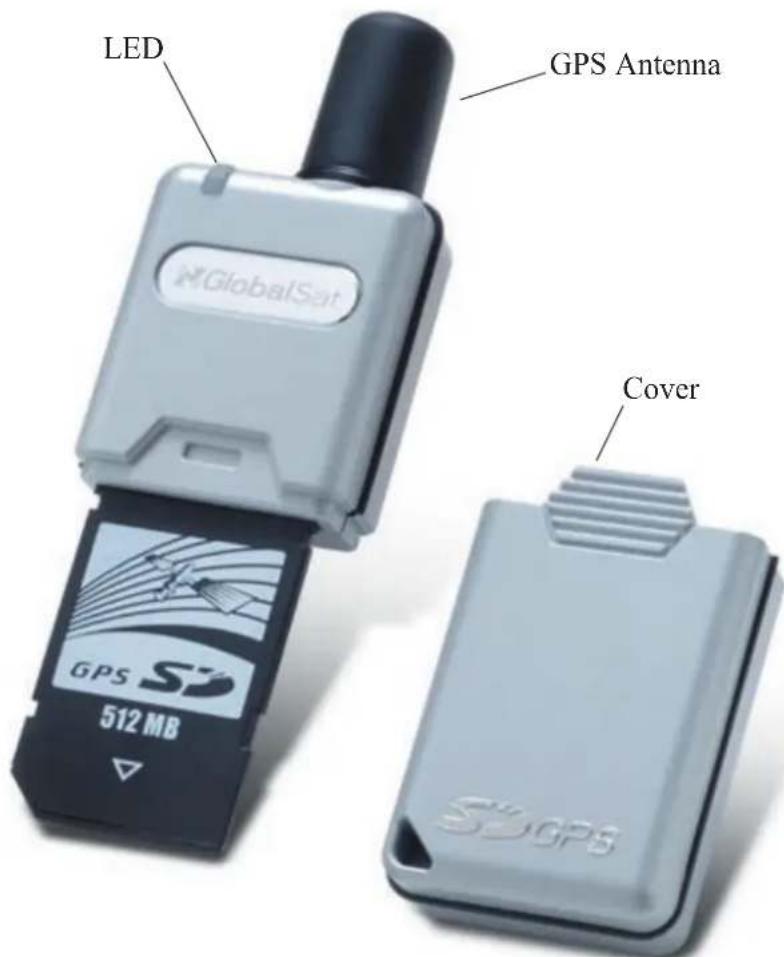
1. SD-502 at a glance
text_image
LED GPS Antenna GlobalSat GPS 512 MB Cover2. System Specification
| Electrical Characteristics (Receiver) | |
| Chipset Si RF Start III | |
| Frequency L1, 1575.42 MHz | |
| C/A Code 1.023 MHz chip rate | |
| Channels 20 channel all-in-view tracking | |
| Accuracy | |
| Position Horizontal 10 meters, 2D RMS1~5 meters, 2D RMS with WAAS corrected | |
| Velocity 0.1 m/sec | |
| Time 1 micro-second synchronized to GPS time | |
| Datum | |
| Datum WGS-84 (default) | |
| Acquisition Rate | |
| Hot start 1 sec., average | |
| Warm start 38 sec., average | |
| Cold start 42 sec., average | |
| Reacquisition 0.1 sec., average | |
| Protocol | |
| GPS Protocol NMEA 0183 (default)SiRF binary (secondary) | |
| GPS Output format GGA (1 sec), GSA (1 sec), GSV (5 sec), RMC (1 sec).GLL and VTG are optional. | |
| Dynamic Condition | |
| Acceleration Limit Less than 4g | |
| Altitude Limit 18,000 meters (60,000 feet) max. | |
| Velocity Limit 515 meters/sec (1,000 knots) max. | |
| Jerk Limit 20 m/sec**3 | |
| Temperature | |
| Operating | -10°C ~ +70°C |
| Humidity 5 ~ 95% non-condensing | |
| Power | |
| Voltage 3.3 V | |
| Power Consumption 110 mA | |
| Physical Characteristics | |
| Dimension 95 mm x 30 mm x 13 mm | |
| Weight approximately 30 grams | |
| Memory Size 512 MB | |
| SDIO Specification | |
| • Compliant with SDIO Card Specification Ver. 1.00 | |
| • Base on Bsquare SDIO Now! | |
3. Introduction
SD-502 is a GPS Receiver with SDIO (Security Digital Input/Output) interface and an integrated built-in memory, which provides an impressive data capacity. The built-in 512 MB memory allows you to easily organize, store, and share files or documents. It also allows for tracking signals and large map data according to the mapping software usage. It's sleek and stylish design of look can go with any kind of the Pocket PC. With light and handy appearance, it is convenient for you to put it in pocket and bring it to anywhere you go. Just plug it into your Pocket PC, and use it to receive the GSP signal right away! Its cylindrical antenna can receive the signal from all directions by 360 degree. It satisfies a wide variety of applications, including car navigation, personal touring navigation or tracking and even marine navigation purpose. With our professional manufacturing technology along with the cutting edge, SiRF Star III chipset, this receiver has provided higher sensitivity, lower power usage and more rapid time-to-fix!
3.1 Features
- SiRF Star III high performance and low power consumption chipset
• Built-in high sensitivity GPS antenna
• LED to show GPS fix or not fix
• Built-in super capacitor to reserve system data for rapid satellite acquisition - SDIO interface
- Operating platform: Pocket PC 2003, Win CE.Net, WM2003
- Base on Bsquare SDIO Now!
• Built-in memory size: 512 MB
3.2 Package
Before you start up, make sure that your package includes the following items. If any item is missing or damaged, contact your dealer immediately.
• SDIO GPS Receiver and its cover.
- A CD (including the User Manual, Driver and the Testing Program.)
3.3 LED Function
GPS Status LED (Green):
- Blinking — GPS position is fixed
- Steady light — GPS position is not fixed
3.4 Compatible Device
- Dell Axim X3 Pocket PC
• Dell Axim X30 Pocket PC
• Dell Axim X50 Pocket PC
• Dell Axim X50V Pocket PC
• Dell Axim X51V Pocket PC
• HP iPAQ h1930 Pocket PC
• HP iPAQ h1940 Pocket PC
• HP iPAQ h1950 Pocket PC
• HP iPAQ h2210 Pocket PC
• HP iPAQ h2750 Pocket PC
• HP iPAQ h4150 Pocket PC
• HP iPAQ hx2410 Pocket PC
• HP iPAQ hx4700 Pocket PC
• HP iPAQ h6315 Pocket PC
• HP iPAQ rx3115 Pocket PC
- Eten M500
- Fujitsu Loox 720
- Asus MyPal 730
• T-Mobile MDA compact
Devices listed above have been tested and proved to be compatible with SD-502.
4. Install Driver
You have to install the driver before you can use the SD-502 GPS receiver with your Pocket PC. The driver will be installed into the Pocket PC via the ActiveSync program. So, before you start, please make sure the ActiveSync has been installed and the Pocket PC is connected to your desktop PC.
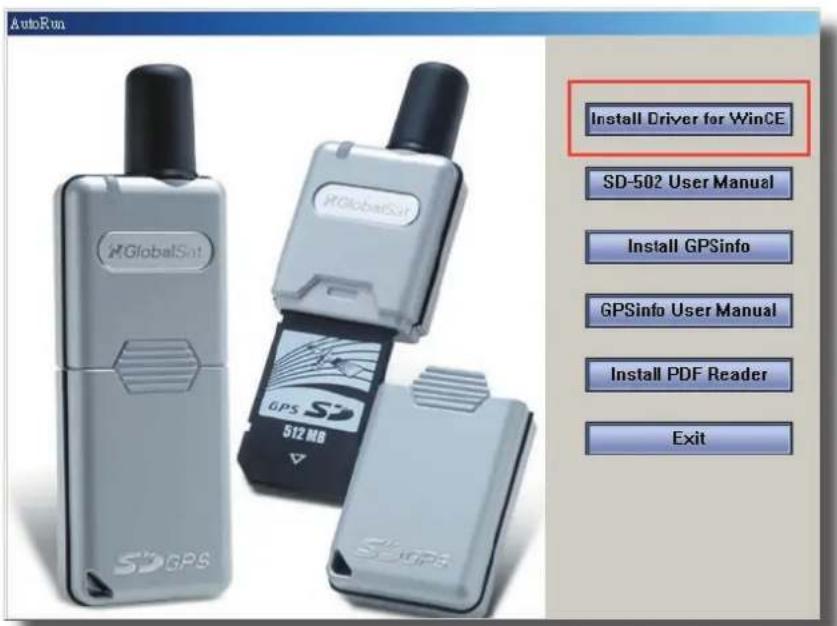
(1). Put the CD into CD-ROM drive. The AutoRun will start the installation program automatically. Click on the "Install Driver for WinCE" button to install the driver. (or you can manually install it by double click the "GlobalSatSDGPS.exe" from the root directory of the CD.)
text_image
AutoRun GlobalSat GlobalSat 512 MB SDGPS SDGPS Install Driver for WinCE SD-502 User Manual Install GPSinfo GPSinfo User Manual Install PDF Reader Exit(2). Click the Next button on the Welcome dialog box and click Yes button on the End User License Agreement dialog box.

text_image
Thank you for choosing to install this software for your Windows CE device. Before you begin, please look through the following README. Press the PAGE DOWN key to view the remaining portion. Gsal If you wish to exit Setup without installing this software, choose Exit. If you wish to continue installing this software, choose Next. Exit Next >>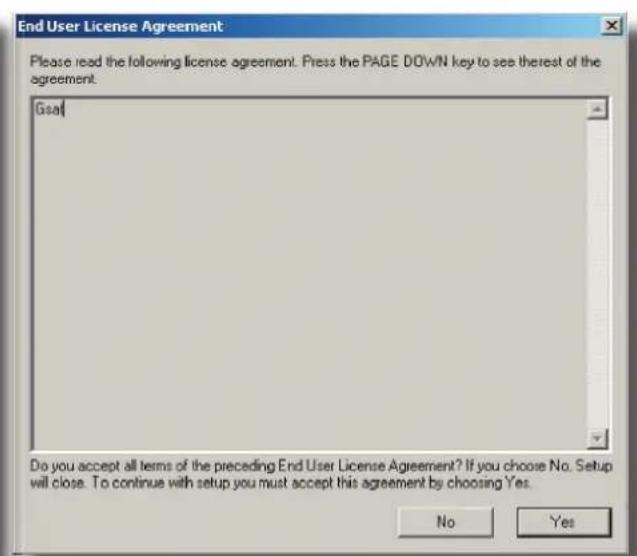
text_image
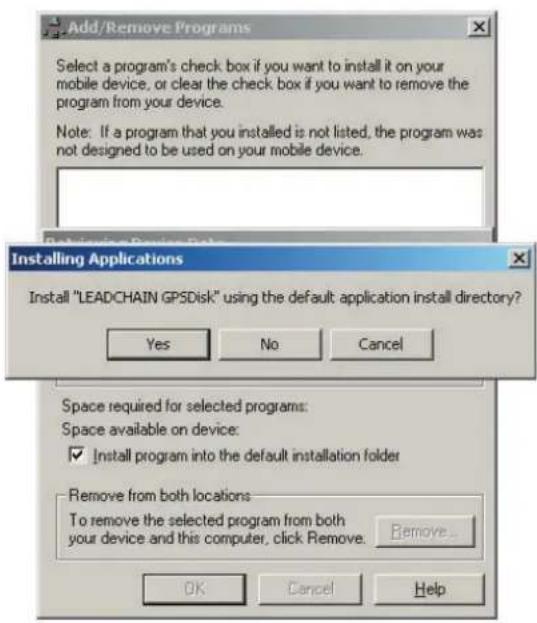
End User License Agreement Please read the following license agreement. Press the PAGE DOWN key to see thereof the agreement. Goal Do you accept all terms of the preceding End User License Agreement? If you choose No. Setup will close. To continue with setup you must accept this agreement by choosing Yes. No Yes(3). Click Yes and OK on next 2 dialog boxes. Now the driver has been installed in your PDA.
text_image
Add/Remove Programs Select a program's check box if you want to install it on your mobile device, or clear the check box if you want to remove the program from your device. Note: If a program that you installed is not listed, the program was not designed to be used on your mobile device. Installing Applications Install "LEADCHAIN GPSDisk" using the default application install directory? Yes No Cancel Space required for selected programs: Space available on device: ✓ Install program into the default installation folder Remove from both locations To remove the selected program from both your device and this computer, click Remove. Remove... OK Cancel Help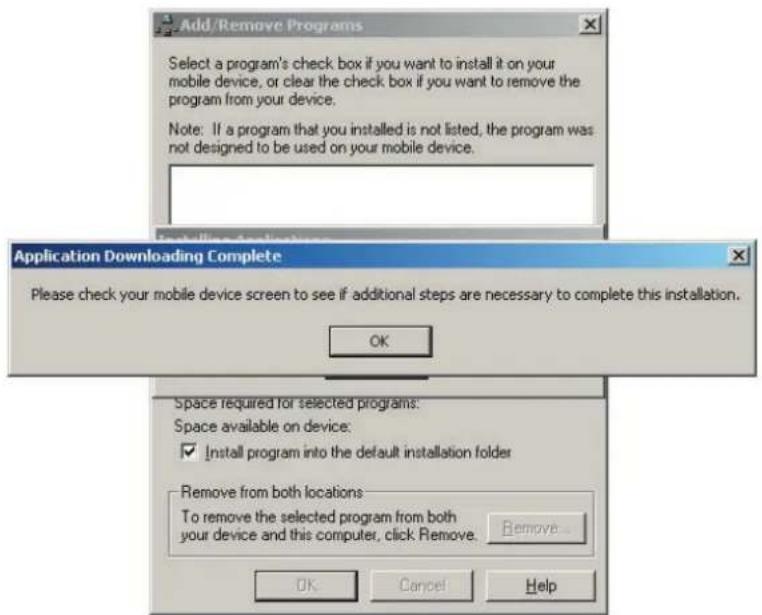
text_image
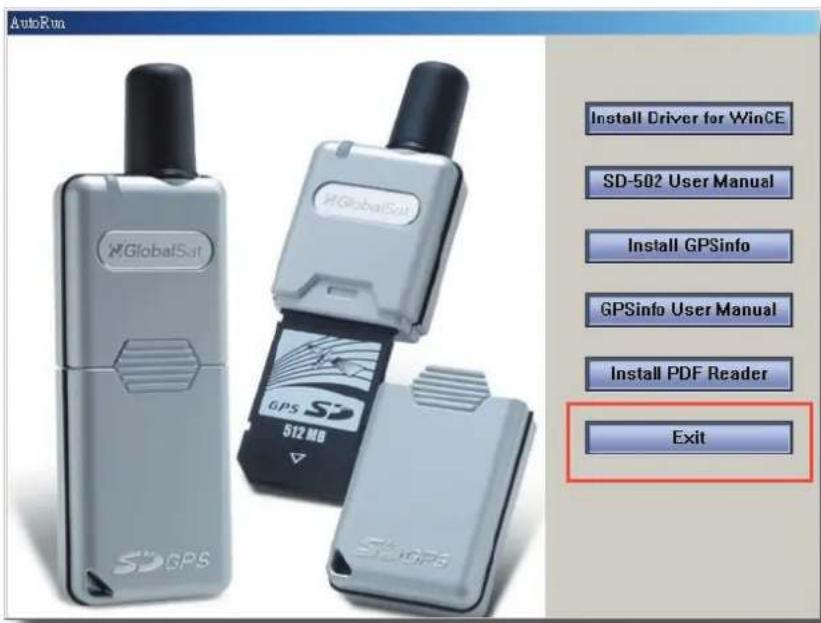
Add /Remove Programs Select a program's check box if you want to install it on your mobile device, or clear the check box if you want to remove the program from your device. Note: If a program that you installed is not listed, the program was not designed to be used on your mobile device. Application Downloading Complete Please check your mobile device screen to see if additional steps are necessary to complete this installation. OK Space required for selected programs: Space available on device: ✓ Install program into the default installation folder Remove from both locations: To remove the selected program from both your device and this computer, click Remove. Remove... OK Cancel Help(4). Click Exit button to close the AutoRun program.
text_image
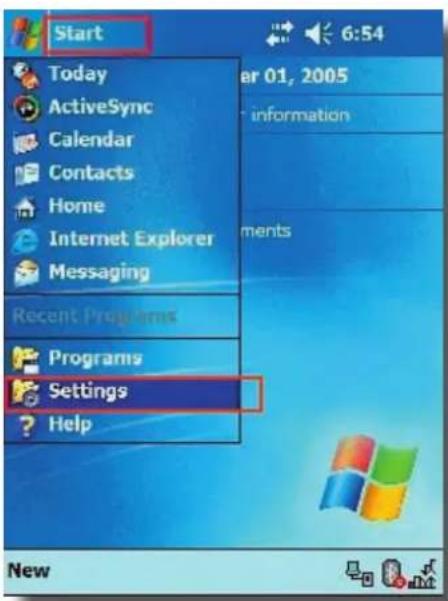
AutoRun GlobalSat GlobalSat GPS 512 MB 512 GPS Install Driver for WinCE SD-502 User Manual Install GPSinfo GPSinfo User Manual Install PDF Reader Exit(5). If you want to check whether the driver has been properly installed or not, please do the following steps. In your PDA, tap Start / Settings, tap System tab and then Remove Programs icon. You will see the driver "LEADCHAIN GPSDisk" is on the list.
text_image
Start Today ActiveSync Calendar Contacts Home Internet Explorer Messaging Recent Programs Programs Settings Help 6:54 01, 2005 information ments New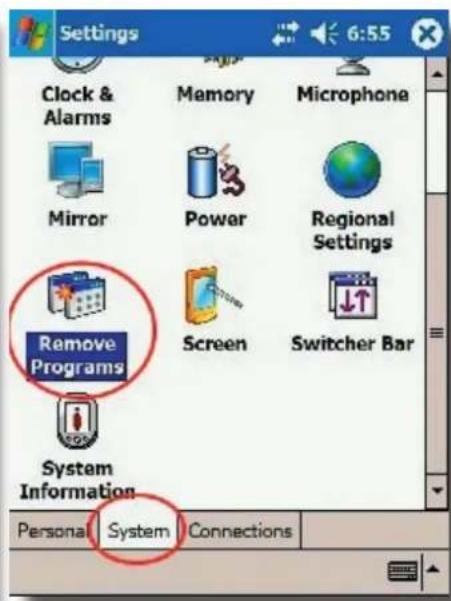
text_image
Settings Clock & Alarms Memory Microphone Mirror Power Regional Settings Remove Programs Screen Switcher Bar System Information Personal System Connections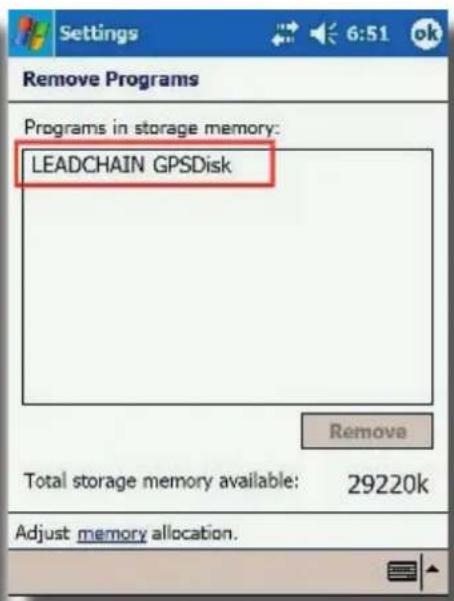
text_image
Settings 6:51 ok Remove Programs Programs in storage memory: LEADCHAIN GPSDisk Remove Total storage memory available: 29220k Adjust memory allocation.(6). If you want to check version information of the installed driver. Please tap Start / Programs / File Explorer, go to "My Device / Windows" folder and open the "GPSDiskVersion.txt". You will see the driver's version information.
5. Test the SD-502 GPS Receiver
You can use the testing program to see if the GPS Receiver is working correctly or not. The testing program only supports the Microsoft Windows CE and Pocket PC based PDA platform.
Note : For more detail about this GPSinfo testing program, please refer to the GPSinfo User Manual, you can find it in the root of CD. (GPSinfo_User_Manual_Eng.pdf)
To install the testing program, please follow the steps below:
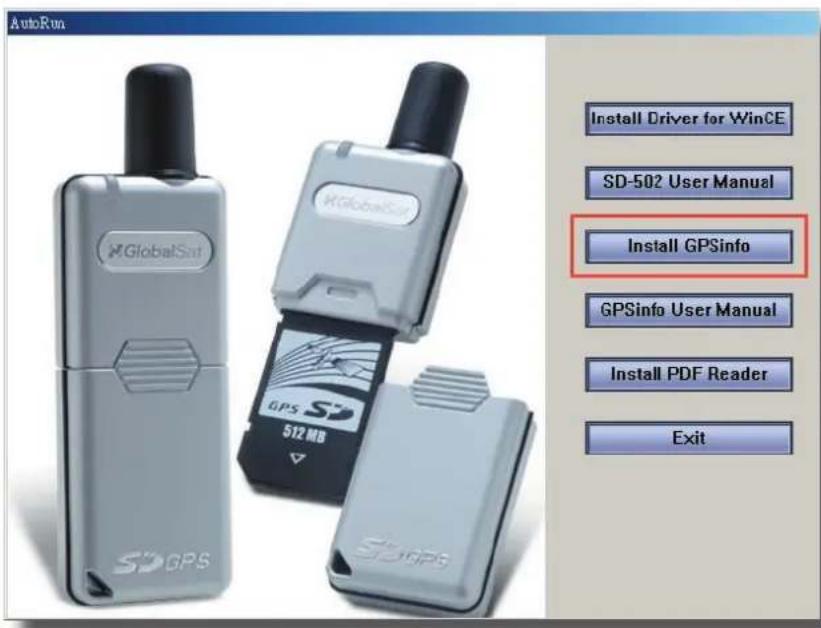
(1). Put the CD into CD-ROM drive. The AutoRun will start the installation program automatically. Click on the "Install GPSinfo" button to install the testing program. (or you can manually install it by double click the "GPSinfo.exe" from the root directory of the CD.)
text_image
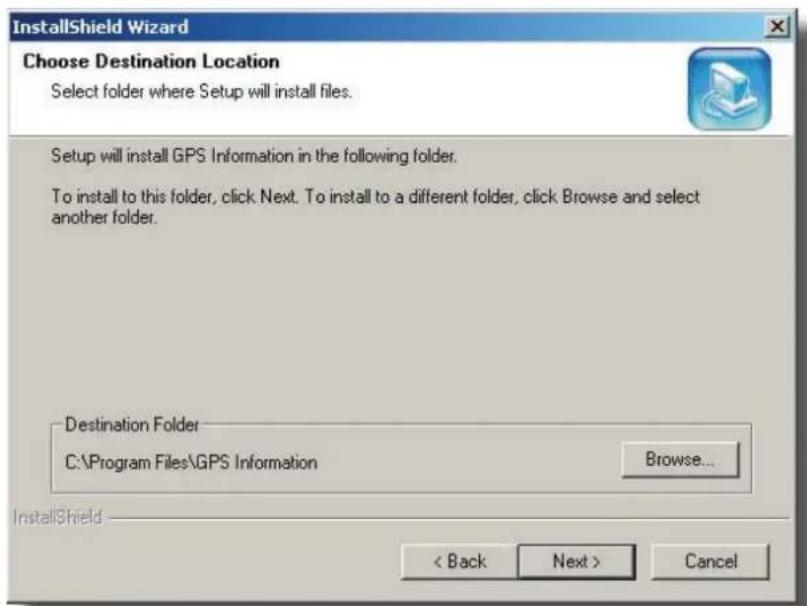
AutoRun GlobalSat GlobalSat SD-502 User Manual Install GPSinfo GPSInfo User Manual Install PDF Reader Exit(2). Click the Next button to continue.
text_image
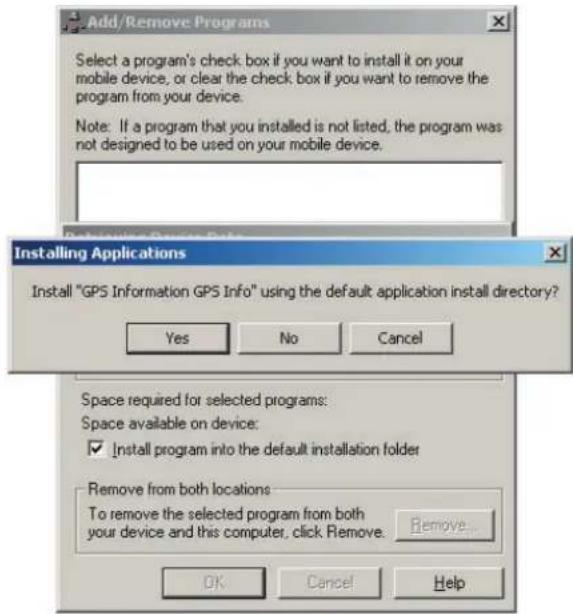
InstallShield Wizard Choose Destination Location Select folder where Setup will install files. Setup will install GPS Information in the following folder. To install to this folder, click Next. To install to a different folder, click Browse and select another folder. Destination Folder C:\Program Files\GPS Information Browse... < Back Next > Cancel(3). Click Yes and OK on next 2 dialog boxes. Now the GPSinfo program has been installed in your PDA.
text_image
Add/Remove Programs Select a program's check box if you want to install it on your mobile device, or clear the check box if you want to remove the program from your device. Note: If a program that you installed is not listed, the program was not designed to be used on your mobile device. Installing Applications Install "GPS Information GPS Info" using the default application install directory? Yes No Cancel Space required for selected programs: Space available on device: ✓ Install program into the default installation folder Remove from both locations To remove the selected program from both your device and this computer, click Remove. Remove... OK Cancel Help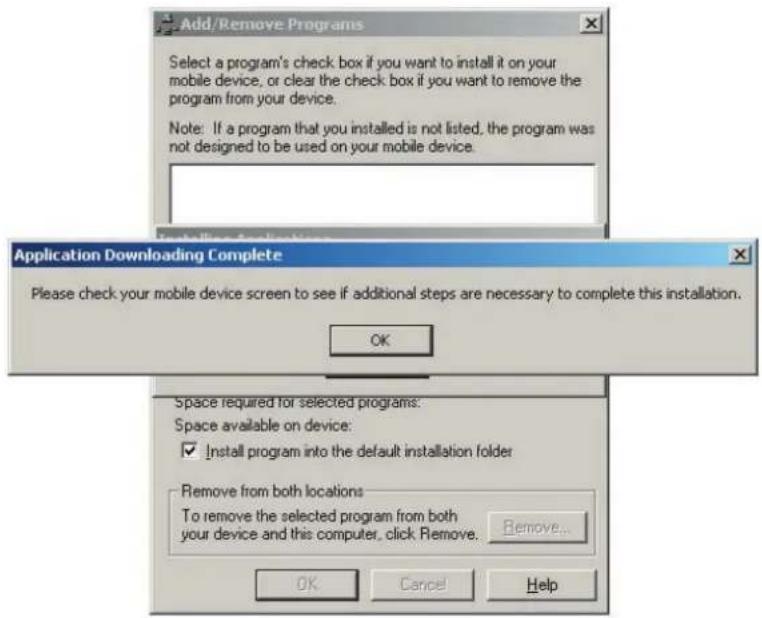
text_image
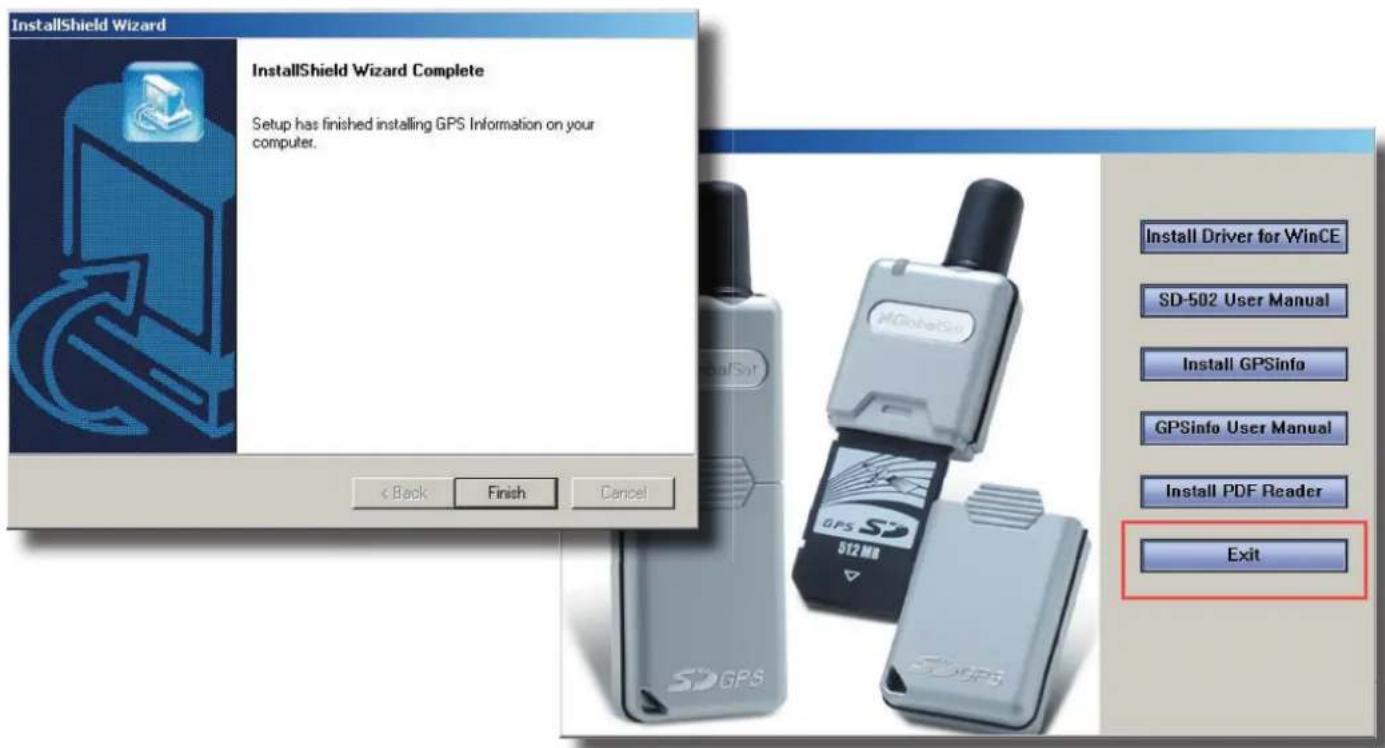
Add/Remove Programs Select a program's check box if you want to install it on your mobile device, or clear the check box if you want to remove the program from your device. Note: If a program that you installed is not listed, the program was not designed to be used on your mobile device. Application Downloading Complete Please check your mobile device screen to see if additional steps are necessary to complete this installation. OK Space required for selected programs: Space available on device: ✓ Install program into the default installation folder Remove from both locations To remove the selected program from both your device and this computer, click Remove. Remove... OK Cancel Help(4). Click Finish button and finish the installation and click Exit button to close the AutoRun program.
text_image
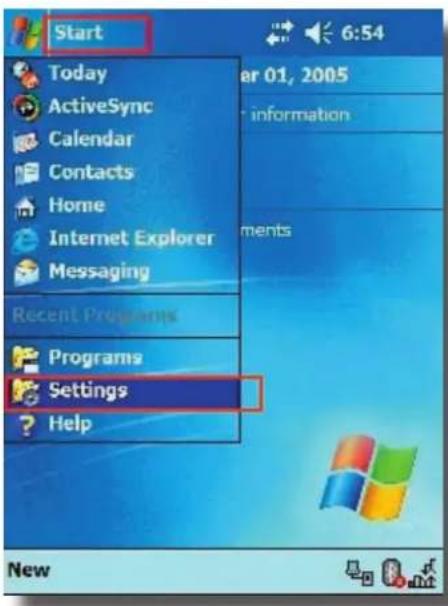
InstallShield Wizard InstallShield Wizard Complete Setup has finished installing GPS Information on your computer. < Back Finish Cancel Install Driver for WinCE SD-502 User Manual Install GPSinfo GPSinfo User Manual Install PDF Reader Exit(5). If you want to check whether the program has been properly installed or not, please do the following steps. In your PDA, tap Start / Settings, tap System tab and then Remove Programs icon. You will see the “GPS Information GPS Info” is on the list.
text_image
Start Today ActiveSync Calendar Contacts Home Internet Explorer Messaging Recent Programs Programs Settings Help 6:54 ear 01, 2005 information ments New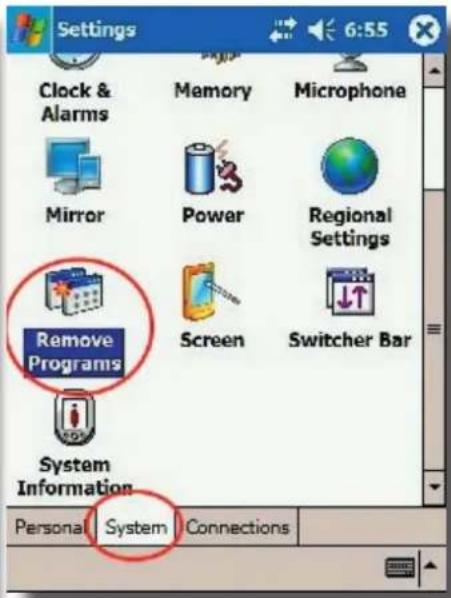
text_image
Settings Clock & Alarms Memory Microphone Mirror Power Regional Settings Remove Programs Screen Switcher Bar System Information Personal System Connections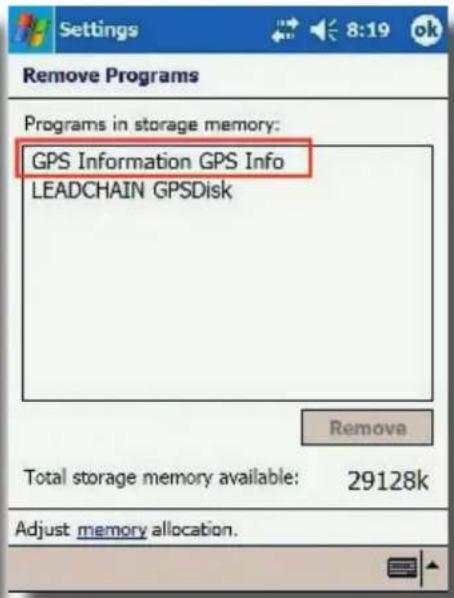
text_image
Remove Programs Programs in storage memory: GPS Information GPS Info LEADCHAIN GPSDisk Remove Total storage memory available: 29128k Adjust memory allocation.FCC Notices
This device complies with part 15 of the FCC rules. Operation is subject to the following two conditions:
(1)This device may not cause harmful interference, and
(2)This device must accept any interference received, including interference that may cause undesired operation.
FCC RF Exposure requirements:
This device and its antenna(s) must not be co-located or operation in conjunction with any other antenna or transmitter.
NOTE: THE MANUFACTURER IS NOT RESPONSIBLE FOR ANY RADIO OR TV INTERFERENCE CAUSED BY UNAUTHORIZED MODIFICATIONS TO THIS EQUIPMENT. SUCH MODIFICATIONS COULD VOID THE USER'S AUTHORITY TO OPERATE THE EQUIPMENT.