
Talkabout T5820 - Radio MOTOROLA - Free user manual and instructions
Find the device manual for free Talkabout T5820 MOTOROLA in PDF.


| Product Type | Two-Way Radio (GMRS/FRS) |
| Model | Motorola Talkabout T5820 |
| Power Source | 3 AA alkaline batteries (not included) or optional NiCd rechargeable battery |
| Number of Channels | 22 (7 GMRS Interstitial, 7 shared GMRS/FRS, 8 FRS) |
| Interference Eliminator Codes | 38 per channel |
| Transmit Power | 1 Watt (channels 1-7, 15-22); 0.5 Watt (channels 8-14) |
| Maximum Range | Up to 5 miles (depending on terrain and conditions) |
| Scan Feature | Yes – scans channels and codes for activity |
| VOX (Hands-Free) | Yes – with compatible VOX accessory (3 sensitivity levels) |
| VibraCall Alert | Yes – vibrating alert for incoming calls |
| Call Tones | 10 selectable call tones (T5820) |
| Roger Beep/Talk Confirmation | Yes – configurable |
| Keypad Lock | Yes – prevents accidental setting changes |
| Low Battery Alert | Yes – audible tone and visual indicator |
| Weather Resistance | Enhanced weather resistance with rubber seals |
| Display | Illuminated LCD display |
| Built-in Belt Clip | Yes – swivel belt clip included |
| Antenna | Fixed, durable antenna |
| Audio Accessory Jack | Yes – for headphones, microphones, etc. |
| FCC License Required | Yes – for GMRS operation |
| Warranty | 1 year limited warranty |
Frequently Asked Questions - Talkabout T5820 MOTOROLA
User questions about Talkabout T5820 MOTOROLA
0 question about this device. Answer the ones you know or ask your own.
Ask a new question about this device
Download the instructions for your Radio in PDF format for free! Find your manual Talkabout T5820 - MOTOROLA and take your electronic device back in hand. On this page are published all the documents necessary for the use of your device. Talkabout T5820 by MOTOROLA.
USER MANUAL Talkabout T5820 MOTOROLA
natural_image
Three motorola telephones displayed side by side, no visible text or symbols on the devices themselves.
6864110R06-O
Models T5800 and T5820
Introduction
Congratulations on your purchase of a Motorola Product!
Product registration is an important step toward enjoying your new Motorola Product. Registering helps us facilitate warranty service, and permits us to contact you should your Motorola Product require an update of other service. Registration is not required for warranty coverage. To register your product on-line, visit www.motorola.com/warranty/radios.
Please retain your original dated sales receipt for your records. For warranty service of your Motorola Personal Communications Product you will need to provide a copy of your dated sales receipt to confirm warranty status.
For a copy of a large-print version of this guide, or for product-related questions, please contact:
1-800-353-2729 U.S.A.
1-800-461-4575 Canada
1-888-390-6456 TTY (Text Telephone)
On the web, please refer to: www.motorola.com/talkabout
Contents
Safety and General Information ...1
FCC Licensing Information .....9
Getting Started....10
Turning On/Off Your Radio .....10
Radio Etiquette .....10
Diagram of Your Radio .....11
Power 12
Batteries 12
Charging Desk Stand (Optional Accessory) .....13
Talking and Listening .....14
Talk Range 15
Channel 16
Interference Eliminator Code .....16
Volume 17
Monitor Button 17
Time-out Timer 17
Keypad Lock 17
Scan (T5820 Only) .....18
Scan Advance .....18
Nuisance Delete 19
Alerts....19
Channel Busy Indicator .....19
Call Tone 19
Roger Beep/Talk Confirmation Tone . .20
VibraCall® Alert (T5820 Only) .....21
Accessories .....21
To Use Audio Accessories .....21
Hands-Free Use/VOX With Compatible VOX Accessories .....21
Belt-clip (Included) .....23
Troubleshooting .....24
Use and Care ....26
Limited Warranty 27
Safety and General Information
IMPORTANT INFORMATION ON SAFE AND EFFICIENT OPERATION READ THIS INFORMATION BEFORE USING YOUR RADIO
The information provided in this document supersedes the general safety information contained in user guides published prior to July 2000. For information regarding radio use in a hazardous atmosphere please refer to the Factory Mutual (FM) Approval Manual Supplement or Instruction Card, which is included with radio models that offer this capability.
Transmit and Receive Procedure
Your two-way radio contains a transmitter and a receiver. To transmit (talk), you must push the Push-to-Talk button; to receive (listen), release the Push-to-Talk button.
Exposure To Radio Frequency Energy
Your Motorola radio is designed to comply with the following national and international standards and guidelines regarding exposure of human beings to radio frequency electromagnetic energy:
- United States Federal Communications Commission, Code of Federal Regulations; 47 CFR part 2 sub-part J
• American National Standards Institute (ANSI) / Institute of Electrical and Electronic Engineers (IEEE) C95. 1-1992
• Institute of Electrical and Electronic Engineers (IEEE) C95.1-1999 Edition
• National Council on Radiation Protection and Measurements (NCRP) of the United States, Report 86, 1986
• International Commission on Non-Ionizing Radiation Protection (ICNIRP) 1998
- Ministry of Health (Canada) Safety Code 6. Limits of Human Exposure to Radiofrequency Electromagnetic Fields in the Frequency Range from 3 kHz to 300 GHz, 1999
• Australian Communications Authority Radiocommunications (Electromagnetic Radiation - Human Exposure) Standard 1999 (applicable to wireless phones only)
To assure optimal radio performance and make sure human exposure to radio frequency electromagnetic energy is within the guidelines set forth in the above standards, always adhere to the following procedures:
PORTABLE RADIO OPERATION AND EME EXPOSURE
Antenna Care
Use only the supplied or an approved replacement antenna. Unauthorized antennas, modifications, or attachments could damage the radio and may violate FCC regulations.
DO NOT hold the antenna when the radio is “IN USE.” Holding the antenna affects call quality and may cause the radio to operate at a higher power level than needed.
Two-way Radio Operation
When using your radio as a traditional two-way radio, hold the radio in a vertical position with the microphone one to two inches (2.5 to 5 cm) away from the lips.
Body-worn Operation
To maintain compliance with FCC/Health Canada RF exposure guidelines, if you wear a radio on your body when transmitting, always place the radio in a Motorola supplied or approved clip, holder, holster, case, or body harness for this product. Use of non-Motorola-approved accessories may exceed FCC/Health Canada RF exposure guidelines. If you do not use one of the Motorola-supplied or approved body-worn accessories, and are not using the radio held in the normal use position, ensure the radio and its antenna are at least one inch (2.5 cm) away from your body when transmitting.
Data Operation
When using any data feature of the radio, with or without an accessory cable, position the radio and its antenna at least one inch (2.5 cm) away from the body.
Approved Accessories
For a list of approved Motorola accessories visit our website at www.mot.com.
ELECTROMAGNETIC INTERFERENCE/COMPATIBILITY
Note: Nearly every electronic device is susceptible to electromagnetic interference (EMI) if inadequately shielded, designed or otherwise configured for electromagnetic compatibility.
- FACILITIES
To avoid electromagnetic interference and/or compatibility conflicts, turn off your radio in any facility where posted notices instruct you to do so. Hospitals or health care facilities may be using equipment that is sensitive to external RF energy.
- AIRCRAFT
When instructed to do so, turn off your radio when on board an aircraft. Any use of a radio must be in accordance with applicable regulations per airline crew instructions.
• MEDICAL DEVICES
Pacemakers
The Advanced Medical Technology Association recommends that a minimum separation of 6 inches (15 centimeters) be maintained between a handheld wireless radio and a pacemaker. These recommendations are consistent with the independent research by, and recommendations of, the United States Food and Drug Administration.
Persons with pacemakers should:
- ALWAYS keep the radio more than six inches (15 centimeters) from their pacemaker when the radio is turned ON.
- not carry the radio in the breast pocket.
- use the ear opposite the pacemaker to minimize the potential for interference.
- turn the radio OFF immediately if you have any reason to suspect that interference is taking place.
Hearing Aids
Some digital wireless radio may interfere with some hearing aids. In the event of such interference, you may want to consult your hearing aid manufacturer to discuss alternatives.
Other Medical Devices
If you use any other personal medical device, consult the manufacturer of your device to determine if it is adequately shielded from RF energy. Your physician may be able to assist you in obtaining this information.
Safety and General Use While Driving
Check the laws and regulations on the use of radio in the area where you drive. Always obey them.
When using your radio while driving, please:
- Give full attention to driving and to the road.
- Use hands-free operation, if available.
- Pull off the road and park before making or answering a call if driving conditions so require.
OPERATIONAL WARNINGS
• FOR VEHICLES WITH AN AIR BAG
Do not place a portable radio in the area over an air bag or in the air bag deployment area. Air bags inflate with great force. If a portable radio is placed in the air bag deployment area and the air bag inflates, the radio may be propelled with great force and cause serious injury to occupants of the vehicle.
• POTENTIALLY EXPLOSIVE ATMOSPHERES
Turn off your radio prior to entering any area with a potentially explosive atmosphere, unless it is a radio type especially qualified for use in such areas as “Intrinsically Safe.” Do not remove, install, or charge batteries in such areas. Sparks in a potentially explosive atmosphere can cause an explosion or fire resulting in bodily injury or even death.
Note: The areas with potentially explosive atmospheres referred to above include fueling areas such as below decks on boats, fuel or chemical transfer or storage facilities, areas where the air contains chemicals or particles, such as grain, dust or metal powders, and any other area where you would normally be advised to turn off your vehicle engine. Areas with potentially explosive atmospheres are often but not always posted.
• BLASTING CAPS AND AREAS
To avoid possible interference with blasting operations, turn off your radio when you are near electrical blasting caps, in a blasting area, or in areas posted: "Turn off two-way radio." Obey all signs and instructions.
OPERATIONAL CAUTIONS
• ANTENNAS
Do not use any portable radio that has a damaged antenna. If a damaged antenna comes into contact with your skin, a minor burn can result.
• BATTERIES
All batteries can cause property damage and/or bodily injury such as burns if a conductive material such as jewelry, keys, or beaded chains touch exposed terminals. The conductive material may complete an electrical circuit (short circuit) and become quite hot. Exercise care in handling any charged battery, particularly when placing it inside a pocket, purse, or other container with metal objects.
BATTERY CHARGER SAFETY INSTRUCTIONS
Save these Charger Instructions
- Do not expose the charger to rain or snow.
- Do not operate the charger if it has received a sharp blow, or has been dropped or damaged in any way.
-
Do not disassemble the charger if it has received a sharp blow, or has been dropped or damaged in any way.
-
Never alter the AC cord or plug provided with the unit. If plug will not fit the outlet, have proper outlet installed by a qualified electrician. An improper condition can result in a risk of electric shock.
- To reduce risk of damage to cord or plug, pull the plug rather than the cord when disconnecting charger from AC receptacle.
- To reduce the risk of electric shock, unplug the charger from the outlet before attempting any maintenance or cleaning.
- Use of an attachment not recommended or sold by Motorola may result in a risk of fire, electric shock, or personal injury.
- Make sure that the cord is located so that it will not be stepped on, tripped over, or subjected to damage or stress.
- An extension cord should not be used unless absolutely necessary. Use of an improper extension cord could result in a risk of fire and/or electric shock. If an extension cord must be used, make sure:
- That the pins on the plug of the extension cord are the same number, size and shape as those on the plug of the charger.
- That the extension cord is properly wired and in good electrical condition, and
-
That the cord size is 18 AWG for lengths up to 100 feet, and 16 AWG for lengths up to 150 feet.
-
The supply cord of this charger cannot be replaced. If the cord is damaged, call Motorola Product Services at:
1-800-353-2729 (U. S. A.)
1-800-461-4575 (Canada)
1-888-390-6456 TTY (Text Telephone)
FCC Licensing Information
Your Motorola radio operates on General Mobile Radio Service (GMRS) frequencies and is subject to the Rules and Regulations of the Federal Communications Commission (FCC). The FCC requires that all operators using General Mobile Radio Service (GMRS) frequencies obtain a radio license before operating their equipment. To obtain the FCC forms please request Form 605 which includes all forms and instructions. If you wish to have the document faxed, mailed or have questions, please use the following contact information.
| FaxedContact the Fax-On-Demand system at: | MailedCall the FCC forms hotline at: | Questionsregarding FCC licenseContact the FCC at: |
| 1-202-418-0177 | 1-800-418-FORM1-800-418-3676 | 1-888-CALL-FCC1-888-225-5322Or: http://www.fcc.gov |
Changes or modifications not expressly approved by Motorola may void the user's authority granted by the FCC to operate this radio and should not be made. To comply with FCC requirements, transmitter adjustments should be made only by or under the supervision of a person certified as technically qualified to perform transmitter maintenance and repairs in the private land mobile and fixed services as certified by an organization representative of the user of those services. Replacement of any transmitter component (crystal, semiconductor, etc.) not authorized by the FCC equipment authorization for this radio could violate FCC rules. Note: Use of this radio outside the country where it was intended to be distributed is subject to government regulations and may be prohibited.
Getting Started
Turning On/Off Your Radio
Turn Knob
Display Normal Menu Mode

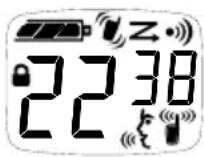
Turn knob on the top of the radio clockwise to use. Turn the knob counterclockwise to turn the radio Off.
The radio chirps and the display will show all feature icons that your radio has available for a brief period.
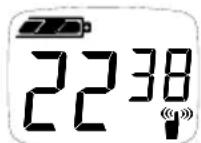
Display will Show the Channel 1-22 and Interference Eliminator Code 0-38.
Radio Etiquette
Your radio has multiple Channels shared on a “take turns” basis; other groups may be talking on the Channels. For uninterrupted communications, do not talk over someone who is already using the Channel – your message may not be completely heard. Try changing the Channel to avoid Channel congestion or use the ☑ (T5820) or ☑ (T5800) to check for Channel activity. If you hear static while holding down ☑, Channel is clear to use.
Diagram of Your Radio
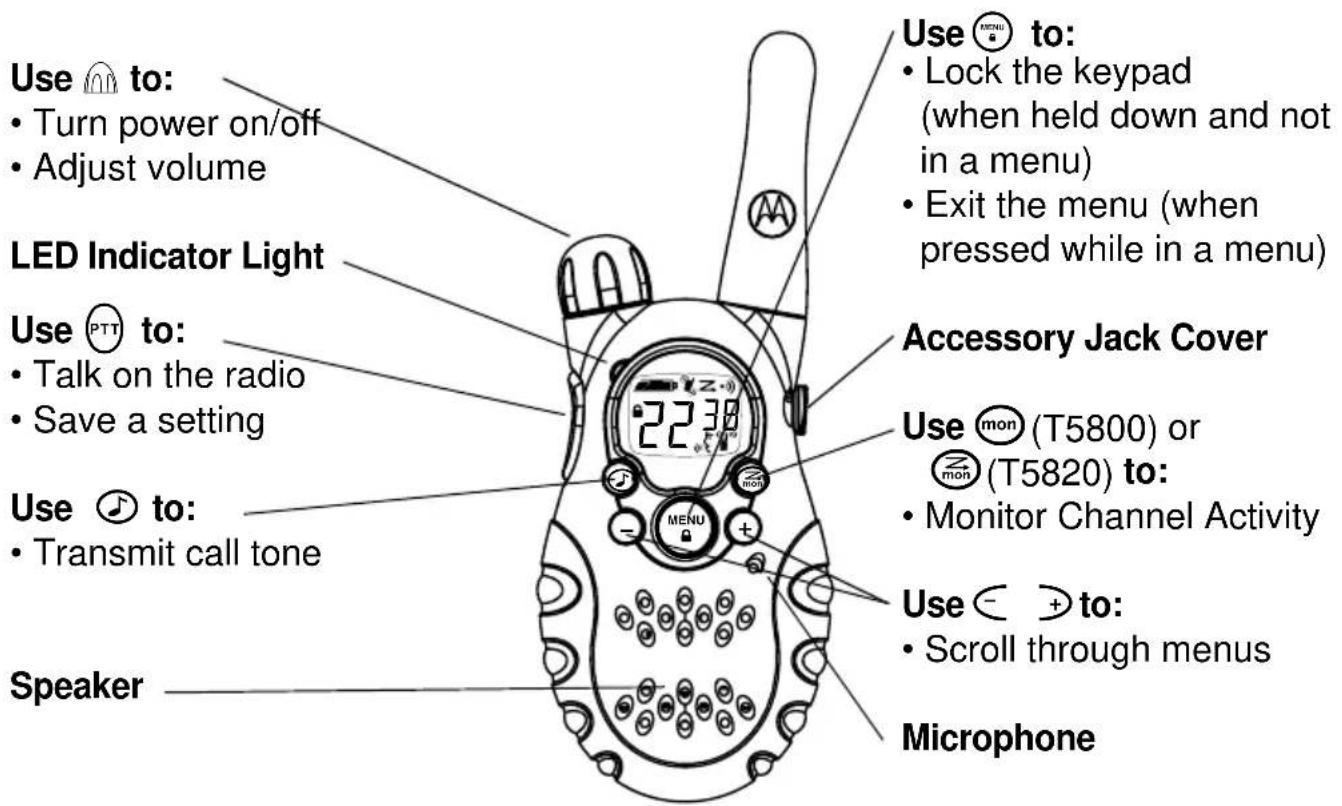
Power
Batteries
T5800 and T5820 radios operate with 3 AA Alkaline batteries or a NiCd rechargeable battery. A Rechargeable Upgrade Kit, model no. 53614 is available for your radio.
Call 1-800-353-2729 (USA) or 1-800-461-4575 (Canada) for the dealer nearest you or visit our website: www.motorola.com/talkabout.
Installation
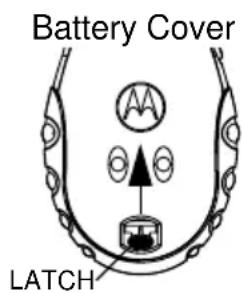
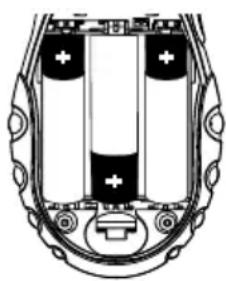
- With back of radio facing you, lift Battery Latch up to release the Battery Cover.
- Lift cover off.
- Insert 3 AA batteries as shown.
- Reposition Battery Cover, press Battery Cover down to secure.
natural_image
Cross-sectional diagram of a battery pack with two cells and battery terminals (no text or labels)Meter
The battery meter in the upper left corner of the display indicates battery power.
The radio will power off when the voltage drops below a predetermined level to protect the rechargeable battery. When the battery meter is an empty shell ( —— ), the radio chirps after releasing Ⓞ and every 10 minutes.
Charging Desk Stand (Optional Accessory)
The Charging Desk Stand provides drop-in charging convenience. The Charging Desk Stand can be placed on any flat surface, such as a desk or workbench. Charge the NiCd battery overnight (16 hours) before using it for the first time.
- With the radio OFF, remove the Battery Cover.
- Insert the battery pack as indicated on the battery-pack label.
- Replace the Battery Cover.
- Plug the wire on the AC Power Supply into the plug on the Desk Stand.
- Plug the AC Power Supply into a standard wall outlet.
- Slide the radio into one of the Desk Stand charging pockets facing forward. The red light will glow if the radio is properly inserted.
- The radio/battery will be fully charged within 14 hours.
You can also charge the battery pack separately from the radio, as follows:
- Plug the wire on the AC Power Supply into the plug on the Desk Stand.
- Plug the AC Power Supply into a standard wall outlet.
- Insert the battery pack into the Desk Stand charging pocket using the charging pocket insert provided.
- Make sure that the contacts on the side of the battery pack align with the metal contacts in the pocket of the Desk Stand. The red light will glow if they have been properly inserted.
- The radio/battery will be fully charged within 14 hours.
Charging Status
The Solid Red Light Indicator shows that the radio and/or the NiCd battery are charging.
Note: When moving between hot and cold environments, do not charge the battery until the battery temperature acclimates (usually about 20 minutes).
A depleted battery will recharge to full capacity within 14 hours.
Note: For optimal battery life, remove the radio or battery from the charger within 16 hours. Do not store the radio in the charger.
Radio Channels
Your two-way radio has 22 channels:
Channel Numbers Description Transmit Power
Channels 1-7
GMRS Interstitial 1-7 also FRS 1-7
1 watt
Channels 8-14 FRS 8-14 0.5 watt
Channels 15-22 GMRS Primary 1-8 1 watt
- When the radio is on a 1 watt channel, the
- When the radio is on a 0.5 watt channel, the
icon displays.
icon displays.
Talking and Listening
To communicate, all radios in your group must be set to the same Channel (1-22) and Interference Eliminator Code (0-38).
- To maximize clarity, hold radio 2 to 3 inches from mouth.
- Press and hold (PTT) and speak into the microphone.
LED Indicator Light glows continuously when transmitting.
• To receive messages, release ⒽTT.
Talk Range
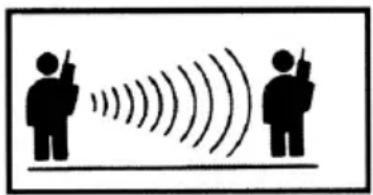
Your radio has been designed to maximize performance and improve transmission range. It is recommended that you do not use the radios closer than 5 feet apart.
natural_image
Silhouette of two people with sound waves, no text or symbols presentOptimal Range Outdoors
Flat, open areas
natural_image
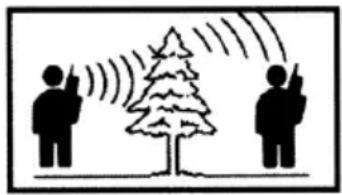
Illustration of two people using a tree with signal waves, no text or symbols presentMedium Range Outdoors
Buildings or trees
Also near residential buildings
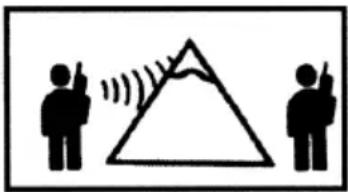
Minimal Range Outdoors
Dense foliage or mountains
Also inside some buildings
Your radio is compatible with both General Mobile Radio Service (GMRS) and Family Radio Service (FRS) channels. You can talk to FRS radios on channels 1-14.
Remember that FRS radios operate at 0.5 watts of transmit power. On channels1-7, your radio operates at 1 watt. In certain situations, when talking to FRS radios on channels 1-7, it is possible that they will be able to hear you, but you will not be able to hear them. This is because you are transmitting with more power (1 watt) than the FRS radio (0.5 watts). If this occurs, you must move closer to the other person to have clear, two-way communication.
Channel
- With radio On, press Ⓞ, Current Channel will begin to flash.
- Use ⊂ and ⊕ to change Channel while flashing.
- Press to set new Channel.
Interference Eliminator Code
The interference eliminator codes help minimize interference by providing you with a choice of code combinations.
- To set the code, press ⏚ until the code display begins to blink.
- Then press or to set the code.
- Press (PTT) to save the code setting.
You can specify a different code for each channel. To set a channel and code combination, press Ⓞ and then press ⊥ or ➤ to select the channel. Press Ⓞ again and then press ⊥ or ➤ to select a code. Press Ⓗ to exit the menu and to save the
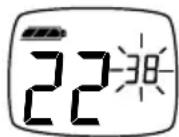
channel and code combination. To set another channel and code combination, repeat these steps.
Volume
Rotate 📐 while holding down 📏 (T5820) or 📞 (T5800) until you reach a comfortable listening level. Rotate 🔗 clockwise to increase and counterclockwise to decrease volume.
Monitor Button
Pressing and holding ☑ (T5820) or ☑ (T5800), lets you hear the radio's volume level when you are not receiving so you can adjust the volume. It is also used to check activity on current Channel before transmitting.
Time-out Timer
The Time-out Timer feature helps extend battery life by preventing accidental transmission. The radio will emit a continuous warning tone after is pressed for 60 continuous seconds and will stop transmitting.
Keypad Lock
To avoid accidentally changing radio operation, press Ⓞ for 3 seconds. Now you will see the ▪ icon. This sequence locks the menu, ⊥ and ➤, and Scan (T5820 Only) functions. Once locked, you will be able to turn the radio Off and On, increase or decrease volume, transmit, send a call tone and monitor. To unlock, press and hold Ⓞ for 3 seconds.
Scan (T5820 Only)
By Scanning, you can monitor Channels and Codes for transmissions and lock in on the one that interests you. More importantly, you can find someone in your group who has accidentally changed Channels and is talking during your scan.
To start scanning, briefly press and release the ☐. If you activate scan while your code is set to ☐, then the radio will check for activity on each Channel regardless of the Code in use on that Channel. If you activate scan while the Code is set on ☐ to ☐, the radio will check for activity on each Channel, but only for Codes ☐ to ☐. Transmissions using Code ☐ are ignored. When the radio detects Channel activity, it stops on that Channel and displays the Code in use.
While the radio is scanning, will display and scroll through the Channels. When activity is detected on a Channel, the radio will stop scanning and you will hear whatever transmissions are detected. The radio's display will show the Channel and Code on which activity was detected.
If you want to respond to the transmission, press the PTT button within 5 seconds and you can respond. To stop scanning, briefly press and release the Zmon.
Scan Advance
If scan stops on a Channel that you don't want to listen to, briefly press either the and to resume scanning for the next active Channel.
Nuisance Delete
If scan continuously stops on an undesired Channel:
- Press and hold either or for at least 3 seconds.
- Then release.
These steps will temporarily remove the undesired Channel from being scanned. To restore the deselected Channel to the Scan List, turn the radio Off and then On.
You cannot remove your Home Channel from the Scan List. The Home Channel is the Channel your radio was set to when you activated Scan.
Alerts
Channel Busy Indicator
The radio also has a Channel Busy Indicator where the LED will also flash twice per second to indicate the Channel is in use.
Call Tone
The Call Tone obtains others' attention before you start talking. Press Ⓜ to allow users using the same Channel and Code to hear your Call Tone.
T5800 has 5 Call Tones. The T5820 has 10 call tones to choose. Setting the Call Tone to ☐ disables ⏻.
To Set the Call Tone
- With the radio on, press ⏰ until ER appears in the upper right portion of the display. Current Call Tone setting will begin to flash.
- Press ⊂ and ⊕ to change and hear Call Tone while flashing.
- Press Ⓞ or Ⓞ to set new Call Tone.
• T5800 has 5 Call Tones
• T5820 has 10 Call Tones
- Setting the Call Tone to disables the Call Tone function.
Roger Beep/Talk Confirmation Tone
When you turn on this feature, your two-way radio transmits a unique tone when you finish transmitting. It's like saying "Roger" or "Over" and lets others know you're finished talking.
- To enable Roger Beep/Talk Confirmation Tone, press and hold ➕ as you turn your radio On. Now, when you release the Ⓞ button, your set tone lets your friends know you're finished talking and •» will appear on the display.
- To disable the Talk Confirmation Tone feature, turn your radio Off and then back On while pressing and holding ⊕.
VibraCall® Alert (T5820 Only)
T5820 features VibraCall Alert, a vibrating alert to notify you that your radio is receiving a message. This is useful in noisy environments.
To activate VibraCall Alert, press Ⓜ until 📋 appears. Press + and ⌘ will appear.
To deactivate, press so that - appears in the same menu. When VibraCall Alert is activated, your T5820 will vibrate when your radio receives a message on the channel and code that you set. Your T5820 will not vibrate more than once every 30 seconds.
Accessories
To Use Audio Accessories
- Make sure radio is Off. Open cover and plug accessory connector into jack.
- Turn radio On and lower volume before placing accessory on head or in ear.
- Press ☑ while rotating 🔒 to adjust volume for comfort level.
- To transmit, press (PTT) and speak into accessory microphone (if any).
- To receive, release PTT.
Hands-Free Use/VOX With Compatible VOX Accessories
VOX allows you to transmit “hands-free” by talking while using VOX accessories connected to the radio. See the Motorola Talkabout Accessory Brochure for the available VOX accessories.
- Turn radio Off.
- Insert plug of audio accessory firmly into Accessory Jack.
- Turn radio On. Radio will display:
- Lower radio volume BEFORE placing accessory on head or in ear.
- To transmit, speak into Accessory Microphone and to receive, stop talking.
VOX operation can be disabled by pressing or removing audio accessory.
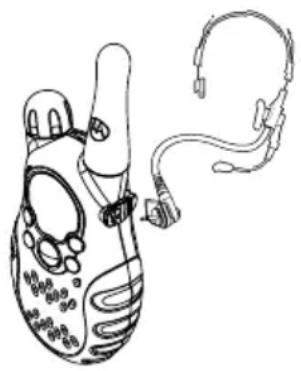
natural_image
Line drawing of a medical device with attached earplugs (no text or symbols)There is a short delay between when you start talking and the radio transmits.
Note: To order accessories, please refer to: www.motorola.com/talkabout Setting Sensitivity Level
Adjusting your radio's Sensitivity Level helps to minimize the possibility of unintended noises triggering a transmission, or enhances the ability to pick up quiet voices.
- Press Ⓞ as needed to display «
- Select Sensitivity Level of 1, 2, or 3 by using or :
∃ = High Sensitivity, 2 = Medium Sensitivity, 1 = Low Sensitivity, quiet environments for most environments for noisy environment
Note: When you connect a VOX accessory, the radio will automatically be set to the last chosen sensitivity level.
Belt-clip (Included)
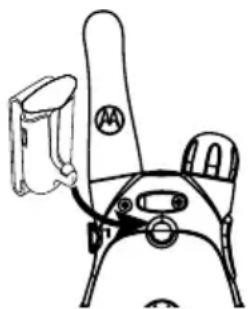
Motorola T5800 and T5820 radios come with a swivel belt-clip
To Attach
- Align belt-clip post with hole in the radio back.
- Gently push until it clicks into place.
To Remove
- Push release tab on top of belt clip down to release catch.
- Pull belt-clip from the radio back.
There are many accessories (sold separately) available for T5800 and T5820 radios. For more information refer to the
brochure we've included with your radio, contact place of purchase or call Motorola at:
1-800-353-2729 USA 1-800-461-4575 Canada 1-800-739-7834 (TTY)
natural_image
Line drawing of a mechanical device with a handle and lever (no text or symbols)Troubleshooting
| Problem Solution | |
| No Power Reposition, replace or recharge batteries. | |
| Erratic Display Reposition, replace or recharge batteries. | |
| Message Not Transmitted | Make sure button is completely pressed while you transmit.Reposition, replace or recharge batteries.Shared Channel may be in use, try another Channel. |
| Message Not Received | Confirm radios have same Channel settings and/or Interference Eliminator Code (helps minimize interference).Make sure is not inadvertently being pressed.Reposition, replace or recharge batteries.Obstructions, and operating indoors or in vehicles may interfere with communication. Change your location.Check to make sure volume is turned up. |
| Hearing Other Conversation or Noise on a Channel | Shared Channel may be in use, try another. |
Problem Solution
| Limited Talk Range | Steel/concrete structures, heavy foliage and use in buildings and in vehicles will decrease range. Check for clear line of sight to improve transmission.Wearing radio close to body such as in a pocket or on a belt will decrease range. Change location of radio. |
| Heavy Static or Interference | Radios too close. Radios must be at least 5 feet apart; increase your distance.Radios too far apart. Obstacles interfere with transmission. |
Use and Care
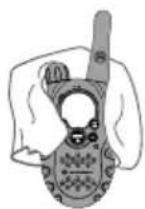
To clean the radio, use a soft damp cloth.
If the radio gets wet...
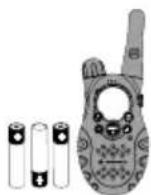
Turn it off and remove batteries.
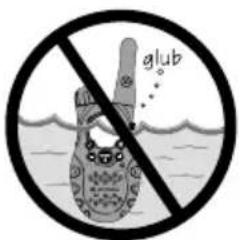
Do not immerse in water.
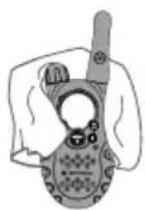
Dry with soft cloth. Battery contacts may be wiped with a dry, lint-free cloth
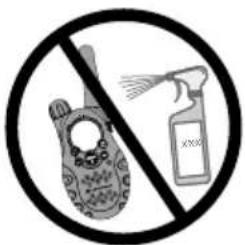
Do not use alcohol or cleaning solutions.
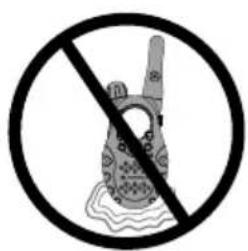
Do not use until completely dry.
Limited Warranty
for Motorola Personal Communications Products and Accessories Purchased in the United States and Canada
I. What This Warranty Covers
Defects in materials and workmanship in the following new “Products” manufactured, sold or certified by Motorola, with which this limited warranty is included in/on the package: (a) wireless cellular telephones, pagers and two-way radios that operate via “Personal Radio Service” (such as Family Radio Service and General Mobile Radio Service), together with software imbedded in any of these products, and (b) subject to the following exceptions, accessories or software sold for use with these products.
- Battery Exception. This limited warranty extends only to batteries in which the fully-charged capacity falls below 80% of rated capacity and batteries that leak;
- Software Exceptions. This limited warranty extends only to physical defects in the media (such as CD-ROM) that tangibly embodies each copy of any software sold and/or certified by Motorola for use with Products. Software that is not tangibly embodied in media and that is purchased separately from Products (such as software that is downloaded from the internet) comes “as is” and without warranty.
II. What the Period of Coverage Is
Subject to the following exceptions, one year from the date the Products are purchased by the first end-user:
- 90-Day Warranty Exception. The warranty is for 90 days for: (a) any software tangibly embodied in media or (b) any accessories for two-way radios that are covered by this warranty, as described in Section I, above.
- Limited Lifetime Warranty Exception. The warranty is a limited lifetime warranty for the lifetime of ownership by the first end-user of the following products, only: (a) decorative covers, including bezel, PhoneWrap™ or case (any model); and (b) ear buds and boom headsets that transmit mono sound through a wire connection (this does not include ear buds or boom headsets that either transmit stereo sound or that are wireless, or both).
- Repair / Replacement Exception. The warranty is for the balance of the original warranty or for 90 days from the date returned and delivered to the first end-user, whichever is longer.
III. Who is Covered
This warranty extends to you only if you are the first end-user purchaser.
IV. What We Will Do to Correct Warranty Problems
At no charge to you, we have the option to repair or replace the Products that do not conform to the warranty, or to refund the Products' purchase price. We may use functionally equivalent reconditioned/refurbished/pre-owned or new Products or parts. No software updates are provided.
V. How to Get Warranty Service
PLEASE CALL US – DO NOT SHIP:
USA Canada
Cellular 1-800-331-6456 All Products 1-800-461-4575
Paging 1-800-548-9954 1-888-390-6456 TTY (Text Telephone)
FRS Radios 1-800-353-2729
1-888-390-6456 TTY (Text Telephone)
Accessories and software -- call the number designated for the product with which they are used.
You will receive instructions on how to ship the Products to Motorola or our designated resource. If instructed to ship the Products, you must ship them with freight, duties and insurance prepaid. Regardless of where you are instructed to return the Products, you must include: (a) a copy of your receipt, bill of sale or other comparable proof of purchase; (b) a written description of the problem; (c) the name of your service provider (if this Product requires subscription service); (d) the name and location of the installation facility (if applicable) and, most importantly; (e) your address and telephone number. If requested, you must also return all detachable parts such as antennas, batteries and chargers. RETAIN YOUR ORIGINAL PROOF OF PURCHASE.
For Products we ask you ship to us, we will ship repaired or replacement Products at our expense for the freight and insurance, but at your expense for any duties. If additional information is needed, please contact us at the telephone number listed above.
VI. What This Warranty Does Not Cover
- Products that are operated in combination with ancillary or peripheral equipment or software not furnished or otherwise certified by Motorola for use with the Products (“ancillary equipment”), or any damage to the Products or ancillary equipment as a result of such use. Among other things, “ancillary equipment” includes batteries, chargers, adaptors, and power supplies not manufactured or supplied by Motorola. Any of these voids the warranty.
-
Someone other than Motorola (or its authorized service centers) tests, adjusts, installs, maintains, alters, modifies or services the Products in any way. Any of these voids the warranty.
-
Rechargeable batteries that: (a) are charged by other than the Motorola-approved battery charger specified for charging such batteries; (b) have any broken seals or show evidence of tampering; (c) are used in equipment other than the Product for which they are specified; or (d) are charged and stored at temperatures greater than 60 degrees centigrade. Any of these voids the warranty.
- Products that have: (a) serial numbers or date tags that have been removed, altered or obliterated; (b) board serial numbers that do not match each other, or board serial numbers that do not match the housing; or (c) nonconforming or non-Motorola housings or parts. Any of these voids the warranty.
- Defects or damage that result from: (a) use of the Products in a manner that is not normal or customary; (b) improper operation or misuse; (c) accident or neglect such as dropping the Products onto hard surfaces; (d) contact with water, rain, extreme humidity or heavy perspiration; (e) contact with sand, dirt or the like; or (f) contact with extreme heat, or spills of food or liquid.
- Physical damage to the surface of the Products, including scratches, cracks or other damage to a display screen, lens or other externally exposed parts.
- Failure of Products that is due primarily to any communication service or signal you may subscribe to or use with the Products.
- Coil cords that are stretched or that have any broken modular tabs.
- Leased Products.
Flat-rate repair rates may apply to Products not covered by this warranty. To obtain information about Products needing repairs that are not covered by this warranty, please call the telephone number previously listed. We will provide information on repair availability, rates, methods of payment, where to send the Products, etc.
VII. Some Other Limitations
This is Motorola's complete warranty for the Products, and states your exclusive remedies. This warranty is given in lieu of all other express warranties. Implied warranties, including without limitation, the implied warranties of merchantability and fitness for a particular purpose, are given only if specifically required by applicable law. Otherwise, they are specifically excluded.
No warranty is made as to coverage, availability, or grade of service provided by the Products, whether through a service provider or otherwise.
No warranty is made that the software will meet your requirements or will work in combination with any hardware or applications software products provided by third parties, that the operation of the software products will be uninterrupted or error free, or that all defects in the software products will be corrected.
In no event shall Motorola be liable, whether in contract or tort (including negligence) for damages in excess of the purchase price of the Product, or for any indirect, incidental, special or consequential damages of any kind, or loss of revenue or profits, loss of business, loss of information or data, or other financial loss arising out of or in connection with the ability or inability to use the Products, to the full extent these damages may be disclaimed by law.
VIII. Patent and Software Provisions
At Motorola's expense, we will defend you, and pay costs and damages that may be finally awarded against you, to the extent that a lawsuit is based on a claim that the
Products directly infringe a United States patent. Our obligation is conditioned on: (a) you notifying us promptly in writing when you receive notice of the claim; (b) you giving us sole control of the defense of the suit and all negotiations for its settlement or compromise; and (c) should the Products become, or in Motorola's opinion be likely to become, the subject of a claim of infringement of a United States patent, you permit us, at our option and expense, either to: procure for you the right to continue using the Products; replace or modify them so that they become non-infringing; or grant you a credit for such Products, as depreciated, and accept their return. The depreciation will be an equal amount per year over the lifetime of the Products, as established by Motorola.
Motorola will have no liability to you with respect to any claim of patent infringement that is based upon the combination of the Products or parts furnished under this limited warranty with ancillary equipment, as defined in VI., above.
This is Motorola's entire liability with respect to infringement of patents by the Products.
IX. State Law and Other Jurisdiction Rights
Some states and other jurisdictions do not allow the exclusion or limitation of incidental or consequential damages, or limitation on the length of an implied warranty, so the above limitations or exclusions may not apply to you.
This warranty gives you specific legal rights, and you may also have other rights, which vary from jurisdiction to jurisdiction.
To obtain information on Motorola Personal Communications Products, including warranty service, accessories and optional Extended Warranties on selected Products, please call:
USA Canada
Cellular 1-800-331-6456 All Products 1-800-461-4575
Paging 1-800-548-9954 TTY (Text Telephone)
FRS Radios 1-800-353-2729 1-888-390-6456
TTY (Text Telephone) 1-888-390-6456
Accessories and software -- call the telephone number designated above for the product with which they are used.
DO NOT SHIP PRODUCTS TO THESE ADDRESSES – INSTEAD PLEASE CALL.
To correspond with Motorola about the Products, please write us at http://www.motorola.com or at:
USA Canada
Motorola, Inc. Motorola Canada Limited
600 North U.S. Highway 45 5875 Whittle Road
Libertyville, IL 60048 Mississauga, ON L4Z 2H4
Software Copyright Notice
The Motorola products described in this manual may include copyrighted Motorola and third party software stored in semiconductor memories or other media. Laws in the United States and other countries preserve for Motorola and third party software providers certain exclusive rights for copyrighted software, such as the exclusive rights to distribute or reproduce the copyrighted software. Accordingly, any copyrighted software contained in the Motorola products may not be modified, reverse-engineered, distributed, or reproduced in any manner to the extent allowed by law. Furthermore, the purchase of the Motorola products shall not be deemed to grant either directly or by implication, estoppel, or otherwise, any license under the copyrights, patents, or patent applications of Motorola or any third party software provider, except for the normal, non-exclusive, royalty-free license to use that arises by operation of law in the sale of a product.
Patent Information
This product is manufactured under one or more of the following United States patents:
5896277 5894292 5864752 5699006 5742484 D408396 D399821 D387758
D389158 5894592 5893027 5789098 5734975 5861850 D395882 D383745
D389827 D389139 5929825 5926514 5953640 6071640 D413022 D416252
D416893 D433001
Export Law Assurances
This product is controlled under the export regulations of the United States of America and Canada. The Governments of the United States of America and Canada may restrict the exportation or re-exportation of this product to certain destinations. For further information contact the U.S. Department of Commerce or the Canadian Department of Foreign Affairs and International Trade.
• 22 Channels including 8 GMRS, 7 GMRS/FRS (shared), and 7 FRS, each with 38 codes
GMRS channels feature increased power for longer range; 38 interference eliminator codes per channel help minimize interference.
- Audible Call Tones
Multiple distinct ringing options so your group can identify who's calling.
- Weather-Resistant (T5800)
Helps protect your radios against the elements.
- Enhanced Weather Resistance (T5820 only) The T5820 features rubber seals for added protection.
Motorola® Talkabout®

T5800, T5820 Proof of Purchase
• Durable, fixed antenna
Maximizes talk range.
- “Roger” Beep/Talk Confirmation Tone Signals others you’re done talking.
• Keypad Lock
Prevents your settings from being accidentally changed.
- Scan (T5820 Only)
Easily finds your group's channel and code by searching all combinations.
- Talk Hands-Free (VOX)
"Voice activation" (VOX) lets you talk hands-free when used with optional accessories.
- Batteries (not included)
Requires 3 AA Alkaline batteries or one NiCd rechargeable battery.
FCC GMRS License is required.
• 1 Year Limited Warranty
For warranty details call 1-800-353-2729 and visit Warranty Registration at www.motorola.com/talkabout.
- User's Guide included
- Low Battery Alert
Audible tone and visual display tell you your battery is running down.
- Quick release Swivel Belt-clip included
- Illuminated display
Easy to read your settings in dark places.
- Up to 5 mile range*
*Range will vary based on terrain and conditions.
- VibraCall® Alert (T5820 only)
Privately alerts you of an incoming call.
WARNING CHOKING HAZARD
SMALL PARTS
Not for children under 3 years. This product is not intended to be used as a toy or plaything.
MOTOROLA, the Stylized M Logo, TALKABOUT, and all other trademarks indicated as such herein are trademarks of Motorola, Inc. ® Reg. U.S. Pat. & Tm. Off. All other product or service names are the property of their respective owners. © 2002 Motorola, Inc. All rights reserved.
- Introduction
- Congratulations on your purchase of a Motorola Product!
- Contents
- Safety and General Information
- IMPORTANT INFORMATION ON SAFE AND EFFICIENT OPERATION READ THIS INFORMATION BEFORE USING YOUR RADIO
- Transmit and Receive Procedure
- Exposure To Radio Frequency Energy
- PORTABLE RADIO OPERATION AND EME EXPOSURE
- Antenna Care
- Two-way Radio Operation
- Body-worn Operation
- Data Operation
- Approved Accessories
- ELECTROMAGNETIC INTERFERENCE/COMPATIBILITY
- - FACILITIES
- - AIRCRAFT
- • MEDICAL DEVICES
- Safety and General Use While Driving
- OPERATIONAL WARNINGS
- • FOR VEHICLES WITH AN AIR BAG
- • POTENTIALLY EXPLOSIVE ATMOSPHERES
- • BLASTING CAPS AND AREAS
- • ANTENNAS
- • BATTERIES
- BATTERY CHARGER SAFETY INSTRUCTIONS
- Save these Charger Instructions
- FCC Licensing Information
- Getting Started
- Turning On/Off Your Radio
- Turn Knob
- Display Normal Menu Mode
- Radio Etiquette
- Diagram of Your Radio
- Power
- Batteries
- Installation
- Meter
- Charging Desk Stand (Optional Accessory)
- Charging Status
- Radio Channels
- Channel Numbers Description Transmit Power
- Talking and Listening
- Talk Range
- Channel
- Interference Eliminator Code
- Volume
- Monitor Button
- Time-out Timer
- Keypad Lock
- Scan (T5820 Only)
- Scan Advance
- Nuisance Delete
- Alerts
- Channel Busy Indicator
- Call Tone
- To Set the Call Tone
- Roger Beep/Talk Confirmation Tone
- VibraCall® Alert (T5820 Only)
- Accessories
- To Use Audio Accessories
- Hands-Free Use/VOX With Compatible VOX Accessories
- Belt-clip (Included)
- To Attach
- To Remove
- Use and Care
- If the radio gets wet...
- Limited Warranty
- for Motorola Personal Communications Products and Accessories Purchased in the United States and Canada
- What This Warranty Covers
- What the Period of Coverage Is
- Who is Covered
- What We Will Do to Correct Warranty Problems
- How to Get Warranty Service
- PLEASE CALL US – DO NOT SHIP:
- USA Canada
- What This Warranty Does Not Cover
- Some Other Limitations
- Patent and Software Provisions
- State Law and Other Jurisdiction Rights
- DO NOT SHIP PRODUCTS TO THESE ADDRESSES – INSTEAD PLEASE CALL.
- Software Copyright Notice
- Patent Information
- Export Law Assurances
- FCC GMRS License is required.
- WARNING CHOKING HAZARD
- SMALL PARTS
Brand : MOTOROLA
Model : Talkabout T5820
Category : Radio