
60PH6710 - TV LG - Free user manual and instructions
Find the device manual for free 60PH6710 LG in PDF.


User questions about 60PH6710 LG
0 question about this device. Answer the ones you know or ask your own.
Ask a new question about this device
Download the instructions for your TV in PDF format for free! Find your manual 60PH6710 - LG and take your electronic device back in hand. On this page are published all the documents necessary for the use of your device. 60PH6710 by LG.
USER MANUAL 60PH6710 LG
3D Depth (3D Mode is Manual Only) : 01
3D Viewpoint : 02
3D Color Correction : 06
3D Sound Zooming : 07
Normal Image View : 08
Data Min: 0 - Max: 14 (*transmit by Hexadecimal code)
Data value range(0 - 20) converts Viewpoint range (-10 - +10)
Top and Bottom : 00 [Data 01]
Side by Side : 01
Check Board:02
Frame Sequential: 03
Column interleaving: 04
Row interleaving: 05
Right to Left: 00 [Data 02]
Left to Right: 01
(*transmit by Hexadecimal code)
Data Min:00 to Max:64
Ack [g][ ][Set ID][ ][OK/NG][Data][x]
Data 00 = Don't know Physical = 00
Data 01 & 02 = Major is 30 = 00 1E
Data 03 & 04 = Minor is 3 = 00 03
Data 05 = Digital Terrestrial TV = 22
Total = ma 00 00 00 1E 00 03 22
Ack [a][ ][Set ID][ ][OK][Data 00][Data 01][Data 02][Data 03][Data 04]
[Data 05]
[x][a][ ][Set ID][ ][NG][Data 00][x]
ISDB * برای مدل
Data 00: xx (Don't care)
[Data 01][Data 02]: Major Channel Number
Data 01: High byte Channel Data
Data 02: Low byte Channel Data
00 01 \~ 27 0F (Decimal: 1 \~ 9999) -
[Data 03][Data 04]: Minor/Branch Channel Number
(Don't care in Satellite)
Data 03: High byte Channel Data
Data 04: Low byte Channel Data
BS (Broadcasting Satellite) : 07 -
CS1 (Communication Satellite 1): 08 -
CS2 (Communication Satellite 2): 09 -
Data 00 = Don't know Physical = 00
Data 01 & 02 = Major is 17 = 00 11
Data 03 & 04 = Minor/Branch is 1 = 00 01
Data 05 = Digital Terrestrial TV = 02
Total = ma 00 00 00 11 00 01 02
Data 00 = Don't know Physical = 00
Data 01 & 02 = Major is 30 = 00 1E
Data 03 & 04 = Don't Care = 00 00
Data 05 = Digital BS TV = 07
Total = ma 00 00 00 1E 00 00 07
00 : Terrestrial TV (ATV) -
01 : Cable TV (CATV) -
Data 00: xx (Don't care)
[Data 01][Data 02]: Major Channel Number
Data 01: High byte Channel Data
Data 02: Low byte Channel Data
- 00 01 \~ 27 0F (Decimal: 1 \~ 9999)
[Data 03][Data 04]: Minor Channel Number
Data 03: High byte Channel Data
Data 04: Low byte Channel Data
- 22 : Terrestrial TV (DTV) – Don't Use Physical Channel Number
- 26 : Cable TV ( CADTV) - Don't Use Physical Channel Number
- 46 : Cable TV (CADTV) - Use Major Channel Number Only
(One Part Channel)
Data 00 = Channel Data is 35 = 23
Data 01 & 02 = No Major = 00 00
Data 03 & 04 = No Minor = 00 00
Data 05 = Analogue Cable TV = 01
Total = ma 00 23 00 00 00 00 01
ma
1V(
- 00 00 \~ 00 C7 (Decimal : 0 \~ 199)
Data 02: Input Source (Analogue)
- 00 : Terrestrial TV (ATV)
- 80 : Cable TV (CATV)
Data 00 : High Channel data
Data 01: Low Channel data
- 00 00 \~ 27 0F (Decimal: 0 \~ 9999)
Data 02 : Input Source (Digital)
- 10 : Terrestrial TV (DTV)
- 20 : Terrestrial Radio (Radio)
- 40 : Satellite TV (SDTV)
- 50 : Satellite Radio (S-Radio)
- 90 : Cable TV (CADTV)
- a0 : Cable Radio (CA-Radio)
Data 00 & 01 = Channel Data is 10 = 00 0a
Data 02 = Analogue Terrestrial TV = 00
Result = ma 00 00 0a 00
Data 00 & 01 = Channel Data is 1 = 00 01
Data 02 = Digital Terrestrial TV = 10
Result = ma 00 00 01 10
Data 00 & 01 = Channel Data is 1000 = 03 E8
Data 02 = Digital Satellite TV = 40
Result = ma 00 03 E8 40
Ack [a][ ][Set ID][ ][OK][Data 00][Data 01][Data 02][x]
[a][ ][Set ID][ ][NG][Data 00][x]
Transmission [k][k][ ][Set ID][ ][Data][Cr]
Data Min : 00 to Max : 32
‘Real data mapping’ ۱۱ه
Ack [k][ ][Set ID][ ][OK/NG][Data][x]
kI OSD 11( : مان
Cinema Zoom 1 to 16 :10 to 1F
Ack [c][ ][Set ID][ ][OK/NG][Data][x]
[Command 1] [Command 2] [ ] [set ID] [ ] [Data] [Cr]
(x ی j, k, m). : [Command 1]
Communication code: ASCII code •
Use a crossed (reverse) cable.
Baud rate: 9600 bps (UART)
Data length: 8 bits •
Parity: None
فهرست مرجع فرامين
(به مدل بستگی دارد)
| 1 فرمان | 2 فرمان | (هگز دسیمال) | (هکز دسیمال) | 1 فرمان | 2 فرمان | (هکز دسیمال) | ||
| 01. Power off | k | a | 00 | 13. Balance | k | t | 00 to 64 | |
| 02. Aspect Ratio | k | c | (ب)ه صفحه مراجعه شود | 14. Colour Temperature | x | u | 00 to 64 | |
| 03. Screen Mute | k | d | (ب)ه صفحه مراجعه شود | 15. ISM Method (Only Plasma TV) | j | p | (ب)ه صفحه مراجعه شود | |
| 04. Volume Mute | k | e | 00 to 01 | 16. Energy Saving | j | q | 00 to 05 | |
| 05. Volume Control | k | f | 00 to 64 | 17. Tune Command | m | a | (ب)ه صفحه مراجعه شود | |
| 06. Contrast | k | g | 00 to 64 | 18. Channel (Programme) Add/Del(SKIP) | m | b | 00 to 01 | |
| 07. Brightness | k | h | 00 to 64 | 19. Key | m | c | Key Code | |
| 08. Colour | k | i | 00 to 64 | 20. Control Back Light | m | g | 00 to 64 | |
| 09. Tint | k | j | 00 to 64 | 21. Input select (Main) | x | b | (ب)ه صفحه مراجعه شود | |
| 10. Sharpness | k | k | 00 to 32 | 22. 3D (Only 3D models) | x | t | (ب)ه صفحه مراجعه شود | |
| 11. OSD Select | k | l | 00 to 01 | 23. Extended 3D (Only 3D models) | x | v | (ب)ه صفحه مراجعه شود | |
| 12. Remote Control Lock Mode | k | m | 00 to 01 |
UC-232A with USB كابل
USB نوع

text_image
(رايانه) USB IN (telويزيون)با کابل RS-232C
نوع جک تلفنى
natural_image
Grid pattern with colored vertical bars (red, blue, green) and a circular inset showing small red and blue bars against black background (no text or symbols)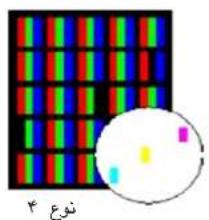
text_image
###
natural_image
Colorful grid pattern with a magnified inset showing vertical color bars (no text or symbols)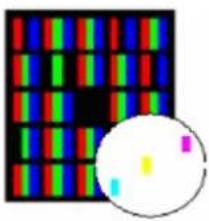
natural_image
Colorful pixel grid pattern with a magnified circular inset showing small colored squares (no text or symbols)ISO 13406
7,295,673; 7,460,668; 7,515,710; 7,519,274"
DIVX HD
text_image
OPTION > To set language SMART → Settings → OPTION → Language Selects Menu Language and Audio Language displayed on the screen Menu Language Selects a language for the display text (In Digital Mode Only) Audio Language When watching a digital broadcaster containing several audio languages, you can select the language you want. (In Digital mode Only) Subtable Language Use the Subtable Wizard when two or more wireless languages are broadcast ■ If subsite data is in a selected language is not broadcast; the default language subtile will be displayed. Try Now Closetext_image
Screenshot of a software interface with tool panels, icons, and a toolbar with Chinese text.
راهنماي کاربر

natural_image
Diagram of a handheld electrical iron with coiled cable and terminal connectors (no text or symbols)اجزای قلم لمسی سیمی
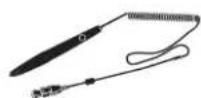
قلم لمسی سیمی

بست قلم لمسی سیمی

پایه قلم لمسی سیمی

نوك

natural_image
Simple line drawing of a curved object with two arrows and a small square mark at the base (no text or symbols)Magic Remote Control battery is low. Change the battery
natural_image
Illustration of a computer monitor displaying multiple screens with no visible text or symbols
text_image
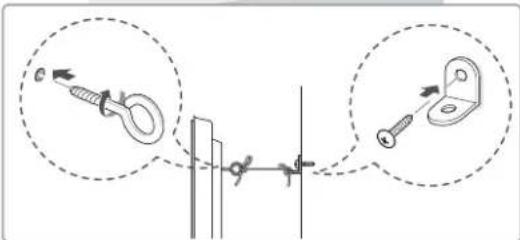
Diagram showing two mechanical mounting or bracketing setups with labeled components and directional arrows indicating assembly or alignment.natural_image
Line drawing of a monitor setup with a small electronic device on top (no text or symbols)هشدار

natural_image
Technical line drawing of a mechanical assembly with an inset close-up showing a detail (no text or symbols)
natural_image
Technical line drawing of a mechanical assembly with an inset magnified detail (no text or symbols)natural_image
Silhouette of two people holding a large rectangular device with a computer monitor on the screen (no text or symbols visible)natural_image
Symbol of a person holding a box inside a circle, crossed out by a diagonal line (no text or numbers present)text_image
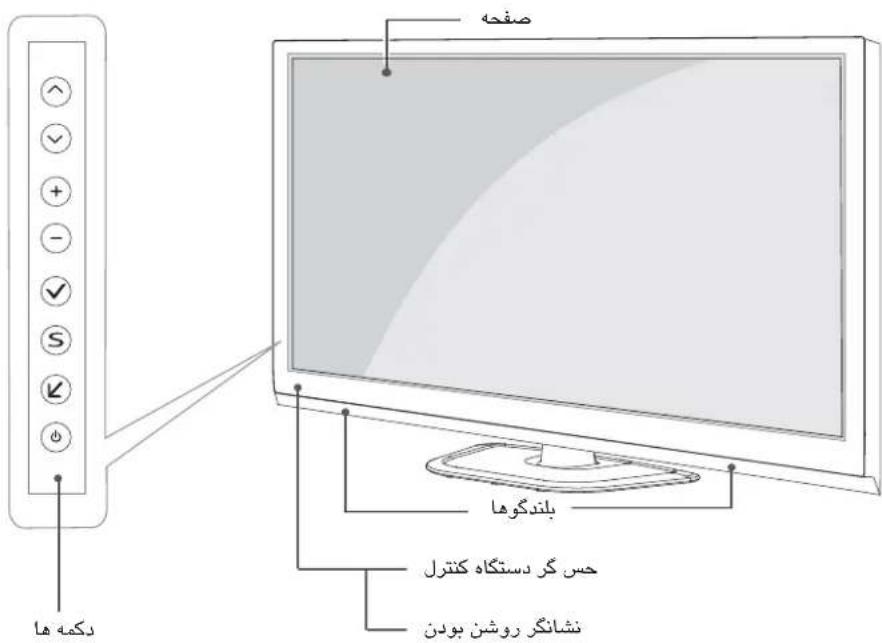
Diagram illustrating hand positioning and stress application on a screen, with labeled X marks indicating specific states.بخش ها و دكمه ها
natural_image
Illustration of a sound mixer with a cylindrical component and a separate 3D model (no text or symbols)دستگاه صوتى ال جى