SUB-1200 - Subwoofer Dayton Audio - Free user manual and instructions
Find the device manual for free SUB-1200 Dayton Audio in PDF.


User questions about SUB-1200 Dayton Audio
0 question about this device. Answer the ones you know or ask your own.
Ask a new question about this device
Download the instructions for your Subwoofer in PDF format for free! Find your manual SUB-1200 - Dayton Audio and take your electronic device back in hand. On this page are published all the documents necessary for the use of your device. SUB-1200 by Dayton Audio.
USER MANUAL SUB-1200 Dayton Audio
text_image
DAYTON® AUDIOWarranty Information
Dayton Audio® products are constructed by industry experts, and are thoroughly tested before shipment. Dayton Audio® products are warranted for the period of one year. This warranty is limited to manufacturer defects, either in materials or workmanship. Dayton Audio® is not responsible for any consequential on inconsequential damage to any other unit or component or the cost for installation or extraction of any component of the audio system. In the rare case of a product failure, please contact your place of purchase or call our Customer Support Department at (937) 743-8248.
Warranty Limitations
There are no other warranties, either express or implied, which extend the foregoing, and there are no warranties of merchantability or fitness for any particular purpose. The warranty will not cover incidental or consequential damage due to defective or improper use of products.
This warranty gives you specific legal rights and you may also have other rights which vary from state to state.
Non-Warranty Service: If non-warranty service is required, the product may be sent to the Company for repair/replacement, transportation prepaid, by calling (937) 743-8248 for details, complete instructions, and service fee charges.
natural_image
Black rectangular electronic device with a circular vent on top, no visible text or symbolsSUB-1200
12" Subwoofer System User Manual
© Dayton Audio Last Revised: 8/4/2011
daytonaudio.com
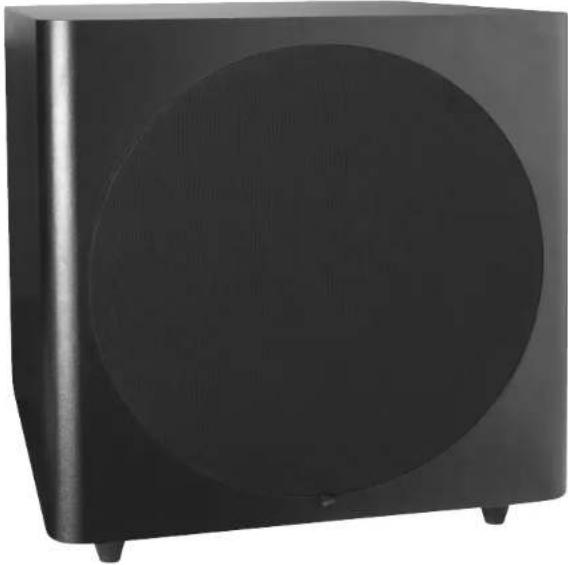
Thank you for purchasing the Dayton Audio® SUB-1200 12" Powered Subwoofer. It is the perfect addition to any home theater system. This powered sub features a bottom firing flared port bass reflex design for reduced port noise and increased bass response. It also utilizes a long throw 12" woofer and up to 120 watts of house shaking power. This compact sub is finished in a non-obtrusive black veneer that will complement any decor.
Hookup
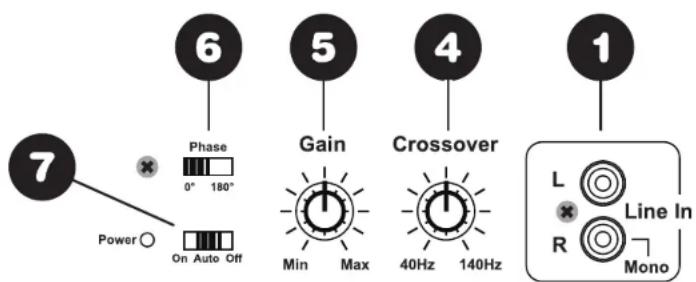
1. Line Level Inputs
The line level inputs are used to connect pre-out or preamplifier outputs directly to the subwoofer amplifier's internal crossover. These inputs are summed to mono. This is the preferred way to connect the subwoofer amplifier. If you have a mono line level signal from a "Pro Logic" or "Dolby Digital" receiver use the right "red" input. Note: If a LFE mono output is connected, set the crossover point to maximum.
2. High Level Inputs
If preamplifier outputs are not available, use the high-level (speaker) inputs. The speaker level inputs can be connected directly to the amplifier by inserting the speaker wire.
3. High Level Outputs
There are also high level outputs which can be used to connect to main speakers or to another powered subwoofer with high level inputs. Note: High level outputs are paralleled to the high level inputs with no high pass filter.
4. Crossover Frequency Control:
Continuously variable from 40Hz to 140Hz at 12dB/octave. Set the frequency control to where the audio does not sound "muddy", normally between 60-80Hz. Note: If a LFE mono output is connected set the crossover point to maximum.
5. Gain Control:
Adjusts the output level of the subwoofer. Set the level to where the bass frequencies blend with the other speakers. Note: Most people have a tendency to set the level too high which makes the audio sound “boomy”.
6. Phase Switch:
Selectable between 0^ and 180^ . This assists subwoofer placement. The correct position will be the one that provides the most apparent bass output.
7. Power Switch (Auto On/Off):
When the power is in the auto position, the amplifier will automatically turn on when a signal is present. Note: In auto/off mode, the power on LED is always on (red), even when amp is in rest mode (off). The power LED will turn green when the unit is activated.
text_image
7 Phase 0° 180° Gain Crossover 1 Power ○ On Auto Off 6 5 4 L Line In R Mono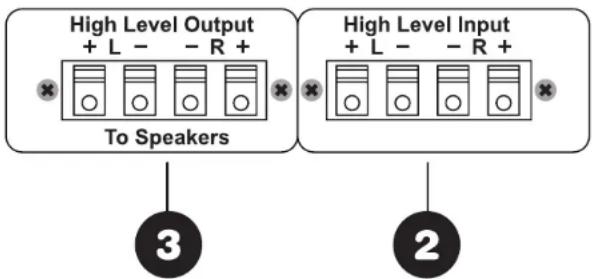
text_image
High Level Output + L - - R + To Speakers High Level Input + L - - R + 2Room Placement
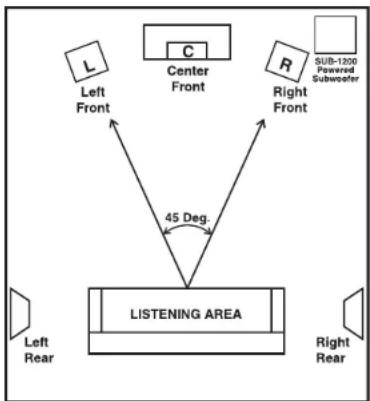
The SUB-1200 Subwoofer System will produce more bass when it is placed in a corner. Choose a corner that is close to the component area and place it at the front of the listening area. See diagram:
Specifications
Dimensions: 16-3/4" H x 16-3/16" W x 17-3/4" D
Frequency Response: 25Hz-140Hz
Woofer: 12" long throw
Power: 120W RMS
Voltage: 120VAC / 60Hz
Net weight: 44 lbs.
flowchart
graph TD
    A["Left Front"] --> B["Center Front"]
    C["Right Front"] --> B
    D["Sub-1200 Powered Subwoofer"] --> B
    E["Left Rear"] --> F["LISTENING AREA"]
    G["Right Rear"] --> F
    B -->|45 Deg.| F
    style A fill:#f9f,stroke:#333
    style C fill:#f9f,stroke:#333
    style D fill:#f9f,stroke:#333
    style E fill:#f9f,stroke:#333
    style F fill:#ccf,stroke:#333