
QuietComfort 2 - Headphones BOSE - Free user manual and instructions
Find the device manual for free QuietComfort 2 BOSE in PDF.


| Product Type | Active Noise Cancelling Headphones |
| Brand | Bose |
| Model | QuietComfort 2 (QC-2) |
| Noise Cancellation | Acoustic Noise Cancelling® technology |
| Power Source | 1 AAA alkaline battery (IEC LR03) |
| Battery Life | Approximately 35 hours |
| Low Battery Indication | Flashing light ~5 hours remaining |
| Audio Attenuator | Hi/Lo switch for volume adjustment |
| Earcup Rotation | Rotating earcups for flat storage |
| Earcup Cushions | Replaceable, snap-on mounting flange |
| Headband | Adjustable |
| Plug Type | 1/8" (3.5 mm) stereo plug, 1/4" (6.3 mm) adapter included |
| Dual Plug Adapter | For two 3.5 mm jacks (e.g., airline) |
| Extension Cord | 1.5 m (optional 6.2 m) |
| Maximum Input Voltage | 9 Vrms |
| Accessories Included | Dual plug adapter, 1/4" adapter, extension cord, 2 AAA batteries |
| Care & Cleaning | Wipe with damp cloth; keep ports clear |
| Safety Warnings | Not for use while driving; avoid loud volumes |
| Compliance | EMC Directive 89/336/EEC, EN55013, EN55020 |
Frequently Asked Questions - QuietComfort 2 BOSE
User questions about QuietComfort 2 BOSE
0 question about this device. Answer the ones you know or ask your own.
Ask a new question about this device
Download the instructions for your Headphones in PDF format for free! Find your manual QuietComfort 2 - BOSE and take your electronic device back in hand. On this page are published all the documents necessary for the use of your device. QuietComfort 2 by BOSE.
USER MANUAL QuietComfort 2 BOSE
The Bose® QuietComfort® 2 Acoustic Noise Cancelling® Headphones
BOSE®
May 13, 2003 AM257565_00_V.pdf Bose Corporation
CE
DECLARATION OF CONFORMITY
We, the offerer:
Bose Corporation, The Mountain, Framingham, MA
01701-9168 USA
acknowledge our sole responsibility,
that the product:
Kind of equipment: Headphones
Type designation: QuietComfort® 2
Acoustic Noise Cancelling®
Headphones
Model number: QC-2
In accordance with EMC Directive 89/336/EEC
and Article 10(1) of the Directive,
is in compliance with the following
norm(s) or document(s)
Technical regulations: EN55013, EN55020
Accredited by:
Bose Corporation, The Mountain, Framingham, MA
01701-9168 USA
24 February 2003 Nic Merks
Bose Products B.V. Vice President Europe
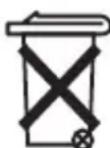
Please dispose of used batteries properly, following any local regulations. Do not incinerate.
Batteries
About Your Headphones
QuietComfort® 2 Acoustic Noise Cancelling® headphones
Thank you for purchasing the QuietComfort 2 Acoustic Noise Cancelling headphones from Bose. Advanced research and development, innovative engineering, and integrated technologies enable the headphones to reduce unwanted noise and provide you with exceptional acoustic performance in a comfortable, convenient package.
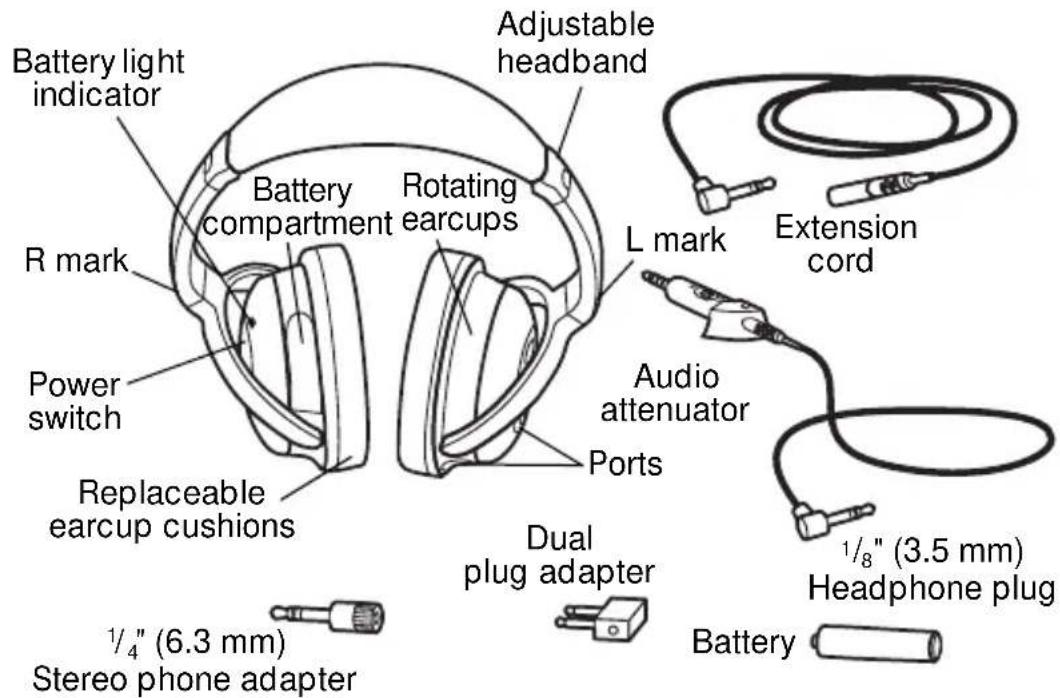
Insert the battery first, before you put on the headphones.
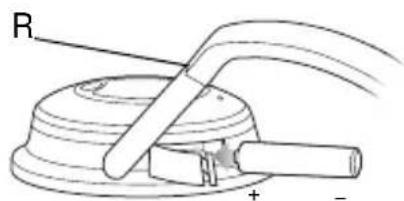
Wearing the headphones
As you put on the headphones, observe the markings that identify the left (L) and right (R) earcups. Adjust the headband so it rests gently on top of your head and the earcup cushions fit comfortably around your ears.
Use
Using your headphones
If you plan to use them for noise reduction only, simply put on the headphones and turn on the power switch, located on the right earcup. There are no cable connections required for this use.
To use the headphones for audio, first notice the settings on the audio attenuator shown below.
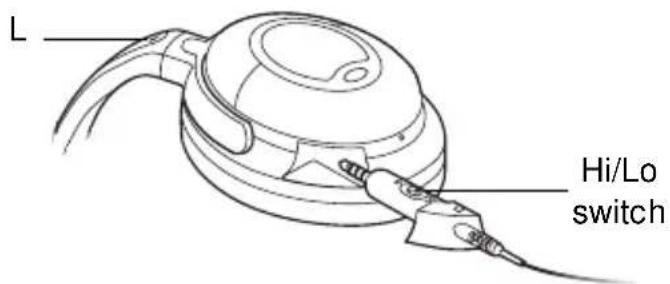
These Hi and Lo settings are used to adjust the output volume of different audio sources. “Lo” is typically used for airline audio or audio devices that use A/C power. “Hi” is typically used for battery-powered audio devices.
Note: Hi and Lo settings have no effect on noise reduction.
Select the appropriate setting for the sound source you will use. Then insert the audio attenuator into the opening on the left (L) earcup and press it in so it is flush with the side of the earcup.
As soon as you connect the headphone plug to your audio source, you are ready to put on the headphones and turn on the power switch to enjoy both audio and noise reduction. Use the volume control on the selected audio source to make additional volume adjustments.
Use
Connecting to an audio source
You can use the headphones with a variety of audio sources: airline audio, a CD, DVD or MP3 player, a personal or laptop computer, or home stereo. The maximum input voltage is 9 Vrms.
To make the connection, insert the headphone plug into the jack on the audio source you will use.
Notice the jack configurations on the left in the chart below. Instructions on the right tell you how to connect to each type of jack:
- A single, 3.5 mm jack (on most portable sources) – use the single plug. No adapter needed.
- Two 3.5 mm jacks – use the dual plug adapter.
- One 3.5 mm jack and one power jack – use the single plug in the 3.5 mm jack (the larger one). The smaller jack does not need a connection.
One power jack and two 3.5 mm jacks – use the dual plug adapter for the two 3.5 mm jacks. The power jack does not need a connection.
One 6.3 mm jack (for home stereos) – use the 6.3 mm stereo phone adapter.
Note: Audio jack configurations on airplanes vary. Also, airline audio may not equal the high quality audio you can get from a home stereo or a portable source.
Care
Folding the earcups for storage
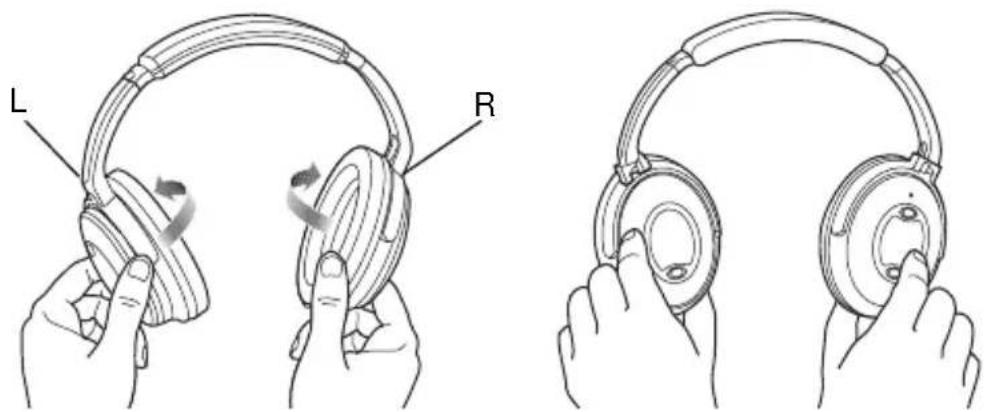
QuietComfort® 2 Acoustic Noise Cancelling® headphones feature rotating earcups that fold flat for easy, convenient storage. They rotate in one direction only.
natural_image
Illustration of two hands holding a headboard with labeled parts (L and R), showing ear rotation and finger press application (no text or symbols beyond labels)Note: Incorrectly rotating the earcups can damage the headphones.
Reattaching earcup cushions
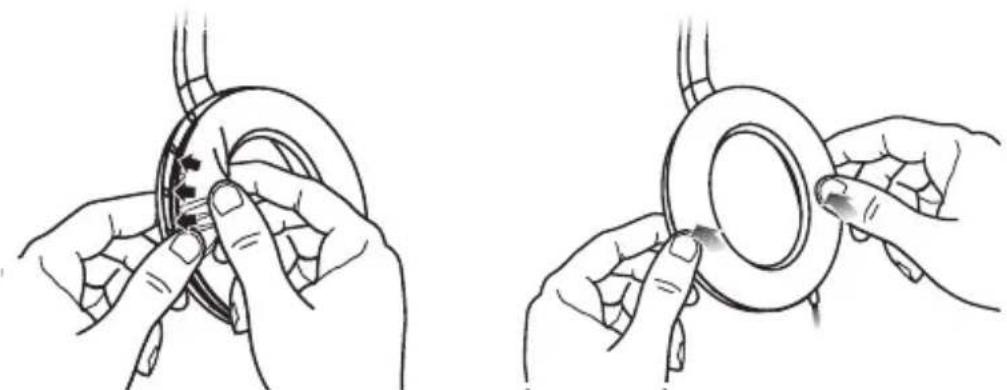
The earcup cushions are held in place by a mounting flange. This flange snaps under small tabs located around the inside rim of the earcup.
natural_image
Two-step illustration showing hands adjusting a circular component with arrows indicating motion (no text or symbols)If an earcup cushion becomes partially or completely detached, push its mounting flange back into the earcup. Then use your finger or thumb to press around the edge of the mounting flange, making sure it snaps into place all the way around the earcup.
Care
Battery replacement
Although it varies by usage, battery life averages 35 hours. With the headphones turned on, the battery light indicator will flash when there are approximately 5 hours of battery life remaining.
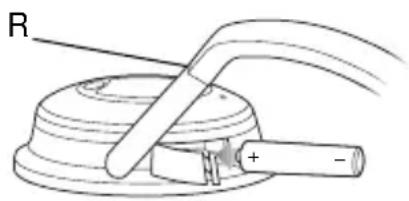
When a replacement is needed, use 1 AAA alkaline battery (IEC LR03). Tilt the top of the right earcup inward to gain access to the battery compartment.
Note: You can use rechargeable batteries (NiMH, composed of nickel metal hydride, are recommended). They average half the life of alkaline batteries. However, the low battery indicator light is not set for such batteries and will not be a reliable indicator of their remaining battery life.
Replacement parts and accessories
You can order parts and accessories, as listed below, by contacting Bose® Customer Service. See the phone number for your area on the inside back cover of this guide.
- Dual plug adapter
-
Accessory kit (includes adapters, extension cord, 2 AAA batteries)
-
Deluxe carry case
- Replacement ear cushion kit
• 1.5 m extension cord - 6.2 m extension cord
- A udio attenuator
Reference
Cleaning the headphones
Scheduled cleaning is not required. However, you can simply wipe the outside surfaces with a damp cloth, as needed. Also, be sure that the earcup ports are clear and that no moisture is allowed into the earcups.
Troubleshooting
| Problem Possible Cause Solution | ||
| Noise reduction absent | No power to headphone | Turn unit on; check battery |
| Low or no volume | Audio source setting | Turn source volume up or set audio attenuator on “Hi” |
| Audio attenuator connection | Check connection at source and insertion into the earcup | |
| Crackling noise; intermittent loss of noise reduction | Low battery | Replace battery |
| Low rumbling | Poor earcup fit Ports blocked | Adjust fit on ears Clear ports |
Reference
Other needs
These headphones are not engineered to meet the needs of pilots or to meet civil aviation authority standards for aviation communications.
For that purpose, Bose offers the Aviation Headset X, which features a microphone with the appropriate power and intelligibility for transmission of flight information. It is engineered to withstand the altitude and temperature conditions common in non-commercial aircraft.
For information on the Bose® Aviation Headset X, contact Bose Corporation by calling 1-508-766-1099 or +31(0)299-390777.
Cautions
Long-term exposure to loud music may cause hearing damage. It is best to avoid extreme volume when using these headphones, especially for extended periods.
Do not use these headphones when operating a motor vehicle on a public road, or where the inability to hear outside sounds may present a danger to the user or others.
Sounds that you rely on as reminders or warnings may have an unfamiliar character when you are using the headphones. Be aware of how these sounds vary in character, so you can recognize them as needed.
Do not drop, sit on, or allow the headphones to be immersed in water.
Europe
Phone: 0299 390111
Fax: 0299 390114
Australia
Phone: 800 023 367
www.bose.at
Belgique/België
Phone: 012 390800
Fax: 012 390840
Canada
1-800-4652673
Danmark
Phone: 04343 7777
Fax: 04343 7818
Deutschland
Phone: 06172-71040
Fax: 06172-710419
www.bose.de
France
Phone: 01-30616363
Fax: 01-30614105
Ireland
Phone: 042-9661988
Fax: 042-9661988
www.bose.ie
Italia
Phone: 066-5670802
Fax: 066-5680167
Nederland
Phone: 0299 390111
Fax: 0299 390109
New Zealand
Phone: 61 2 8737 99567
(Australian number)
Norge
Phone: 62 82 15 60
Fax: 62 82 15 69
Österreich
Phone: 01-60404340
Fax: 01-604043423
Schweiz
Phone: 061-9815544
Fax: 061-9815502
Sverige
Phone: 031-878850
Fax: 031-274891
United Kingdom
Phone: 0800 614293
0870 7414500
Fax: 0870 7414545
www.bose.co.uk
United States
Phone: 1-888-757-9943
Fax: 1-877-289-4366
www.bose.com
BOSE Better sound through research.
©2003 Bose Corporation,
The Mountain, Framingham, MA
01701-9168 USA
PN257565 AM Rev.00 JN30819
- The Bose® QuietComfort® 2 Acoustic Noise Cancelling® Headphones
- CE
- DECLARATION OF CONFORMITY
- About Your Headphones
- QuietComfort® 2 Acoustic Noise Cancelling® headphones
- Wearing the headphones
- Use
- Using your headphones
- Connecting to an audio source
- Care
- Folding the earcups for storage
- Reattaching earcup cushions
- Battery replacement
- Replacement parts and accessories
- Reference
- Cleaning the headphones
- Other needs
- Cautions
- Europe
- Australia
- Belgique/België
- Canada
- Danmark
- Deutschland
- France
- Ireland
- Italia
- Nederland
- New Zealand
- Norge
- Österreich
- Schweiz
- Sverige
- United Kingdom
- United States
Brand : BOSE
Model : QuietComfort 2
Category : Headphones