
APB-10E - TV LG - Free user manual and instructions
Find the device manual for free APB-10E LG in PDF.


User questions about APB-10E LG
0 question about this device. Answer the ones you know or ask your own.
Ask a new question about this device
Download the instructions for your TV in PDF format for free! Find your manual APB-10E - LG and take your electronic device back in hand. On this page are published all the documents necessary for the use of your device. APB-10E by LG.
USER MANUAL APB-10E LG
Please read this manual carefully before operating your set and retain it for future reference.
APB-10E

WARNING
- This product contains chemicals known to the State of California to cause cancer and birth defects or other reproductive harm. Wash hands after handling.
TABLE OF CONTENTS
1. Introduction 4
2. Hardware overview 6
2.1. Specification 6
2.2. Unpacking 7
3. Configuration 8
-
- Diagnostic page 8
-
-
- Connection with Diagnostic IP 8
-
-
-
- Connection with static / dynamic IP 8
-
3.2. Network configuration 9
3.2.1.WAN Mode 9
3. 2. 2. WAN Setting 10
3. 2. 3. VLAN ID Setting 12
3.3. Wireless Configuration 13
-
-
- Basic Wireless Setting 13
-
-
-
- Advanced Wireless Setting 15
-
-
-
- Wireless Security / Encryption Setting 17
-
-
-
- Station List 18
-
3.4. Management 18
3.4.1. System management 18
3.4.2. Registration Setup 19
3. 4. 3. Upload Firmware from Server 20
3.4.4. Setting Management 22
3.4.5. Status 23
3.4.6.Statistics 24
3.4.7. System Command 25
3.4.8.Log 26
4. Regulatory 27

WARNING
- If you ignore the warning message, you may be seriously injured or there is a possibility of accident or death.

CAUTION
- If you ignore the caution message, you may be slightly injured or the product may be damaged.

NOTE
- The note helps you understand and use the product safely. Please read the note carefully before using the product.
1. INTRODUCTION
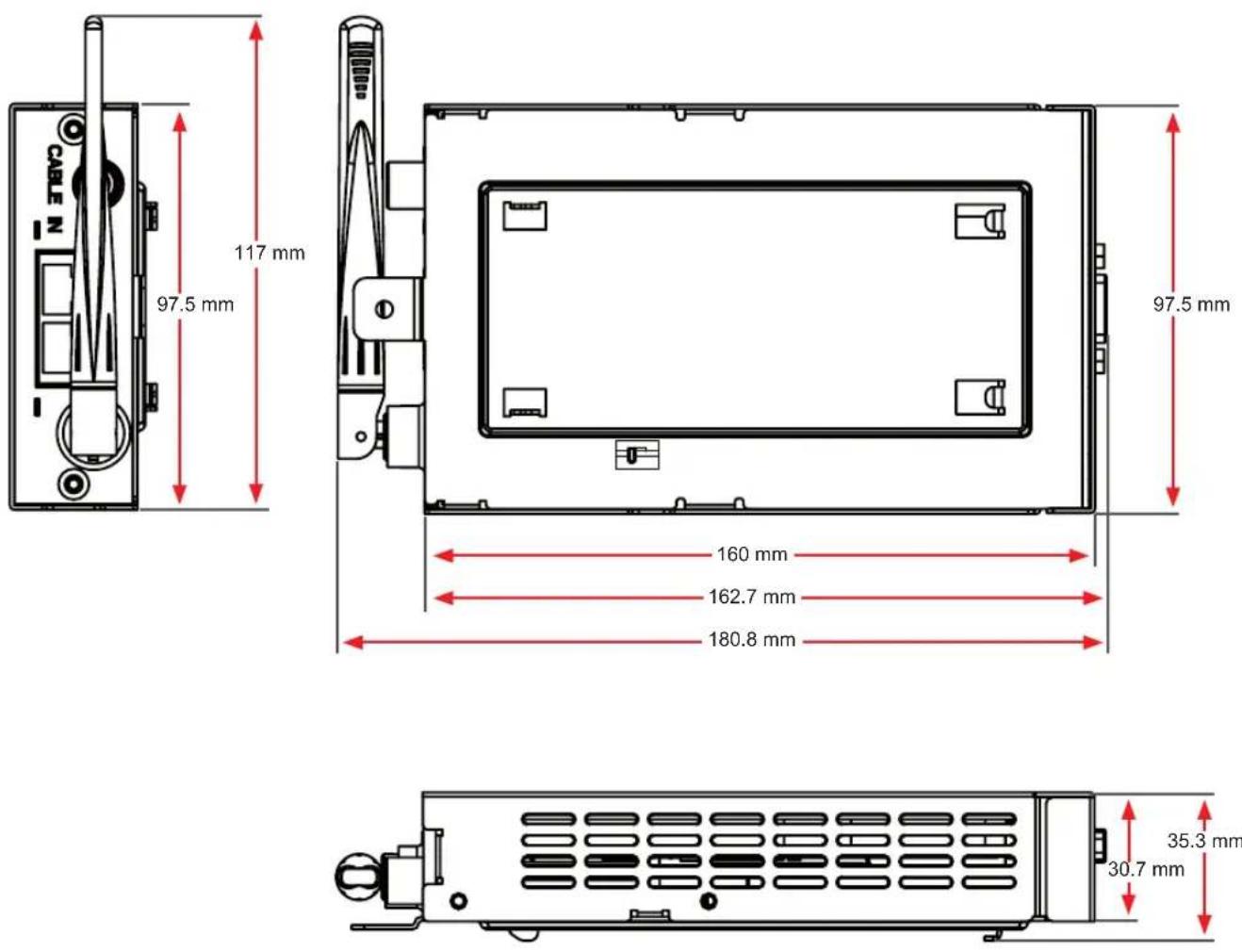
LGIT MPI AP Card is a expansion network card for the commercial DTV.
It will allow you to access broadband network using the existing coaxial infra.
VOD, EPG and other hospitality services can be provided to DTV with the MPI AP Card.
Also MPI AP Card has three RJ-45 Ports and wireless LAN interface.
The wired or wireless devices, like the laptop, smartphone, wireless printer, can be connected to broadband.
Entropic's c.Link technology is used for the ethernet to coax converting.
Wireless access follows 802.11b/g standard.
Ports description
Front side
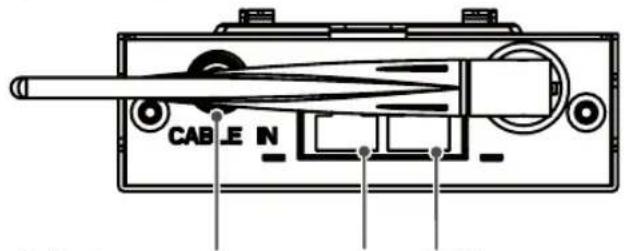
text_image
CABLE NBelling-lee connector (IP over Coax + Broadcast)
Back side
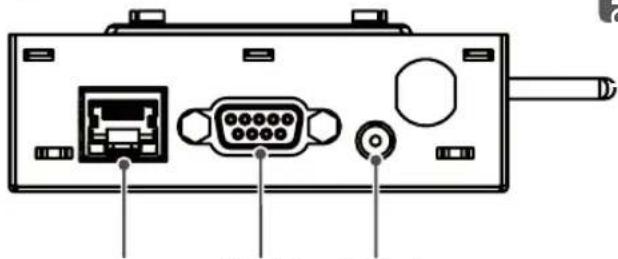
natural_image
Back panel diagram showing internal components including ports, connectors, and a cable (no text or labels)LAN3
RS232
DC jack
ENG
RS232
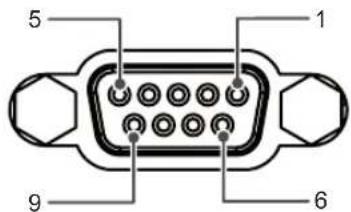
text_image
5 1 9 6| No. Pin | Name No. Pin | Name | |
| 1 NC | 6 NC | ||
| 2 TX | OUT 7 NC | ||
| 3 RX | IN 8 NC | ||
| 4 NC | 9 +12VDD | (Max:12V/1A) | |
| 5 GND | |||

CAUTION
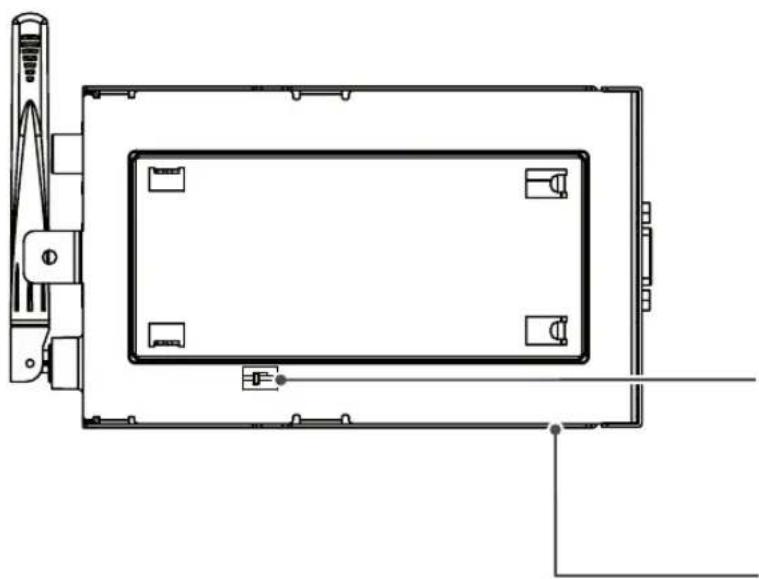
natural_image
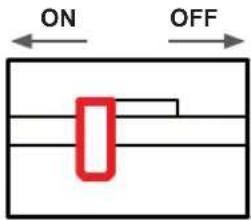
Top-down schematic of a rectangular device with internal components and mounting points (no text or symbols)The slide switch must be "ON" position before the install. (Default : ON)
text_image
ON OFF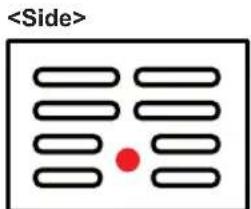
text_image
Reset Button

NOTE
- Use the FTP type or STP type LAN Cable for smooth operation.
2. HARDWARE OVERVIEW
2. 1. Specification
| Features | Provides IP over Coax & wireless AP6 SSIDs supportedVLAN supportedRemote Management via Web UI, XML(HTTP, HTTPS)IGMP proxyDiagnostic IP provided |
| Standards | IEEE 802.3, IEEE 802.3u, IEEE 802.11b, IEEE 802.11g |
| Wireless | Channels11Channels (USA, Canada)13 Channels (Europe)14 Channels (Japan)Transmitted Power : typ. 13dBmData rate : up to 54MbpsModulation802.11b : CCK, DQPSK, DBSK802.11g : OFDM, QPSKMin Sensitivity802.11b : -82dBm802.11g : -70dBmMax Sensitivity802.11b : -7dBm802.11g : -20dBmExterior Antenna : 1 EA, Tilt type |
| Ethernet to Coax | Frequency Range : 1000~1500 MHzTransmitted Power : typ. 0dBmLink conditionsMin. 240Mbps @ 50dB cable attenuationMin. 50Mbps @ 65dB cable attenuation |
| Interface | RFInput Connector : Belling-Lee socket type (A.K.A. PAL connector)Output Connector : RCA type femaleImpedance : 75 ohmEthernetConnector type : RJ-45Configuration : Two ports (Port 1 for LAN1, Port 2 for WAN or LAN2)Protocol : IEEE 802.3x, 100M Fast Ethernet |
| Power Requirement | Voltage : 12VDCCurrent consumptionIdle : 0.38Aloaded : 0.5~0.6AMax : 0.9A |
| Environment | Operating Temperature : 0 ~ 60 °CStorage Temperature : - 20 ~ 70 °C |
Europe (2.4GHz \~ 2.4835GHz)
| Channel | 1 2 3 4 5 6 7 8 | 9 10 11 | 12 13 | ||||||||||||
| Freq.(GHz) | 2.412 | 2.417 | 2.422 | 2.427 | 2.432 | 2.437 | 2.442 | 2.447 | 2.452 | 2.457 | 2.462 | 2.467 | 2.472 | ||
| Bandwidth(MHz) | 20 20 | 20 | 20 20 | 20 20 | 20 20 | 20 20 | 20 20 | 20 20 | 20 20 | ||||||
2.2. Unpacking
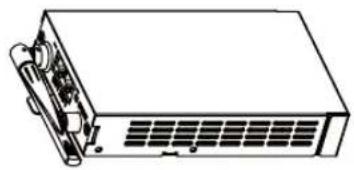
natural_image
Line drawing of a rectangular electronic device with ports and connectors (no text or symbols)AP BOX 1EA
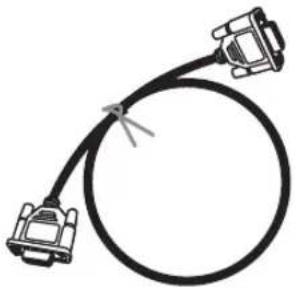
natural_image
Simple line drawing of a coaxial cable with two connectors (no text or symbols)RS232 Cable (1:1 Direct Cable) 1EA
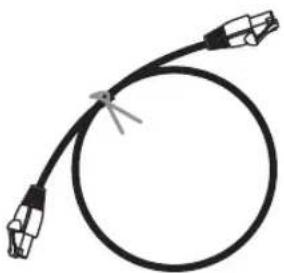
natural_image
Pure electrical circuit lines without any symbolsLAN Cable 1EA
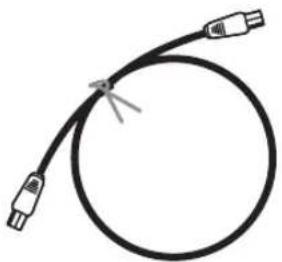
natural_image
Simple line drawing of a black cable with two connectors (no text or symbols)RF Cable 1EA

Screw 1EA
3. CONFIGURATION
3. 1. Diagnostic page
3. 1. 1. Connection with Diagnostic IP
- Connect Card and Laptop with LAN cable.
- (If connected), Must remove WAN connection. (Coax or UTP)
- Set Laptop IP to 172.31.1.2 / 255.255.255.0
- Open web browser and input http://172.31.1.1 to address
- Log in with ID: admin / PASS : 77lge
3. 1. 2. Connection with static / dynamic IP

LG Electronics
open all | close all
MPI AP
Internet Settings
Wireless Settings
Administration
Registration Setup
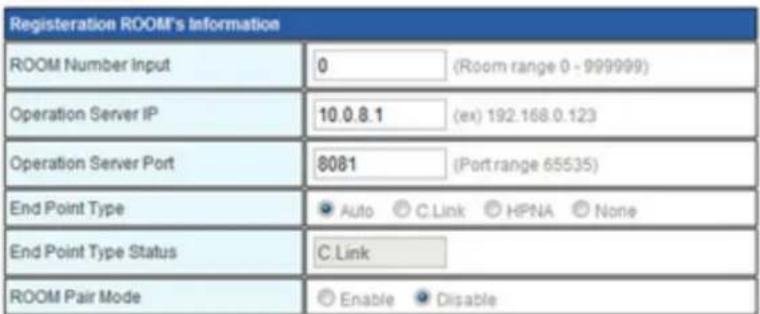
Use the ROOM Number Input page for the Registration.
text_image
Registration ROOM's Information ROOM Number Input 0 (Room range 0 - 999999) Operation Server IP 10.0.8.1 (ex) 192.168.0.123 Operation Server Port 8081 (Port range 65535) End Point Type Auto C.Link HPNA None End Point Type Status C.Link ROOM Pair Mode Enable DisableApply
Reset
- Verify assigned IP of Card
- Open web browser and input http://Card IP to address
- Log in with ID : admin / PASS : 77lge
3.2. Network configuration
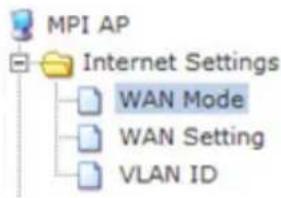
3.2.1. WAN Mode
text_image
MPI AP Internet Settings WAN Mode WAN Setting VLAN IDWAN Mode Configuration
You may configure the operation mode suitable for your environment.
Bridge:
All ethernet and wireless interfaces are bridged into a single bridge interface.
The first ethernet port is treated as WAN port. The other ethernet ports and the wireless interface are bridged together and are treated as LAN ports.
VLAN Mode:
All ethernet and wireless interfaces are bridged into a single bridge interface with VLAN ID.
Apply Cancel
Bridge
Connect WAN and Endpoint with the same network. After apply, The adaptation will take 40\~50 seconds.
VLAN Mode
Connect WAN and endpoint with the same network. Supply VLAN tagging for each port, each SSID. After apply, The adaptation will take 40\~50 seconds.
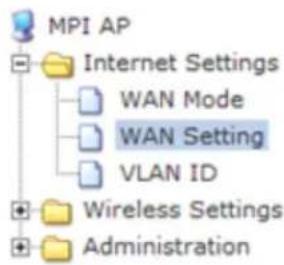
3. 2. 2. WAN Setting
open all | close all
text_image
MPI AP Internet Settings WAN Mode WAN Setting VLAN ID Wireless Settings AdministrationWide Area Network (WAN) Settings
You may choose different connection type suitable for your environment. Besides, you may also configure parameters according to the selected connection type.
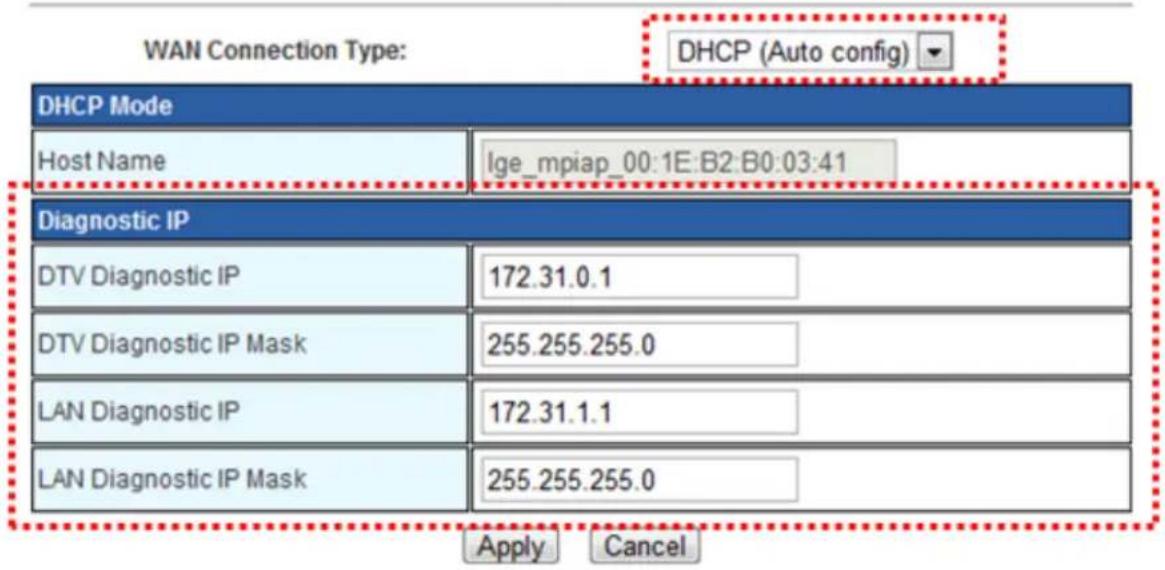
text_image
WAN Connection Type: DHCP (Auto config) DHCP Mode Host Name Ige_mpiap_00:1E:B2:B0:03:41 Diagnostic IP DTV Diagnostic IP 172.31.0.1 DTV Diagnostic IP Mask 255.255.255.0 LAN Diagnostic IP 172.31.1.1 LAN Diagnostic IP Mask 255.255.255.0 Apply CancelWAN Connection Type
- DHCP Mode : Assign IP address from DHCP server. The adaption will take 40 seconds.
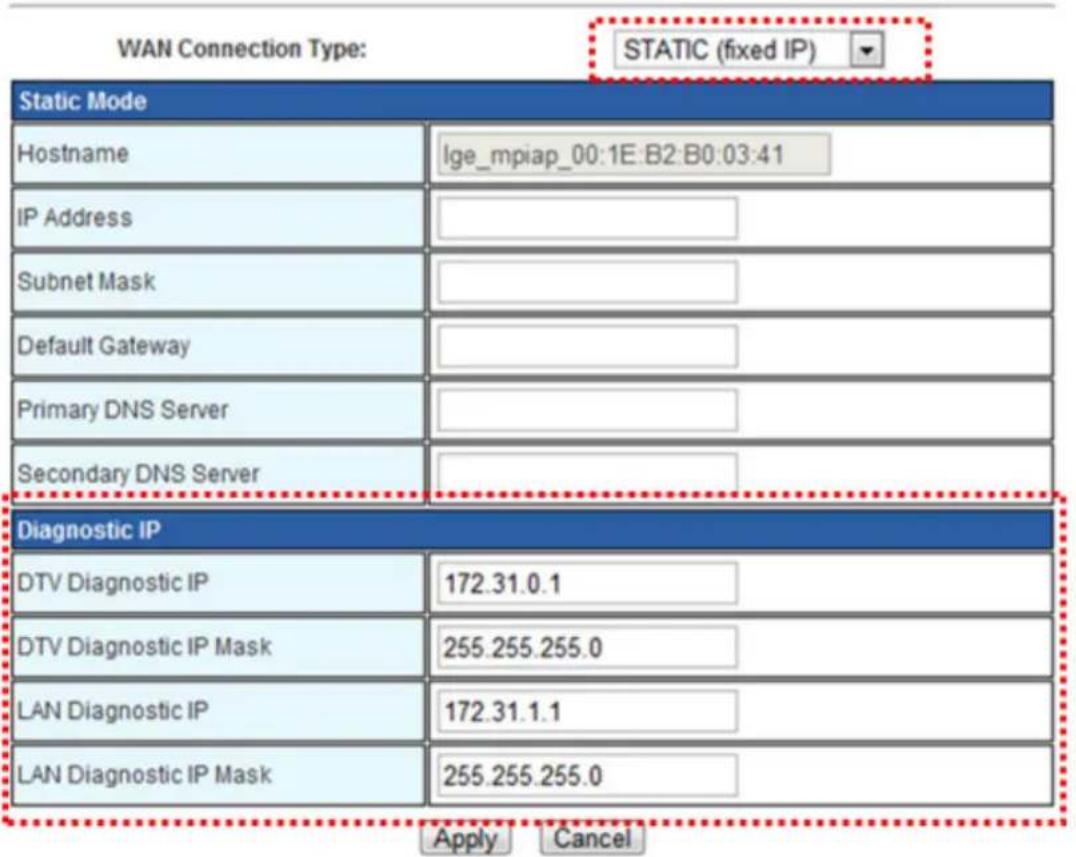
- Static Mode : IP Address will be assigned manually.
Input IP address, Subnet Mask Default Gateway, DNS Server and apply.
After apply, The adaptation will take 40\~50 seconds.
Wide Area Network (WAN) Settings
You may choose different connection type suitable for your environment. Besides, you may also configure parameters according to the selected connection type.
text_image
WAN Connection Type: STATIC (fixed IP) Static Mode Hostname lge_mpiap_00:1E:B2:B0:03:41 IP Address Subnet Mask Default Gateway Primary DNS Server Secondary DNS Server Diagnostic IP DTV Diagnostic IP 172.31.0.1 DTV Diagnostic IP Mask 255.255.255.0 LAN Diagnostic IP 172.31.1.1 LAN Diagnostic IP Mask 255.255.255.0 Apply CancelDiagnostic IP
Set diagnostic IP.
It is possible to configure diagnostic IP from LAN port and DTV each.
3. 2. 3. VLAN ID Setting
open all | close all

MPI AP

Internet Settings

WAN Mode WAN Setting VLAN ID

Wireless Settings

Administration
VLAN ID setting Page
You may configure VLAN ID for each port including SSIDs.
VLAN ID setting
| VLAN ID for MPI | 1 |
| VLAN ID for DTV | 6 |
| VLAN ID for LAN #1 | 1 |
| VLAN ID for LAN #2 | 1 |
Apply
Reset
Can configure VLAN ID for LAN#1, LAN#2, TV-Side port
This configuration is available only for VLAN Mode. (Not available in bridge mode)
After apply, The adaptation will take 40\~50 seconds.
3. 3. Wireless Configuration
3. 3. 1. Basic Wireless Setting
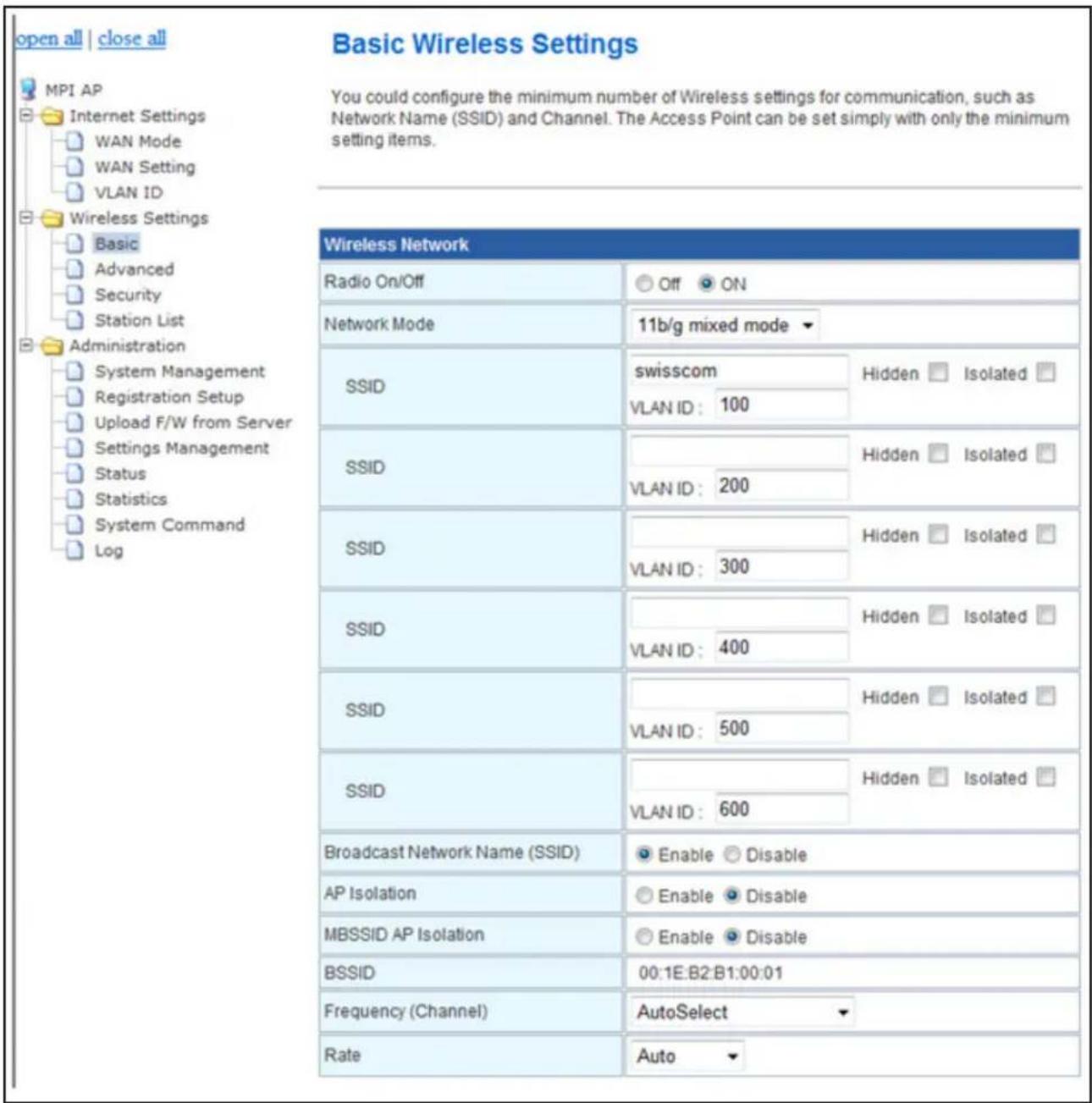
Set basic wireless parameter & each SSID VLAN ID. After apply, The adaptation will take 40\~50 seconds.
text_image
open all | close all MPI AP Internet Settings WAN Mode WAN Setting VLAN ID Wireless Settings Basic Advanced Security Station List Administration System Management Registration Setup Upload F/W from Server Settings Management Status Statistics System Command Log Basic Wireless Settings You could configure the minimum number of Wireless settings for communication, such as Network Name (SSID) and Channel. The Access Point can be set simply with only the minimum setting items. Wireless Network Radio On/Off Off ON Network Mode 11b/g mixed mode SSID swisscom Hidden Isolated VLAN ID: 100 SSID Hidden Isolated VLAN ID: 200 SSID Hidden Isolated VLAN ID: 300 SSID Hidden Isolated VLAN ID: 400 SSID Hidden Isolated VLAN ID: 500 SSID Hidden Isolated VLAN ID: 600 Broadcast Network Name (SSID) Enable Disable AP Isolation Enable Disable MBSSID AP Isolation Enable Disable BSSID 00:1E:B2:B1:00:01 Frequency (Channel) AutoSelect Rate AutoRadio On/Off
Wireless AP On/Off
Network Mode
Select wireless mode. Supported systems are belows; 802.11b, 802.11g, 802.11 b/g mixed.
SSID
Can name each SSID.
If "hidden" option is selected, that SSID will not be scanned by name.
If "isolated" option is selected, network is limited to that SSID.
Broadcast Network Name (SSID)
This option makes SSIDs visible to wireless devices.
If "Disabled" is selected, wireless devices can not scan SSID.
AP Isolation
Can apply or remove isolation option for ALL SSIDs.
MBSSID AP Isolation
BSSID
Display MAC Address of basic SSID.
Frequency (Channel)
Select channel of wireless AP.
1\~11, 1\~13, 1\~14 can be selected. (Dependent on the countries or location)
If "AutoSelect" is selected, channel will be assigned automatically.
Rate
Set wireless connection speed.
If "Auto" is selected, Speed will be adjusted automatically.
3. 3. 2. Advanced Wireless Setting
Set advanced wireless parameter. After apply, The adaptation will take 40\~50 seconds.
Advanced Wireless Settings
Use the Advanced Setup page to make detailed settings for the Wireless. Advanced Setup includes items that are not available from the Basic Setup page, such as Beacon Interval, Control Tx Rates and Basic Data Rates.
| Advanced Wireless | |
| BG Protection Mode | Auto |
| Beacon Interval | 100 ms (range 20 - 999, default 100) |
| Data Beacon Rate (DTIM) | 1 ms (range 1 - 255, default 1) |
| Fragment Threshold | 2346 (range 256 - 2346, default 2346) |
| RTS Threshold | 2347 (range 1 - 2347, default 2347) |
| TX Power | 100 (range 1 - 100, default 100) |
| Short Preamble | Enable Disable |
| Short Slot | Enable Disable |
| Tx Burst | Enable Disable |
| Pkt_Aggregate | Enable Disable |
| IEEE 802.11H Support | Enable Disable(only in A band) |
| Country Code | US (United States) |
| Wi-Fi Multimedia | |
| WMM Capable | Enable Disable |
| APSD Capable | Enable Disable |
| WMM Parameters | WMM Configuration |
| Multicast-to-Unicast Converter | |
| Multicast-to-Unicast | Enable Disable |
BG Protection Mode
This mode is for the condition 11b and 11g devices are simultaneously used. "Auto" is recommended.
Beacon interval
Can adjust Beacon interval time. The range is 20\~999, and normally 100 ms is used.
Data Beacon Rate (DTIM)
Can adjust the ratio of data and Beacon signal.
Fragment Threshold
Data will be transferred divided by configuration value. If the value is small, connection will be more stable, but data rate will decrease. If the value is big, connection will be less stable, but data rate will increase. In case the connection is unstable, small value is recommended.
RTS Threshold
Data will be transferred by RTS/CTS. If the value is small, connection will be more stable, but data rate will decrease. If the value is big, connection will be less stable, but data rate will increase. In case the wireless devices are many, small value is recommended.
TX Power
Adjust TX power. Higher TX power, Wider the range.
Short Preamble
Short Preamble can bring a little improvement. But it will bring compatibility problem. For compatibility, "Disable" is recommended.
Short slot
This mode may improve the performance of 11g devices. But if Some devices have a connection problem, turn off this mode and retry.
Tx Burst
This mode may raise maximum speed. But in case the number of the wireless devices are many quantities, turn off this mode for stability.
Pkt\_Aggregate
In case wireless device support, This mode can raise network performance.
IEEE 802.11H Support
Not supported. This mode is for 11a.
Country Code
Select location for countries.
Wireless channels can be chagned.
3. 3. 3. Wireless Security / Encryption Setting
This option is about protecting security from outer intrusion.
After apply, The adaptation will take 40\~50 seconds.
Wireless Security/Encryption Settings
Setup the wireless security and encryption to prevent from unauthorized access and monitoring.

text_image
Select SSID SSID choice mpiap_inet
text_image
"mpiap_inet" Security Mode WPA2-PSK| WPA | |
| WPA Algorithms | TKIP AES TKIPAES |
| Pass Phrase | LGHOTELAP |
| Key Renewal Interval | 3600 seconds |
| Access Policy | |
| Policy | Reject |
| Add a station Mac: | |

- Select SSID
- Select Authentication
- Configuring keyword
- Configuring Access policy
3. 3. 4. Station List
Display MAC Addresses of connected devices.
Station List
You could monitor stations which associated to this AP here.
| Wireless Network | |||||||
| MAC Address | Aid | PSM | MimoPS | MCS | BW | SGI | STBC |
| 00:13:02:35:2A:E9 | 1 | 0 | 0 | 7 | 20M | 0 | 0 |
3.4. Management
3.4.1. System management
After apply, The adaptation will take 10 seconds.
System Management
You may configure administrator account and password, NTP settings, and Dynamic DNS settings here.

text_image
Language Settings Select Language English Apply Cancel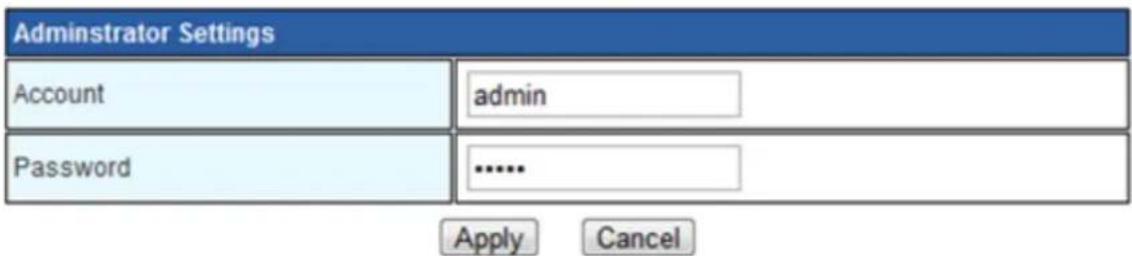
text_image
Administrator Settings Account admin Password ...... Apply Cancel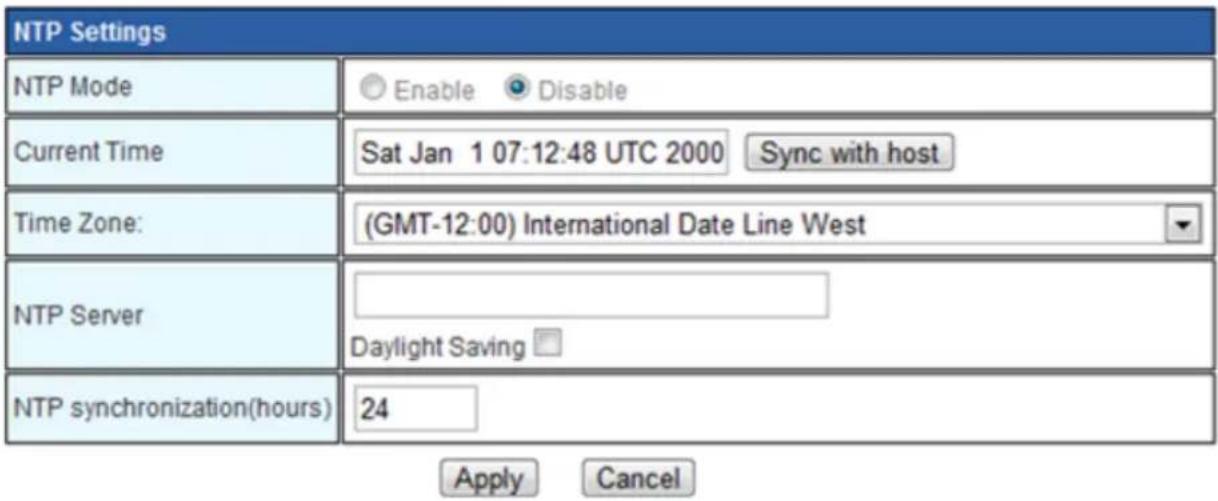
text_image
NTP Settings NTP Mode Enable Disable Current Time Sat Jan 1 07:12:48 UTC 2000 Sync with host Time Zone: (GMT-12:00) International Date Line West NTP Server Daylight Saving NTP synchronization(hours) 24 Apply Cancel3. 4. 2. Registration Setup
Configure MPI AP Card installed Room number and operation server. After apply, The adaptation will take 10 seconds.
Registration Setup
Use the ROOM Number Input page for the Registration.
| Registration ROOM's Information | |
| ROOM Number Input | 0 (Room range 0 - 999999) |
| Operation Server IP | 10.0.8.1 (ex) 192.168.0.123 |
| Operation Server Port | 8081 (Port range 65535) |
| End Point Type | Auto C.Link HPNA None |
| End Point Type Status | C.Link |
| ROOM Pair Mode | Enable Disable |
Apply Reset
Room Number
Input Room number
Operation Server IP
Input IP address of operation server.
Operation Server Port
Input port number of operation Server.
Endpoint type
Select endpoint type. "Auto" is recommended.
- Auto : WAN port is assigned automatically as below ;
If Endpoint type is detected, WAN is assigned to that port.
If Endpoint is not detected, WAN is assigned to front LAN#2. - None : WAN is assigned to front LAN#2
Endpoint type status
Display Endpoint type
Room Pair mode
Select Room pair mode Enable/Disable.
3. 4. 3. Upload Firmware from Server
Upload Firmware of MPI AP card from server After apply, The adaptation will take 3 minutes.
Upload Firmware from Server
Upload Firmware from server and then MPI AP card's Flash writing.
Current S/W version : Ver "0.3.2"
| Upload Firmware | |
| Upload Server IP | 192.168.0.100 (ex) default 192.168.0.100) |
| File Name | |
| Protocol select | TFTP HTTP |
| Upload Port | 8081 Only HTTP case |

Server IP
Input IP address of the server which provide Firmware.
Filename
Input file name of firmware.
Protocol
Select download protocol.
- TFTP
Use TFTP for download
- HTTP
Use HTTP for download.
Must assign Port number for proper download
Port
Input port number of server. (HTTP only)
If Firmware Update success, Below will be displayed. And after 1 minute, Diagnostic page is available
Firmware Download Start ...
Download Server ip : 172.31.1.100
Download file name: mpiap-0.3.4
Select Download method is TFTP : 1
Download Complete -> return value : 0
Downlaod image CRC check
Image Open success
file size 2353127I:head size:2353111I
Image CRC check OK
Bank[1] Update.
Bank[1] CRC Check.
Nextboot Bank[1] Change.
Firmware Download Complete
Now System Reboot
Wait about 5 minutes...! Current WEB page close and reopen!
3.4.4. Setting Management
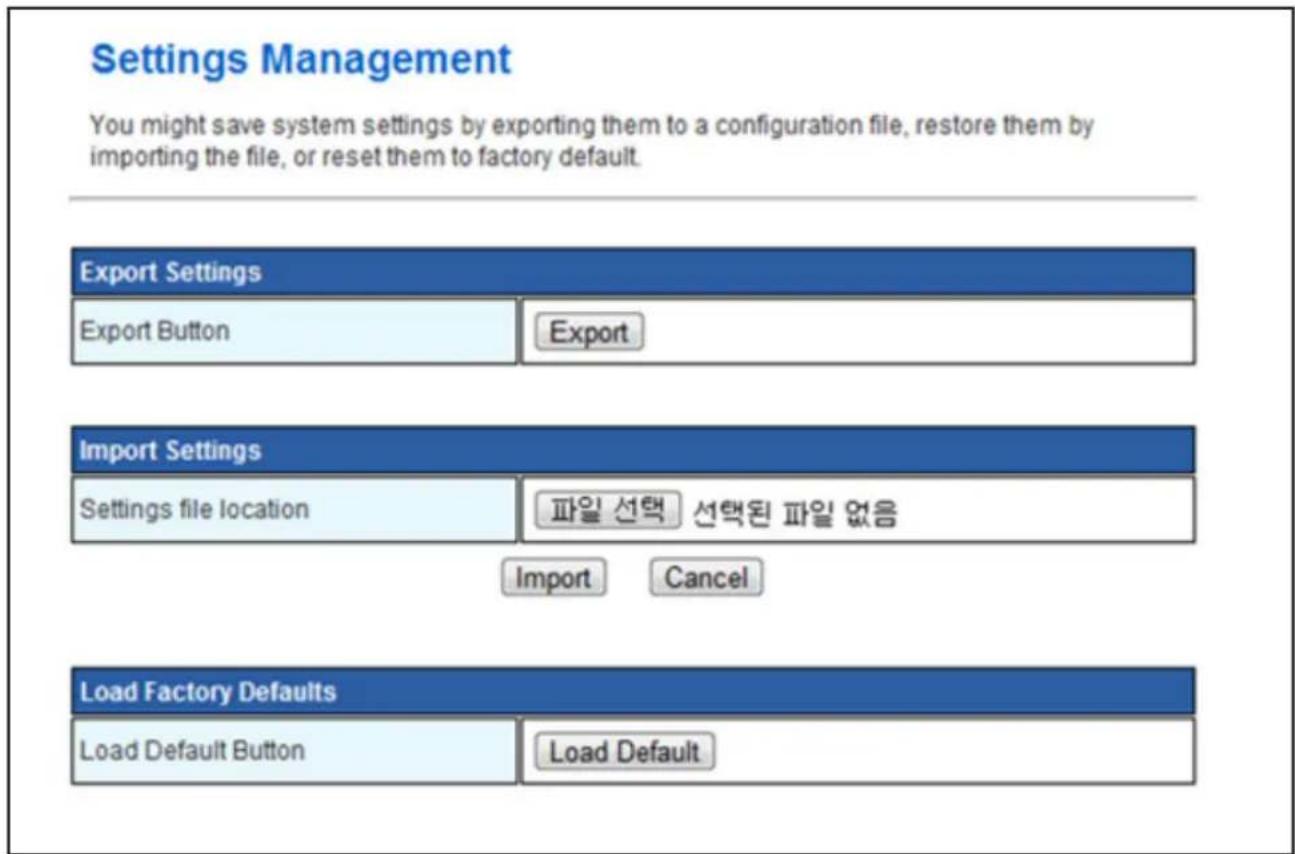
Save or restore configuration or set factory default. Adaptation will take 1 minute.
text_image
Settings Management You might save system settings by exporting them to a configuration file, restore them by importing the file, or reset them to factory default. Export Settings Export Button Export Import Settings Settings file location 파일 선택 선택된 파일 없음 Import Cancel Load Factory Defaults Load Default Button Load DefaultExport Settings
Save configuration to the file.
Import Settings
Restore configuration from the file.
Load Factory Default
Set factory default.
3.4.5. Status
Display status.
SDK Version of firmware, system up time, Operation mode, Mac Address.
Access Point Status
Let's take a look at the status of LWM SoC Platform.
| System Info | |
| SDK Version | 3.3.0.0 (Jul 21 2010) |
| System Up Time | 21 hours, 56 mins, 11 secs |
| System Platform | RT3052 embedded switch |
| IAK Operation Mode | Bridge Mode |
| Internet Configurations | |
| Connected Type | 1 |
| WAN IP Address | |
| Subnet Mask | |
| Default Gateway | |
| Primary Domain Name Server | 192.168.0.1 |
| Secondary Domain Name Server | 192.168.0.2 |
| MAC Address | 00:1E:B2:B0:03:41 |
3.4.6. Statistics
Memory usage and Packet carriage
Statistic
Take a look at the LWM SoC statistics
| Memory | |
| Memory total: | 29148 kB |
| Memory left: | 16400 kB |
| WAN/LAN | |
| WAN Rx packets: | 3419 |
| WAN Rx bytes: | 367648 |
| WAN Tx packets: | 4286 |
| WAN Tx bytes: | 2414185 |
| LAN Rx packets: | 3419 |
| LAN Rx bytes: | 367648 |
| LAN Tx packets: | 4286 |
| LAN Tx bytes: | 2414185 |
| All interfaces | |
| Name | lo |
| Rx Packet | 92 |
| Rx Byte | 12590 |
| Tx Packet | 92 |
| Tx Byte | 12590 |
| Name | ra0 |
| Rx Packet | 832753 |
| Rx Byte | 51924556 |
| Tx Packet | 338002 |
| Tx Byte | 2858892 |
| Name | eth2 |
| Rx Packet | 7985 |
| Rx Byte | 970350 |
| Tx Packet | 14027 |
| Tx Byte | 7251182 |
| Name | br0 |
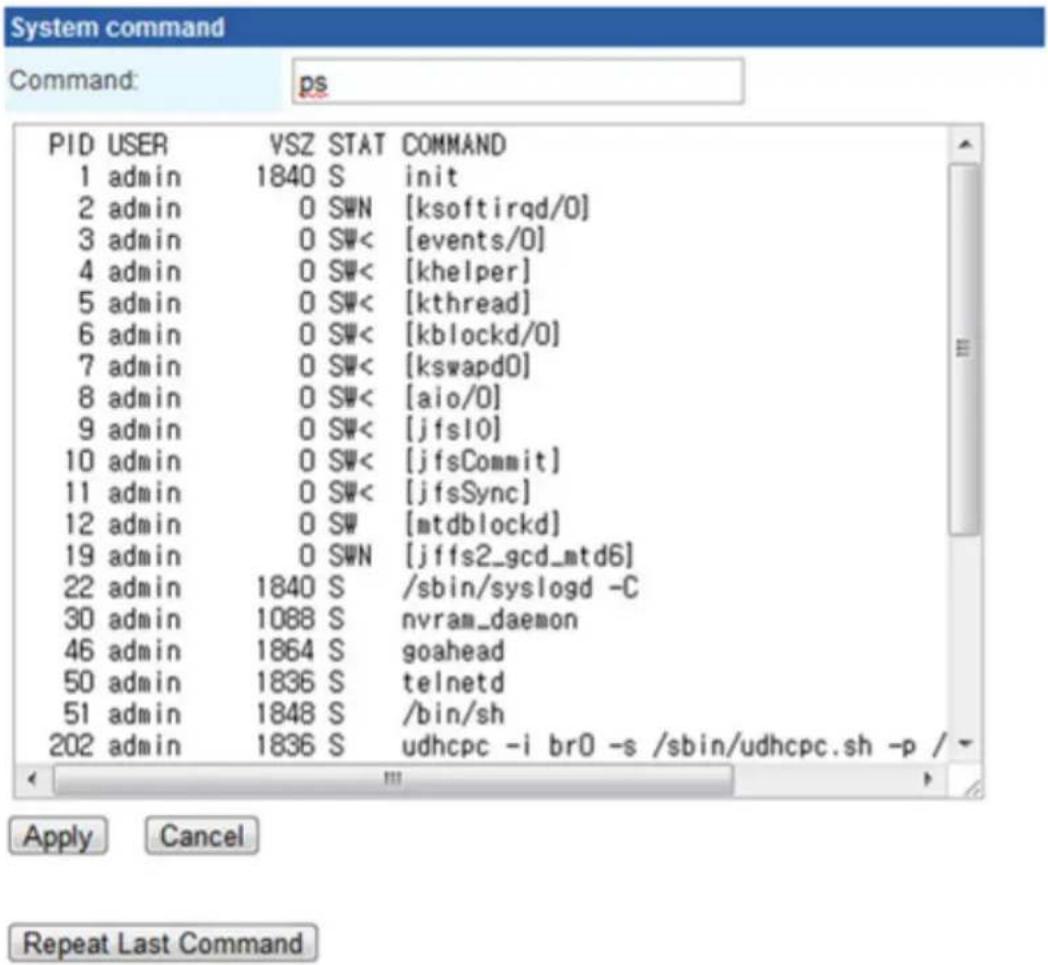
3. 4. 7. System Command
By input simple command in command line, Status can be checked.
System Command
Run a system command as root:
text_image
System command Command: ps PID USER VSZ STAT COMMAND 1 admin 1840 S init 2 admin 0 SWN [ksoftirqd/0] 3 admin 0 SW< [events/0] 4 admin 0 SW< [khelper] 5 admin 0 SW< [kthread] 6 admin 0 SW< [kblockd/0] 7 admin 0 SW< [kswapd0] 8 admin 0 SW< [aio/0] 9 admin 0 SW< [jfs10] 10 admin 0 SW< [jfsCommit] 11 admin 0 SW< [jfsSync] 12 admin 0 SW [mtdblockd] 19 admin 0 SWN [jffs2_gcd_mtd6] 22 admin 1840 S /sbin/syslogd -C 30 admin 1088 S nvram_daemon 46 admin 1864 S goahead 50 admin 1836 S telnetd 51 admin 1848 S /bin/sh 202 admin 1836 S udhcpc -i br0 -s /sbin/udhcpc.sh -p / Apply Cancel Repeat Last Command3.4.8.Log
Display history (ex. Firmware update)
System Log
Syslog:
Refresh
Clear
System Log
2010-08-19 11:49:34 lge_mpiap_00:1E:B2:B0:03:41 ERROR 1 update: failure 2010-08-19 11:51:05 lge_mpiap_00:1E:B2:B0:03:41 NOTICE 1 update: success
4. REGULATORY
EU Conformity Notice:
CE 0197
LG Electronics hereby declares that this product is in compliance with the following Directives.
R&TTE Directive 1999/5/EC
EMC Directive 2004/108/EC
LOW VOLTAGE Directive 2006/95/EC
The products described above comply with the essential requirements of the directives specified.
This device is a 2.4 GHz wideband transmission system, intended for use in all EU member states and EFTA countries.
European representative:
LG Electronics Inc. Krijgsman 1, 1186 DM Amstelveen, The Netherland
CE Notified Body statement:
This is a Class B product. In a domestic environment, this product may cause radio interference, in which case the user may be required to take adequate measures.
Explosive device proximity warning – Do not operate a portable transmitter (such as a wireless network device) near unshielded blasting caps or in an explosive environment unless the device has been modified to be qualified for such use.
This CE marking is valid for EU non-harmonized telecommunications products R&TTE Directive (1999/5/EC) issued by the Commission of the European Community.
[DEUTSCH]
Directive 2004/108/CE EMC
Representant european:
LG Electronics Krijgsman 1, 1186 DM Amstelveen, Olanda
[БЪЛГАРСКИ]
Disposal of your old appliance
- When this crossed-out wheeled bin symbol is attached to a product it means the product is covered by the European Directive 2002/96/EC.
- All electrical and electronic products should be disposed of separately from the municipal waste stream through designated collection facilities appointed by your government or your local authorities.
- The correct disposal of your old appliance will help prevent potential negative consequences for the environment and human health.
- For more detailed information about disposal of your old appliance, please contact your city office, waste disposal service or the shop where you purchased the product.
[FRANÇAIS]
Ukraine Restriction of Hazardous Substances
The equipment complies with requirements of the Technical Regulation, in terms of restrictions for the use of certain dangerous substances in electrical and electronic equipment.

LG
Life's Good
Record the model number and serial number.
MODEL
SERIAL