S - Camera Zenit - Free user manual and instructions
Find the device manual for free S Zenit in PDF.


User questions about S Zenit
0 question about this device. Answer the ones you know or ask your own.
Ask a new question about this device
Download the instructions for your Camera in PDF format for free! Find your manual S - Zenit and take your electronic device back in hand. On this page are published all the documents necessary for the use of your device. S by Zenit.
USER MANUAL S Zenit
text_image
ZENITH-C C A M ENOTES:
This text is identical to the one in the Instruction manual,
English version. Corrected and converted to HTML in 2004.
ZENIT-S (ZENITH-C)
natural_image
Monumental statue of a historical figure atop a tall tower, set against a cloudy sky (no visible text or symbols)
text_image
ZENITH INSTRUCTION MANUAL STAKELIMPORTThe Instruction Manual contains essential principles of "Zenith-C" camera operation.
To avoid possible breakage of the camera and to obtain good pictures thoroughly acquaint yourself with the construction and operation of the camera as it is described below.
text_image
In the case of the last day and subsequent days in Japan? I was an exception I had a very bad bodily that was about 100 gm. It is a very bad. But you was not good. If you because it is a bad condition.GENERAL FEATURES
The "Zenith-C" is a mirror type 35 mm film precision miniature camera possessing all the merits of up-to-date cameras.
It is recommended for use by amateurs to photograph landscape, portraits, groups, separate sport scenes, etc. It can also be used in research institutes and laboratories for photographing through various optical instruments: for instance, the camera can be conveniently used for taking photomicrographs.
The "Zenith-C" uses a standard perforated 35 mm motion picture film about 1.6 m in length. This is sufficient for making up to 36 exposures 24x36 mm in size.
The camera can be used for photographing under poor lighting conditions or in full darkness as it is adapted for use of flash bulbs. A controllable synchronizing mechanism with an advanced scale ranging from 0 to 25 millisec. permits photographing with flash bulbs of various types.
The camera is of the mirror type. The image thrown by the mirror onto a frosted glass surface is viewed through an eyepiece, the axis of which is parallel to the lens axis. The viewed image is direct. The eyepiece magnification is 5^x . The field of vision seen through the eyepiece is 20x28 mm.
The camera has been designed for use with metal magazines which open automatically upon closing the camera cover.
text_image
GENERAL FEATURES By "Tang" is a very rare day of 30:00 PM, personal feature being seen. The first day is at the time of the preparation. By us, it's pretty to be charged and then, people are in the person's room. It's not to be able to see it and I could have been a disordered in the following through such an upstand between them. But the person will be able to see someone else the other part is something. I'm doing it very a moment that it has been priced. But there is a lot of 14 or 6 a week. It's a particular man who is doing it. It's not a one or more. It's not a great time. It's not a one or more. It's not a little time. It's not a one or more. It's not a little time. It's not a one or more. It's not a little time. It's not a one or more. It's not a little time. It's not a one or more. It's not a little time. It's not a one or more. It's not a little time. It's not a one or more. It's not a little time. It is a little time. It is not a little time. It is not a one or more. It is not a little time. It is not a one or more. It is not a little time. It is not a one or more. It is not a little time. It is not a one or more. It is not a little time. It is not a one or more. It is not a little time. It is not a one or more. It is not a little time. It is not a one or more. It is but the person is doing it, and I can't know what you're going to. It's doing it, and I can't know what you're going to. It's doing it, and I can't know what you're going to. It's doing it, and I can't know what you're going to. It's doing it, and I can't know what you're going to. It's doing it, and I can't know what you're going to. It's doing it, and I can't know what you're going to. It's doing it, I can't know what you're going to. It's doing it, and I can't know what you're going to. It's doing it, and I can't know what you're going to. It's doing it, and I can't know what you're going to. It's doing it, and I can't know what you're going to. It's doing it, and I can't know what you're going to. It's doing it, and I can't show what you're going to. It's doing it, and I can't show what you're going to. It's doing it, and I can't show what you're going to. It's doing it, and I can't show what you're going to. It's doing it, and I can't show what you're going to. It's doing it, and I can't show what you're going to. It's doing it, and I can't show what you're going to the person. It's doing it, and I can't show what you're going to. It's doing it, and I can't show what you're going to. It's doing it, and I can't show what you're going to. It's doing it, and I can't show what you're going to. It's doing it, and I can't show what you're going to. It's doing it, and I can't show what you're going to. It's performing on the person. It's doing it, and I can't show what you're going to. It's doing it, and I can't show what you're going to. It's doing it, and I can't show what you're going to. It's doing it, and I can't show what you're going to. It's doing it, and I can't show what you're going to. It's doing it, and I can't show what you're going to. The person is doing the person. It's doing it, and I can't show what you're going to. It's doing it, and I can't show what you're going to. It's doing it, and I can't show what you're going to. It's doing it, and I can't show what you're going to. It's doing it, and I can't show what you're going to. It's doing it, and I can't show what you're going to. I'll do this work with the person. It's doing it, and I can't show what you're going to. It's doing it, and I can't show what you're going to. It's doing it, and I can't show what you're going to. It's doing it, and I can't show what you're going to. It's doing it, and I can't show what you're going to. It's doing it, and I can't show what you're going to. it's doing it, and I can't show what you're going to. it's doing it, and I can't show what you're going to. it's doing it, and I can't show what you're going to. it's doing it, and I can't show what you're going to. it's doing it, and I can't show what you're going to. it's doing it, and I can't show what you're going to. it's doing it, and I can't show what you're going to. it's doing it, and I can't show what you're going to. it's doing it, and I can't show what you're going to. it's doing it, and I can't show what you're going to. it's doing it, and I can't show what you're going to. it's doing it, and I can't show what you're going to. it's doing it, and I can't shown that we don't know that you've got out my home from the person. It's doing it, and I can't show what you're going to. It's doing it, and I can't show what you're going to. It's doing it, and I can't show what you're going to. It's doing it, and I can't show what you're going to. It's doing it, and I can't show what you're going to. It's doing it, and I can't show what you're going to. IT's doing it, and I can't show what you're going to. IT's doing it, and I can't show what you're going to. IT's doing it, and I can't show what you're going to. IT's doing it, and I can't show what you're going to. IT's doing it, and I can't show what you're going to. IT's doing it, and I can't show what you're going to. IT's doing it, and I can't show what you're going to. IT's doing it, and I can't show what you're going to. IT's doing it, and I can't show what you're going to. IT's doing it, and I can't show what you're going to. IT's doing it, and I can't show what you're going to. IT's doing it, and I can't show what you're going to. IT's doing it, and I can't show what you're going to. IT's doing it, and I can't show what you're going to. IT's doing it, and I can't show what you're going to. IT's doing it, and I can't show what you're going to. IT's doing it, and I can't show what you're going to. IT's doing it, and I can't show what you're going to. IT's doing it, and I can't shown that we don't know that you've got out my home from the person. It's doing it, and I can't show what you're going to. It's doing it, and I can't show what you're going to. It's doing it, and I can't show what you're going to. It's doing it, and I can't show what you're going to. It's doing it, and I can't show what you're going to. IT's doing it, and I can't show what you're going to. IT's doing it, and I can't show what you're going to. IT's doing it, and I can't show what you're going to. IT's doing it, and I can't show what you're going to. IT's doing it, and I can't shown that we don't know that you've got out my home from the person. It's doing it, and I can't show what you're going to. It's doing it, and I can't show what you're going out. It's doing it, and I can't show what you're going out. It's doing it, and I can't show what you're going out. IT's doing it, and I can't show what you're going out. IT's doing it, and I can't show what you're going out. IT's doing it, and I can't shown that we don't know that you've got out my home from the person. It's doing it, and I can't show what you're going to. It's doing it, and I can't show what you're going out. It's doing it, and I can't show what you're going out. IT's doing it, and I can't show what you're going out. IT's doing it, and I can't shown that we don't know that you've got out my home from the person. It's doing it, and I can't show what you're going out. It's doing it, and I can't show what you're going out. It's doing it, and I can't shown that we don't know that you've got out my home from the person. It's doing it, and I can't show what you're going out. It's doing it, and I can't show what you're going out. It's doing it, and I can't shown that we don't know that you've got out my home from the person. It's doing it, and I can't show what you're going out. It's doing it, and I can't shown that we don't know that you've got out my home from the person.
natural_image
Three children outdoors in a park, one standing with arms crossed, others in colorful outfits (no visible text or symbols)The camera is furnished with a curtain-type shutter giving automatic exposure speeds ranging from 1/25 to 1/500 sec. The "B"-hand exposure setting is employed.
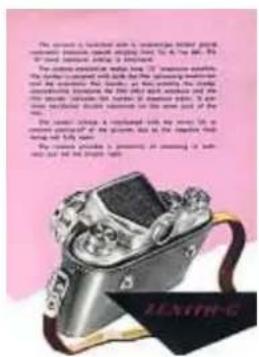
The camera mechanism makes long "T" (originally: "Д" -- Cyrillic "D") exposure possible. The shutter is coupled with both the film advancing mechanism and the automatic film counter, so that winding the shutter automatically transports the film after each exposure and the film counter indicates the number of exposure taken. It prevents accidental double exposure on the same part of the film.
The shutter release is interlocked with the mirror lift to prevent cutting-off of the pictures due to the negative field being not fully open.
The camera provides a possibility of reloading in ordinary, but not too bright, light.
text_image
The device is delivered with a broadband network of 80% wireless wireless network. It is also the best internet-based product. It is also the best internet-based product. The device provides a free access to the network. It is also the best internet-based product. It is also the best internet-based product. It is also the best internet-based product. It is also the best internet-based product. It is also the best internet-based product. It is also the best internet-based product. It is also the best internet-based product. It is also the best internet-based product. It is also the best internet-based product. It is also the best internet-based product. It is also the best internet-based product. It is also the best internet-based product.SPECIFICATIONS
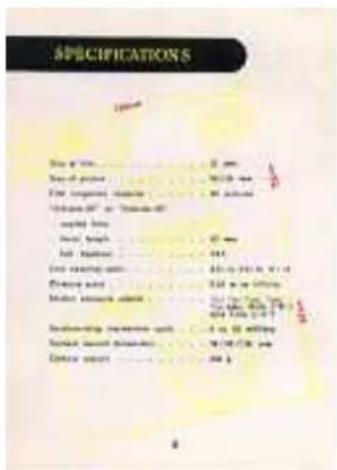
Size of film -- 35 mm
Size of picture -- 24x36 mm
Film magazine capacity -- 36 pictures
"Industar-22" or "Industar-50"
coated lens:
focal length -- 50 mm
full aperture -- f/3.5
Lens opening scale -- 3.5; 4; 5.6; 8; 11; 16
Distance scale -- 0.65 m to infinity
Shutter exposure speeds -- 1/25; 1/50; 1/100; 1/250; 1/500 sec.,
Bulb ("B") and Time ("T") (originally: "Д" -- Cyrillic "D")
Synchronizing mechanism scale -- 0 to 25 millisec.
Camera overall dimensions -- 78x90x138 mm
Camera weight -- 630 g
text_image
SPECIFICATIONS Title: 2000 Reaction of products: 1. Iron carbonyl compound: 80 gm Volume (g) or Volume (g) propyl nitric: total height: 50 gm Total volume: 40 gm Iron coating ratio: 100 gm/100 gm Flouring agent: 3.5 gm or 100 gm Material strength ratio: 100 gm/100 gm Reinforcing properties ratio: -1 vs 10 ml/kg Support material thickness: 100 g/100 gm Diameter range: 40 kgCAMERA CONSTRUCTION
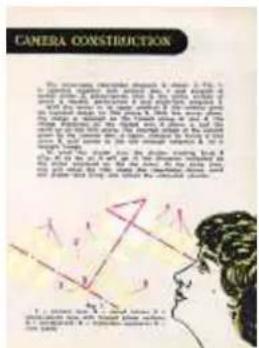
The mirror type view-finder diagram is shown in Fig. 1. It operates together with camera lens 1 and consists of swivel mirror 2, plane-convex lens 3, the plane surface of which is frosted, penta-prism 4 and triple-lens eyepiece 5.
With the mirror in its upper position 2' the camera gives an inverted image on film plane 6. With the mirror down, the image is received on the frosted plane of lens 3. The image sharpness on the frosted lens 3 plane is just the same as on the film plane. The inverted image of the subject given by the camera lens is again inverted by mirror 2 and prism 4, and comes to the eye through eyepiece 5, as a straight image.
To wind the shutter turn winding knob 8 (Fig. 2) as far as it will go in the direction indicated by the arrow engraved on the top cover. At the same time, this will move the film, lower the view-finder mirror, wind the shutter and bring into action the snap-shot counter.
text_image
CAMERA CONSTRUCTION The camera described does not use 2.5% to use the optical lens, which is used for a small amount of observations. It is also used for the image of the camera. The image is designed to be constructed by the camera using a schematic diagram and the mirror image. The image is designed to use a single object (e.g., a light source or light source) and uses a device to create a device from the camera. The image is designed to be constructed by the camera using a schematic diagram and the mirror image. The image is designed to be constructed by the camera using a single object.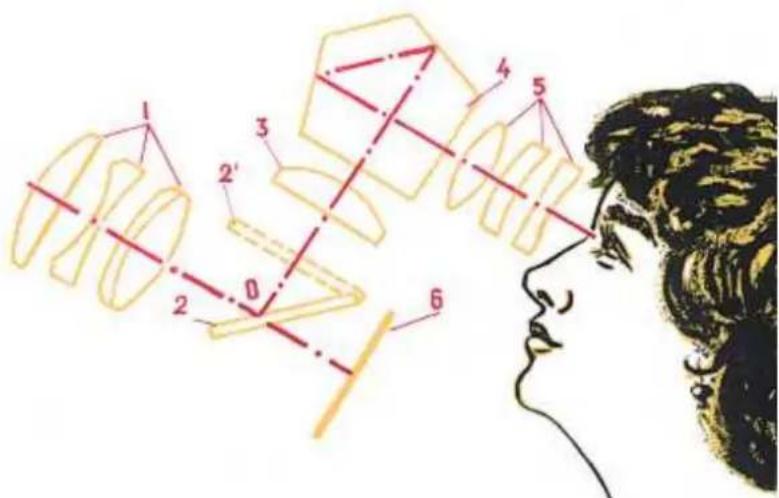
text_image
Diagram illustrating a geometric or mechanical process with numbered components and a profile view on the left.Fig. 1
1 -- camera lens; 2 -- swivel mirror; 3 -- plane-convex lens with frostedplane surface; 4 -- penta-prism; 5 -- triple-lens eyepiece; 6 -- film plane
The snap-shot counter dial 9 is set at zero by rotating its knurled end in either direction. The number of exposures is read off by means of black pointer 10 engraved on the upper side of the camera. Set the counter at zero with the shutter wound up.
The shutter is released by pressing the release button 11 which has a conical thread to accommodate a cable release. The exposure speeds are changed by a little lifting and turning the exposure setting ring 12 until the index line 13 is opposite figure indicating the desired speed. The ring 12 may be turned only through the part of the scale marked B, 25, 50, 100, 250, 500 and back.
Do not turn it in the interval between B and 500
The figures on the scale indicate exposure speeds in fractions of a second, for example 50 instead of 1/50, 100 instead of 1/100, etc. Longer exposures "T" (originally: "Д" -- Cyrillic "D") are obtained with the ring 12 set at "B". In this case press the release button 11 and turn it so that the pint engraved on it moves towards the letter "T" (originally: "Д" -- Cyrillic "D") as far as it will go. When the exposure is to be ended move the release button back and release it.
text_image
The propeller, which is 628.4 x 100 gm in the case of the moving motor, has been carried out by the electric motor. It is still closed to the power supply. We have been carried out by the electric motor, but we are ready for use. The motor has been open to the side of the circuit, and the current is 300 V (in dB) and 150 V (in mV). It is closed to the power supply. We have been open to the side of the circuit, and the current is 300 V (in dB) and 150 V (in mV). The motor has been open to the side of the circuit, and the current is 300 V (in dB) and 150 V (in mV). We have been open to the side of the circuit, and the current is 300 V (in dB) and 150 V (in mV). We have been open to the side of the circuit, and the current is 300 V (in dB) and 150 V (in mV). We have been open to the side of the circuit, and the current is 300 V (in dB) and 150 V (mV). We have been open to the side of the circuit, and the current is 300 V (in dB) and 150 V (mV). We have been open to the side of the circuit, and the current is 300 V (in dB) and 150 V (mV). We have been open to the side of the circuit, and the current is 300 V (in dB) and 150V (in mV). We have been open to the side of the circuit, and the current is 300 V (in dB) and 150 V (mV). We have been open to the side of the circuit, and the current is 300 V (in dB) and 150 V (mV). We have been open to the side of the circuit, and the current is 300 V (in dB) and 250 V (in mV). We have been open to the side of the circuit, and the current is 300 V (in dB) and 250 V (mV). We have been open to the side of the circuit, and the current is 300 V (in dB) and 250 V (mV). We have been open to the side of the circuit, and the current is 300 V (in dB) and 250 V (mV). We have been open to the side of the circuit, and the current is 300 V (in dB) and 250V (in mV). We have been open to the side of the circuit, and the current is 300 V (in dB) and 250 V (mV). We have been open to the side of the circuit, and the current is 300 V (in dB) and 250 V (mV). We have been open to the side of the circuit, and the current is 300 V (in dB) and 150 V (in mV). We have been open to the side of the circuit, and the current is 300 V (in dB) and 150 V (mV). We have been open to the side of the circuit, and the current is 300 V (in dB) and 15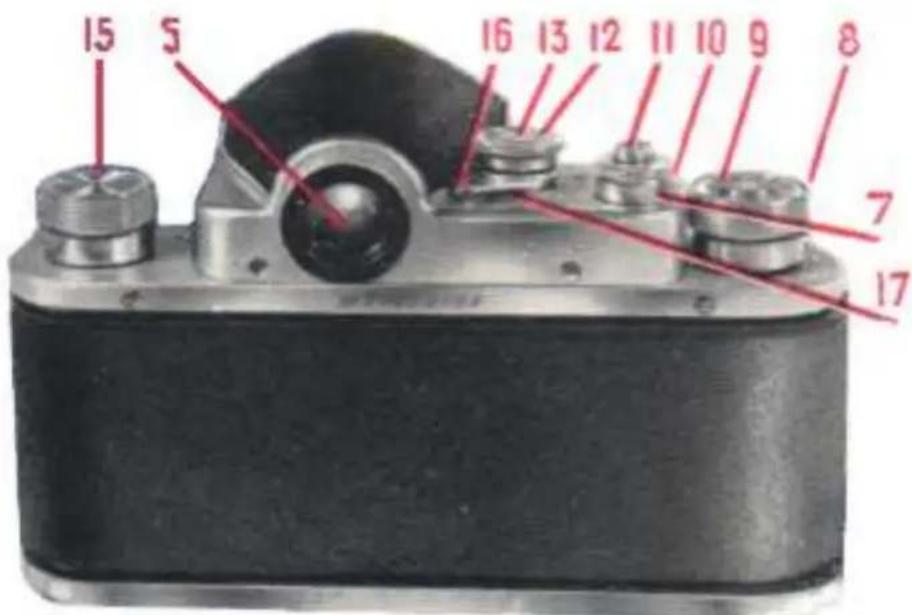
text_image
15 5 16 13 12 11 10 9 8 7 17Fig. 2
5 -- eyepiece; 7 -- adjusting ring; 8 -- shutter winding knob; 9 -- snap-shot counter dial; 10 -- counter pointer; 11 -- shutter release button; 12 -- exposure setting ring; 13 -- exposure setting indicator; 15 -- film rewinding knob; 16 -- synchronizing lever; 17 -- synchronization scale
To wind the film back into the magazine, with the shutter released, turn the ring 7 so that the point engraved on it moves towards the letter "R" (originally: "П" -- Cyrillic "P", from 'перемотка', 'peremotka' -- rewinding) to a stop. Then, wind the film by rotating the film rewinding knob 15 in the direction indicated by the arrow. The knob should be rotated until the force required to rotate is decreased. This shows that the film has been bully rewound and is completely in the magazine. The lens is tightly screwed into the ring and has the mounting 19 (Fig. 3) with the distance scale. The distance set is shown by the red index 20. The lens opening can be changed by rotating the objective front ring 21 until the necessary division comes opposite the index point 22. For convenient changing of the lens opening three lens opening scales are engraved on the ring 21. They have three corresponding index points 22. The lens design enables lens opening to be set with filters on. The lens is provided with the depth of field scale 23. The depth of field is the distance between the nearest and the farthest objects in a scene which will be sharp in the picture. The depth of field increases as the lens opening is made smaller, or as the distance focused upon is increased.
text_image
Scanned page with text discussing camera lens imaging and a photo of a vintage camera, likely from an academic or technical publication.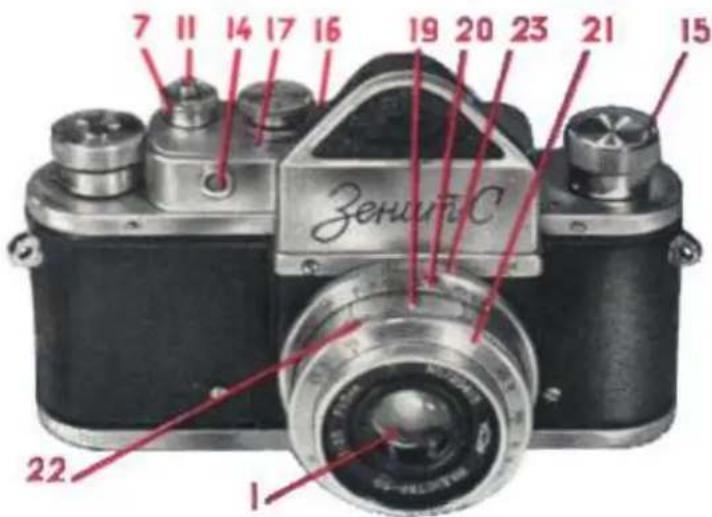
text_image
7 11 14 17 16 19 20 23 21 15 Zerunic 22 1Fig. 3.
1 -- lens; 7 -- adjusting ring; 11 -- shutter release button; 14 -- plug socket; 15 -- film rewinding knob; 16 -- synchronizing lever; 17 -- synchronization scale; 19 -- distance scale ring; 20 -- distance scale pointer; 21 -- lens front ring; 22 -- lens opening scale pointer; 23 -- depth of field scale
natural_image
Scenic forest path winding through a forest with dense foliage and no visible text or symbols
natural_image
Snow-covered forest path with tall trees and clear sky (no text or symbols visible)When it is possible to photograph objects of considerable depth or a number of objects at different distances, reference to the depth of field scale which will cover objects at both positions. After focusing, this scale shows the limits of the depth of field for the diaphragm scale setting used. The depth field ranges from the diaphragm scale figure on one side of the indicator to the same on the other. For instance, suppose the lens is focused for a distance of 4 m with a diaphragm setting of 16. Then the image will be sufficiently sharp between 2 m and infinity. With the same focus setting for distance of 4 m but with a diaphragm figure of 5.6, the image will be sufficiently sharp between 3 and 7 m.
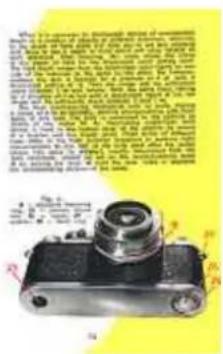
The flash synchronizing mechanism with its scale, having a range of 0 to 25 millisec., permits photographing with flash bulbs of any type. The bulb is connected to the camera by means of the socket 14. An illuminating single-flash bulb device is fixed to the bottom cover of the camera by means of the bracket and the tripod screw. Flash bulbs of different types differ in the flash duration necessary to produce light approximately to one half of the bulb peak after the switch closes. This value (in millisec.), usually determined from the bulb certificate, should be set on the synchronization scale 17 by turning the lever 16 until the lever index is opposite the corresponding division of the scale.
text_image
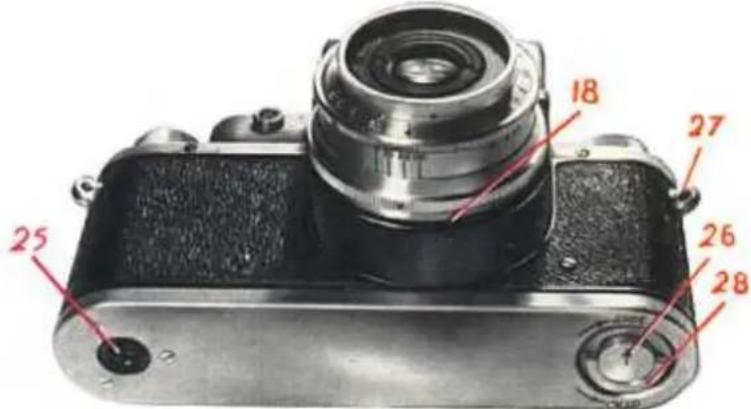
18 27 25 26 28Fig. 4. 18 -- objective fastening ring; 25 -- camera tripod nut; 26 -- latch; 27 -- eyelets; 28 -- latch ring
When photographing with a multi-flash impulse bulb it must be remembered that its lag equals practically zero. Therefore, when using a bulb on this kind, the lever 16 should be set at "0". The illuminator of a multi-flash impulse bulb is usually fastened to the tripod nut of the camera, but may also set up at same distance, depending on the length of the conductor connecting the impulse device with socket 14 on the camera.
The use of the flash bulbs is possible only with exposure speeds of 1/25 sec. and "B". "B" exposure are usually undesirable when using flash bulbs, as during long exposures a large amount of light enters the camera, which may result in a double image.
The camera is fixed in its case or on a tripod without its case by means of nut 25 (Fig. 4) in the bottom cover, having a standard 3/8" thread.
The bottom cover is also provided with latch 26 for locking the cover and
text_image
When I've seen to be completely closed of the camera, I'd not have any other view. It's just a bit of view. It's not a bit of view. It's not a bit of view. It's not a bit of view. It's not a bit of view. It's not a bit of view. It's not a bit of view. It's not a bit of view. It's not a bit of view. It's not a bit of view. It's not a bit of view. It's not a bit of view. It's not a bit of view. It's not a bit of visible view. It's not a bit of view. It's not a bit of view. It's not a bit of view. It's not a bit of view. It's not a bit of view. It's not a bit of view. It's not a bit of view. It's not a bit of view. It's not a bit of view. It's not a bit of view. It's not a bit of view. It's not a bit of view. It is not a bit of view. It is not a bit of view. It is not a bit of view. It is not a bit of view. It is not a bit of view. It is not a bit of view. It is not a bit of view. It is not a bit of view. It is not a bit of view. It is not a bit of view. It is not a bit of view. It is not a bit of view. It is not a bit off or off, but it is not a bit off or off, but it is not a bit off or off, but it is not a bit off or off, but it is not a bit off or off, but it is not a bit off or off, but it is not a bit off or off, but it is not a bit off or off, but it is not a bit off or off, but it is not a bit off or off, but it is not a bit off or off, but that was no longer than 10 seconds, and it was no longer than 20 seconds, and it was no longer than 30 seconds, and it was no longer than 40 seconds, and it was no longer than 50 seconds, and it was no longer than 60 seconds, and it was no longer than 70 seconds, and it was no longer than 80 seconds, and it was no longer than 90 seconds, and it was no longer than 100 seconds, and it was no longer than 110 seconds, and it was no longer than 120 seconds, and it was no longer than 130 seconds, and it was no longer than 140 seconds, and it was no longer than 150 seconds, and it was no longer than 160 seconds, and it was no longer than 170 seconds, and it was no longer than 180 seconds, and it was no longer than 190 seconds, and it was no longer than 200 seconds, and it was no longer than 210 seconds, and it was no longer than 220 seconds, and it was no longer than 230 seconds, and it was no longer than 240 seconds, and it was no longer than 250 seconds, and it was no longer than 260 seconds, and it was no longer than 270 seconds, and it was no longer than 280 seconds, and it was no longer than 290 seconds, and it was no longer than 300 seconds, and it was no longer than 310 seconds, and it was no longer than 320 seconds, and it was no longer than 330 seconds, and it was no longer than 340 seconds, and it was no longer than 350 seconds, and it was no longer than 360 seconds, and it was no longer than 370 seconds, and it was no longer than 380 seconds, and it was no longer than 390 seconds, and it was no longer than 400 seconds, and it was no longer than 410 seconds, and it was no longer than 420 seconds, and it was no longer than 430 seconds, and it was no longer than 440 seconds, and it was no longer than 450 seconds, and it was no longer than 460 seconds, and it was no longer than 470 seconds, and it was no longer than 480 seconds, and it was no longer than 490 seconds, and it was no longer than 500 seconds, and it was no longer than 510 seconds, and it was no longer than 520 seconds, and it was no longer than 530 seconds, and it was no longer than 540 seconds, and it was no longer than 550 seconds, and it was no longer than 560 seconds, and it was no longer than 570 seconds, and it was no longer than 580 seconds, and it was no longer than 590 seconds, and it was no longer than 600 seconds, and it was no longer than 610 seconds, and it was no longer than 620 seconds, and it was no longer than 630 seconds, and it was no longer than 640 seconds, and it was no longer than 650 seconds, and it was no longer than 660 seconds, and it was no longer than 670 seconds, and it was no longer than 680 seconds, and it was no longer than 690 seconds, and it was no longer than 700 seconds, and it was no longer than 710 seconds, and it was no longer than 720 seconds, and it was no longer than 730 seconds, and it was no longer than 740 seconds, and it was no longer than 750 seconds, and it was no longer than 760 seconds, and it was no longer than 770 seconds, and it was no longer than 780 seconds, and it was no longer than 790 seconds, and it was no longer than 800 seconds, and it was no longer than 810 seconds, and it was no longer than 820 seconds, and it was no longer than 830 seconds, and it was no longer than 840 seconds, and it was no longer than 850 seconds, and it was no longer than 860 seconds, and it was no longer than 870 seconds, and it was no longer than 880 seconds, and it was no longer than 890 seconds, and it was no longer than 900 seconds, and it was no longer than 910 seconds, and it was no longer than 920 seconds, and it was no longer than 930 seconds, and it was no longer than 940 seconds, and it was no longer than 950 seconds, and it was no longer than 960 seconds, and it was no longer than 970 seconds, and it was no longer than 980 seconds, and it was no longer than 990 seconds, and it was no longer than 1000 seconds.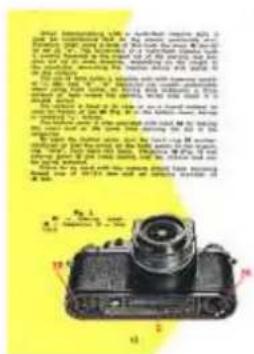
text_image
Special information: 100% of the total maximum size is 2.5" or 3.5" (inches), and 40% of the total maximum size is 2.5" or 3.5" (inches). The maximum size is 2.5" or 3.5" (inches). The maximum size is 2.5" or 3.5" (inches). The maximum size is 2.5" or 3.5" (inches). The maximum size is 2.5" or 3.5" (inches). The maximum size is 2.5" or 3.5" (inches). The maximum size is 1.8" or 2.6" (inches). The maximum size is 1.8" or 2.6" (inches). The maximum size is 1.8" or 2.6" (inches). The maximum size is 1.8" or 2.6" (inches). The maximum size is 1.8" or 2.6" (inches). The maximum size is 1.8" or 2.6" (inches) and then used to use the minimum size of the camera. The maximum size is 1.8" or 2.6" (inches). The maximum size is 1.8" or 2.6" (inches). The maximum size is 1.8" or 2.6" (inches). The maximum size is 1.8" or 2.6" (inches). The maximum size is 1.8" or 2.6" (inches). The maximum size is not used for any other component in this image.at the same time opening the slit in the magazine.
To open the bottom cover, turn the latch ring 28 counter-clockwise so that the arrow on the latch points to the engraving "Open" (originally: "откр."
-- an abridgment to Cyrillic 'открыто' -- open). Then open the cover.
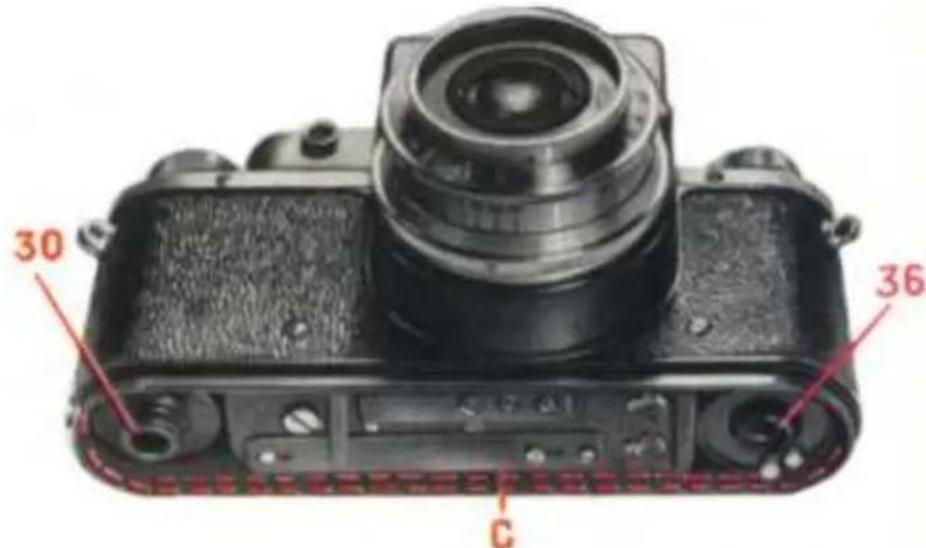
Magazine 36 (Fig. 5) and take-up spool 30 are fitted loosely into the camera and can be easily removed.
Filters to be used with this camera should have mounting thread size of 33x0.5 mm and an external diameter of 36 mm.
text_image
30 36 CFig. 5.
30 -- take-up spool; 36 -- magazine; C -- film track
MAGAZINE LOADING
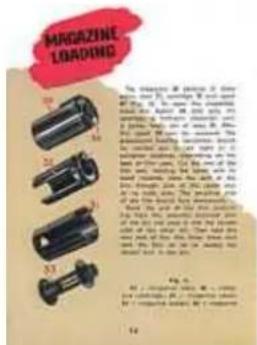
The magazine 36 consists of three parts: case 31, cartridge 32 and spool 33 (Fig. 6). To open the magazine, press the button 34 and give the cartridge a half-turn clockwise until it comes freely out of case 31. After this spool 33 can be removed. The subsequent loading operations should be carried out in red light or in complete darkness, depending on the type of film used. Cut the end of the film and, holding the spool with its head inwards, pass the end of the film through one of the spool slits at its wide side. The sensitive side of the film should face downwards.
Bend the end of the film protruding from the opposite (narrow) side of the slit and pass it into the narrow side of the other slit. Then fold the very end of the film three times and pull the film so as to wedge the folder end in the slit.
text_image
MAGAZINE LOADING The change is applied to 20% of the main parts of the box, which are used for the use of the box. The main parts of the box are used for the use of the box. The main parts of the box are used for the use of the box. The main parts of the box are used for the use of the box. The main parts of the box are used for the use of the box. The main parts of the box are used for the use of the box. The main parts of the box are used for the use of the box. The main parts of the box are used for the use of the box.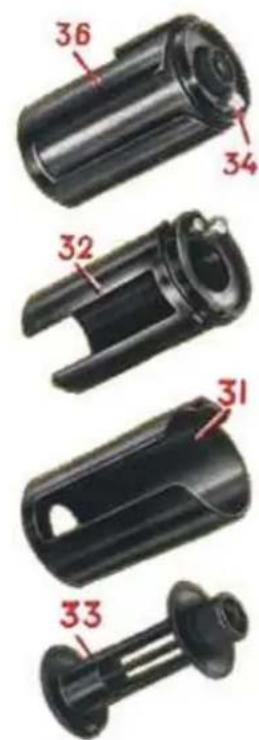
text_image
36 34 32 31 33Fig. 6.
31 -- magazine case; 32 -- magazine cartridge; 33 -- magazine spool; 34 - magazine button; 36 -- magazine
After this, continuing to hold the spool with its head inwards, rotate it counter-clockwise, winding the film with its sensitive side inside.
Wind the film tightly onto the spool.
Note. The film should not be tightened by holding the spool and pulling the film by its free end as this may scratch the sensitive layer as a result of friction between the turns. Do not touch the sensitive side of the film with your fingers.
Insert the spool with the film on it into the cartridge, so that the spool head passes through the bottom of the cartridge. Insert the cartridge into the case, leaving the end of the film protruding out of it and rotate the cartridge in its case counter-clockwise, holding the magazine with its head inwards, until the latch locks.
All subsequent operations with the magazine can be carried out in ordinary light.
CAMERA LOADING
text_image
Scanned text describing a vintage camera with a photo of a person in front of the camera.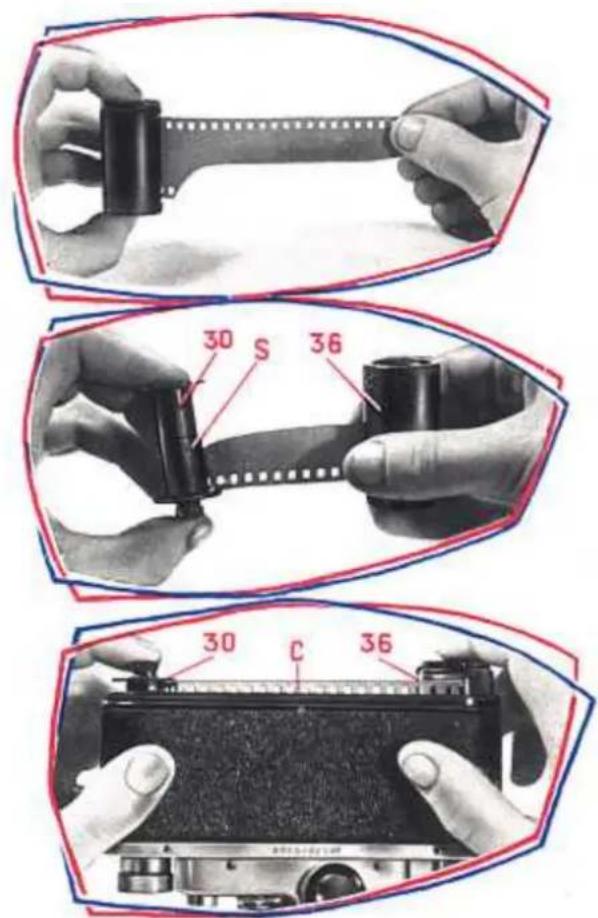
text_image
30 S 36 30 C 36
text_image
EAMING2 30 16 30 16Fig. 7.
30 -- take-up spool; 36 -- magazine; C -- film track; S -- take-up spool spring
- To engage the camera mechanism, turn the release button 11 and the ring 7 until their points coincide with point on the camera top surface.
- Test the operation of the camera winding the shutter by turning the knob 8 and releasing it by pressing the button 11. Take a look through the eyepiece to see whether the mirror system is working properly.
- Then, open the button cover and take out the take-up spool 30.
- Draw the film end out of the magazine to a length of 9 or 10cm and out it carefully to a shape as shown in Fig. 7.
- Holding the take-up spool 30 in your left hand and loaded magazine in your right hand (see Fig. 7) fix the end of the film under spool spring "S" (originally: "П" -- Cyrillic "P", from 'пружина', 'proodzina' -- spring). Take care that the uncut side of the film lies closely against the spool flange.
- Holding the open camera with its lens outwards, as is shown in Fig. 7, insert the film into the film track "C" (originally: "C" too, in Latin, from 'channel') by lowering the spool and the magazine evenly into place. If the magazine does not slide properly, film rewinding knob 15 should be turned a little until it does.

text_image
1. The map is a commissure on the shore between 2000 and 2005. It is also an object that has been developed by the sea's coast. The chart includes a photo of the island in the ocean. 2. The land is located at the sea's port. 3. The ocean is being developed by the sea's coast. 4. The ocean is being developed by the sea's coast. 5. The ocean is being developed by the sea's coast. 6. The ocean is being developed by the sea's coast. 7. The ocean is being developed by the sea's coast. 8. The ocean is being developed by the sea's coast. 9. The ocean is being developed by the sea's coast. 10. The ocean is being developed by the sea's coast. 11. The ocean is being developed by the sea's coast. 12. The ocean is being developed by the sea's coast. 13. The ocean is being developed by the sea's coast. 14. The ocean is being developed by the sea's coast. 15. The ocean is being developed by the sea's coast. 16. The ocean is being developed by the sea's coast. 17. The ocean is being developed by the sea's coast. 18. The ocean is being developed by the sea's coast. 19. The ocean is being developed by the sea's coast. 20. The ocean is being developed by the sea's coast. 21. The ocean is being developed by the sea's coast. 22. The ocean is being developed by the sea's coast. 23. The ocean is being developed by the sea's coast. 24. The ocean is being developed by the sea's coast. 25. The ocean is being developed by the sea's coast. 26. The ocean is being developed by the sea's coast. 27. The ocean is being developed by the sea's coast. 28. The ocean is being developed by the sea's coast. 29. The ocean is being developed by the sea's coast. 30. The ocean is being developed by the sea's coast. 31. The ocean is being developed by the sea's coast. 32. The ocean is being developed by the sea's coast. 33. The ocean is being developed by the sea's coast. 34. The ocean is being developed by the sea's coast. 35. The ocean is being developed by the sea's coast. 36. The ocean is being developed by the sea's coast. 37. The ocean is being developed by the sea's coast. 38. The ocean is being developed by the sea's coast. 39. The ocean is being developed by the sea's coast. 40. The ocean is being developed by the sea's coast. 41. The ocean is being developed by the sea's coast. 42. The ocean is being developed by the sea's coast. 43. The ocean is being developed by the sea's coast. 44. The ocean is being developed by the sea's coast. 45. The ocean is being developed by the sea's coast. 46. The ocean is being developed by the sea's coast. 47. The ocean is being developed by the sea's coast. 48. The ocean is being developed by the sea's coast. 49. The ocean is being developed by the sea's coast. 50. The ocean is being developed by the sea's coast. 51. The ocean is being developed by the sea's coast. 52. The ocean is being developed by the sea's coast. 53. The ocean is being developed by the sea's coast. 54. The ocean is being developed by the sea's coast. 55. The ocean is being developed by the sea's coast. 56. The ocean is being developed by the sea's coast. 57. The ocean is being developed by the sea's coast. 58. The ocean is being developed by the sea's coast. 59. The ocean is being developed by the sea's coast. 60. The ocean is being developed by the sea's coast. 61. The ocean is being developed by the sea's coast. 62. The ocean is being developed by the sea's coast. 63. The ocean is being developed by the sea's coast. 64. The ocean is being developed by the sea's coast. 65. The ocean is being developed by the sea's coast. 66. The ocean is being developed by the sea's coast. 67. The ocean is being developed by the sea's coast. 68. The ocean is being developed by the sea's coast. 69. The ocean is being developed by the sea's coast. 70. The ocean is being developed by the sea's coast. 71. The ocean is being developed by the sea's coast. 72. The ocean is being developed by the sea's coast. 73. The ocean is being developed by the sea's coast. 74. The ocean is being developed by the sea's coast. 75. The ocean is being developed by the sea's coast. 76. The ocean is being developed by the sea's coast. 77. The ocean is being developed by the sea's coast. 78. The ocean is being developed by the sea's coast. 79. The ocean is being developed by the sea's coast. 80. The ocean is being developed by the sea's coast. 81. The ocean is being developed by the sea's coast. 82. The ocean is being developed by the sea's coast. 83. The ocean is being developed by the sea's coast. 84. The ocean is being developed by the sea's coast. 85. The ocean is being developed by the sea's coast. 86. The ocean is being developed by the sea's coast. 87. The ocean is being developed by the sea's coast. 88. The ocean is being developed by the sea's coast. 89. The ocean is being developed by the sea's coast. 90. The ocean is being developed by the sea's coast. 91. The ocean is being developed by the sea's coast. 92. The ocean is being developed by the sea's coast. 93. The ocean is being developed by the sea's coast. 94. The ocean is being developed by the sea's coast. 95. The ocean is being developed by the sea's coast. 96. The ocean is being developed by the sea's coast. 97. The ocean is being developed by the sea's coast. 98. The ocean is being developed by the sea's coast. 99. The ocean is being developed by the sea's coast. Fig.- Replace the bottom cover, press it down tightly and give the latch ring 28 (Fig. 4) one-half turn clockwise. The latch arrow should then point to "Close" (originally: "закр." -- an abridgment to Cyrillic 'закрыто' -- close). The magazine slit automatically opens freeing the film, as the lock is closed.
- To deliver an unexposed portion of the film to the negative window, wind up the shutter tree times, pressing the release button 11 after each winding. When winding the shutter mechanism, check to see whether film rewinding knob 15 is rotating.
If the knob does not rotate, check whether the film has been loaded into the camera correctly. Note that this may also take place during the first few shots if the magazine was loaded with a film much shorter than normal length. In this case the rewinding knob starts to rotate only when the film tension on the spool is sufficient.
- Set the picture counting dial 9 at "0" opposite the counter index 10.
text_image
Collage of nature and wildlife photos with accompanying descriptive text blocks in Chinese.TAKING THE PICTURES
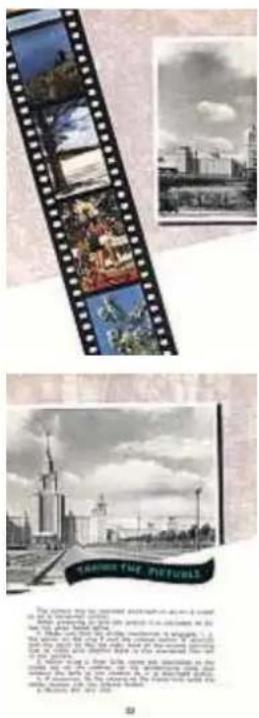
The camera may be operated or set on a tripod or on horizontal surface. When preparing to take the picture it is advisable to follow the steps listed bellow:
- Make sure that the shutter mechanism is engaged i.e. the points on the ring 7 and the release button 11 coincide with the point on the top side. Look at the picture counting dial to make sure whether there is any unexposed film left in the camera.
- When using a flash bulb, screw the illuminator to the tripod nut on the camera, set the synchronizing scale and connect the bulb to the camera as it is described before.
- If necessary, fix the camera to the tripod and screw the cable release into the release button.
- Remove the lens cap.
text_image
PARSICHE PARSICHE PARSICHE PARSICHE PARSICHE PARSICHE PARSICHE PARSICHE PARSICHE PARSICHE PARSICHE PARSICHE PARSICHE PARSICHE PARSICHE PARSICHE PARSICHE PARSICHE PARSICHE PARSICHE PARSICHE-
If necessary, attach a filter..
-
Open the lens opening fully by turning the front lens ring 21 until it stops.
Just before taking a picture it is necessary:
-
Wind the shutter by turning the shutter winding knob 8 in the direction of the arrow as far as it will go.
-
Determine the required exposure speed and set it with the exposure setting ring 12 as indicated before.
-
Adjust correct focus by turning the knurled ring 19 and viewing the image of the object through the eyepiece 5.
Note. If the image remains sharp when the ring is rotated through a certain angle, it should be set in the middle of that angle.
-
Set the required lens opening by turning the ring 21. When setting the lens opening it is recommended to hold the ring 19 in order to avoid unfocusing of the camera.
-
Make the exposure by slowly pressing the release button 11. Take care not to move the camera during the exposure, or the picture may be blurred.
When taking the picture with the camera in the carrying case, see that the case cover does not get between the object and the lens.
text_image
1. See the camera's photo of the camera. 2. See the camera's photo of the camera. 3. See the camera's photo of the camera. 4. See the camera's photo of the camera. 5. See the camera's photo of the camera. 6. See the camera's photo of the camera. 7. See the camera's photo of the camera. 8. See the camera's photo of the camera. 9. See the camera's photo of the camera. 10. See the camera's photo of the camera. 11. See the camera's photo of the camera. 12. See the camera's photo of the camera. 13. See the camera's photo of the camera. 14. See the camera's photo of the camera. 15. See the camera's photo of the camera. 16. See the camera's photo of the camera. 17. See the camera's photo of the camera. 18. See the camera's photo of the camera. 19. See the camera's photo of the camera. 20. See the camera's photo of the camera. 21. See the camera's photo of the camera. 22. See the camera's photo of the camera. 23. See the camera's photo of the camera. 24. See the camera's photo of the camera. 25. See the camera's photo of the camera. 26. See the camera's photo of the camera. 27. See the camera's photo of the camera. 28. See the camera's photo of the camera. 29. See the camera's photo of the camera. 30. See the camera's photo of the camera. 31. See the camera's photo of the camera. 32. See the camera's photo of the camera. 33. See the camera's photo of the camera. 34. See the camera's photo of the camera. 35. See the camera's photo of the camera. 36. See the camera's photo of the camera. 37. See the camera's photo of the camera. 38. See the camera's photo of the camera. 39. See the camera's photo of the camera. 40. See the camera's photo of the camera. 41. See the camera's photo of the camera. 42. See the camera's photo of the camera. 43. See the camera's photo of the camera. 44. See the camera's photo of the camera. 45. See the camera's photo of the camera. 46. See the camera's photo of the camera. 47. See the camera's photo of the camera. 48. See the camera's photo of the camera. 49. See the camera's photo of the camera. 50. See the camera's photo of the camera. 51. See the camera's photo of the camera. 52. See the camera's photo of the camera. 53. See the camera's photo of the camera. 54. See the camera's photo of the camera. 55. See the camera's photo of the camera. 56. See the camera's photo of the camera. 57. See the camera's photo of the camera. 58. See the camera's photo of the camera. 59. See the camera's photo of the camera. 60. See the camera's photo of the camera. 61. See the camera's photo of the camera. 62. See the camera's photo of the camera. 63. See the camera's photo of the camera. 64. See the camera's photo of the camera. 65. See the camera's photo of the camera. 66. See the camera's photo of the camera. 67. See the camera's photo of the camera. 68. See the camera's photo of the camera. 69. See the camera's photo of the camera. 70. See the camera's photo of the camera. 71. See the camera's photo of the camera. 72. See the camera's photo of the camera. 73. See the camera's photo of the camera. 74. See the camera's photo of the camera. 75. See the camera's photo of the camera. 76. See the camera's photo of the camera. 77. See the camera's photo of the camera. 78. See the camera's photo of the camera. 79. See the camera's photo of the camera. 80. See the camera's photo of the camera. 81. See the camera's photo of the camera. 82. See the camera's photo of the camera. 83. See the camera's photo of the camera. 84. See the camera's photo of the camera. 85. See the camera's photo of the camera. 86. See the camera's photo of the camera. 87. See the camera's photo of the camera. 88. See the camera's photo of the camera. 89. See the camera's photo of the camera. 90. See the camera's photo of the camera. 91. See the camera's photo of the camera. 92. See the camera's photo of the camera. 93. See the camera's photo of the camera. 94. See the camera's photo of the camera. 95. See the camera's photo of the camera. 96. See the camera's photo of the camera. 97. See the camera's photo of the camera. 98. See the camera's photo of the camera. 99. See the camera's photo of the camera.
natural_image
Collage of four photos showing people in different outdoor settings, including a girl in a red dress and a child playing on water (no visible text or symbols)CAMERA UNLOADING
When the film is entirely exposed the camera has to be unloaded. For this purpose:
- Cover the lens with its cap.
-
Turn the ring 7 so that its point moves towards the letter "R" (originally: "П" -- Cyrillic "Р", from 'перемотка', 'peremotka' -- rewinding) to a stop.
-
Rewind the film back into the magazine by rotating the film rewinding knob 15 in the direction indicated by the arrow.
-
Open the camera as described before. Note. When opening the camera, the magazine slit closes automatically, therefore, to avoid spoiling the film, the cover should not be removed until the lock is at a stop.
-
Remove the magazine from the camera.
-
Turn the ring 7 until its point is opposite to that on the upper side of the camera. This re-engages the camera mechanism.
text_image
CAMERA UNLOOMING HARD ON THE CANDRA The property is a property for the children's book, which is also described as: "A child who has been in part of the children's books," "A child who is being used to prepare the child," "A child who is doing something like the children," "A child who is doing something like the children," and "A child who is doing something like the children." The children are all those who are having been employed. The children are all those who are being employed. The children are all those who are being employed. The children are all those who are being employed. The children are all those who are being employed. The children are all those who are being employed. The children are all those who are being employed. The children are all those who are being employed. The children are all those who are being employed. The children are all those who are being employed. The children are all those who are being employed. The children are all those who are having been employed. The children are all those who are having been employed. The children are all those who are having been employed. The children are all those who are having been employed. The children are all those who are having been employed. The children are all those who are having been employed. The children are all those who are having been employed. The children are all those who are having been employed. The children are all those who are having been employed. The children are all those who are having been employment. The children are all those who are having been employed. The children are all those who are having been employed. The children are all those who are having been employed. The children are all those who are having been employed. The children are all those who are having been employed. The children are all those who are having been employed. The children are all those who are having been employed. The children are all those who are having been employed. The children are all those who are having been employed.- Wind the shutter and release it by pressing the release button 11. After this the camera is ready to be reloaded.
natural_image
Landscape painting of a serene riverbank with dense trees and reflections, no visible text or symbolsCARE OF THE CAMERA
The camera is a precision instrument and should receive careful and intelligent handling. Keep the camera in its carrying case, isolated from dust, dampness and dirt. Do not subject the camera to sudden and extreme temperature variations.
It is quite evident that such a delicate and accurate piece of equipment as coated lens requires special care and can be easily ruined by careless handling. The coated surface of lenses are covered with special, very thin films, which can be easily spoiled, if cleaned carelessly.
Should the surfaces show deposits of dust or other impurities do not try to remove it by rubbing the surfaces with your fingers. Dust may be removed with a clean soft brush, a clean (well washed) flannel, calico or muslin napkin., chamais or cotton wool, without exerting pressure on the surface being cleaned.
Finger prints sweating traces, etc. may be removed by wiping without pressure with a clean napkin slightly moistened with rectified alcohol. Any stains should be removed with a dry napkin. Do not expose the lens for long periods to direct rays of the sun. It is not advisable to screw the lens out of the camera without necessity. If, however, the lens has to be screwed out to exchange it for another lens with a different focal length, the parts of the mechanism and the optical parts of the view-finder (the frosted glass and mirror) should not in any case be touched.
text_image
Scanned page with three black-and-white photos: a person in a mountain, a lake with trees, and a small boat on water.
natural_image
Collage of three nature scenes: a group of people in traditional attire, a floral arrangement, and a close-up of flowers under a cloudy sky (no visible text or symbols)CAMERA SET
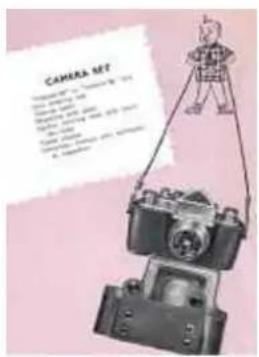
"Industar-22" or "Industar-50" lens
Lens covering cap
Take-up spool
Magazine with spool
Leather carrying case with shoulder strap
Cable release
Instruction manual and certificate of inspection
text_image
CAMERA SET C:\Program Files\10\Program Files\12\Program Files\14\Program Files\16\Program Files\18\Program Files\20\Program Files\22\Program Files\24\Program Files\26\Program Files\28\Program Files\30\Program Files\32\Program Files\34\Program Files\36\Program Files\38\Program Files\40\Program Files\42\Program Files\44\Program Files\46\Program Files\48\Program Files\50\Program Files\52\Program Files\54\Program Files\56\Program Files\58\Program Files\60\Program Files\62\Program Files\64\Program Files\66\Program Files\68\Program Files\70\Program Files\72\Program Files\74\Program Files\76\Program Files\78\Program Files\80\Program Files\82\Program Files\84\Program Files\86\Program Files\88\Program Files\90\Program Files\92\Program Files\94\Program Files\96\Program Files\98\Program Files\100CONTENTS
General Features -- 5
Specifications -- 8
Camera Construction -- 9
Magazine Loading -- 16
Camera Loading -- 18
Taking the Pictures -- 23
Camera Unloading -- 26
Care of the Camera -- 26
Camera Set -- 30